@george1421 The one off kernel.

Posts
-
RE: Lenovo L13 yoga 'Maybe the usb cable is bad' error when trying to registerposted in Hardware Compatibility
@george1421 It does, but it requires a special proprietary dongle. We actually have one, but we can’t find it anywhere.
-
RE: Lenovo L13 yoga 'Maybe the usb cable is bad' error when trying to registerposted in Hardware Compatibility
@george1421
There wasn’t a /var/log/syslog in the debug console, I didcat /var/log/messagesas that was there and the most interesting bit was at the bottom, it’s a bit much to type out manually at the moment.I took photos at the sections where I saw warnings
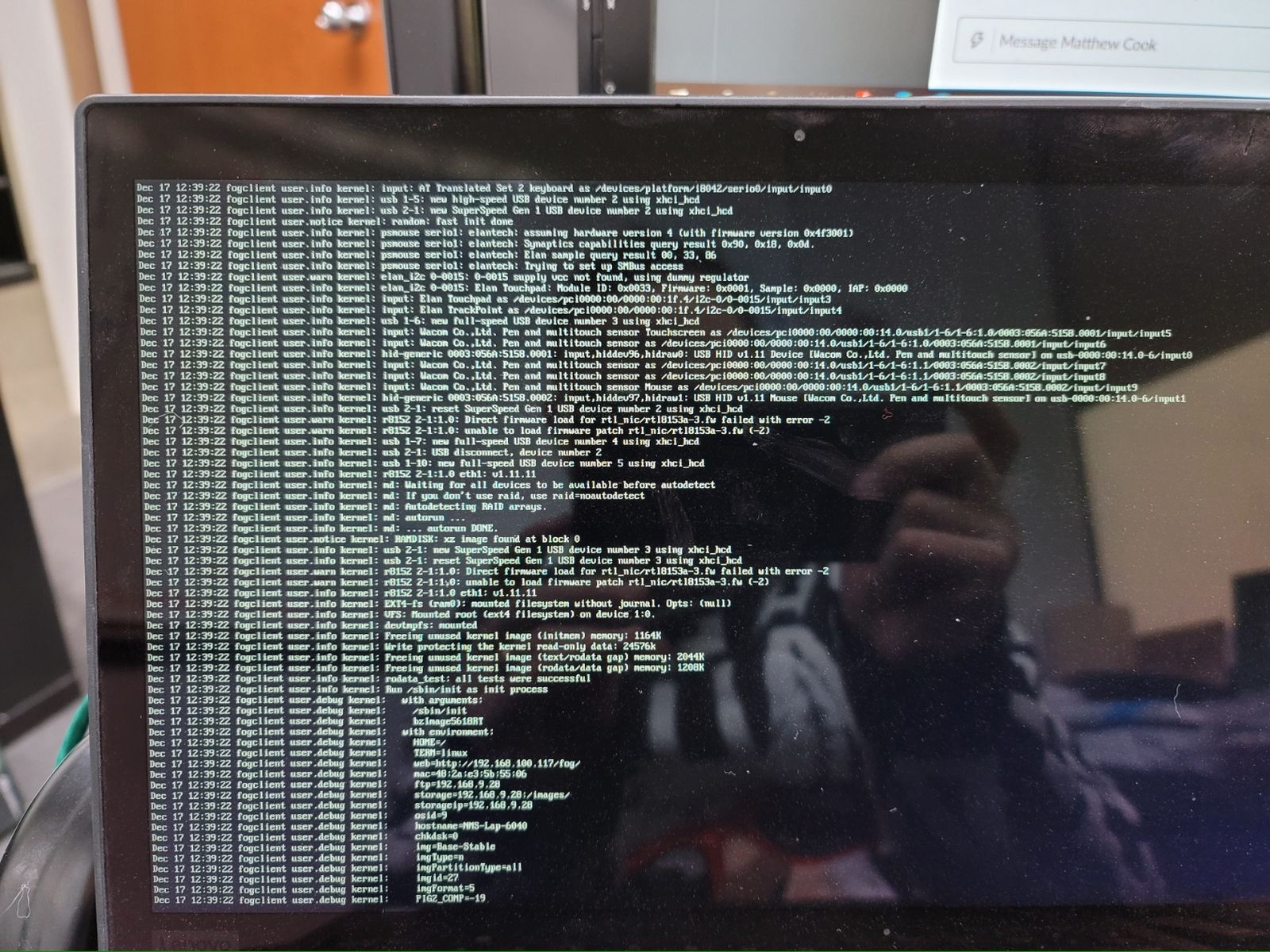
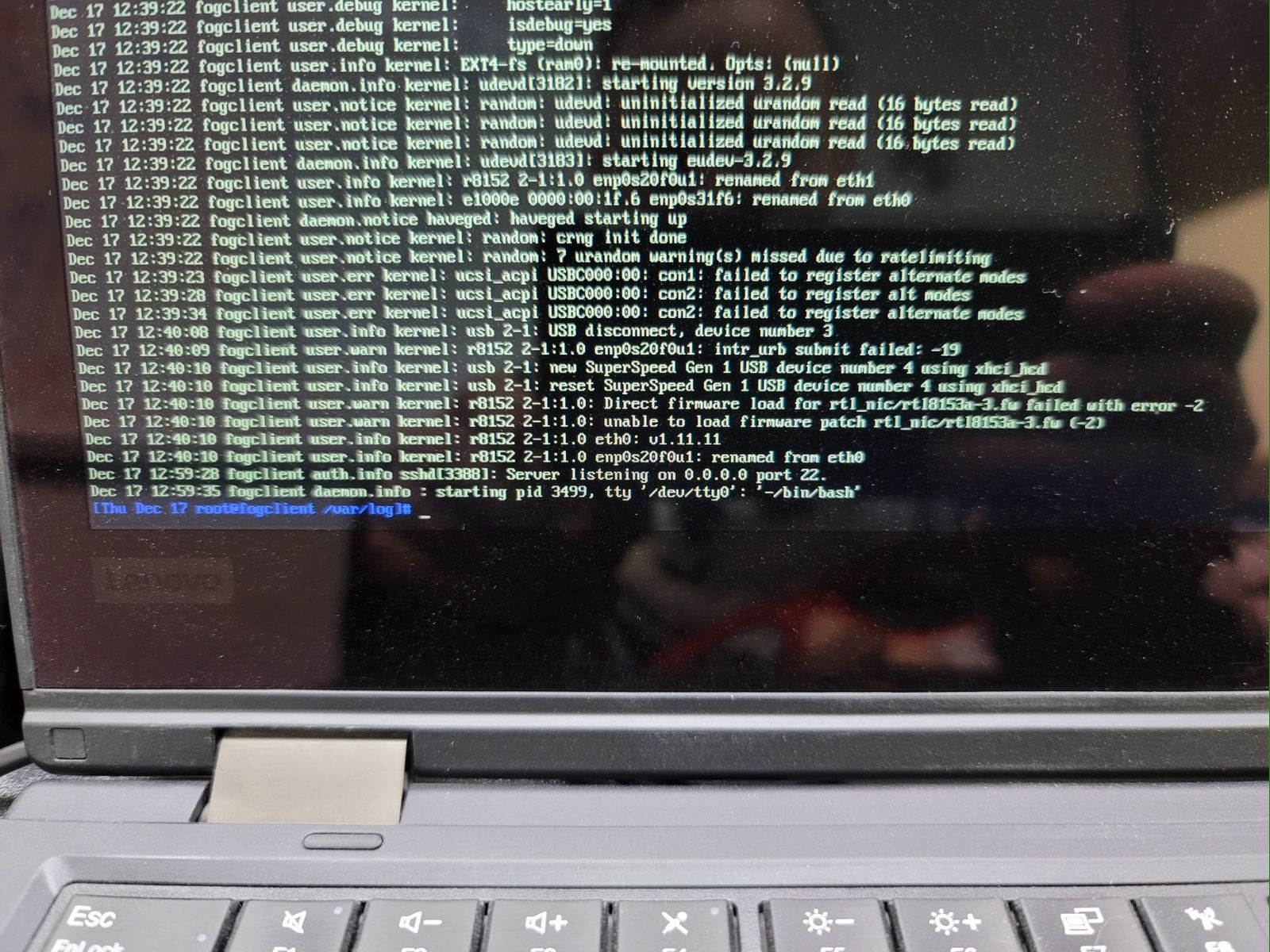
-
RE: Lenovo L13 yoga 'Maybe the usb cable is bad' error when trying to registerposted in Hardware Compatibility
Actually, when I hit enter to continue it did boot into the FOS debug console
-
RE: Lenovo L13 yoga 'Maybe the usb cable is bad' error when trying to registerposted in Hardware Compatibility
Photo of the output when attempting debug with test kernel
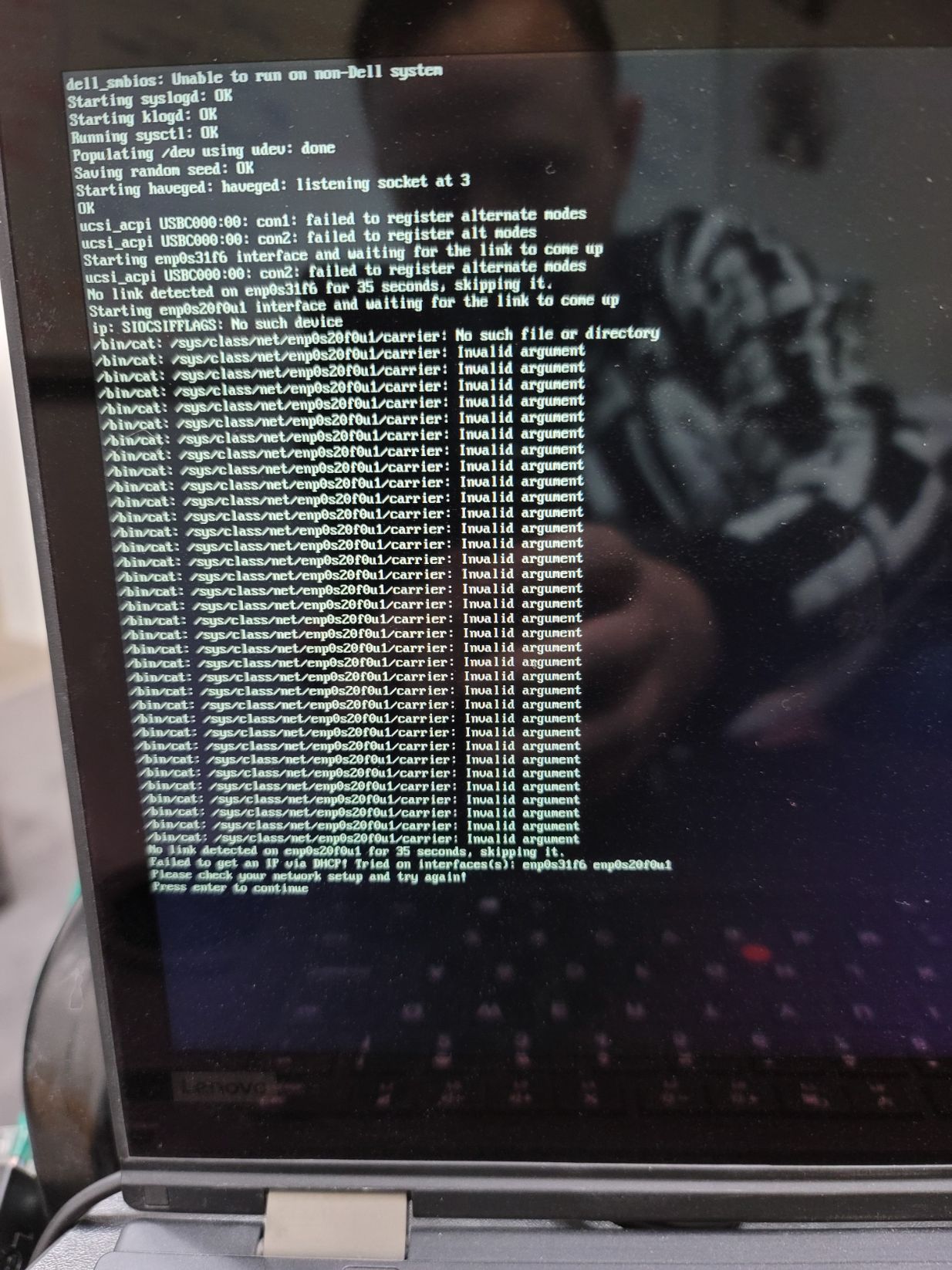
Photo of output when attempting normal deploy task with test kernel
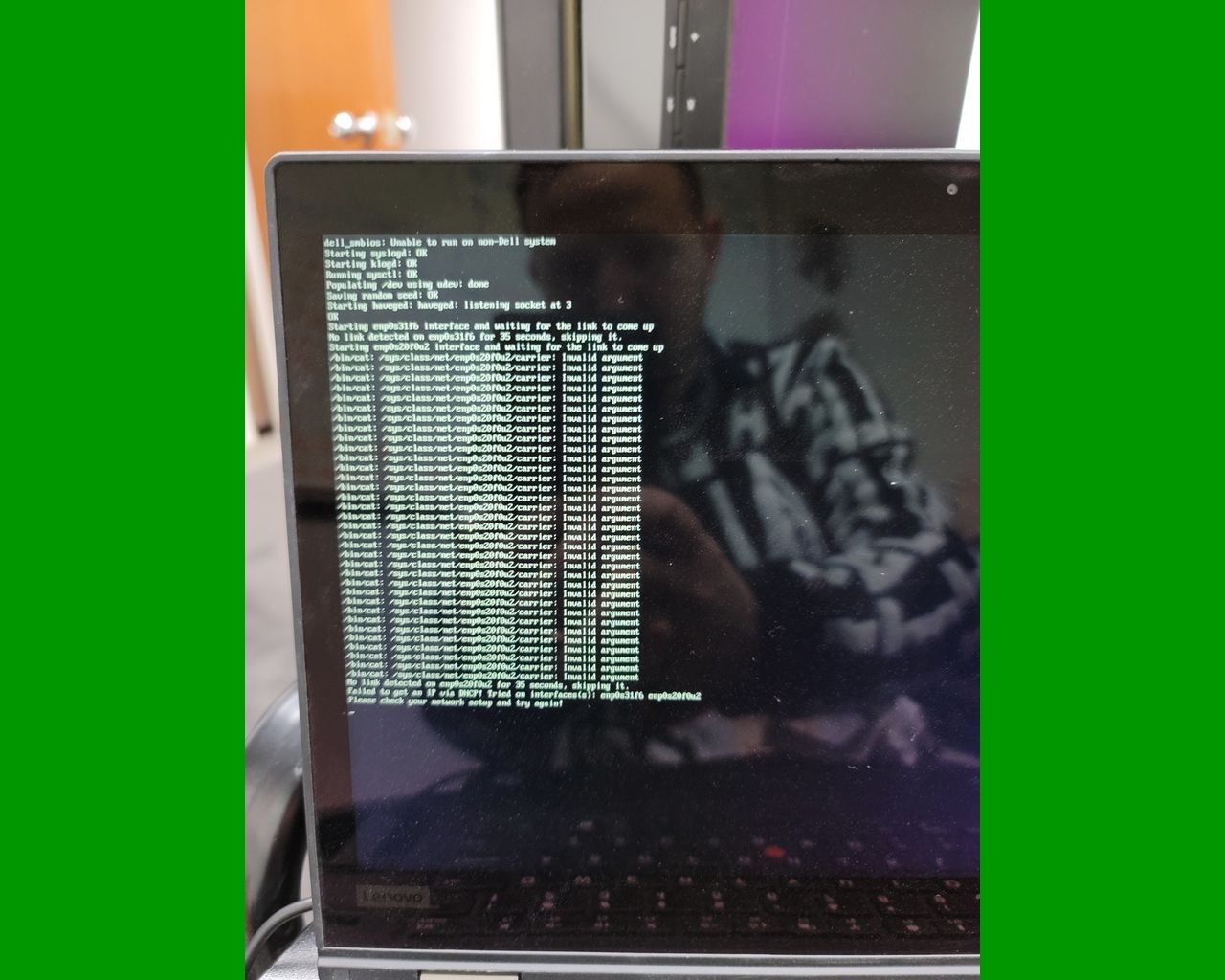
-
RE: Lenovo L13 yoga 'Maybe the usb cable is bad' error when trying to registerposted in Hardware Compatibility
@george1421 First notes are it says at the start
ucsi_acpi USBC000:00 con1: failed to register alternate modes
ucsi_acpi USBC000:00 con2: failed to register alt modesIt didn’t get into debug mode, gonna try again with the normal kernel, and if that doesn’t go into debug then I’ll try the latest 4.x
-
RE: Lenovo L13 yoga 'Maybe the usb cable is bad' error when trying to registerposted in Hardware Compatibility
@george1421 On it! Going to try it still using your test kernel
-
RE: Lenovo L13 yoga 'Maybe the usb cable is bad' error when trying to registerposted in Hardware Compatibility
@george1421
Sorry for the delay, things are a bit crazy. Finally got a chance to give this a try
Getting a different error now/bin/cat: /sys/class/net/enp0s20f0u2/carrier: Invalid ArgumentI queued up the host to be imaged, booted into fog, it loaded the test kernel, then gave this error like 20 times, the said it failed to get an IP via DHCP and then paused with a press enter to continue.
Gonna try with the normal 5.6.18 kernel again.
-
RE: Lenovo L13 yoga 'Maybe the usb cable is bad' error when trying to registerposted in Hardware Compatibility
Hardware IDS:
USB\VID_17EF&PID_720C&REV_3000
USB\VID_17EF&PID_720C
Vendor, the name of the device in windows is
Lenovo USB-C to Ethernet Adapterbut the driver provider and the Manufacturer is listed as Realtek -
Lenovo L13 yoga 'Maybe the usb cable is bad' error when trying to registerposted in Hardware Compatibility
Just got a couple of these laptops.
I’m using Fog Version 1.5.9.46
Kernel version 5.6.18I got into the fog pxe menu using a lenovo usb-c adapter.
I had the lenovo’s bios set to use mac-address pass through using the second address.
I hit the full host registration and inventory button.
It then repeatedly gave me this errorusb usb2-port1: Cannot enable. Maybe the USB cable is bad?It attempted to bring the network up but failed eventually.
I have used this usb-c adapter for imaging in the past (it’s been a while, maybe even a year, but it did work before).
I was able to get it to image using a different lenovo adapter (there’s a proprietary one that connects to a special port, basically making it act as a normal ethernet port). So this problem only occurred using the lenovo usb-c adapter.
It’s weird that it got to the pxe menu without issue, but I saw another post from February for this model where there were issues too. I’m hoping the fixes from Feb are already built into the current kernel so I haven’t tried that one.
I have one more of these to image today, so if there’s something to test for it I’d be happy to give it a go.
-
RE: Image Deploy Job doesn't show up in image history and shows as 2020+ years duration in imaging reportposted in FOG Problems
@sebastian-roth I have not, it seems to have just been that one time.
-
RE: API Return object for scheduledtask is malformed (has a tiny typo)posted in Bug Reports
@tom-elliott said in API Return object for scheduledtask is malformed (has a tiny typo):
@tom-elliott Added a little tiny bit.
Thank you,
That tiny bit that allowed non-unique names for tasks and scheduled tasks did the trick!
-
RE: API Return object for scheduledtask is malformed (has a tiny typo)posted in Bug Reports
@tom-elliott Saw this reply after I wrote mine, I’ll just give updating a go then and see what happens
-
RE: API Return object for scheduledtask is malformed (has a tiny typo)posted in Bug Reports
@tom-elliott So there’s a check if the name exists? But the name is not required? I’ll try creating one without a name and see what happens. I don’t think there needs to be a unique name.
-
RE: API Return object for scheduledtask is malformed (has a tiny typo)posted in Bug Reports
@Tom-Elliott When I create a scheduled task via the API, it errors out if the name field has a task that already exists. Which is odd because if you make the tasks manually they always have the same name and it causes no problems. Could there be some check on these api post calls that’s making them not work if the name is not unique? I could probably make it so the name has an incremented number or something, but my first attempts at doing that revealed that there’s either a character limit on that field, or it just doesn’t like it when the host name of the host being imaged is in that field. Thoughts?
-
RE: Print Managementposted in FOG Problems
@cedre2 I believe you need to put in the model of the printer that matches the driver. This is sometimes listed somewhere in the inf file.
I believe this name also shows up as the default name of the printer when you install it windows manually. -
RE: Powershell API Moduleposted in Tutorials
See also this post if you’re searching for how to create scheduled tasks via the api
https://forums.fogproject.org/post/139328 -
RE: 504 Gateway Timeout hitting fog/scheduledtask/listposted in Bug Reports
@nehsa I finally figured out scheduled tasks via the api.
I have it written out with a powershell example (with verbose output so you can see the POST url used and the json data) in post
https://forums.fogproject.org/post/139328Give that a looksee and let me know if you want more examples. Also in that Thread @Tom-Elliott explained what some of the needed fields for a scheduled or crontask do.
-
RE: API Return object for scheduledtask is malformed (has a tiny typo)posted in Bug Reports
GREAT SUCCESS!
Here is a working example of setting a scheduled deploy image task on a host with the id 1736 using the FogAPI powershell module (provided you also paste/import this function into your console/session until I eventually add it to the module) I’m also including the verbose output for reference of what’s happening. You can omit the
-Verbosepart ofNew-FogObjectif you don’t want all the outputfunction Get-SecsSinceEpoch { param ( $scheduleDate = (Get-Date) ) process { $EpochDiff = New-TimeSpan "01 January 1970 00:00:00" $($scheduleDate) $EpochSecs = [INT] $EpochDiff.TotalSeconds - [timezone]::CurrentTimeZone.GetUtcOffset($(get-date)).totalseconds return $EpochSecs } }$scheduleTime = Get-SecsSinceEpoch -scheduleDate (Get-Date 15:30) $jsonData = @" >> { >> "name":"Deploy Test 7", >> "type":"S", >> "taskTypeID":"1", >> "runTime":"2020-11-20 15:30", >> "scheduleTime":"$scheduleTime", >> "isGroupTask":"0", >> "hostID":"1736", >> "shutdown":"0", >> "other2":"-1", >> "other4":"1", >> "isActive":"1" >> } >> "@ C:\Users\jfullmer\git\admin_scripts [master ≡ +1 ~3 -0 !]> New-FogObject -type object -coreObject scheduledtask -jsonData $jsonData -vb VERBOSE: Building uri and api call VERBOSE: Pulling settings from settings file VERBOSE: Pulling settings from settings file VERBOSE: Building Headers... VERBOSE: Building api call URI... VERBOSE: POSTing { "name":"Deploy Test 7", "type":"S", "taskTypeID":"1", "runTime":"2020-11-20 15:30", "scheduleTime":"1605911400", "isGroupTask":"0", "hostID":"1736", "shutdown":"0", "other2":"-1", "other4":"1", "isActive":"1" } to/from http://fog-server/fog/scheduledtask/create VERBOSE: POST http://fog-server/fog/scheduledtask/create with -1-byte payload VERBOSE: received -1-byte response of content type application/json VERBOSE: finished api call id : 83 name : Deploy Test 7 description : type : S taskTypeID : 1 minute : hour : dayOfMonth : month : dayOfWeek : isGroupTask : 0 hostID : 1736 shutdown : 0 other1 : other2 : -1 other3 : other4 : 1 other5 : scheduleTime : 1605911400 isActive : 1 imageID : 0 runtime : 2020-11-20 15:30And here it is in the gui
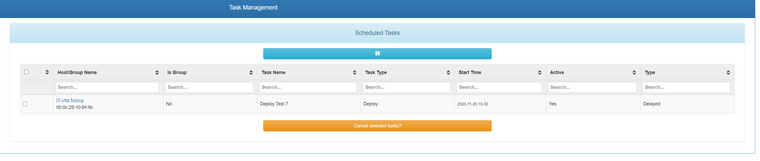
I believe you probably also need to update to the lastest dev version of fog for this to work from windows. Before this change I wasn’t ever able to get or create anything on this api path. But I also didn’t have the correct parameters for the json.
I hope to eventually make this a much more user friendly api powershell function. Something like
Set-FogScheduledtask -host $somehost -time (get-date 15:40) -allSnapins -name "just a nice name" -taskType (capture|deploy|snapin|etc)will probably have a lot of parameters, but it will probably be worth putting in the time to make that work nicely so people can easily create scheduled tasks from a command line. Just need to get a couple hours to myself to get it done. -
RE: API Return object for scheduledtask is malformed (has a tiny typo)posted in Bug Reports
@jj-fullmer said in API Return object for scheduledtask is malformed (has a tiny typo):
1605895200
It looks like this is the seconds since epoch you can get with linux date function.
i.e.date --date='@1605895200'returnsFri Nov 20 11:00:00 MST 2020
maybe setting schedule time as a normal date string works too…nope it does not, has to be seconds since epoch.
I think I can work with this though. There is a-unixtimesecondsparam on the powershell 7 version ofget-datebut it looks like it coverts a number to a date not a date to a number. So just gotta do some date math.$EpochDiff = New-TimeSpan “01 January 1970 00:00:00” $(Get-Date) $EpochSecs = [INT] $EpochDiff.TotalSeconds - [timezone]::CurrentTimeZone.GetUtcOffset($(get-date)).totalseconds $EpochSecsThat gets and displays the current time in epoch secs. So at some point I just need to add a function to the module for scheduledtasks where it will take a given datetime object and convert it to seconds since epoch like
function Get-SecsSinceEpoch { param ( $scheduleDate = (Get-Date) ) process { $EpochDiff = New-TimeSpan "01 January 1970 00:00:00" $($scheduleDate) $EpochSecs = [INT] $EpochDiff.TotalSeconds - [timezone]::CurrentTimeZone.GetUtcOffset($(get-date)).totalseconds return $EpochSecs } }Implementing the rest of the scheduled task object would take a bit more time than I have at the moment sadly.
Also credit where it’s due, found this snippet in the comments on this blog post https://jamgotre.blogspot.com/2011/02/powershell-seconds-since-1970.html
I just turned it into a function here. I’m sure there’s gotta be someone else who’s done this before or something and it really should be included inGet-Dateif it isn’t already. I just actually submitted an issue so that it might become included https://github.com/PowerShell/PowerShell/issues/14211 I feel special.