What version of FOG are you running?
V
Posts
-
RE: Will not PXE boot when in Windows 10posted in Windows Problems
-
RE: How to upgrade to FOG 1.6?posted in General
FOG 1.6 is great, but I ultimately had to roll back to version 1.5.10 because I ran into an issue I couldn’t resolve, and the deadline for deploying a large batch of computers is fast approaching.
All my images are stored on a Synology NAS. On the older version, I had multiple storage groupe and nodes configured on the multiple Synology NAS, and everything (capture/deploy) worked fast without any issues.
In version 1.6, however, I’m hitting a roadblock. It seems there is a check during task creation that verifies if the primary storage node (in storage group) is online. Since it’s a Synology NAS, this check naturally fails, and FOG won’t allow me to create any capture tasks. I also tried mounting a share directly inside the /image, but it wasn’t fast at all (capture/deploy).I tried the sanboot, and it really helped—it works well, especially on some HP machines.
I kept version 1.6 in a VM for testing purposes. Maybe a feature to disable the online node check will be added in the future—or perhaps it’s already there and I didn’t find it—or maybe direct NAS support will be introduced eventually.
-
FOG 1.6 own pluginposted in General
Hello,
How can I add JavaScript and CSS files to my own custom plugin in FOG 1.6?
My plugin has several submenus, and I would like all of them to use the same JavaScript and CSS files. I want to avoid creating duplicate files for each submenu or copying the same files multiple times under different names.
For example:
index.php?node=myplugin&sub=listshould load:
myjs.js
mycss.css
and
index.php?node=myplugin&sub=somethingshould also load:
myjs.js
mycss.css
What is the recommended way to include shared JS and CSS files across all pages/submenus of a custom FOG 1.6 plugin?
-
RE: How to upgrade to FOG 1.6?posted in General
@Tom-Elliott said in How to upgrade to FOG 1.6?:
@Tom-Elliott, Thank you very much for the comprehensive guide. All the necessary files for secure boot were signed correctly when upgrading from 1.5.10.1903 to 1.6.3200 I encountered a few problems, however. I’am now on 1.6.3279.
1. Secure boot
I set my dhcp server (FortiGate) to forward DHCP option 67 (set filename) “secureboot/snponly-shimx64.efi”. On my computers that already had an enroll key, so:
loading snponly-shimx64.efi OK
loading bzImage OK
no FOG task -> refind should be loaded -> SECURITY VIOLATIONI don’t know why, but for some unknown reason the file /var/www/fog/service/ipxe/refind_x64.efi is not loaded and the file refind.efi is loaded, which was not signed, so I signed them additionally and now the whole boot process works as it should, then no more secure boot errors.
root@fog:/var/www/fog/service/ipxe# sbverify --cert /root/sbkeys/FOG_SB.crt refind_x64.efi
Signature verification OK

root@fog:/var/www/fog/service/ipxe# sbverify --cert /root/sbkeys/FOG_SB.crt refind.efi
warning: data remaining[237128 vs 262592]: gaps between PE/COFF sections?
Signature verification failed

root@fog:/var/www/fog/service/ipxe# sbsign --key /root/sbkeys/FOG_SB.key --cert /root/sbkeys/FOG_SB.crt --output refind.efi refind.efi
warning: data remaining[237128 vs 262592]: gaps between PE/COFF sections?
Image was already signed; adding additional signature

root@fog:/var/www/fog/service/ipxe# sbverify --cert /root/sbkeys/FOG_SB.crt refind.efi
Signature verification OK
2. Web GUI
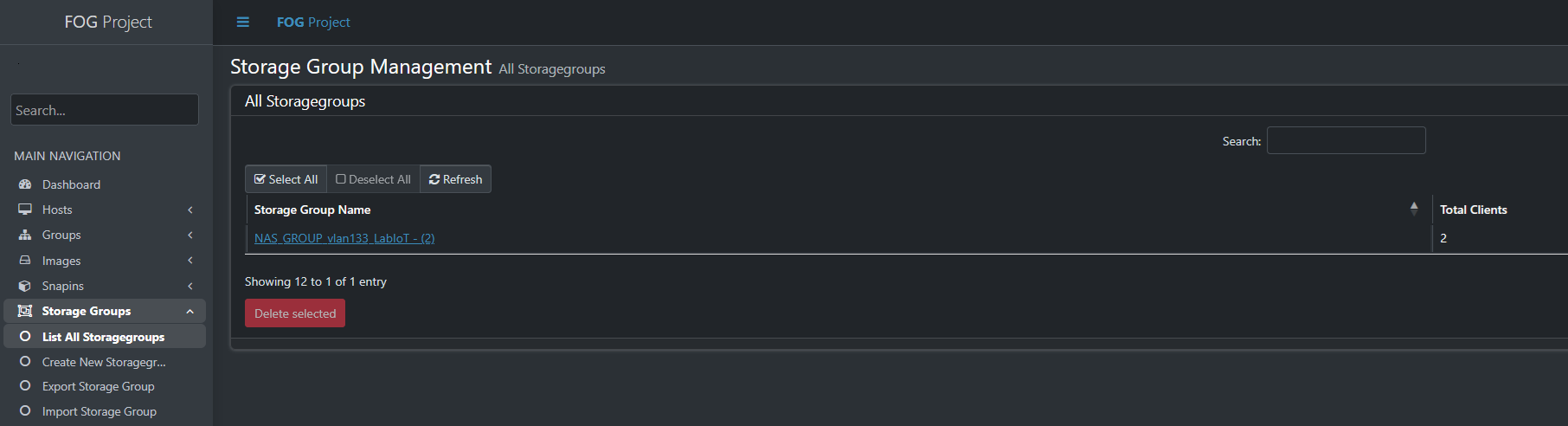
In the menuStorage Node-> List All Storagegroups, I see a table with a list for only one row, but I have 12 storage groups created. I can scroll through them using the mouse wheel, but only one row is displayed. Tested in Firefox and Chrome on Windows 11.
In the menuStorage Node -> List All Storagenodes, the same problem as the previous Storage Group.
3. iPXE menu
The new item “Enroll Secure Boot Key” did not appear in the iPXE menu, but I had to add it manually. I have FOG 1.6 installed as a clean installation in another virtual machine. Just for testing. In this clean installation, this iPXE menu item was there, but in the version upgraded from 1.5.10 it did not appear. I had some custom items added to the iPXE menu before the upgrade. Maybe that caused the new one not to be added?
-
How to upgrade to FOG 1.6?posted in General
Hello everyone,
I am currently using FOG 1.5.10.1903 and have about 200 computers on my network, already registered in FOG, with a lot of image. I would like to upgrade to FOG 1.6.
I also now have my own certificate for secure boot, which I manually enrolled to all computers (before this option appeared in FOG) and I had fog files signed with it and a working secure boot.
/root/SB_key/FOG_SB.crt
/root/SB_key/FOG_SB.der
/root/SB_key/FOG_SB.key
What would you recommend? Should I perform an in-place upgrade from 1.5 to 1.6, or would it be better to do a clean installation and migrate database and images to the new server?
Thanks for your advice.
-
RE: Partition Errorposted in FOG Problems
To check the BitLocker status, open an elevated Command Prompt and run:
manage-bde -statusIf the C drive shows as encrypted, disable BitLocker and allow the drive to fully decrypt before attempting another capture:
manage-bde -off C:
manage-bde -off D:
Have you tried setting the image type to “Multiple Partition Image - All Disks (Not Resizable)” instead of “Single disk - resizable”?
In “Single disk - resizable” mode, you will save an image of only one of the two disks. In the host settings, you can set the primary disk.
Try disable Windows Fast Boot or restart computer from cmd
shutdown /r /t 0 -
RE: FOG: 1.5.4 -> How to setup NAS - Synology DiskStation as Master Nodeposted in Tutorials
UPDATE 07/17/2026
After some experimentation and examining the fogftp.class.php file, I found that FOG calls ftp_rename to move files from the /image/dev/<mac_host> folder to the /image/<image_name> folder.
Finally, it helped me to connect with a regular ftp client (WinSCP) and try to move the folders manually. This is how I found out that the problem was in the permissions set on the folders.
So I found out that from my original version 1.5.10.10 to the current 1.5.10.1903 there was a change in the file
/lib/reg-task/taskqueue.class.phpin the private function _moveUpload() method it was previously
->chmod(0777, $dest)

and now it is

->chmod(0775, $dest)
That (maybe) could be the reason why it stopped working for me. Thanks to this post https://forums.fogproject.org/post/156271
chown -R fog:users /volume1/images/
#set inheritance to the dev folder
chmod g+s /volume1/images/dev/
I connected to the NAS with ssh and fixed the permissions over the folders. Now it’s working fine again.
-
How to hide some items in the Advanced menu?posted in FOG Problems
FOG version: 1.5.10.1903
Hello,
I’m trying to hide the menu item “Perform Full Host Registration and Inventory” (fog.reginput) in the iPXE menu and make it available only after a user successfully logs in.
My configuration is:
PXE MENU HIDDEN = disabled
NO MENU = disabled
iPXE General Configuration → Advanced Menu Login = enabledMenu settings:
-
Perform Full Host Registration and Inventory (fog.reginput)
Menu Show With: Advanced Login Required -
Advanced Menu (fog.advancedlogin)
Menu Show With: Show All
Test scenario:
I am booting a test machine that is not registered as a host in FOG.
During PXE boot, the normal FOG menu is displayed.
The Advanced Menu option is visible.
I select Advanced Menu and successfully log in with my username and password.
After authentication, I return to the FOG menu, but the “Perform Full Host Registration and Inventory” option is still not visible.
I also tested the same behavior with Memtest configured as Advanced Login Required, with the same result.My expectation is that after a successful Advanced Menu login, all menu items configured with “Advanced Login Required” should become visible.
Am I misunderstanding how this feature is supposed to work, or could there be another setting that I’m missing?
Thank you for any help.
-
-
FOG 1.6.0-beta.2641 - Instalation on Debian 13posted in Bug Reports
Hello everyone,
I am currently testing the FOG Project
working-1.6branch on a fresh installation of Debian 13 (Trixie) and encountered a fatal error during the installation script. I wanted to share the bug and a proposed fix.The Issue
During the package installation phase, the installer fails with the following error:
Installing package: sysv-rc-conf............................Failed! (Will try later)
 ...
 sysv-rc-conf:amd64=0.99-10 is selected for install
 sysv-rc-conf:amd64 Depends on sysvinit-core
Because Debian 13 uses
systemd, trying to installsysv-rc-confforces the package manager to attempt installingsysvinit-core, which conflicts directly withsystemd-sysv. The OS prevents this to avoid breaking the system, causing the FOG installation to halt.The Cause
In
/lib/ubuntu/config.sh, the variablesysvrcconfis hardcoded for all Debian versions:bash if [[ $linuxReleaseName_lower == +(*bian*) ]]; then sysvrcconf="sysv-rc-conf"Proposed Fix
Since sysv-rc-conf is completely obsolete on modern Debian systems, we should exclude it for Debian 13 (and newer). I modified /lib/ubuntu/config.sh on my machine as follows, which allowed the installation to finish successfully:
if [[ $linuxReleaseName_lower == +(*bian*) ]]; then
    # Exclude sysv-rc-conf for Debian 13 and newer
    if [[ "$OSVersion" -ge 13 ]] 2>/dev/null; then
        sysvrcconf=""
    else
        sysvrcconf="sysv-rc-conf"
    fi
elif [[ $linuxReleaseName_lower == +(*ubuntu*|*mint*) ]]; then
I hope this helps anyone else trying to deploy FOG on the upcoming Debian releases, and perhaps this check could be merged into the repository for future compatibility.
Thanks for all the great work on FOG!
-
RE: FOG: 1.5.4 -> How to setup NAS - Synology DiskStation as Master Nodeposted in Tutorials
Hello everyone,
I am facing an issue with image capturing after performing an upgrade on my FOG server from 1.5.10 to 1.5.10.1886. Before the update, everything worked fine for me. The images were stored directly on the Synology NAS.
My Setup:
FOG Server: IP 192.168.10.220 (Debian 13)

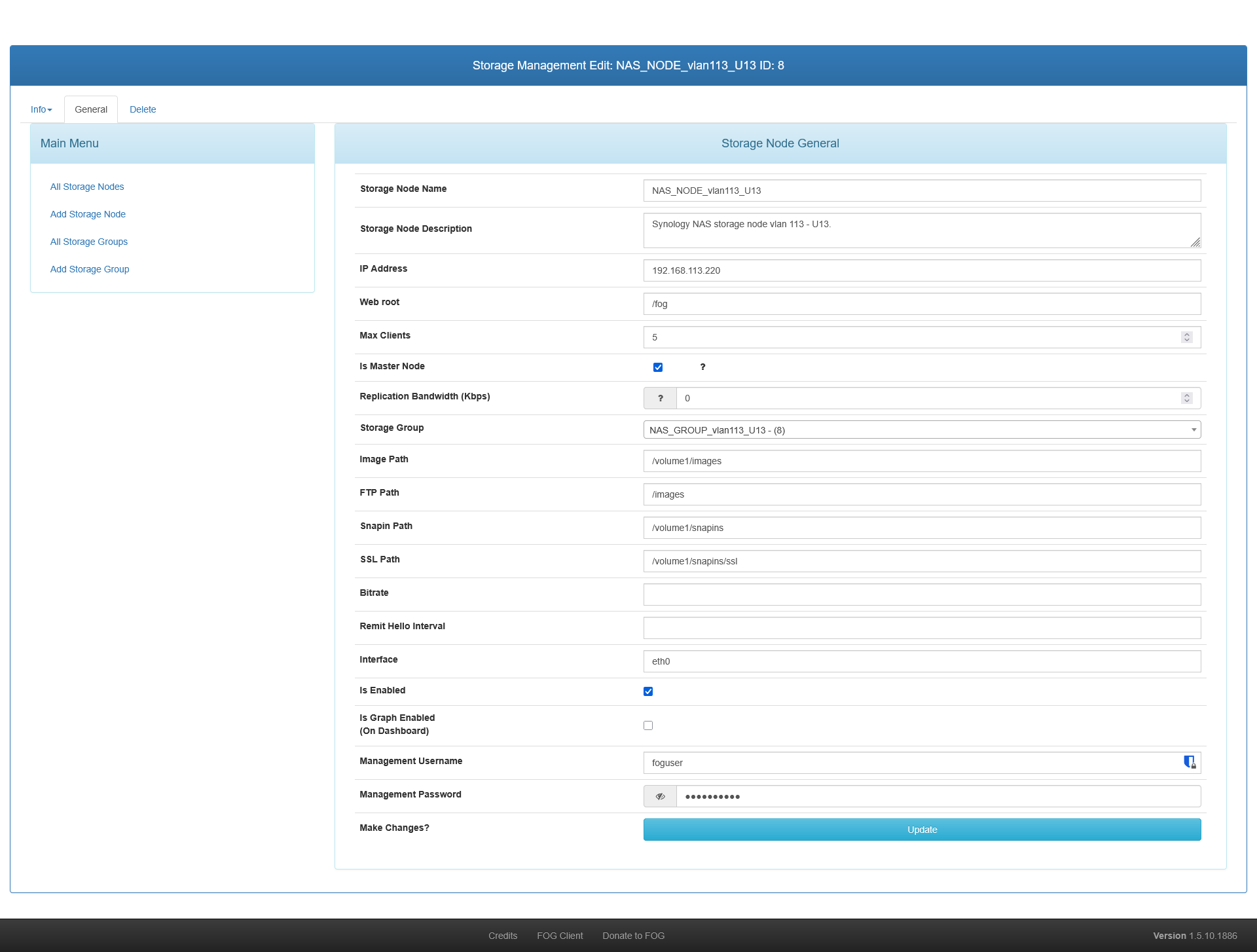
Storage: External Synology NAS with multiple virtual IPs (192.168.109.220 and 192.168.110.220).

Storage Configuration: The Synology NAS is configured in FOG web UI as the Master Node for its storage group. The local Default storage node is NOT the master.

Clients: Multiple clients on different subnets (e.g., 192.168.109.23 and 192.168.110.23).
The Problem:
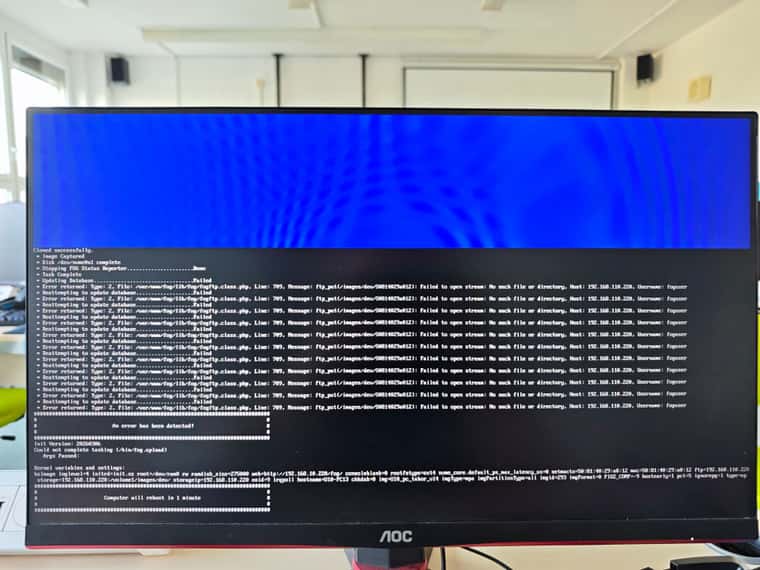
The Partclone phase finishes successfully on the client machine. The image files are correctly uploaded via NFS directly to the Synology NAS into the /images/dev/[MAC_ADDRESS] folder.However, right after Partclone reaches 100%, the task gets stuck in the FOG Web UI (at around 70%), and the client screen shows the following PHP FTP error:
Error returned: Type: 2, File: /var/www/html/fog/lib/fog/fogftp.class.php, Line: 709, Message: ftp_put(/images/dev/[MAC]): Failed to open stream: No such file or directory, Host: 192.168.110.220, Username: foguser
What I have verified:
I tested the FTP connection manually via CMD/PowerShell from a PC using the same foguser credentials. I am able to log in, mkdir, rename, and rmdir inside the /images and /images/dev directories on the NAS without any permission errors.

If I move and rename the MAC folder manually inside Synology File Station from /images/dev/[MAC] to /images/[Image_Name], the image works fine.

This setup worked flawlessly before the FOG server upgrade. The /images directory is NOT mounted locally on the FOG server itself (and never had to be).

Verified FTP username and password on NAS and FOG. It's same.
It seems that fogftp.class.php is incorrectly triggering ftp_put (trying to read a local file from the FOG server) instead of doing a remote ftp_rename directly on the NAS storage node.
Has anyone encountered this bug after a recent upgrade, or is there a specific setting in the new version that I missed?
Thank you for any help.
Storage Node for NAS
Error on PC
-
RE: IPXE 2.0 Secure Boot Workingposted in General
Has anyone tried this? It would be very useful for my organization. Any guidance on what files to manually replace/edit?
-
RE: [HELP WANTED] Client Internationalizationposted in General
Czech language code cs-CZ
### SHUTDOWN PROMPT ### {company} je vyžadována údržba tohoto počítače. Uložte prosím Vaši práci a ukončete všechny programy. Zrušit Skrýt Odložit Restartovat nyní Vypnout nyní Odložit o X hodin Y minut Z sekund ### NOTIFICATIONS ### Vypnutí přerušeno Vypnutí bylo přerušeno Vypnutí odloženo Vypnutí bylo odloženo o {time} K vypnutí dojde v {time} Chystáte se odhlásit Pokud zůstanete neaktivní, budete odhlášeni Instaluje se {snapin name} Prosím nevypínejte počítač dokud nebude dokončeno. {snapin name} byl instalován Instalace byla dokončena a je nyní připravena k použití -
RE: FOG with UEFI - rEFInd Error: Failure booting legacy (BIOS) OSposted in General Problems
@Sebastian-Roth Thank you very much. It worked. Now everything is ok.
-
RE: FOG with UEFI - rEFInd Error: Failure booting legacy (BIOS) OSposted in General Problems
Hi,
i have this issue. After upgrade from Fog 1.5.5 to 1.5.6 not work rEFInd.
In 1.5.5 works all fine. HP workstation boot from UEFI PXE, FOG did not task and then normaly load Windows 10.
In 1.5.6 HP workstation boot from UEFI PXE ok, FOG did not task and then freeze on line “rEFInd - Initializing…” and nothing happens. I wait 5 minutes. Keyboard not response. Only powerbutton on pc case power off computer.
I tried change in /var/www/fog/service/ipxe/refind.conf config to “scanfor internal”. The same problem remains.
I dont know what to do next.
-
Windows 10 change BIOS boot order after deployposted in Windows Problems
Hello,
FOG work ok. Capture and deploy works fine.
My BIOS (UEFI) boot order:
- PXE IPv4 Intel
- SSD M.2 Windows loader
After deploy Windows 10 Pro x64 to PC (HP Z2 Tower G4 Workstation), change BIOS boot order to:
- SSD M.2 Windows loader
- PXE IPv4 Intel
How to prevent change BIOS boot order after deploy?
Thank you for your advice
-
RE: Adding Hiren’s BootCD PE to Advanced Menuposted in FOG Problems
I would also be interested. You have tried this tutorial?
-
RE: New FTP userposted in FOG Problems
Solution my problem:
- tips of Sebastian Roth:
mkdir /home/fogbackup/ chown fogbackup:fogbackup /home/fogbackup/- change config file /etc/vsftpd/vsftpd.conf
vsftpd_log_file=/var/log/vsftpd.log log_ftp_protocol=YES allow_writeable_chroot=YES chroot_local_user=YES chroot_list_enable=YES chroot_list_file=/etc/vsftpd.chroot_list rsa_cert_file=/etc/ssl/private/vsftpd.pem rsa_private_key_file=/etc/ssl/private/vsftpd.pem ssl_enable=YES force_local_data_ssl=NO force_local_logins_ssl=NO -
New FTP userposted in FOG Problems
Hello,
I would like to create a new FTP user ‘fogbackup’. Lock (jail) on own home directory.
Install: Debian 9 + FOG Project 1.5.4
I use:
useradd fogbackup
passwd fogbackup
usermod -d /home/fogbackup/ fogbackup
service vsftp restart
Use FTP client (WinSCP from MS Windows) and can’t login: authentication error.
I read wiki: https://wiki.fogproject.org/wiki/index.php/Troubleshoot_FTP
And as FOG user i can login successful.What am I doing wrong?
Thanks for help