• Recent
    • Unsolved
    • Tags
    • Popular
    • Users
    • Groups
    • Search
    • Register
    • Login

    Partition Error

    Scheduled Pinned Locked Moved Unsolved FOG Problems
    5 Posts 2 Posters 368 Views
    Loading More Posts
    • Oldest to Newest
    • Newest to Oldest
    • Most Votes
    Reply
    • Reply as topic
    Log in to reply
    This topic has been deleted. Only users with topic management privileges can see it.
    • T
      tukes
      last edited by

      So I’m new to FOG and have been trying to figure this out including searching the forum and posts. I’m using FOG 1.5.10.1870 and anytine I attempt to capture an image regardless of the option selected I get No Resizable Partiions found. I’m attempting to capture images for Windows 11 25H2 on a Lenovo X1 Carbon and HP Envy x360.

      Please assist, I need to figure this out as it’s likely the image solution we will be using moving forward. Thanks in advance!

      1 Reply Last reply Reply Quote 0
      • V
        Valer
        last edited by

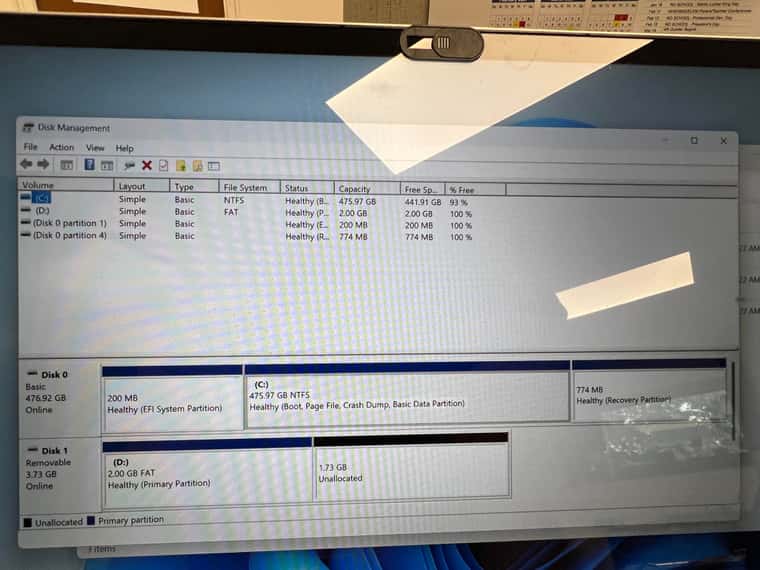
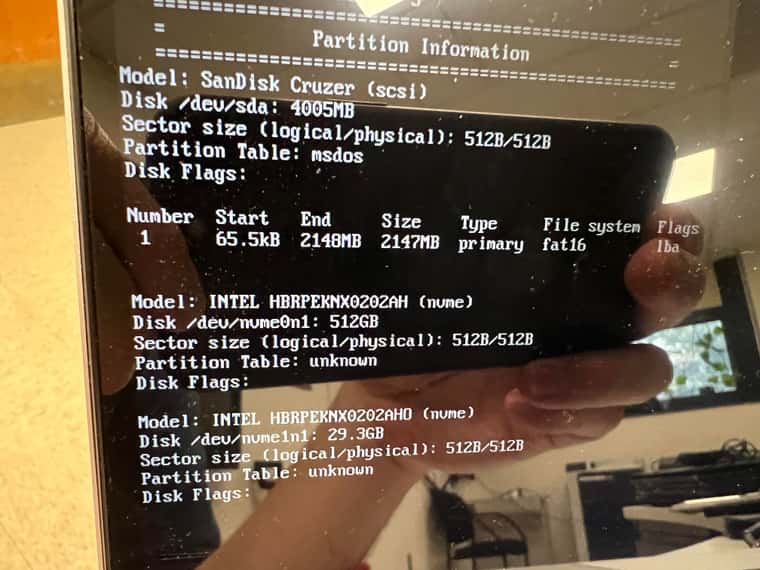
        Send a photo showing how your image is configured.

        1 Reply Last reply Reply Quote 0
        • T
          tukes
          last edited by

          unnamed.jpg

          1 Reply Last reply Reply Quote 0
          • T
            tukes
            last edited by

            unnamed (1).jpg

            1 Reply Last reply Reply Quote 0
            • V
              Valer
              last edited by Valer

              To check the BitLocker status, open an elevated Command Prompt and run:

              manage-bde -status
              

              If the C drive shows as encrypted, disable BitLocker and allow the drive to fully decrypt before attempting another capture:

              manage-bde -off C:
              manage-bde -off D:
              

              Have you tried setting the image type to “Multiple Partition Image - All Disks (Not Resizable)” instead of “Single disk - resizable”?

              In “Single disk - resizable” mode, you will save an image of only one of the two disks. In the host settings, you can set the primary disk.

              Try disable Windows Fast Boot or restart computer from cmd

              shutdown /r /t 0
              
              1 Reply Last reply Reply Quote 0
              • 1 / 1
              • First post
                Last post

              58

              Online

              12.7k

              Users

              17.6k

              Topics

              156.8k

              Posts
              Copyright © 2012-2026 FOG Project