How to upgrade to FOG 1.6?
-
Hello everyone,
I am currently using FOG 1.5.10.1903 and have about 200 computers on my network, already registered in FOG, with a lot of image. I would like to upgrade to FOG 1.6.
I also now have my own certificate for secure boot, which I manually enrolled to all computers (before this option appeared in FOG) and I had fog files signed with it and a working secure boot.
/root/SB_key/FOG_SB.crt
/root/SB_key/FOG_SB.der
/root/SB_key/FOG_SB.key
What would you recommend? Should I perform an in-place upgrade from 1.5 to 1.6, or would it be better to do a clean installation and migrate database and images to the new server?
Thanks for your advice.
-
@Valer — good news on both counts.
In-place upgrade. With 200 hosts and a pile of images, upgrade in place. The installer handles the schema migration, and nothing about your images or host records needs to move. A clean install plus migration buys you nothing here and gives you a lot more to get wrong.
cd /opt
git clone https://github.com/fogproject/fogproject.git --branch working-1.6
cd fogproject/bin
sudo ./installfog.sh
Back up
/opt/fog/.fogsettingsand take a database dump first, as always.(If you still have your 1.5 clone at
/opt/fogproject, clone this one to a different directory rather than pulling a new branch into the old checkout.)Your existing Secure Boot key. You don’t have to re-enrol anything. FOG 1.6 signs the FOS kernels itself, and it will use your key if you hand it over:
sudo ./installfog.sh \
  --secure-boot-key  /root/SB_key/FOG_SB.key \
  --secure-boot-cert /root/SB_key/FOG_SB.crt
Three things that matter here:
- An admin-supplied pair always wins and is never touched or overwritten. FOG only generates a key of its own when you haven’t given it one.
- Both paths get written into
.fogsettings, so every future upgrade re-signs the kernels with the same key without you passing the flags again. An upgrade quietly replacing signed kernels with unsigned ones is the main way this setup breaks, so it’s deliberately persistent. --secure-boot-certtakes either PEM or DER, so your.crtor your.derboth work. It converts internally —sbsignwants PEM,mokutilwants DER, and you shouldn’t have to care which.
Since your key is already enrolled as a MOK on all 200 machines, that’s the whole job. Kernels get signed with the key those machines already trust, and they keep booting exactly as they do now.
After the upgrade, go to FOG Configuration → Secure Boot and check the SHA-256 fingerprint shown there against your enrolled cert:
openssl x509 -in /root/SB_key/FOG_SB.der -inform der -noout -fingerprint -sha256If those match, you’re done.
Bringing your own key doesn’t cost you the automatic path. The server still generates its own PK and KEK, and the
db.authit publishes is built from your signing certificate — Microsoft’s db CAs plus yours. So for any machine you buy next year, you can use the hands-off enrolment described below and it will enrol the same key your existing 200 already trust. Your key and FOG’s platform keys are doing two different jobs and don’t conflict.Kernel updates stay signed. When you pull a new FOS kernel from FOG Configuration → Kernel Update, the web UI doesn’t get near your private key. It downloads into a staging directory and then calls a helper through one narrow sudoers rule:
<apache user> ALL=(root) NOPASSWD: /opt/fog/bin/fog-sign-kernelThat helper deliberately takes no arguments — every path it uses comes from a root-owned config file at
/opt/fog/.fog-secureboot(mode0600), which it parses as data rather than sourcing as shell. So the web tier can ask for a signature but cannot point the signer at a different key, read the key, or write outside the staging area. The rule is validated withvisudo -cqfbefore it’s installed; if validation fails the installer refuses to install it and tells you the Kernel Update page will serve unsigned kernels, rather than leaving you with a brokensudo.Worth knowing because it’s the piece that keeps working silently for years — your key stays root-only at
0600, and kernel updates keep coming out signed with it.What FOG does out of the box, for anyone starting fresh
Two different keys doing two different jobs — worth separating because they get conflated constantly:
- The signing key (
MOK.key/MOK.pem, generated at/opt/fog/secureboot/, root-only,0700). This signs the FOS kernel so a Secure Boot client will execute it. It never regenerates once it exists — a fresh key would silently invalidate enrolment on every machine that trusted the old one, and you’d only find out when a client failed to boot. - Platform keys (
PKandKEK). These sign nothing that ever executes. They exist only to authorise updates to a client’s Secure Boot databases.
Then three ways to get a machine to trust it:
A. Live USB. The server publishes an enrolment kit at
http://<server>/fog/service/secureboot/—MOK.der, plusfog-enroll-mok.shand a.desktoplauncher. Boot any stock Ubuntu/Debian live image with Secure Boot still on (they boot fine on their own signed shim), run the launcher, confirm the fingerprint, reboot into MokManager. No firmware trip.B. PXE menu item “Enroll Secure Boot Key”, which chains straight to MokManager. Handy for answering a pending request, or for a machine FOS can’t boot.
C. Automatic, no touch — the new one. The server generates its own PK and KEK and publishes three signed variable updates alongside the kit:
File Contents PK.auththis server’s platform key, self-signed KEK.authMicrosoft’s KEK CAs + this server’s KEK, signed by PK db.authMicrosoft’s db CAs + this server’s FOS signing cert, signed by KEK Schedule the Enroll Secure Boot task and FOS writes them. No USB, no live image, no keyboard.
The catch, and it’s the part people get wrong: the client must be in Setup Mode — Secure Boot keys cleared. Turning Secure Boot off is not the same thing and does not help; a machine with Secure Boot off but keys still present is in User Mode, and the databases cannot be written. In the firmware, look for “Erase all Secure Boot settings”, “Clear Secure Boot keys” or “Custom mode”. It’s still a firmware visit, but it can be the same visit that turns Secure Boot on afterwards.
Microsoft’s certificates are in there on purpose. Enrolling a PK replaces the platform’s trust anchor, so anything not in the db you write stops being bootable — that includes Windows, and it includes the Microsoft-signed shim in FOG’s own PXE chain. Omitting them would mean enrolling a key and destroying the thing you enrolled it for.
Everything above, including key rotation, is written up here: https://docs.fogproject.org/en/latest/kb/how-tos/secure-boot-signing/
Last thing — to PXE boot with Secure Boot on, DHCP option 67 needs to point at
secureboot/snponly-shimx64.efi. The usual boot file is unsigned and a Secure Boot client will refuse it. -
Small correction to my own post above — I wrote “automatic, no touch” and then said it still needs a firmware visit, which reads as a contradiction. Let me untangle it, because the distinction is actually useful.
There is one Enroll Secure Boot task. What it manages to do depends on the state the client is in when it runs:
Client state What the task does Setup Mode (platform key cleared) Enrols outright. Nothing to confirm, nobody at the keyboard. Normal (keys present, Secure Boot off) FOS stages the MOK request itself, non-interactively. Someone answers the blue MokManager screen once on the next reboot. Already enforcing Secure Boot Cannot run — the machine will not boot FOS in the first place. Use the live USB route for those. So the task always removes the USB stick and the live image, which is the part that matters when you have 200 machines. Putting a machine in Setup Mode first removes the MokManager keystrokes as well.
Setup Mode is one visit to the firmware screen per machine, once — and it can be the same visit where you turn Secure Boot on afterwards. It is not the same as turning Secure Boot off: a machine with Secure Boot disabled still has a platform key and still refuses the database write. In the firmware, look for “Erase all Secure Boot settings”, “Clear Secure Boot keys” or “Custom mode”.
One practical note if you go the MokManager route: that blue screen has timeouts FOG cannot change. It gives up and boots normally if nothing is pressed within about 10 seconds of appearing, and it reboots if left idle partway through. Do not walk away from it.
None of this changes the answer for your existing fleet, @Valer — your key is already enrolled on those 200 machines, so you just pass it to the installer and they carry on as they are. The above is for machines you enrol from here on.
Please help us build the FOG community with everyone involved. It's not just about coding - way more we need people to test things, update documentation and most importantly work on uniting the community of people enjoying and working on FOG! Get in contact with me (chat bubble in the top right corner) if you want to join in.
Web GUI issue? Please check apache error (debian/ubuntu: /var/log/apache2/error.log, centos/fedora/rhel: /var/log/httpd/error_log) and php-fpm log (/var/log/php*-fpm.log)
Please support FOG if you like it: https://wiki.fogproject.org/wiki/index.php/Support_FOG
-
@Tom-Elliott said in How to upgrade to FOG 1.6?:
@Tom-Elliott, Thank you very much for the comprehensive guide. All the necessary files for secure boot were signed correctly when upgrading from 1.5.10.1903 to 1.6.3200 I encountered a few problems, however. I’am now on 1.6.3279.
1. Secure boot
I set my dhcp server (FortiGate) to forward DHCP option 67 (set filename) “secureboot/snponly-shimx64.efi”. On my computers that already had an enroll key, so:
loading snponly-shimx64.efi OK
loading bzImage OK
no FOG task -> refind should be loaded -> SECURITY VIOLATIONI don’t know why, but for some unknown reason the file /var/www/fog/service/ipxe/refind_x64.efi is not loaded and the file refind.efi is loaded, which was not signed, so I signed them additionally and now the whole boot process works as it should, then no more secure boot errors.
root@fog:/var/www/fog/service/ipxe# sbverify --cert /root/sbkeys/FOG_SB.crt refind_x64.efi
Signature verification OK

root@fog:/var/www/fog/service/ipxe# sbverify --cert /root/sbkeys/FOG_SB.crt refind.efi
warning: data remaining[237128 vs 262592]: gaps between PE/COFF sections?
Signature verification failed

root@fog:/var/www/fog/service/ipxe# sbsign --key /root/sbkeys/FOG_SB.key --cert /root/sbkeys/FOG_SB.crt --output refind.efi refind.efi
warning: data remaining[237128 vs 262592]: gaps between PE/COFF sections?
Image was already signed; adding additional signature

root@fog:/var/www/fog/service/ipxe# sbverify --cert /root/sbkeys/FOG_SB.crt refind.efi
Signature verification OK
2. Web GUI
In the menuStorage Node-> List All Storagegroups, I see a table with a list for only one row, but I have 12 storage groups created. I can scroll through them using the mouse wheel, but only one row is displayed. Tested in Firefox and Chrome on Windows 11.
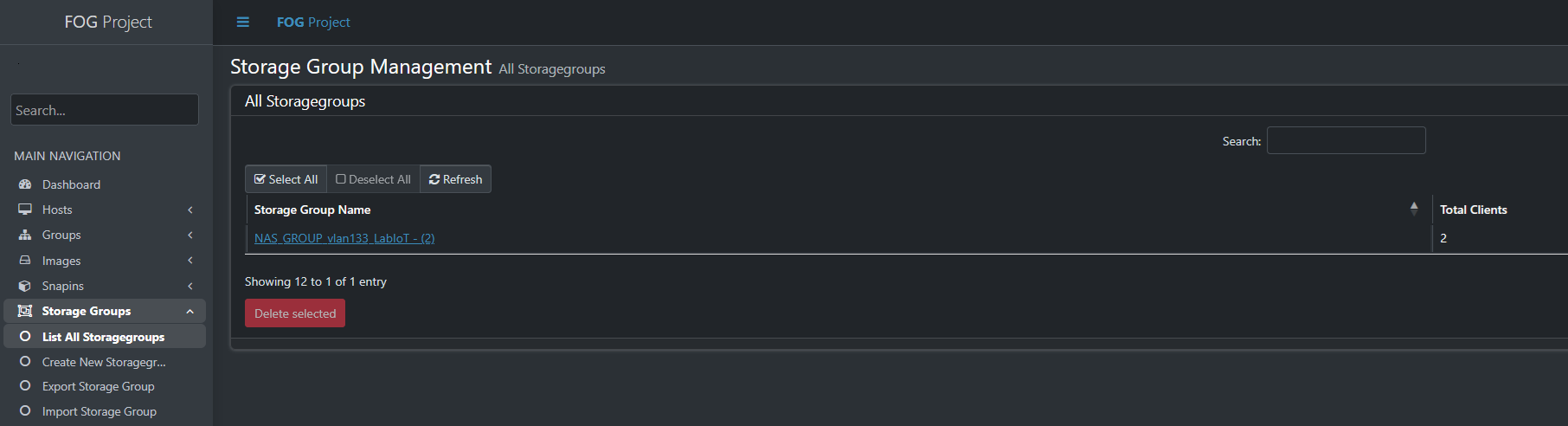
In the menuStorage Node -> List All Storagenodes, the same problem as the previous Storage Group.
3. iPXE menu
The new item “Enroll Secure Boot Key” did not appear in the iPXE menu, but I had to add it manually. I have FOG 1.6 installed as a clean installation in another virtual machine. Just for testing. In this clean installation, this iPXE menu item was there, but in the version upgraded from 1.5.10 it did not appear. I had some custom items added to the iPXE menu before the upgrade. Maybe that caused the new one not to be added?
-
@Valer For the Storage Group/Storage Node issue, fog doesn’t delete anything when installing.
At most it may alter tables or swap data around but I don’t think that’s what happened here.
I do see it showing 12 storage groups, I don’t see your screen for storage nodes. I’ll see if I can replicate the problem there. Confusing why it shows 12 to 1 of 1 entry? A little strange
Refind needing being signed, makes sense. The Secureboot stuff we worked on was mostly concerned with the flow from IPXE -> Kernel, I didn’t think about the refind file. I’ll see if I can address that.
Can you tell me what schema version you’re on?
MariaDB [fog]> select * from schemaVersion;
+-----+--------+
| vID | vValue |
+-----+--------+
|   1 |    323 |
+-----+--------+
1 row in set (0.000 sec)
Is what you should see. 323 is the latest which injects that new Task item, that said if your machine is in legacy boot, (non-uefi) you won’t be presented with the menu.
If you can give me:
SELECT vValue FROM schemaVersion; SELECT pxeID, pxeName FROM pxeMenu ORDER BY pxeID; -
@Valer I was able to replicate and believe I’ve updated the code enough to fix all the issues you were seeing if you don’t mind doing the git pull and re-install.
-
@Tom-Elliott said in How to upgrade to FOG 1.6?:
Client state What the task does
Setup Mode (platform key cleared) Enrols outright. Nothing to confirm, nobody at the keyboard.
Normal (keys present, Secure Boot off) FOS stages the MOK request itself, non-interactively. Someone answers the blue MokManager screen once on the next reboot.
Already enforcing Secure Boot Cannot run — the machine will not boot FOS in the first place. Use the live USB route for those.One minor correction, with secure boot enabled on a new machine, if you boot to the signed shim you can use the Mok enrollment boot issue without needing to disable secure boot, but you do have to be physically at each machine to enroll.
-
@Valer
@Tom-Elliott may have already fixed this, but if you’re using refined that would also need to be signed. We should be able to just have it signed by our new secure boot system and then it should be happy.
But also, the newer version of ipxe has proper support for SANBOOT in uefi mode, so you may be able to skip over refined and just use SANBOOT to boot to disk, try SANBOOT as the exit mode on a host and see if works, if it does you can change your global default and have an easier time. -
FOG 1.6 is great, but I ultimately had to roll back to version 1.5.10 because I ran into an issue I couldn’t resolve, and the deadline for deploying a large batch of computers is fast approaching.
All my images are stored on a Synology NAS. On the older version, I had multiple storage groupe and nodes configured on the multiple Synology NAS, and everything (capture/deploy) worked fast without any issues.
In version 1.6, however, I’m hitting a roadblock. It seems there is a check during task creation that verifies if the primary storage node (in storage group) is online. Since it’s a Synology NAS, this check naturally fails, and FOG won’t allow me to create any capture tasks. I also tried mounting a share directly inside the /image, but it wasn’t fast at all (capture/deploy).I tried the sanboot, and it really helped—it works well, especially on some HP machines.
I kept version 1.6 in a VM for testing purposes. Maybe a feature to disable the online node check will be added in the future—or perhaps it’s already there and I didn’t find it—or maybe direct NAS support will be introduced eventually.
-
@Valer This should be fixed in latest/greatest