FOG boot issue after BIOS update on HP ZBook Fury 16 G11 – iPXE autoexec.ipxe not found
-
Hi, I hope you’re doing well.
Since the latest BIOS update on the HP ZBook Fury 16 G11 Mobile Workstation PC (BIOS version W98 Ver. 01.03.00), the system is no longer able to boot into the FOG PXE environment for image deployment.
When attempting to boot from the network, the process fails with the following error message:
“autoexec.ipxe… Not found (https://ipxe.org/2d12618e)”This issue occurs only on this model when running the most recent BIOS version.
The same hardware model with an older BIOS version boots into FOG correctly, and image deployment works as expected.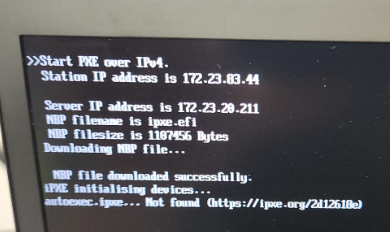
Thank you !
-
Hi, to get more details, we run fog version 1.5.10.1733 and the kernel version 6.12.35.
Should we try the experimental kernel version 6.12.35 from 21 december?
For this post, admin can move it to hardware compatibility if you want.
-
@CanadienITGuy @gchartrandCRL I had to switch from using ipxe.efi to snp.efi for all my newer HP machines. Please try changing that in your DHCP scope options.
-
@rodluz Good it’s working. Can we left this option like that and all the previous machine will works too of we need to switch this option just for new HP and came back up ipxe.efi after that?
-
@gchartrandCRL I’m glad that worked! You should be able to keep using snp.efi with your previous machines.
-
@CanadienITGuy Just for your and anyone’s fyi the
autoexec.ipxe... Not Foundis not an error. It’s more of an info message than a warning or error.
I actually have tested adding an autoexec.ipxe, even just an empty file to remove that message but even an empty file or a file that is even just a symlink or copy/paste of our normal ipxe/boot menu files causes things to break in the process.
The autoexec.ipxe is meant for adding customization to the ipxe process without needing to re-build the ipxe binary. But my testing with it within the fog workflow was that it’s best to just let that message exist and to see it as it being not found means the process will not be altered from your expected Fog ipxe workflow
