• Recent
    • Unsolved
    • Tags
    • Popular
    • Users
    • Groups
    • Search
    • Register
    • Login
    1. Home
    2. rogalskij
    3. Posts
    • Profile
    • Following 0
    • Followers 0
    • Topics 22
    • Posts 100
    • Groups 1

    Posts

    Recent Best Controversial
    • Issue deploying image to new Dell Latitude 5410

      Tried to deploy our existing image to Dell Latitude 5410 laptops. Deploying these to the laptops manually via the “keyboard method” (not registering in the console but just going through the menus right at the laptop).

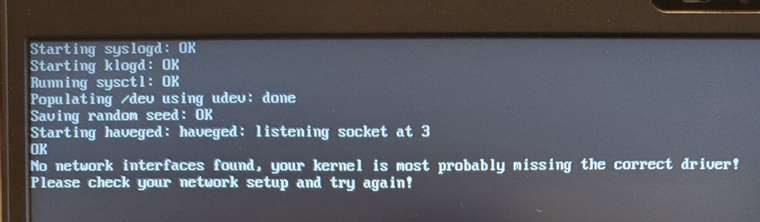
      Makes it through the menu system of the server, I choose the image and then when it starts deployment, it throws an error “No network interfaces found, your kernel is most probably missing the correct driver!”

      This is odd since it netbooted and I am on the latest version of FOG 1.5.9, not sure if it is a kernel issue or something else. I updated the bios and tried several of the laptops. My Kernel version is 4.19.143 which claims it is the latest in the list. Any suggestions?
      sdfdsfdsf.jpg

      posted in FOG Problems
      rogalskijR
      rogalskij
    • RE: "Pending/additional" mac addresses combining with other hosts

      @sebastian-roth

      The process is as follows for a new machine never having been imaged. Desktop support tech sets all the necessary BIOS settings to get it to PXE boot. Then said technician PXE boots the machine, images it without registering it, and waits for it to reboot. After it reboots, the technician logs in locally and renames it while at the same time joining it to our Active Directory Domain.

      Then I log into the console sometime later and I notice that yet another mac address has been crammed into a machine in the console.

      posted in FOG Problems
      rogalskijR
      rogalskij
    • RE: "Pending/additional" mac addresses combining with other hosts

      @sebastian-roth

      Sorry I didn’t respond until now. We are still having the issue. For these machines, the majority we DON’T register beforehand. These are usually imaged by our desktop team at the PC using a manual “netboot” on the machine itself and then imaging it. Then we end up with hosts in the “Pending Hosts” section or in this case they never show up there because they show up under some other previously imaged machine as shown in the image I posted. We rename the PC manually after it get’s imaged in this case.

      Currently we have the default setting of “Change hostname early” set, should we disable this?

      I do have the FOG client installed in my image as I thought this was the desired behavior to “capture” an image

      If we need to rename the PC BEFORE imaging, how would we go about this but still utilize the manual imaging process right at the PC itself? (My desktop team prefers to image this way even when the original image on the machine is functioning correctly).

      posted in FOG Problems
      rogalskijR
      rogalskij
    • RE: "Pending/additional" mac addresses combining with other hosts

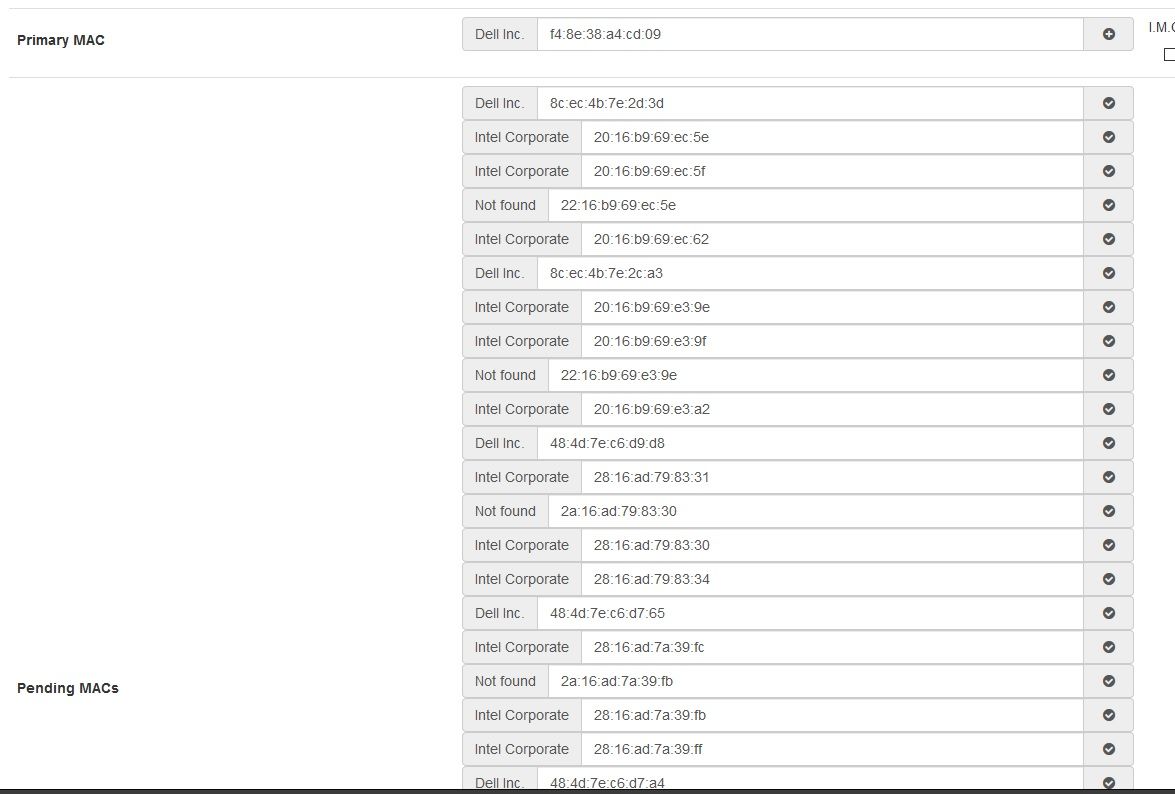
      I will certainly turn this off in my image, but the mac address that shows up on another machine, is a real mac address of a machine that I just imaged. So let’s say I image a computer named “PC1” using the manual keyboard based method of FOG. Then after I go log into the console, I can’t find it under “pending” or anywhere else. That is because it’s real primary mac address is listed under “PC7” or some other host on the FOG console under “pending macs”.

      posted in FOG Problems
      rogalskijR
      rogalskij
    • "Pending/additional" mac addresses combining with other hosts

      We have been using FOG for a bit now, and what find is that with some machines, once we image them they don’t create hosts of their own but combine into existing hosts that already show up on the FOG Web UI. They show up as either “Pending Macs” or “Additional Macs” but either way it makes the machine not able to be found. The only real way to find where they are is by creating a new host and punching in the mac address manually and it will show you what other existing host the mac has been added to.

      Is there a way to fix this globally and then prevent it from happening? I am not even sure the cause. If I delete the host with all the pending macs will the real hosts show up in the console? Very confused at the moment.

      pending_macs.jpg

      posted in FOG Problems
      rogalskijR
      rogalskij
    • RE: Feature Modification Request - Image Task Email Addition

      @Tom-Elliott Thank you very much! This will help us greatly as we image off hours or when others want to monitor the duration of imaging and such. Thank you so much!

      posted in Feature Request
      rogalskijR
      rogalskij
    • Feature Modification Request - Image Task Email Addition

      Respectfully requesting a modification to the data “Image Completion Task” emails contain. The feature is excellent, one small request would be to add the following lines in the email sent:

      Image Duration (in other words, how long the task took to complete)
      IP Address of the host that was imaged

      The image duration is the most important as sometimes we start images before leaving for the day, or sometimes our supervisor requests that sort of information about an image task. Thank you for your consideration!

      posted in Feature Request
      rogalskijR
      rogalskij
    • RE: Hosts not showing up after installing client

      @Sebastian-Roth

      I suspect this already had the fog client at some point. We image the same machines over and over for various reasons in our labs and in our classrooms. Is this not supported by FOG? Is there some procedure I should be running before we image the machines or something?

      From the GUI is there any way to search via mac address?

      posted in FOG Problems
      rogalskijR
      rogalskij
    • RE: Hosts not showing up after installing client

      Thank you Wayne, I use a deployment program to install the client so I figured it should work just like the others in the lab did. It is odd, like 25 will work, and 4 will fail in one room. By “fail” I mean not show up in the client. Attached is the log. I notice the response module fails but I don’t know what that means.

      fog.log

      posted in FOG Problems
      rogalskijR
      rogalskij
    • Hosts not showing up after installing client

      I have several hosts in several computer labs that don’t show up in the console when we install the FOG client. They just never show up in pending hosts or in “hosts”. It is possible we have installed the client on them previously and maybe that is the issue? I tried resetting the encryption data on all of the hosts but it didn’t change anything.

      In any event, is there a way I can globally fix this? I considered that 1.5.9 might fix this issue as every update seems to fix problems all over the place but I was curious what the community thought.

      posted in FOG Problems
      rogalskijR
      rogalskij
    • RE: Captured Image is about the size of the Hard Drive

      I realize this post is a bit old, but I wanted to thank everyone for their suggestions and give our experience to back up what has been said in this topic already. We experienced an image that should have been about 120gb, but was showing in FOG as the full 500GB hard drive. After referencing this thread, it fixed the issue. The steps we took are below in order:

      Verified that the PC didn’t have a second drive or second large partition it was capturing
      Verified that bitlocker encryption was OFF using the command prompt command “manage-bde -off C:”
      Ran Disk Cleanup (to get rid of old unused files)
      Ran Tools > Check to scan for hard drive errors (may require reboot to fix)
      Ran Tools > Tools > Optimize and defagment
      Capture Image again

      Once we did those steps, the newly captured image only takes up the actual amount used on the hard drive.

      posted in Windows Problems
      rogalskijR
      rogalskij
    • RE: Slowness after upgrade to 1.5.7.102 (dev branch)

      @Sebastian-Roth Thank you for all you and everyone does. I agree with you this was a good choice to make a second topic out of. This is working well now and I greatly appreciate all the assistance!

      posted in FOG Problems
      rogalskijR
      rogalskij
    • RE: Slowness after upgrade to 1.5.7.102 (dev branch)

      @Sebastian-Roth Testing with newer init with partclone 0.3.13 and kernel 4.19.101 seems to fix my slowness in deployment of images. I am seeing speeds of 9GB or more in my testing now. I am guessing it is the partclone that is causing the slowness in some environments. Will continue to test and utilize 0.3.13 partclone to verify theory.

      speed2.jpg

      posted in FOG Problems
      rogalskijR
      rogalskij
    • RE: Slowdown Unicast and Multicast after upgrading FOG Server

      @Sebastian-Roth Can confirm that after testing this in my environment with the new init (partclone 0.3.13) and the latest dev Kernel specified, things are back to fast again. Average in my environment was somewhere around 9/GB per minute.

      speed2.jpg

      posted in FOG Problems
      rogalskijR
      rogalskij
    • RE: Slowdown Unicast and Multicast after upgrading FOG Server

      @Sebastian-Roth My apologies if this is too forward, but would the latest build with 0.3.13 be able to be installed by myself as well? I would love to test 0.3.13 to see if it fixes my slowness issue as well. I would gladly report back my findings.

      posted in FOG Problems
      rogalskijR
      rogalskij
    • RE: Change existing Fog server to force HTTPS using Enterprise CA for certs

      @64bitfury We only did the web UI. We ended up giving it a DNS entry, getting our commercial certificate, and then installing the cert in Apache on the server. It wasn’t FOG specific, it was more installing a cert on Apache that you have to go through. Have you had much experience in commercial certificates?

      posted in Tutorials
      rogalskijR
      rogalskij
    • RE: Change existing Fog server to force HTTPS using Enterprise CA for certs

      Do you mean just securing the web UI with a certificate? Or do you mean securing the client communication between the server and the client with a cert? I have done the former.

      posted in Tutorials
      rogalskijR
      rogalskij
    • RE: Slowness after upgrade to 1.5.7.102 (dev branch)

      @Tom-Elliott I tried some newer kernels like 5.3.3 as well as what shipped with 1.5.7 (kernel version 4.19.48). I tried using the original version of init.xz but it claimed my memory was too low or something of that nature so I switched it back. The speed didn’t seem to change at all on any of the different kernels, almost like the speed wasn’t related to those kernels. Also as another piece of information I am using UEFI pxe booting with ipxe.efi as the boot file.

      I just updated to 1.5.7.115 but no change at all. Just for full disclosure.

      posted in FOG Problems
      rogalskijR
      rogalskij
    • RE: Slowness after upgrade to 1.5.7.102 (dev branch)

      @Tom-Elliott It is possible it is something in my environment. Typically it is a single machine (imaged either via the console, or directly from the machine itself by a member of our desktop support team). It seemed related to the version because I first noticed it after I upgraded from 1.5.7 to the dev version of 1.5.8 and then later the dev version of 1.5.7.102. It went from like 12GB/min to 4GB/min or 1GB/min. The servers are production boxes so I can’t make too many changes without potentially affecting others but it still seems like it is related to the update I did. Perhaps the update of partclone? Also I noticed that when I pulled an image today for testing, the capture was super quick at 10GB/min but the deploys to the same machine and others like it were 4GB or less. I feel like I am missing something extremely mundane and obvious.

      posted in FOG Problems
      rogalskijR
      rogalskij
    • RE: Slowness after upgrade to 1.5.7.102 (dev branch)

      @Sebastian-Roth They are normal SSD sata drives for the most part. I was told by a member of the desktop team today though that they tried to image an Optiplex 7070 with an M2 solid state drive (the ram style drives) and it was around 1.4gb per minute.

      I will certainly try to make some changes, but the fixes that came with the dev version far outweigh the speed issues I am having at the moment. Hoping some bug fixes in the 1.5.8 version will do the trick. I will keep testing as I can. Thank you all for your help for now!

      posted in FOG Problems
      rogalskijR
      rogalskij
    • 1
    • 2
    • 3
    • 4
    • 5
    • 3 / 5