• Recent
    • Unsolved
    • Tags
    • Popular
    • Users
    • Groups
    • Search
    • Register
    • Login
    1. Home
    2. rogalskij
    3. Posts
    • Profile
    • Following 0
    • Followers 0
    • Topics 22
    • Posts 93
    • Groups 1

    Posts

    Recent Best Controversial
    • Windows Firewall ports on machines

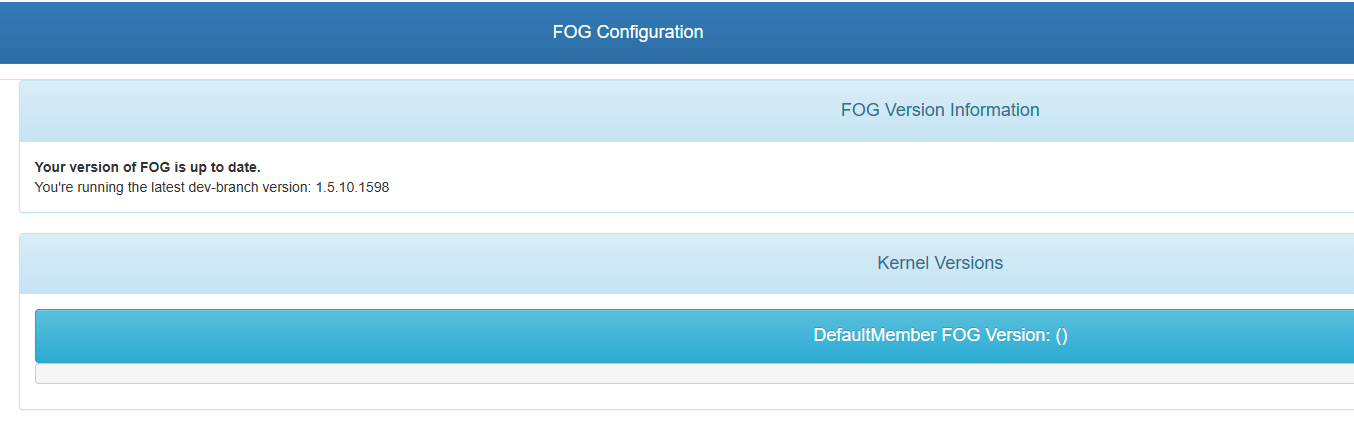
      We are a FOG Server school, and we utilize the .13 client. We are on version 1.5.10.41 which we recently updated to. When we attempt to start tasks, the client on the machines don’t seem to execute the tasks regularly. I am thinking it is because we are missing firewall rules on the machine we pull the image from, but am unsure. Are there specific ports we should be adding on the client itself in Windows Firewall? If so, what are they, and are they inbound, outbound, TCP or UDP?

      Any assistance would be appreciated. We have the FOG client itself in the Windows Firewall inbound list, but doesn’t seem to have changed anything.

      posted in FOG Problems
      rogalskijR
      rogalskij
    • RE: FOG Server no longer UEFI pxe Booting

      @george1421 Thank you for checking in. So strangely I was able to get it to start up by replacing the permissions on: /tftpboot and “/var/www/html/fog/service/ipxe". I am not sure if this made the difference or was a coincidence or?

      Imaging is now back to working as it did before. One thing I was curious about, what program is used for TFTP on CentOS 8? I couldn’t tell which product FOG uses, is it vsftpd?

      posted in FOG Problems
      rogalskijR
      rogalskij
    • FOG Server no longer UEFI pxe Booting

      Starting Friday the 5th (or late Thursday the 4th) our FOG server stopped PXE booting the clients. We have tried a reboot as well as checking several other small things but we have had no luck.

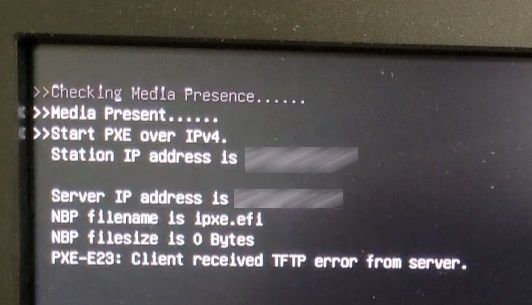
      When the client boots, it starts UEFI pxe boot but fails so quickly we can barely see the message. The error itself (attached below) when slowed down claims “PXE-E23: Client received TFTP error from Server”

      This seemed to coincide with OS updates for CentOS 8 but I am not 100% sure that was the cause. Not sure what could have broken with TFTP but any suggestions would be appreciated. August is our busy season and we are lost without FOG.

      tftp_error1.jpg

      posted in FOG Problems
      rogalskijR
      rogalskij
    • RE: How to disable "password viewing" in the web UI

      @george1421 and @Sebastian-Roth I really appreciate everyone taking a look into this so it could possibly be fixed in a later release. We use FOG every day at our College so I tend to come across different quirks time to time. So appreciative of the product and the support provided by the community, devs, and users. Thanks and take care!

      -Josh-

      posted in FOG Problems
      rogalskijR
      rogalskij
    • RE: How to disable "password viewing" in the web UI

      @sebastian-roth On my 1.5.9 server you can absolutely see the AD password. It is blanked on the setting itself, but if you go into a host and click the “join domain” you can see that password in plain text no issue. Is this a bug on my system perhaps?

      posted in FOG Problems
      rogalskijR
      rogalskij
    • RE: How to disable "password viewing" in the web UI

      @george1421 Thank you for the information George. The fields that I see it affects where you can actually view the password in plane text are as follows:

      storage node general > Management Password
      Hosts >pick a host > Active Directory > Domain Password
      Fog Configuration > Fog Settings > Fog Storage Nodes > STORAGENODE MYSQLPASS
      Fog Configuration > Fog Settings > Proxy Settings > Proxy Password
      Fog Configuration > Fog Settings >TFTP Server > TFTP FTP Password

      Could be others that I am missing, but these are where users of the GUI on my server can see the password in plain text. The ability to toggle this feature on or off would be great. Probably requiring an admin password to change the toggle. Thank you very much!

      posted in FOG Problems
      rogalskijR
      rogalskij
    • How to disable "password viewing" in the web UI

      We have FOG 1.5.9 installed, and for security purposes we were curious if it was possible to remove the plain text viewing of passwords in the various locations this shows up? Our security requirements are fairly strict, and this would be helpful to not have the password show in plain text to those who have access to the GUI. Happens in several locations we notice, including with domain accounts for joining machines to our domain post imaging. Any thoughts or assistance is appreciated. If this is not possible, would it be possible for me to submit a feature request for this? Thank you all!

      -Josh-

      posted in FOG Problems
      rogalskijR
      rogalskij
    • RE: Dell Latitude 5420 won't boot to PXE

      @george1421

      We found that we had to fiddle with a good many settings in the bios including UEFI boot path security and a few others. Even then the only way we can get to it is by doing “F12” and manually choosing PXE Boot which is very strange. It works after that however. This can be closed out.

      posted in Hardware Compatibility
      rogalskijR
      rogalskij
    • Dell Latitude 5420 won't boot to PXE

      We have 15 or so Dell Latitude 5420 laptops, we have configured them for UEFI, PXE boot, AHCI, and disabled secure boot all per our normal routine.

      When it starts to boot, it finds no compatible pxe boot and skips it and continues in the boot order. We are on version 1.5.9.62 of FOG, with a version 5.10.50 Kernel. It feels like the Kernel doesn’t support this particular device, but could it be something else we are missing? Anyone have any suggestions or experience with Dell Laptops this new?

      posted in Hardware Compatibility
      rogalskijR
      rogalskij
    • RE: PXE Error "PXE-E99" after OS update

      @george1421 I will certainly never try to upgrade CentOS forklift style again. You were correct I upgraded Centos from version 7 to 8. After the mess it created I took your advice and ran the FOG installer using “GIT” and it cleaned up a bunch of the issues. A BOAT LOAD of things were missing after the upgrade but now they are functional. Thank you for all the assistance, FOG’s community and dev team is top notch.

      posted in FOG Problems
      rogalskijR
      rogalskij
    • PXE Error "PXE-E99" after OS update

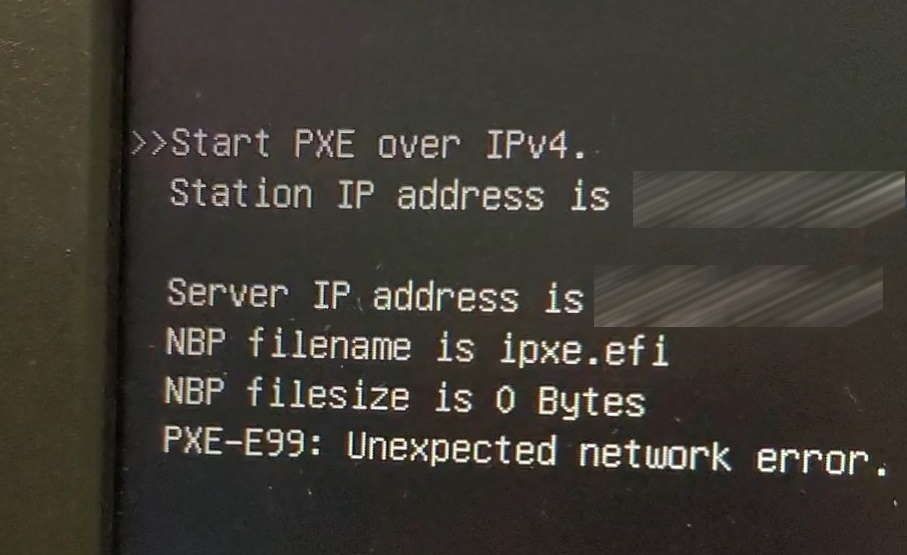
      After updating Centos to version 8, my fog server no longer PXE Boots for UEFI clients (that is all we have). We get the attached error, it claims the error is “PXE-E99” and that the “NBP filesize is 0” and then PXE skips right on by. I believe it is something to do with the upgrade of Centos but not sure what exactly. The interface names did change from em1 to eno1 Anyone have any suggestions? Currently unable to image at all.

      fog_error.jpg

      posted in FOG Problems
      rogalskijR
      rogalskij
    • RE: Issue deploying image to new Dell Latitude 5410

      @rogalskij And I answered by own question after reading this post. Very helpful and explains the difference in the kernel versions. Very helpful as always!

      https://forums.fogproject.org/topic/14732/kernel-versions-4-19-143-vs-5-6-18

      posted in FOG Problems
      rogalskijR
      rogalskij
    • RE: Issue deploying image to new Dell Latitude 5410

      @george1421 I upgraded to the 5.6.18 and it fixed it! What I don’t understand is why the 5.6.18 kernel is lower in the list of kernels if it is the “latest and greatest” kernel. Shouldn’t it be on top instead of the 4.19.145? I am a bit confused by this.

      Also, forgive my ignorance, but what does LTS stand for?

      posted in FOG Problems
      rogalskijR
      rogalskij
    • Issue deploying image to new Dell Latitude 5410

      Tried to deploy our existing image to Dell Latitude 5410 laptops. Deploying these to the laptops manually via the “keyboard method” (not registering in the console but just going through the menus right at the laptop).

      Makes it through the menu system of the server, I choose the image and then when it starts deployment, it throws an error “No network interfaces found, your kernel is most probably missing the correct driver!”

      This is odd since it netbooted and I am on the latest version of FOG 1.5.9, not sure if it is a kernel issue or something else. I updated the bios and tried several of the laptops. My Kernel version is 4.19.143 which claims it is the latest in the list. Any suggestions?

      sdfdsfdsf.jpg

      posted in FOG Problems
      rogalskijR
      rogalskij
    • RE: "Pending/additional" mac addresses combining with other hosts

      @sebastian-roth

      The process is as follows for a new machine never having been imaged. Desktop support tech sets all the necessary BIOS settings to get it to PXE boot. Then said technician PXE boots the machine, images it without registering it, and waits for it to reboot. After it reboots, the technician logs in locally and renames it while at the same time joining it to our Active Directory Domain.

      Then I log into the console sometime later and I notice that yet another mac address has been crammed into a machine in the console.

      posted in FOG Problems
      rogalskijR
      rogalskij
    • RE: "Pending/additional" mac addresses combining with other hosts

      @sebastian-roth

      Sorry I didn’t respond until now. We are still having the issue. For these machines, the majority we DON’T register beforehand. These are usually imaged by our desktop team at the PC using a manual “netboot” on the machine itself and then imaging it. Then we end up with hosts in the “Pending Hosts” section or in this case they never show up there because they show up under some other previously imaged machine as shown in the image I posted. We rename the PC manually after it get’s imaged in this case.

      Currently we have the default setting of “Change hostname early” set, should we disable this?

      I do have the FOG client installed in my image as I thought this was the desired behavior to “capture” an image

      If we need to rename the PC BEFORE imaging, how would we go about this but still utilize the manual imaging process right at the PC itself? (My desktop team prefers to image this way even when the original image on the machine is functioning correctly).

      posted in FOG Problems
      rogalskijR
      rogalskij
    • RE: "Pending/additional" mac addresses combining with other hosts

      I will certainly turn this off in my image, but the mac address that shows up on another machine, is a real mac address of a machine that I just imaged. So let’s say I image a computer named “PC1” using the manual keyboard based method of FOG. Then after I go log into the console, I can’t find it under “pending” or anywhere else. That is because it’s real primary mac address is listed under “PC7” or some other host on the FOG console under “pending macs”.

      posted in FOG Problems
      rogalskijR
      rogalskij
    • "Pending/additional" mac addresses combining with other hosts

      We have been using FOG for a bit now, and what find is that with some machines, once we image them they don’t create hosts of their own but combine into existing hosts that already show up on the FOG Web UI. They show up as either “Pending Macs” or “Additional Macs” but either way it makes the machine not able to be found. The only real way to find where they are is by creating a new host and punching in the mac address manually and it will show you what other existing host the mac has been added to.

      Is there a way to fix this globally and then prevent it from happening? I am not even sure the cause. If I delete the host with all the pending macs will the real hosts show up in the console? Very confused at the moment.

      pending_macs.jpg

      posted in FOG Problems
      rogalskijR
      rogalskij
    • RE: Feature Modification Request - Image Task Email Addition

      @Tom-Elliott Thank you very much! This will help us greatly as we image off hours or when others want to monitor the duration of imaging and such. Thank you so much!

      posted in Feature Request
      rogalskijR
      rogalskij
    • Feature Modification Request - Image Task Email Addition

      Respectfully requesting a modification to the data “Image Completion Task” emails contain. The feature is excellent, one small request would be to add the following lines in the email sent:

      Image Duration (in other words, how long the task took to complete)
      IP Address of the host that was imaged

      The image duration is the most important as sometimes we start images before leaving for the day, or sometimes our supervisor requests that sort of information about an image task. Thank you for your consideration!

      posted in Feature Request
      rogalskijR
      rogalskij
    • 1 / 1