• Recent
    • Unsolved
    • Tags
    • Popular
    • Users
    • Groups
    • Search
    • Register
    • Login
    1. Home
    2. george1421
    3. Posts
    • Profile
    • Following 1
    • Followers 66
    • Topics 113
    • Posts 15,373
    • Groups 2

    Posts

    Recent Best Controversial
    • RE: UEFI: NBP downloaded successfully - then blackscreen

      @gabrielzeit Remember dnsmasq configured this way is also a “dhcp server”

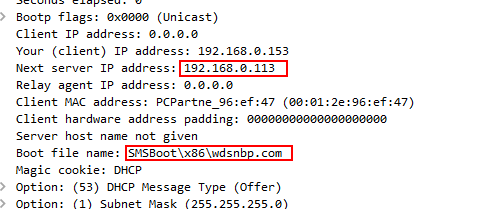
      If we look at the packet from the .205 dhcp server, you will see the next server points to .113 (assume to be wds server) and the boot file is surely a wds boot loader (akin to undionly.kpxe). The .1 dhcp server (looks like maybe a router) is also telling the same story.

      2023-08-31 11_42_59-Window.png

      posted in General Problems
      george1421G
      george1421
    • RE: UEFI: NBP downloaded successfully - then blackscreen

      @gabrielzeit I have to run to a meeting but your pcap is interesting in that you have 3 dhcp servers and 2 of them are pointing at a WDS deployment server.

      .201 and .1 are pointing to WDS and .49 appears to be the fog server.

      This configuration will cause intermittent issues.

      posted in General Problems
      george1421G
      george1421
    • RE: UEFI: NBP downloaded successfully - then blackscreen

      @gabrielzeit said in UEFI: NBP downloaded successfully - then blackscreen:

      Then blackscreen. And this repeats every few minutes.

      Ensure that secure/safe boot is disabled on the target computer.

      posted in General Problems
      george1421G
      george1421
    • RE: DHCP failed: no configuration method succeeded - after automatic reboot

      @gabrielzeit So just to be clear the device that is hanging with no configuration methods succeeded is a VirtualBox VM and not a physical computer?

      If a physical computer is doing this, I would think its spanning tree not something to do with ipxe.

      Now if its ipxe then Tom’s recommendation is the better answer. VB is a strange critter as it were. Just be aware that ipxe.pxe is only supported in bios modes and not uefi.

      posted in General Problems
      george1421G
      george1421
    • RE: DHCP failed: no configuration method succeeded - after automatic reboot

      @gabrielzeit Your dnsmasq config is not complete and a bit out of date.

      What version of dnsmasq are you running? dnsmasq -v
      Here is a tutorial with a good configuration for dnsmasq version 2.75 and later: https://forums.fogproject.org/topic/12796/installing-dnsmasq-on-your-fog-server?_=1693476360006 It will dual boot bios and uefi systems.

      posted in General Problems
      george1421G
      george1421
    • RE: FOG speed problem

      @DBCountMan Yes if you are using the location plugin. Using the location plugin you assign the storage node to a location and then when you register the target computer with FOG you assign the target computer to a location. Then when the computer pxe boots it learns who it needs to communicate with. So a storage node would work in this case to spread the load.

      One caveat with storage nodes is that they can’t capture images. Only the master node can capture images. Then all storage nodes (including the master node) in the same storage group can deploy the image.

      posted in FOG Problems
      george1421G
      george1421
    • RE: FOG speed problem

      @alexamore90 You have painted an incomplete picture here so I can only speak in general terms.

      Using modern target computers you can flood a 1GbE network link with 2-3 simultaneous unicast imaging. Any additional number of simultaneous will impact the overall performance of all systems imaging. On a well designed 1GbE network you should be able to get between 5.5 and 6.5 GB/min as displayed on the partclone screen during imaging. For a 10GbE network you should get between 13 and 15 GB/min. (your performance metrics of 16gbs and 1000 and auto-negotiate are inconsistent). If you only have a 1 GbE network, you can add additional network cards configured in a LAG trunk to spread the imaging load of 10 computers across multiple nic cards.

      During imaging the heavy load is carried by the target computer. The FOG server only moves disk blocks from its local storage and sends them out the network adapter. The fog server does monitor the imaging process but does not perform heavy computational load. The speed of the disk subsystem on the FOG server will also have an impact. If your fog server only has 1 physical spinning disk, that disk will have to work hard to keep up with delivering 10 data streams from different locations on the disk platter. In this case if you only have spinning disks, setting up a striped raid configuration using multiple disks will help or moving to SSD drives.

      The last comment is if you need to image 10 systems at a time, you might look into FOG multicasting mode. This mode requires some setup and a network infrastructure that supports multicasting, but with this mode you can image 30 or more systems at the same network bandwidth as just 2 multicast streams.

      posted in FOG Problems
      george1421G
      george1421
    • RE: invalid integer value and chainloading failed

      @krokodeilakias said in invalid integer value and chainloading failed:

      I’ ll try to strip it down in case I hit on a conflicting command.

      This was going to be my next suggestion. Your script is very advanced and I was having a hard time following it just reading through it. As a test discard everything except the first level menu. The error kind of indicates a problem around a colon, but I’m not sure.

      posted in FOG Problems
      george1421G
      george1421
    • RE: invalid integer value and chainloading failed

      @krokodeilakias So lets walk that path then.

      You installed FOG 1.5.10 onto your new server, then migrated your database over. So your 1.5.10 version of fog is running on 1.5.7 version of the database? If yes, rerun the fog installer, it will remember all of your previous settings. Half way through the install it will ask you go open a web browser and upgrade the database. That should force the DB to be upgraded to 1.5.10, there has been about 5 years between 1.5.7 and 1.5.10 so there has been database changes and fields added/moved.

      posted in FOG Problems
      george1421G
      george1421
    • RE: invalid integer value and chainloading failed

      @krokodeilakias said in invalid integer value and chainloading failed:

      which after successfully loading advanced.php and bg.png returns an error:

      OK more clues. This one jumps out at me. In your advanced.php script it references
      console --picture https://${fog-ip}/fog/service/ipxe/bg.png

      The variable ${fog-ip} doesn’t seem to be set in the advanced.php output. So this might cause an invalid URL. I don’t know if the values fall forward from boot.php or not. If no, then this seems to be an uninitialized variable.

      I also noted two invocation lines #!ipxe in the output. That shouldn’t cause a problem because it just resets everything a second time.

      posted in FOG Problems
      george1421G
      george1421
    • RE: invalid integer value and chainloading failed

      @krokodeilakias I don’t have a clue what’s wrong here because your code look right.

      If we look at the error message it give me a few clues.

      Chainloading failed…

      In your script there are only 2 chain commands.

      Image deployment works as expected

      That would kind of indicate chain -ar https://192.168.61.38/fog/service/ipxe/boot.php##params || chain command is working as intended

      but I can’t access Advanced Menu
      Indicates that there is a problem with this line: chain -ar https://192.168.61.38/fog/service/ipxe/advanced.php || goto MENU The structure of the line seems OK, I can’t tell at the moment if there are any strange white space characters in there messing us up though.

      Lets start out by calling that url directly from your browser, there might be something in the advanced.php program that is having a hard time causing the chain load to fail.

      posted in FOG Problems
      george1421G
      george1421
    • RE: Fog Delay Join Domain after Deploy

      @Brad39413 The FOG service should be started from your setupcomplete.cmd batch file. That way it doesn’t start doing its part before oobe is complete. Just update your software or delay the startup of the fog service until you are ready for it to do its thing.

      posted in Windows Problems
      george1421G
      george1421
    • RE: List OUs under hosts and move computers (object) in AD from one OU to another OU

      @2000gtacoma FOG doesn’t have a concept of OUs built in. You could use one of the “extra” fields to define the unique part of the OU and then have a FOG post install script update the unattend.xml file with the right/proper OU path.

      First we don’t use the fog client on the target computes on my campus. We use a custom post install script to determine what image was deployed as well as the current IP address of the target computer, from there we calculate what OU the computer belongs in. We update the unattend.xml file with the proper OU path and then let the unattend.xml file connect the computer to AD as well as define the right OU path.

      At other times we had to deploy the computer to a specific container that didn’t have any GPOs defined. These GPOs broke deployment so we had to deploy the target computers to this clean OU, then we had a vbs script that would move the computer to the right OU after deployment. This vbs script was launched by the setupcomplete.cmd batch file.

      The point of this is there may be a different way you can go about getting the job done, if FOG doesn’t support the feature directly.

      posted in FOG Problems
      george1421G
      george1421
    • RE: A power operation is pending

      @plegrand said in A power operation is pending:

      However, the deployment task is still active/ongoing in the fog web interface, and when renaming the workstation, an error message is present in the fog client logs “HostnameChanger A power operation is pending, aborting module”.

      I’ve seen this only happen when the imaging process actually doesn’t complete. The very last step in the imaging process is for the target computer to send an “all done” command to the FOG server to clear the task. This may be the root of your other issues because “imaging never really completed” according to the fog task manager.

      So do you have any kind of post install script running at the end of deployment? Might that script cause the target computer to reboot before the “all done” message is sent?

      posted in FOG Problems
      george1421G
      george1421
    • RE: A power operation is pending

      @plegrand FOG can’t see bitlocker encrypted disks as being encrypted disks. It will blindly copy sector by sector to a new system. BUT a bitlocker protected system will care since the secuity token won’t match (because that is held in the TPM chip on the source computer) the TPM chip certificate. You must disable bitlocker on the mother image before cloning. If you need bitlocker enabled on the target system issue the command through the windows setupcomplete.cmd batch file or via a GPO policy.

      posted in FOG Problems
      george1421G
      george1421
    • RE: FOG with TrueNAS on Proxmox Setup

      @OutlastTrace said in FOG with TrueNAS on Proxmox Setup:

      not sure what tfp is.

      well that should have read ftp

      posted in General
      george1421G
      george1421
    • RE: Fog mysql-client install Fail

      @PRK08 The root cause of the issue is that you are currently running on an unsupported/old version of ubuntu [16.04] where some of the packages from the ubuntu repository are out of date or no longer supported. This is an issue with the ubuntu repo and not specifically with FOG.

      posted in Linux Problems
      george1421G
      george1421
    • RE: ipxe chain boot.php permission denied on pxe but not autoboot

      @DBCountMan Now that you know the root of the problem, you can/could bring everything back together by syncing the certificates and ipxe boot files from your primary FOG server to your secondary FOG server. The issue as you found is two different certificates on your campus.

      posted in FOG Problems
      george1421G
      george1421
    • RE: Prepare Windows Client for clone in domain network

      @seppim TBH Your results do not match your subject line, but…
      Yes you discovered that bios computers need a different boot loader than uefi computers.

      bios == undionly.kpxe
      uefi == ipxe.efi or snponly.efi

      If you have a windows or linux based dhcp server you can configure it to dynamically send out the right boot loader name based on the pxe booting computer.

      And you are also correct to pxe boot into FOG secure boot needs to be disabled.

      posted in Windows Problems
      george1421G
      george1421
    • RE: PXE Boot - File not found

      @greichelt said in PXE Boot - File not found:

      dnsmasq is undionly,kpxe.0

      You need to update dnsmasq to version 2.75 or later. Most modern linux OS already are past this version wit dnsmasq. I have a tutorial on compiling a supported version of dnsmasq if you need it. But my suspicion is that you have an old version of a linux OS that will cause you pain in the future.

      posted in FOG Problems
      george1421G
      george1421
    • 1
    • 2
    • 28
    • 29
    • 30
    • 31
    • 32
    • 768
    • 769
    • 30 / 769