• Recent
    • Unsolved
    • Tags
    • Popular
    • Users
    • Groups
    • Search
    • Register
    • Login
    1. Home
    2. george1421
    3. Posts
    • Profile
    • Following 1
    • Followers 66
    • Topics 113
    • Posts 15,373
    • Groups 2

    Posts

    Recent Best Controversial
    • RE: Client hangs at EFI stub:

      @Sebastian-Roth I did do a side by side comparison between ubuntu configs and FOS linux configs and there are roughly 1800 differences. Many were in drivers and options. The only one that stood out in the efi section was CONFIG_EFI_MIXED which allowed a 32 bit EFI kernel boot a 64 bit linux kernel. Seems kind of strange, but we probably should turn that on.

      Though a second process I started with an ia64 defconfig template and then added in the FOS required settings leaving almost all of the defconfig settings in place but adding in the fog required settings. I built this last night but haven’t had time to see if it boots. I did not add in the old ISA card network drivers or network adapters that I’m pretty sure are not in circulation like DEC Tulip network drivers. That kernel came in at 15MB as compared to the FOS kernel of 10MB. I’m not really worried about that extra 5MB kernel in size in 2023. This kernel is based on linux 6.5.3.

      The other thing I need to point out is the the OPs platform is a server with an intel scalable processor. I don’t know what other hardware might be getting in the way. The FOS kernel should at least try to boot, it might not boot completely but should at least try to boot. We are not seeing that. By building the FOS usb boot drive we have eliminated all of the pxe and ipxe issues so we’ve narrowed it down to the FOS kernel, and swapping in the ubuntu kernel points directly to the FOS kernel at fault.

      I hadn’t considered a ubuntu kernel patch to be the solution here either. I used linux 6.5.3 thinking that it should have all of the mainstream patches already in it.
      posted in FOG Problems
      george1421G
      george1421
    • RE: Client hangs at EFI stub:

      @sgilbe said in Client hangs at EFI stub::

      This kernel is hanging at the same place as the fos kernel

      In a way that’s good because it should be the same exact kernel except for 6.5.3 version instead of 6.2.x. So now the next part is I need to compare ubuntu kernel settings with FOS linux kernel settings.

      posted in FOG Problems
      george1421G
      george1421
    • RE: Fog and Pfsense 2.7

      These should be the steps needed to configure network/pxe booting using pfsense firewall: https://forums.fogproject.org/topic/17021/how-to-configure-pfsense-for-netbooting

      posted in FOG Problems
      george1421G
      george1421
    • How to configure pfSense for netbooting

      If you use a pfSense router as your primary dhcp server you can configure it to provide dynamic PXE booting information to your target computers that you wish to image.

      To configure PXE (Network) Booting with pfSense please do the following.

      1. Edit your DHCP Server configuration for the subnet where you require pxe booting.
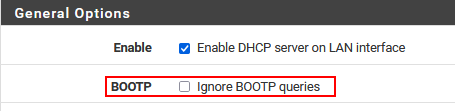
      2. At the top of the DHCP Server conifugration page for the network interface (LAN in this example). Make sure that you have the DHCP server enabled and Ignore Bootp queries disabled.
        ignore_bootp.png
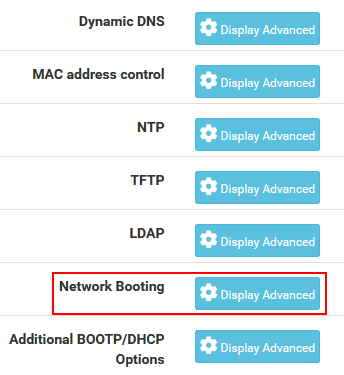
      3. Scroll down the page until you see the Network Booting section and press the Display Advanced button.
        do_netbooting.png
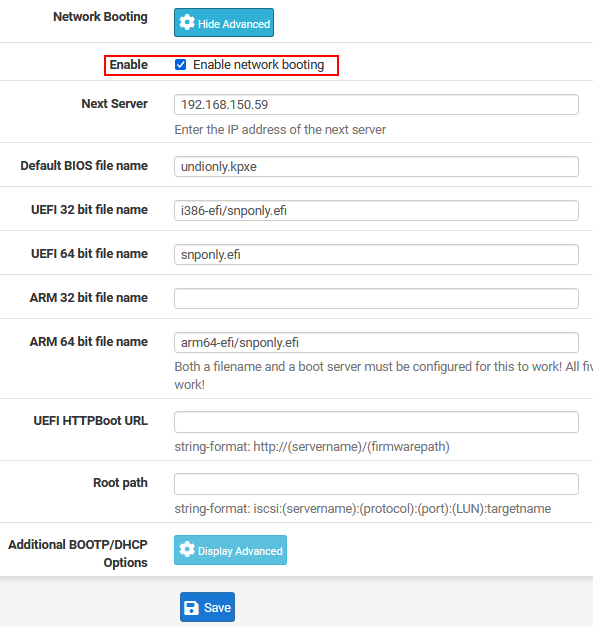
      4. Tick the checkbox for Enable network booting and then enter the IP address of the FOG server (netboot server) in the Next Server field.
      5. Complete the form as below
        boot_settings.png
      6. Make sure you don’t have any value populated for the TFTP server field
        no_tftp.png
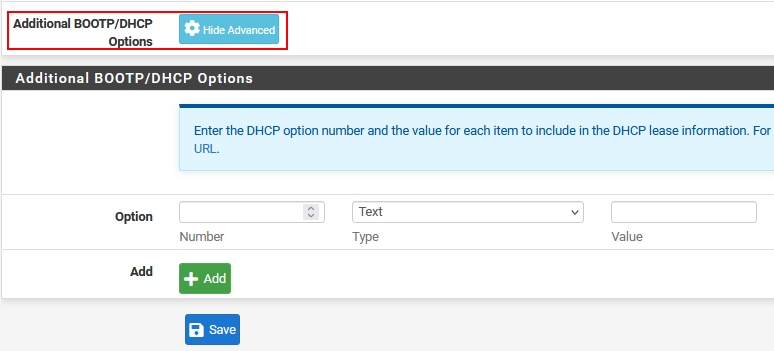
      7. As well as under the Additional Bootp/DHCP options section. Make sure you are not populating dhcp options 60, 66, or 67.
        no_advanced_dhcp.png
      8. Save the configuration and then restart the dhcp server.
        9, Be aware that you might need to enable some additional firewall rules if you have the LAN inteface locked down. Net/PXE booting requires access to the TFTP server on udp port 69 on the FOG server.

      Note: If you are running pfSense as a VM, you may need to configure promiscuous mode on the network interface for your hypervisor. You would only need this option if your external target computer’s can’t pick up an IP address from pfSense. This promiscuous mode is a requirement of dhcp and not network booting.

      posted in Tutorials
      george1421G
      george1421
    • RE: Fog PXE Boot for specific workstations

      @FuriousGamer065 Is the lab on its own subnet or can it be placed on its own subnet (still fully routable across your campus)? The goal would be to put this lab on its own broadcast domain. Then as you said use dnsmasq to configure it as a proxydhcp server to supply pxe boot info only. Run dnsmasq on the FOG server that way when the fog server is off line there is no pxe boot info and everything functions normally on this lab subnet.

      posted in FOG Problems
      george1421G
      george1421
    • RE: Client hangs at EFI stub:

      @sgilbe It looks like my build environment was really out of date. The last time I needed to create a one off kernel was for version 5.15.x. More to the point I updated the build environment to 6.5.3 and built this kernel. https://drive.google.com/file/d/1P-OX1LXhm-N_oBLg0PVcIjj0P3Cxm_Rp/view?usp=drive_link download this kernel and save it onto your flash drive as bzImage. I don’t expect it to work any better than the FOS standard kernel, but I want to see if the new kernel release works on your processor. If this kernel doesn’t work better than the stock FOS kernel then I compare what ubuntu is creating with this config file to see what is missing. I do have kernel options to turn on the advanced features of the Intel scalable processor, but the base x64 kernel should also run on this processor (IMO).

      Also please confirm that you updated all of the firmware on the server using the lifecycle controller.

      posted in FOG Problems
      george1421G
      george1421
    • RE: Client hangs at EFI stub:

      @sgilbe I realize this debugging is a lot of try this and do that, but we’ve narrowed it down to exactly the FOS Linux kernel. The ubuntu kernel error bombed out exactly where I expected it to do, at mounting the virtual hard drive (init.xz).

      I think you asked earlier about the config file fog uses these are all posted on the fog project github site: https://github.com/FOGProject/fos/tree/master/configs The config file you are looking for is kernelx64.config this is the config file used to create the current kernel.

      posted in FOG Problems
      george1421G
      george1421
    • RE: Pxe-E32: TFTP open timeout - FOG 1.5.10 - DHCP Windows Server 2019

      @Redbob ok I think I know where its falling down but we need evidence and not an opinion.

      Can you get a computer on the target’s network running wireshark? If yes create a pcap of the pxe booting process with this capture filter port 67 or port 68 This will only capture the dhcp process. What we are interested in is the dhcp OFFERS from one or more dhcp servers. In one of those OFFER packets is the bad actor that is sending your pxe booting into a loop. If you can’t figure it out who the bad actor is post the pcap here and I’ll look at it. The answer will be in the pcap. Use my capture filter so we only see the dhcp process and not other random traffic on your network.

      posted in Linux Problems
      george1421G
      george1421
    • RE: Pxe-E32: TFTP open timeout - FOG 1.5.10 - DHCP Windows Server 2019

      @Redbob Yes again we are seeing the multiple queries and then to load request. You have confirmed that 172.24.5.180 is the fog server?
      Did you turn on any firewalls on the fog server, or are they on?

      For a test, on a windows computer on the same subnet as the pxe booting computer, install the tftp client feature. Temp turn off the windows firewall (or this test will fail). Finally from a windows command line key in the following command tftp 172.24.5.180 get undiohly.kpxe see if you can download the file to your test computer on the remote subnet.

      posted in Linux Problems
      george1421G
      george1421
    • RE: Client hangs at EFI stub:

      @sgilbe I haven’t had a chance to look into the settings as of now. Its kind of a complicated subject to explain in an email. My gut reaction is that it should boot even if the advanced features are not turned on. It might be what rhromkyo mentioned about the preboot environment but that also got me thinking if this is new hardware have you run through the lifecycle controllers and updated all of the firmware in that server? I’m going to keep working on the kernel bits but lets make sure there isn’t something in the firmware causing the issue.

      Also as a hack and it won’t fully work, it would be interesting to take the vmlinuz from your ubuntu disk that is working and save it on the usb stick as bzImage (watch the case) and see if the kernel tries to boot when you select debug mode from the grub menu. It appears that the FOS linux kernel doesn’t even try to boot.

      posted in FOG Problems
      george1421G
      george1421
    • RE: Pxe-E32: TFTP open timeout - FOG 1.5.10 - DHCP Windows Server 2019

      @Redbob I think something happened to the pcap where it didn’t get uploaded correctly. I get file not found when I go to download it

      posted in Linux Problems
      george1421G
      george1421
    • RE: Pxe-E32: TFTP open timeout - FOG 1.5.10 - DHCP Windows Server 2019

      @Redbob What I’m seeing here:

      2023-09-14 11_19_15-Window.png

      It asks for the file size over and over again, on a 5 second timeout, then eventually it asks for the file. This should be a two packet process. 1. Ask for the file size and 2. Download the file. There is something abnormal going on here.

      posted in Linux Problems
      george1421G
      george1421
    • RE: Pxe-E32: TFTP open timeout - FOG 1.5.10 - DHCP Windows Server 2019

      @Redbob said in Pxe-E32: TFTP open timeout - FOG 1.5.10 - DHCP Windows Server 2019:

      server is in default subnet (172.24.0.0/22) and the workstation 172.24.12.35 is in WLAN 12 (172.24.12.0/23)

      Specifically I’m asking if they are on the same site or different sites? I have seen the tftp download fail (which is what it looks like in the pcap) if the mtu of the link between the subnets are smaller than the default tftp packet size of 1456. I have seen WAN links sometimes have smaller than 1500 mtu.

      Also is there a screening firewall between the subnets that might be blocking tftp traffic?

      posted in Linux Problems
      george1421G
      george1421
    • RE: Pxe-E32: TFTP open timeout - FOG 1.5.10 - DHCP Windows Server 2019

      @Redbob Without being able to see the original pcap it makes this a little hard to debug on the boot file side to see if your dhcp server profiles are correct.

      But on the surface if you are pxe booting a bios based computer everything looks right between the dhcp server configuration and the pcap. It should be working…

      So I have to ask you this, is the pxe booting computer on the same subnet as the fog server? Is it local or across some WAN link?

      posted in Linux Problems
      george1421G
      george1421
    • RE: I've deleted images but the storage node space remains the same?

      @Jim-Holcomb

      Just a few questions:

      1. How did you delete your images?
      2. Did you go into the image definition and pick delete, or did you delete the images from the image list?

      If you deleted them from the image list then the files still persist on the fog server this is by design. If you went into the image definition then picked delete, it gives you the option to purge the files from the disk.

      If you have deleted the image definitions already, you can manually go into the fog server console and purge the files. You will need to sudo to root then navigate to /images directory on the fog server. Your images will be under that directory. You can use the command rm -rf <image_directory_name> and it will purge what ever directory you give it. Be mindful with that command because if you remove a directory this way its gone. The -rf flag is recursively delete the files and force the delete. With great power comes great responsibility.

      posted in FOG Problems
      george1421G
      george1421
    • RE: Fog and Pfsense 2.7

      @elchapulin You created the pcap perfectly.

      I can see the pxe booting computer is in bios mode.

      Looking at the dhcp OFFER packet, I see in the header the next-server is 192.168.1.22 and the boot file is undionly.kpxe. What is strange is in the dhcp options there is only dhcp option 66 which again points to 192.168.1.22. The issue is there is no dhcp option 67. All 4 fields need to be filled out. Its strange that pfsense is doing this…

      Lets try this, in your screen shot the tftp server field is filled out, but that is in a different section than netbooting. Lets remove the tftp server value under the tftp section, but lets leave the next-server field set correctly under network booting. I think the tftp section is overriding the netbooting section.

      posted in FOG Problems
      george1421G
      george1421
    • RE: Fog and Pfsense 2.7

      @elchapulin Ok follow the instructions to get the pcap. That will tell us what the target computer is being asked to do. With a bios computer it should just work.

      posted in FOG Problems
      george1421G
      george1421
    • RE: FOG Update issues causing PXE boot issues

      @skyborne98 Just for confirmation 10.23.3.17 is your fog server’s IP address?

      The deployment path looks strange 10.23.3.17:/**vol/lab.fog.image.std.1/**images is not the default FOG path. How did you get this path?

      What is the output of showmount -e 127.0.0.1?

      The web url look strange too, but that’s not the issue here.

      posted in FOG Problems
      george1421G
      george1421
    • RE: Client hangs at EFI stub:

      @sgilbe said in Client hangs at EFI stub::

      Platinum 8480

      OK I’ll look into the kernel configurations tonight. From what I see commercial linux can run on this hardware, there must be something missing from FOS linux. Understand that FOS Linux is a very light and fast version of linux dedicated to imaging. So it supports almost all hardware, servers them selves give us a problem since the hardware is more specific than generic.

      posted in FOG Problems
      george1421G
      george1421
    • RE: JLT 6012 rev 2023 - restor boot

      @totoro Ok this can give me something to work with.

      00:1d.1 Ethernet controller [0200]: Intel Corporation Device [8086:4ba0] (rev 11)

      This is the ethernet controller. first available in linux kernels 5.7–5.19, 6.0–6.5. I don’t see a fail to load firmware for this one. Run the lspci command again lspci -Knn | more you will need to look for device 00:1d.1. I need to see that entire section.

      EDIT: I just looked at the build settings for FOS Linux 6.x and it does compile the driver in the 6.x released of FOS Linux https://github.com/FOGProject/fos/blob/45ba692315f6e5857c12d933ae2c9c4dd5c35778/configs/kernelx64.config#L1720 lines 1720-1724

      Bus 001 Device 011: ID 0bda:8153 Realtek Semiconductor Corp. RTL8153 Gigabit Ethernet Adapter

      OK that answers why I was seeing a failing to load for the realtek nic

      posted in Hardware Compatibility
      george1421G
      george1421
    • 1
    • 2
    • 26
    • 27
    • 28
    • 29
    • 30
    • 768
    • 769
    • 28 / 769