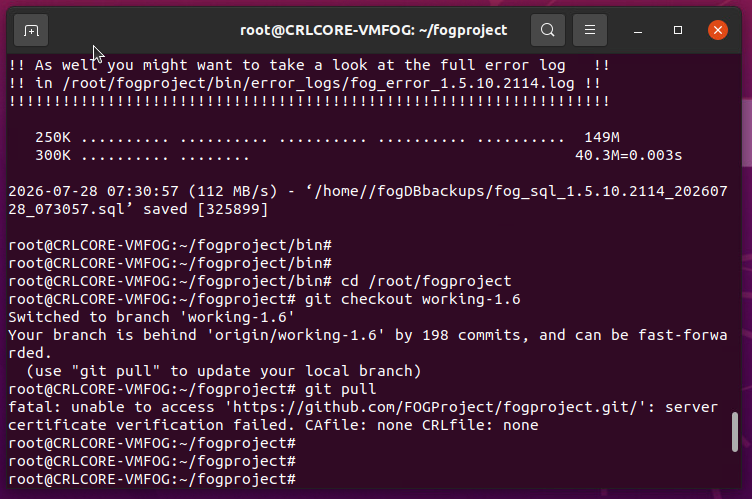
Upgraded from FOG 1.5.9 to 1.5.10.1903 and having issues
-
@Tom-Elliott I did the install process again. No change, same error.
-
@Strahd Please pull dev-branch/working-1.6 again and try again. I think it should work.
I’m trying to test all cases but need the help thanks
-
@Tom-Elliott ok I did my best to install again. Different error this time
sudo -i
cd /root
cd fogproject
git fetch --all
(“git pull dev-branch/working1.6” is not a valid comand and I’m not very familiar with this os)
git checkout dev-branch
git pull (“already up to date”)
cd /root/fogproject/bin
./installfog.sh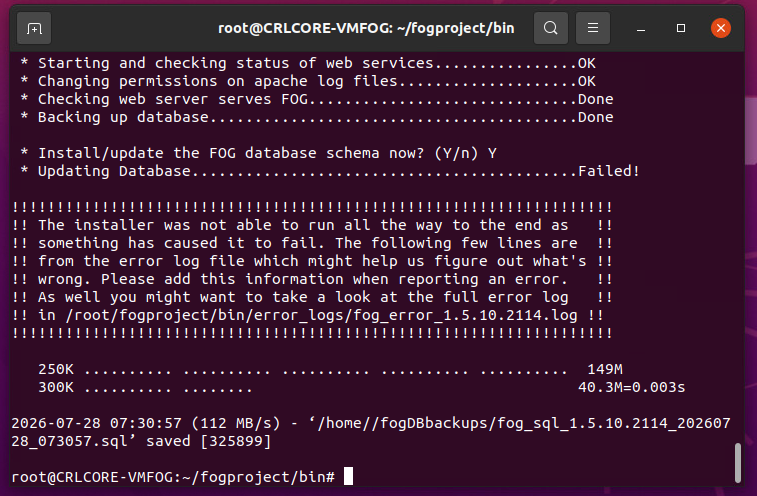
/usr/bin/lsb_release
/usr/bin/systemctl
systemd
ln: failed to create symbolic link ‘/lib/systemd/system/mysql.service’: File exists
ln: failed to create symbolic link ‘/lib/systemd/system/mysqld.service’: File exists
ln: failed to create symbolic link ‘/etc/systemd/system/mysql.service’: File exists
ln: failed to create symbolic link ‘/etc/systemd/system/mysqld.service’: File exists
/usr/sbin/iptables
/opt/fog/.fogsettings
Reading package lists…
Building dependency tree…
Reading state information…
curl is already the newest version (7.68.0-1ubuntu2.25).
The following packages were automatically installed and are no longer required:
gir1.2-goa-1.0 libfwupdplugin1 libxmlb1
Use ‘apt autoremove’ to remove them.
0 upgraded, 0 newly installed, 0 to remove and 0 not upgraded.
Testing DNS name resolution (httpbin.org)… OK
Testing HTTP connection (http://httpbin.org)… OK
Testing HTTPS connection (https://github.com)… OK
‘universe’ distribution component is already enabled for all sources.
Hit:1 http://us.archive.ubuntu.com/ubuntu focal InRelease
Hit:2 http://us.archive.ubuntu.com/ubuntu focal-updates InRelease
Hit:3 http://us.archive.ubuntu.com/ubuntu focal-backports InRelease
Hit:4 http://security.ubuntu.com/ubuntu focal-security InRelease
Reading package lists…
ii apache2 2.4.41-4ubuntu3.23 amd64 Apache HTTP Server
ii attr 1:2.4.48-5 amd64 utilities for manipulating filesystem extended attributes
ii bc 1.07.1-2build1 amd64 GNU bc arbitrary precision calculator language
ii build-essential 12.8ubuntu1.1 amd64 Informational list of build-essential packages
ii cpp 4:9.3.0-1ubuntu2 amd64 GNU C preprocessor (cpp)
ii curl 7.68.0-1ubuntu2.25 amd64 command line tool for transferring data with URL syntax
ii g++ 4:9.3.0-1ubuntu2 amd64 GNU C++ compiler
ii gawk 1:5.0.1+dfsg-1ubuntu0.1 amd64 GNU awk, a pattern scanning and processing language
ii gcc 4:9.3.0-1ubuntu2 amd64 GNU C compiler
ii genisoimage 9:1.1.11-3.1ubuntu1 amd64 Creates ISO-9660 CD-ROM filesystem images
ii git 1:2.25.1-1ubuntu3.14 amd64 fast, scalable, distributed revision control system
ii gzip 1.10-0ubuntu4.1 amd64 GNU compression utilities
ii htmldoc 1.9.7-1ubuntu0.3 amd64 HTML processor that generates indexed HTML, PS, and PDF
ii isolinux 3:6.04~git20190206.bf6db5b4+dfsg1-2 all collection of bootloaders (ISO 9660 bootloader)
ii jq 1.6-1ubuntu0.20.04.1 amd64 lightweight and flexible command-line JSON processor
ii lftp 4.8.4-2build3 amd64 Sophisticated command-line FTP/HTTP/BitTorrent client programs
ii libapache2-mod-php 2:7.4+75 all server-side, HTML-embedded scripting language (Apache 2 module) (default)
ii libc6:amd64 2.31-0ubuntu9.18 amd64 GNU C Library: Shared libraries
ii libcurl4:amd64 7.68.0-1ubuntu2.25 amd64 easy-to-use client-side URL transfer library (OpenSSL flavour)
ii liblzma-dev:amd64 5.2.4-1ubuntu1.1 amd64 XZ-format compression library - development files
ii m4 1.4.18-4 amd64 macro processing language
mariadb-client-10.3
mariadb-client-core-10.3
mariadb-client
ii mariadb-client 1:10.3.39-0ubuntu0.20.04.2 all MariaDB database client (metapackage depending on the latest version)
ii mariadb-client 1:10.3.39-0ubuntu0.20.04.2 all MariaDB database client (metapackage depending on the latest version)
mariadb-server-core-10.3
mariadb-server-10.3
mariadb-server
ii mariadb-server 1:10.3.39-0ubuntu0.20.04.2 all MariaDB database server (metapackage depending on the latest version)
ii mariadb-server 1:10.3.39-0ubuntu0.20.04.2 all MariaDB database server (metapackage depending on the latest version)
ii net-tools 1.60+git20180626.aebd88e-1ubuntu1.3 amd64 NET-3 networking toolkit
ii nfs-kernel-server 1:1.3.4-2.5ubuntu3.7 amd64 support for NFS kernel server
ii openssh-server 1:8.2p1-4ubuntu0.13 amd64 secure shell (SSH) server, for secure access from remote machines
ii php 2:7.4+75 all server-side, HTML-embedded scripting language (default)
ii php-bcmath 2:7.4+75 all Bcmath module for PHP [default]
ii php-cli 2:7.4+75 all command-line interpreter for the PHP scripting language (default)
ii php-curl 2:7.4+75 all CURL module for PHP [default]
ii php-fpm 2:7.4+75 all server-side, HTML-embedded scripting language (FPM-CGI binary) (default)
ii php-gd 2:7.4+75 all GD module for PHP [default]
php-json
php-json-schema
ii php-json 2:7.4+75 all JSON module for PHP [default]
ii php-ldap 2:7.4+75 all LDAP module for PHP [default]
ii php-mbstring 2:7.4+75 all MBSTRING module for PHP [default]
php-mysql
ii php-mysql 2:7.4+75 all MySQL module for PHP [default]
ii php-ssh2 1.2+0.13-1build1 amd64 Bindings for the libssh2 library
ii tar 1.30+dfsg-7ubuntu0.20.04.4 amd64 GNU version of the tar archiving utility
ii tftpd-hpa 5.2+20150808-1ubuntu4 amd64 HPA’s tftp server
ii tftp-hpa 5.2+20150808-1ubuntu4 amd64 HPA’s tftp client
ii unzip 6.0-25ubuntu1.2 amd64 De-archiver for .zip files
ii vsftpd 3.0.5-0ubuntu0.20.04.2 amd64 lightweight, efficient FTP server written for security
ii wget 1.20.3-1ubuntu2.1 amd64 retrieves files from the web
ii zlib1g:amd64 1:1.2.11.dfsg-2ubuntu1.5 amd64 compression library - runtime
Reading package lists…
Building dependency tree…
Reading state information…
attr is already the newest version (1:2.4.48-5).
bc is already the newest version (1.07.1-2build1).
cpp is already the newest version (4:9.3.0-1ubuntu2).
g++ is already the newest version (4:9.3.0-1ubuntu2).
gcc is already the newest version (4:9.3.0-1ubuntu2).
genisoimage is already the newest version (9:1.1.11-3.1ubuntu1).
isolinux is already the newest version (3:6.04~git20190206.bf6db5b4+dfsg1-2).
lftp is already the newest version (4.8.4-2build3).
libapache2-mod-php is already the newest version (2:7.4+75).
m4 is already the newest version (1.4.18-4).
php is already the newest version (2:7.4+75).
php-cli is already the newest version (2:7.4+75).
php-curl is already the newest version (2:7.4+75).
php-gd is already the newest version (2:7.4+75).
php-ldap is already the newest version (2:7.4+75).
php-mysql is already the newest version (2:7.4+75).
tftp-hpa is already the newest version (5.2+20150808-1ubuntu4).
tftpd-hpa is already the newest version (5.2+20150808-1ubuntu4).
php-bcmath is already the newest version (2:7.4+75).
php-fpm is already the newest version (2:7.4+75).
php-json is already the newest version (2:7.4+75).
php-mbstring is already the newest version (2:7.4+75).
php-ssh2 is already the newest version (1.2+0.13-1build1).
apache2 is already the newest version (2.4.41-4ubuntu3.23).
build-essential is already the newest version (12.8ubuntu1.1).
curl is already the newest version (7.68.0-1ubuntu2.25).
gawk is already the newest version (1:5.0.1+dfsg-1ubuntu0.1).
git is already the newest version (1:2.25.1-1ubuntu3.14).
gzip is already the newest version (1.10-0ubuntu4.1).
jq is already the newest version (1.6-1ubuntu0.20.04.1).
libc6 is already the newest version (2.31-0ubuntu9.18).
libcurl4 is already the newest version (7.68.0-1ubuntu2.25).
liblzma-dev is already the newest version (5.2.4-1ubuntu1.1).
net-tools is already the newest version (1.60+git20180626.aebd88e-1ubuntu1.3).
nfs-kernel-server is already the newest version (1:1.3.4-2.5ubuntu3.7).
openssh-server is already the newest version (1:8.2p1-4ubuntu0.13).
tar is already the newest version (1.30+dfsg-7ubuntu0.20.04.4).
unzip is already the newest version (6.0-25ubuntu1.2).
vsftpd is already the newest version (3.0.5-0ubuntu0.20.04.2).
wget is already the newest version (1.20.3-1ubuntu2.1).
zlib1g is already the newest version (1:1.2.11.dfsg-2ubuntu1.5).
htmldoc is already the newest version (1.9.7-1ubuntu0.3).
mariadb-client is already the newest version (1:10.3.39-0ubuntu0.20.04.2).
mariadb-server is already the newest version (1:10.3.39-0ubuntu0.20.04.2).
Calculating upgrade…
The following packages were automatically installed and are no longer required:
gir1.2-goa-1.0 libfwupdplugin1 libxmlb1
Use ‘apt autoremove’ to remove them.
0 upgraded, 0 newly installed, 0 to remove and 0 not upgraded.
ii apache2 2.4.41-4ubuntu3.23 amd64 Apache HTTP Server
ii attr 1:2.4.48-5 amd64 utilities for manipulating filesystem extended attributes
ii bc 1.07.1-2build1 amd64 GNU bc arbitrary precision calculator language
ii build-essential 12.8ubuntu1.1 amd64 Informational list of build-essential packages
ii cpp 4:9.3.0-1ubuntu2 amd64 GNU C preprocessor (cpp)
ii curl 7.68.0-1ubuntu2.25 amd64 command line tool for transferring data with URL syntax
ii g++ 4:9.3.0-1ubuntu2 amd64 GNU C++ compiler
ii gawk 1:5.0.1+dfsg-1ubuntu0.1 amd64 GNU awk, a pattern scanning and processing language
ii gcc 4:9.3.0-1ubuntu2 amd64 GNU C compiler
ii genisoimage 9:1.1.11-3.1ubuntu1 amd64 Creates ISO-9660 CD-ROM filesystem images
ii git 1:2.25.1-1ubuntu3.14 amd64 fast, scalable, distributed revision control system
ii gzip 1.10-0ubuntu4.1 amd64 GNU compression utilities
ii htmldoc 1.9.7-1ubuntu0.3 amd64 HTML processor that generates indexed HTML, PS, and PDF
ii isolinux 3:6.04~git20190206.bf6db5b4+dfsg1-2 all collection of bootloaders (ISO 9660 bootloader)
ii jq 1.6-1ubuntu0.20.04.1 amd64 lightweight and flexible command-line JSON processor
ii lftp 4.8.4-2build3 amd64 Sophisticated command-line FTP/HTTP/BitTorrent client programs
ii libapache2-mod-php 2:7.4+75 all server-side, HTML-embedded scripting language (Apache 2 module) (default)
ii libc6:amd64 2.31-0ubuntu9.18 amd64 GNU C Library: Shared libraries
ii libcurl4:amd64 7.68.0-1ubuntu2.25 amd64 easy-to-use client-side URL transfer library (OpenSSL flavour)
ii liblzma-dev:amd64 5.2.4-1ubuntu1.1 amd64 XZ-format compression library - development files
ii m4 1.4.18-4 amd64 macro processing language
ii mariadb-client 1:10.3.39-0ubuntu0.20.04.2 all MariaDB database client (metapackage depending on the latest version)
ii mariadb-server 1:10.3.39-0ubuntu0.20.04.2 all MariaDB database server (metapackage depending on the latest version)
ii net-tools 1.60+git20180626.aebd88e-1ubuntu1.3 amd64 NET-3 networking toolkit
ii nfs-kernel-server 1:1.3.4-2.5ubuntu3.7 amd64 support for NFS kernel server
ii openssh-server 1:8.2p1-4ubuntu0.13 amd64 secure shell (SSH) server, for secure access from remote machines
ii php 2:7.4+75 all server-side, HTML-embedded scripting language (default)
ii php-bcmath 2:7.4+75 all Bcmath module for PHP [default]
ii php-cli 2:7.4+75 all command-line interpreter for the PHP scripting language (default)
ii php-curl 2:7.4+75 all CURL module for PHP [default]
ii php-fpm 2:7.4+75 all server-side, HTML-embedded scripting language (FPM-CGI binary) (default)
ii php-gd 2:7.4+75 all GD module for PHP [default]
ii php-json 2:7.4+75 all JSON module for PHP [default]
ii php-ldap 2:7.4+75 all LDAP module for PHP [default]
ii php-mbstring 2:7.4+75 all MBSTRING module for PHP [default]
ii php-mysql 2:7.4+75 all MySQL module for PHP [default]
ii php-ssh2 1.2+0.13-1build1 amd64 Bindings for the libssh2 library
ii tar 1.30+dfsg-7ubuntu0.20.04.4 amd64 GNU version of the tar archiving utility
ii tftpd-hpa 5.2+20150808-1ubuntu4 amd64 HPA’s tftp server
ii tftp-hpa 5.2+20150808-1ubuntu4 amd64 HPA’s tftp client
ii unzip 6.0-25ubuntu1.2 amd64 De-archiver for .zip files
ii vsftpd 3.0.5-0ubuntu0.20.04.2 amd64 lightweight, efficient FTP server written for security
ii wget 1.20.3-1ubuntu2.1 amd64 retrieves files from the web
ii zlib1g:amd64 1:1.2.11.dfsg-2ubuntu1.5 amd64 compression library - runtime
New password: Retype new password: passwd: password updated successfully
init.xz: OK
init_32.xz: OK
bzImage: OK
bzImage32: OK
FOGService.msi: OK
SmartInstaller.exe: OK
arm_init.cpio.gz: OK
arm_Image: OK
‘bzImage’ -> ‘/var/www/fog//service/ipxe/bzImage’
Attribute “version” set to a 7 byte value for /var/www/fog//service/ipxe/bzImage:
6.12.35
Attribute “tag_name” set to a 10 byte value for /var/www/fog//service/ipxe/bzImage:
“20260306”
‘bzImage32’ -> ‘/var/www/fog//service/ipxe/bzImage32’
Attribute “version” set to a 7 byte value for /var/www/fog//service/ipxe/bzImage32:
6.12.35
Attribute “tag_name” set to a 10 byte value for /var/www/fog//service/ipxe/bzImage32:
“20260306”
‘arm_Image’ -> ‘/var/www/fog//service/ipxe/arm_Image’
Attribute “version” set to a 7 byte value for /var/www/fog//service/ipxe/arm_Image:
6.12.35
Attribute “tag_name” set to a 10 byte value for /var/www/fog//service/ipxe/arm_Image:
“20260306”
‘init.xz’ -> ‘/var/www/fog//service/ipxe/init.xz’
Attribute “version” set to a 9 byte value for /var/www/fog//service/ipxe/init.xz:
2025.02.4
Attribute “tag_name” set to a 10 byte value for /var/www/fog//service/ipxe/init.xz:
“20260306”
‘init_32.xz’ -> ‘/var/www/fog//service/ipxe/init_32.xz’
Attribute “version” set to a 9 byte value for /var/www/fog//service/ipxe/init_32.xz:
2025.02.4
Attribute “tag_name” set to a 10 byte value for /var/www/fog//service/ipxe/init_32.xz:
“20260306”
‘arm_init.cpio.gz’ -> ‘/var/www/fog//service/ipxe/arm_init.cpio.gz’
Attribute “version” set to a 9 byte value for /var/www/fog//service/ipxe/arm_init.cpio.gz:
2025.02.4
Attribute “tag_name” set to a 10 byte value for /var/www/fog//service/ipxe/arm_init.cpio.gz:
“20260306”
‘FOGService.msi’ -> ‘/var/www/fog//client/FOGService.msi’
‘SmartInstaller.exe’ -> ‘/var/www/fog//client/SmartInstaller.exe’
mysqlnd
ln: ‘/opt/fog/snapins/ssl//CA/.fogCA.key’ and ‘/opt/fog/snapins/ssl//CA/.fogCA.key’ are the same file
ln: ‘/opt/fog/snapins/ssl//CA/.fogCA.pem’ and ‘/opt/fog/snapins/ssl//CA/.fogCA.pem’ are the same file
Signature ok
subject=CN = 10.46.10.40
Getting CA Private Key
Site 001-fog disabled.
To activate the new configuration, you need to run:
systemctl reload apache2
Enabling site 000-default.
To activate the new configuration, you need to run:
systemctl reload apache2
renamed ‘/etc/apache2/sites-available/001-fog.conf’ -> ‘/etc/apache2/sites-available/001-fog.conf.1785160292’
ln: failed to create symbolic link ‘/var/www/fog/fog’: File exists
ERROR: Module php does not exist!
Considering dependency proxy for proxy_fcgi:
Module proxy already enabled
Module proxy_fcgi already enabled
Module setenvif already enabled
Module rewrite already enabled
Module expires already enabled
Considering dependency filter for deflate:
Module filter already enabled
Module deflate already enabled
Module filter already enabled
Considering dependency setenvif for ssl:
Module setenvif already enabled
Considering dependency mime for ssl:
Module mime already enabled
Considering dependency socache_shmcb for ssl:
Module socache_shmcb already enabled
Module ssl already enabled
Enabling site 001-fog.
To activate the new configuration, you need to run:
systemctl reload apache2
Site 000-default disabled.
To activate the new configuration, you need to run:
systemctl reload apache2
● apache2.service - The Apache HTTP Server
Loaded: loaded (/lib/systemd/system/apache2.service; enabled; vendor preset: enabled)
Active: active (running) since Mon 2026-07-27 09:52:22 EDT; 11ms ago
Docs: https://httpd.apache.org/docs/2.4/
Process: 314014 ExecStart=/usr/sbin/apachectl start (code=exited, status=0/SUCCESS)
Main PID: 314026 (apache2)
Tasks: 1 (limit: 1032)
Memory: 9.0M
CGroup: /system.slice/apache2.service
└─314026 /usr/sbin/apache2 -k startJul 27 09:52:22 CRLCORE-VMFOG systemd[1]: Starting The Apache HTTP Server…
Jul 27 09:52:22 CRLCORE-VMFOG apachectl[314018]: AH00558: apache2: Could not reliably determine the server’s fully qualified domain name, using 127.0.1.1. Set the ‘ServerName’ directive globally to suppress this message
Jul 27 09:52:22 CRLCORE-VMFOG systemd[1]: Started The Apache HTTP Server.● php7.4-fpm.service - The PHP 7.4 FastCGI Process Manager
Loaded: loaded (/lib/systemd/system/php7.4-fpm.service; enabled; vendor preset: enabled)
Active: active (running) since Mon 2026-07-27 09:52:22 EDT; 1s ago
Docs: man:php-fpm7.4(8)
Process: 314024 ExecStartPost=/usr/lib/php/php-fpm-socket-helper install /run/php/php-fpm.sock /etc/php/7.4/fpm/pool.d/www.conf 74 (code=exited, status=0/SUCCESS)
Main PID: 314015 (php-fpm7.4)
Status: “Ready to handle connections”
Tasks: 6 (limit: 1032)
Memory: 14.2M
CGroup: /system.slice/php7.4-fpm.service
├─314015 php-fpm: master process (/etc/php/7.4/fpm/php-fpm.conf)
├─314019 php-fpm: pool www
├─314020 php-fpm: pool www
├─314021 php-fpm: pool www
├─314022 php-fpm: pool www
└─314023 php-fpm: pool wwwJul 27 09:52:22 CRLCORE-VMFOG systemd[1]: Starting The PHP 7.4 FastCGI Process Manager…
Jul 27 09:52:22 CRLCORE-VMFOG systemd[1]: Started The PHP 7.4 FastCGI Process Manager. -
@Strahd are you attempting to install dev-branch or working-1.6?
I see the problem appears to be when you’re installing dev-branch this time around, but yesterday it seemed you were attempting working-1.6?
So I’m unsure if the issue is related to a partially updated version now attempting to install against a version that would no longer be directly supported.
Please also post:
sudo tail -50 /var/log/apache2/error.log
sudo php -v
sudo ls /etc/php/*/fpm/pool.d/
sudo systemctl status 'php*-fpm' --no-pager
Findings
-
@Tom-Elliott The FOG kernal was failing to load on our newest computers so I figured I needed to update since our fog server is at least 5 or more years old now. I just wanted to update to the latest working release, but when it failed I came here for support.
According to your post “Dev-branch appears to have this fixed best I can tell, but also fixed it in working-1.6 (if you want to test this version I think you’ll like it a bit more - but I’ll admit I’m biased lol)”
Ok so I tried to install the working-1.6 but it failed too.
You next posted “Please pull dev-branch/working-1.6 again and try again. I think it should work.”
Ok so now I’m on the dev-branch I think? At this point I just don’t care what version I’m running, I just need things to work. If you’re in the mood to remote in and poke around, I’m 100% fine with that. If it’s just a database problem of some sort, I don’t even care if I lose all my registered clients, but I would like to keep my images and pxe boot files. The last thing I wanted to do was blow everything out and reinstall the os+fog from scratch but it keeps looking like that. Thanks for looking into this.
-
@Strahd Do this:
cd /root/fogproject git checkout working-1.6 git pull cd bin sudo ./installfog.sh -y -
-
ok cancel that last post I think our internet filter was getting in the way or somethine weird and i’m past that now.
-
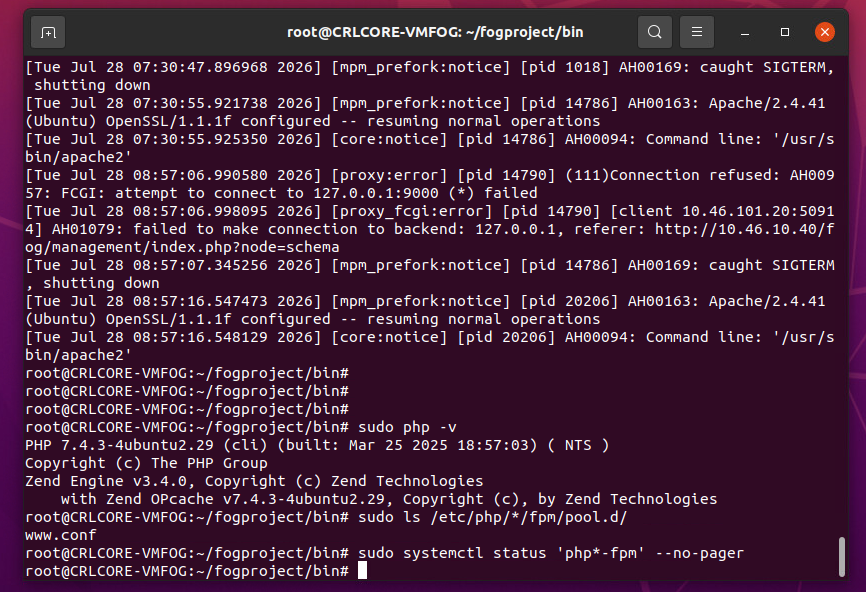
@Tom-Elliott ok heres the logs you requested
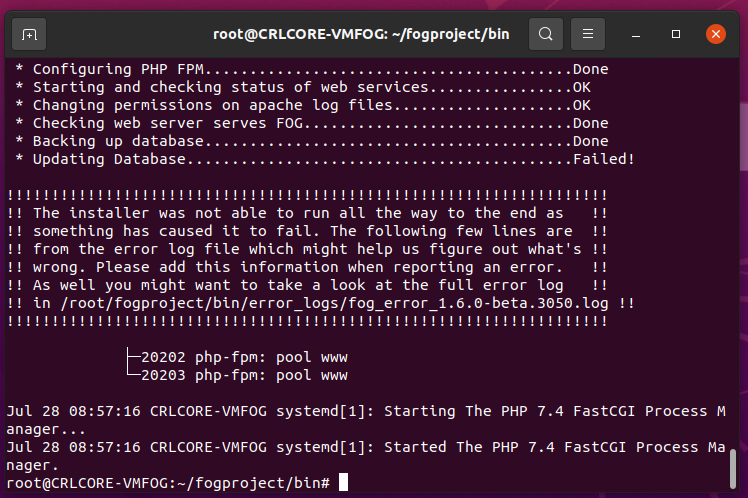
(FYI 10.46.101.20 is my PC’s ip address. The fog server is a VM. It is 10.46.10.40)
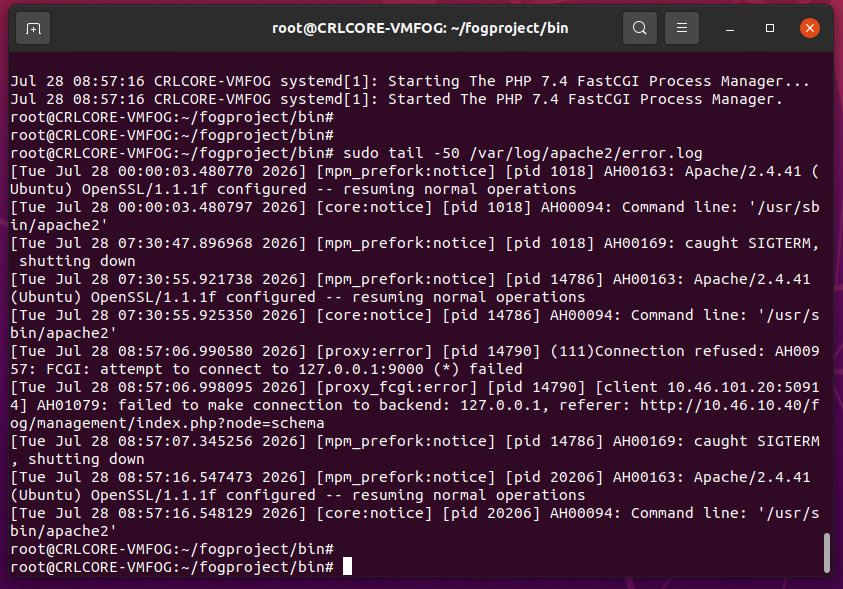
-
@Tom-Elliott I did this as per your post, did not work, same DB update error as before
cd /root/fogproject
git checkout working-1.6
git pull
cd bin
sudo ./installfog.sh -y -
@Strahd @Strahd Those logs were exactly what I needed, thank you. Two separate things going on
and neither one is your fault.First, this line is your 500:
[proxy:error] (111)Connection refused: AH00957: FCGI: attempt to connect to 127.0.0.1:9000 (*) failed
[proxy_fcgi:error] AH01079: failed to make connection to backend: 127.0.0.1
Apache was trying to hand PHP off on port 9000 and php-fpm wasn’t listening there yet.
Notice apache came back up at 08:57:16 and there are no more of those errors after it.
So before you do anything else, just reload the page:http://10.46.10.40/fog/managementThere’s a decent chance it works now.
Second, “Updating Database…Failed!” is the part I still need to see. That curl’s
output goes into the install log, so please post:sudo grep -A5 -i "schema\|Updating Database" /root/fogproject/bin/error_logs/fog_error_1.6.0-beta.3050.log | tail -60That’ll tell me why the schema update itself came back an error, which is the last piece.
Third - you found a real bug. On 1.6 the schema page makes you log in first, but the
login reads a database column that doesn’t exist until the schema update runs. So it
asks you to sign in, sign in can’t work, and there’s no way out. That hits everyone
upgrading from any released FOG, not just you. I’ve fixed it and pushed it, tracked in
#927.If the page is still dead, here’s the manual way to force the database update. Get your
token:sudo grep FOG_SCHEMA_INSTALL_TOKEN /var/www/html/fog/lib/fog/config.class.phpThen paste it into this:
sudo curl -X POST -H "X-Fog-Install-Token: PASTE_TOKEN_HERE" -d "schemaupdate=1" \
  "http://10.46.10.40/fog/management/index.php?node=schema"
You want to see:
{"msg":"Schema updated successfully!","title":"Schema Update Success"}I tested that against a real 1.5.9 database on PHP 7.4 here, it works.
And to put your mind at ease - none of this touches /images or your tftpboot files. You
are not going to lose your images over this, so please don’t rebuild the box yet.One last thing. Your install log still had these:
ln: failed to create symbolic link '/lib/systemd/system/mysql.service': File existsI fixed those on the 27th and the current code can’t print them anymore, so I don’t think
your checkout took. Run this and show me what it says:cd /root/fogproject git rev-parse --abbrev-ref HEAD git log -1 --onelineThanks for sticking with this one. You’ve found two real bugs so far
-
@Strahd Simply put:
Please try a repull and install:
cd /root/fogproject
git pull
cd bin
sudo ./installfog.sh -y
should work?
-
@Tom-Elliott ok here’s the latest results:
When I visit http://10.46.10.40/fog/management it immediately jumps to http://10.46.10.40/fog/management/index.php?node=schema instead and displays the following:
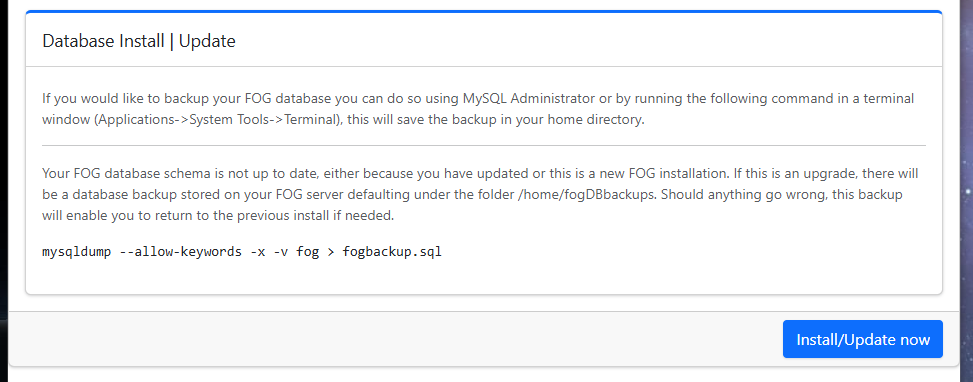
Clicking update reveals (if I click “here to login” again it sends me to the previous update page, making an endless loop):
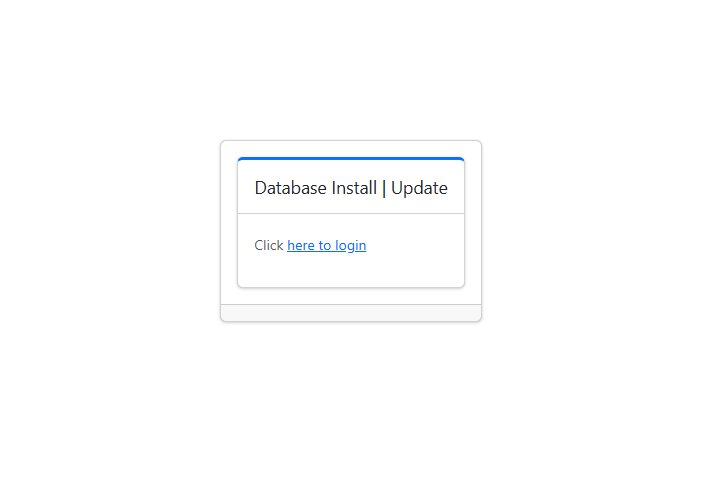
Typing
sudo grep -A5 -i “schema|Updating Database” /root/fogproject/bin/error_logs/fog_error_1.6.0-beta.3050.log | tail -60
Delivers no output at all. If you are looking for the term “Updating Database” I manually opened the log with a text editor and found no reference to “Updating” anywhere in there.I tried updating the token but it threw an error - please check my syntax
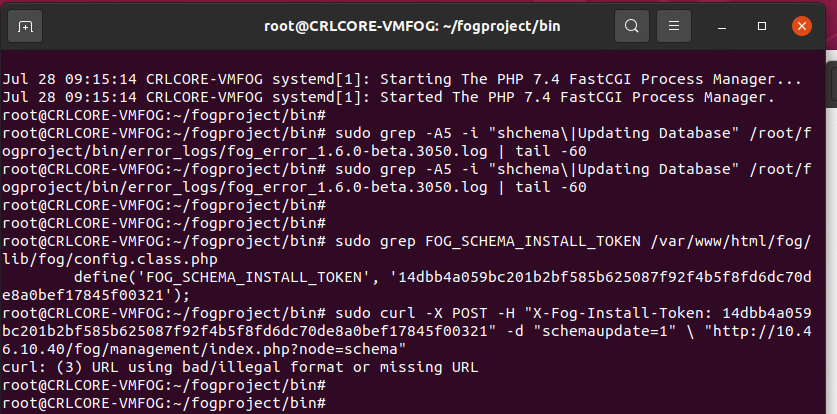
-
@Strahd IT’s likely the
\character in the line that casued the error you saw.
Either way it seems like it’s working now? -
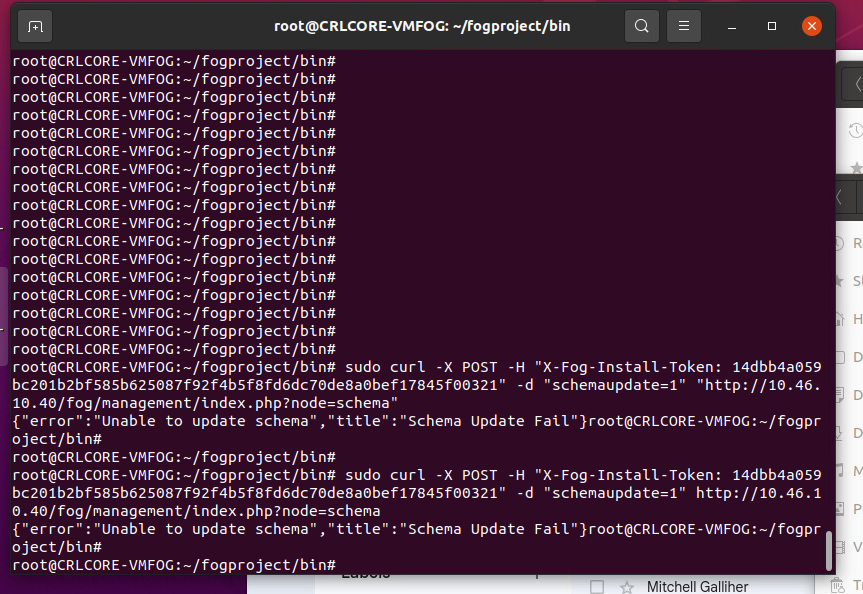
@Tom-Elliott No, can’t get that command to work. I tried removing the \ or removing the quotes, no joy.
-
@Strahd IS your fog server actually having issues now?
I know you have the schema testing stuffs, but that was less important.
it seems you have a database and all that jazz
-
@Tom-Elliott Fog server has not been working since this entire thread was created… it’s not working.
So far the database has refused to update and the web management console is 100% unavailable since the only thing it does is prompt me to update the database.Tried the manual update with
sudo curl -X POST -H “X-Fog-Install-Token: 14dbb4a059bc201b2bf585b625087f92f4b5f8fd6dc70de8a0bef17845f00321” -d “schemaupdate=1” “http://10.46.10.40/fog/management/index.php?node=schema”but it responded with
{“error”:“Unable to update schema”,“title”,“Schema Update Fail”}Here’s some data you requested earlier

-
@Strahd Try another git pull please then try install again?
-
@Tom-Elliott ok here we go again
git pull
sudo ./installfog.sh -y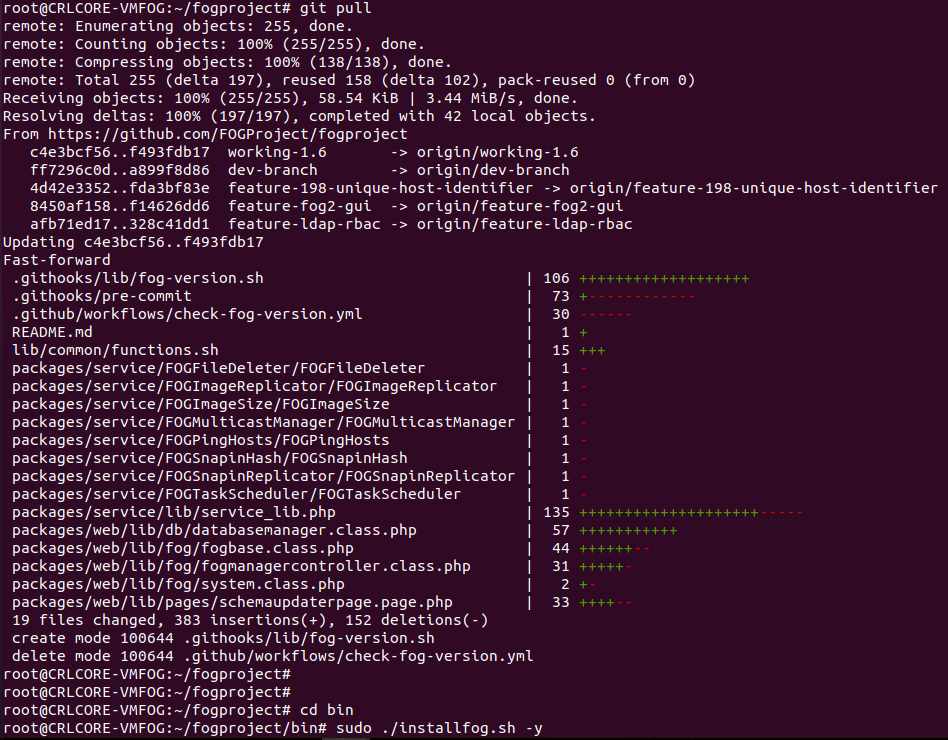
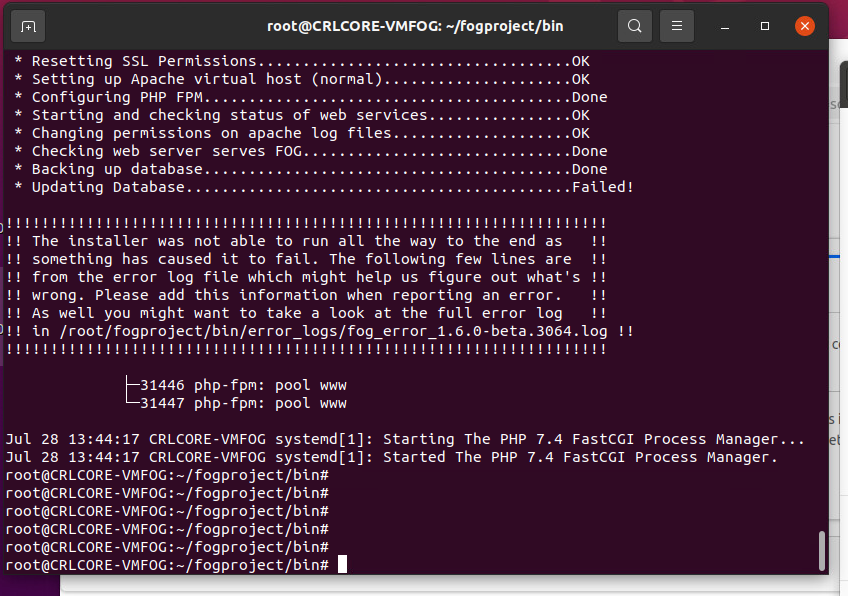
I read somewhere in another post that having a simple password on my account can cause DB problems, should we look into that? My password on this system is very simple, it’s never needed to be complex.
-
@Strahd I would try updating PHP to 8.3, @Tom-Elliott managed to test it and it worked with 7.4 but I’d still suggest updating your PHP for best results and best security practice. I found (though didn’t test) a guide online right quick https://php.watch/articles/php-8.3-install-upgrade-on-debian-ubuntu#php83-ubuntu-quick there are many others out there.
I would also go in the database and see what your schema version is
mysql -u root fog
select * from schemaVersion;
318 is the latest I believe, if yours says 318 and is stuck in a loop, maybe you can try forcing it down and then trying the schema update again. i.e.
mysql u root fog
update schemaVersion set vValue=317 where vID=1;
Then open your fog server, it will redirect you to update the schema, and see if it takes then.
Also any time you’re attempting an install and it fails, if you could grab and share the error log it mentions i.e.
/root/fogproject/bin/error_logs/fog_error_1.6.0-beta. 3064. logthat would be very helpful.There’s something specific to your instance that we need to find and fix. Maybe you have a firewall running
sudo ufw status?