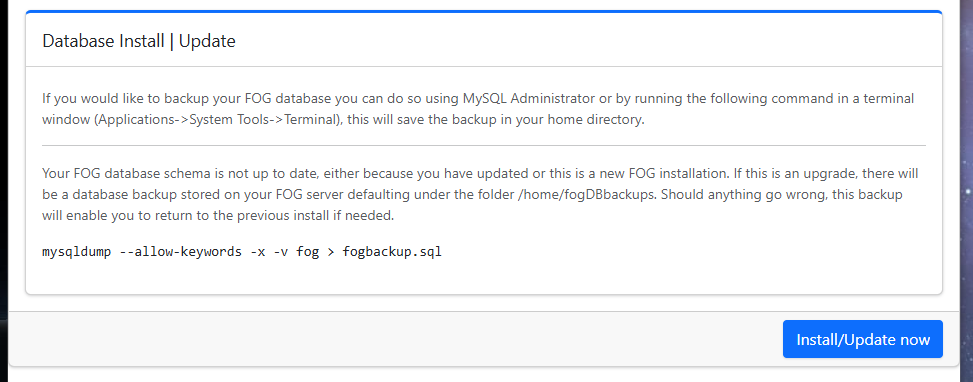
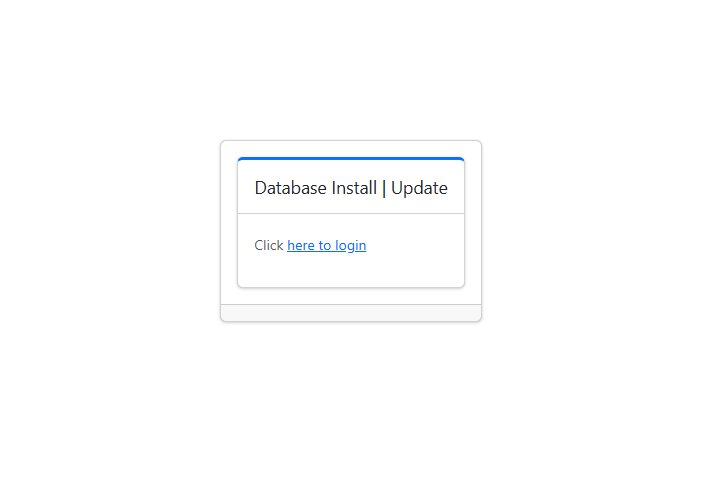
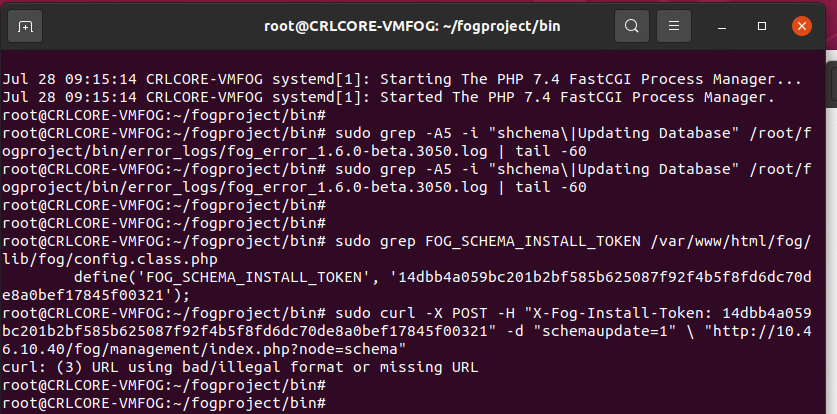
I set up a new fog server, according to the installation guide on your site. The old fog server had a failed update, but it was due for a major upgrade anyway. Current system is a VM with 4 cores, 8GM ram, and 2 TB HDD. I reformatted and installed Ubuntu 26.04.1 with Fog working-1.6, following most default options - totally clean.
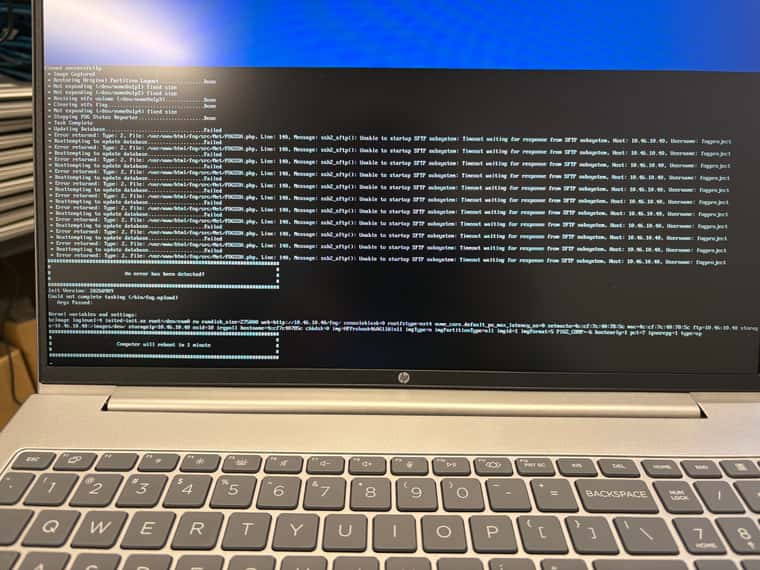
Ran my first capture, and everything seemed to run well until the end. Ultimately this error prevented me from capturing a usable image. (see screenshot)
I’m guessing I’m missing a Linux app or a configuration somewhere. I’m not sure why a standard installation does not somehow provision for this. I remember a similar problem TFTP(?) many years ago on my previous fog server but I don’t emember what I had to do to get past it.
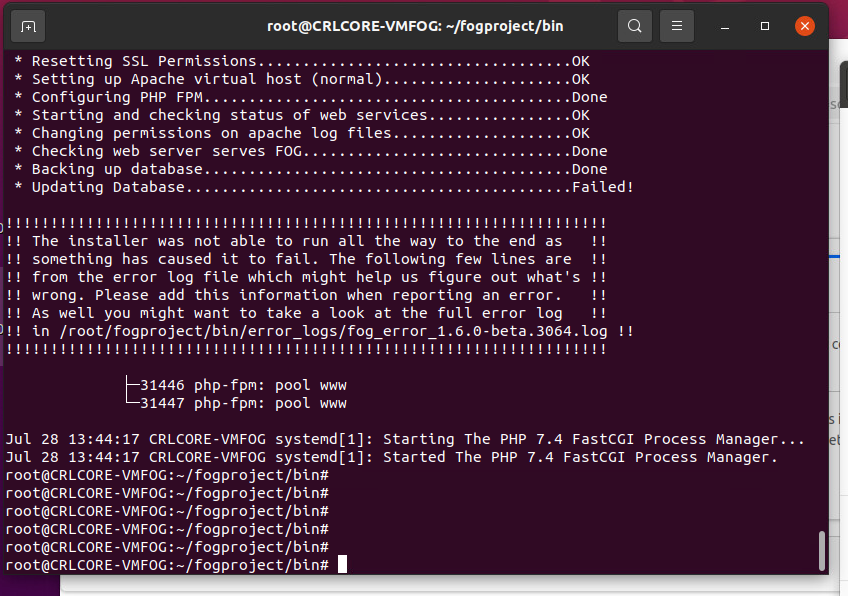
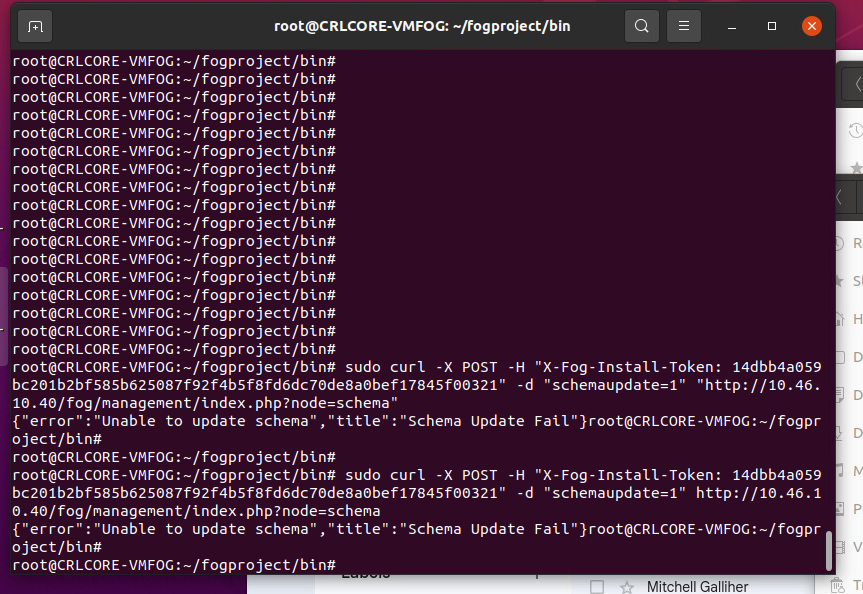
Updating database…Failed
Error returned: Type: 2
Unable to startup SFTP subsystem: Timeout waiting for response from SFTP subsystem
In fact… this installation is so new I still have my installation text from my Terminal window, which I will paste here in case you want to see the options I picked.
root@CRLCORE-VMFOG:~# git clone https://github.com/FOGProject/fogproject.git
Cloning into ‘fogproject’…
remote: Enumerating objects: 218070, done.
remote: Counting objects: 100% (678/678), done.
remote: Compressing objects: 100% (220/220), done.
remote: Total 218070 (delta 605), reused 475 (delta 449), pack-reused 217392 (from 4)
Receiving objects: 100% (218070/218070), 972.31 MiB | 42.77 MiB/s, done.
Resolving deltas: 100% (154925/154925), done.
root@CRLCORE-VMFOG:~# cd fogproject
root@CRLCORE-VMFOG:~/fogproject# dir
CLAUDE.md README.md SELinux docs tests
CONTRIBUTING.md Release\ Notes.MD authors.txt lib utils
LICENSE SECURITY.md bin packages
root@CRLCORE-VMFOG:~/fogproject#
root@CRLCORE-VMFOG:~/fogproject#
root@CRLCORE-VMFOG:~/fogproject# cd /root/fogproject
root@CRLCORE-VMFOG:~/fogproject# git fetch --all
root@CRLCORE-VMFOG:~/fogproject# git checkout working-1.6
branch ‘working-1.6’ set up to track ‘origin/working-1.6’.
Switched to a new branch ‘working-1.6’
root@CRLCORE-VMFOG:~/fogproject# git pull
Already up to date.
root@CRLCORE-VMFOG:~/fogproject# whoami
root
root@CRLCORE-VMFOG:~/fogproject#
root@CRLCORE-VMFOG:~/fogproject# cd /root/fogproject/bin
root@CRLCORE-VMFOG:~/fogproject/bin# ./installfog.sh
Installing LSB_Release as needed
- Attempting to get release information…Done
==================================
=== ==== ===== ====
=== ========= == === == ===
=== ======== ==== == ==== ===
=== ======== ==== == =========
=== ==== ==== == =========
=== ======== ==== == === ===
=== ======== ==== == ==== ===
=== ========= == === == ===
=== ========== ===== ====
===== Free Opensource Ghost ======
== Released under GPL Version 3 ==
Version: 1.6.0-beta.5378 Installer/Updater
What version of Linux would you like to run the installation for?
      1) Redhat Based Linux (Redhat, Alma, Rocky, CentOS, Mageia)
      2) Debian Based Linux (Debian, Ubuntu, Kubuntu, Edubuntu)
      3) Alpine Linux (experimental)
      4) Arch Based Linux (Arch, Manjaro)
Choice: [2] 2
Starting Debian based Installation
FOG Server installation modes:
* Normal Server: (Choice N)
This is the typical installation type and
will install all FOG components for you on this
machine. Pick this option if you are unsure what to pick.
  * Storage Node: (Choice S)
      This install mode will only install the software required
      to make this server act as a node in a storage group
More information:
http://www.fogproject.org/wiki/index.php?title=InstallationModes
What type of installation would you like to do? [N/s (Normal/Storage)] N
We found the following interfaces on your system:
* ens160 - 10.46.10.40/24
Would you like to change the default network interface from ens160?
If you are not sure, select No. [y/N] N
Would you like to use the FOG server for DHCP service? [y/N] N
This version of FOG has internationalization support, would
you like to install the additional language packs? [y/N] N
Which hostname would you like to use? Currently is: CRLCORE-VMFOG
Note: This hostname will be in the certificate we generate for your
FOG webserver, and in its web server virtual host. Your server is
already named, so FOG will not rename it.
Would you like to change it? If you are not sure, select No. [y/N] N
FOG issues its own certificates from two CAs – one for web servers,
one for signing FOS kernels. Both are constrained so they can only
ever issue for names inside your own network.
By default that means CRLCORE-VMFOG and every private IP range
(10.x, 172.16-31.x, 192.168.x).
Would you like to narrow or extend that? [y/N] N
FOG would like to collect some data:
We would like to collect the following information:
1. OS Name (CentOS, RedHat, Debian, etc…)
2. OS Version (8.0.2004, 7.2.1409, 9, etc…)
3. FOG Version (1.5.9, 1.6, etc…)
What is this information used for?
We would like to simply track the common types of OS
being used, along with the OS Version, and the various
versions of FOG being used.
Are you ok with sending this information? [Y/n] Y
######################################################################
FOG now has everything it needs for this setup, but please
understand that this script will overwrite any setting you may
have setup for services like DHCP, apache, pxe, tftp, and NFS.
######################################################################
It is not recommended that you install this on a production system
as this script modifies many of your system settings.
######################################################################
This script should be run by the root user.
It will prepend the running with sudo if root is not set
######################################################################
Please see our wiki for more information at:
######################################################################
######################################################################
-
Here are the settings FOG will use:
-
Base Linux: Debian
-
Detected Linux Distribution: Ubuntu
-
Interface: ens160
-
Server IP Address: 10.46.10.40
-
Server Subnet Mask: 255.255.255.0
-
Hostname: CRLCORE-VMFOG
-
Installation Type: Normal Server
-
Internationalization: No
-
Image Storage Location: /images
-
Using FOG DHCP: No
-
DHCP will NOT be setup but you must setup your
| current DHCP server to use FOG for PXE services.
-
On a Linux DHCP server you must set: next-server and filename
-
On a Windows DHCP server you must set options 066 and 067
-
Option 066/next-server is the IP of the FOG Server: (e.g. 10.46.10.40)
-
Option 067/filename is the bootfile, per client architecture:
| BIOS / legacy undionly.kkpxe
| 32-bit UEFI i386-efi/snponly.efi
| 64-bit UEFI secureboot/snponly-shimx64.efi
| ARM64 UEFI secureboot/arm64-efi/snponly-shimaa64.efi
-
The secureboot/ files are the signed chain. They boot the same
| whether Secure Boot is enabled or not, so they are the right
| answer for every 64-bit UEFI client, not just the ones enforcing
| it. There is no signed 32-bit chain – those clients must have
| Secure Boot disabled to netboot at all.
| See https://docs.fogproject.org/en/latest/secure-boot-netboot
-
Send OS Name, OS Version, and FOG Version: Yes
-
Web protocol: https
-
Netboot (PXE) protocol: http (resolved during install)
-
Force HTTP->HTTPS redirect: No
-
Web certificate chains to a public root: No
-
Rebuild iPXE with your CA: No
-
How should this server handle HTTPS, netboot and Secure Boot?
-
standard (default) HTTPS web UI and API, netboot over HTTP.
Secure Boot binaries staged. No redirect, no rebuild.
Right for almost everyone, including FOG’s own CA.
-
http-only Plain HTTP everywhere. Simplest, and what FOG did
before 1.6.
-
public-cert Your web certificate chains to a PUBLIC root (Let’s
Encrypt, a commercial CA). Netboot can then use
HTTPS with no rebuild, because iPXE cross-certifies
public roots on its own. Needs an FQDN, not an IP.
-
embed-ca Rebuild iPXE with your own CA compiled in, so
netboot can use HTTPS behind a private CA.
CAUTION: adds 10-25 minutes to this install AND to
every future update, with no warm path. The result
is not upstream’s signed binary, so each machine
needs this server’s MOK enrolled BEFORE it can
netboot at all. Most sites want 1 or 3 instead.
-
Choose 1-4, or press Enter for standard: 1
-
Using install mode: standard
web=https netboot=http redirect=no
PKI_web_cert_publicly_trusted=no BOOT_rebuild_ipxe_with_my_ca=no
-
Are you sure you wish to continue (Y/N) Y
-
Installation Started
-
Testing internet connection…Done
-
Adjusting repository (can take a long time for cleanup)…OK
-
Preparing Package Manager…OK
-
Reading package state…OK
-
Packages to be installed:
apache2 attr bc build-essential cpp curl efitools g++ gawk gcc gcc-aarch64-linux-gnu genisoimage git gzip htmldoc isolinux jq lftp libapache2-mod-php libc6 libcurl4t64 liblzma-dev m4 mariadb-client mariadb-server net-tools nfs-kernel-server openssh-server php php-bcmath php-cli php-curl php-fpm php-gd php-json php-ldap php-mbstring php-mysql php-ssh2 sbsigntool sudo tar tftpd-hpa tftp-hpa unzip vsftpd wget zlib1g
-
Pending package: apache2…(Queued)
-
Pending package: attr…(Queued)
-
Skipping package: bc…(Already Installed)
-
Pending package: build-essential…(Queued)
-
Skipping package: cpp…(Already Installed)
-
Skipping package: curl…(Already Installed)
-
Pending package: efitools…(Queued)
-
Pending package: g++…(Queued)
-
Pending package: gawk…(Queued)
-
Pending package: gcc…(Queued)
-
Pending package: gcc-aarch64-linux-gnu…(Queued)
-
Pending package: genisoimage…(Queued)
-
Skipping package: git…(Already Installed)
-
Skipping package: gzip…(Already Installed)
-
Pending package: htmldoc…(Queued)
-
Pending package: isolinux…(Queued)
-
Skipping package: jq…(Already Installed)
-
Skipping package: lftp…(Already Installed)
-
Pending package: libapache2-mod-php…(Queued)
-
Skipping package: libc6…(Already Installed)
-
Skipping package: libcurl4t64…(Already Installed)
-
Pending package: liblzma-dev…(Queued)
-
Pending package: m4…(Queued)
-
Pending package: mariadb-client…(Queued)
-
Pending package: mariadb-server…(Queued)
-
Pending package: net-tools…(Queued)
-
Pending package: nfs-kernel-server…(Queued)
-
Pending package: openssh-server…(Queued)
-
Pending package: php…(Queued)
-
Pending package: php-bcmath…(Queued)
-
Pending package: php-cli…(Queued)
-
Pending package: php-curl…(Queued)
-
Pending package: php-fpm…(Queued)
-
Pending package: php-gd…(Queued)
-
Pending package: php-json…(Queued)
-
Pending package: php-ldap…(Queued)
-
Pending package: php-mbstring…(Queued)
-
Pending package: php-mysql…(Queued)
-
Pending package: php-ssh2…(Queued)
-
Skipping package: sbsigntool…(Already Installed)
-
Skipping package: sudo…(Already Installed)
-
Skipping package: tar…(Already Installed)
-
Pending package: tftpd-hpa…(Queued)
-
Pending package: tftp-hpa…(Queued)
-
Skipping package: unzip…(Already Installed)
-
Pending package: vsftpd…(Queued)
-
Skipping package: wget…(Already Installed)
-
Skipping package: zlib1g…(Already Installed)
-
Installing 33 packages…OK
-
Updating packages as needed…OK
-
Confirming package installation
-
Checking package: apache2…OK
-
Checking package: attr…OK
-
Checking package: bc…OK
-
Checking package: build-essential…OK
-
Checking package: cpp…OK
-
Checking package: curl…OK
-
Checking package: efitools…OK
-
Checking package: g++…OK
-
Checking package: gawk…OK
-
Checking package: gcc…OK
-
Checking package: gcc-aarch64-linux-gnu…OK
-
Checking package: genisoimage…OK
-
Checking package: git…OK
-
Checking package: gzip…OK
-
Checking package: htmldoc…OK
-
Checking package: isolinux…OK
-
Checking package: jq…OK
-
Checking package: lftp…OK
-
Checking package: libapache2-mod-php…OK
-
Checking package: libc6…OK
-
Checking package: libcurl4t64…OK
-
Checking package: liblzma-dev…OK
-
Checking package: m4…OK
-
Checking package: mariadb-client…OK
-
Checking package: mariadb-server…OK
-
Checking package: net-tools…OK
-
Checking package: nfs-kernel-server…OK
-
Checking package: openssh-server…OK
-
Checking package: php…OK
-
Checking package: php-bcmath…OK
-
Checking package: php-cli…OK
-
Checking package: php-curl…OK
-
Checking package: php-fpm…OK
-
Checking package: php-gd…OK
-
Checking package: php-json…OK
-
Checking package: php-ldap…OK
-
Checking package: php-mbstring…OK
-
Checking package: php-mysql…OK
-
Checking package: php-ssh2…OK
-
Checking package: sbsigntool…OK
-
Checking package: sudo…OK
-
Checking package: tar…OK
-
Checking package: tftpd-hpa…OK
-
Checking package: tftp-hpa…OK
-
Checking package: unzip…OK
-
Checking package: vsftpd…OK
-
Checking package: wget…OK
-
Checking package: zlib1g…OK
-
Configuring services
-
Setting up fogproject user…OK
-
Locking fogproject as a system account…OK
-
Setting up fogproject password…OK
-
Stopping FOGMulticastManager.service Service…OK
-
Stopping FOGImageReplicator.service Service…OK
-
Stopping FOGSnapinReplicator.service Service…OK
-
Stopping FOGScheduler.service Service…OK
-
Stopping FOGPingHosts.service Service…OK
-
Stopping FOGSnapinHash.service Service…OK
-
Stopping FOGImageSize.service Service…OK
-
Stopping FOGFileDeleter.service Service…OK
-
Stopping FOGPluginRunner.service Service…OK
-
Stopping FOGRetentionRunner.service Service…OK
-
Stopping FOGAgentReleaseSync.service Service…OK
-
Setting up and starting MySQL…OK
-
Testing connection to database…OK
-
Setting up MySQL user and database…OK
-
Backing up user reports…Done
-
Backing up customizations…OK
-
Downloading plugins (v1.6.24)…OK
-
Stopping web service…OK
-
Setting up Apache and PHP files…OK
-
Testing and removing symbolic links if found…OK
-
Backing up old data…Skipped
-
Copying new files to web folder…OK
-
Dropping the stale class file lists…OK
-
Creating config file…OK
-
Creating paths file…OK
-
Creating redirection index file…OK
-
Downloading kernel, init and fog-client binaries…Done
-
Copying binaries to destination paths…OK
This run will mint a new FOG PKI CA. A CA’s name constraints are
fixed at the moment it’s issued – widening them later means
re-issuing it (rm -rf the CA directory, then re-run).
Extra hostnames for this server, space-separated (blank = none):
Internal domain, e.g. example.local (blank = none):
-
Creating FOG Server CA…OK
-
Creating FOG Secure Boot CA…OK
-
Creating Secure Boot code signing certificate…OK
-
Generating Secure Boot platform keys…Done
-
Signing FOS kernels and Memtest86+ for Secure Boot…Done
-
Installing Secure Boot signing helper…Done
-
Publishing Secure Boot enrollment kit…Done
-
Publishing Secure Boot variable updates…Done
-
Enabling apache2 and fpm services on boot…OK
-
Creating SSL Private Key…OK
-
Creating client communication certificate…OK
-
Creating FOG Web CA…OK
-
Creating FOG Agent CA…OK
-
Creating web server private key…OK
-
Creating SSL Certificate…OK
-
Publishing client communication certificate…OK
-
Creating auth pub key and cert…OK
-
Resetting SSL Permissions…OK
-
Setting up Apache virtual host (normal)…OK
-
Testing Apache configuration…OK
-
Configuring PHP FPM…Done
-
Starting and checking status of web services…OK
-
Changing permissions on apache log files…OK
-
Checking web server serves FOG…Done
-
Backing up database…Skipped
-
Install/update the FOG database schema now? (Y/n) Y
-
Updating Database…OK
-
Verifying database schema…Done
-
Update fogstorage database password…OK
-
Granting access to fogstorage database user…OK
-
Setting up storage…OK
-
Downloading iPXE Secure Boot binaries (v2.0.0-fog.8)…OK
-
Setting up and starting DHCP Server…Skipped
-
A sample Kea DHCP config for a dedicated/external DHCP server was
| written to: /var/www/html/fog/kea-dhcp4.conf.fog-sample
| Copy it to your DHCP server as /etc/kea/kea-dhcp4.conf and adjust the
| subnet/pool/routers/domain-name-servers to match that network.
| next-server is already set to this FOG server (10.46.10.40).
-
Downloading iPXE binaries (v2.0.0-fog.8)…OK
-
Configuring default iPXE file…OK
-
Setting up and starting TFTP Server…OK
-
Restoring customizations…OK
-
Signing rEFInd for Secure Boot…Done
-
Signing iPXE binaries for Secure Boot…Done (15)
-
Publishing local ESP boot archives…Done (3)
-
Setting up and starting VSFTP Server…OK
-
Setting up FOG Snapins…OK
-
Restricting private key access…OK
###################################################################
The CA private key for this server is on this server, readable
only by root:
/etc/fog/pki/root/ca/.fogCA.key
That protects it from a compromise of the web application, but
not from a compromise of the machine. To move it to a vault:
/opt/fog/bin/fog-offline-ca-key /mnt/vault
Day to day nothing needs it. Restore it only to issue a new
intermediate, or a certificate for a new storage node.
The Secure Boot CA private key is also on this server,
readable only by root:
/etc/fog/pki/secureboot/ca/.fogSBCA.key
Restore it to issue a new Secure Boot intermediate, or a
new signing leaf. To move it to a vault:
/opt/fog/bin/fog-offline-ca-key /mnt/vault --zone secureboot
###################################################################
-
Installing node certificate signing helper…Done
-
Installing the certificate management helper…Done
-
Trusting the FOG CA on this server…Done
-
Setting up UDPCast…OK
-
Configuring UDPCast…OK
-
Building UDPCast…OK
-
Installing UDPCast…OK
-
Installing FOG System Scripts…OK
-
Configuring FOG System Services
-
Setting permissions on FOGMulticastManager.service script…OK
-
Enabling FOGMulticastManager.service Service…OK
-
Setting permissions on FOGImageReplicator.service script…OK
-
Enabling FOGImageReplicator.service Service…OK
-
Setting permissions on FOGSnapinReplicator.service script…OK
-
Enabling FOGSnapinReplicator.service Service…OK
-
Setting permissions on FOGScheduler.service script…OK
-
Enabling FOGScheduler.service Service…OK
-
Setting permissions on FOGPingHosts.service script…OK
-
Enabling FOGPingHosts.service Service…OK
-
Setting permissions on FOGSnapinHash.service script…OK
-
Enabling FOGSnapinHash.service Service…OK
-
Setting permissions on FOGImageSize.service script…OK
-
Enabling FOGImageSize.service Service…OK
-
Setting permissions on FOGFileDeleter.service script…OK
-
Enabling FOGFileDeleter.service Service…OK
-
Setting permissions on FOGPluginRunner.service script…OK
-
Enabling FOGPluginRunner.service Service…OK
-
Setting permissions on FOGRetentionRunner.service script…OK
-
Enabling FOGRetentionRunner.service Service…OK
-
Setting permissions on FOGAgentReleaseSync.service script…OK
-
Enabling FOGAgentReleaseSync.service Service…OK
-
Setting up FOG Services…OK
-
Creating FOG plugin runner log directory…OK
-
Creating FOG retention runner log directory…OK
-
Creating FOG agent release sync log directory…OK
-
Creating FOS report log directory…OK
-
Creating FOG fault log directory…OK
-
Setting FOG service master log ownership…OK
-
Creating FOG cache directory…OK
-
Creating FOG agent directory…OK
-
Creating FOG agent versions directory…OK
-
Creating FOG session directory…OK
-
Creating FOG plugin directory…OK
-
Starting FOGMulticastManager.service Service…OK
-
Starting FOGImageReplicator.service Service…OK
-
Starting FOGSnapinReplicator.service Service…OK
-
Starting FOGScheduler.service Service…OK
-
Starting FOGPingHosts.service Service…OK
-
Starting FOGSnapinHash.service Service…OK
-
Starting FOGImageSize.service Service…OK
-
Starting FOGFileDeleter.service Service…OK
-
Starting FOGPluginRunner.service Service…OK
-
Starting FOGRetentionRunner.service Service…OK
-
Starting FOGAgentReleaseSync.service Service…OK
-
Setting up NFS configuration file…OK
-
Setting up exports file…OK
-
Setting up and starting RPCBind…OK
-
Setting up and starting NFS Server…OK
-
Linking FOG Logs to Linux Logs…OK
-
Linking FOG Service config /etc…OK
-
Recording FOG base path…OK
-
Installing FOG utilities…OK
-
Ensuring node username and passwords match…Done
-
Recording fog_git_path/update channel/extra server names…OK
-
Setting the new-install retention window for host login records…OK
-
Setting up FOG External Reporting…Done
-
Netboot (PXE) is using HTTP, not HTTPS.
Your web UI and API are HTTPS; only iPXE’s own fetches are not.
iPXE validates TLS strictly and cannot be told to trust a private
CA, so an HTTPS netboot against one simply fails. HTTP here is the
same exposure a default install has always had, on a pre-boot
network.
-
Secure Boot binaries ARE staged on this server, in every mode.
That used to be skipped on any HTTPS install. To enroll a machine,
boot it and choose ‘Enroll Secure Boot Key’ from the FOG menu.
-
To move netboot onto HTTPS, tell FOG which is true:
–public-web-cert your certificate chains to a public
root (needs an FQDN, not an IP)
–rebuild-ipxe-with-my-ca rebuild iPXE with your CA embedded
(slow, and its MOK must be enrolled
before a client can netboot)
Or force it outright with --netboot-proto https.
-
Setup complete
You can now login to the FOG Management Portal using
the information listed below. The login information
is only if this is the first install.
This can be done by opening a web browser and going to:
https://CRLCORE-VMFOG/fog/management
https://10.46.10.40/fog/management
Either works – the certificate covers the address as well as the
name, so neither is a name mismatch. The address needs no DNS; the
name it is issued for is CRLCORE-VMFOG.
Default User Information
Username: fog
Password: password
-
Changed configurations:
The FOG installer changed configuration files and created the
following backup files from your original files:
- /etc/default/tftpd-hpa <=> /etc/default/tftpd-hpa.1789403261
- /etc/vsftpd.conf <=> /etc/vsftpd.conf.1789403261
- /etc/exports <=> /etc/exports.1789403261
root@CRLCORE-VMFOG:~/fogproject/bin# ^C
root@CRLCORE-VMFOG:~/fogproject/bin#