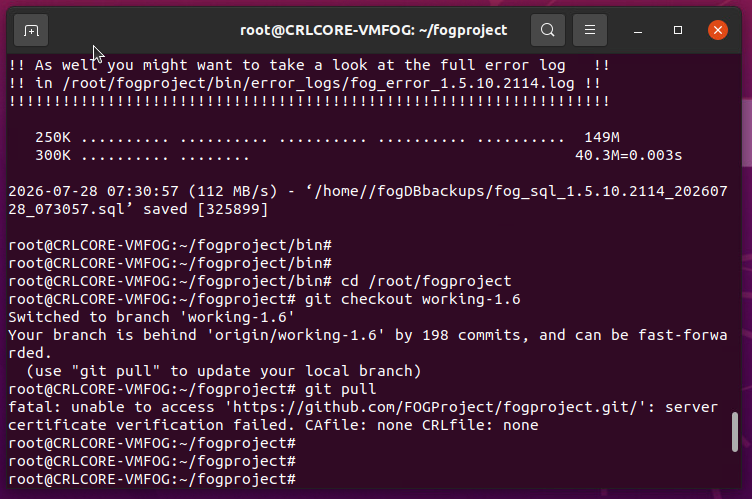
Upgraded from FOG 1.5.9 to 1.5.10.1903 and having issues
-
@Strahd are you attempting to install dev-branch or working-1.6?
I see the problem appears to be when you’re installing dev-branch this time around, but yesterday it seemed you were attempting working-1.6?
So I’m unsure if the issue is related to a partially updated version now attempting to install against a version that would no longer be directly supported.
Please also post:
sudo tail -50 /var/log/apache2/error.log
sudo php -v
sudo ls /etc/php/*/fpm/pool.d/
sudo systemctl status 'php*-fpm' --no-pager
Findings
-
@Tom-Elliott The FOG kernal was failing to load on our newest computers so I figured I needed to update since our fog server is at least 5 or more years old now. I just wanted to update to the latest working release, but when it failed I came here for support.
According to your post “Dev-branch appears to have this fixed best I can tell, but also fixed it in working-1.6 (if you want to test this version I think you’ll like it a bit more - but I’ll admit I’m biased lol)”
Ok so I tried to install the working-1.6 but it failed too.
You next posted “Please pull dev-branch/working-1.6 again and try again. I think it should work.”
Ok so now I’m on the dev-branch I think? At this point I just don’t care what version I’m running, I just need things to work. If you’re in the mood to remote in and poke around, I’m 100% fine with that. If it’s just a database problem of some sort, I don’t even care if I lose all my registered clients, but I would like to keep my images and pxe boot files. The last thing I wanted to do was blow everything out and reinstall the os+fog from scratch but it keeps looking like that. Thanks for looking into this.
-
@Strahd Do this:
cd /root/fogproject git checkout working-1.6 git pull cd bin sudo ./installfog.sh -y -
-
ok cancel that last post I think our internet filter was getting in the way or somethine weird and i’m past that now.
-
@Tom-Elliott ok heres the logs you requested
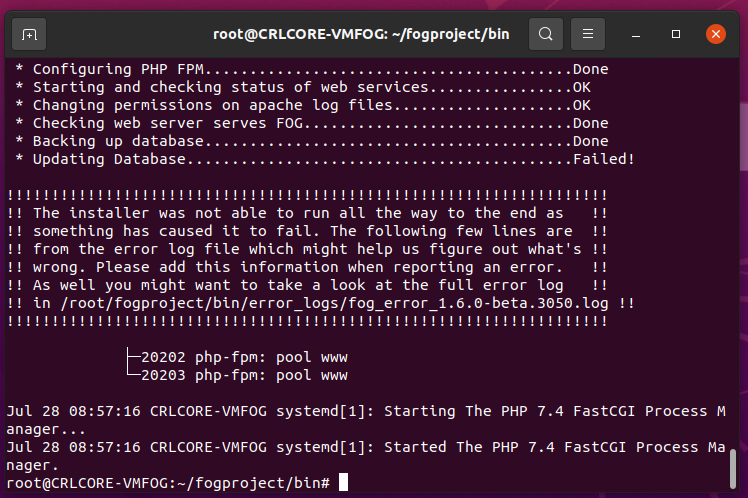
(FYI 10.46.101.20 is my PC’s ip address. The fog server is a VM. It is 10.46.10.40)
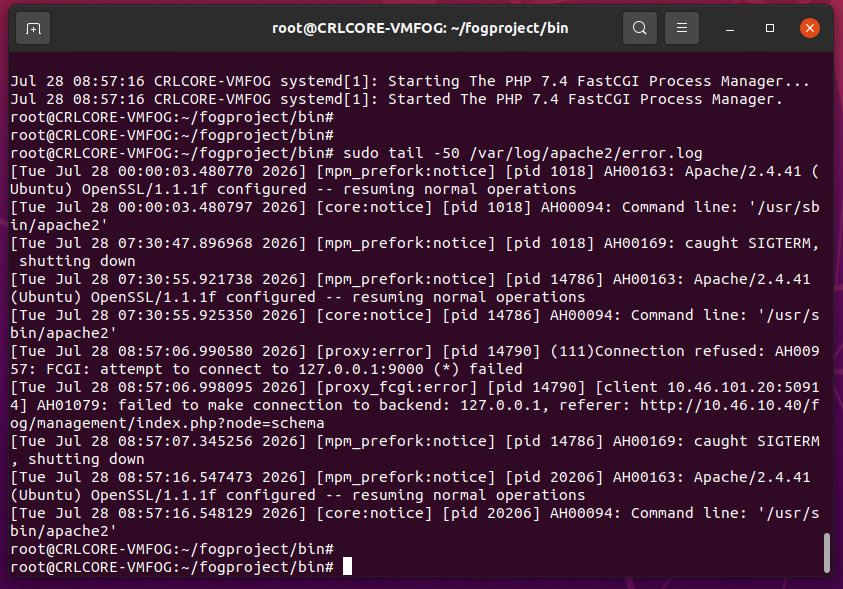
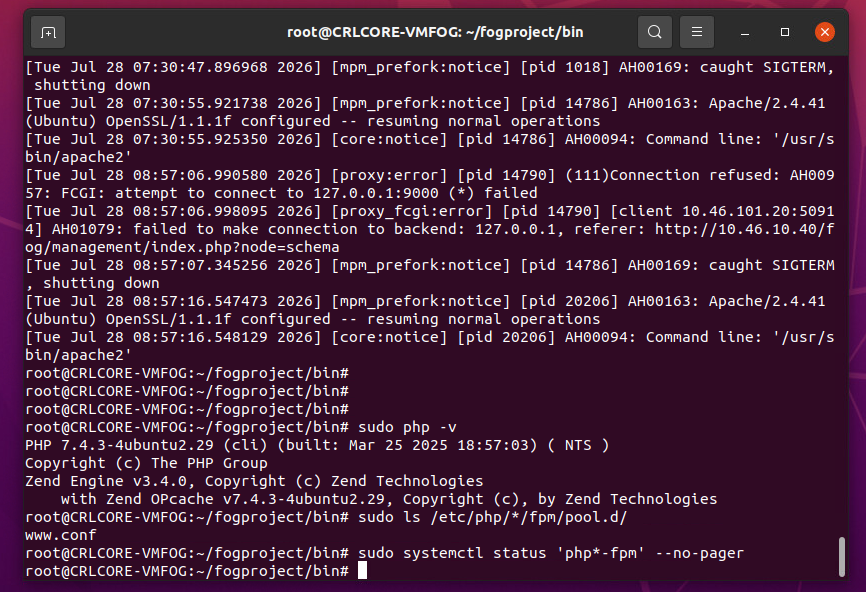
-
@Tom-Elliott I did this as per your post, did not work, same DB update error as before
cd /root/fogproject
git checkout working-1.6
git pull
cd bin
sudo ./installfog.sh -y -
@Strahd @Strahd Those logs were exactly what I needed, thank you. Two separate things going on
and neither one is your fault.First, this line is your 500:
[proxy:error] (111)Connection refused: AH00957: FCGI: attempt to connect to 127.0.0.1:9000 (*) failed
[proxy_fcgi:error] AH01079: failed to make connection to backend: 127.0.0.1
Apache was trying to hand PHP off on port 9000 and php-fpm wasn’t listening there yet.
Notice apache came back up at 08:57:16 and there are no more of those errors after it.
So before you do anything else, just reload the page:http://10.46.10.40/fog/managementThere’s a decent chance it works now.
Second, “Updating Database…Failed!” is the part I still need to see. That curl’s
output goes into the install log, so please post:sudo grep -A5 -i "schema\|Updating Database" /root/fogproject/bin/error_logs/fog_error_1.6.0-beta.3050.log | tail -60That’ll tell me why the schema update itself came back an error, which is the last piece.
Third - you found a real bug. On 1.6 the schema page makes you log in first, but the
login reads a database column that doesn’t exist until the schema update runs. So it
asks you to sign in, sign in can’t work, and there’s no way out. That hits everyone
upgrading from any released FOG, not just you. I’ve fixed it and pushed it, tracked in
#927.If the page is still dead, here’s the manual way to force the database update. Get your
token:sudo grep FOG_SCHEMA_INSTALL_TOKEN /var/www/html/fog/lib/fog/config.class.phpThen paste it into this:
sudo curl -X POST -H "X-Fog-Install-Token: PASTE_TOKEN_HERE" -d "schemaupdate=1" \
  "http://10.46.10.40/fog/management/index.php?node=schema"
You want to see:
{"msg":"Schema updated successfully!","title":"Schema Update Success"}I tested that against a real 1.5.9 database on PHP 7.4 here, it works.
And to put your mind at ease - none of this touches /images or your tftpboot files. You
are not going to lose your images over this, so please don’t rebuild the box yet.One last thing. Your install log still had these:
ln: failed to create symbolic link '/lib/systemd/system/mysql.service': File existsI fixed those on the 27th and the current code can’t print them anymore, so I don’t think
your checkout took. Run this and show me what it says:cd /root/fogproject git rev-parse --abbrev-ref HEAD git log -1 --onelineThanks for sticking with this one. You’ve found two real bugs so far
-
@Strahd Simply put:
Please try a repull and install:
cd /root/fogproject
git pull
cd bin
sudo ./installfog.sh -y
should work?
-
@Tom-Elliott ok here’s the latest results:
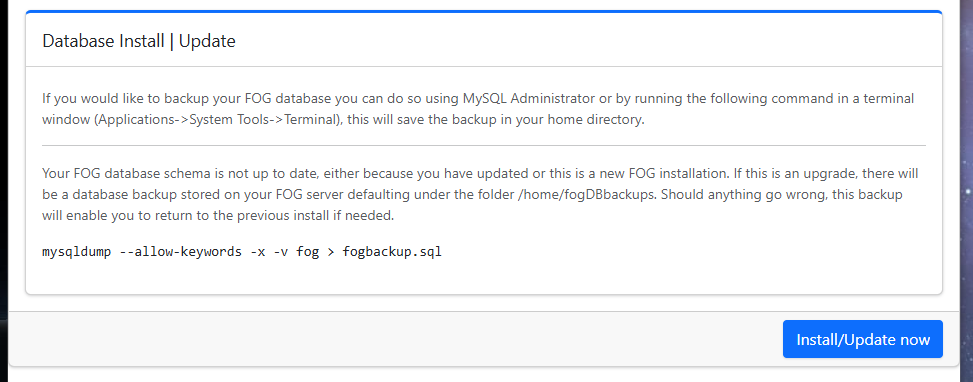
When I visit http://10.46.10.40/fog/management it immediately jumps to http://10.46.10.40/fog/management/index.php?node=schema instead and displays the following:
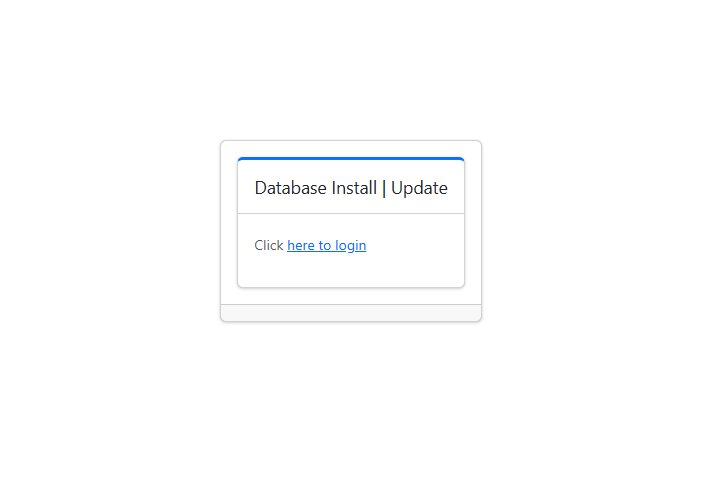
Clicking update reveals (if I click “here to login” again it sends me to the previous update page, making an endless loop):
Typing
sudo grep -A5 -i “schema|Updating Database” /root/fogproject/bin/error_logs/fog_error_1.6.0-beta.3050.log | tail -60
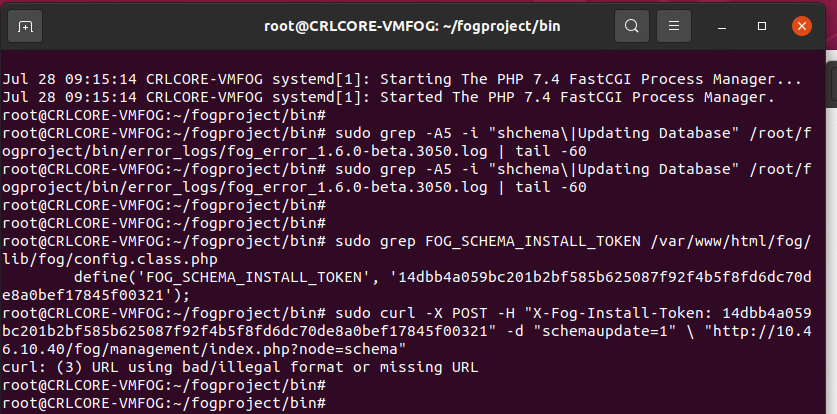
Delivers no output at all. If you are looking for the term “Updating Database” I manually opened the log with a text editor and found no reference to “Updating” anywhere in there.I tried updating the token but it threw an error - please check my syntax
-
@Strahd IT’s likely the
\character in the line that casued the error you saw.
Either way it seems like it’s working now? -
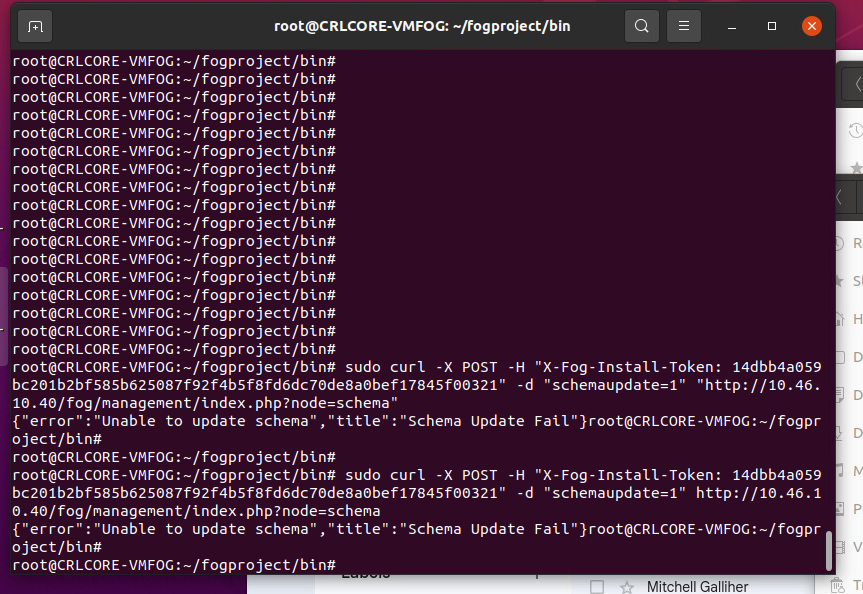
@Tom-Elliott No, can’t get that command to work. I tried removing the \ or removing the quotes, no joy.
-
@Strahd IS your fog server actually having issues now?
I know you have the schema testing stuffs, but that was less important.
it seems you have a database and all that jazz
-
@Tom-Elliott Fog server has not been working since this entire thread was created… it’s not working.
So far the database has refused to update and the web management console is 100% unavailable since the only thing it does is prompt me to update the database.Tried the manual update with
sudo curl -X POST -H “X-Fog-Install-Token: 14dbb4a059bc201b2bf585b625087f92f4b5f8fd6dc70de8a0bef17845f00321” -d “schemaupdate=1” “http://10.46.10.40/fog/management/index.php?node=schema”but it responded with
{“error”:“Unable to update schema”,“title”,“Schema Update Fail”}Here’s some data you requested earlier

-
@Strahd Try another git pull please then try install again?
-
@Tom-Elliott ok here we go again
git pull
sudo ./installfog.sh -y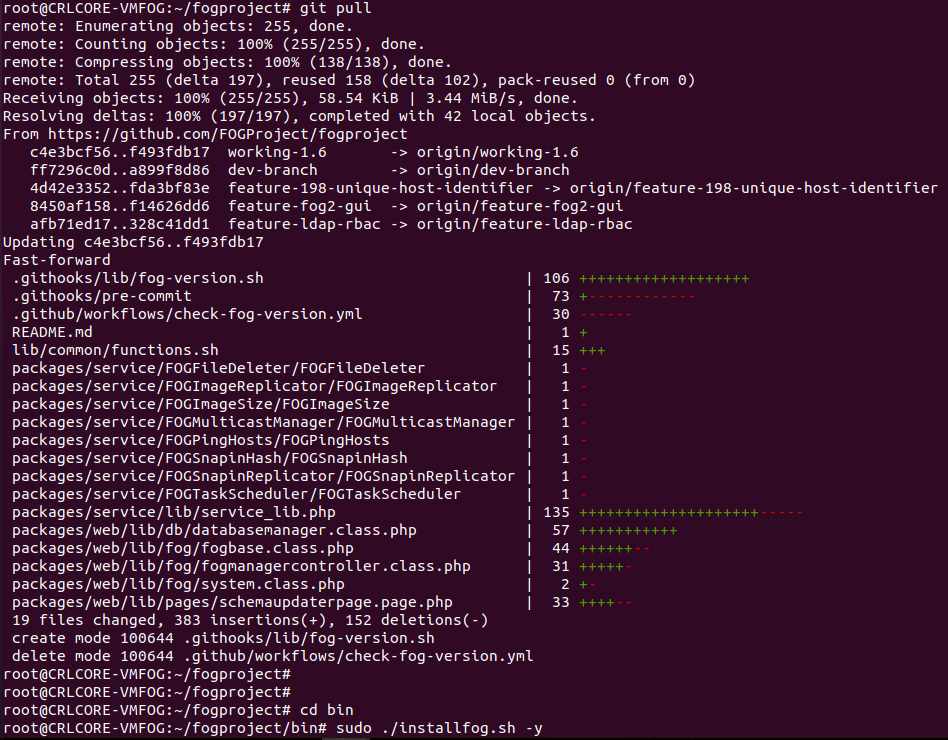
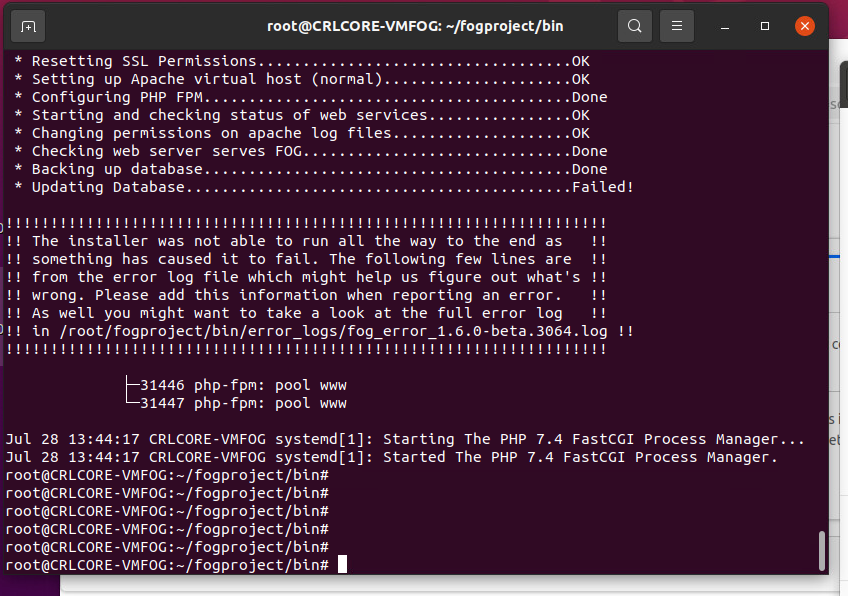
I read somewhere in another post that having a simple password on my account can cause DB problems, should we look into that? My password on this system is very simple, it’s never needed to be complex.
-
@Strahd I would try updating PHP to 8.3, @Tom-Elliott managed to test it and it worked with 7.4 but I’d still suggest updating your PHP for best results and best security practice. I found (though didn’t test) a guide online right quick https://php.watch/articles/php-8.3-install-upgrade-on-debian-ubuntu#php83-ubuntu-quick there are many others out there.
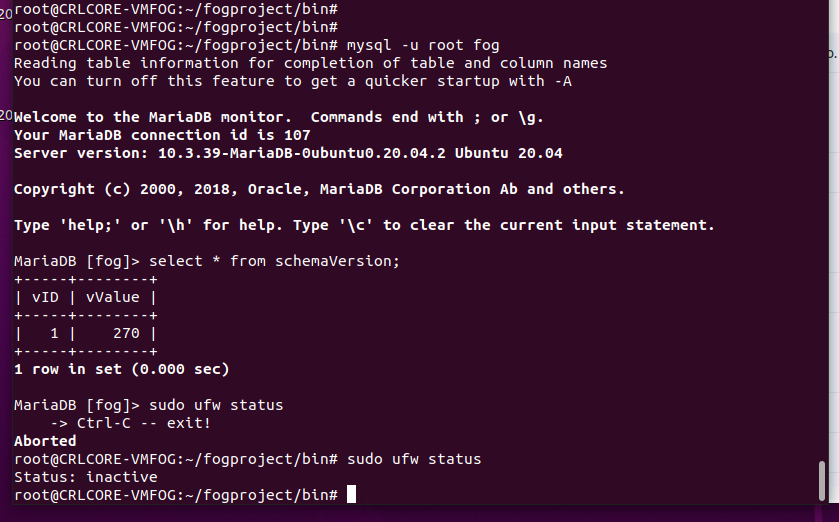
I would also go in the database and see what your schema version is
mysql -u root fog
select * from schemaVersion;
318 is the latest I believe, if yours says 318 and is stuck in a loop, maybe you can try forcing it down and then trying the schema update again. i.e.
mysql u root fog
update schemaVersion set vValue=317 where vID=1;
Then open your fog server, it will redirect you to update the schema, and see if it takes then.
Also any time you’re attempting an install and it fails, if you could grab and share the error log it mentions i.e.
/root/fogproject/bin/error_logs/fog_error_1.6.0-beta. 3064. logthat would be very helpful.There’s something specific to your instance that we need to find and fix. Maybe you have a firewall running
sudo ufw status? -
@JJ-Fullmer My version is 270. Do you still want me to try updating PHP to 8.3?
-
@Tom-Elliott Guys… I’m out of time. School starts soon and I need to image 34 desktops and maybe around 10 laptops. Since my fog update can’t get past the database update, is there an easy way I can just delete the entire database and have the fog installer create a fresh one? I don’t mind losing the data since the whole fog system is basically inaccessable anyway. Thanks for your time.
-
@Strahd At the least I’d suggest downloading an export of your hosts/images:
From there you can delete the database or rebuidl from scratch by:
mysql -u rootIf you have a password on your db I don’t know it but use the -p and you’ll be prompted to enter it.DROP DATABASE fog;Will delete everything.
From there, I still highly recommend you delete the /opt/fog/.fogsettings
Then rerun the installer.
I’m still going to say use working-1.6 as the testbed.
I hate that you’re having issues and I assure you I’m unable to replicate the problem you’re currently having which makes trying to fix your specific case impossible of course.
Hope this helps.
I’d still (at the least) get a full backup of your DB just in case something goes horribly wrong.