• Recent
    • Unsolved
    • Tags
    • Popular
    • Users
    • Groups
    • Search
    • Register
    • Login
    1. Home
    2. sgennadi
    3. Posts
    S
    • Profile
    • Following 0
    • Followers 0
    • Topics 31
    • Posts 95
    • Groups 0

    Posts

    Recent Best Controversial
    • RE: FOG 1.6.0.127 — efitools unavailable on Oracle Linux 8 and Secure Boot signing failures

      [SOLVED] FOG 1.6.0.127 — Fix Secure Boot Signing on Oracle Linux 8 (efitools + sbsigntools)

      I encountered Secure Boot signing failures when installing/upgrading FOG 1.6.0.127 (dev-branch) on Oracle Linux 8 x86_64.

      I was able to resolve the installer signing failures using compatible RPM packages from AlmaLinux 8 and Rocky Linux 8.

      Below is the step-by-step solution, including the verified results.

      Step 1 — Enable the Oracle Linux 8 CodeReady Builder repository

      sudo dnf config-manager --set-enabled ol8_codeready_builder
      sudo dnf makecache
      

      This repository provides additional development dependencies.

      Step 2 — Install efitools 1.9.2

      The default Oracle Linux 8 repositories did not provide efitools.

      The FOG installer originally reported:

      Building efitools (no package for this distro)........Failed
      Publishing Secure Boot variable updates..............Skipped
      

      I used the compatible AlmaLinux 8.10 RPM:

      Package: efitools-1.9.2-9.el8.x86_64

      Package information:

      https://almalinux.pkgs.org/8/almalinux-devel-x86_64/efitools-1.9.2-9.el8.x86_64.rpm.html

      Download:

      curl -fL -o efitools-1.9.2-9.el8.x86_64.rpm \
        https://ftp.ucsb.edu/almalinux/8.10/devel/x86_64/os/Packages/efitools-1.9.2-9.el8.x86_64.rpm
      

      Verify the RPM’s provenance, signature and dependencies using the trusted AlmaLinux signing key before installing. Do not disable signature verification.

      Install:

      sudo dnf install ./efitools-1.9.2-9.el8.x86_64.rpm
      

      Verify:

      rpm -q efitools
      command -v cert-to-efi-sig-list
      command -v sign-efi-sig-list
      command -v efi-readvar
      

      Confirmed installed version:

      efitools-1.9.2-9.el8.x86_64
      

      After installation, the FOG installer recognized the package and successfully generated Secure Boot variable updates.

      Step 3 — Resolve the incompatible sbsigntools version

      Oracle Linux 8 / EPEL initially provided:

      sbsigntools-0.9.2-1.el8.x86_64
      

      This version does not support the --addcert option required by the current FOG Secure Boot signing implementation.

      The installer repeatedly failed with:

      sbsign: unrecognized option '--addcert'
      

      This caused failures signing FOS kernels, Memtest86+, rEFInd and iPXE binaries.

      Step 4 — Install compatible sbsigntools 0.9.5

      I used the Rocky Linux 8 Core SIG RPM:

      Package: sbsigntools-0.9.5-2.el8.core.x86_64

      Download:

      curl -fL -o sbsigntools-0.9.5-2.el8.core.x86_64.rpm \
        https://dl.rockylinux.org/pub/sig/8/core/x86_64/core-infra/Packages/s/sbsigntools-0.9.5-2.el8.core.x86_64.rpm
      

      Verify the package signature and trust the appropriate Rocky Linux signing key through an independently verified source. Review the DNF transaction before installation.

      Install:

      sudo dnf install ./sbsigntools-0.9.5-2.el8.core.x86_64.rpm
      

      Verify:

      rpm -q sbsigntools
      command -v sbsign
      sbsign --help 2>&1 | grep -- '--addcert'
      

      Confirmed result:

      sbsigntools-0.9.5-2.el8.core.x86_64
      
      /usr/bin/sbsign
      
      --addcert <addcertfile> additional intermediate certificates in a file
      

      The --addcert option is important because FOG uses it to include an intermediate signing certificate in the EFI signature.

      Simply removing this argument from the FOG source would not be an equivalent fix.

      Step 5 — Rerun the FOG installer

      With both compatible packages installed:

      cd /root/fogproject-dev-branch/bin
      sudo ./installfog.sh -y
      

      The installer updates services and configuration, so this should be performed during a maintenance window, without active imaging tasks.

      Step 6 — Confirm successful signing

      After upgrading both packages, the installer reported:

      Signing FOS kernels and Memtest86+ for Secure Boot..........Done
      Publishing Secure Boot variable updates.....................Done
      Signing rEFInd for Secure Boot..............................Done
      Signing iPXE binaries for Secure Boot.......................Done (18)
      Setup complete
      

      All previously failing signing stages completed successfully.

      Step 7 — Verify the signed binaries

      Check the installed package versions:

      rpm -q efitools sbsigntools
      

      Confirmed:

      efitools-1.9.2-9.el8.x86_64
      sbsigntools-0.9.5-2.el8.core.x86_64
      

      Inspect EFI signatures:

      sbverify --list /var/www/html/fog/service/ipxe/bzImage
      sbverify --list /tftpboot/snponly.efi
      

      Both commands identified signatures containing the FOG Project Secure Boot Signing certificate.

      Note that sbverify --list confirms the presence of signatures, not firmware trust. A certificate-specific verification and a real Secure Boot client boot test are still required for complete end-to-end validation.

      Recommendations for FOG developers

      1. Check whether efitools is available in the distribution’s repositories before attempting a source build.
      2. Document an appropriate EL8-compatible efitools package or provide a reliable source-build fallback.
      3. Check whether sbsign supports --addcert before starting Secure Boot signing.
      4. Report an explicit compatibility error when the installed sbsigntools version lacks the required option.
      5. Document the minimum supported sbsigntools version for RHEL-compatible distributions.
      6. Preserve the certificate-chain behavior when handling older signing tools.
      7. Consider improving the installer’s final summary so that a completed installation does not obscure Secure Boot signing failures.

      Final Result

      Resolved at the installer/signing stage on Oracle Linux 8 with FOG 1.6.0.127.

      The complete Secure Boot signing process now reports success, and the inspected binaries contain signatures.

      Actual client boot testing with Secure Boot enabled remains pending.

      I hope this helps other Oracle Linux 8, RHEL 8, AlmaLinux 8 and Rocky Linux 8 users encountering similar issues.

      Thank you to the FOG Project developers!

      posted in Bug Reports
      S
      sgennadi
    • RE: FOG 1.6.0.127 — efitools unavailable on Oracle Linux 8 and Secure Boot signing failures

      FOG 1.6.0.127 — Secure Boot signing fails on Oracle Linux 8 due to unsupported sbsign --addcert

      FOG version: 1.6.0.127 (dev-branch)
      OS: Oracle Linux 8 x86_64
      Installed sbsigntools: 0.9.2-1.el8
      Component: Installer / Secure Boot signing

      I have identified the specific reason for the Secure Boot signing failures on Oracle Linux 8.

      The distribution provides sbsigntools-0.9.2-1.el8.x86_64 from EPEL.

      This version does not support sbsign --addcert.

      During the installation, FOG repeatedly reports:

      sbsign: unrecognized option '--addcert'
      

      As a result, three signing stages fail:

      Signing FOS kernels and Memtest86+ for Secure Boot...Failed
      Signing rEFInd for Secure Boot...Failed
      Signing iPXE binaries for Secure Boot...Failed
      

      I found that FOG uses --addcert in lib/common/functions.sh and packages/secureboot/fog-sign-kernel.

      I understand that the option is used to embed the intermediate signing certificate, so simply removing it may break certificate-chain verification.

      The installed Secure Boot key directory contains MOK, PK and KEK key/certificate files. However, I have not yet verified the complete signing-certificate chain.

      Related efitools issue — resolved with workaround

      Oracle Linux 8 repositories did not provide efitools.

      I manually installed the compatible AlmaLinux 8 RPM:

      efitools-1.9.2-9.el8.x86_64

      After that, FOG successfully completed:

      Checking package: efitools...OK
      Publishing Secure Boot variable updates...Done
      

      Suggested improvements

      1. Detect sbsign --addcert support before attempting Secure Boot signing.
      2. Report a clear compatibility error when the installed sbsigntools lacks the required functionality.
      3. Document or provide a compatible signing-tool version for Oracle Linux 8.
      4. Preserve the intended intermediate-certificate trust chain.
      5. Improve the handling of distributions where efitools is not available through native repositories.

      Could you clarify the minimum supported sbsigntools version and the recommended installation method for Oracle Linux 8?

      Thank you.

      posted in Bug Reports
      S
      sgennadi
    • FOG 1.6.0.127 — efitools unavailable on Oracle Linux 8 and Secure Boot signing failures

      FOG 1.6.0.127 — efitools unavailable on Oracle Linux 8 and Secure Boot signing failures

      FOG version: 1.6.0.127 (dev-branch)
      Operating system: Oracle Linux 8 x86_64
      Component: Installer / Secure Boot

      Hello FOG developers,

      I encountered several Secure Boot installation issues while upgrading FOG on Oracle Linux 8.

      1. efitools package unavailable

      The installer initially reported:

      Skipping package: efitools (Does not exist)
      Building efitools (no package for this distro)...Failed
      efitools 1.9.2 did not build
      Publishing Secure Boot variable updates...Skipped
      

      The Oracle Linux 8 CodeReady Builder repository was enabled, but dnf install efitools and dnf repoquery --available '*efitools*' returned no matching package.

      Working workaround

      I found the following EL8-compatible RPM:

      efitools-1.9.2-9.el8.x86_64

      Source: AlmaLinux 8.10 Devel repository.

      https://almalinux.pkgs.org/8/almalinux-devel-x86_64/efitools-1.9.2-9.el8.x86_64.rpm.html

      After manually installing this RPM, the next FOG installation completed the previously failing step:

      Skipping package: efitools (Already Installed)
      Checking package: efitools...OK
      Publishing Secure Boot variable updates...Done
      

      This confirms that FOG recognizes the manually installed package.

      Suggested improvement

      Could the installer improve its handling of efitools on Oracle Linux 8, including checking for an existing compatible installation and providing more useful diagnostics when building from source fails?

      2. Remaining Secure Boot signing failures

      Even after resolving the efitools issue, the installer continues to report:

      Signing FOS kernels and Memtest86+ for Secure Boot...Failed
      Signing rEFInd for Secure Boot...Failed
      Signing iPXE binaries for Secure Boot...Failed
      

      The installer also reports that no Secure Boot CA is available on the server.

      The overall installation finishes with Setup complete, but the Secure Boot signing stages remain unsuccessful.

      Questions

      1. Are these signing failures expected when no Secure Boot CA has been configured?
      2. Should the installer skip signing with a clear warning instead of reporting a generic failure?
      3. Is there a recommended procedure for initializing Secure Boot signing on an existing Oracle Linux 8 installation?
      4. Can the installer provide more specific diagnostics when kernel, rEFInd or iPXE signing fails?

      The exact compiler and signing error output has not yet been analyzed, so I cannot confirm whether these failures share a common root cause.

      Thank you for your work on FOG Project.

      posted in Bug Reports
      S
      sgennadi
    • After updating FOG to version 1.6.0.117, the Management Portal returns HTTP 500 Internal Server

      Project: FOG Project
      Affected version: 1.6.0.117
      Branch: dev-branch
      Commit: 8b579c5cb
      OS: Oracle Linux Server
      PHP: 8.3.36
      Web server: Apache 2.4.37 / PHP-FPM
      Database: MariaDB 10.3
      Severity: High

      Problem Description

      After updating FOG to version 1.6.0.117, the Management Portal returns HTTP 500 Internal Server Error for some browser sessions.

      Apache, PHP-FPM and MariaDB are running correctly.

      Requests without the affected session return HTTP 200, indicating that the problem is associated with session handling rather than general web server availability.

      PHP Fatal Error

      PHP Fatal error:
      Uncaught Error: [] operator not supported for strings
      in FOGBase.php on line 1515

      Call sequence:

      FOGBase::setMessage()
      User::_isLoggedIn()
      User::isLoggedIn()
      Page::_isContentOnly()
      Page::__construct()
      management/index.php

      The error occurs when FOG attempts to queue a session-expiration notification.

      Root Cause

      File: packages/web/src/Base/FOGBase.php
      Method: FOGBase::setMessage()
      Line: 1515

      Current implementation:

      $_SESSION[‘FOG_MESSAGES’][] = [
      ‘title’ => (string)$title,
      ‘body’ => (string)$body,
      ‘type’ => (string)$type
      ];

      The implementation assumes that $_SESSION[‘FOG_MESSAGES’] is always an array.

      However, if the session variable contains a string, PHP throws a fatal error when the array append operator [] is used.

      The origin of the invalid string value has not yet been established.

      This is an application-level type-handling defect, not evidence that the installed PHP version is too old.

      Proposed Fix

      Validate and initialize the session message queue before appending new messages.

      public static function setMessage($body, $title = ‘’, $type = ‘info’)
      {
      if (session_status() !== PHP_SESSION_ACTIVE) {
      return;
      }

      if (!isset($_SESSION['FOG_MESSAGES'])
          || !is_array($_SESSION['FOG_MESSAGES'])
      ) {
          $_SESSION['FOG_MESSAGES'] = [];
      }
      
      $_SESSION['FOG_MESSAGES'][] = [
          'title' => (string)$title,
          'body' => (string)$body,
          'type' => (string)$type
      ];
      

      }

      This defensive check prevents fatal errors when the session message queue contains an unexpected type.

      Recommended Tests

      Missing FOG_MESSAGES session variable.

      FOG_MESSAGES contains a string.

      FOG_MESSAGES contains an empty array.

      FOG_MESSAGES contains previously queued messages.

      Multiple calls to setMessage().

      Expired sessions and login redirects.

      Compatibility with FOGBase::getMessage().

      PHP Version Considerations

      The issue was reproduced with PHP 8.3.36.

      Upgrading PHP is not expected to fix this defect because the application attempts to append an array element to a string.

      The proposed fix is compatible with PHP 8.3 and does not require a newer PHP release.

      Verification

      The installed FOGBase.php was compared with the corresponding file in the dev-branch repository. No differences were found.

      The PHP-FPM error log repeatedly recorded the fatal error during session expiration.

      Unauthenticated requests without the affected session returned HTTP 200.

      The proposed patch still requires regression testing.

      Expected Behavior

      FOG should handle invalid or expired sessions gracefully, without generating HTTP 500 errors.

      The message queue should be initialized safely, and the user should be redirected to the login screen or shown an appropriate session-expiration notification.

      Suggested Resolution

      Apply defensive session-type validation in FOGBase::setMessage() and review FOGBase::getMessage() for similar assumptions.

      Consider investigating where FOG_MESSAGES receives a string value to prevent the underlying state corruption.

      Suggested fix version: Next development build after 1.6.0.117, subject to maintainer approval.

      posted in Bug Reports
      S
      sgennadi
    • Scope preserved NFS no_root_squash warning to image staging export

      Summary
      When STORAGE_rebuild_nfs_exports != yes, configureNFS() currently warns if no_root_squash appears anywhere in /etc/exports.

      That produces a false warning when /images/dev is already configured correctly with all_squash,anonuid=…,anongid=…, but an unrelated read-only export (for example a mounted Linux ISO tree) intentionally uses no_root_squash.
      Change
      Add nfsDevExportHasNoRootSquash() and scope the check to exactly:

      ${STORAGE_image_share_path}/dev

      The warning still appears when the image staging export itself uses no_root_squash, but unrelated exports no longer trigger it.
      Regression coverage
      tests/nfs-preserved-exports-warning.test.sh covers:

      • safe /images/dev plus an ISO export using no_root_squash -> no warning condition
      • /images/dev using no_root_squash -> warning condition
      • similarly named paths and commented lines -> ignored
      • configureNFS() actually uses the scoped helper
        Reproduction
        Example preserved exports:
      /images *(ro,sync,no_wdelay,subtree_check,insecure_locks,all_squash,anonuid=1002,anongid=1002,fsid=0)
      /images/dev *(rw,async,no_wdelay,subtree_check,all_squash,anonuid=1002,anongid=1002,fsid=1)
      /var/www/html/ISO/Ubuntu/26.04X64/ *(ro,sync,no_wdelay,insecure_locks,no_root_squash,insecure)
      

      The existing global grep -q “no_root_squash” “$nfsconfig” reports that captures land as root even though the /images/dev export is already ownership-safe.

      diff --git a/lib/common/functions.sh b/lib/common/functions.sh
      --- a/lib/common/functions.sh
      +++ b/lib/common/functions.sh
      @@ -1,3 +1,14 @@
      +nfsDevExportHasNoRootSquash() {
      +    local config="$1"
      +    local devpath="${STORAGE_image_share_path%/}/dev"
      +    [[ -f "$config" ]] || return 1
      +    awk -v path="$devpath" '
      +        $1 == path && /(^|[,(])no_root_squash([,)]|$)/ {
      +            found=1
      +        }
      +        END { exit !found }
      +    ' "$config"
      +}
       configureNFS() {
           dots "Setting up NFS configuration file"
           if [[ -f "/etc/nfs.conf" ]]; then
      @@ -25,7 +36,7 @@
           dots "Setting up exports file"
           if [[ ${STORAGE_rebuild_nfs_exports} != yes ]]; then
               echo "Skipped"
      -        if [[ -f "$nfsconfig" ]] && grep -q "no_root_squash" "$nfsconfig"; then
      +        if nfsDevExportHasNoRootSquash "$nfsconfig"; then
                   echo
                   echo "  ** WARNING: ${nfsconfig} still exports with no_root_squash."
                   echo "  ** Captures land as root, so moving the image out of"
      diff --git a/tests/nfs-preserved-exports-warning.test.sh b/tests/nfs-preserved-exports-warning.test.sh
      new file mode 100755
      --- /dev/null
      +++ b/tests/nfs-preserved-exports-warning.test.sh
      @@ -0,0 +1,89 @@
      +#!/bin/bash
      +#
      +# The preserved-exports warning must only inspect the image staging export.
      +# An unrelated read-only ISO export may intentionally use no_root_squash and
      +# must not make FOG claim that /images/dev will capture files as root.
      +#
      +# Usage: bash tests/nfs-preserved-exports-warning.test.sh
      +
      +root=$(cd -- "$(dirname -- "${BASH_SOURCE[0]}")/.." && pwd)
      +functions="$root/lib/common/functions.sh"
      +
      +pass=0
      +fail=0
      +
      +pass_case() {
      +    pass=$((pass + 1))
      +}
      +
      +fail_case() {
      +    fail=$((fail + 1))
      +    printf '  FAIL  %s\n' "$1"
      +}
      +
      +if [[ ! -r $functions ]]; then
      +    echo "FAIL: cannot read $functions" >&2
      +    exit 1
      +fi
      +
      +# Load only the helper under test. Sourcing all of functions.sh would make
      +# this small unit test depend on the installer's global setup.
      +helper=$(
      +    awk '
      +        /^nfsDevExportHasNoRootSquash\(\) \{/ { emit=1 }
      +        emit { print }
      +        emit && /^}/ { exit }
      +    ' "$functions"
      +)
      +if [[ -z $helper ]]; then
      +    echo "FAIL: nfsDevExportHasNoRootSquash() not found" >&2
      +    exit 1
      +fi
      +eval "$helper"
      +
      +tmp=$(mktemp)
      +trap 'rm -f "$tmp"' EXIT
      +STORAGE_image_share_path=/images
      +
      +cat > "$tmp" <<'EOF_CASE'
      +/images *(ro,sync,all_squash,anonuid=1002,anongid=1002,fsid=0)
      +/images/dev *(rw,async,all_squash,anonuid=1002,anongid=1002,fsid=1)
      +/var/www/html/ISO/Ubuntu/26.04X64/ *(ro,sync,no_root_squash,insecure)
      +EOF_CASE
      +if nfsDevExportHasNoRootSquash "$tmp"; then
      +    fail_case "unrelated ISO no_root_squash does not trigger warning"
      +else
      +    pass_case
      +fi
      +
      +cat > "$tmp" <<'EOF_CASE'
      +/images *(ro,sync,all_squash,anonuid=1002,anongid=1002,fsid=0)
      +/images/dev *(rw,async,no_root_squash,fsid=1)
      +EOF_CASE
      +if nfsDevExportHasNoRootSquash "$tmp"; then
      +    pass_case
      +else
      +    fail_case "/images/dev no_root_squash triggers warning"
      +fi
      +
      +cat > "$tmp" <<'EOF_CASE'
      +/images/dev *(rw,async,all_squash,anonuid=1002,anongid=1002,fsid=1)
      +/images-old/dev *(rw,async,no_root_squash,fsid=2)
      +# /images/dev *(rw,no_root_squash)
      +EOF_CASE
      +if nfsDevExportHasNoRootSquash "$tmp"; then
      +    fail_case "prefix paths and comments do not trigger warning"
      +else
      +    pass_case
      +fi
      +
      +if ! grep -q 'if nfsDevExportHasNoRootSquash "$nfsconfig"; then' "$functions"; then
      +    echo "  FAIL  configureNFS does not use nfsDevExportHasNoRootSquash" >&2
      +    fail=$((fail + 1))
      +else
      +    pass=$((pass + 1))
      +fi
      +
      +echo "ok $pass"
      +[[ $fail -eq 0 ]] || { echo "FAIL ($fail of $((pass + fail)))" >&2; exit 1; }
      +exit 0
      
      posted in Bug Reports
      S
      sgennadi
    • RE: Version 1.6.0-beta.3187 ipxe 2.0.0.x problems

      Working 👍

      posted in Bug Reports
      S
      sgennadi
    • RE: Version 1.6.0-beta.3187 ipxe 2.0.0.x problems

      Are you plan secure boot fog kernel ?

      posted in Bug Reports
      S
      sgennadi
    • RE: Fog 1.6.0-beta.2141 remove folder with image

      ** WARNING: /etc/exports still exports with no_root_squash.
      ** Captures land as root, so moving the image out of
      ** /images/dev fails with ‘550 Rename failed’.
      ** Replace the /images/dev export options with:
      ** all_squash,anonuid=1002,anongid=1002

      Fixed problem

      posted in Bug Reports
      S
      sgennadi
    • RE: Version 1.6.0-beta.3187 ipxe 2.0.0.x problems

      @Tom-Elliott
      Fixed keyboard and kernel panic 🙂

      posted in Bug Reports
      S
      sgennadi
    • Version 1.6.0-beta.3187 ipxe 2.0.0.x problems

      Then I use latest ipxe 2.0.0.x on Lenovo M80t / M70t Gen3 keyboard not worked ,
      if i change ipxe.efi to snponly.efi

      sudo cp -a /tftpboot/ipxe.efi /tftpboot/ipxe.efi.backup
      sudo cp -f /tftpboot/snponly.efi /tftpboot/ipxe.efi

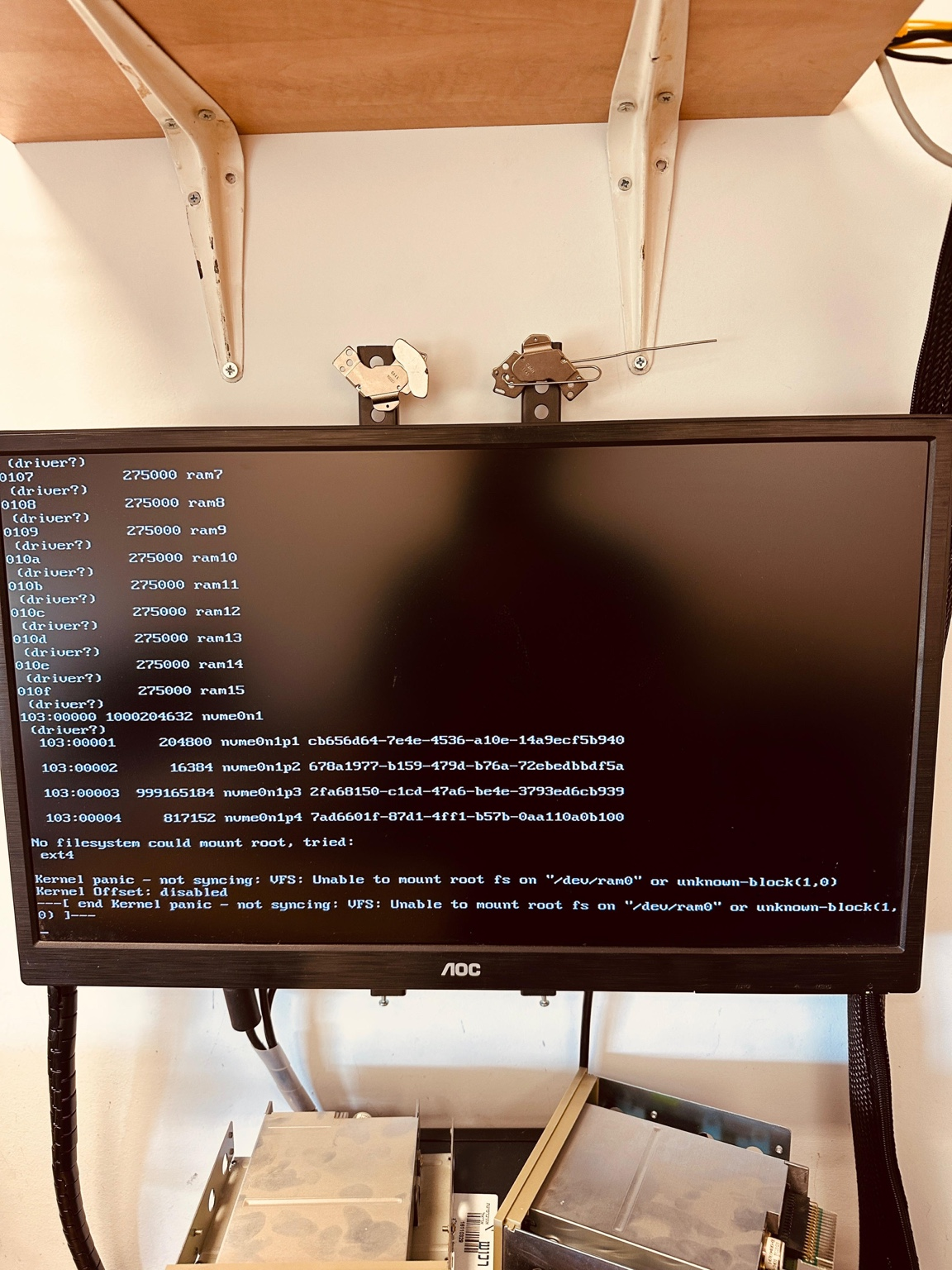
      keyboard worked but receive kernel panic:

      Kernel panic - not syncing:
      VFS: Unable to mount root fs on “/dev/ram0”
      or unknown-block(1,0)
      2eb438c5-1849-4fca-b922-b4e3a2c38097-image.png

      if I use old snponly.efi 2.0.0.0 all work

      posted in Bug Reports
      S
      sgennadi
    • RE: Windows 11 | 65x HP Z2 Tower G1i | UPDATE -

      Please check memory of computer with memtest86+ 8.0

      https://www.memtest.org/

      posted in FOG Problems
      S
      sgennadi
    • IPXE 2.0 Secure Boot Working

      Hi, i try IPXE 2.0 and Secure Boot worked… Please add support of IPXE 2.0 to fog devel branch
      → shimx64.efi
      → ipxe.efi /snponly.ipxe
      → autoexec.ipxe
      → FOG menu

      https://github.com/ipxe/ipxe/releases/tag/v2.0.0

      posted in General
      S
      sgennadi
    • RE: Fog 1.6.0-beta.2141 remove folder with image

      Every time after updating to a new build, the first image works, but the next one doesn’t.

      posted in Bug Reports
      S
      sgennadi
    • RE: Fog 1.6.0-beta.2268 Could not verify mount point

      @sgennadi
      Fixed by
      touch /images/dev/.mntcheck

      posted in Bug Reports
      S
      sgennadi
    • RE: Fog 1.6.0-beta.2141 remove folder with image

      Problem exists also with latest 1.6 builds…
      I think problem something in my database…
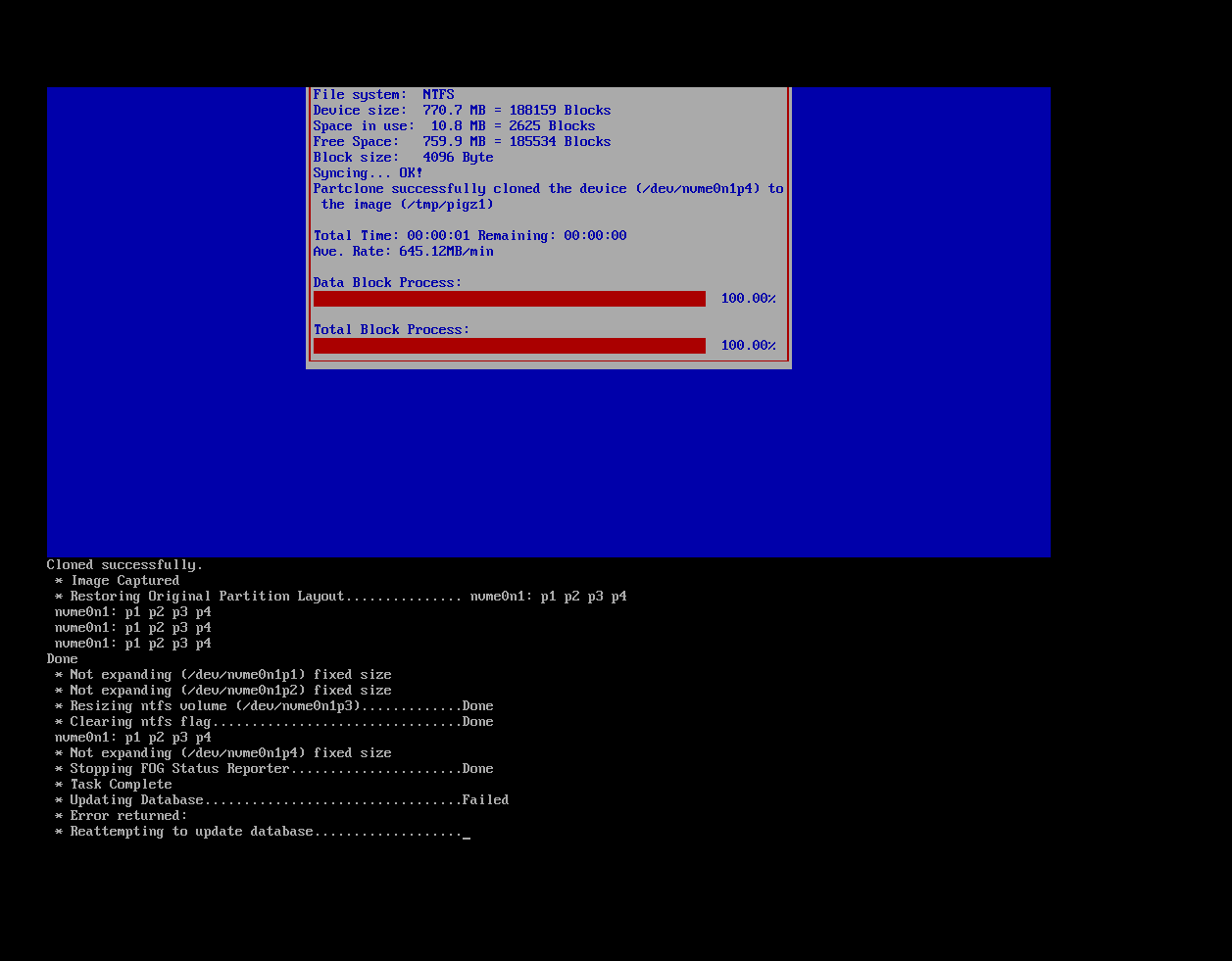
      When fog competed image early I see failed to update database… latest version no error but folder with previous version of image removed
      Task present not removed

      5ab3ea3a-ebaa-4e6e-969e-1997d8d3a978-image.png

      posted in Bug Reports
      S
      sgennadi
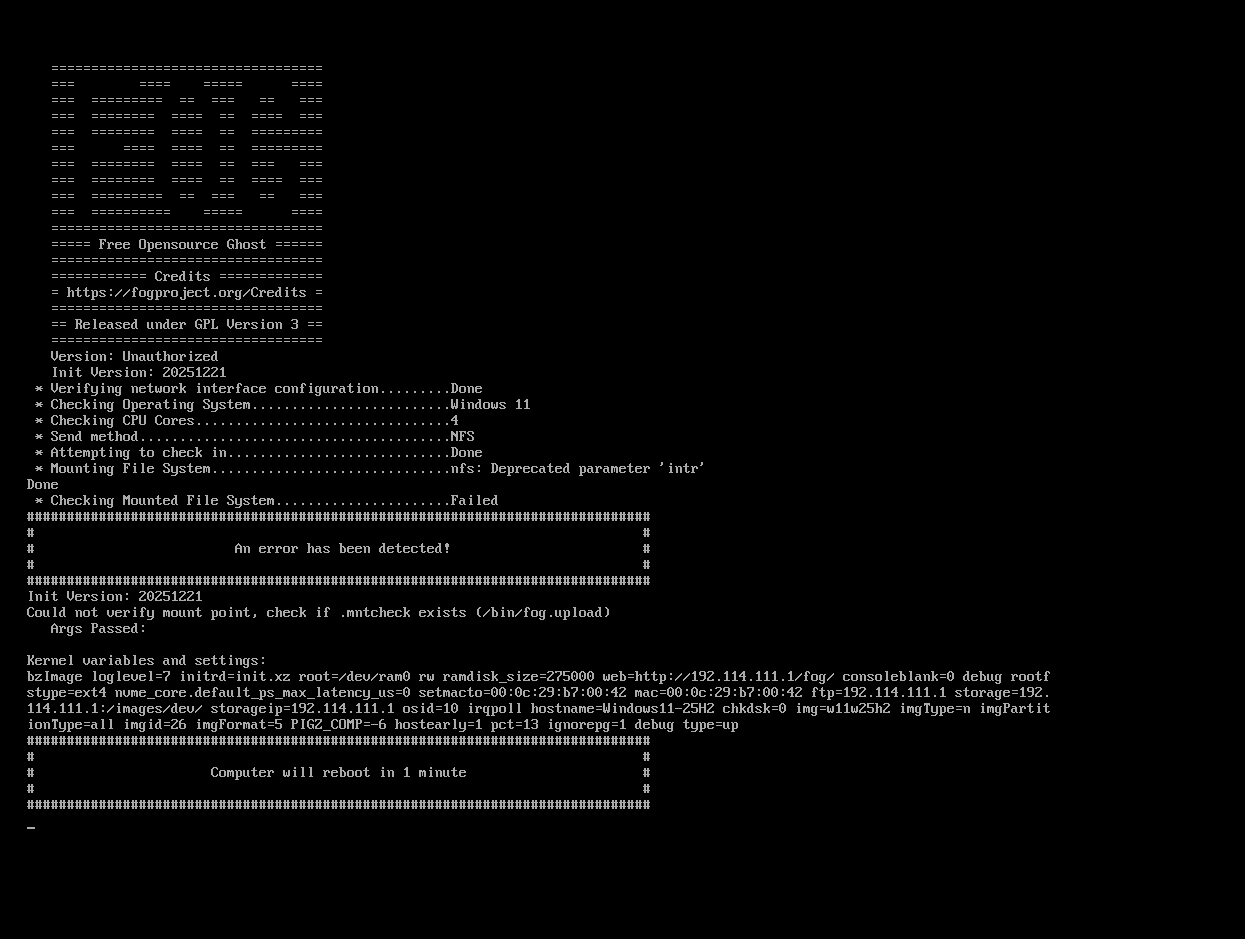
    • Fog 1.6.0-beta.2268 Could not verify mount point

      New problem 1 image create sucessfully, but second image I get this …
      Source disk checked also with checkdisk no error
      (also nfs deprecated parameter not fixed along time )
      99e0c9f4-5f46-4090-b149-c435a0163207-image.png

      posted in Bug Reports
      S
      sgennadi
    • RE: Fog 1.6.0-beta.2262 Create Task successful but no Active / Scheduled Task

      Can you help me with bug topic ?
      Fog 1.6.0-beta.2141 remove folder with image

      posted in Bug Reports
      S
      sgennadi
    • RE: Fog 1.6.0-beta.2262 Create Task successful but no Active / Scheduled Task

      Fixed 👍

      posted in Bug Reports
      S
      sgennadi
    • RE: Fog 1.6.0-beta.2262 Create Task successful but no Active / Scheduled Task

      Fixed task but
      Attempting check in failed…
      Failed to update / create image log … Failed

      Loop

      posted in Bug Reports
      S
      sgennadi
    • Fog 1.6.0-beta.2262 Create Task successful but no Active / Scheduled Task

      Fog 1.6.0-beta.2262 I Create Task successful but no Active Task / Scheduled Task?

      posted in Bug Reports
      S
      sgennadi
    • 1 / 1