RHVER=awk '{for(i=1;i<=NF;i++) if ($i == "release") print $(i+1)}' /etc/redhat-release | cut -d. -f 1;
Solve problem
RHVER=awk '{for(i=1;i<=NF;i++) if ($i == "release") print $(i+1)}' /etc/redhat-release | cut -d. -f 1;
Solve problem
undionly.kkpxe or ipxe.efi don’t work
realtek.kpxe work
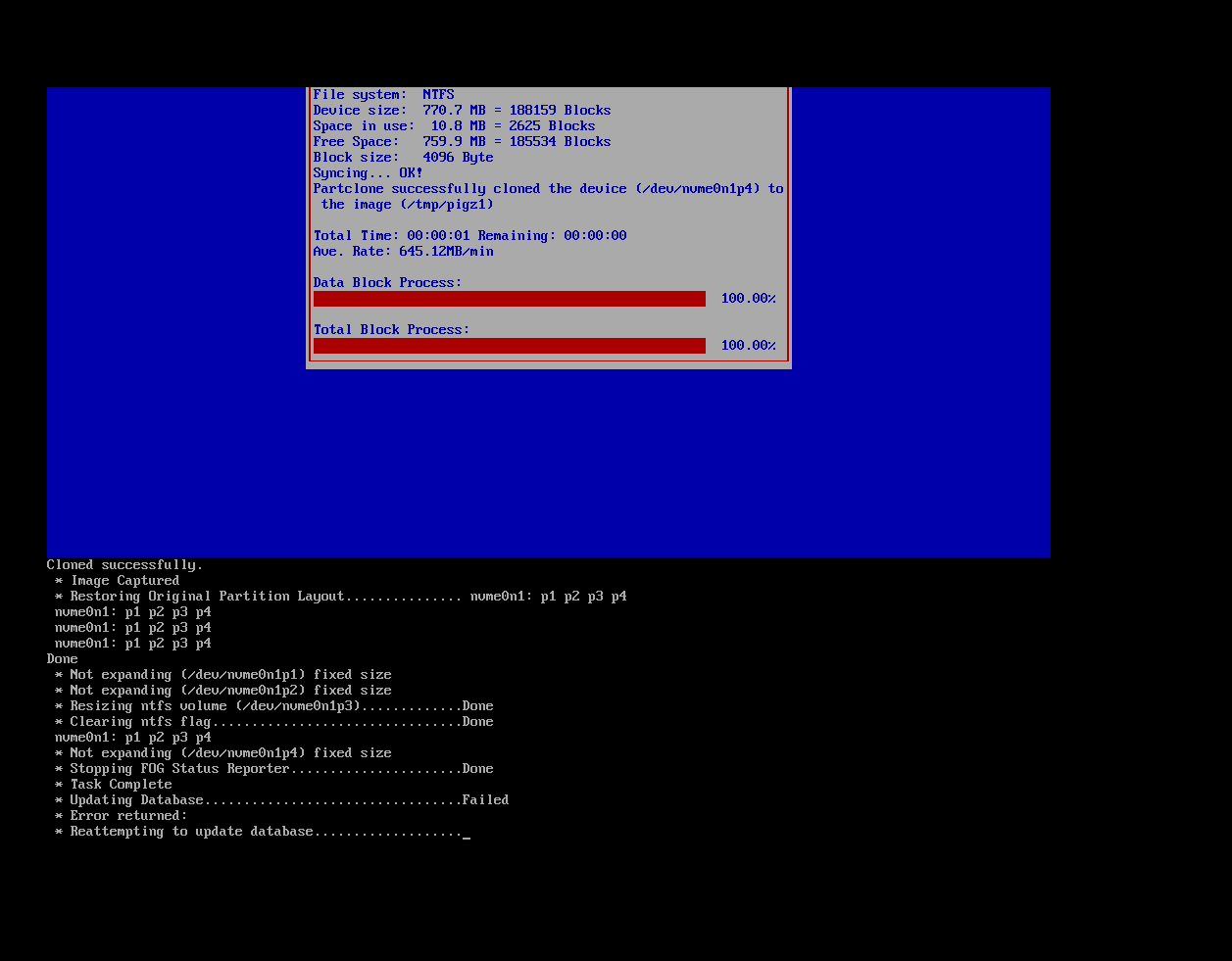
** WARNING: /etc/exports still exports with no_root_squash.
** Captures land as root, so moving the image out of
** /images/dev fails with ‘550 Rename failed’.
** Replace the /images/dev export options with:
** all_squash,anonuid=1002,anongid=1002
Fixed problem

:MENU2
menu
item --gap – ---------------- AntiVirus Diagnostics ----------
item avg AVG
item kav Kaspersky
item panda Panda
item --gap – ---------------- Memory Diagnostics -------------
item memtest Memtest86+ 5.01
item msm Windows Memory Diagnostic
item --gap – ---------------- HDD Diagnostics ----------------
item fujitsu Fujitsu HDD Diagnostic
item ibm IBM / Hitachi (OLD) HDD Diagnostic
item samsung Samsung HDD Diagnostic
item seagate Seagate HDD Diagnostic
item seagateold Seagate Old HDD Diagnostic
item seagatefirm Seagate HDD Firmware Diagnostic
item seagatens Seagate HDD Barracuda ES Firmware Diagnostic
item toshiba Toshiba HDD Diagnostic
item wd Western Digital HDD Diagnostic
item wdold Western Digital Old HDD Diagnostic
item --gap – ---------------- Partition Managment --------------
item mbrwizd MBR Rewrite
item fog.fastwipe FastWipe
item gparted GParted
item src System Rescue
item --gap – ---------------- Password Recovery ----------------
item owpre Offline Windows Password & Registry Editor
item return return to previous menu
choose --default return --timeout 15000 target && goto ${target}
:wd
initrd http://${fog-ip}/IMG/wd.img
chain memdisk keeppxe ||
goto MENU2
:wdold
initrd http://${fog-ip}/ISO/wdold.img
chain memdisk raw keeppxe ||
goto MENU2
:ibm
initrd http://${fog-ip}/IMG/ibm.img
chain memdisk keeppxe ||
goto MENU2
:seagate
initrd http://${fog-ip}/IMG/seagate.img
chain memdisk keeppxe ||
goto MENU2
:seagateold
initrd http://${fog-ip}/IMG/seagateold.img
chain memdisk keeppxe ||
goto MENU2
:seagatefirm
initrd http://${fog-ip}/ISO/SeagateFirmware.iso
chain memdisk iso raw ||
goto MENU2
:seagatens
initrd http://${fog-ip}/ISO/ST31000340NS.iso
chain memdisk iso raw ||
goto MENU2
:samsung
initrd http://${fog-ip}/IMG/samsung.img
chain memdisk keeppxe ||
goto MENU2
:fujitsu
initrd http://${fog-ip}/IMG/fujitsu.img
chain memdisk keeppxe ||
goto MENU2
:toshiba
initrd http://${fog-ip}/IMG/toshiba.img
chain memdisk keeppxe ||
goto MENU2
:memtest
initrd http://${fog-ip}/ISO/mt501.iso
chain memdisk iso raw ||
goto MENU2
:msm
initrd http://${fog-ip}/IMG/msm.img
chain memdisk keeppxe ||
goto MENU2
:fog.fastwipe
kernel bzImage32 loglevel=4 initrd=init_32.xz root=/dev/ram0 rw ramdisk_size=127000 keymap= web=${fog-ip}/fog consoleblank=0 loglevel=4 capone=1 mode=wipe wipemode=fast mac=00:00:00:00:00:00
imgfetch init_32.xz
boot ||
goto MENU2
:gparted
kernel http://${fog-ip}/ISO/Gparted/vmlinuz boot=live username=user config keyboard-layouts=us components quiet noswap nomodeset vga=791 fetch=http://${fog-ip}/ISO/Gparted/filesystem.squashfs
initrd http://${fog-ip}/ISO/Gparted/initrd.img
boot ||
goto MENU2
:src
kernel http://${fog-ip}/ISO/SRC/rescue32 setkmap=us dostartx netboot=http://${fog-ip}/ISO/SRC/sysrcd.dat
initrd http://${fog-ip}/ISO/SRC/initram.igz
boot ||
goto MENU2
:mbrwizd
initrd http://${fog-ip}/IMG/mbrwizd.img
chain memdisk keeppxe ||
goto MENU2
:kav
kernel http://${fog-ip}/ISO/KAV/rescue root=live kav_lang=en udev liveimg doscsi nomodeset
initrd http://${fog-ip}/ISO/KAV/rescue.igz
boot ||
goto MENU2
:avg
kernel http://${fog-ip}/ISO/AVG/vmlinuz max_loop=255 vga=791 init=linuxrc reboot=bios ramdisk_size=100000
initrd http://${fog-ip}/ISO/AVG/initrd.lzm
boot ||
goto MENU2
:panda
kernel http://${fog-ip}/ISO/Panda/vmlinuz boot=live union=aufs noswap fetch=http://${fog-ip}/ISO/Panda/filesystem.squashfs
initrd http://${fog-ip}/ISO/Panda/initrd.img
boot ||
goto MENU2
:owpre
initrd http://${fog-ip}/ISO/cd140201.iso
chain memdisk iso raw ||
goto MENU2
:return
chain http://${fog-ip}/${fog-webroot}/service/ipxe/boot.php?mac=${net0/mac} ||
prompt
goto MENU2
autoboot
Are you plan secure boot fog kernel ?
** WARNING: /etc/exports still exports with no_root_squash.
** Captures land as root, so moving the image out of
** /images/dev fails with ‘550 Rename failed’.
** Replace the /images/dev export options with:
** all_squash,anonuid=1002,anongid=1002
Fixed problem
@Tom-Elliott
Fixed keyboard and kernel panic 
Then I use latest ipxe 2.0.0.x on Lenovo M80t / M70t Gen3 keyboard not worked ,
if i change ipxe.efi to snponly.efi
sudo cp -a /tftpboot/ipxe.efi /tftpboot/ipxe.efi.backup
sudo cp -f /tftpboot/snponly.efi /tftpboot/ipxe.efi
keyboard worked but receive kernel panic:
Kernel panic - not syncing:
VFS: Unable to mount root fs on “/dev/ram0”
or unknown-block(1,0)
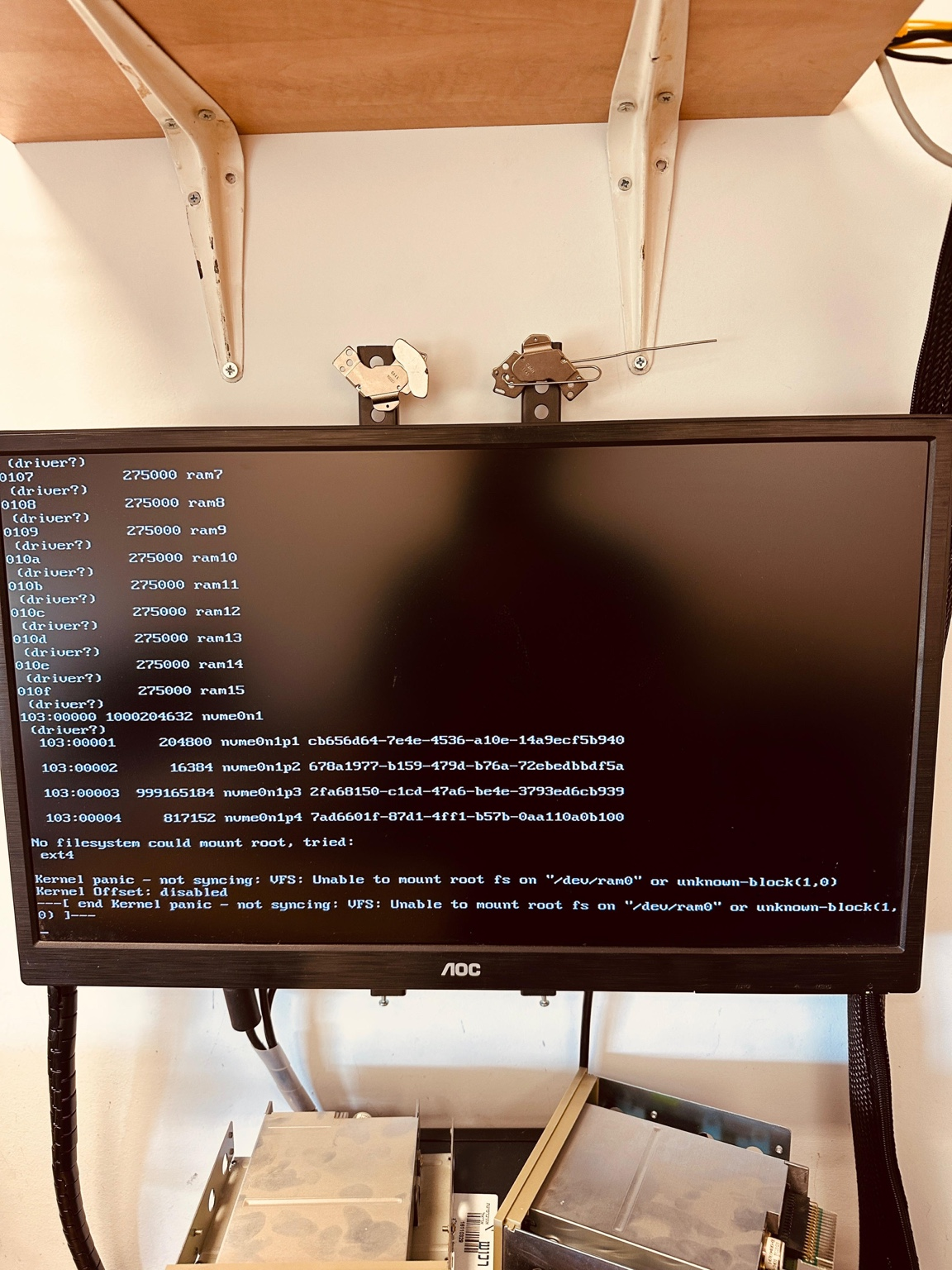
if I use old snponly.efi 2.0.0.0 all work
Please check memory of computer with memtest86+ 8.0
Hi, i try IPXE 2.0 and Secure Boot worked… Please add support of IPXE 2.0 to fog devel branch
→ shimx64.efi
→ ipxe.efi /snponly.ipxe
→ autoexec.ipxe
→ FOG menu
Every time after updating to a new build, the first image works, but the next one doesn’t.
@sgennadi
Fixed by
touch /images/dev/.mntcheck
Problem exists also with latest 1.6 builds…
I think problem something in my database…
When fog competed image early I see failed to update database… latest version no error but folder with previous version of image removed
Task present not removed