• Recent
    • Unsolved
    • Tags
    • Popular
    • Users
    • Groups
    • Search
    • Register
    • Login
    1. Home
    2. AUTH IT Center
    • Profile
    • Following 2
    • Followers 0
    • Topics 5
    • Posts 49
    • Groups 0

    AUTH IT Center

    @AUTH IT Center

    12
    Reputation
    10
    Profile views
    49
    Posts
    0
    Followers
    2
    Following
    Joined
    Last Online
    Website it.auth.gr/en/homepage/

    AUTH IT Center Unfollow Follow

    Best posts made by AUTH IT Center

    • RE: What ports does FOG use?

      @fogcloud we have an ansible playbook to handle FOG firewall rules (firewalld) and the ports used are:

         allow_icmp:
            - echo-request
            - echo-reply
          services:
            - ftp
            - http
            - mountd
            - nfs
            - rpc-bind
            - tftp
          ports:
            - { port: 20048, proto: tcp }  # nfs
            - { port: 20048, proto: udp }  # nfs
            - { port: "35350-36350", proto: udp }  # tftp
            - { port: "49512-65532", proto: udp }  # multicast
      

      the port 20048 is added on nfs.conf
      the range 35350-36350 is added on tftp options
      and the 49512-65532 is for all the dynamic ports

      posted in FOG Problems
      AUTH IT CenterA
      AUTH IT Center
    • RE: constant 100% CPU Usage

      @PatrickL

      you might want to check https://forums.fogproject.org/topic/17648/massive-cpu-usage-from-a-service

      also please state the FOG version you are using. If its before 1.5.10.41 there were some security issues that were patched.

      posted in Linux Problems
      AUTH IT CenterA
      AUTH IT Center
    • RE: FOG 1.5.10.1604 ldap plugin

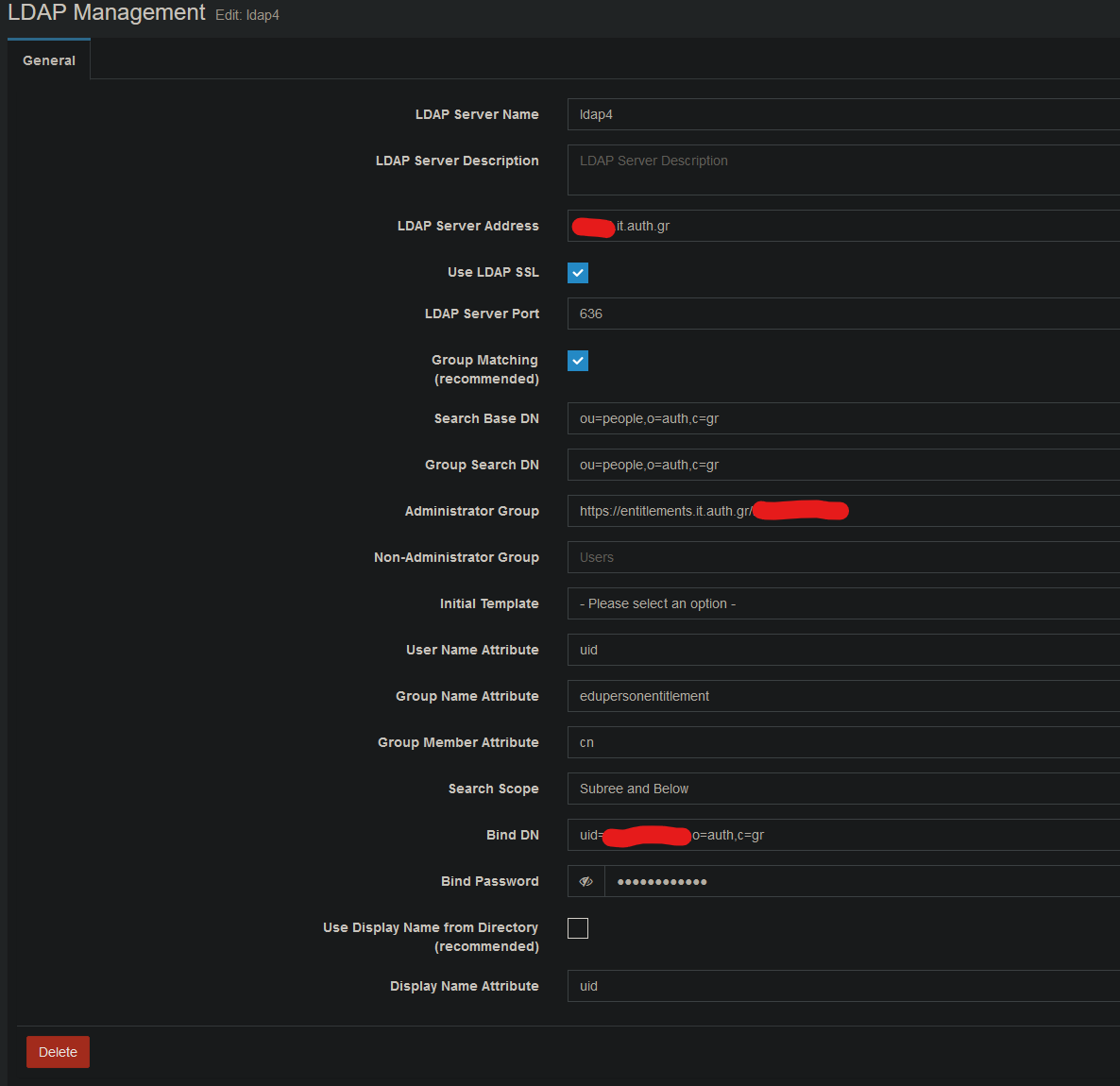
      @Tom-Elliott couldn’t wait till tomorrow… tested with 1.6 and works with the below settings.

      0955e463-2290-40ef-a234-e85859badb2f-image.png

      also in 1.6 you need to change Subree on line 988 also.

      Thank you once more for your time and effort.

      posted in General
      AUTH IT CenterA
      AUTH IT Center
    • RE: export unauthorized

      I believe the problem you are facing is the way the new export.php (https://github.com/FOGProject/fogproject/compare/1.5.10...1.5.10.41?diff=split&w=#diff-ff9e620c45c9b82140dffca512e6417f03cc4972a20a6659a4f4a248ffa56082) validates the export.

      I have the same problem on a newly installed server OS: Ubuntu 22.04, FOG Server: 1.5.10.48. I changed the if statement with

      echo $currentUser;
      echo '<br>';
      echo strtolower($_SERVER['HTTP_X_REQUESTED_WITH']);
      echo '<br>';
      echo _('Unauthorized');
      exit;
      

      on export.php and as it shows

      User ID: 1 Name: fog
      
      Unauthorized
      

      the blank line is the empty variable which then forces the Unauthorized exit.

      posted in FOG Problems
      AUTH IT CenterA
      AUTH IT Center
    • RE: FOG has issues if the temp image location is on another drive. FOG 1.5.10.1612 Ubuntu Server24.04.1 LTS

      @Fog_Newb

      try the below

      /dev/disk/by-uuid/d61ab2ae-b79a-4b07-bfc5-4678ab0902f4 /images ext4 defaults 0 1
      /dev/disk/by-uuid/3d7874cb-8c59-4e6d-8735-fb8361994590 /imagesdev ext4 defaults 0 1
      /imagesdev  /images/dev   none    defaults,bind   0   0
      

      Sources:

      • https://man.archlinux.org/man/systemd.mount.5
      • https://wiki.archlinux.org/title/Fstab#Bind_mount
      posted in FOG Problems
      AUTH IT CenterA
      AUTH IT Center
    • RE: Transferring database and .fogsettings

      @MarkG Hello and happy new year.

      First of all, I hope you have taken backup the database and files from the old server. Everything you need for the migration are documented in https://wiki.fogproject.org/wiki/index.php?title=Migrate_FOG

      posted in FOG Problems
      AUTH IT CenterA
      AUTH IT Center
    • RE: New FOG master server - broken CA Certificate trust

      @sideone

      hello! You can migrate the ssl certificates from the old server to the new. Read the wiki and you will be ok.

      posted in FOG Problems
      AUTH IT CenterA
      AUTH IT Center
    • RE: Booting from SAN device 0x08 failed

      HP desktop are a pain in the …

      we had similar issues and the current solution we use is to deploy the FOG updates but keep refind to v0.11.0.

      posted in FOG Problems
      AUTH IT CenterA
      AUTH IT Center
    • RE: Interface logout gives timeout

      Solved with http://forums.fogproject.org/post/157456

      posted in FOG Problems
      AUTH IT CenterA
      AUTH IT Center
    • RE: Snapin Tasks Not Creating

      @Tom-Elliott I can confirm that it works with v1.5.10.1760. 🎉 Thank you very much! 🙇

      posted in FOG Problems
      AUTH IT CenterA
      AUTH IT Center

    Latest posts made by AUTH IT Center

    • FOG 1.5.10.2482 iPXE 2.0.0 - intermittent UEFI boot failures on Realtek NICs (1.21.1+ and snponly.efi unaffected)

      Summary

      After updating FOG from 1.5.10.1903 to 1.5.10.2482, a subset of our UEFI clients with Realtek NICs began failing to boot, intermittently — about 6% of boots.
      Clients with Intel NICs on the identical boot path are unaffected (0 failures in 62 boots). Reverting only /tftpboot/ipxe.efi to the binary shipped with 1.5.10.1903, while leaving FOG itself on 2482, stopped the failures.

      The two iPXE builds involved are g5de5d (1.21.1+) and g12798 (2.0.0)`.

      Environment

      FOG (new) 1.5.10.2482, commit ff6410d242252fee5cf1370213b2bf459e858315
      FOG (previous) 1.5.10.1903
      OS Ubuntu 22.04.5 LTS, kernel 5.15.0-191-generic
      PHP 8.1.2
      Database MariaDB, separate host
      Fleet ~2,500 clients, ~450 PXE boots/day
      DHCP ISC DHCP, per-host filename; 1,879 hosts on ipxe.efi

      iPXE versions as reported by clients in the HTTP User-Agent:

      • before: iPXE/1.21.1+ (g5de5d) — ipxe.efi 1,107,456 bytes
      • after: iPXE/2.0.0 (g12798) — ipxe.efi 1,144,832 bytes

      installfog.sh replaced every binary under /tftpboot at the time of the update.

      Boot flow

      DHCP (option 67) → ipxe.efi via TFTP → boot.php → exit type refind_efi → imgfetch refind.conf + chain -ar refind_x64.efi → rEFInd → local Windows Boot Manager.

      rEFInd is chainloaded over HTTP (not installed on the ESP). Its config uses scanfor netboot,internal,external,optical,manual, timeout -1, use_nvram false.

      Symptom

      On a failing boot, every network operation succeeds:

      POST /fog/service/ipxe/boot.php        200    8658 b   iPXE/2.0.0 (g12798)
      GET  /fog/service/ipxe/bgdark.png      200   16523 b   iPXE/2.0.0 (g12798)
      GET  /fog/service/ipxe/refind.conf     200   36624 b   iPXE/2.0.0 (g12798)
      GET  /fog/service/ipxe/refind_x64.efi  200  222155 b   iPXE/2.0.0 (g12798)
      

      …and then the client returns to PXE and repeats. Correct byte counts every time, no failed transfers, nothing in the Apache error log. Users report either a boot loop or the machine sitting on the rEFInd menu.

      The failure therefore occurs after all network I/O has completed — at or after chain -ar into rEFInd, not during a transfer.

      It is intermittent: the same host may succeed on one attempt and fail on the next (we observed 1 to 11 consecutive failures on one machine). Disconnecting the network cable, forcing local disk boot, always works — that is how our on-site staff were
      recovering machines.

      Evidence

      1. Same host, same day, only the loader changed

      Dell OptiPlex 3020, Realtek. From the tftpd log:

      time request result
      07:30:19 RRQ ... filename ipxe.efi (2.0.0) failed, never reached Windows
      11:30:39 RRQ ... filename snponly.efi (2.0.0) booted, Windows in 38 s

      2. Old binary via per-host DHCP override

      A second OptiPlex 3020 (Realtek) served the 1.5.10.1903 ipxe.efi: 2/2 unattended boots in ~18–25 s, after previously requiring a cable pull on every attempt.

      3. Failure rates

      Loader determined from the tftpd log — i.e. what each client actually fetched, not what the config says:

      PRE-revert — /tftpboot/ipxe.efi = iPXE 2.0.0 (g12798)
        loader           NIC       ok    failed   rate
        ipxe.efi         Realtek   131      9      6.4%
        ipxe.efi         Intel      62      0      0%
        undionly.kpxe    Realtek    96      0      0%
        undionly.kpxe    Intel       5      0      0%
        snponly.efi      any         2      0      0%
      
      POST-revert — /tftpboot/ipxe.efi = iPXE 1.21.1+ (g5de5d), FOG still on 2482
        ipxe.efi         Realtek    14      0      0%
        ipxe.efi         Intel       9      1*     (*BitLocker recovery prompt, unrelated)
        undionly.kpxe    Realtek     8      0      0%
      

      The cleanest comparison is Intel vs Realtek on the same binary and the same UEFI path: 0/62 vs 9/140, p ≈ 0.02.

      The undionly.kpxe row (0/96 Realtek) points the same way but is confounded - those clients are BIOS-mode, so they differ in boot path as well as in which driver iPXE uses. We offer it as supporting, not primary, evidence. The snponly.efi sample is too small to stand on its own.

      What we ruled out

      None of these discriminate between failing and working hosts:

      • Machine model — OptiPlex 3020: 26 booted fine, 7 failed. Same model, both outcomes.
      • BIOS version — A02 and A19 appear among failures and among successes.
      • Disk type — failures include NVMe, SATA SSD and spinning HDD.
      • Optical drive presence — 70% of working hosts vs 57% of failing hosts.

      We also confirmed the FOG side is unchanged: $_exitTypes, $sanboot and $refind in bootmenu.class.php are byte-identical between 1903 and 2482, and refind.conf / refind_x64.efi are served byte-identically before and after (verified by response size in the access log).

      Affected hardware

      All report Realtek PCIe GbE Family Controller under Windows. We do not have PCI IDs to hand but can collect them.

      vendor / board BIOS count
      Dell OptiPlex 3020 A19 4
      Dell OptiPlex 3020 A02 3
      Dell OptiPlex 3000 1.41.0 2
      Gigabyte H110M-S2H F22 1
      Gigabyte H81M-S2V F2 1
      Fujitsu ESPRIMO D556/2 V5.0.0.12 R1.35.0 1
      ASUS (System Product Name) 0803 1

      Unaffected: Intel I219-LM (Dell Pro Slim QCS1250) — 0 failures in 62 boots.

      Current workaround

      We reverted only /tftpboot/ipxe.efi to the 1.5.10.1903 binary, leaving FOG on 2482. Every path we have tested works with that combination:

      • normal boot and rEFInd chainload
      • full image deploy — task script, 11 MB bzImage + 31 MB init.xz over HTTP, FOG client OS, NFS mount of /images, partclone, reboot into the deployed image, client check-in

      Hypothesis and questions

      snponly.efi — the same 2.0.0 build, but using the firmware’s UEFI SNP driver instead of iPXE’s own — works on hardware where ipxe.efi fails. That points at iPXE 2.0.0’s built-in Realtek driver. Since all network I/O completes before the failure, we suspect driver teardown/handover when chainloading another EFI application rather than anything in the transfers themselves. The intermittency suggests a race rather than a hard incompatibility.

      Questions:

      1. Are there known changes to the Realtek driver, or to EFI driver unbinding / shutdown() behaviour, between g5de5d and g12798?
      2. Could the state iPXE leaves the NIC in affect a chainloaded EFI application - specifically rEFInd, which scans for netboot entries (scanfor netboot,...) and may re-enumerate SNP?
      3. Is snponly.efi the recommended long-term choice for Realtek clients, or would you prefer a fix in the built-in driver?

      We have ~1,200 Realtek clients and can reproduce readily. Happy to run test builds, capture verbose iPXE console output, or collect PCI IDs and chipset revisions.

      AI-assisted-by: Claude Code (Opus 5)

      posted in FOG Problems
      AUTH IT CenterA
      AUTH IT Center
    • RE: Firewall Rules Fog Server

      @astrugatch we have firewalld but you can make the adjustments… some ports have been changed from the initial setup due to network restrictions.

      - name: FOG_Services
          short: FOG Server network rules
          description: >-
            For FOG Server to handle boot, image and various tasks on workstations
          sources:
            - SUBNET_IPS
          allow_icmp:
            - echo-request
            - echo-reply
          services:
            - ftp
            - http
            - mountd
            - nfs
            - rpc-bind
            - tftp
          ports:
            - { port: 20048, proto: tcp }  # nfs
            - { port: 20048, proto: udp }  # nfs
            - { port: "35350-36350", proto: udp }  # tftp
            - { port: "49512-65532", proto: udp }  # multicast
      
      posted in General Problems
      AUTH IT CenterA
      AUTH IT Center
    • RE: Snapin Tasks Not Creating

      @Tom-Elliott I can confirm that it works with v1.5.10.1760. 🎉 Thank you very much! 🙇

      posted in FOG Problems
      AUTH IT CenterA
      AUTH IT Center
    • RE: Snapin Tasks Not Creating

      @Tom-Elliott said in Snapin Tasks Not Creating:

      @AUTH-IT-Center Sorry moved these items to a new topic.

      I want to get this addressed, but this is different from the double quotes issue:

      I thought it was caused by that change (possibly wrong guess),

      @Tom-Elliott said in Snapin Tasks Not Creating:

      Also:

      please hit up your sql database:

      SELECT * FROM fog.history;
      

      likely it will see the latest entry of something along the lines if:

      Task ID:  Name: Single Snapin Task - test321 has failed to save. Error: Save completed but no valid ID was assigned (insertId=0). Possible duplicate-key update or missing auto-increment.
      

      This is what I’m seeing when I try to create a single snapin task (i’ve not tried with all-snapins yet, but one thing at a time. I am working to fix it, just trying to narrow down the why.

      There are 2 history entries with the same timestamp.

      [2026-01-22 08:24:29] ImageAssociation ID:  has failed to save. Error: Required database field is empty: imageID
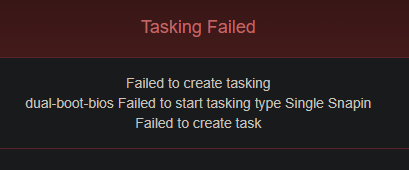
      [2026-01-22 08:24:29] Task ID:  Name: Single Snapin Task - dual-boot-bios has failed to save. Error: Save completed but no valid ID was assigned (insertId=0). Possible duplicate-key update or missing auto-increment.
      
      posted in FOG Problems
      AUTH IT CenterA
      AUTH IT Center
    • RE: Snapin Tasks Not Creating

      @Tom-Elliott Good morning.

      I updated to v1.5.10.1758 but again no luck…

      25621a1a-5e47-4fae-b639-d73333f124c2-image.png

      Apache error.log

      [Thu Jan 22 08:24:12.486715 2026] [proxy_fcgi:error] [pid 2840142] [client computer_ip:54196] AH01071: Got error 'PHP message: PHP Warning:  Attempt to read property "dev" on null in /var/www/html/fog/lib/pages/dashboardpage.class.php on line 586PHP message: PHP Warning:  Attempt to read property "rx" on null in /var/www/html/fog/lib/pages/dashboardpage.class.php on line 588PHP message: PHP Warning:  Attempt to read property "tx" on null in /var/www/html/fog/lib/pages/dashboardpage.class.php on line 589', referer: https://hostname_dev/fog/management/index.php?node=home
      [Thu Jan 22 08:24:13.935665 2026] [proxy_fcgi:error] [pid 2840140] [client computer_ip:54198] AH01071: Got error 'PHP message: PHP Warning:  Attempt to read property "dev" on null in /var/www/html/fog/lib/pages/dashboardpage.class.php on line 586PHP message: PHP Warning:  Attempt to read property "rx" on null in /var/www/html/fog/lib/pages/dashboardpage.class.php on line 588PHP message: PHP Warning:  Attempt to read property "tx" on null in /var/www/html/fog/lib/pages/dashboardpage.class.php on line 589', referer: https://hostname_dev/fog/management/index.php?node=home
      
      posted in FOG Problems
      AUTH IT CenterA
      AUTH IT Center
    • RE: Snapin Tasks Not Creating

      @Tom-Elliott said in Snapin Pack Arguments double-quotes problem:

      I’m only guessing here that this was a machine that did not have an image defined to it?
      …
      I corrected this specifically by setting assocID to null if there’s nothing in the returned assocIDs previously.

      Apologies for the long winded answer.

      You are correct. The host doesn’t have image associated (as many of our hosts 🙂 ).

      Unfortunately seems with have to dig more…

      [Wed Jan 21 14:52:42.687383 2026] [proxy_fcgi:error] [pid 2630261] [client computer_ip:50247] AH01071: Got error 'PHP message: PHP Warning:  Attempt to read property "dev" on null in /var/www/html/fog/lib/pages/dashboardpage.class.php on line 586PHP message: PHP Warning:  Attempt to read property "rx" on null in /var/www/html/fog/lib/pages/dashboardpage.class.php on line 588PHP message: PHP Warning:  Attempt to read property "tx" on null in /var/www/html/fog/lib/pages/dashboardpage.class.php on line 589', referer: https://dev-hostname.it.auth.gr/fog/management/index.php?node=home
      [Wed Jan 21 14:55:03.693789 2026] [proxy_fcgi:error] [pid 2665714] [client computer_ip:57526] AH01071: Got error 'PHP message: PHP Fatal error:  Uncaught ValueError: min(): Argument #1 ($value) must contain at least one element in /var/www/html/fog/lib/fog/image.class.php:496\nStack trace:\n#0 /var/www/html/fog/lib/fog/image.class.php(496): min()\n#1 /var/www/html/fog/lib/fog/image.class.php(389): Image->getPrimaryGroup()\n#2 /var/www/html/fog/lib/fog/host.class.php(1133): Image->getStorageGroup()\n#3 /var/www/html/fog/lib/fog/host.class.php(1408): Host->_createTasking()\n#4 /var/www/html/fog/lib/fog/fogpage.class.php(1757): Host->createImagePackage()\n#5 /var/www/html/fog/lib/fog/fogpagemanager.class.php(220): FOGPage->deployPost()\n#6 /var/www/html/fog/management/index.php(69): FOGPageManager->render()\n#7 {main}\n  thrown in /var/www/html/fog/lib/fog/image.class.php on line 496', referer: https://dev-hostname.it.auth.gr/fog/management/index.php?node=host&sub=deploy&id=1&type=13
      

      @Tom-Elliott said in Snapin Pack Arguments double-quotes problem:

      I corrected this specifically by setting assocID to null if there’s nothing in the returned assocIDs previously.

      the imageID in the database is int so maybe the null value causes the error?

      FYI I am checking it on the DEV VM (other host without image association).

      posted in FOG Problems
      AUTH IT CenterA
      AUTH IT Center
    • RE: Snapin Tasks Not Creating

      @Tom-Elliott

      [Wed Jan 21 10:55:51.389462 2026] [proxy_fcgi:error] [pid 206230] [client computer_ip:57559] AH01071: Got error 'PHP message: PHP Fatal error:  Uncaught ValueError: min(): Argument #1 ($value) must contain at least one element in /var/www/html/fog/lib/fog/image.class.php:496\nStack trace:\n#0 /var/www/html/fog/lib/fog/image.class.php(496): min()\n#1 /var/www/html/fog/lib/fog/image.class.php(389): Image->getPrimaryGroup()\n#2 /var/www/html/fog/lib/fog/host.class.php(1133): Image->getStorageGroup()\n#3 /var/www/html/fog/lib/fog/host.class.php(1408): Host->_createTasking()\n#4 /var/www/html/fog/lib/fog/fogpage.class.php(1757): Host->createImagePackage()\n#5 /var/www/html/fog/lib/fog/fogpagemanager.class.php(220): FOGPage->deployPost()\n#6 /var/www/html/fog/management/index.php(69): FOGPageManager->render()\n#7 {main}\n  thrown in /var/www/html/fog/lib/fog/image.class.php on line 496', referer: https://hostname.it.auth.gr/fog/management/index.php?node=host&sub=deploy&id=369&type=13
      [Wed Jan 21 10:57:46.453159 2026] [proxy_fcgi:error] [pid 206208] [client computer_ip:62589] AH01071: Got error 'PHP message: PHP Fatal error:  Uncaught ValueError: min(): Argument #1 ($value) must contain at least one element in /var/www/html/fog/lib/fog/image.class.php:496\nStack trace:\n#0 /var/www/html/fog/lib/fog/image.class.php(496): min()\n#1 /var/www/html/fog/lib/fog/image.class.php(389): Image->getPrimaryGroup()\n#2 /var/www/html/fog/lib/fog/host.class.php(1133): Image->getStorageGroup()\n#3 /var/www/html/fog/lib/fog/host.class.php(1408): Host->_createTasking()\n#4 /var/www/html/fog/lib/fog/fogpage.class.php(1757): Host->createImagePackage()\n#5 /var/www/html/fog/lib/fog/fogpagemanager.class.php(220): FOGPage->deployPost()\n#6 /var/www/html/fog/management/index.php(69): FOGPageManager->render()\n#7 {main}\n  thrown in /var/www/html/fog/lib/fog/image.class.php on line 496', referer: https://hostname.it.auth.gr/fog/management/index.php?node=host&sub=deploy&id=369&type=13
      [Wed Jan 21 10:58:23.857033 2026] [proxy_fcgi:error] [pid 277454] [client computer_ip:49357] AH01071: Got error 'PHP message: PHP Fatal error:  Uncaught ValueError: min(): Argument #1 ($value) must contain at least one element in /var/www/html/fog/lib/fog/image.class.php:496\nStack trace:\n#0 /var/www/html/fog/lib/fog/image.class.php(496): min()\n#1 /var/www/html/fog/lib/fog/image.class.php(389): Image->getPrimaryGroup()\n#2 /var/www/html/fog/lib/fog/host.class.php(1133): Image->getStorageGroup()\n#3 /var/www/html/fog/lib/fog/host.class.php(1408): Host->_createTasking()\n#4 /var/www/html/fog/lib/fog/fogpage.class.php(1757): Host->createImagePackage()\n#5 /var/www/html/fog/lib/fog/fogpagemanager.class.php(220): FOGPage->deployPost()\n#6 /var/www/html/fog/management/index.php(69): FOGPageManager->render()\n#7 {main}\n  thrown in /var/www/html/fog/lib/fog/image.class.php on line 496', referer: https://hostname.it.auth.gr/fog/management/index.php?node=host&sub=deploy&id=369&type=13
      [Wed Jan 21 10:58:40.252836 2026] [proxy_fcgi:error] [pid 255909] [client computer_ip:58776] AH01071: Got error 'PHP message: PHP Fatal error:  Uncaught ValueError: min(): Argument #1 ($value) must contain at least one element in /var/www/html/fog/lib/fog/image.class.php:496\nStack trace:\n#0 /var/www/html/fog/lib/fog/image.class.php(496): min()\n#1 /var/www/html/fog/lib/fog/image.class.php(389): Image->getPrimaryGroup()\n#2 /var/www/html/fog/lib/fog/host.class.php(1133): Image->getStorageGroup()\n#3 /var/www/html/fog/lib/fog/host.class.php(1408): Host->_createTasking()\n#4 /var/www/html/fog/lib/fog/fogpage.class.php(1757): Host->createImagePackage()\n#5 /var/www/html/fog/lib/fog/fogpagemanager.class.php(220): FOGPage->deployPost()\n#6 /var/www/html/fog/management/index.php(69): FOGPageManager->render()\n#7 {main}\n  thrown in /var/www/html/fog/lib/fog/image.class.php on line 496', referer: https://hostname.it.auth.gr/fog/management/index.php?node=host&sub=deploy&id=369&type=13
      [Wed Jan 21 11:09:53.556796 2026] [proxy_fcgi:error] [pid 231725] [client computer_ip:59174] AH01071: Got error 'PHP message: PHP Fatal error:  Uncaught ValueError: min(): Argument #1 ($value) must contain at least one element in /var/www/html/fog/lib/fog/image.class.php:496\nStack trace:\n#0 /var/www/html/fog/lib/fog/image.class.php(496): min()\n#1 /var/www/html/fog/lib/fog/image.class.php(389): Image->getPrimaryGroup()\n#2 /var/www/html/fog/lib/fog/host.class.php(1133): Image->getStorageGroup()\n#3 /var/www/html/fog/lib/fog/host.class.php(1408): Host->_createTasking()\n#4 /var/www/html/fog/lib/fog/fogpage.class.php(1757): Host->createImagePackage()\n#5 /var/www/html/fog/lib/fog/fogpagemanager.class.php(220): FOGPage->deployPost()\n#6 /var/www/html/fog/management/index.php(69): FOGPageManager->render()\n#7 {main}\n  thrown in /var/www/html/fog/lib/fog/image.class.php on line 496', referer: https://hostname.it.auth.gr/fog/management/index.php?node=host&sub=deploy&id=369&type=13
      [Wed Jan 21 11:13:02.195715 2026] [proxy_fcgi:error] [pid 259259] [client computer_ip:59235] AH01071: Got error 'PHP message: PHP Fatal error:  Uncaught ValueError: min(): Argument #1 ($value) must contain at least one element in /var/www/html/fog/lib/fog/image.class.php:496\nStack trace:\n#0 /var/www/html/fog/lib/fog/image.class.php(496): min()\n#1 /var/www/html/fog/lib/fog/image.class.php(389): Image->getPrimaryGroup()\n#2 /var/www/html/fog/lib/fog/host.class.php(1133): Image->getStorageGroup()\n#3 /var/www/html/fog/lib/fog/host.class.php(1408): Host->_createTasking()\n#4 /var/www/html/fog/lib/fog/fogpage.class.php(1757): Host->createImagePackage()\n#5 /var/www/html/fog/lib/fog/fogpagemanager.class.php(220): FOGPage->deployPost()\n#6 /var/www/html/fog/management/index.php(69): FOGPageManager->render()\n#7 {main}\n  thrown in /var/www/html/fog/lib/fog/image.class.php on line 496', referer: https://hostname.it.auth.gr/fog/management/index.php?node=host&sub=deploy&id=369&type=13
      [Wed Jan 21 11:28:48.963228 2026] [proxy_fcgi:error] [pid 279174] [client computer_ip:49452] AH01071: Got error 'PHP message: PHP Fatal error:  Uncaught ValueError: min(): Argument #1 ($value) must contain at least one element in /var/www/html/fog/lib/fog/image.class.php:496\nStack trace:\n#0 /var/www/html/fog/lib/fog/image.class.php(496): min()\n#1 /var/www/html/fog/lib/fog/image.class.php(389): Image->getPrimaryGroup()\n#2 /var/www/html/fog/lib/fog/host.class.php(1133): Image->getStorageGroup()\n#3 /var/www/html/fog/lib/fog/host.class.php(1408): Host->_createTasking()\n#4 /var/www/html/fog/lib/fog/fogpage.class.php(1757): Host->createImagePackage()\n#5 /var/www/html/fog/lib/fog/fogpagemanager.class.php(220): FOGPage->deployPost()\n#6 /var/www/html/fog/management/index.php(69): FOGPageManager->render()\n#7 {main}\n  thrown in /var/www/html/fog/lib/fog/image.class.php on line 496', referer: https://hostname.it.auth.gr/fog/management/index.php?node=host&sub=deploy&id=369&type=13
      
      posted in FOG Problems
      AUTH IT CenterA
      AUTH IT Center
    • RE: Snapin Tasks Not Creating

      @Tom-Elliott what happens when we want the default snapin use (no added arguments before the file)? With the latest patch 1.5.10.1754 (htmlspecialchars escape) all our previous working powershell snapins are failing.

      0c9ee852-a0bb-4769-9309-0b3c82ec4ca8-image.png

      The snapin command preview is correct but the dashboard returns error 500

      073df294-b42f-4fde-b10c-77b66f4cb5b4-image.png

      Related commit: https://github.com/FOGProject/fogproject/commit/473787d0f59b9df77f675b24fa74fd6153a57c59

      posted in FOG Problems
      AUTH IT CenterA
      AUTH IT Center
    • RE: Interface logout gives timeout

      @Tom-Elliott no stress, with so many posts it’s normal to miss some 😉

      posted in FOG Problems
      AUTH IT CenterA
      AUTH IT Center
    • RE: Interface logout gives timeout

      Solved with http://forums.fogproject.org/post/157456

      posted in FOG Problems
      AUTH IT CenterA
      AUTH IT Center