• Recent
    • Unsolved
    • Tags
    • Popular
    • Users
    • Groups
    • Search
    • Register
    • Login

    Hp z secure boot not booting into windows

    Scheduled Pinned Locked Moved Unsolved FOG Problems
    4 Posts 2 Posters 20 Views
    Loading More Posts
    • Oldest to Newest
    • Newest to Oldest
    • Most Votes
    Reply
    • Reply as topic
    Log in to reply
    This topic has been deleted. Only users with topic management privileges can see it.
    • R
      robertkwild
      last edited by robertkwild

      Hi all,

      I’m deploying an image I captured using fog and trying to deploy it to a pc with secure boot on but when fog deploys the image using partclone and it reboots after it’s imaged it I get a secure boot error,
      I did do enroll secure boot keys to this pc using the fog pxe menu

      SECURE BOOT
      Selected boot image did not authenticate

      Is there another setting on uefi i need to change as i do know hp z workstations are a nightmare as they have a lot of settings on the uefi ie vmd ie raid and hp sure start

      Thanks,
      Rob

      Tom ElliottT 1 Reply Last reply Reply Quote 0
      • Tom ElliottT
        Tom Elliott @robertkwild
        last edited by

        @robertkwild I think we need a screenshot of the issue you’re describing. Also, how did you enroll the machine? It almost sounds like the enrollment failed.

        Please help us build the FOG community with everyone involved. It's not just about coding - way more we need people to test things, update documentation and most importantly work on uniting the community of people enjoying and working on FOG! Get in contact with me (chat bubble in the top right corner) if you want to join in.

        Web GUI issue? Please check apache error (debian/ubuntu: /var/log/apache2/error.log, centos/fedora/rhel: /var/log/httpd/error_log) and php-fpm log (/var/log/php*-fpm.log)

        Please support FOG if you like it: https://wiki.fogproject.org/wiki/index.php/Support_FOG

        R 1 Reply Last reply Reply Quote 0
        • R
          robertkwild @Tom Elliott
          last edited by

          @Tom-Elliott

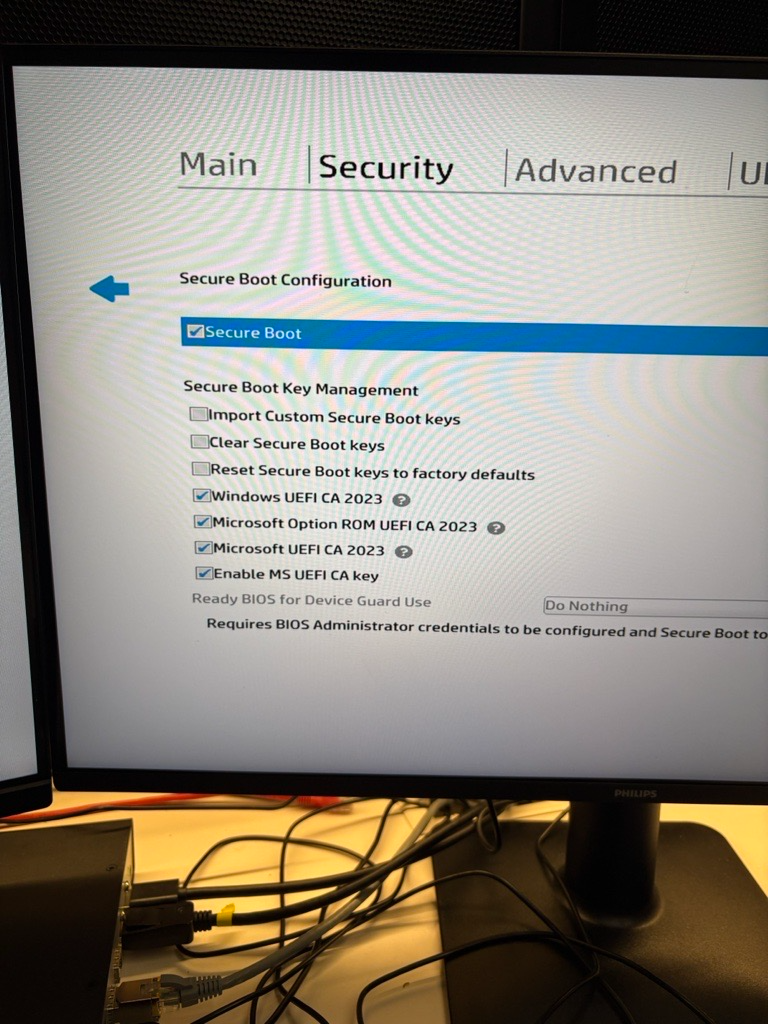
          c10b3ff5-675e-402a-ad00-6fc0e486e704-image.png

          i updated the uefi bios and i got more options under “secure boot” all the options before i got were just “enable ms uefi ca key”, i clicked on all uefi ca’s and i can now boot into windows

          Tom ElliottT 1 Reply Last reply Reply Quote 0
          • Tom ElliottT
            Tom Elliott @robertkwild
            last edited by

            @robertkwild So you’re good now?

            Please help us build the FOG community with everyone involved. It's not just about coding - way more we need people to test things, update documentation and most importantly work on uniting the community of people enjoying and working on FOG! Get in contact with me (chat bubble in the top right corner) if you want to join in.

            Web GUI issue? Please check apache error (debian/ubuntu: /var/log/apache2/error.log, centos/fedora/rhel: /var/log/httpd/error_log) and php-fpm log (/var/log/php*-fpm.log)

            Please support FOG if you like it: https://wiki.fogproject.org/wiki/index.php/Support_FOG

            1 Reply Last reply Reply Quote 0
            • 1 / 1
            • First post
              Last post

            48

            Online

            12.8k

            Users

            17.7k

            Topics

            157.3k

            Posts
            Copyright © 2012-2026 FOG Project