Hp z secure boot not booting into windows
-
Hi all,
I’m deploying an image I captured using fog and trying to deploy it to a pc with secure boot on but when fog deploys the image using partclone and it reboots after it’s imaged it I get a secure boot error,
I did do enroll secure boot keys to this pc using the fog pxe menuSECURE BOOT
Selected boot image did not authenticateIs there another setting on uefi i need to change as i do know hp z workstations are a nightmare as they have a lot of settings on the uefi ie vmd ie raid and hp sure start
Thanks,
Rob -
@robertkwild I think we need a screenshot of the issue you’re describing. Also, how did you enroll the machine? It almost sounds like the enrollment failed.
-
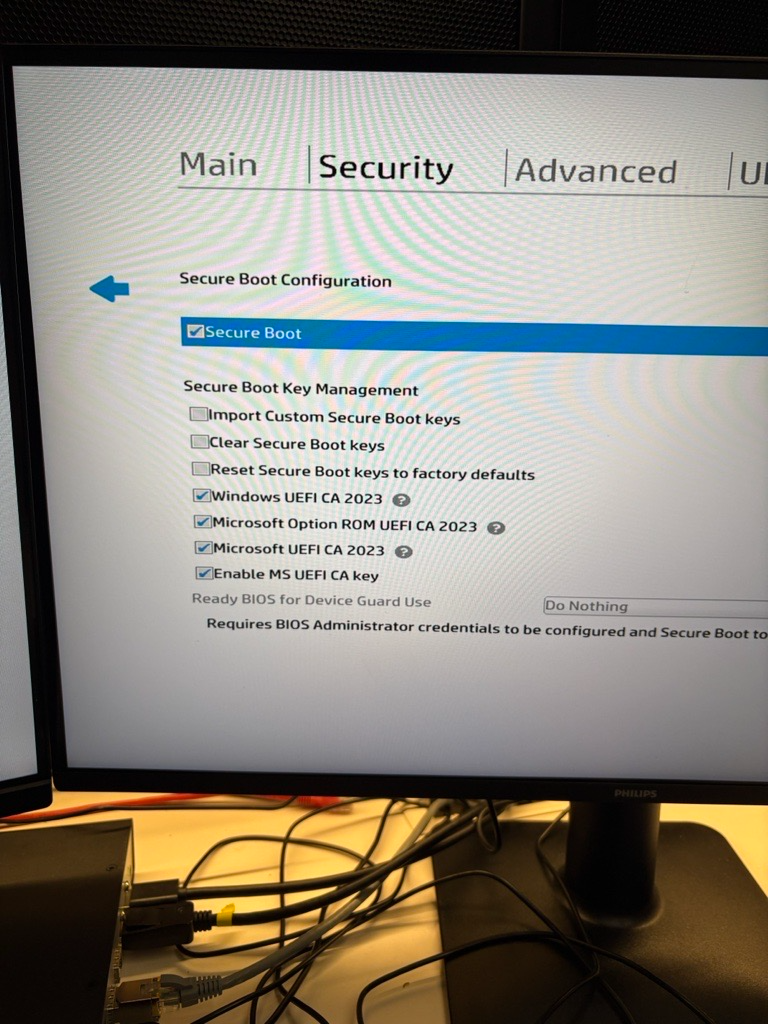
i updated the uefi bios and i got more options under “secure boot” all the options before i got were just “enable ms uefi ca key”, i clicked on all uefi ca’s and i can now boot into windows
