lovely stuff, job done -
kernel http://fog/listing/centos7_1804/images/pxeboot/vmlinuz ks=http://fog/listing/centos7_1804/ks.cfg
initrd http://fog/listing/centos7_1804/images/pxeboot/initrd.img
boot || goto MENU
lovely stuff, job done -
kernel http://fog/listing/centos7_1804/images/pxeboot/vmlinuz ks=http://fog/listing/centos7_1804/ks.cfg
initrd http://fog/listing/centos7_1804/images/pxeboot/initrd.img
boot || goto MENU
@george1421 made it into all one script, even the mkkeys.sh
#!/bin/bash

apt-get update
apt-get upgrade -y

apt-get install -y openssl efitools gnu-efi git build-essential help2man libssl-dev
perl -e'use CPAN; install "File::Slurp"'

mkdir -p /opt/fog/secureboot/efikeys

cat << EOF > /opt/fog/secureboot/mkkeys.sh
#!/bin/bash
# Copyright (c) 2015 by Roderick W. Smith
# Updated 26-Nov-2021 by George1421 for the FOG Project
# Licensed under the terms of the GPL v3

NAME=FOGProjectSB

openssl req -new -x509 -newkey rsa:2048 -subj "/CN=$NAME PK/" -keyout efikeys/PK.key \
        -out efikeys/PK.crt -days 3650 -nodes -sha256
openssl req -new -x509 -newkey rsa:2048 -subj "/CN=$NAME KEK/" -keyout efikeys/KEK.key \
        -out efikeys/KEK.crt -days 3650 -nodes -sha256
openssl req -new -x509 -newkey rsa:2048 -subj "/CN=$NAME DB/" -keyout efikeys/DB.key \
        -out efikeys/DB.crt -days 3650 -nodes -sha256
openssl x509 -in efikeys/PK.crt -out efikeys/PK.cer -outform DER
openssl x509 -in efikeys/KEK.crt -out efikeys/KEK.cer -outform DER
openssl x509 -in efikeys/DB.crt -out efikeys/DB.cer -outform DER

GUID=`python3 -c 'import uuid; print(str(uuid.uuid1()))'`
echo $GUID > efikeys/myGUID.txt

cert-to-efi-sig-list -g $GUID efikeys/PK.crt efikeys/PK.esl
cert-to-efi-sig-list -g $GUID efikeys/KEK.crt efikeys/KEK.esl
cert-to-efi-sig-list -g $GUID efikeys/DB.crt efikeys/DB.esl
rm -f efikeys/noPK.esl
touch efikeys/noPK.esl

sign-efi-sig-list -t "$(date --date='1 second' +'%Y-%m-%d %H:%M:%S')" \
                  -k efikeys/PK.key -c efikeys/PK.crt PK efikeys/PK.esl efikeys/PK.auth
sign-efi-sig-list -t "$(date --date='1 second' +'%Y-%m-%d %H:%M:%S')" \
                  -k efikeys/PK.key -c efikeys/PK.crt PK efikeys/noPK.esl efikeys/noPK.auth
sign-efi-sig-list -t "$(date --date='1 second' +'%Y-%m-%d %H:%M:%S')" \
                  -k efikeys/PK.key -c efikeys/PK.crt KEK efikeys/KEK.esl efikeys/KEK.auth
sign-efi-sig-list -t "$(date --date='1 second' +'%Y-%m-%d %H:%M:%S')" \
                  -k efikeys/KEK.key -c efikeys/KEK.crt db efikeys/DB.esl efikeys/DB.auth

chmod 0600 efikeys/*.key

echo ""
echo ""
echo "For use with KeyTool, copy the *.auth and *.esl files to a FAT USB"
echo "flash drive or to your EFI System Partition (ESP)."
echo "For use with most UEFIs' built-in key managers, copy the *.cer files;"
echo "but some UEFIs require the *.auth files."
echo ""
EOF

chmod a+x /opt/fog/secureboot/mkkeys.sh
cd /opt/fog/secureboot/
./mkkeys.sh

git clone git://git.kernel.org/pub/scm/linux/kernel/git/jejb/efitools.git

cd /opt/fog/secureboot/efitools
make

mkdir -p /opt/fog/secureboot/hwkeys
cd /opt/fog/secureboot/

efi-readvar -v PK -o /opt/fog/secureboot/hwkeys/hw_PK.esl
efi-readvar -v KEK -o /opt/fog/secureboot/hwkeys/hw_KEK.esl
efi-readvar -v db -o /opt/fog/secureboot/hwkeys/hw_db.esl
efi-readvar -v dbx -o /opt/fog/secureboot/hwkeys/hw_dbx.esl
chmod 666 /opt/fog/secureboot/hwkeys/*

cp /opt/fog/secureboot/efikeys/* /opt/fog/secureboot/efitools/
cp /opt/fog/secureboot/hwkeys/* /opt/fog/secureboot/efitools/
cd /opt/fog/secureboot/efitools

cat hw_db.esl > DB.esl
cat hw_KEK.esl > KEK.esl
cat hw_dbx.esl > dbx.esl

rm LockDown*efi LockDown.so LockDown.o
make

cp LockDown-signed.efi EnrollKeys.efi

mkdir -p /tftpboot

cp /opt/fog/secureboot/efitools/EnrollKeys.efi /tftpboot

mv /var/www/html/fog/service/ipxe/bzImage /var/www/html/fog/service/ipxe/bzImage-unsigned
sbsign --key /opt/fog/secureboot/efikeys/DB.key --cert /opt/fog/secureboot/efikeys/DB.crt --output /var/www/html/fog/service/ipxe/bzImage /var/www/html/fog/service/ipxe/bzImage-unsigned

mv /var/www/html/fog/service/ipxe/bzImage32 /var/www/html/fog/service/ipxe/bzImage32-unsigned
sbsign --key /opt/fog/secureboot/efikeys/DB.key --cert /opt/fog/secureboot/efikeys/DB.crt --output /var/www/html/fog/service/ipxe/bzImage32 /var/www/html/fog/service/ipxe/bzImage32-unsigned

mv /var/www/html/fog/service/ipxe/refind.efi /var/www/html/fog/service/ipxe/refind-unsigned.efi
sbsign --key /opt/fog/secureboot/efikeys/DB.key --cert /opt/fog/secureboot/efikeys/DB.crt --output /var/www/html/fog/service/ipxe/refind.efi /var/www/html/fog/service/ipxe/refind-unsigned.efi


mv /tftpboot/ipxe.efi /tftpboot/ipxe-unsigned.efi
sbsign --key /opt/fog/secureboot/efikeys/DB.key --cert /opt/fog/secureboot/efikeys/DB.crt --output /tftpboot/ipxe.efi /tftpboot/ipxe-unsigned.efi

mv /tftpboot/snponly.efi /tftpboot/snponly-unsigned.efi
sbsign --key /opt/fog/secureboot/efikeys/DB.key --cert /opt/fog/secureboot/efikeys/DB.crt --output /tftpboot/snponly.efi /tftpboot/snponly-unsigned.efi

mv /tftpboot/snp.efi /tftpboot/snp-unsigned.efi
sbsign --key /opt/fog/secureboot/efikeys/DB.key --cert /opt/fog/secureboot/efikeys/DB.crt --output /tftpboot/snp.efi /tftpboot/snp-unsigned.efi
@robertkwild good news, its worked!
before i did “quick inventroy” it listed the vm in “hosts” and then i clicked on “capture” to the image i just created, i used the “windows 10” as the os drop down
i syspreped windows 11, it failed first time, due to some program stopping it, all i had to do was remove it in powershell
Get-AppxPackage Microsoft.BingNews* | Remove-AppxPackage
then try again
sysprep /oobe /generalize /shutdown
it captured it fine, then i deleted that vm, created a new vm, disabled “secure boot”, network booted to my fog clicked on “deploy image” chose the windows 11 image
and the end result i get a nice windows 11 vm desktop 
@AlexPDX @Sebastian-Roth it was something simple in the end
BIOS > advanced > system options
i turned off/unticked - configure storage controller for VMD
basically its there version of RAID, untick it and its AHCI
hi all,
got a good way installing windows 11 on esxi, bypassing tpm check, as thats where i got the error saying “your pc doesnt meet all the requirements”
ive also on the vm disabled/unticked “secure boot” so i can still network boot my fog server
heres the how to
https://www.virten.net/2021/10/windows-11-on-vmware-esxi-this-pc-cant-run-windows-11/
basically, when you come to the “enter your key screen” press shift+f10
REG ADD HKLM\SYSTEM\Setup\LabConfig /v BypassTPMCheck /t REG_DWORD /d 1
my end goal is to sysprep it and capture it to fog and then see if i can deploy it to new vm!
thanks,
rob
@george1421 result!!!
i bought a HP NIC as i have a HP laptop and it works
this one if anyone is inteerested
https://www.amazon.co.uk/HP-N7P47AA-Network-DesignJet-Adapters-Black/dp/B01618WGMY?th=1
as literally star tech, ugreen, tp link, realtek or asix chipsets didnt work
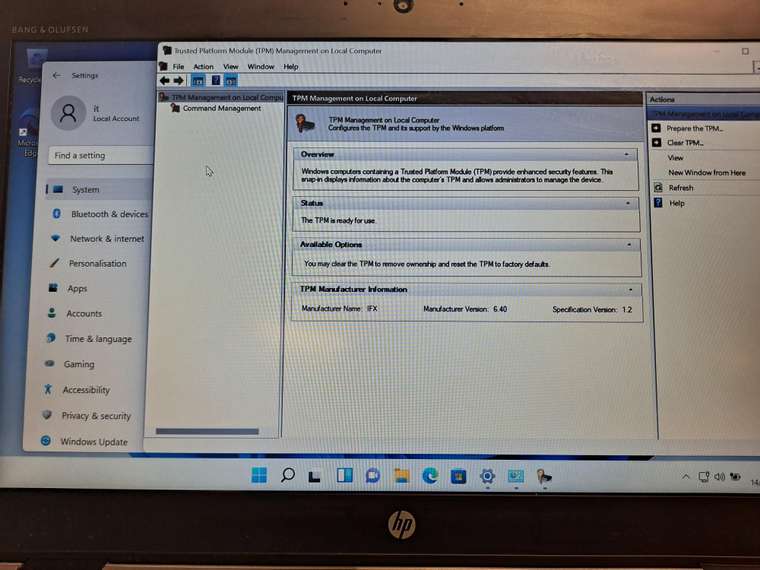
@george1421 the good thing is, you only need to do the reg hack and app removal on the GI, once you sysprep the GI and capture it, when you deploy it, you have to do nothing and you can deploy to multiple laptops, vms etc
the pic i shows you shows a laptop with TPM enabled, using the deployed image
@Tom-Elliott sorry took my time in replying back tom my bad
in the end i updated my stable to the latest 1.5.10.1650 and now when i capture the image it saves it as a folder not a file
@tcthorne i thought i resolved it by updating fog to 1.5.10.1650 ie the latest at the time but guess what the error has come back and i have no idea why its come back, the last resort is to update to working branch ie 1.6
@Tom-Elliott thanks Tom, you have been very helpful!!!
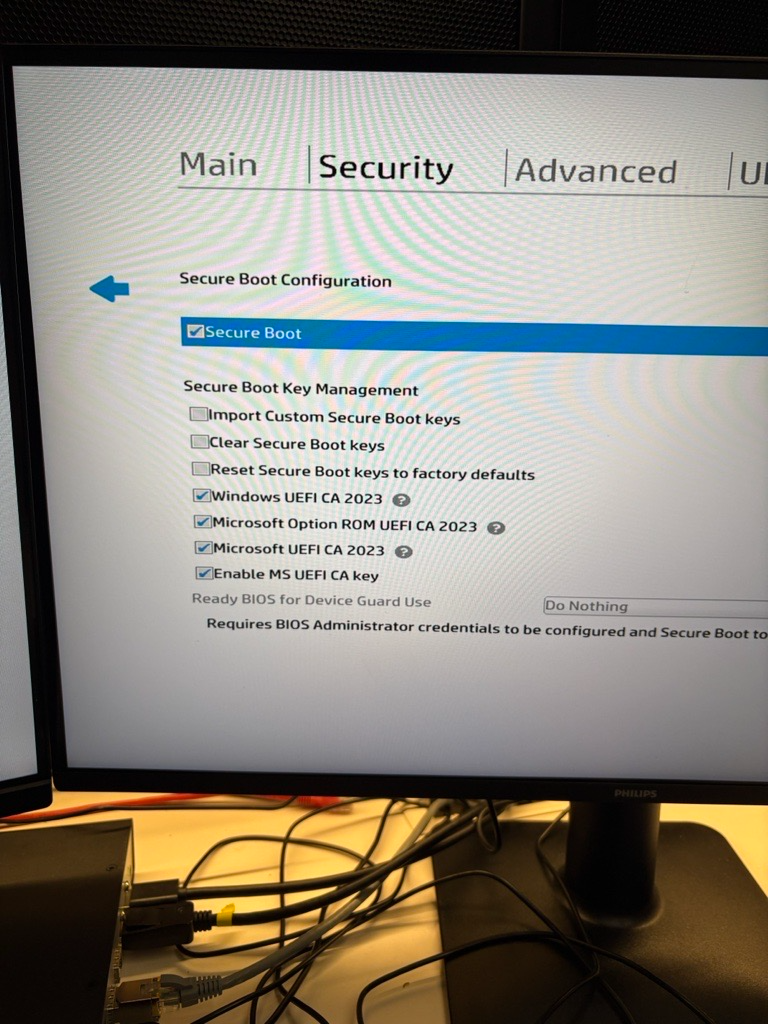
i updated the uefi bios and i got more options under “secure boot” all the options before i got were just “enable ms uefi ca key”, i clicked on all uefi ca’s and i can now boot into windows
Hi all,
I’m deploying an image I captured using fog and trying to deploy it to a pc with secure boot on but when fog deploys the image using partclone and it reboots after it’s imaged it I get a secure boot error,
I did do enroll secure boot keys to this pc using the fog pxe menu
SECURE BOOT
Selected boot image did not authenticate
Is there another setting on uefi i need to change as i do know hp z workstations are a nightmare as they have a lot of settings on the uefi ie vmd ie raid and hp sure start
Thanks,
Rob
@Tom-Elliott tbh ive found in my own experience if you install windows with secure boot on or off and then after if you change secure boot you get the blue screen
am i right in thinking i could capture the image using uefi non secure boot but i can deploy it to either uefi secure boot (need to enroll to fog) or non secure boot but then if it installs the image on secure boot on or off i then cant change the secure boot setting in bios as thats when windows will blue screen
@Tom-Elliott thanks Tom, you have been very helpful!!!
ok so if I want to use fog with a host with secure boot on, I need to “enroll secure boot key” and once the keys been burnt in the FW of the host it’s good to work with fog so it’s a one off thing you do and then you don’t have to enrol that specific host anymore ie a one time thing
@Tom-Elliott makes sense
as going forward we do need secure boot on for sophos endpoint for bitlocker
so does that mean if i delete the host from the web portal i need to re register it if i want to deploy or capture a new image?
@Tom-Elliott lovely
what i did once i registered the host i clicked on “task” and clicked “enroll secure boot”
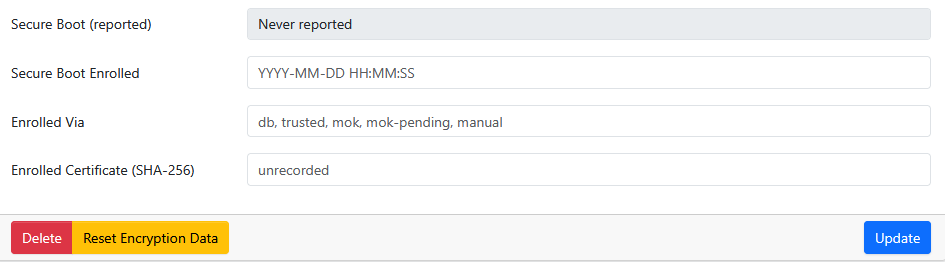
and now i see all the info now once its enrolled secure boot, i see all the info once i refresh the host on fog web portal
so tom, tbh i dont get it, why do you have to “enroll secure boot” on a host, do i need to to capture or deploy images?
as my main goal is to capture/deploy images to hosts when “secure boot” is on/ticked in bios
@Tom-Elliott ok ive got somewhere
so i did “quick enrollment” and now i see it on the web portal
after i did “enroll secure boot key”
went back on the host on the web portal and i dont see the key its enrolled
answer to your questions
curl -s -o /dev/null -w '%{http_code} %{size_download}\n' http://10.110.10.60/fog/service/ipxe/bzImage
200 11063696
cant do the other one as now its registered the host on fog
i get this now when i do a quick enrollment
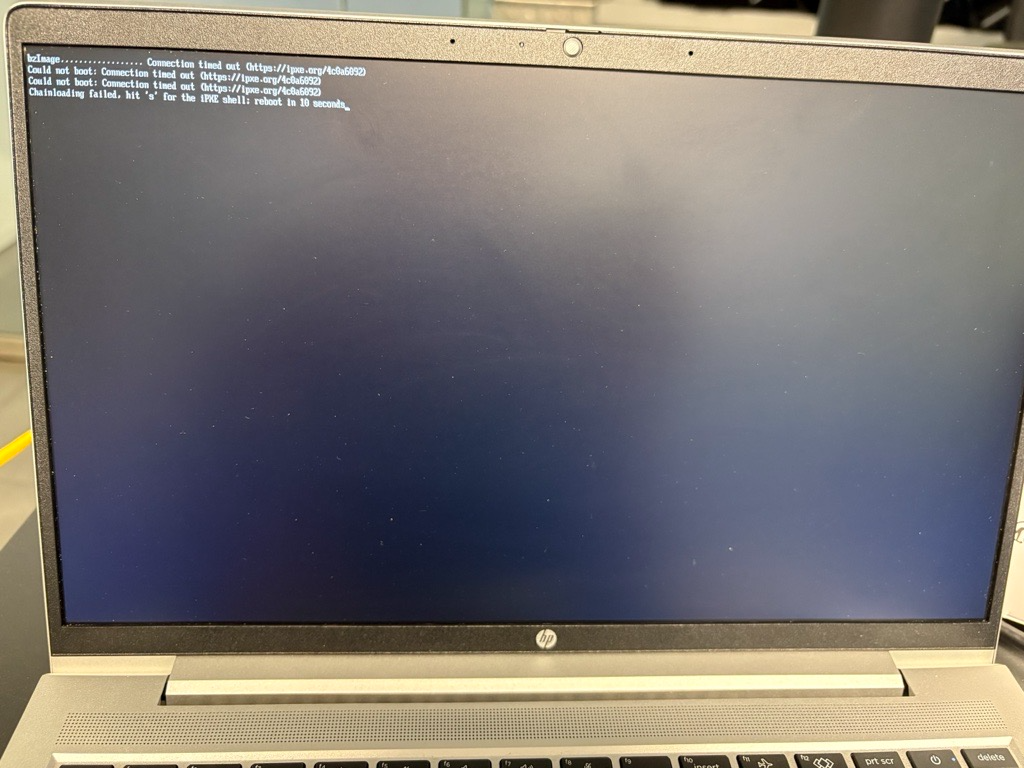
very wierd, when i pxebooted i got a black screen cli (different from the usual white gui one)
i restarted again (got the correct white screen gui), clicked on “quick enrollment”, went back to the web portal and cliked “all hosts” and i could see the host it added