• Recent
    • Unsolved
    • Tags
    • Popular
    • Users
    • Groups
    • Search
    • Register
    • Login

    Upgraded from FOG 1.5.9 to 1.5.10.1903 and having issues

    Scheduled Pinned Locked Moved Unsolved FOG Problems
    27 Posts 3 Posters 885 Views
    Loading More Posts
    • Oldest to Newest
    • Newest to Oldest
    • Most Votes
    Reply
    • Reply as topic
    Log in to reply
    This topic has been deleted. Only users with topic management privileges can see it.
    • Tom ElliottT
      Tom Elliott @Strahd
      last edited by

      @Strahd IT’s likely the \ character in the line that casued the error you saw.
      Either way it seems like it’s working now?

      Please help us build the FOG community with everyone involved. It's not just about coding - way more we need people to test things, update documentation and most importantly work on uniting the community of people enjoying and working on FOG! Get in contact with me (chat bubble in the top right corner) if you want to join in.

      Web GUI issue? Please check apache error (debian/ubuntu: /var/log/apache2/error.log, centos/fedora/rhel: /var/log/httpd/error_log) and php-fpm log (/var/log/php*-fpm.log)

      Please support FOG if you like it: https://wiki.fogproject.org/wiki/index.php/Support_FOG

      S 1 Reply Last reply Reply Quote 0
      • S
        Strahd @Tom Elliott
        last edited by

        @Tom-Elliott No, can’t get that command to work. I tried removing the \ or removing the quotes, no joy.

        d26a8d74-8f91-4a77-9ca4-0cbb79381317-image.png

        Tom ElliottT 1 Reply Last reply Reply Quote 0
        • Tom ElliottT
          Tom Elliott @Strahd
          last edited by

          @Strahd IS your fog server actually having issues now?

          I know you have the schema testing stuffs, but that was less important.

          it seems you have a database and all that jazz

          Please help us build the FOG community with everyone involved. It's not just about coding - way more we need people to test things, update documentation and most importantly work on uniting the community of people enjoying and working on FOG! Get in contact with me (chat bubble in the top right corner) if you want to join in.

          Web GUI issue? Please check apache error (debian/ubuntu: /var/log/apache2/error.log, centos/fedora/rhel: /var/log/httpd/error_log) and php-fpm log (/var/log/php*-fpm.log)

          Please support FOG if you like it: https://wiki.fogproject.org/wiki/index.php/Support_FOG

          S 1 Reply Last reply Reply Quote 0
          • S
            Strahd @Tom Elliott
            last edited by

            @Tom-Elliott Fog server has not been working since this entire thread was created… it’s not working.
            So far the database has refused to update and the web management console is 100% unavailable since the only thing it does is prompt me to update the database.

            Tried the manual update with
            sudo curl -X POST -H “X-Fog-Install-Token: 14dbb4a059bc201b2bf585b625087f92f4b5f8fd6dc70de8a0bef17845f00321” -d “schemaupdate=1” “http://10.46.10.40/fog/management/index.php?node=schema”

            but it responded with
            {“error”:“Unable to update schema”,“title”,“Schema Update Fail”}

            Here’s some data you requested earlier
            ebea6aea-521d-4527-aede-c586a08d8821-image.png

            Tom ElliottT 1 Reply Last reply Reply Quote 0
            • Tom ElliottT
              Tom Elliott @Strahd
              last edited by

              @Strahd Try another git pull please then try install again?

              Please help us build the FOG community with everyone involved. It's not just about coding - way more we need people to test things, update documentation and most importantly work on uniting the community of people enjoying and working on FOG! Get in contact with me (chat bubble in the top right corner) if you want to join in.

              Web GUI issue? Please check apache error (debian/ubuntu: /var/log/apache2/error.log, centos/fedora/rhel: /var/log/httpd/error_log) and php-fpm log (/var/log/php*-fpm.log)

              Please support FOG if you like it: https://wiki.fogproject.org/wiki/index.php/Support_FOG

              S 1 Reply Last reply Reply Quote 0
              • S
                Strahd @Tom Elliott
                last edited by

                @Tom-Elliott ok here we go again

                git pull
                sudo ./installfog.sh -y
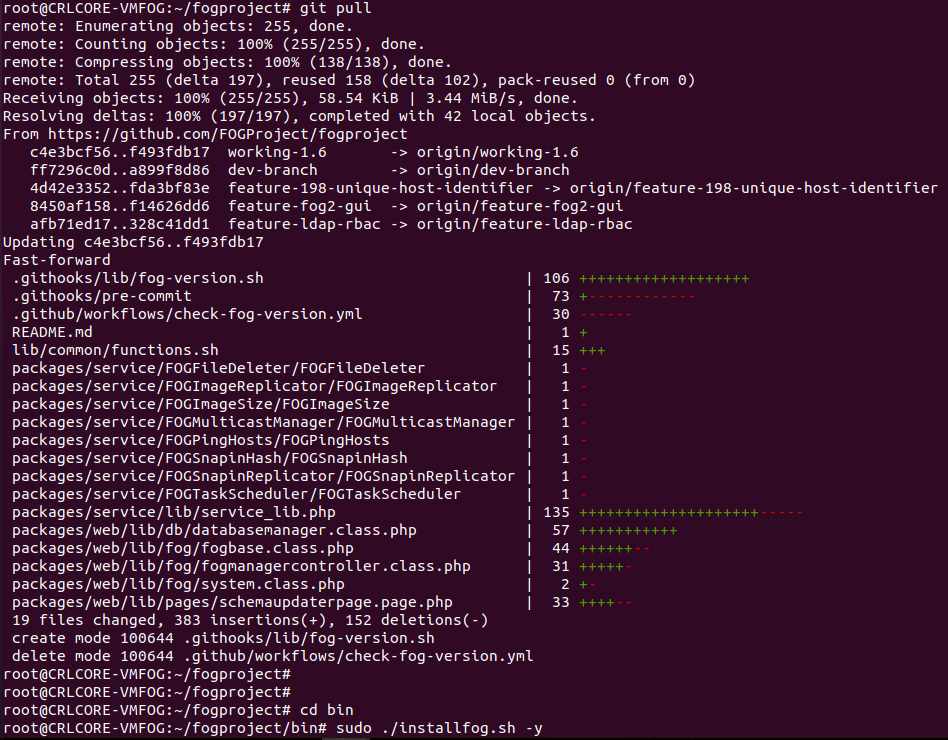
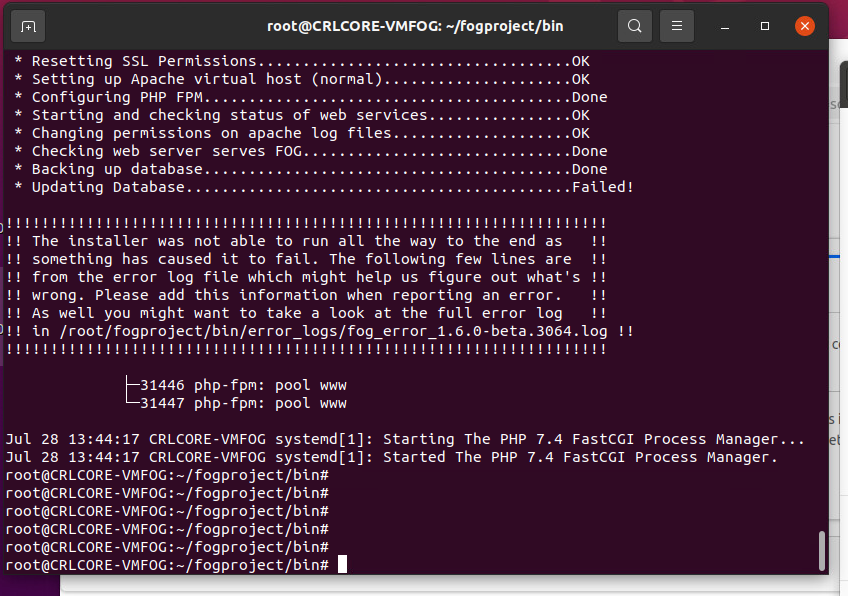
                8bbe0ed0-9248-45ca-8732-b167fc020296-image.png

                291def0c-6bb5-4f9c-aa14-3a0b03f5842b-image.png

                I read somewhere in another post that having a simple password on my account can cause DB problems, should we look into that? My password on this system is very simple, it’s never needed to be complex.

                JJ FullmerJ 1 Reply Last reply Reply Quote 0
                • JJ FullmerJ
                  JJ Fullmer Testers @Strahd
                  last edited by

                  @Strahd I would try updating PHP to 8.3, @Tom-Elliott managed to test it and it worked with 7.4 but I’d still suggest updating your PHP for best results and best security practice. I found (though didn’t test) a guide online right quick https://php.watch/articles/php-8.3-install-upgrade-on-debian-ubuntu#php83-ubuntu-quick there are many others out there.

                  I would also go in the database and see what your schema version is

                  mysql -u root fog
                  select * from schemaVersion;
                  

                  318 is the latest I believe, if yours says 318 and is stuck in a loop, maybe you can try forcing it down and then trying the schema update again. i.e.

                  mysql u root fog
                  update schemaVersion set vValue=317 where vID=1;
                  

                  Then open your fog server, it will redirect you to update the schema, and see if it takes then.

                  Also any time you’re attempting an install and it fails, if you could grab and share the error log it mentions i.e. /root/fogproject/bin/error_logs/fog_error_1.6.0-beta. 3064. log that would be very helpful.

                  There’s something specific to your instance that we need to find and fix. Maybe you have a firewall running sudo ufw status ?

                  Have you tried the FogApi powershell module? It's pretty cool IMHO
                  https://github.com/darksidemilk/FogApi
                  https://fogapi.readthedocs.io/en/latest/
                  https://www.powershellgallery.com/packages/FogApi
                  https://forums.fogproject.org/topic/12026/powershell-api-module

                  S 1 Reply Last reply Reply Quote 0
                  • S
                    Strahd @JJ Fullmer
                    last edited by Strahd

                    @JJ-Fullmer My version is 270. Do you still want me to try updating PHP to 8.3?
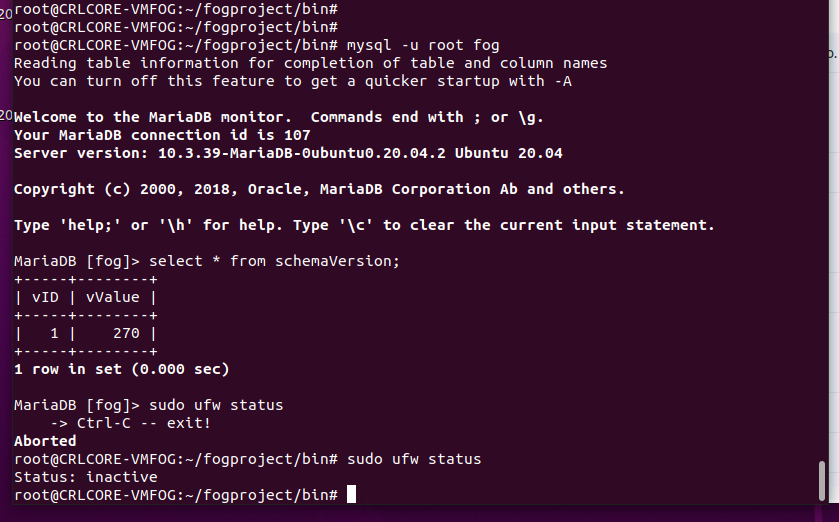
                    2b08c072-e93f-40b2-b2e2-43226ebf9d98-image.png

                    1 Reply Last reply Reply Quote 0
                    • S
                      Strahd @Tom Elliott
                      last edited by

                      @Tom-Elliott Guys… I’m out of time. School starts soon and I need to image 34 desktops and maybe around 10 laptops. Since my fog update can’t get past the database update, is there an easy way I can just delete the entire database and have the fog installer create a fresh one? I don’t mind losing the data since the whole fog system is basically inaccessable anyway. Thanks for your time.

                      Tom ElliottT 1 Reply Last reply Reply Quote 0
                      • Tom ElliottT
                        Tom Elliott @Strahd
                        last edited by

                        @Strahd At the least I’d suggest downloading an export of your hosts/images:

                        From there you can delete the database or rebuidl from scratch by:

                        mysql -u root If you have a password on your db I don’t know it but use the -p and you’ll be prompted to enter it.

                        DROP DATABASE fog;

                        Will delete everything.

                        From there, I still highly recommend you delete the /opt/fog/.fogsettings

                        Then rerun the installer.

                        I’m still going to say use working-1.6 as the testbed.

                        I hate that you’re having issues and I assure you I’m unable to replicate the problem you’re currently having which makes trying to fix your specific case impossible of course.

                        Hope this helps.

                        I’d still (at the least) get a full backup of your DB just in case something goes horribly wrong.

                        Please help us build the FOG community with everyone involved. It's not just about coding - way more we need people to test things, update documentation and most importantly work on uniting the community of people enjoying and working on FOG! Get in contact with me (chat bubble in the top right corner) if you want to join in.

                        Web GUI issue? Please check apache error (debian/ubuntu: /var/log/apache2/error.log, centos/fedora/rhel: /var/log/httpd/error_log) and php-fpm log (/var/log/php*-fpm.log)

                        Please support FOG if you like it: https://wiki.fogproject.org/wiki/index.php/Support_FOG

                        1 Reply Last reply Reply Quote 0
                        • 1
                        • 2
                        • 2 / 2
                        • First post
                          Last post

                        83

                        Online

                        12.7k

                        Users

                        17.6k

                        Topics

                        156.9k

                        Posts
                        Copyright © 2012-2026 FOG Project