The DDP package file was not found or could not be read
-
@george1421 helped build a custom kernel for me in the past and I’m wondering if I’ve hit a similar situation. This is a newer Supermicro platform. I pulled the latest bzImage and init.xz from https://github.com/FOGProject/fos/releases but no joy.
Server model: AS-3015MR-H8TNR
Board model: H13SRD-F
NIC model: AOC-S25GC-i2S / Intel E810-XXVAM2I get the following attempting to capture an image:
ice 0000:01:00.0: The DDP package file was not found or could not be read. Entering Safe Mode ice 0000:01:00.0: Fail during requesting FW: -2 ice 0000:01:00.1: The DDP package file was not found or could not be read. Entering Safe Mode ice 0000:01:00.1: Fail during requesting FW: -2 hub 6-0:1.0: config failed, hub doesn't have any ports! (err -19) Kernel panic - not syncing: VFS: Unable to mount root fs on "/dev/ram0" or unknown-block(1,0) Kernel Offset: disabled ---[ end Kernel panic - not syncing: VFS: Unable to mount root fs on "/dev/ram0" or unknown-block(1,0) ]--- -
@djgalloway said in The DDP package file was not found or could not be read:
The DDP package file was not found or could not be read. Entering Safe Mode
This specific issue is the default fog kernel doesn’t contain the required firmware that is required to communicate with your E810 network adapter.
If I built a custom fog kernel for you in the past you already know this, but for the folks that find this post in the future… The fog developers in an effort to make a super fast imaging engine designed it using the 90/10 rule in that they will build a kernel for 90% of the deployments (which mean desktop computers) and leaving the rest for one-off builds. The supermicro servers or servers in general are in a different class than desktop/workstation computers. The desktop/workstation computers are pretty much the same even from different vendors. So the 90% rule has almost all of the hardware drivers built into the kernel. Servers class computers on the other hand have specialty components to aid in redundancy, performance, or monitoring (that other 10%) that are not typically found in the workstation class computers. Natively supporting that remaining 10% means almost doubling the size of the FOS engine kernel as well as having an impact on imaging speed. That is why the native FOS kernel doesn’t have every hardware driver built in. In your case the Intel E810 is a server class network adapter with QSFP28 ports (not something typically found in a workstation class computer).
With that said, I’m sure either the FOG kernel developers or I can create a one-off kernel for you. I will need to resetup my development environment because I just built a new linux server and haven’t move the files over from my old server, so it may take me a day or so to be in the position to create a current kernel with the required firmware built in for the nic.
-
As I was connecting the firmware to the kernel I thought to myself, it would be great to see the log files to see what firmware the nic needed. When I looked at the nic’s firmware directory there was only one file to I compiled it into kernel so I just added that file and moved on. While it was compiling I looked at the error again and came to the conclusion that the DPP package error is a bit of a red herring. While its an error that you will eventually have to deal with, it didn’t cause this specific error.
The issue is the kernel panic unable to mount the root fs. Initializing the nic comes after the root fs (init.bz) is mounted. Please verify that both bzImage (which is the kernel that is booting) and init.xz is being transferred via ipxe to the target computer. The kernel bzImage is having an issue mounting init.xz (root fs).
Now with that said, here is a current kernel with the intel nic firmware included: https://drive.google.com/file/d/1rISBOUuqAlnV_cq9HZgsFdjfygpB4JLT/view?usp=drive_link
-
Hiya @george1421. First, thanks for your time thus far and thank you for the background/context. I truly was not aware the way we are using FOG was an edge case so I appreciate the extra help.
I can confirm I’ve put the bzImage you provided in place but continue to hit the same screen. Taking a step back, here is some additional context from my end:
- This is a new deployment and new environment.
- I am using dnsmasq for DNS and DHCP on a server, “soko01” at 10.20.192.11
- The rest of the servers of this type are still pointed at a MaaS instance so I have some chain loading going on in dnsmasq to target one server, “trial194” that I am attempting to capture a FOG image from. The rest are still pointed at MaaS.
- MaaS lives on soko02 at 10.20.192.12
- FOG lives on soko03 at 10.20.192.13
Here is my dnsmasq conf
##########################
### maas configuration ###
##########################

dhcp-match=set:pxearch0,option:client-arch,00:00
dhcp-match=set:pxearch7,option:client-arch,00:07
dhcp-match=set:pxearch10,option:client-arch,00:10
dhcp-match=set:pxearch9,option:client-arch,00:09
dhcp-match=set:pxearch8,option:client-arch,00:08
dhcp-match=set:pxearch13,option:client-arch,00:13
dhcp-match=set:pxearch0c,option:client-arch,00:0c
dhcp-match=set:pxearch0e,option:client-arch,00:0e
dhcp-match=set:pxearch1f,option:client-arch,00:1f
dhcp-match=set:pxearch20,option:client-arch,00:20
dhcp-match=set:pxearch11,option:client-arch,00:0b

dhcp-boot=tag:maas,tag:pxearch0,lpxelinux.0,soko02,10.20.192.12
dhcp-boot=tag:maas,tag:pxearch7,bootx64.efi,0.0.0.0,10.20.192.12
dhcp-boot=tag:maas,tag:pxearch10,http://10.20.192.12:5248/images/bootx86.efi,soko02,10.20.192.12
dhcp-boot=tag:maas,tag:pxearch9,bootx64.efi,0.0.0.0,10.20.192.12
dhcp-boot=tag:maas,tag:pxearch8,bootaa64.efi,0.0.0.0,10.20.192.12
dhcp-boot=tag:maas,tag:pxearch13,http://10.20.192.12:5248/images/bootaa64.efi,soko02,10.20.192.12
dhcp-boot=tag:maas,tag:pxearch0c,bootppc64.bin,soko02,10.20.192.12
dhcp-boot=tag:maas,tag:pxearch0e,pxelinux.0,soko02,10.20.192.12
dhcp-boot=tag:maas,tag:pxearch1f,boots390x.bin,soko02,10.20.192.12
dhcp-boot=tag:maas,tag:pxearch20,s390x_partition/maas,soko02,10.20.192.12
dhcp-boot=tag:maas,tag:pxearch11,http://10.20.192.12:5248/images/grubaa64.efi,soko02,10.20.192.12

#########################
### fog configuration ###
#########################

# FOG PXE (soko03 / 10.20.192.13)
# Detect iPXE
dhcp-userclass=set:ipxe,iPXE
dhcp-vendorclass=set:ipxe,iPXE
dhcp-match=set:ipxe,175

# FOG stage 1 (only if NOT already iPXE)
dhcp-boot=tag:fog,tag:!ipxe,tag:pxearch0,undionly.kpxe,soko03,10.20.192.13
dhcp-boot=tag:fog,tag:!ipxe,tag:pxearch0e,undionly.kpxe,soko03,10.20.192.13
dhcp-boot=tag:fog,tag:!ipxe,tag:pxearch7,snponly.efi,10.20.192.13,10.20.192.13
dhcp-boot=tag:fog,tag:!ipxe,tag:pxearch9,snponly.efi,10.20.192.13,10.20.192.13

# iPXE stage: set BOTH bootfile AND next-server
dhcp-boot=tag:fog,tag:ipxe,http://10.20.192.13/fog/service/ipxe/boot.php,soko03,10.20.192.13

# A MaaS-provisioned host
dhcp-host=set:maas,set:front,90:5a:08:77:62:02,10.20.193.193,trial193.front.sepia.ceph.com
# A FOG-provisioned host
dhcp-host=set:fog,set:front,90:5a:08:77:63:36,10.20.193.194,trial194.front.sepia.ceph.com
The autoexec.ipxe file I am serving
root@soko03:/var/www/html/fog/service/ipxe# cat /tftpboot/autoexec.ipxe
#!ipxe
dhcp
chain http://10.20.192.13/fog/service/ipxe/boot.php || shell
Here is the screen I am getting right before the
DDP packageerror
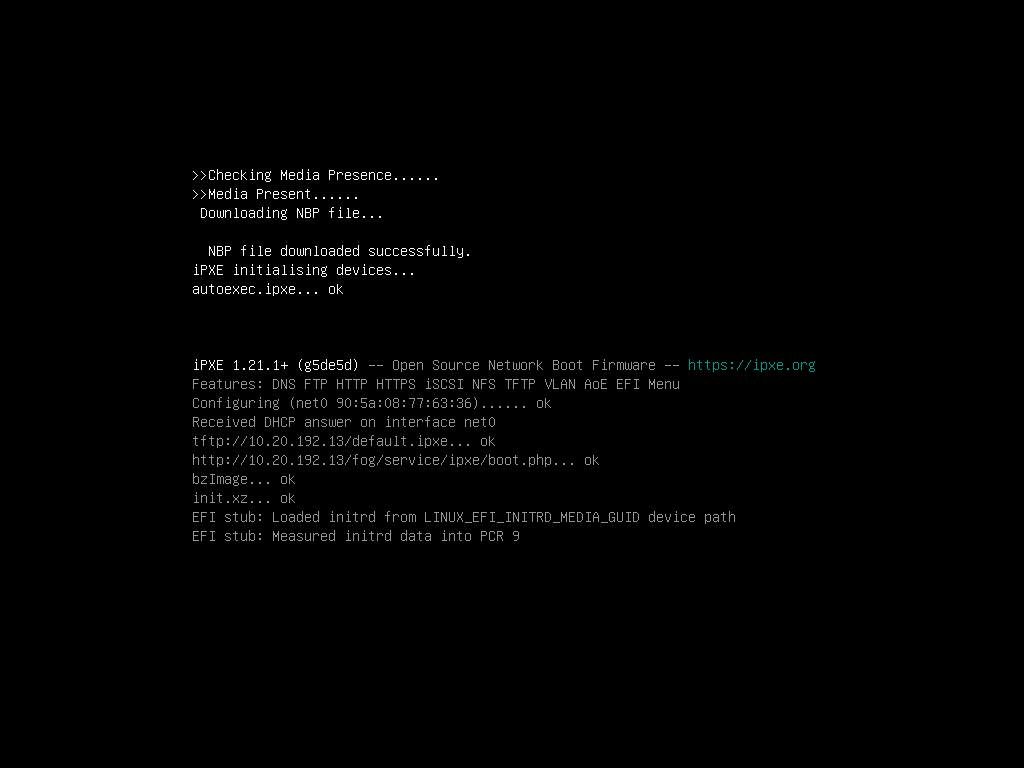
Which signals to me that it’s getting the bzImage file okay. If I load http://10.20.192.13/fog/service/ipxe/boot.php, it looks normal.
What should I check next?
-
@djgalloway Well you have a pretty complex environment when you are chain loading other boot loaders. What I would do on a temporary debugging bases, update your dhcp server settings to use the fog server’s IP for dhcp option 66 and ipxe.efi for dhcp option 67. This will use a fog only solution. Something else that might cause the issue is that the linux kernel that is booting, is not the kernel shipped with FOG. Or the opposite, the init.xz image is not a FOG image. The fog developers compress the init.xz image with an uncommon (in regards to linux file systems) compressor, if the booting linux kernel doesn’t have that image decompressor built in you will get that error about unknown block (because its still compressed).
It does look from your screen shot that both a bzImage and init.xz is being copied over to the target computer. Another but less likely issue could be that you are not using the custom ipxe.efi boot loader that was shipped with FOG.
-
@george1421 Today’s findings:
- autoexec.ipxe is getting loaded by some default somewhere (not because of my dnsmasq entry) and it’s completely ignored. None of its contents get run. I confirmed the correct autoexec.ipxe file is actually being loaded by renaming it, attempting a boot, and observing a ‘file not found’ error message.
- I pulled bzImage and init.xz directly from the latest release and N-1 https://github.com/FOGProject/fos/releases to ensure compatibility. No change.
- This server’s NIC does not support the native iPXE drivers. Only snponly.efi works.
No joy

-
Here is the working config
# detect iPXE
dhcp-userclass=set:ipxe,iPXE
dhcp-match=set:ipxe,175

# FIRST STAGE: UEFI firmware -> iPXE using SNP
dhcp-boot=tag:fog,tag:!ipxe,tag:!maas,snponly.efi,10.20.192.13,10.20.192.13

# SECOND STAGE: iPXE -> FOG (give it the script directly)
dhcp-boot=tag:fog,tag:ipxe,tag:!maas,default.ipxe,10.20.192.13,10.20.192.13
Factory default.ipxe.
I think deleting autoexec.ipxe was the missing piece a la https://forums.fogproject.org/topic/17937/uefi-boot-kernel-panic-unable-to-mount-root-fs-on-dev-ram0/9?_=1768445663029? Unfortunately, I tried so many different things that I am afraid to try to reproduce the failure and not be able to get back to a working state.
Regardless, it was not a missing NIC driver as I originally suspected. Thank you for your help nonetheless.
-
@djgalloway Just to add a bit of detail here. All of the work you did was on the iPXE side, which is great work by the way. The kernel driver I updated was after you select an FOG iPXE menu item that is when bzImage is loaded and run. It relies on kernel parameters that is provided by iPXE to find the root file system. This is technically what you fixed by ensuring that default.ipxe/boot.php from the fog server was being called. At the end of the day, I’m glad you got that working because your setup is definitely an edge case that works well in your environment.
