• Recent
    • Unsolved
    • Tags
    • Popular
    • Users
    • Groups
    • Search
    • Register
    • Login
    1. Home
    2. djgalloway
    D
    • Profile
    • Following 0
    • Followers 0
    • Topics 3
    • Posts 20
    • Groups 0

    djgalloway

    @djgalloway

    0
    Reputation
    8
    Profile views
    20
    Posts
    0
    Followers
    0
    Following
    Joined
    Last Online

    djgalloway Unfollow Follow

    Latest posts made by djgalloway

    • RE: The DDP package file was not found or could not be read

      Here is the working config

      # detect iPXE
      dhcp-userclass=set:ipxe,iPXE
      dhcp-match=set:ipxe,175
      
      # FIRST STAGE: UEFI firmware -> iPXE using SNP
      dhcp-boot=tag:fog,tag:!ipxe,tag:!maas,snponly.efi,10.20.192.13,10.20.192.13
      
      # SECOND STAGE: iPXE -> FOG (give it the script directly)
      dhcp-boot=tag:fog,tag:ipxe,tag:!maas,default.ipxe,10.20.192.13,10.20.192.13
      

      Factory default.ipxe.

      I think deleting autoexec.ipxe was the missing piece a la https://forums.fogproject.org/topic/17937/uefi-boot-kernel-panic-unable-to-mount-root-fs-on-dev-ram0/9?_=1768445663029? Unfortunately, I tried so many different things that I am afraid to try to reproduce the failure and not be able to get back to a working state.

      Regardless, it was not a missing NIC driver as I originally suspected. Thank you for your help nonetheless.

      posted in Hardware Compatibility
      D
      djgalloway
    • RE: The DDP package file was not found or could not be read

      @george1421 Today’s findings:

      • autoexec.ipxe is getting loaded by some default somewhere (not because of my dnsmasq entry) and it’s completely ignored. None of its contents get run. I confirmed the correct autoexec.ipxe file is actually being loaded by renaming it, attempting a boot, and observing a ‘file not found’ error message.
      • I pulled bzImage and init.xz directly from the latest release and N-1 https://github.com/FOGProject/fos/releases to ensure compatibility. No change.
      • This server’s NIC does not support the native iPXE drivers. Only snponly.efi works.

      No joy 😞

      posted in Hardware Compatibility
      D
      djgalloway
    • RE: The DDP package file was not found or could not be read

      Hiya @george1421. First, thanks for your time thus far and thank you for the background/context. I truly was not aware the way we are using FOG was an edge case so I appreciate the extra help.

      I can confirm I’ve put the bzImage you provided in place but continue to hit the same screen. Taking a step back, here is some additional context from my end:

      • This is a new deployment and new environment.
      • I am using dnsmasq for DNS and DHCP on a server, “soko01” at 10.20.192.11
      • The rest of the servers of this type are still pointed at a MaaS instance so I have some chain loading going on in dnsmasq to target one server, “trial194” that I am attempting to capture a FOG image from. The rest are still pointed at MaaS.
      • MaaS lives on soko02 at 10.20.192.12
      • FOG lives on soko03 at 10.20.192.13

      Here is my dnsmasq conf

      ##########################
      ### maas configuration ###
      ##########################
      
      dhcp-match=set:pxearch0,option:client-arch,00:00
      dhcp-match=set:pxearch7,option:client-arch,00:07
      dhcp-match=set:pxearch10,option:client-arch,00:10
      dhcp-match=set:pxearch9,option:client-arch,00:09
      dhcp-match=set:pxearch8,option:client-arch,00:08
      dhcp-match=set:pxearch13,option:client-arch,00:13
      dhcp-match=set:pxearch0c,option:client-arch,00:0c
      dhcp-match=set:pxearch0e,option:client-arch,00:0e
      dhcp-match=set:pxearch1f,option:client-arch,00:1f
      dhcp-match=set:pxearch20,option:client-arch,00:20
      dhcp-match=set:pxearch11,option:client-arch,00:0b
      
      dhcp-boot=tag:maas,tag:pxearch0,lpxelinux.0,soko02,10.20.192.12
      dhcp-boot=tag:maas,tag:pxearch7,bootx64.efi,0.0.0.0,10.20.192.12
      dhcp-boot=tag:maas,tag:pxearch10,http://10.20.192.12:5248/images/bootx86.efi,soko02,10.20.192.12
      dhcp-boot=tag:maas,tag:pxearch9,bootx64.efi,0.0.0.0,10.20.192.12
      dhcp-boot=tag:maas,tag:pxearch8,bootaa64.efi,0.0.0.0,10.20.192.12
      dhcp-boot=tag:maas,tag:pxearch13,http://10.20.192.12:5248/images/bootaa64.efi,soko02,10.20.192.12
      dhcp-boot=tag:maas,tag:pxearch0c,bootppc64.bin,soko02,10.20.192.12
      dhcp-boot=tag:maas,tag:pxearch0e,pxelinux.0,soko02,10.20.192.12
      dhcp-boot=tag:maas,tag:pxearch1f,boots390x.bin,soko02,10.20.192.12
      dhcp-boot=tag:maas,tag:pxearch20,s390x_partition/maas,soko02,10.20.192.12
      dhcp-boot=tag:maas,tag:pxearch11,http://10.20.192.12:5248/images/grubaa64.efi,soko02,10.20.192.12
      
      #########################
      ### fog configuration ###
      #########################
      
      # FOG PXE (soko03 / 10.20.192.13)
      # Detect iPXE
      dhcp-userclass=set:ipxe,iPXE
      dhcp-vendorclass=set:ipxe,iPXE
      dhcp-match=set:ipxe,175
      
      # FOG stage 1 (only if NOT already iPXE)
      dhcp-boot=tag:fog,tag:!ipxe,tag:pxearch0,undionly.kpxe,soko03,10.20.192.13
      dhcp-boot=tag:fog,tag:!ipxe,tag:pxearch0e,undionly.kpxe,soko03,10.20.192.13
      dhcp-boot=tag:fog,tag:!ipxe,tag:pxearch7,snponly.efi,10.20.192.13,10.20.192.13
      dhcp-boot=tag:fog,tag:!ipxe,tag:pxearch9,snponly.efi,10.20.192.13,10.20.192.13
      
      # iPXE stage: set BOTH bootfile AND next-server
      dhcp-boot=tag:fog,tag:ipxe,http://10.20.192.13/fog/service/ipxe/boot.php,soko03,10.20.192.13
      
      # A MaaS-provisioned host
      dhcp-host=set:maas,set:front,90:5a:08:77:62:02,10.20.193.193,trial193.front.sepia.ceph.com
      # A FOG-provisioned host
      dhcp-host=set:fog,set:front,90:5a:08:77:63:36,10.20.193.194,trial194.front.sepia.ceph.com
      

      The autoexec.ipxe file I am serving

      root@soko03:/var/www/html/fog/service/ipxe# cat /tftpboot/autoexec.ipxe 
      #!ipxe
      dhcp
      chain http://10.20.192.13/fog/service/ipxe/boot.php || shell
      

      Here is the screen I am getting right before the DDP package error
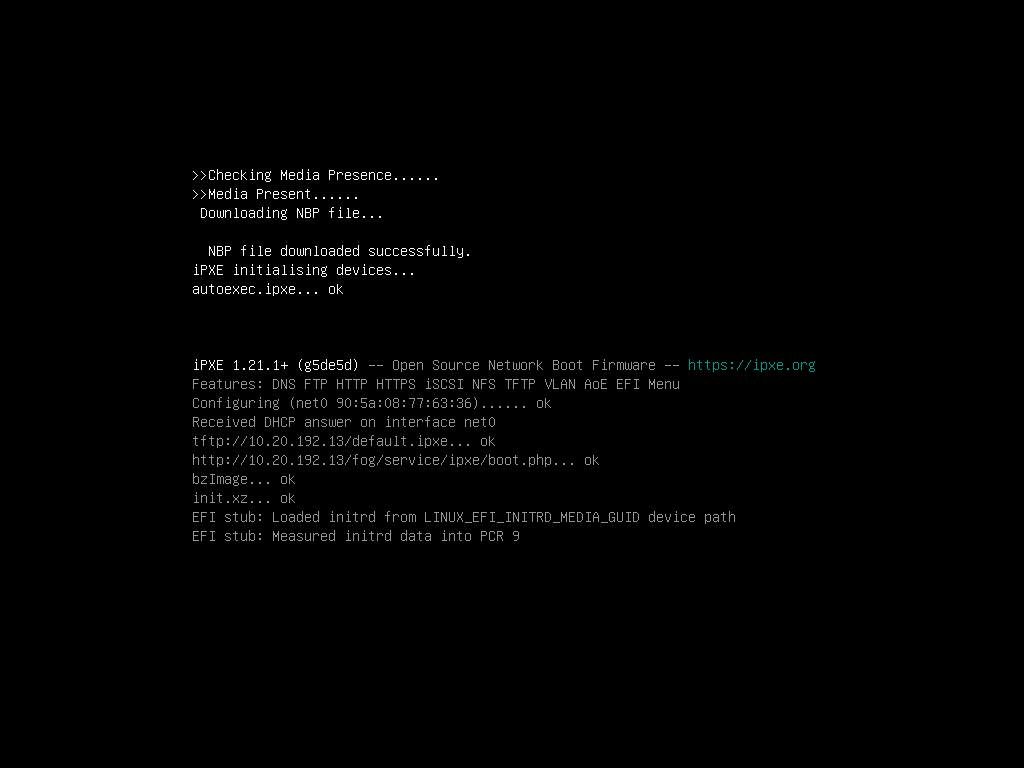
      iKVM_capture3.jpg

      Which signals to me that it’s getting the bzImage file okay. If I load http://10.20.192.13/fog/service/ipxe/boot.php, it looks normal.

      What should I check next?

      posted in Hardware Compatibility
      D
      djgalloway
    • The DDP package file was not found or could not be read

      @george1421 helped build a custom kernel for me in the past and I’m wondering if I’ve hit a similar situation. This is a newer Supermicro platform. I pulled the latest bzImage and init.xz from https://github.com/FOGProject/fos/releases but no joy.

      Server model: AS-3015MR-H8TNR
      Board model: H13SRD-F
      NIC model: AOC-S25GC-i2S / Intel E810-XXVAM2

      I get the following attempting to capture an image:

      ice 0000:01:00.0: The DDP package file was not found or could not be read. Entering Safe Mode
      ice 0000:01:00.0: Fail during requesting FW: -2
      ice 0000:01:00.1: The DDP package file was not found or could not be read. Entering Safe Mode
      ice 0000:01:00.1: Fail during requesting FW: -2
      hub 6-0:1.0: config failed, hub doesn't have any ports! (err -19)
      Kernel panic - not syncing: VFS: Unable to mount root fs on "/dev/ram0" or unknown-block(1,0)
      Kernel Offset: disabled
      ---[ end Kernel panic - not syncing: VFS: Unable to mount root fs on "/dev/ram0" or unknown-block(1,0) ]---
      
      posted in Hardware Compatibility
      D
      djgalloway
    • RE: No network interfaces found | Dell PowerEdge R650 | Intel E810-XXV

      @george1421 Great, thanks much for your help. I don’t have a lot of spare cycles to donate to the project at the moment but I did just throw you all some beer money.

      posted in Hardware Compatibility
      D
      djgalloway
    • RE: No network interfaces found | Dell PowerEdge R650 | Intel E810-XXV

      @george1421 That did it!

      Is there any additional information I could provide that might be helpful?

      Is there any harm in replacing my existing bzImage files with this patched kernel?

      posted in Hardware Compatibility
      D
      djgalloway
    • RE: No network interfaces found | Dell PowerEdge R650 | Intel E810-XXV

      Still no dice unfortunately. The NIC doesn’t show up in ip output at all.

      rpviewer (7).png

      posted in Hardware Compatibility
      D
      djgalloway
    • RE: No network interfaces found | Dell PowerEdge R650 | Intel E810-XXV

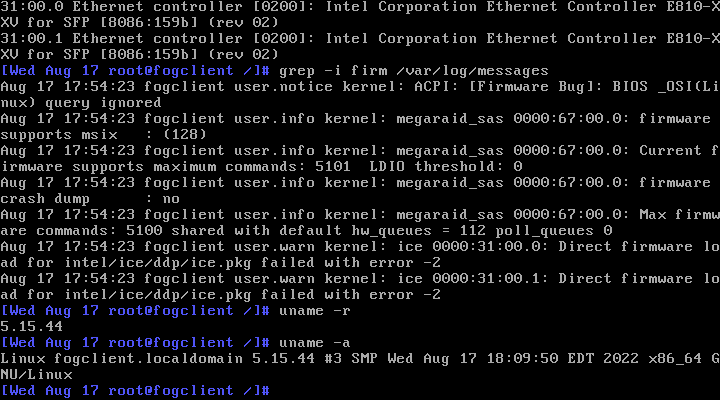
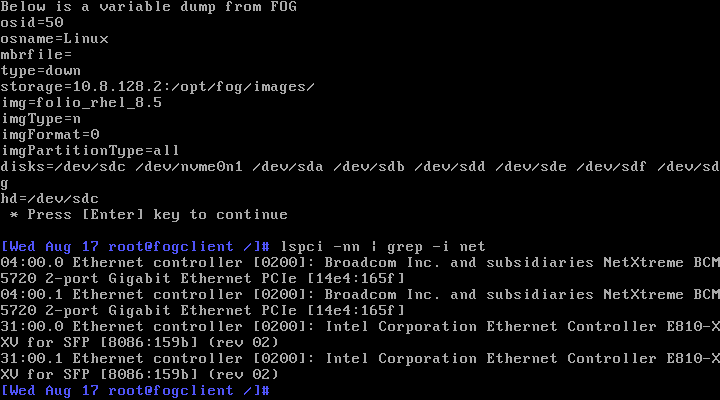
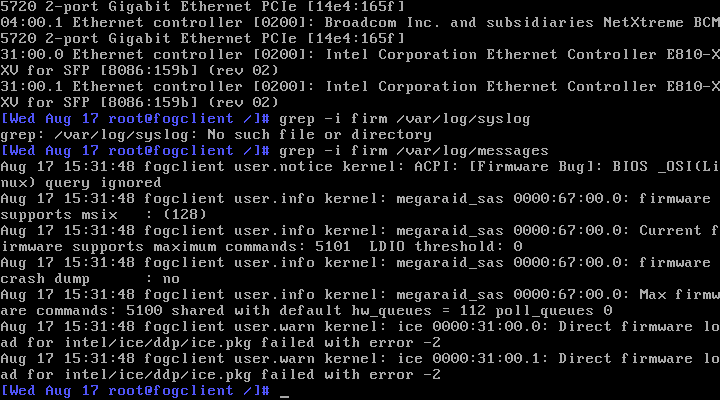
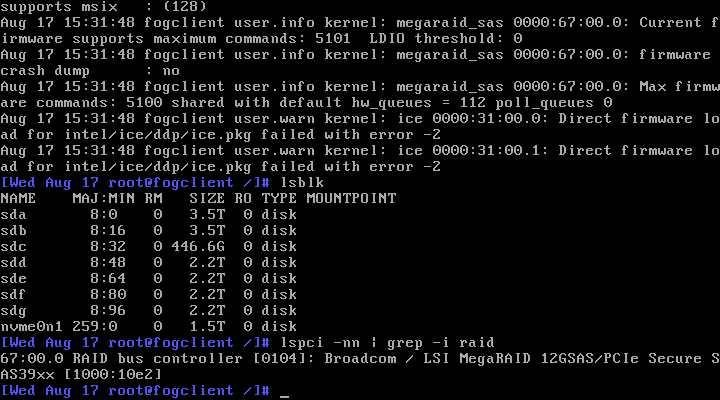
      @george1421 Here you are!
      rpviewer (2).png
      rpviewer (3).png
      rpviewer (5).png

      Looks like it’s playing nice with the RAID controller at least.

      posted in Hardware Compatibility
      D
      djgalloway
    • RE: No network interfaces found | Dell PowerEdge R650 | Intel E810-XXV

      @george1421 said in No network interfaces found | Dell PowerEdge R650 | Intel E810-XXV:

      @djgalloway we are going to need to build a one off kernel for this. We can get an answer but will need your help. But to preface this FOG is intended and designed to image desktop or workstation class systems. Its not designed for server with custom and unique hardware requirements.

      I’m aware of this and grateful for any special assistance you can provide. FOG is the perfect tool for my use case and has been serving us faithfully for 5 years.

      We will have to go the debugging route.

      Sure. How can I help?

      posted in Hardware Compatibility
      D
      djgalloway
    • No network interfaces found | Dell PowerEdge R650 | Intel E810-XXV

      I just got a new batch of Dell R650 servers with both an Embedded BCM5720 NIC and an add-on Intel® Ethernet 25G 2P E810-XXV. I will not be cabling the 1Gb NIC and intend to only use the 25Gb NIC.

      The servers are able to PXE boot to the 25Gb NIC and even get the FOG menu but upon attempting to capture a FOG image, the kernel quits at “No network interfaces found.” This is after I disabled the 1Gb NIC in the BIOS.

      This tells me the kernel doesn’t have the right driver but I am using the latest kernel available.

      file /var/www/html/fog/service/ipxe/bzImage*
      /var/www/html/fog/service/ipxe/bzImage:   Linux kernel x86 boot executable bzImage, version 5.15.34 (buildkite-agent@Tollana) #1 SMP Sat Apr 16 10:44:28 CDT 2022, RO-rootFS, swap_dev 0x8, Normal VGA
      /var/www/html/fog/service/ipxe/bzImage32: Linux kernel x86 boot executable bzImage, version 5.15.34 (buildkite-agent@Tollana) #1 SMP Sat Apr 16 10:40:09 CDT 2022, RO-rootFS, swap_dev 0x8, Normal VGA
      

      As I understand it, they should be supported https://github.com/torvalds/linux/commit/7dcf78b870be6418d72bb1c4d4924bf0f5ca5052

      posted in Hardware Compatibility
      D
      djgalloway