• Recent
    • Unsolved
    • Tags
    • Popular
    • Users
    • Groups
    • Search
    • Register
    • Login
    1. Home
    2. djgalloway
    D
    • Profile
    • Following 0
    • Followers 0
    • Topics 3
    • Posts 19
    • Groups 0

    djgalloway

    @djgalloway

    0
    Reputation
    8
    Profile views
    19
    Posts
    0
    Followers
    0
    Following
    Joined
    Last Online

    djgalloway Unfollow Follow

    Latest posts made by djgalloway

    • RE: The DDP package file was not found or could not be read

      @george1421 Today’s findings:

      • autoexec.ipxe is getting loaded by some default somewhere (not because of my dnsmasq entry) and it’s completely ignored. None of its contents get run. I confirmed the correct autoexec.ipxe file is actually being loaded by renaming it, attempting a boot, and observing a ‘file not found’ error message.
      • I pulled bzImage and init.xz directly from the latest release and N-1 https://github.com/FOGProject/fos/releases to ensure compatibility. No change.
      • This server’s NIC does not support the native iPXE drivers. Only snponly.efi works.

      No joy 😞

      posted in Hardware Compatibility
      D
      djgalloway
    • RE: The DDP package file was not found or could not be read

      Hiya @george1421. First, thanks for your time thus far and thank you for the background/context. I truly was not aware the way we are using FOG was an edge case so I appreciate the extra help.

      I can confirm I’ve put the bzImage you provided in place but continue to hit the same screen. Taking a step back, here is some additional context from my end:

      • This is a new deployment and new environment.
      • I am using dnsmasq for DNS and DHCP on a server, “soko01” at 10.20.192.11
      • The rest of the servers of this type are still pointed at a MaaS instance so I have some chain loading going on in dnsmasq to target one server, “trial194” that I am attempting to capture a FOG image from. The rest are still pointed at MaaS.
      • MaaS lives on soko02 at 10.20.192.12
      • FOG lives on soko03 at 10.20.192.13

      Here is my dnsmasq conf

      ##########################
      ### maas configuration ###
      ##########################
      
      dhcp-match=set:pxearch0,option:client-arch,00:00
      dhcp-match=set:pxearch7,option:client-arch,00:07
      dhcp-match=set:pxearch10,option:client-arch,00:10
      dhcp-match=set:pxearch9,option:client-arch,00:09
      dhcp-match=set:pxearch8,option:client-arch,00:08
      dhcp-match=set:pxearch13,option:client-arch,00:13
      dhcp-match=set:pxearch0c,option:client-arch,00:0c
      dhcp-match=set:pxearch0e,option:client-arch,00:0e
      dhcp-match=set:pxearch1f,option:client-arch,00:1f
      dhcp-match=set:pxearch20,option:client-arch,00:20
      dhcp-match=set:pxearch11,option:client-arch,00:0b
      
      dhcp-boot=tag:maas,tag:pxearch0,lpxelinux.0,soko02,10.20.192.12
      dhcp-boot=tag:maas,tag:pxearch7,bootx64.efi,0.0.0.0,10.20.192.12
      dhcp-boot=tag:maas,tag:pxearch10,http://10.20.192.12:5248/images/bootx86.efi,soko02,10.20.192.12
      dhcp-boot=tag:maas,tag:pxearch9,bootx64.efi,0.0.0.0,10.20.192.12
      dhcp-boot=tag:maas,tag:pxearch8,bootaa64.efi,0.0.0.0,10.20.192.12
      dhcp-boot=tag:maas,tag:pxearch13,http://10.20.192.12:5248/images/bootaa64.efi,soko02,10.20.192.12
      dhcp-boot=tag:maas,tag:pxearch0c,bootppc64.bin,soko02,10.20.192.12
      dhcp-boot=tag:maas,tag:pxearch0e,pxelinux.0,soko02,10.20.192.12
      dhcp-boot=tag:maas,tag:pxearch1f,boots390x.bin,soko02,10.20.192.12
      dhcp-boot=tag:maas,tag:pxearch20,s390x_partition/maas,soko02,10.20.192.12
      dhcp-boot=tag:maas,tag:pxearch11,http://10.20.192.12:5248/images/grubaa64.efi,soko02,10.20.192.12
      
      #########################
      ### fog configuration ###
      #########################
      
      # FOG PXE (soko03 / 10.20.192.13)
      # Detect iPXE
      dhcp-userclass=set:ipxe,iPXE
      dhcp-vendorclass=set:ipxe,iPXE
      dhcp-match=set:ipxe,175
      
      # FOG stage 1 (only if NOT already iPXE)
      dhcp-boot=tag:fog,tag:!ipxe,tag:pxearch0,undionly.kpxe,soko03,10.20.192.13
      dhcp-boot=tag:fog,tag:!ipxe,tag:pxearch0e,undionly.kpxe,soko03,10.20.192.13
      dhcp-boot=tag:fog,tag:!ipxe,tag:pxearch7,snponly.efi,10.20.192.13,10.20.192.13
      dhcp-boot=tag:fog,tag:!ipxe,tag:pxearch9,snponly.efi,10.20.192.13,10.20.192.13
      
      # iPXE stage: set BOTH bootfile AND next-server
      dhcp-boot=tag:fog,tag:ipxe,http://10.20.192.13/fog/service/ipxe/boot.php,soko03,10.20.192.13
      
      # A MaaS-provisioned host
      dhcp-host=set:maas,set:front,90:5a:08:77:62:02,10.20.193.193,trial193.front.sepia.ceph.com
      # A FOG-provisioned host
      dhcp-host=set:fog,set:front,90:5a:08:77:63:36,10.20.193.194,trial194.front.sepia.ceph.com
      

      The autoexec.ipxe file I am serving

      root@soko03:/var/www/html/fog/service/ipxe# cat /tftpboot/autoexec.ipxe 
      #!ipxe
      dhcp
      chain http://10.20.192.13/fog/service/ipxe/boot.php || shell
      

      Here is the screen I am getting right before the DDP package error
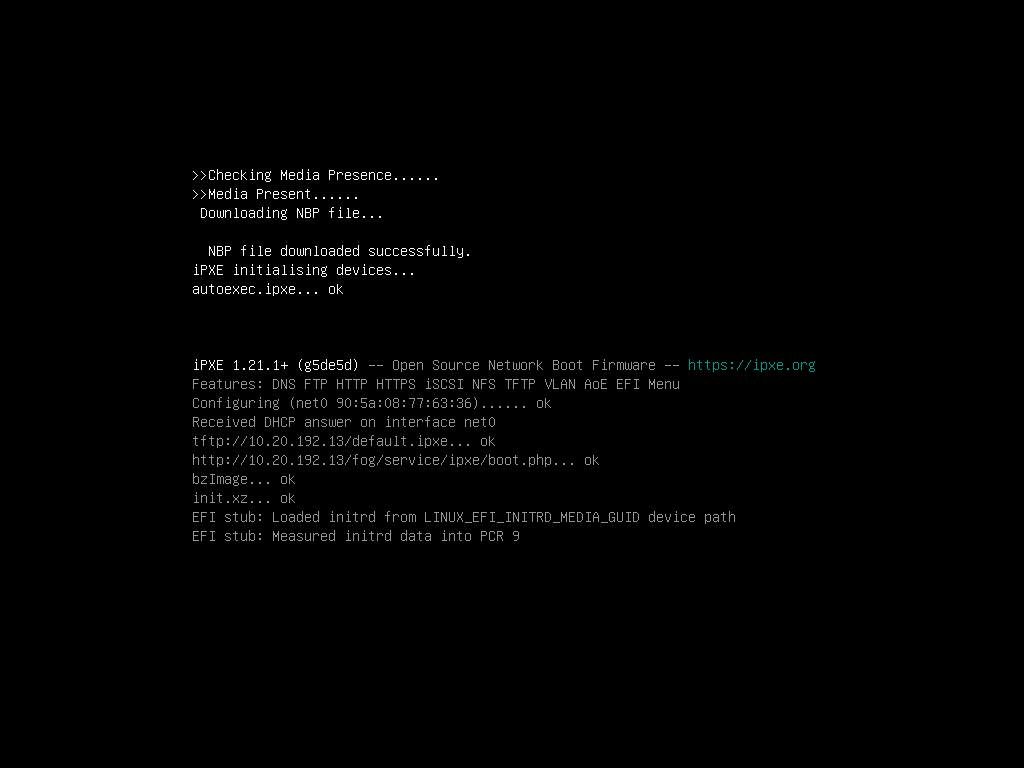
      iKVM_capture3.jpg

      Which signals to me that it’s getting the bzImage file okay. If I load http://10.20.192.13/fog/service/ipxe/boot.php, it looks normal.

      What should I check next?

      posted in Hardware Compatibility
      D
      djgalloway
    • The DDP package file was not found or could not be read

      @george1421 helped build a custom kernel for me in the past and I’m wondering if I’ve hit a similar situation. This is a newer Supermicro platform. I pulled the latest bzImage and init.xz from https://github.com/FOGProject/fos/releases but no joy.

      Server model: AS-3015MR-H8TNR
      Board model: H13SRD-F
      NIC model: AOC-S25GC-i2S / Intel E810-XXVAM2

      I get the following attempting to capture an image:

      ice 0000:01:00.0: The DDP package file was not found or could not be read. Entering Safe Mode
      ice 0000:01:00.0: Fail during requesting FW: -2
      ice 0000:01:00.1: The DDP package file was not found or could not be read. Entering Safe Mode
      ice 0000:01:00.1: Fail during requesting FW: -2
      hub 6-0:1.0: config failed, hub doesn't have any ports! (err -19)
      Kernel panic - not syncing: VFS: Unable to mount root fs on "/dev/ram0" or unknown-block(1,0)
      Kernel Offset: disabled
      ---[ end Kernel panic - not syncing: VFS: Unable to mount root fs on "/dev/ram0" or unknown-block(1,0) ]---
      
      posted in Hardware Compatibility
      D
      djgalloway
    • RE: No network interfaces found | Dell PowerEdge R650 | Intel E810-XXV

      @george1421 Great, thanks much for your help. I don’t have a lot of spare cycles to donate to the project at the moment but I did just throw you all some beer money.

      posted in Hardware Compatibility
      D
      djgalloway
    • RE: No network interfaces found | Dell PowerEdge R650 | Intel E810-XXV

      @george1421 That did it!

      Is there any additional information I could provide that might be helpful?

      Is there any harm in replacing my existing bzImage files with this patched kernel?

      posted in Hardware Compatibility
      D
      djgalloway
    • RE: No network interfaces found | Dell PowerEdge R650 | Intel E810-XXV

      Still no dice unfortunately. The NIC doesn’t show up in ip output at all.

      rpviewer (7).png

      posted in Hardware Compatibility
      D
      djgalloway
    • RE: No network interfaces found | Dell PowerEdge R650 | Intel E810-XXV

      @george1421 Here you are!
      rpviewer (2).png
      rpviewer (3).png
      rpviewer (5).png

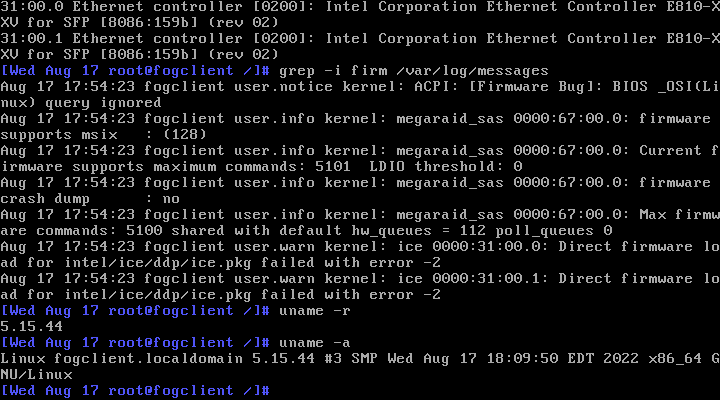
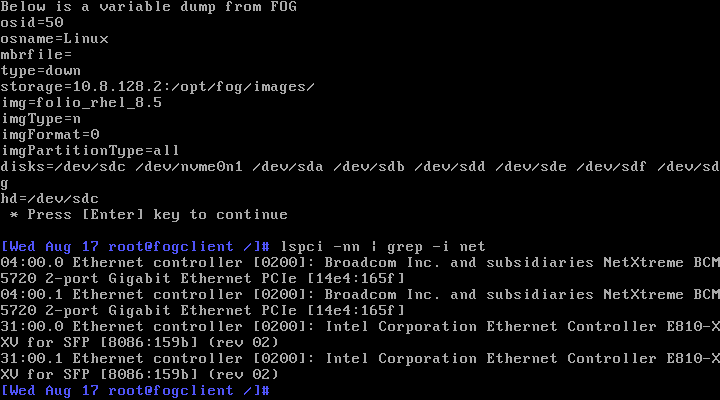
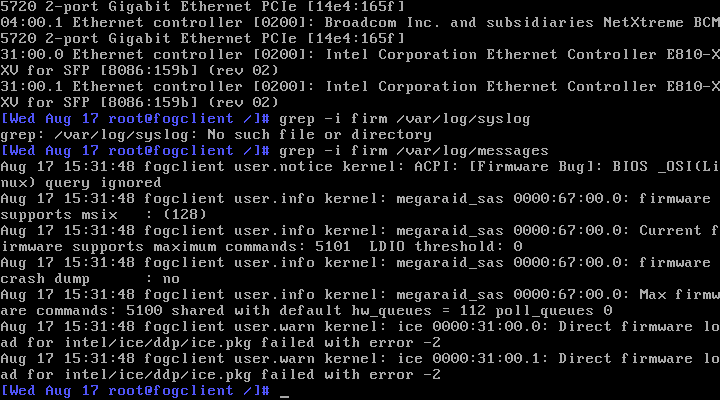
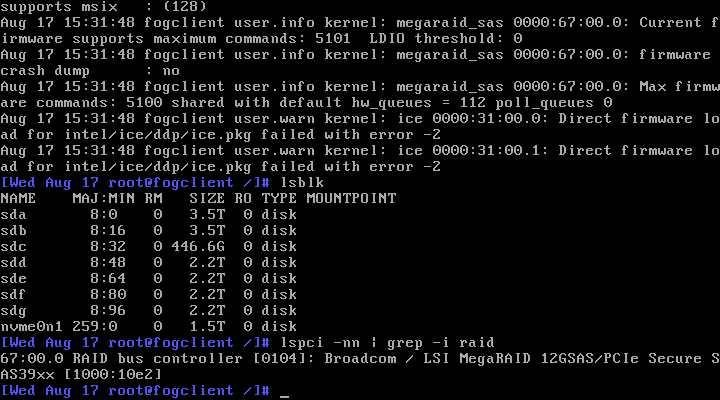
      Looks like it’s playing nice with the RAID controller at least.

      posted in Hardware Compatibility
      D
      djgalloway
    • RE: No network interfaces found | Dell PowerEdge R650 | Intel E810-XXV

      @george1421 said in No network interfaces found | Dell PowerEdge R650 | Intel E810-XXV:

      @djgalloway we are going to need to build a one off kernel for this. We can get an answer but will need your help. But to preface this FOG is intended and designed to image desktop or workstation class systems. Its not designed for server with custom and unique hardware requirements.

      I’m aware of this and grateful for any special assistance you can provide. FOG is the perfect tool for my use case and has been serving us faithfully for 5 years.

      We will have to go the debugging route.

      Sure. How can I help?

      posted in Hardware Compatibility
      D
      djgalloway
    • No network interfaces found | Dell PowerEdge R650 | Intel E810-XXV

      I just got a new batch of Dell R650 servers with both an Embedded BCM5720 NIC and an add-on Intel® Ethernet 25G 2P E810-XXV. I will not be cabling the 1Gb NIC and intend to only use the 25Gb NIC.

      The servers are able to PXE boot to the 25Gb NIC and even get the FOG menu but upon attempting to capture a FOG image, the kernel quits at “No network interfaces found.” This is after I disabled the 1Gb NIC in the BIOS.

      This tells me the kernel doesn’t have the right driver but I am using the latest kernel available.

      file /var/www/html/fog/service/ipxe/bzImage*
      /var/www/html/fog/service/ipxe/bzImage:   Linux kernel x86 boot executable bzImage, version 5.15.34 (buildkite-agent@Tollana) #1 SMP Sat Apr 16 10:44:28 CDT 2022, RO-rootFS, swap_dev 0x8, Normal VGA
      /var/www/html/fog/service/ipxe/bzImage32: Linux kernel x86 boot executable bzImage, version 5.15.34 (buildkite-agent@Tollana) #1 SMP Sat Apr 16 10:40:09 CDT 2022, RO-rootFS, swap_dev 0x8, Normal VGA
      

      As I understand it, they should be supported https://github.com/torvalds/linux/commit/7dcf78b870be6418d72bb1c4d4924bf0f5ca5052

      posted in Hardware Compatibility
      D
      djgalloway
    • RE: rcu_sched stall OR kernel panic on PowerEdge R640

      Here’s the latest output using the debug kernel:

      console [ttyS1] enabled
      bootconsole [earlyvga0] disabled
      ACPI: Core revision 20180810
      clocksource: hpet: mask: 0xffffffff max_cycles: 0xffffffff, max_idle_ns: 79635855245 ns
      APIC: Switch to symmetric I/O mode setup
      x2apic: IRQ remapping doesn't support X2APIC mode
      x2apic disabled
      Switched APIC routing to flat.
      ..TIMER: vector=0x30 apic1=0 pin1=2 apic2=-1 pin2=-1
      clocksource: tsc-early: mask: 0xffffffffffffffff max_cycles: 0x1fb633008a4, max_idle_ns: 440795292230 ns
      Calibrating delay loop (skipped), value calculated using timer frequency.. 4400.00 BogoMIPS (lpj=2200000)
      pid_max: default: 32768 minimum: 301
      Mount-cache hash table entries: 131072 (order: 8, 1048576 bytes)
      Mountpoint-cache hash table entries: 131072 (order: 8, 1048576 bytes)
      ENERGY_PERF_BIAS: Set to 'normal', was 'performance'
      ENERGY_PERF_BIAS: View and update with x86_energy_perf_policy(8)
      process: using mwait in idle threads
      Last level iTLB entries: 4KB 64, 2MB 8, 4MB 8
      Last level dTLB entries: 4KB 64, 2MB 0, 4MB 0, 1GB 4
      Spectre V1 : Mitigation: usercopy/swapgs barriers and __user pointer sanitization
      Spectre V2 : Mitigation: Full generic retpoline
      Spectre V2 : Spectre v2 / SpectreRSB mitigation: Filling RSB on context switch
      Spectre V2 : Enabling Restricted Speculation for firmware calls
      Spectre V2 : mitigation: Enabling conditional Indirect Branch Prediction Barrier
      Spectre V2 : User space: Mitigation: STIBP via seccomp and prctl
      Speculative Store Bypass: Mitigation: Speculative Store Bypass disabled via prctl and seccomp
      MDS: Mitigation: Clear CPU buffers
      Freeing SMP alternatives memory: 52K
      smpboot: CPU0: Intel(R) Xeon(R) Silver 4114 CPU @ 2.20GHz (family: 0x6, model: 0x55, stepping: 0x4)
      Performance Events: PEBS fmt3+, Skylake events, 32-deep LBR, full-width counters, Intel PMU driver.
      ... version:                4
      ... bit width:              48
      ... generic registers:      4
      ... value mask:             0000ffffffffffff
      ... max period:             00007fffffffffff
      ... fixed-purpose events:   3
      ... event mask:             000000070000000f
      rcu: Hierarchical SRCU implementation.
      smp: Bringing up secondary CPUs ...
      x86: Booting SMP configuration:
      .... node  #0, CPUs:      #1 #2 #3 #4 #5 #6 #7
      smp: Brought up 1 node, 8 CPUs
      smpboot: Max logical packages: 10
      smpboot: Total of 8 processors activated (35220.85 BogoMIPS)
      devtmpfs: initialized
      clocksource: jiffies: mask: 0xffffffff max_cycles: 0xffffffff, max_idle_ns: 1911260446275000 ns
      futex hash table entries: 2048 (order: 5, 131072 bytes)
      xor: automatically using best checksumming function   avx       
      pinctrl core: initialized pinctrl subsystem
      rcu: INFO: rcu_sched self-detected stall on CPU
      rcu:    0-....: (20999 ticks this GP) idle=04a/1/0x4000000000000002 softirq=10/10 fqs=5241 
      rcu:     (t=21000 jiffies g=-1175 q=19)
      NMI backtrace for cpu 0
      CPU: 0 PID: 1 Comm: swapper/0 Not tainted 4.19.65 #12
      Hardware name: Dell Inc. PowerEdge R640/08HT8T, BIOS 2.2.11 06/13/2019
      Call Trace:
       <IRQ>
       0xffffffff81d6ecad
       0xffffffff81d7222f
       ? 0xffffffff8102b073
       0xffffffff81d7228a
       0xffffffff8107ce90
       0xffffffff8107c41d
       0xffffffff810806b4
       0xffffffff8108a34e
       0xffffffff81e017d5
       0xffffffff81e013af
       </IRQ>
      RIP: 0010:0xffffffff8108fa1d
      Code: 36 48 89 de 89 c7 e8 ca ef cd 00 3b 05 c0 13 86 01 73 24 48 63 f0 49 8b 16 48 03 14 f5 30 83 61 82 8b 72 18 40 80 e6 01 74 04 <f3> 90 eb f3 eb d1 0f 0b e9 72 fe ff ff 48 83 c4 10 5b 5d 41 5c 41
      RSP: 0000:ffffc9000007fae0 EFLAGS: 00000202 ORIG_RAX: ffffffffffffff13
      RAX: 0000000000000001 RBX: ffff8897e101fac8 RCX: 0000000000000001
      RDX: ffff8897e10621c0 RSI: 0000000000000001 RDI: ffff8897e101fac8
      RBP: 000000000001fa80 R08: 0000000000000000 R09: 00000000016daed4
      R10: ffffc9000007fb58 R11: 000fffffffe00000 R12: 0000000000000001
      R13: 0000000000000008 R14: ffff8897e101fac0 R15: 0000000000000000
       ? 0xffffffff81039a
      
      posted in FOG Problems
      D
      djgalloway