Surface Laptop 7th Edition - PXE loads and then immediately reboot's
-
Having major issues PXE booting an intel based Surface Laptop 7th Edition. I have two these same devices that are unable to boot; secure boot is fully disable, pxe boot enabled.
PXE successfully downloads the file with no errors then machine immediately reboots. I am using the surface USB Ethernet adapter (which works fine with other surface pro devices). Microsoft changed something with this latest iteration of the Surface Laptop.
Same behavior when changing out the following:
- snponly.efi
- ipxe.efi
- Tried at least 6 different development kernel
- Not having any pxe issues with HP, Lenovo, Dell and Surface Pro(tablet) devices
FOG Server
- 1.5.10.1903
- bzImage Version: 6.6.69
- bzImage32 Version: 6.12.35
- arm_Image Version: 6.12.35
Help @Tom-Elliott Elliott I’m at my wits end!
Thanks!
Joe
-
@csurepair Have you tried one of the expermental (recent) kernels?
They’re using 6.18 and use a lot more stuffs that might help you.
-
This post is deleted! -
@Tom-Elliott We just tried the following experimental kernels, same reboot behavior.
bzImage Version: 6.18.38
bzImage32 Version: 6.18.38
arm_Image Version: 6.18.38and
bzImage Version: 6.12.35
bzImage32 Version: 6.12.35
arm_Image Version: 6.12.35Anything else we could try?
-
@csurepair Is this surface laptop an intel cpu, or is it a qualcomm cpu?
-
@JJ-Fullmer It is the Intel variant,
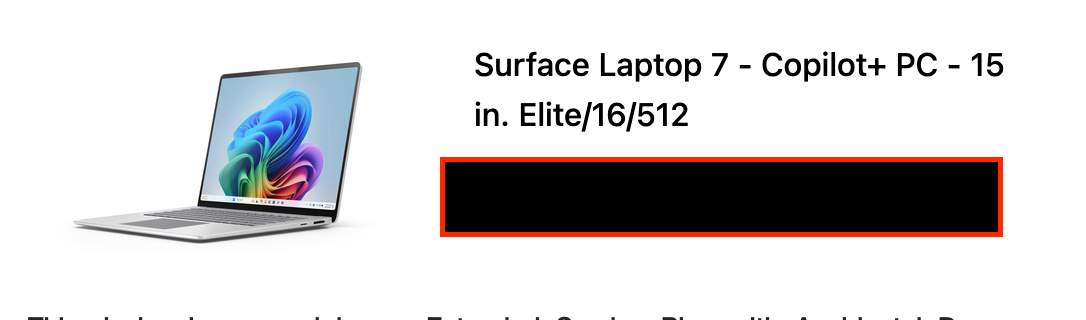
-
@csurepair I think Elite is referencing snapdragon elite? I actually don’t see any intel options for the laptop 7.
So you may need it to boot to the arm pxe file, but you’ll also need a new image for arm64 I imagine.
Microsoft also did something like this with the surface GO for business, there was a surface go 4 but all of a sudden no more surface go 4 being made and the product line was dead. They made a similarly priced (at the time, not anymore) 12" surface tablet but snapdragon based. We opted to not change our entire cpu architecture, so sadly I don’t have any experience with getting this working. I know @rodluz has done a lot with getting arm working with FOG and may be of more help if booting to arm kernel and init doesn’t work. -
@JJ-Fullmer This was it, thank you!!
Everything I read kept telling me this machine was x86 based and there is no hint in the BIOS or the serial number lookup tool, of it running an ARM processor(other then “Elite”). We are going to return these machines to the vendor, so problem solved for us.
Would be interested in hearing about future support for ARM in FOG because I’m sure this isn’t the last time we will cross paths with it.