Unable to Capture an image: ERROR: Could not adjust the bad sector list
-
Hi Fog Support Community,
I am all of a sudden having an issue capturing an image the error is
Error: Could not adjust the bad sector list
(ShrinkPartition)
Args Passed: /dev/sda3 /images/00155d0a050f/d1.orignal.fstypes 1:2:4:5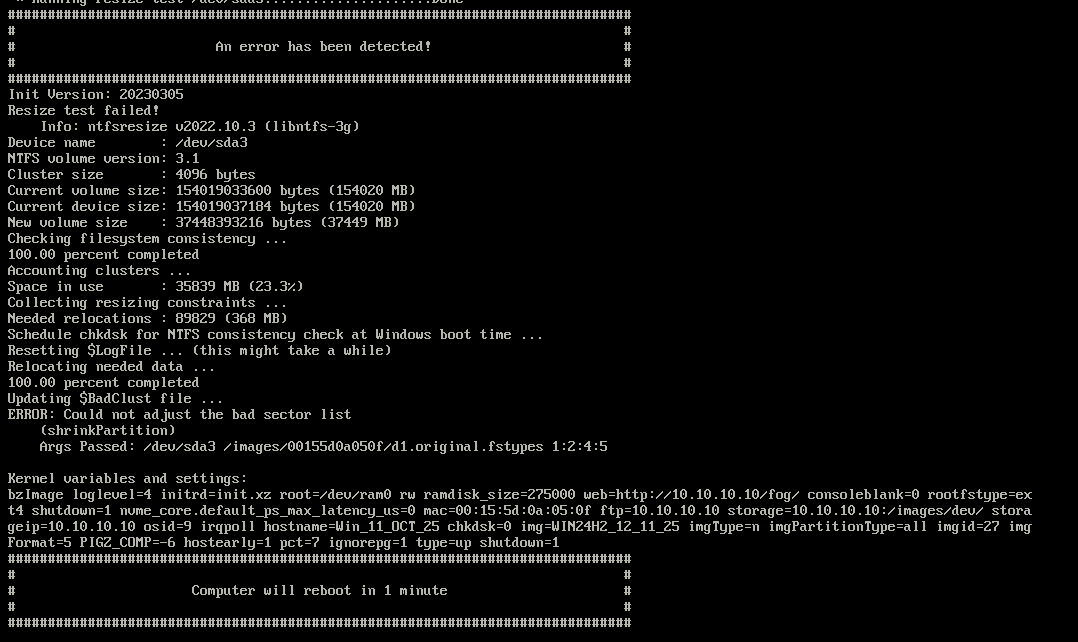
I have tried the following
chkdsk via both the command prompt and windows media
Updating FOG to the latest
Change the Kernel Version
Changed CAPTURERESIZEPCT to 15
Fog Debut FixPartStill no go, I am able to deploy my old image still but not capture
I still have plenty of disk space
-
@bond007fink I also did a check disk using gparted.
I am able to capture the image if I turn off compression using Multiple Partition single disk (Not Resizable)
-
Yes, I’ve had the same issue since the most recent Windows 11 updates, can’t resize the image
-
@jayrehme Thank you, I updated the files I need on an October image and it worked. Looks like its a bug that Fog is going to need to fix.
-
@bond007fink I want to push back on the conclusion being drawn here.
There are multiple workarounds mentioned in this thread, and at least one other user has already pointed out that this behavior correlates with recent Microsoft updates. That strongly suggests a change in how Windows is laying out or flagging the filesystem — not a regression in FOG itself.
FOG does not implement NTFS.
FOG does not write partclone.
FOG orchestrates existing, well-established tooling to capture and deploy disk images.When Microsoft changes disk metadata behavior in a way that causes ntfsclone/partclone to behave differently, that does not automatically make it a “FOG bug.” At best, it’s an upstream compatibility issue; at worst, it’s Windows leaving the filesystem in a state that violates assumptions those tools rely on.
For something to be classified as a FOG bug, it needs to meet at least one of the following:
- A regression introduced by a FOG code change
- Incorrect parameters being passed to the underlying tooling
- A failure in FOG’s logic that independently causes the issue
None of that has been demonstrated here.
If someone can provide
- A reproducible case across systems
- Debug runs showing FOG invoking tooling incorrectly
- Evidence that FOG’s behavior changed independent of OS updates.
then I’m happy to investigate it as a FOG issue.
But attributing “FOG needs to fix this” to what appears to be an upstream file-system behavior change isn’t accurate, and it doesn’t help move the problem toward an actual solution.
To be clear: I don’t mind helping fix problems - even upstream or compatibility issues - if there’s a clear, reproducible failure that can be attributed to something FOG controls.
What I do mind is hand-waving the problem away with “FOG needs to fix this” without showing:
- how to reliably reproduce it
- what changed that caused it
- or where FOG itself is behaving incorrectly.
Saying
it works if I use an older imageorit started after recent Windows updatesis useful diagnostic information - but it points away from FOG being the root cause, not toward it.If someone can demonstrate that:
- FOG is passing incorrect parameters
- FOG logic regressed
- or FOG can reasonably detect and mitigate a specific file-system condition.
then I’m happy to look at code or tooling changes.
Until then, attributing this to “FOG needing to fix something” is a conclusion without evidence.
-
@Tom-Elliott you would need to fix FOG so that it works with the latest windows update, that is on FOG. Maybe its not a Bug But a Required Feature update to make it compatible with the latest windows 11 update.
I would get a windows computer updated to the latest build and try to capture with FOG, if it works I am mistaken and I apologies for the inconvenience.
-
@bond007fink The
Could not adjust the bad sector listerror generally indicates that NTFS metadata (bitmap / bad cluster map) is in an inconsistent state. FOG relies onntfsresizeandpartcloneto safely shrink and copy NTFS volumes, and if those tools cannot reliably map the filesystem, the capture will correctly fail.This can occur even when the drive is physically healthy. A filesystem marked dirty will prevent offline resize operations. In that case, FOG is behaving as designed — failing here is preferable to deploying a potentially corrupt image to multiple systems.
We are seeing this more frequently after recent Windows updates, which appear to be leaving or reasserting the NTFS dirty bit.
Please boot the source machine into Windows and run a full filesystem and encryption check. Make sure to adjust the drive letter if your system volume is not
C:.chkdsk /x /r /f C: manage-bde -off C:Also ensure hibernation is disabled, as it can leave NTFS in a state that prevents offline resizing:
powercfg -h offIf capture succeeds when resizing is disabled, that further confirms this is a Windows filesystem state issue rather than a FOG defect.
FOG cannot safely work around filesystem states imposed by other vendors. Ignoring NTFS safety checks would risk data integrity, and that is not something FOG should or will do.
-
@bond007fink @jayrehme
I do a monthly update to my image (single disk resizable) with the latest updated added to the iso I use to install. So I’m using the November iso with the December updates embedded for win 11 24H2 x64 and I had no issues with resizing.So it may be a config issue on your end or it could be a more specific use case due to a windows upstream change.
Can you give a little more information on the hardware you’re capturing from and what your settings are on the image definition in fog?
I can try to recreate to some extent.Have you tried the FogApi powershell module? It's pretty cool IMHO
https://github.com/darksidemilk/FogApi
https://fogapi.readthedocs.io/en/latest/
https://www.powershellgallery.com/packages/FogApi
https://forums.fogproject.org/topic/12026/powershell-api-module -
@bond007fink @jayrehme
By “Latest Update” do you mean the December updates for Win 11 or do you mean the latest release version of 25H2 ? I haven’t tested 25H2 yet. -
@Tom-Elliott I’m having this issue currently running Fog version 1.5.10.1593 and OS version 10.0.19044 Build 19044. I’ve tried all of these steps and a plethora of others but have been unable to successfully capture a final image. Do you have any other ideas to try?
-
@deharter i could capture changing the image type , from “Single Disk - Resizeable” to “Multiple Partition Image - Single Disk (Not Resizeable)”
-
Just wanted to update all that I ran into this exact problem again. Though I can contnue to load old images, make the change, then capture new image. If I wait some time and try to capture the image again it fails. I have now tried the following
chkdsk
defrag
edit the init file
update to the latest version of Fogstll no luck “Could not adjust the bad sector list” continues to cause me issues, anyone have any ideas?
-
@bond007fink A new version of
ntfs-3g, which is the parent package forntfsresize, has finally been released last week. That’s after 4 years of no updates. If all goes well, I will be doing an experimental release this weekend with the newer package.As @Tom-Elliott stated, this is not an issue with FOG itself, instead FOG relies on tools like
ntfs-3gandpartcloneto handle all the NTFS filesystem changes. Hopefully this updated version fixes your issue.
I will update the thread once the experimental release is available.

