• Recent
    • Unsolved
    • Tags
    • Popular
    • Users
    • Groups
    • Search
    • Register
    • Login
    1. Home
    2. boombasstic
    B
    • Profile
    • Following 0
    • Followers 0
    • Topics 4
    • Posts 21
    • Groups 0

    boombasstic

    @boombasstic

    0
    Reputation
    1
    Profile views
    21
    Posts
    0
    Followers
    0
    Following
    Joined
    Last Online

    boombasstic Unfollow Follow

    Latest posts made by boombasstic

    • RE: image Multicast issue

      @Tom-Elliott
      I did not update yet to 1824, but i did SELECT * FROM HISTORY;

      MariaDB [fog]> SELECT * FROM history;
      +-----+----------------------------------------------------------------------------------------+-------+---------------------+-------------+
      | hID | hText                                                                                  | hUser | hTime               | hIP         |
      +-----+----------------------------------------------------------------------------------------+-------+---------------------+-------------+
      |   1 | [2026-04-01 08:33:55] MulticastSession ID: 1 NAME: test has been successfully updated. | fog   | 2026-04-01 08:33:55 | 10.10.3.116 |
      +-----+----------------------------------------------------------------------------------------+-------+---------------------+-------------+
      1 row in set (0.000 sec)
      

      the new session i create are not shown, and dont work until i run the maintenance queries

      then it shows in history table:

      MariaDB [fog]> SELECT * FROM history;
      +-----+----------------------------------------------------------------------------------------+-------+---------------------+-------------+
      | hID | hText                                                                                  | hUser | hTime               | hIP         |
      +-----+----------------------------------------------------------------------------------------+-------+---------------------+-------------+
      |   1 | [2026-04-01 08:33:55] MulticastSession ID: 1 NAME: test has been successfully updated. | fog   | 2026-04-01 08:33:55 | 10.10.3.116 |
      |   2 | [2026-04-01 09:10:37] MulticastSession ID: 1 NAME: test has been successfully updated. | fog   | 2026-04-01 09:10:37 | 10.10.3.116 |
      +-----+----------------------------------------------------------------------------------------+-------+---------------------+-------------+
      2 rows in set (0.000 sec)
      
      posted in FOG Problems
      B
      boombasstic
    • RE: image Multicast issue

      ok i ll wait for 1824.
      It’s not a big issue, i can either multicast by doing a quick registration on my devices , grouping them and doing a group multicast. that works everytime. or just run the queries, and that seem to flush whatever it is that is blocking the multicast.

      Thanks!

      posted in FOG Problems
      B
      boombasstic
    • image Multicast issue

      Hi,

      i got some issue with Multicast image, had this issue for sometime, now im running the latest 1.5.10.1815 and still got this issue.

      If i create a multicast image task , by going to image menu then clicking Multicast image, and creating a multicast session. It works, but then if i want to do an other session , when i click on start, it just reset the fields to default value (session name, count, timeout, image ) but the multicast session is not created.

      if i reboot the server i still cannot create a multicast image session anymore.
      i noticed that if i run the database maintenance queries :
      DELETE FROM hosts WHERE hostID = ‘0’;
      DELETE FROM hostMAC WHERE hmID = ‘0’ OR hmHostID = ‘0’;
      DELETE FROM groupMembers WHERE gmID = ‘0’ OR gmHostID = ‘0’ OR gmGroupID = ‘0’;
      DELETE FROM snapinGroupAssoc WHERE sgaID = ‘0’ OR sgaSnapinID = ‘0’ OR sgaStorageGroupID = ‘0’;
      DELETE from snapinAssoc WHERE saID = ‘0’ OR saHostID = ‘0’ OR saSnapinID = ‘0’;
      DELETE FROM hosts WHERE hostID NOT IN (SELECT hmHostID FROM hostMAC WHERE hmPrimary = ‘1’);
      DELETE FROM hosts WHERE hostID NOT IN (SELECT hmHostID FROM hostMAC);
      DELETE FROM hostMAC WHERE hmhostID NOT IN (SELECT hostID FROM hosts);
      DELETE FROM snapinAssoc WHERE saHostID NOT IN (SELECT hostID FROM hosts);
      DELETE FROM groupMembers WHERE gmHostID NOT IN (SELECT hostID FROM hosts);
      DELETE FROM tasks WHERE taskStateID IN (“1”,“2”,“3”);
      DELETE FROM snapinTasks WHERE stState in (“1”,“2”,“3”);
      TRUNCATE TABLE multicastSessions;
      TRUNCATE TABLE multicastSessionsAssoc;
      DELETE FROM tasks WHERE taskTypeId=8;

      then i can create a task again.

      Is there anything to fix this behavior?

      posted in FOG Problems
      B
      boombasstic
    • issue with updating / isntall script

      Hi,

      i use fog on debian trixie, and have no issue so far it works great.
      I tried today to update to the lastest stable version.

      At the end of the install script it checks fogproject user last login with lastlog command.

      But that command was deprecated i think.
      i had to install lastlog2, and modify /lib/common/functions.sh line 1256 , and replace lastlog by lastlog2, and then it worked.

      Otherwise as it cannot check last login time, it cancels the update and say that the usr was logged with, so we should delete the user.

      posted in FOG Problems
      B
      boombasstic
    • RE: Unable to Capture an image: ERROR: Could not adjust the bad sector list

      @deharter i could capture changing the image type , from “Single Disk - Resizeable” to “Multiple Partition Image - Single Disk (Not Resizeable)”

      posted in FOG Problems
      B
      boombasstic
    • Export image doesn't seem to work anymore

      Hi, i recently upgraded my server from 1.5.9 to 1.5.10.1698

      When i go to images , then click Export Images then Export , it asks for the credentials, but does nothing, it says Attempting to perform action but i can click on export and no file is downloaded.

      It used to download a .csv but now it doesnt not anymore.

      Any ideas how i could fix this?

      Thanks.

      posted in FOG Problems
      B
      boombasstic
    • RE: deploy issue after copying image to an other FOG server

      @sebastian-roth

      I changed the d1.partitions and d1.minimum.partitions and it works.

      posted in FOG Problems
      B
      boombasstic
    • RE: deploy issue after copying image to an other FOG server

      @sebastian-roth
      I am not sure to understand what you asked me to do.

      i tried changing the size of the data partition in the d1.minimum.partitions files, and set this partitions to fixed by adding its number in the d1.fixed_size_partitions

      but it did not work.

      posted in FOG Problems
      B
      boombasstic
    • RE: deploy issue after copying image to an other FOG server

      Here are the content of the partition files.

      d1.partitions

      label: gpt
      label-id: 7D3BE2EA-722A-43A9-AEA0-1F36F17095D8
      device: /dev/nvme0n1
      unit: sectors
      first-lba: 34
      last-lba: 500118158
      
      /dev/nvme0n1p1 : start=        2048, size=      532480, type=C12A7328-F81F-11D2-BA4B-00A0C93EC93B, uuid=D1686215-19B9-4424-AE16-3405C9F3DEE1, name="EFI system partition", attrs="RequiredPartition GUID:63"
      /dev/nvme0n1p2 : start=      534528, size=       32768, type=E3C9E316-0B5C-4DB8-817D-F92DF00215AE, uuid=935DDB3D-1186-4C7F-A7D0-903A2F7831CE, name="Microsoft reserved partition", attrs="GUID:63"
      /dev/nvme0n1p3 : start=      567296, size=   496336896, type=EBD0A0A2-B9E5-4433-87C0-68B6B72699C7, uuid=A1E84F32-54EE-481A-A40E-C8A6AE68AD64, name="Basic data partition"
      /dev/nvme0n1p4 : start=   496904192, size=     1165312, type=DE94BBA4-06D1-4D40-A16A-BFD50179D6AC, uuid=5D48B483-9C7A-4094-BDA1-AD3DC4C1070A, name="attrs=\x22RequiredPartition GUID:63"
      /dev/nvme0n1p5 : start=   498069504, size=     2048000, type=DE94BBA4-06D1-4D40-A16A-BFD50179D6AC, uuid=02B11D85-B439-4E37-9004-691A53DCD24F, name="Basic data partition", attrs="RequiredPartition GUID:63"
      

      d1.minimum.partitions

      label: gpt
      label-id: 7D3BE2EA-722A-43A9-AEA0-1F36F17095D8
      device: /dev/nvme0n1
      unit: sectors
      first-lba: 34
      last-lba: 500118158
      
      /dev/nvme0n1p1 : start=        2048, size=      532480, type=C12A7328-F81F-11D2-BA4B-00A0C93EC93B, uuid=D1686215-19B9-4424-AE16-3405C9F3DEE1, name="EFI system partition", attrs="RequiredPartition GUID:63"
      /dev/nvme0n1p2 : start=      534528, size=       32768, type=E3C9E316-0B5C-4DB8-817D-F92DF00215AE, uuid=935DDB3D-1186-4C7F-A7D0-903A2F7831CE, name="Microsoft reserved partition", attrs="GUID:63"
      /dev/nvme0n1p3 : start=      567296, size=    68387676, type=EBD0A0A2-B9E5-4433-87C0-68B6B72699C7, uuid=A1E84F32-54EE-481A-A40E-C8A6AE68AD64, name="Basic data partition"
      /dev/nvme0n1p4 : start=   496904192, size=     1031462, type=DE94BBA4-06D1-4D40-A16A-BFD50179D6AC, uuid=5D48B483-9C7A-4094-BDA1-AD3DC4C1070A, name="attrs=\x22RequiredPartition GUID:63"
      /dev/nvme0n1p5 : start=   498069504, size=     2048000, type=DE94BBA4-06D1-4D40-A16A-BFD50179D6AC, uuid=02B11D85-B439-4E37-9004-691A53DCD24F, name="Basic data partition", attrs="RequiredPartition GUID:63"


      d1.fixed_size_partitions

      :1:2:5:1:2:5
      
      posted in FOG Problems
      B
      boombasstic
    • RE: deploy issue after copying image to an other FOG server

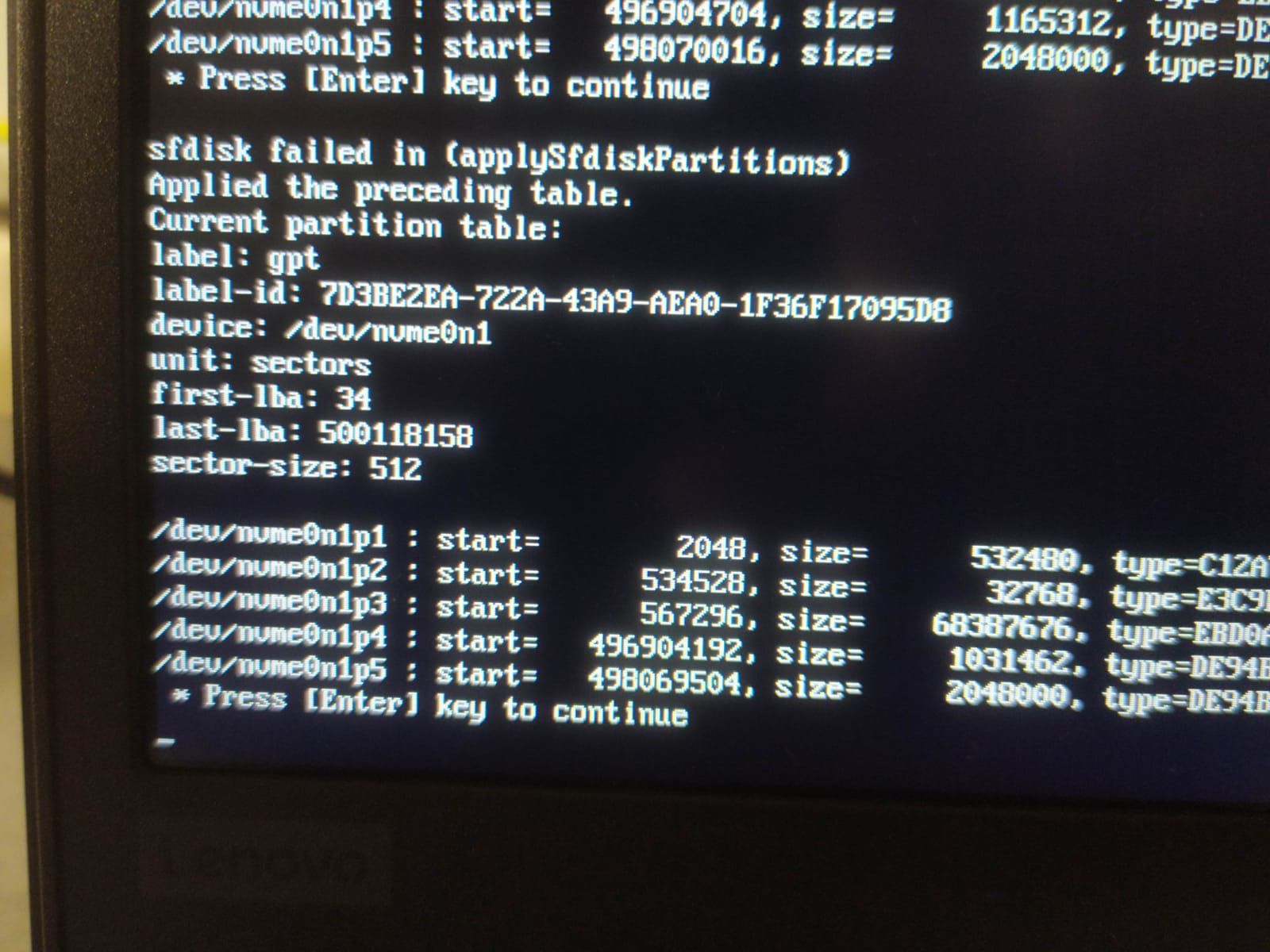
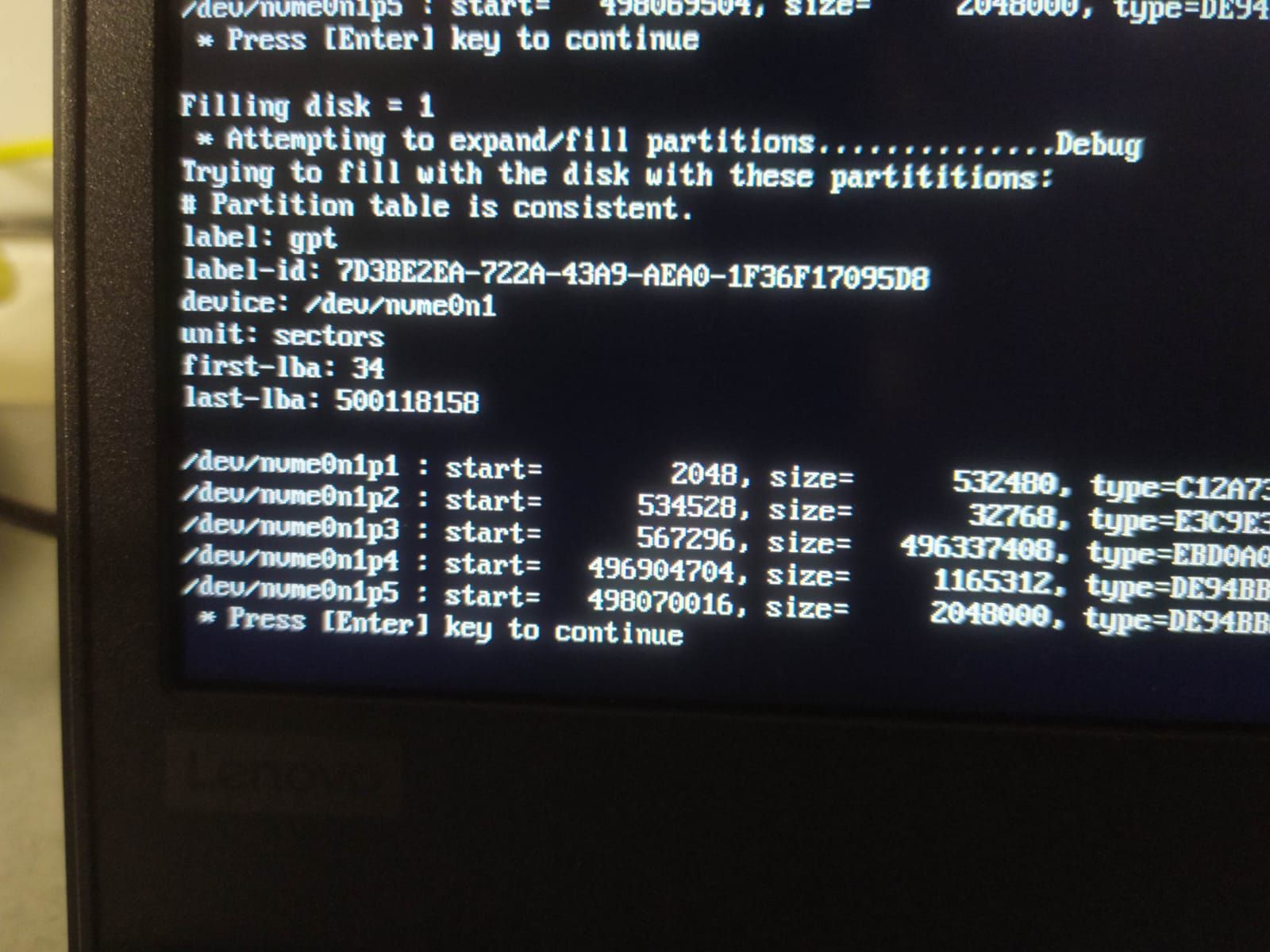
      @sebastian-roth here are the picture of the debug deploy task with kernel arguments.
      It shows an error message "sfdisk failed in (applySfdiskPartitions)

      WhatsApp Image 2021-03-12 at 17.10.28.jpeg

      WhatsApp Image 2021-03-12 at 17.10.36.jpeg

      posted in FOG Problems
      B
      boombasstic