@Tom-Elliott I did update to version 1.6.2254 and the first multicast that worked was the first one I tried after the upgrade. This second one is now hanging like the one that prompted this thread.
Where in the logs can I find any clues?
@Tom-Elliott I did update to version 1.6.2254 and the first multicast that worked was the first one I tried after the upgrade. This second one is now hanging like the one that prompted this thread.
Where in the logs can I find any clues?
@Tom-Elliott I thought this was a switch/network issue, so I alerted IT. However, I just did a multicast of image to 5 computers, which worked and completed, but the job in the web GUI never went away. It said 100% complete, and the computers did the post-image stuff, but the status on that job just sat there with a spinning circle.
Now, a second multicast image job is there, but copy isn’t working. Is it perhaps that the first job never actually completed?
Thanks. Currently working with our IT Dept on this one…multicast works in other labs, just running into an issue with one. I think it’s a switch/router config issue. Unicast works fine.
I have a problem I’ve never run into before…
Running a group multicast session - PXE boot works great. Once all hosts get booted, they go to the blue copying screen…and hang. Nothing starts. Anyone seen this before?
@george1421 I replaced RAM with new, and now I get a BSOD: CLOCK_WATCHDOG_TIMEOUT which indicates it might be the processor.
This computer has been a thorn in our side - we have replaced the motherboard, and so it’s possible the processor didn’t survive the move. (or it went bad with the previous mobo).
I’m satisfied that this is not a FOG issue, but a hardware issue, so I think we can call this issue closed. Thanks for the help!
Tim
@george1421 So, I did update to BIOS version 01.08.08, but that still resulted in a Windows install BSOD:
IRQ_NOT_LESS_THAN_OR_EQUAL
followed by a reboot and another BSOD:
KMODE_EXCEPTION_NOT_HANDLED
Both of these point to either bad memory or device drivers. I’ll keep nosing around there.
@george1421 I thought I’d see if I could just install Windows on this computer without deploying an image to it. It gave me a BSOD. I did end up seeing the BIOS version was old, so I updated it to 01.08.08. Windows install BSOD again.
Memory and NVME hardware tests all come back OK. I have already tried swapping memory.
A successful deploy of this image on another computer indicates that it is not an issue with the image itself or with our server.
Any ideas what the cryptic messaging is saying? Which hardware caused this?
Thanks
Tim
I’m in the process of trying to deploy the same image on another computer with known good hardware to try to rule out any issues with the image itself.
I’m trying to image a computer that we fixed (replaced several components), but halfway through the imaging process I get a kernel panic, like the following:
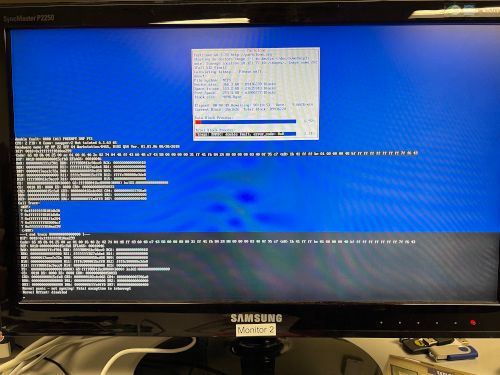
Closeup of text:
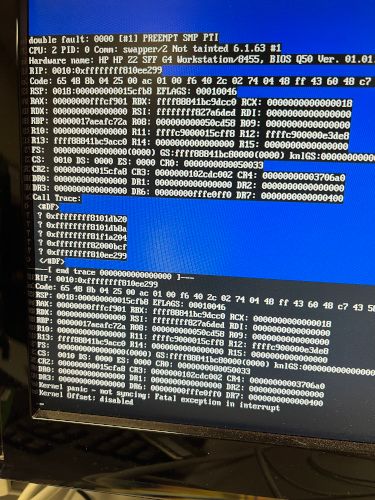
I’m not sure whether the cause is hardware or on the fog server side.
Imaging HP Z2 G4
Fog version 1.5.10
bzImage and bzImage32 are both on version 6.1.63 (I originally tried the stock 5.15.93 but upgraded in case that was the issue).
Any ideas?
@george1421 Thanks again for this. I’ll tuck this away for later if I need it.
@george1421 Thanks so much! So, in the interim I decided to update FOG to 1.5.10 and now it works 
I supposed that upgrade also updated the iPXE file?
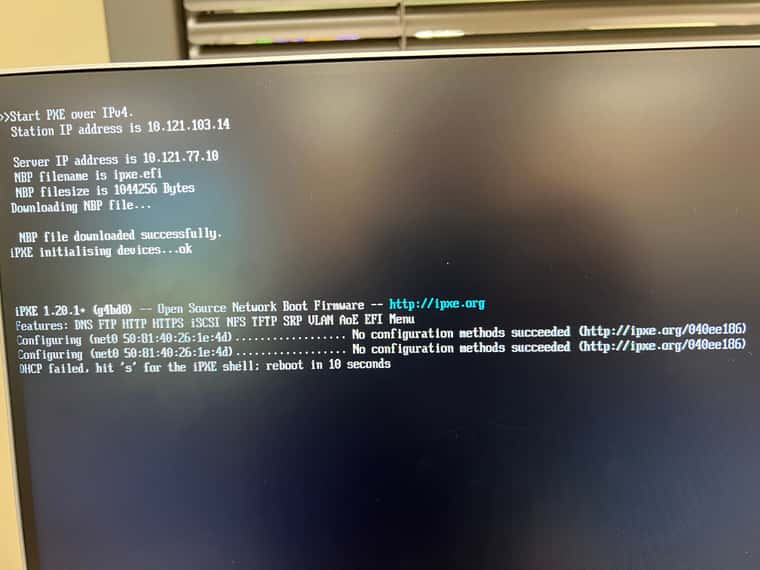
We have some newer HP Z2 G9 computers that are failing at DHCP in PXE. They get the correct IP address at first, then inside iPXE they fail (time out). It takes a long time to get the first address before iPXE. I’ve talked to our IT Dept and they insist it’s not a spanning tree protocol issue (they use MSTP). We have other computers that do not have this issue. Any ideas?
Screen shot of what’s happening:
I recently ran across this same issue, but it was not due to the fast spanning tree protocols. Our IT department added 802.1x authentication on the wired ports of all our switches, but the time out to fail back to MAC authentication was just longer than the 27 seconds @george1421 referenced in his post. We had a handful of hosts work, but a large majority failed. Our IT department had to shorten the 802.1X authentication timeout in order to make this work for us.
Oh, OK. I guess I misread that. I’ll check out the new inits and see what happens, but probably won’t hit this again hard until January. Thanks for the response!
@Sebastian-Roth Looks like we’re still on 4.19.48. I have not needed to image labs since August, and don’t expect to need to do any large-scale imaging before Spring, but could certainly update and test with a newer kernel if need be.
Tim
I’m just checking back on this (rather old) topic to see if any headway had been made. It seems the last tests I ran indicated that the basename commands did indicate the device names remained consistent even when the OS switches them. I won’t need to image these again for a while, but would be nice to see if a fix is available.
Thanks!
Tim
I am busy getting ready for our Fall semester to start next week, BUT…
I will keep a debug task set up for one of our machines in order to do more testing for you all if need be. I’m glad to be part of the solution here, and I promise not to take as long to respond back to a testing request next time…
@Sebastian-Roth I’m sorry it took me so long to get back to this, but I was able to run the testing this morning. It does appear that the device names stay consistent, even though the drives may change order in lsblk. Here are my results:
State 1
> lsblk
NAME        MAJ:MIN RM   SIZE RO TYPE MOUNTPOINT
nvme1n1     259:0    0   477G  0 disk
|-nvme1n1p1 259:2    0   499M  0 part
|-nvme1n1p2 259:3    0   100M  0 part
|-nvme1n1p3 259:4    0    16M  0 part
|-nvme1n1p4 259:5    0 341.2G  0 part
`-nvme1n1p5 259:6    0 135.1G  0 part
nvme0n1     259:1    0 238.5G  0 disk

> basename $(readlink /sys/block/nvme0n1/device)
nvme0

> basename $(readlink /sys/block/nvme0n1/device/device)
0000:02:00.0

> basename $(readlink /sys/block/nvme1n1/device)
nvme1

> basename $(readlink /sys/block/nvme1n1/device/device)
0000:03:00.0
State 2
> lsblk
NAME        MAJ:MIN RM   SIZE RO TYPE MOUNTPOINT
nvme0n1     259:0    0   477G  0 disk
|-nvme0n1p1 259:2    0   499M  0 part
|-nvme0n1p2 259:3    0   100M  0 part
|-nvme0n1p3 259:4    0    16M  0 part
|-nvme0n1p4 259:5    0 341.2G  0 part
`-nvme0n1p5 259:6    0 135.1G  0 part
nvme1n1     259:1    0 238.5G  0 disk

> basename $(readlink /sys/block/nvme0n1/device)
nvme1

> basename $(readlink /sys/block/nvme0n1/device/device)
0000:03:00.0

> basename $(readlink /sys/block/nvme1n1/device)
nvme0

> basename $(readlink /sys/block/nvme1n1/device/device)
0000:02:00.0
Note how the device and device/device names remain unchanged per disk.