@Dino_Nerd Please open the following URL in your browser (correct IP for FOG server) and post the full text here: http://192.168.0.x/fog/service/ipxe/boot.php
S
Posts
-
RE: CentOS 7 Problemsposted in General Problems
-
RE: Dell Venue 8 Pro imaging/eMMCposted in FOG Problems
@AsGF2MX Wow, you are doing a great job here! Thanks a lot for digging into the details and sharing all this here! Awesome.
I tried comparing the kernel configs and I found CONFIG_X86_INTEL_LPSS to be set in your new config. According to this post this is exactly what might be missing to make eMMC working with Bay Trail: https://chromium-review.googlesource.com/221327
And too CONFIG_SPI (with some more sub options) is set in AsGF2MXs config. SPI also seams to be related to eMMC and I guess I will not hurt to be enabled (keep fingers crossed).
I am not sure about the I2C stuff. Both configs have I2C in gerneral enabled. Just some of the I2C settings are different. @AsGF2MX could you please try Toms original config (http://sourceforge.net/p/freeghost/code/HEAD/tree/trunk/kernel/TomElliott.config.32) and enable INTEL_LPSS + SPI and see if it is working??
Maybe I have missed that part of the discussion but why do you use resizable image type?? Maybe use “single disk - multiple partitions” or even “raw” first to get it working without poking around patching the scripts (this might be the second step).
-
FOG kernels and inits moving to githubposted in Announcements
Some time ago when the fogproject.org website was down for a few days we decided to move important things like kernels and inits to a pretty solid destination - github. We already started to move the official kernel releases to github some time ago posting those links in the forums here and there.
It’s getting time to get this done and I will post updates on this here in this topic.
As a first step I added redirects to the webserver config to redirect requests for development kernels and inits directly to github, e.g. https://fogproject.org/kernels/bzImage -> https://github.com/FOGProject/fos/releases/latest/download/bzImage
As the very latest development kernels on github are from the 5.15.x series already everyone running the dev-branch or working-1.6 installer (fresh install or update) will pull those new kernels.
The next step is to move kernel updating through the web UI to github as well. There is more work involved in this and it will take a bit more time. Stay tuned.
Comments, suggestions and help are welcome.
-
RE: Build 6303/6315 on CentOS 7.1 FTP path error when attempting to update kernelposted in Bug Reports
@sudburr Please update to the very latest. Tom just pushed a fix. Seams like the kernel update function is not used very often as this issue has been around for some days AFAIK.
As well see if you have a directory called /var/www/html/fogservice on your FOG server. I guess this was created when the slash was missing in FOG_TFTP_PXE_KERNEL_DIR at first. I think it’s save to delete that. Be careful to not delete the whole fog-www dir

-
RE: boot.php hidden menu prompt translationposted in General Problems
@fred_chx This line is being generated by bootmenu.class.php as all the other lines as well. See here: https://github.com/FOGProject/fogproject/blob/1.4.4/packages/web/lib/fog/bootmenu.class.php#L527 (line 527f)
-
RE: Hostname changer not workingposted in FOG Problems
Sure you haven’t changed this client’s “Service settings” meanwhile? ‘#!nh’ to me sounds like hostnamechanger is not enabled for this client in the web interface. But maybe I am wrong.
-
RE: FOG kernels and inits moving to githubposted in Announcements
Also added redirects for the inits and tested everything. So every install/update should now pull the files from github.
Put up a note on the FOG web UI kernel update page for everyone to spread the word:
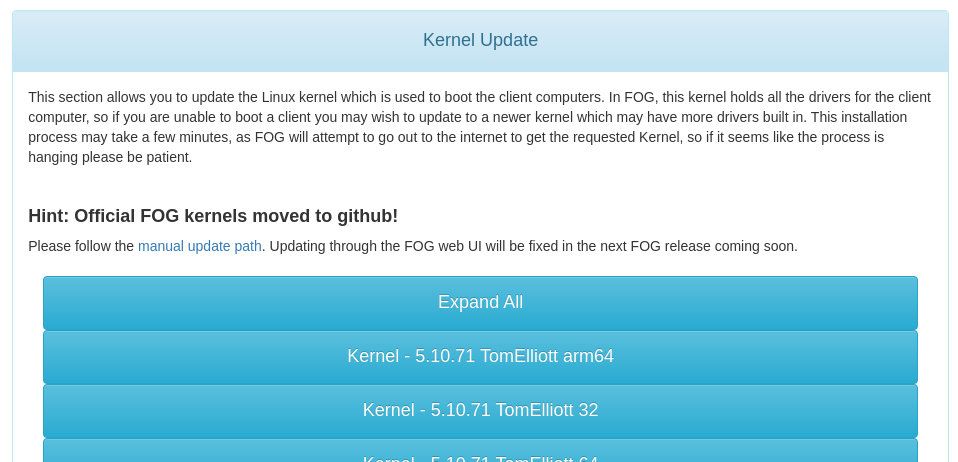
-
RE: Performance decrease using Hyper-V Win10 clientsposted in Bug Reports
@jkozee You are great man! This is what I love about open source and the people knowing how to go with it…

I didn’t even know that there is a storage driver for Hyper-V (and VMware by the way) right in the linux kernel. And we have it enabled: CONFIG_HYPERV_STORAGE
Looking at the scsi_device (sdevice) struct I don’t see page_size. So I don’t think your change is gonna work. Probably wouldn’t compile at all. Looking through the driver code I see PAGE_SIZE used several times. So I feel like this seams ok - although I don’t know much about this particular driver!
You just might want to get in contact with the authors of the storvsc_drv driver (line 18ff) and as well the author of the patch! Tell them that you bisected a major slowdown issue to that particular patch. I guess that their input is a lot more helpful than trying to understand the whole driver by yourself! Please keep us posted.
Edit: Seams like the function blk_queue_virt_boundary was added only a few months back - intended to be used with NVMe devices from what it looks to me (I don’t think this has anything to do with you seeing slower speeds on the SSD backend though).
Edit2: Further interesting things to read on this are here and here - infiniband driver using this as well, interesting part is:
(Very) nice cleanup – so what’s the actual deal here? is that as long
as we plant a slave alloc callback into out scsi host template which
further invokes a
blk_queue_virt_boundary(sdev->request_queue, ~MASK_4K) call, we’re
100% safe/sure what all SGs we get meet the alignment criteria?Correct, the nvme driver has the same alignment constraints for its PRPs
and uses the queue virt_boundary to have the block layer enforce the
SG alignment. -
RE: Cannot capture image- fails at 'Saving original partition table'posted in General Problems
@tandersb said:
I have a functional FOG Server running version 689680.
I don’t think we ever released a version 689680. Can you please take a picture of the version in the web GUI and post here. As well take a picture of the actual error on screen and upload. Recent versions of FOG do try to fix this issue if and oversized protective MBR is found. So I am wondering which version you have.
You can simply try fixing this yourself. Schedule the upload task as debug (checkbox just before creating the task in the web UI) and run
fixparts /dev/sda(say yes and write changes to disk). Then start the actual upload task by runingfogcommand. -
RE: Nothing to Boot error..any solution?posted in FOG Problems
@adi I was a little confused about not seeing TFTP traffic in the packet dump (meaning that iPXE binary didn’t get transferred to the client to boot from) but you still see an iPXE error message. Haven’t used virtualbox for netbooting much lately and so I did not know that it actually uses iPXE as network boot binary in the first place (http://www.virtualbox.org/svn/vbox/trunk/src/VBox/Devices/PC/ipxe/src/usr/autoboot.c).
IMHO the easiest solution for you here is to add a proxyDHCP using dnsmasq on the FOG server. The virtualbox DHCP server will go on handing the IP address to the client and dnsmasq will add the important information to netboot the client.
sudo apt-get install dnsmasq
sudo apt-get remove isc-dhcp-server tftpd-hpa
The second command might fail but I just want to make sure that ISC DHCP and TFTPd are not getting in the way as dnsmasq will do the job for you. Then edit /etc/dnsmasq.conf to your needs. Here is an example for your setup. I am not able to test this so there could be minor errors in it. Look over it and make sure to correct things as needed:
# Don't function as a DNS server:
port=0

# Log lots of extra information about DHCP transactions.
log-dhcp

# Dnsmasq can also function as a TFTP server.
enable-tftp

# Set the root directory for files available via FTP.
tftp-root=/tftpboot

# The boot filename, Server name, Server Ip Address
dhcp-boot=undionly.kpxe,192.168.56.102,192.168.56.102

# Disable re-use of the DHCP servername and filename fields as extra
# option space. That's to avoid confusing some old or broken DHCP clients.
dhcp-no-override

# PXE menu.
pxe-prompt="Press F8 for boot menu", 3

# Tells the client to load undionly.0 from TFTP
pxe-service=X86PC, "Boot from network", undionly

# This range(s) is for the public interface, where dnsmasq functions
# as a proxy DHCP server providing boot information but no IP leases.
dhcp-range=192.168.56.102,proxy
And to finish things up you need to link the boot file and restart dnsmasq:
sudo ln -s /tftpboot/undionly.kpxe /tftpboot/undionly.0
sudo service dnsmasq restart
Then bootup your windows client and keep fingers crossed.
-
RE: FOG kernels and inits moving to githubposted in Announcements
@george1421 said in FOG kernels and inits moving to github:
The only trouble I see is that the github repo is not searchable if we need to get an older kernel for some reason. 99% of the time we are only looking for “the latest” but we have with certain problems had fog admins roll back to a previous kernel to see when the problem first started. We’ll just need to be mindful of the way things works moving forward.
That is a good point. Thought about this as well. We’ll definitely make the FOG web UI to show all the kernel releases that are available on github - similar to what we currently have in the web UI. Currently there are two 4.19.x kernels, four 5.10.x kernels and one 5.15.x kernel. In the old location we had a bunch more. Either we’ll just leave those old ones there for at least a year or so (no trouble at all) or I can upload those binaries to github as well. While the later is more convenient for users it’s just some extra work (find and tag the correct commits) and we don’t know if it’s worth it. Maybe it’s easier to just keep those in the old location and add that information to the docs?
-
RE: Bug deploying image in multidisk systemposted in Bug Reports
@Fernando-Gietz Please don’t use OS type “Other (99)”. Unfortunately there are a lot of checks that don’t consider osid=99. @Tom-Elliott Should we get rid of 99 altogether? So many switch/case statements that miss on setting variables correctly when osid=99…
Please try using Windows 7 for example! FOG should be able to detect the GRUB bootloader on the second disk even if OSID is not set to Linux.
-
RE: FOG client localizationposted in General Problems
@joseska Sorry for the late reply! The fog-client detects the system language and uses that to display the messages. No configuration needed except for setting the system language to Spanish in your case.
-
RE: Fog server to serve 2 separate subnet with independant DHCP and TFTP serversposted in FOG Problems
Well, iPXE does not use IP settings from previous DHCP messages. When the machine comes up it asks for an IP, loads a boot file via TFTP (if told so in the DHCP answer) and then “forgets” about the network information. iPXE has to send another DHCP request to hook up to the network itself. So your script should read like:
... dhcp && chain http://192.168.2.1/fog/service/ipxe/boot.php##params -
RE: FOG Project call for engagementposted in Announcements
@jmeyer said in FOG Project call for engagement:
What kind of documentation is needed ?
We are working on moving all our documentation from the wiki to https://docs.fogproject.org/en/latest/ - lots of work to do. Help is highly appreciated.
Is there still any plan to make a ready to use VM ?
Not from my side because it would mean keeping another part up to date and support it in the forums. But if you are really keen and want to have a go, your call.
-
RE: Strange registration messagesposted in Bug Reports
@george1421 said:
I’ve done quite a bit of research on this in the last few days and it seams these realtek NICs are generally a problem for linix. I have found references that this particular nic 8169 driver is trouble, where the recommendation is to black list this linux driver and to use the 8168 driver instead. If this is the case then it is a kernel builder issue.
You are right, there are a lot of posts and discussions on this r8169 driver included in the kernel and a lot of people say that using the official r8168 driver from realtek fixed things for them. But in those cases the people mostly couldn’t get a proper connection at all. In our case it seams to be just an issue of waiting till the interface is fully up. As well most of those posts date back to 2008-2011. A lot has changed in the kernel since then! For example see this.
@aruhuno Again I may ask you to boot into debug upload mode and check
cat /sys/class/net/eth0/carrier. As well, please runethtool eth0 | grep "Link detected"- both before and after runningip link set eth0 upby hand.Edit: Found an interesting parameter for the udhcpc. Tom added it to the inits. You might want to upgrade and run the installer again to get the latest inits. This might possibly fix things for you…
-
RE: Multicast problemposted in General Problems
@pecata said in Multicast problem:
… after a while whole installation stopped working
Do you mean the deployment process (blue screen)? What exactly do you mean by “stopped”. Do you see an error or is it just slowing down? Please take a picture with your phone or camera and post here so we get an idea what you mean.
In multicast the slowest part of the “chain” dictates the overall performance. So if you have a faulty hard drive in one of your machines that would slow down all together in a multicast session.
-
RE: Nothing to Boot error..any solution?posted in FOG Problems
Great to see that you got it solved yourself. Quite different to how I would have done it but that’s the good thing about FOG and IT in gerneral: There is always more than one way of doing it. Have fun with FOG!
-
RE: How to PXE boot a virtualbox or QEMU/KVM box ?posted in Hardware Compatibility
AFAIK the undionly.kpxe is hardcoded to load default.ipxe script from the TFTP server. Check out /tftpboot/default.ipxe on your FOG server and you’ll see where boot.php comes into play.
-
RE: r6551 "Other" OSIDposted in Bug Reports
Good catch! We can add osid 4 to the validResizeOS check easily but I wonder why it is called in fog.download for single disk - non-resizable on line 38 at all. Should only be called for resizable I reckon.