Great work !! :clap_tone1:
J
Best posts made by jmeyer
-
RE: Remove Legacy client and replace with latest new client?posted in FOG Problems
I just made a .bat with this inside and it looks to work fine.
@echo off
msiexec /qn /x "FOG Service Installer.msi"
msiexec /qn /i "FOGService.msi"
Thank you.
-
RE: Remove Legacy client and replace with latest new client?posted in FOG Problems
@Wayne-Workman I’ll work a bit more on the script.
edit :IF %PROCESSOR_ARCHITECTURE%==AMD64 set programpath=%programfiles(x86)% IF %PROCESSOR_ARCHITECTURE%==x86 set programpath=%programfiles% IF EXIST "%programpath%\FOG\fog.ca.cer" GOTO END set FogServerIP=fogserver set GetID=wmic product where "Version like '3.0.29' and name like 'FOG Service'" get IdentifyingNumber for /F "skip=1 delims=" %%i in ('%GetID%') do if not defined ID set "ID=%%i" IF "%ID%" NEQ "" start /wait msiexec /x %ID% /q start /wait bitsadmin /transfer FOGService /download /priority normal http://%FogServerIP%/fog/client/FOGService.msi %temp%\FOGService.msi start /wait msiexec /i %temp%\FOGService.msi /quiet WEBADDRESS="%FogServerIP%" :ENDThis should works but I don’t know wwhy my download end in queue when there is nothing else to do and I can’t install client silently… I love computers…
-
RE: Send message to Slackposted in Feature Request
@sourceminer Hello, I never tested using a channel but using a private message works fine with test token.
You can also create your bot : https://my.slack.com/services/new/bot
Here is my conf :


-
WAPT snapinsposted in Tutorials
Hello,
I am working on WAPT packages import directly in snapins.
I am writing single line powershell script to rename to zip, extract to directory, find command and run it.This is my first test script for VLC from windows :
$packwapt = "tis-vlc_3.0.16-12_x64_windows_0f4137ed1502b5045d6083aa258b5c42_5.1_PROD.wapt";
$packname = [System.IO.Path]::GetFileNameWithoutExtension($packwapt);
Copy-Item $packwapt $packname".zip";
Expand-Archive -LiteralPath $packname".zip" $packname;
Remove-Item $packname".zip";
$s = Get-Content -Path $packname"\setup.py" | Select-String -Pattern "silentflags = ";
if ($s -ne $null) {
	$s=[regex]::matches($s,'(?<=\").+?(?=\")').value;
	Get-ChildItem -Filter $packname"\*.exe" | ForEach {&$_.Fullname $s}
};
Remove-Item $packname –recurse;
I’m not sure where I am going and if this is useful… lol
-
RE: New FOG client shutdownposted in Bug Reports
@Jbob It’s working.
I found something else.
In the MSI détails, I don’t have the right version displayed.
It’s write : {16B0BCD7-423F-49A9-B757-E457D7312A33}Can you display version during install ?
Shouldn’t we be able to update client from tray or from GUI ?
I didn’t find how do this without overwriting.
-
RE: (SVN) Adding needed repository... Failed!posted in FOG Problems
@george1421 Just found proxy in ~/.bashrc
I run install again. -
RE: WAPT snapinsposted in Tutorials
I have review my first idea.
I have used Snapin Pack.
Zip the wapt and the ps1 script and it’s working for VLC WAPT package.Get-ChildItem -Filter '*.wapt' | ForEach { Set-Variable -Name packwapt -Value $_.Fullname Set-Variable -Name packname -Value $packwapt.Substring(0,$packwapt.Length-5) Copy-Item $packwapt $packname'.zip' Expand-Archive -LiteralPath $packname'.zip' $packname Set-Variable -Name s -Value (Get-Content -Path $packname'\setup.py' | Select-String -Pattern 'silentflags = ') if ($s -ne $null) { Set-Variable -Name s -Value ([regex]::matches($s,'(?<=\").+?(?=\")').value) Get-ChildItem -Path $packname -Filter '*.exe' | ForEach { Start-Process -FilePath $_.Fullname $s -Wait; } } }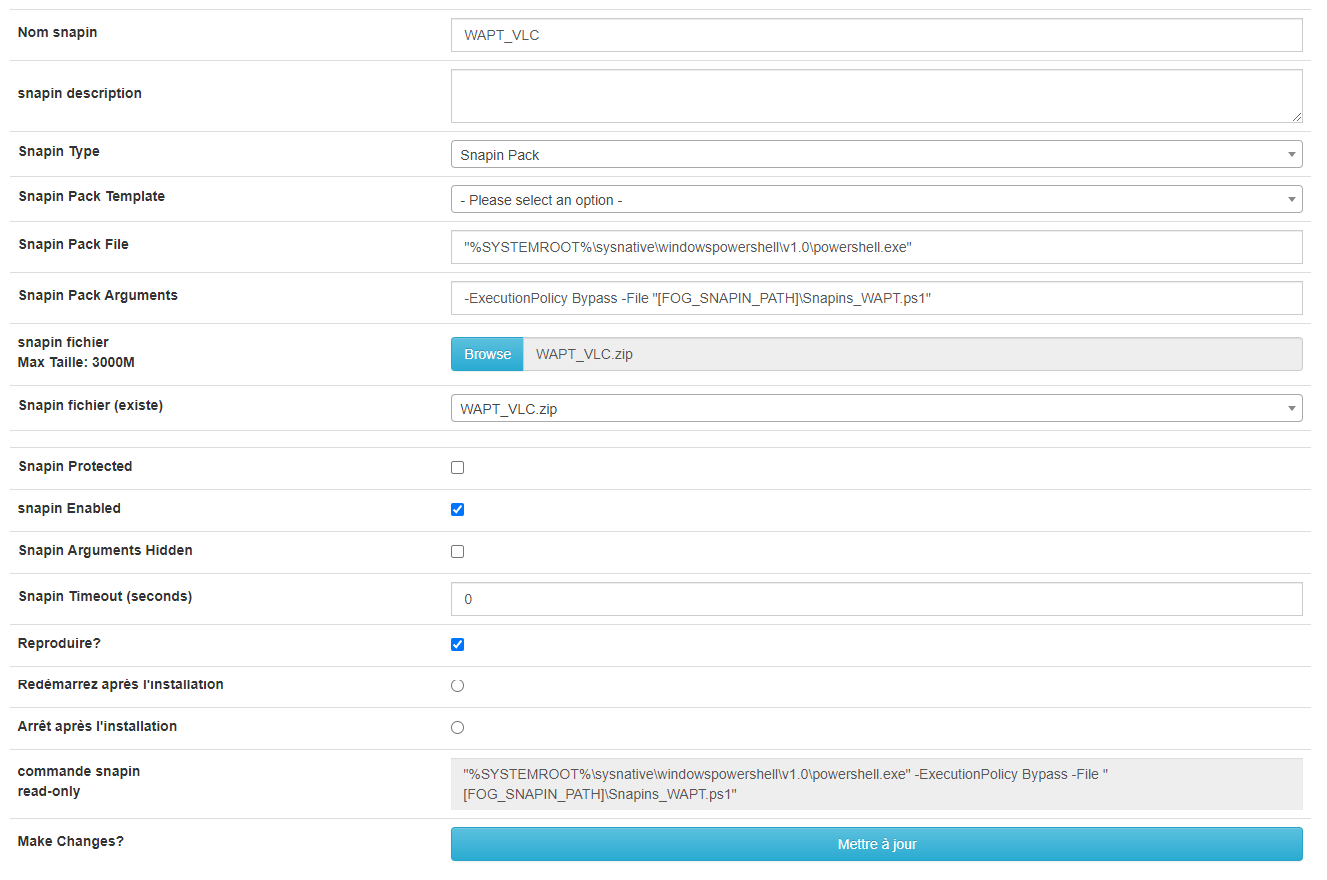
-
RE: Fog 1.6 - Kernel Panicposted in Bug Reports
@Sebastian-Roth
I make new install of Fog under Debian.
I was using Ubuntu years ago so it’s old install (3 years old).I have been testing Fog version since years with Tom.
And as i work with VM, i can revert change easily. -
RE: (SVN) Adding needed repository... Failed!posted in FOG Problems
@george1421 Was this !! But needed a reboot after.
Thank you very much to all of you.

Latest posts made by jmeyer
-
Upgrade 1.5.10.2253 to 1.5.10.2482posted in FOG Problems
Hello,
I try to upgrade to the last 1.5.10 and I have this :
* Updating Database...........................................Failed!

!!!!!!!!!!!!!!!!!!!!!!!!!!!!!!!!!!!!!!!!!!!!!!!!!!!!!!!!!!!!!!!!!!!
!! The installer was not able to run all the way to the end as   !!
!! something has caused it to fail. The following few lines are  !!
!! from the error log file which might help us figure out what's !!
!! wrong. Please add this information when reporting an error.   !!
!! As well you might want to take a look at the full error log   !!
!! in /root/fogproject-1.5.10.2482/bin/error_logs/fog_error_1.5.10.2482.log !!
!!!!!!!!!!!!!!!!!!!!!!!!!!!!!!!!!!!!!!!!!!!!!!!!!!!!!!!!!!!!!!!!!!!

17900K .......... .......... .......... .......... ..........  130M
17950K .......... .......... .......... .......... ........    142M=0,1s

2026-10-09 11:39:11 (128 MB/s) - ‘/home//fogDBbackups/fog_sql_1.5.10.2482_20261009_113907.sql’ enregistré [18430465]
Trying with GUI, I have this :
The following errors occurred
Update ID: 284Database Error:
Failed to query: Error: SQLSTATE[42000]: Syntax error or access violation: 1067 Invalid default value for ‘hostSecTime’ Error Message: Error Code: “42000”, Error Message: [“42000”,1067,“Invalid default value for ‘hostSecTime’”], Debug: SQL: [77] ALTER TABLE
hostsMODIFY COLUMNhostLastDeployDATETIME NULL DEFAULT NULL
Params: 0
SQL: ALTER TABLEhostsMODIFY COLUMNhostLastDeployDATETIME NULL DEFAULT NULL
Params: Array
(
)
ErrorInfo: Array
( [0] => 42000 [1] => 1067 [2] => Invalid default value for ‘hostSecTime’
)
Debug: SQL: [77] ALTER TABLEhostsMODIFY COLUMNhostLastDeployDATETIME NULL DEFAULT NULL
Params: 0
Variable contains:Array
( [0] => ALTER TABLEhostsMODIFY COLUMNhostLastDeployDATETIME NULL DEFAULT NULL [1] => UPDATEhostsSEThostLastDeploy= NULL WHEREhostLastDeployIS NOT NULL AND YEAR(hostLastDeploy) = 0 [2] => ALTER TABLEhostsMODIFY COLUMNhostSecTimeTIMESTAMP NULL DEFAULT NULL [3] => UPDATEhostsSEThostSecTime= NULL WHEREhostSecTimeIS NOT NULL AND YEAR(hostSecTime) = 0 [4] => ALTER TABLEimagesMODIFY COLUMNimageLastDeployDATETIME NULL DEFAULT NULL [5] => UPDATEimagesSETimageLastDeploy= NULL WHEREimageLastDeployIS NOT NULL AND YEAR(imageLastDeploy) = 0 [6] => ALTER TABLEimagingLogMODIFY COLUMNilFinishTimeDATETIME NULL DEFAULT NULL [7] => UPDATEimagingLogSETilFinishTime= NULL WHEREilFinishTimeIS NOT NULL AND YEAR(ilFinishTime) = 0 [8] => ALTER TABLEinventoryMODIFY COLUMNiDeleteDateDATETIME NULL DEFAULT NULL [9] => UPDATEinventorySETiDeleteDate= NULL WHEREiDeleteDateIS NOT NULL AND YEAR(iDeleteDate) = 0 [10] => ALTER TABLEmulticastSessionsMODIFY COLUMNmsStartDateTimeDATETIME NULL DEFAULT NULL [11] => UPDATEmulticastSessionsSETmsStartDateTime= NULL WHEREmsStartDateTimeIS NOT NULL AND YEAR(msStartDateTime) = 0 [12] => ALTER TABLEmulticastSessionsMODIFY COLUMNmsCompleteDateTimeDATETIME NULL DEFAULT NULL [13] => UPDATEmulticastSessionsSETmsCompleteDateTime= NULL WHEREmsCompleteDateTimeIS NOT NULL AND YEAR(msCompleteDateTime) = 0 [14] => ALTER TABLEsnapinTasksMODIFY COLUMNstCompleteDateDATETIME NULL DEFAULT NULL [15] => UPDATEsnapinTasksSETstCompleteDate= NULL WHEREstCompleteDateIS NOT NULL AND YEAR(stCompleteDate) = 0 [16] => ALTER TABLEtasksMODIFY COLUMNtaskCheckInDATETIME NULL DEFAULT NULL [17] => UPDATEtasksSETtaskCheckIn= NULL WHEREtaskCheckInIS NOT NULL AND YEAR(taskCheckIn) = 0 [18] => ALTER TABLEtasksMODIFY COLUMNtaskScheduledStartTimeDATETIME NULL DEFAULT NULL [19] => UPDATEtasksSETtaskScheduledStartTime= NULL WHEREtaskScheduledStartTimeIS NOT NULL AND YEAR(taskScheduledStartTime) = 0 [20] => ALTER TABLEuserTrackingMODIFY COLUMNutDateDATE NULL DEFAULT NULL [21] => UPDATEuserTrackingSETutDate= NULL WHEREutDateIS NOT NULL AND YEAR(utDate) = 0
)
Database SQL:ALTER TABLE
hostsMODIFY COLUMNhostLastDeployDATETIME NULL DEFAULT NULL -
RE: FOG Secure Boot with Shimposted in Tutorials
@KMEH It’s fix for ThinkBook 15-IIL (2nd photo).
I have run git pull, run install and now MOK management load fine.
I don’t know why since I was already on version 1.5.1.2254 and I don’t see change on GitHub… -
RE: FOG Secure Boot with Shimposted in Tutorials
@Tom-Elliott
Something isn’t working well for me.
I can’t get iPXE menu when secureboot is enable and secureboot/snponly-shimx64.efi is set.On a Lenovo ThinkPad E16 Gen 1, I only have this :
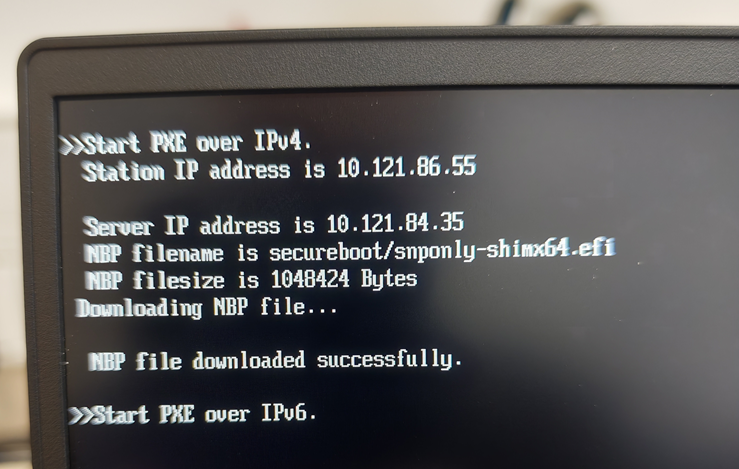
I acces on iPXE menu a Lenovo ThinkBook 15-IIL but yet I think MOK.DER isn’t registering well even with an usb key connected formatted in fat32 with the 3 files.
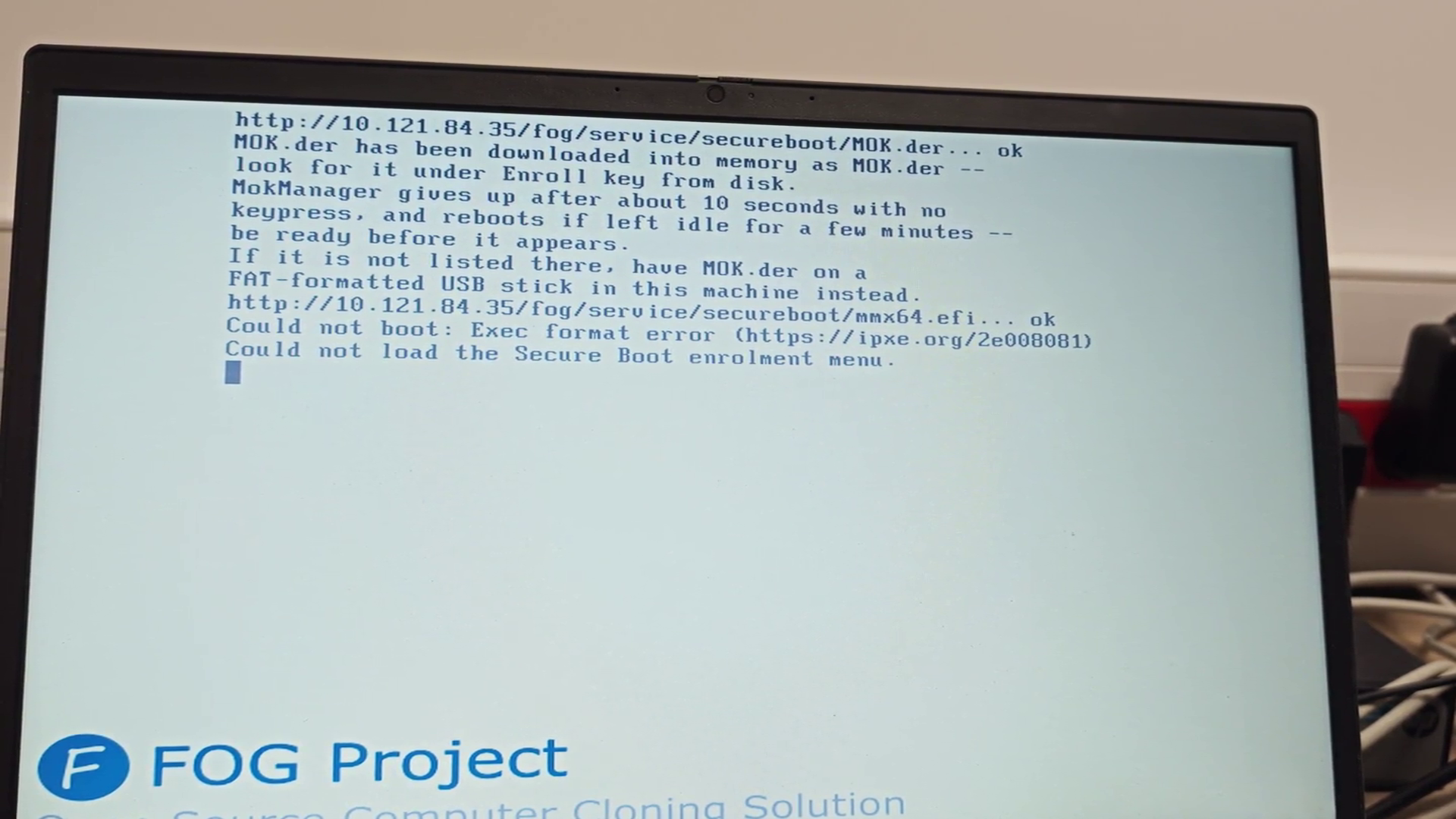 https://streamable.com/v6wyus
 -
RE: FOG Secure Boot with Shimposted in Tutorials
Using “secureboot/snponly-shimx64.efi” without secureboot works like snponly.efi ?
Could it be possible to add a very lightweight OS such as Tiny Core Linux with enrolment kit inside (or that get it from web link) that would enrol key automatically via pxe menu ?


-
RE: FOG Secure Boot with Shimposted in Tutorials
I remplaced grubx64 by grubnetx64 (not sure if needed but was recommanded for PXE) and create a “grub” directory in tftpboot with “grub.cfg” inside.
Grub signed look for cfg file in a subdir called “grub” by default.cp /usr/lib/grub/x86_64-efi-signed/grubnetx64.efi.signed /tftpboot/grubx64.efi mkdir /tftpboot/grub chmod -R a+rX /tftpboot/grubI get grub menu.
update (10 am) :
I copied snponly.efi in grub directory and signed it with the FOG-MOK key I generated before.sbsign --key /root/secureboot/FOG-MOK.key --cert /root/secureboot/FOG-MOK.crt /tftpboot/snponly.efi --output /tftpboot/grub/snponly.efiI end with “error ; bad shim signature”.
I think I need to import the key on the computer with command “mokutil --import /chemin/vers/FOG-MOK.der”I keep on searching…
2nd update (12:30 am):
To enroll key :
cp /usr/lib/shim/mmx64.efi.signed /tftpboot/mmx64.efiand in tftpboot/grub/grub.cfg
menuentry 'Enroll MOK' {
    insmod tftp
    insmod chain
    chainloader (tftp,192.168.69.10)/mmx64.efi
    boot
}

menuentry 'Boot FOG (iPXE)' {
    insmod efinet
    insmod tftp
    insmod chain
    net_bootp
    chainloader (tftp,192.168.69.10)/grub/snponly.efi
    boot
}
Copy the .der on usb key, put it on the computer, run “Enroll MOK” in pxe grub menu then “Enroll from disk”
Reboot and run “Boot FOG” in pxe menu.And at least I have the FOG menu !

I think I’m in the right way.Let’s keep on working.
-
RE: FOG 1.6.0-beta.2644 DHCPposted in FOG Problems
@Tom-Elliott no, i have bypass dhcp configuration during install.
-
RE: FOG Secure Boot with Shimposted in Tutorials
Here is my first steps.
Install signing tools on your FOG server
apt update
apt install sbsigntool openssl mokutil
Install shim & grub
apt install shim-signed grub-efi-amd64-signed
cp /usr/lib/shim/shimx64.efi.signed /tftpboot/shimx64.efi
cp /usr/lib/grub/x86_64-efi-signed/grubx64.efi.signed /tftpboot/grubx64.efi
I end with this at PXE boot :
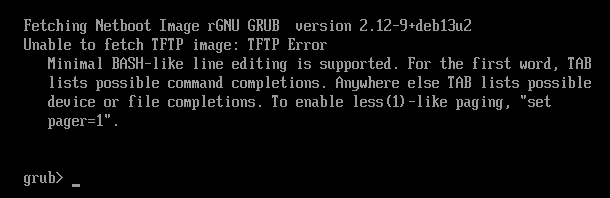
Shim signature give this : (sbverify --list shimx64.efi)
warning: data remaining[831016 vs 957136]: gaps between PE/COFF sections?
signature 1
image signature issuers:
 - /C=US/ST=Washington/L=Redmond/O=Microsoft Corporation/CN=Microsoft Corporation UEFI CA 2011
image signature certificates:
 - subject: /C=US/ST=Washington/L=Redmond/O=Microsoft Corporation/CN=Microsoft Windows UEFI Driver Publisher
   issuer:  /C=US/ST=Washington/L=Redmond/O=Microsoft Corporation/CN=Microsoft Corporation UEFI CA 2011
 - subject: /C=US/ST=Washington/L=Redmond/O=Microsoft Corporation/CN=Microsoft Corporation UEFI CA 2011
   issuer:  /C=US/ST=Washington/L=Redmond/O=Microsoft Corporation/CN=Microsoft Corporation Third Party Marketplace Root
and grub sinature return :
signature 1
image signature issuers:
 - /CN=Debian Secure Boot CA
image signature certificates:
 - subject: /CN=Debian Secure Boot Signer 2022 - grub2
   issuer:  /CN=Debian Secure Boot CA
I tried creating MOK key but I’m stuck with security violation :
mkdir /root/secureboot
cd /root/secureboot
openssl req -new -x509 -newkey rsa:2048 -keyout FOG-MOK.key -out FOG-MOK.crt -nodes -days 3650 -subj "/CN=FOG Secure Boot/"
openssl x509 -in FOG-MOK.crt -outform DER -out FOG-MOK.der
FOG-MOK.key <-- private key (protect!)
FOG-MOK.crt
FOG-MOK.der <-- enroll this on clientsSign ipxe.efi and rename it to grubx64.efi
cd /tftpboot
cp ipxe.efi ipxe.efi.original
sbsign --key /root/secureboot/FOG-MOK.key --cert /root/secureboot/FOG-MOK.crt /tftpboot/ipxe.efi --output /tftpboot/ipxe-signed.efi
cp ipxe-signed.efi grubx64.efi
I think I need to work more and as Fog default exit type is refind, I’ll make more research.
-
RE: FOG 1.6.0-beta.2644 DHCPposted in FOG Problems
drwxr-x— 2 _kea _kea 4096 8 juil. 12:39 /etc/kea
total 12
drwxr-x— 2 _kea _kea 4096 8 juil. 12:39 .
drwxr-xr-x 81 root root 4096 8 juil. 11:31 …
-rw-rw-r-- 1 root root 2236 8 juil. 12:39 kea-dhcp4.confPRETTY_NAME=“Debian GNU/Linux 13 (trixie)”
NAME=“Debian GNU/Linux”
kea-dhcp4
kea-lfc
/usr/sbin/kea-dhcp4 (938) kea-dhcp4I don’t have error log anymore.
-
FOG 1.6.0-beta.2644 DHCPposted in FOG Problems
Hello,
I have installed FOG 1.6.0-beta.2644 with DHCP.
I end withSetting up and starting DHCP Server (Kea)...................Failed Kea base configuration failed validation (kea-dhcp4 -t); see /root/fogproject/bin/error_logs/fog_error_1.6.0-beta.2644.logError logs :
'/etc/kea/kea-dhcp4.conf' <-> '/etc/kea/kea-dhcp4.conf.1783500988' renommé
Syntax check failed with: Unable to open file /etc/kea/kea-dhcp4.conf
This break TFTP directory creation even with the -X option.
Looks to come from Kea.
root@FOGSERVERDEV:~/fogproject/bin# kea-dhcp4 -t /etc/kea/kea-dhcp4.conf
Syntax check failed with: Unable to open file /etc/kea/kea-dhcp4.conf
Temporary fix is to run a second time installfog.sh and put a # before “configureDHCP”.
-
RE: FOG Secure Boot with Shimposted in Tutorials
@Florent @KMEH
First problem I see in the ipxe release is “x86-64 UEFI Secure Boot only”.
So, if SB is not enable, it doesn’t work at all ?
It also means that we need to make a SB check to say what efi file the computer need to use ?I’ll have some time this week, I’ll try make some tests.