• Recent
    • Unsolved
    • Tags
    • Popular
    • Users
    • Groups
    • Search
    • Register
    • Login
    1. Home
    2. lucamathuse
    L
    • Profile
    • Following 0
    • Followers 0
    • Topics 3
    • Posts 8
    • Groups 0

    lucamathuse

    @lucamathuse

    0
    Reputation
    1
    Profile views
    8
    Posts
    0
    Followers
    0
    Following
    Joined
    Last Online

    lucamathuse Unfollow Follow

    Latest posts made by lucamathuse

    • Partition 3 (NTFS) skipped during deployment

      Kernel version: 6.12.35
      FOG version: 1.5.10.1798
      Imaging settings: Operating System (Windows 10), Image Type (Single Disk - Resizable), Partition (Everything), Image Enabled (check), Replicate? (check), Compression (6), Image Manager (Partclone Ztsd)

      Hey guys,
      I’m running into a brick wall with a Windows 11 image. I’m using a GPT/NVMe setup and had a lot of trouble getting the capture to finish, so I ran it in Debug Mode.

      The capture seemed to work, I watched Partclone hit 100% on nvme0n1p3 (the main Windows partition (237GB)), and I have a 5.6GB d1p3.img.000 file on my server. However, at the very end of the capture, the client froze on the blue Partclone screen - it “freezes” every time I try to capture an image. I couldn’t Ctrl+C or reboot, so I had to hard-reset the master PC and manually move the files from /images/dev/ to the image folder.

      The Problem:
      When I try to deploy, FOG restores p1 and p2, but then it just skips p3 entirely. It says “Cloned successfully” and starts resetting UUIDs without ever showing the blue Partclone screen for the main partition.

      Observation:
      I noticed a mismatch in my partition files. My d1.partitions shows the full size, but the minimum and shrunken files show the 16GB size from the resize test.

      d1.partitions: /dev/nvme0n1p3 : start=444416, size=498042880
      d1.minimum.partitions: /dev/nvme0n1p3 : start=444416, size=33833186
      

      Is the deploy skipping p3 because the capture didn’t “finish” properly and the metadata is inconsistent? How can I fix this problem or find out where it’s coming from?

      It’s driving me insane that I can’t deploy images even after days of working on it.

      Thanks in advance!

      posted in FOG Problems
      L
      lucamathuse
    • RE: Deploying captured Windows 11 golden image using FOG results in Windows only being able to boot into recovery

      @mashina I did as you told me and I have a problem I haven’t mentioned yet. When I capture an image and it finishes it just says:“Cloned successfully” and then nothing. The task isn’t getting updated and stays in “In-Progress”. Can I turn the PC off and move the image files from /images/dev to /images/NAMEOFIMAGE or is partclone supposed to do something and I can’t move it manually?

      Captured clean windows install:

      luca@luca:/images/dev/6805cabdf259$ ls -lh
      total 4.5G
      -rw-r--r-- 1 root root    6 Apr  9 10:57 d1.fixed_size_partitions
      -rw-r--r-- 1 root root 1.0M Apr  9 10:57 d1.mbr
      -rw-r--r-- 1 root root  873 Apr  9 10:57 d1.minimum.partitions
      -rw-r--r-- 1 root root   20 Apr  9 10:57 d1.original.fstypes
      -rw-r--r-- 1 root root    0 Apr  9 10:57 d1.original.swapuuids
      -rw-r--r-- 1 root root  873 Apr  9 10:57 d1.partitions
      -rw-r--r-- 1 root root  873 Apr  9 10:57 d1.shrunken.partitions
      -rw-r--r-- 1 root root  15M Apr  9 10:57 d1p1.img
      -rw-r--r-- 1 root root  767 Apr  9 10:57 d1p2.img
      -rw-r--r-- 1 root root 4.5G Apr  9 11:04 d1p3.img.000
      

      It’s only 4.5G big and it’s still in /dev/
      posted in Windows Problems
      L
      lucamathuse
    • RE: Deploying captured Windows 11 golden image using FOG results in Windows only being able to boot into recovery

      @mashina I used a Windows bootstick to go into recovery and checked. All partitions are there but C:\ or the one that would be C:\ is RAW.
      I modified my golden image files to “fix” the problem I’ve been having and here’s the output of the modified files:

      Directory output:

      total 5.7G
      -rwxrwxr-x 1 fogproject fogproject    4 Apr  7 13:44 d1.fixed_size_partitions
      -rwxrwxr-x 1 fogproject fogproject 1.0M Apr  7 12:18 d1.mbr
      -rwxrwxr-x 1 fogproject fogproject  697 Apr  7 13:18 d1.minimum.partitions
      -rwxrwxr-x 1 fogproject fogproject   59 Apr  7 13:44 d1.original.fstypes
      -rwxrwxr-x 1 fogproject fogproject    0 Apr  7 12:18 d1.original.swapuuids
      -rwxrwxr-x 1 fogproject fogproject  697 Apr  7 13:17 d1.partitions
      -rwxrwxr-x 1 fogproject fogproject  697 Apr  7 13:18 d1.shrunken.partitions
      -rwxrwxr-x 1 fogproject fogproject  15M Apr  7 12:18 d1p1.img
      -rwxrwxr-x 1 fogproject fogproject  767 Apr  7 12:18 d1p2.img
      lrwxrwxrwx 1 root       root         12 Apr  7 13:42 d1p3.img -> d1p3.img.000
      -rwxrwxr-x 1 fogproject fogproject 5.6G Apr  7 12:27 d1p3.img.000
      

      As you can see I used I symlink to attempt a fix of d1p3.img.000 and maybe that was my demise.

      d1.partitions:

      label: gpt
      label-id: 99934977-65D0-41C6-B5E0-92E8085EC24F
      device: /dev/nvme0n1
      unit: sectors
      first-lba: 34
      last-lba: 500118158
      sector-size: 512
      
      /dev/nvme0n1p1 : start=        2048, size=      409600, type=C12A7328-F81F-11D2-BA4B-00A0C93EC93B, uuid=740FC648-717D-439E-9AC9-224A270007E2, name="Basic data partition", attrs="GUID:63"
      /dev/nvme0n1p2 : start=      411648, size=       32768, type=E3C9E316-0B5C-4DB8-817D-F92DF00215AE, uuid=45621D9E-3DD9-4D22-9D25-BCCDE3D0D714, name="Microsoft reserved partition", attrs="GUID:63"
      /dev/nvme0n1p3 : start=      444416, size=   498042880, type=EBD0A0A2-B9E5-4433-87C0-68B6B72699C7, uuid=F20FBC57-04B6-4522-9D20-33998BF119F9, name="Basic data partition
      

      d1.original.fstypes

      /dev/nvme0n1p1 vfat
      /dev/nvme0n1p2 raw
      /dev/nvme0n1p3 ntfs
      

      d1.fixed_size_partitions

      1:2
      

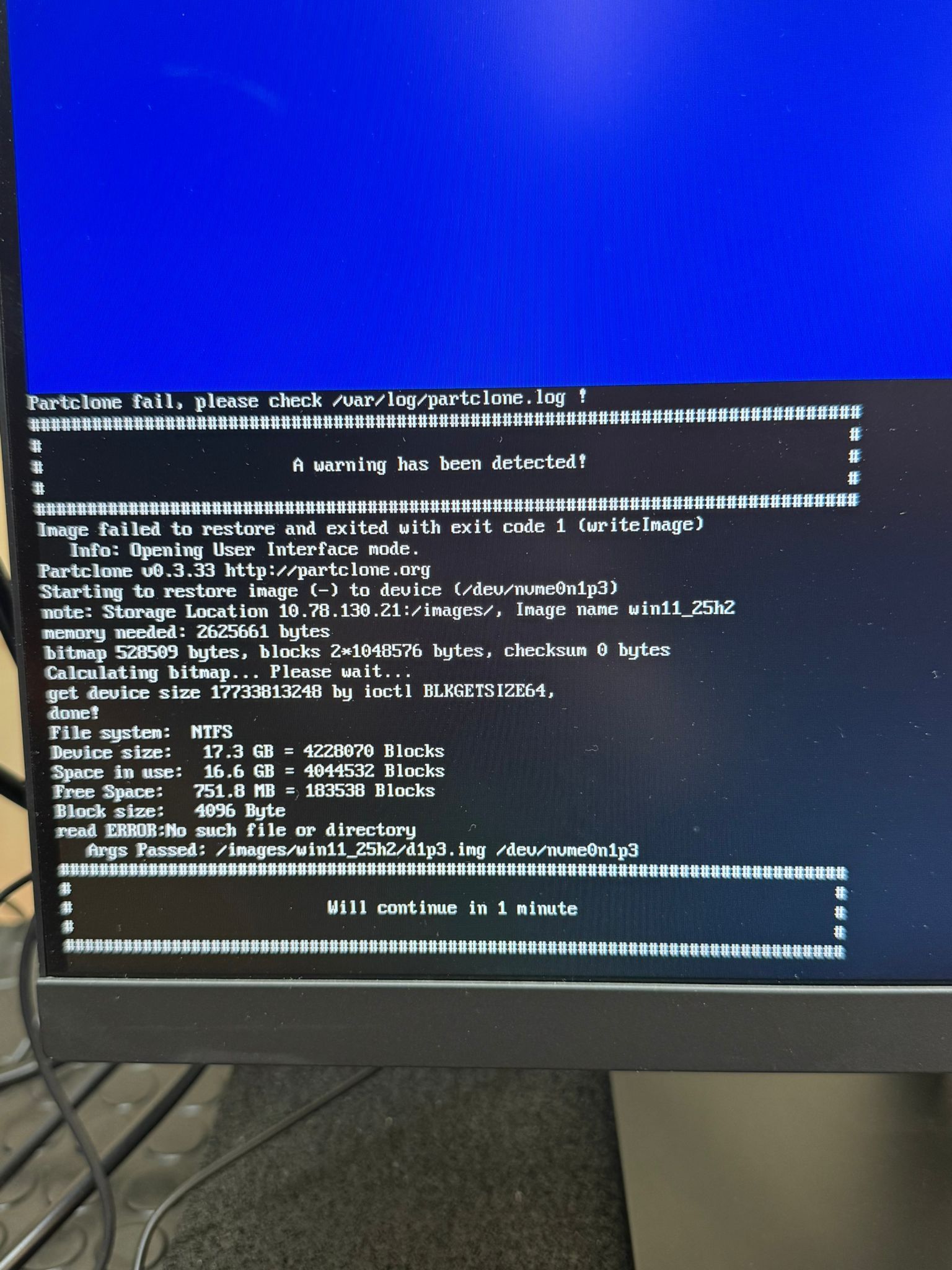
      The changes I made resulted in partclone not breaking off after d1p2 and saying it’s done. Now it starts deploying d1p3 and stops after around 80% and gives me this error screen. I tried accessing the log they mentioned but it doesn’t exist on my FOG server.

      WhatsApp Image 2026-04-08 at 17.06.31.jpeg

      I could try and fix this for days but how do y’all capture an image so that it doesn’t break or get captured in a wrong way? I just want a clean image of Windows 11.

      posted in Windows Problems
      L
      lucamathuse
    • RE: Deploying captured Windows 11 golden image using FOG results in Windows only being able to boot into recovery

      @lucamathuse Update

      I found some more information that changes a lot of stuff. Instead of it deploying correctly and somehow magically landing in the recovery screen it turns out Clonepart messes something up when capturing and deploying. It leaves out some partitions in the config files and when I try to deploy it it skips C:\ completely thus leaving it in a RAW state. I have collected some outputs:

      Image directory with all the files:

      0-rwxrwxr-x 1 fogproject fogproject 6 Apr 7 12:18 d1.fixed_size_partitions 
      -rwxrwxr-x 1 fogproject fogproject 1.0M Apr 7 12:18 d1.mbr 
      -rwxrwxr-x 1 fogproject fogproject 873 Apr 7 12:18 d1.minimum.partitions 
      -rwxrwxr-x 1 fogproject fogproject 20 Apr 7 12:18 d1.original.fstypes 
      -rwxrwxr-x 1 fogproject fogproject 0 Apr 7 12:18 d1.original.swapuuids 
      -rwxrwxr-x 1 fogproject fogproject 873 Apr 7 12:18 d1.partitions 
      -rwxrwxr-x 1 fogproject fogproject 873 Apr 7 12:18 d1.shrunken.partitions 
      -rwxrwxr-x 1 fogproject fogproject 15M Apr 7 12:18 d1p1.img 
      -rwxrwxr-x 1 fogproject fogproject 767 Apr 7 12:18 d1p2.img 
      -rwxrwxr-x 1 fogproject fogproject 5.6G Apr 7 12:27 d1p3.img.000
      

      d1.partitions:

      label: gpt 
      label-id: 99934977-65D0-41C6-B5E0-92E8085EC24F 
      device: /dev/nvme0n1 
      unit: sectors 
      first-lba: 34 
      last-lba: 500118158 
      sector-size: 512 /dev/nvme0n1p1 : start= 2048, size= 409600, type=C12A7328-F81F-11D2-BA4B-00A0C93EC93B, uuid=740FC648-717D-439E-9AC9-224A270007E2, name="Basic data partition", attrs="GUID:63" /dev/nvme0n1p2 : start= 411648, size= 32768, type=E3C9E316-0B5C-4DB8-817D-F92DF00215AE, uuid=45621D9E-3DD9-4D22-9D25-BCCDE3D0D714, name="Microsoft reserved partition", attrs="GUID:63" /dev/nvme0n1p3 : start= 444416, size= 498042880, type=EBD0A0A2-B9E5-4433-87C0-68B6B72699C7, uuid=F20FBC57-04B6-4522-9D20-33998BF119F9, name="Basic data partition" /dev/nvme0n1p4 : start= 498487296, size= 1628160, type=DE94BBA4-06D1-4D40-A16A-BFD50179D6AC, uuid=0D84E62A-99BF-4D91-A1D1-1B5D86FD2F45, attrs="RequiredPartition GUID:63"
      

      d1.original.fstypes

      /dev/nvme0n1p3 ntfs
      

      d1.fixed_size_partitions

      1:2:4
      

      Windows partition layout:

      Partition 	Type 	Size
      1 	EFI (System) 	200MB
      2 	MSR (Reserviert) 	16MB
      3 	Windows (Primär) 	237GB
      4 	Recovery (Wiederherstellung) 	795MB
      

      I have no clue why Clonepart or FOG is doing this.

      posted in Windows Problems
      L
      lucamathuse
    • Deploying captured Windows 11 golden image using FOG results in Windows only being able to boot into recovery

      Hardware/Environment:

      Server: FOG Project v1.5.10 (Running on Ubuntu 22.04)

      Target Hardware: 550x HP ProDesk 600 G6 SFF

      Golden Image: Windows 11 Pro (fresh install)

      Image Settings: Single Disk - Resizable, Partition Manager: Partclone Zstd

      The Problem:

      I am able to capture and deploy the image successfully (no errors during the PXE process), but upon reboot, the target machine immediately enters a Recovery loop with Error Code: 0xc000000f and File: \WINDOWS\system32\winload.efi.

      Steps taken on Golden Image before capture:

      Entered Audit Mode (Ctrl+Shift+F3) during OOBE.

      Disabled WinRE:

      reagentc /disable
      

      Deleted the Recovery Partition via diskpart and extended 😄 to fill the disk (resulting in: EFI -> MSR -> C:).

      Disabled Hibernation:

      powercfg -h off
      

      Verified BitLocker/Device Encryption is Fully Decrypted.

      Made BCD agnostic:

      bcdedit /set {bootmgr} device partition=\Device\HarddiskVolume1
      
      bcdedit /set {default} device boot
      
      bcdedit /set {default} osdevice boot
      

      Ran Sysprep:

      sysprep.exe /oobe /generalize /shutdown
      

      My captured image directory looks like this:

      total 5.9G
      -rwxrwxr-x 1 fogproject fogproject    4 Apr  7 09:45 d1.fixed_size_partitions
      -rwxrwxr-x 1 fogproject fogproject 1.0M Apr  7 09:45 d1.mbr
      -rwxrwxr-x 1 fogproject fogproject  697 Apr  7 09:45 d1.minimum.partitions
      -rwxrwxr-x 1 fogproject fogproject   20 Apr  7 09:45 d1.original.fstypes
      -rwxrwxr-x 1 fogproject fogproject    0 Apr  7 09:45 d1.original.swapuuids
      -rwxrwxr-x 1 fogproject fogproject  697 Apr  7 09:45 d1.partitions
      -rwxrwxr-x 1 fogproject fogproject  697 Apr  7 09:45 d1.shrunken.partitions
      -rwxrwxr-x 1 fogproject fogproject  15M Apr  7 09:45 d1p1.img
      -rwxrwxr-x 1 fogproject fogproject  767 Apr  7 09:45 d1p2.img
      -rwxrwxr-x 1 fogproject fogproject 5.9G Apr  7 09:54 d1p3.img.000
      

      Observations:

      • The target machine BIOS sees the disk as a generic “UEFI - WDC…” rather than “Windows Boot Manager” after deployment.

      • Changing FOG Exit Type to rEFInd did not resolve the issue.

      Has anyone encountered this specific behavior with Windows 11 on HP UEFI hardware? Or with FOG in general? I tried everything I could find but nothing is helping.

      posted in Windows Problems
      L
      lucamathuse
    • RE: Trying to deploy Windows 11 25H2 using FOG always leads to the Windows recovery screen

      @Florent okay and what exactly does it do? I mean that can’t really work, can it? I capture it one way and deploy it another.

      I just tried it again with Single Disk for both capturing and deployment on a clean Win 11 install. I ran these commands:
      reagentc /disable (I removed the recovery partition because I read somewhere that it can cause troubles when capturing), powercfg -h off and C:\Windows\System32\Sysprep\sysprep.exe /oobe /generalize /shutdown.

      The captured image looked like this:

      -rw-r--r-- 1 fogproject fogproject    4 Apr  7 08:18 d1.fixed_size_partitions
      -rw-r--r-- 1 fogproject fogproject 1.0M Apr  7 08:18 d1.mbr
      -rw-r--r-- 1 fogproject fogproject  697 Apr  7 08:18 d1.minimum.partitions
      -rw-r--r-- 1 fogproject fogproject   20 Apr  7 08:18 d1.original.fstypes
      -rw-r--r-- 1 fogproject fogproject    0 Apr  7 08:18 d1.original.swapuuids
      -rw-r--r-- 1 fogproject fogproject  697 Apr  7 08:18 d1.partitions
      -rw-r--r-- 1 fogproject fogproject  697 Apr  7 08:18 d1.shrunken.partitions
      -rw-r--r-- 1 fogproject fogproject  15M Apr  7 08:18 d1p1.img
      -rw-r--r-- 1 fogproject fogproject  767 Apr  7 08:18 d1p2.img
      -rw-r--r-- 1 fogproject fogproject 3.3G Apr  7 08:23 d1p3.img.000
      

      I don’t know why it’s so hard for me to capture an image of Windows 11. I just need to do it once and then never again.

      posted in Windows Problems
      L
      lucamathuse
    • RE: Trying to deploy Windows 11 25H2 using FOG always leads to the Windows recovery screen

      @Florent I do sysprep before capture but I used the GUI version of it that Windows offers me in the admin login. I click on “generalize” and “shutdown” and wait for it to do it’s thing but I’ll do the CLI version of it the next time. And did I understand that right, you use “Multiple Partition Image - All Disks” and before deploying you set it to “Single Disk - Resizable”?

      posted in Windows Problems
      L
      lucamathuse