• Recent
    • Unsolved
    • Tags
    • Popular
    • Users
    • Groups
    • Search
    • Register
    • Login
    1. Home
    2. JasonNaughton
    3. Posts
    J
    • Profile
    • Following 0
    • Followers 0
    • Topics 3
    • Posts 8
    • Groups 0

    Posts

    Recent Best Controversial
    • RE: Linux Client Install Dual Nics

      @george1421

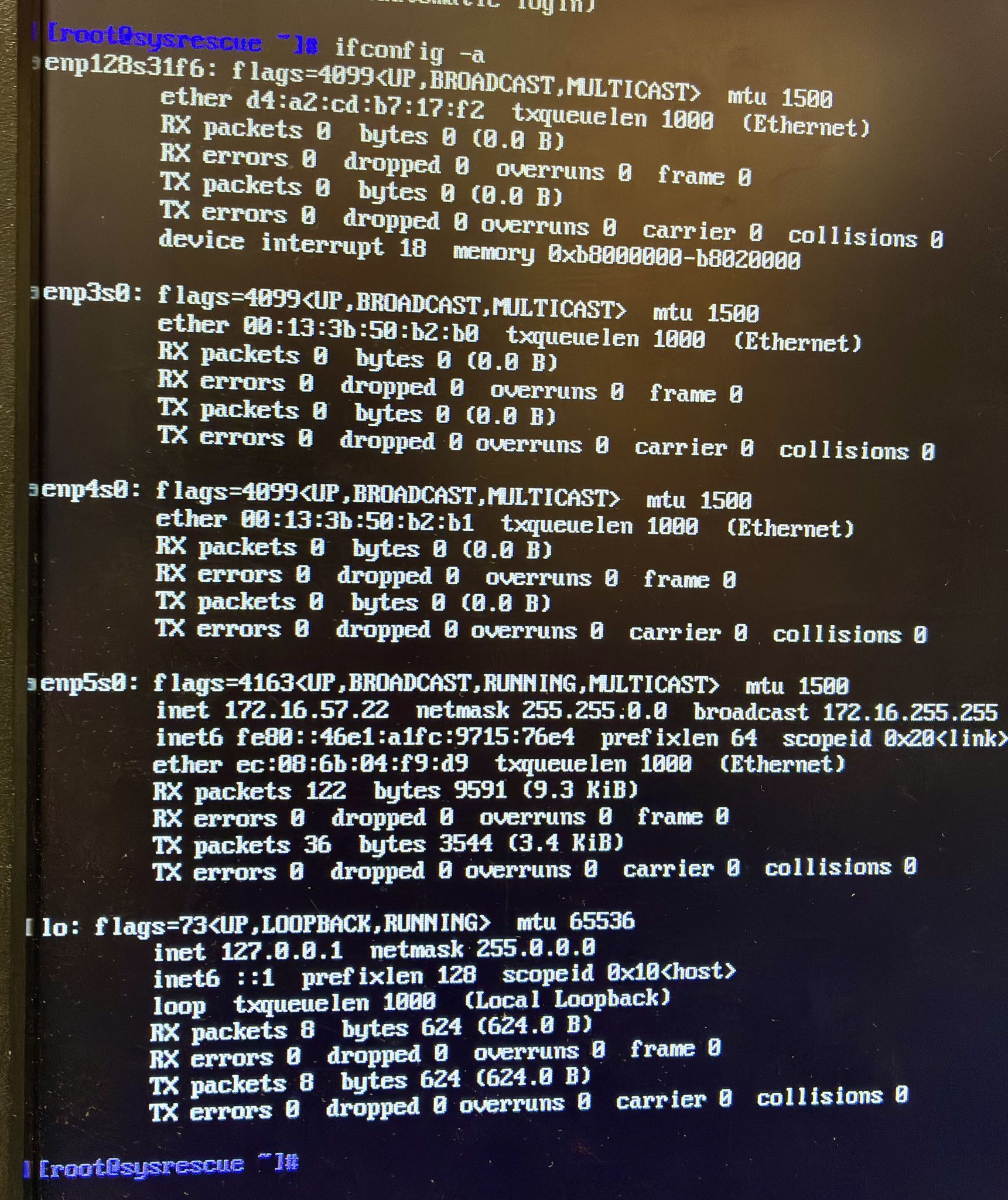
      Ok so the system in question has an on board nic (enp128s31f6), 1 single port Intel PCI-E Gigabit NIC (enp5s0), and 1 dual port Intel PCI-E Gigabit NIC (enp3s0 and enp4s0).

      So I booted the system with a Linux system rescue USB key. The network cable is plugged into the single port nic. You can see that it has the IP address 172.16.57.22 was fetched. Without any issues. The mac addresses on the identified nics are:

      • enp128s31f6 - d4:a2:cd:b7:17:f2
      • enp3s0 - 00:13:3b:50:b2:b0
      • enp4s0 - 00:13:3b:50:b2:b1
      • enp5s0 - ec:08:6b:04:f9:d9 (the one that is attached to the network cable)

      SysResecue-Image.jpg

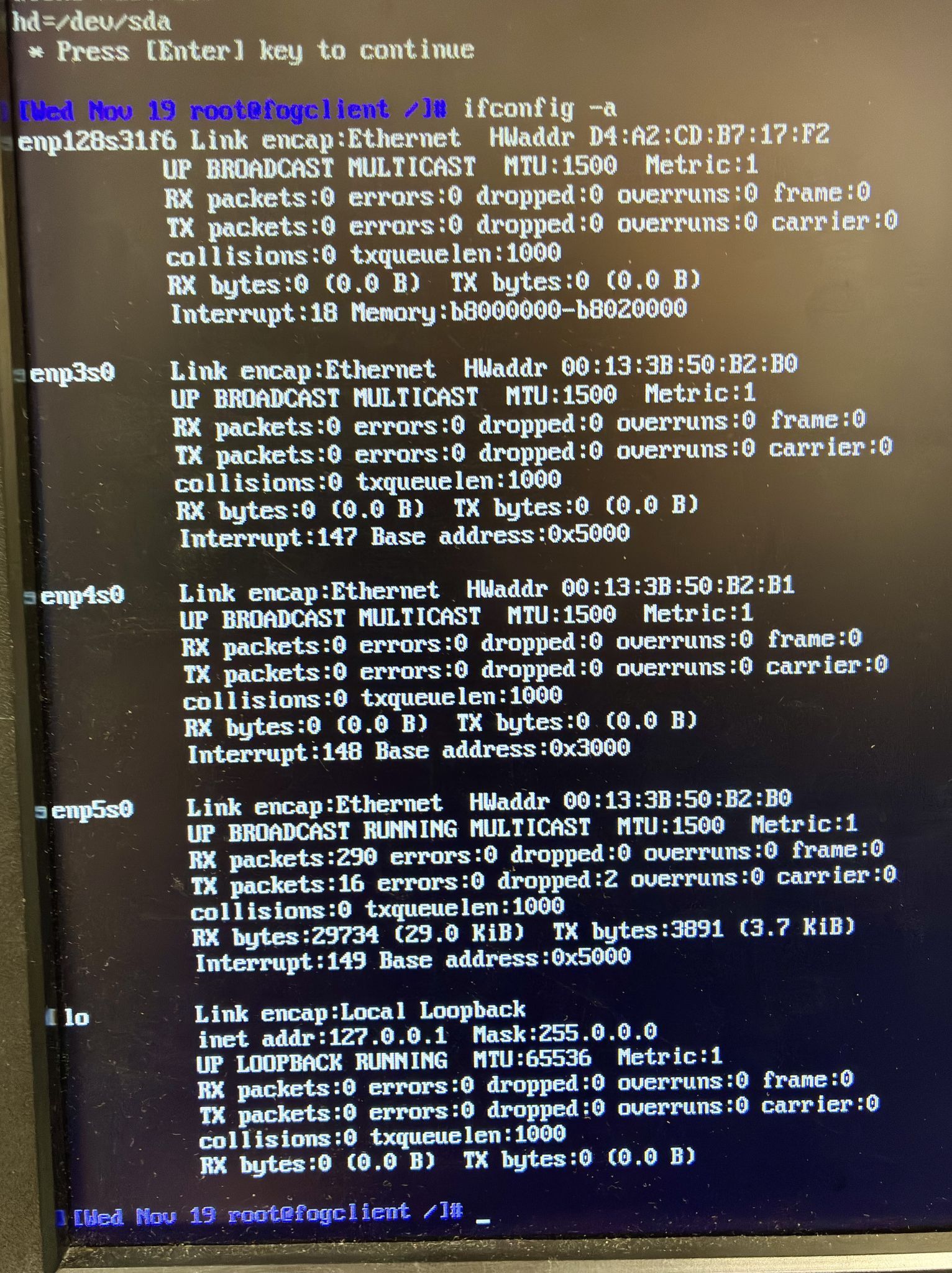
      Now when I boot the system up into debug mode with FOG into the FOS environment it seems whatever port is pluged into the lan it adopts another NIC’s mac address as shown below:

      FogClient-Image.jpg

      Now you can see when the fog client boots the mac address changes on the port that is connected to the LAN as:

      • enp128s31f6 - d4:a2:cd:b7:17:f2
      • enp3s0 - 00:13:3b:50:b2:b0
      • enp4s0 - 00:13:3b:50:b2:b1
      • enp5s0 - ec:08:6b:04:f9:d9 --> Changed to 00:13:3b:50:b2:b0 (the one that is attached to the network cable)

      Now I’ve plugged the cable into enp128s31f6 and setup dhcp on that port as well and tested it. When the fog client starts all of sudden the enp128s31f6 has another NIC’s mac address…

      Just a re-cap if I pull the two network cards, and do the re-image on the system I have no issues. It only occurs when I put an additional nic into the system… Any suggestions?

      posted in Linux Problems
      J
      JasonNaughton
    • RE: Linux Client Install Dual Nics

      @george1421
      Thanks for getting back to me George… I didn’t think I had an issue with reaching the fog server seeing that I was getting the fog display. Turns out that the Dell system that I have boots with one mac address which we included in our DHCP. It get’s it’s IP address and then gets to the second stage of the fog boot. I was able to get to a fog debug mode screen and you are 100% correct that the interface inp128s31f6 which is connected to the LAN does not get an IP address when the udhcpc command is issued. Digging further I found that it’s using a completely different mac address… Odd thing is if I pull the 2 cards, that provides the additional 3 interfaces and pxe boot with the one network jack I’m able to install the box. I had conceded to have to install the network cards post install.

      To add some further thought to this, the system I have has an onboard network jack, one, 1 port PCIE ethernet and one 2 port PCIE ethernet card. I thought this might have something to do with the box doing LOM on the onboard NIC (not something I’m interested in using but it’s there). So I configured the single port NIC and setup dhcp. Again the system boots no issues but when I get to the debug console the card has a completely different mac address… Do you have any idea why this could be happening? It’s almost as if there’s some sort of privacy nic thing which has the mac address different at the second part of the boot or as if I’m passing through some sort of dock but I’m not.

      posted in Linux Problems
      J
      JasonNaughton
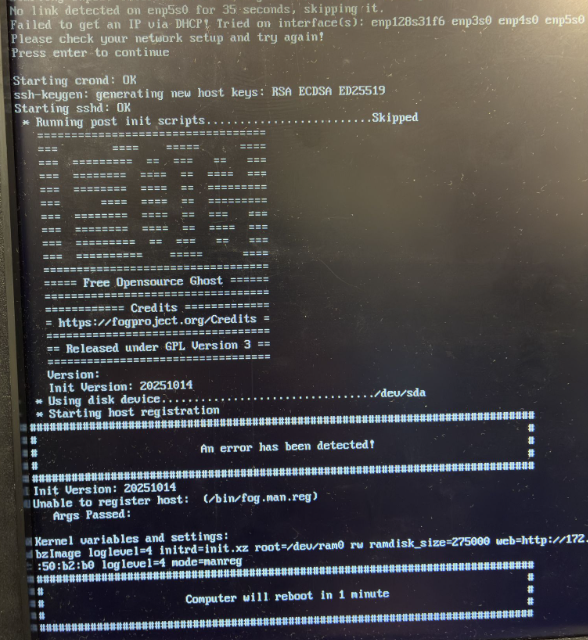
    • Linux Client Install Dual Nics

      Hi All,

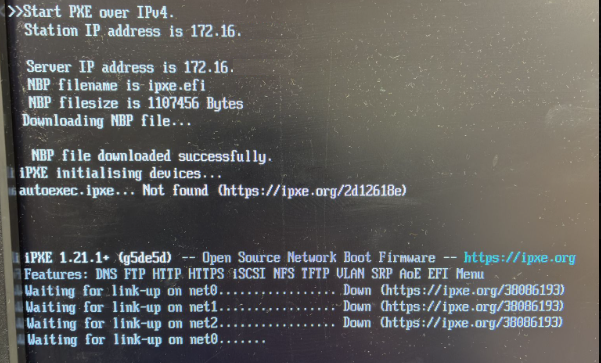
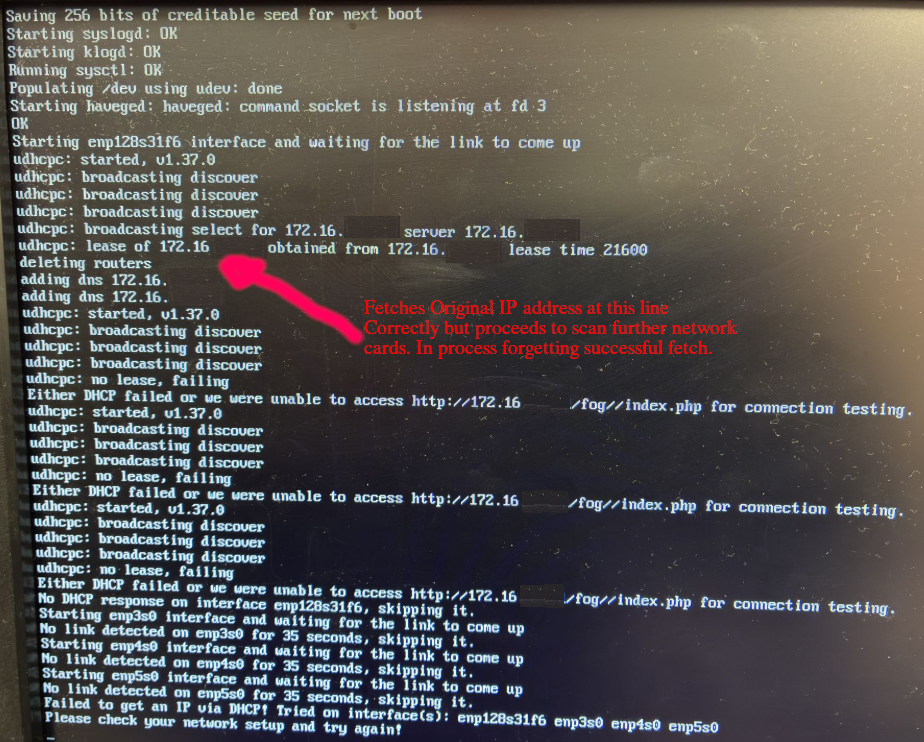
      I’ve been using the fog project for a while (5 years or so). I’ve been heavily relying on it to install various workstations. Today I ran into an issue that I never experienced before. I’ve installed clients with 2 nics without any issues. Normally the pxe boot would simply boot off of whatever nic was connected to the LAN. Today I was installing our standard image that I’ve been using for years, on a Dell Pro Max Slim workstation. Now I’ve installed this type of workstation in the past without any issues, but of course with only one nic. Today the system has 4 nics. Only 1 of the 4 nics is connected to the LAN. The system starts the PXE, and it appears to get it’s IP address and proceeds to the next stage. This time it gets it’s IP address but then scans through the remaining 3 nics… None of them have an IP address configured so they fail. It seems to forgotten that the first nic got the IP address without any issues. When it proceeds to go to the install stage it kacks out as it doesn’t believe it has a valid IP address. If I simply pull the 3 nics out and install the system everything works. Yet I have to re-configure the box with 4 nics in the end. Anyone have a way to tell the fog server, simply continue after getting the first card IP address. (ie stop searching for other nics).
      Screen-1.png Screen-2.png Screen-3.png

      posted in Linux Problems
      J
      JasonNaughton
    • postdownload script...

      Hey All,

      I recently transferred a perfectly working fog project server to another server and pouched the postdownload script functionality. I’ve gone through a bit of debugging. I put a /bin/bash inside my /images/postdownloadscripts/fog.postdownload so that I could shell out and see why I’m not getting the client hostinfo that I used to fetch with curl leveraging the fog-api-token and fog-user-token.

      I’ve validated that my ${FOG_API_TOKEN} contains the same string that is on my configuration page of my fog server. I’ve also validated that my ${FOG_USER_TOKEN} contains the same API string for a user within my user list. Both the user and the fog settings have the api enabled.

      Yet if I issue the following from my bash shell on the client after doing the pxeboot:

      curl -A “” -Lks
      -o /tmp/hostinfo.sh
      -H ‘Content-Type: application/json’
      -H “fog-api-token: ${FOG_API_TOKEN}”
      -H “fog-user-token: ${FOG_USER_TOKEN}”
      ${web}/service/hostinfo.php
      –data “mac=$mac”

      Where $mac is the mac address of the pxe booted client, and $web simply contains http://192.168.1.35/fog/. Yet the contents of the file /tmp/hostinfo.sh is essentially:

      No token passed to authenticate this host

      I kinda need the othertag1 from the fogserver where I store some unique information about the client. Prior to my moving of my server to the new configuration this worked fine… Any insight on this matter would be greatly appreiated.

      posted in Linux Problems
      J
      JasonNaughton
    • RE: Resize CentOS7 fails e2fsck

      @sebastian-roth

      Okay so I’ve done the following debugging so far… The image that I created was called CentOS7-MBR, as it’s a MBR not a GPT installation. After letting the system boot via pxe and get to a fogclient prompt I referenced the URL:

      Troubleshooting an image

      Now unfortunately I’m dumping a linux image via partclone not a windows 7 image but I thought the process would be similar.

      # dd if=d1.mbr of=/dev/sda bs=512 count=1
      1+0 records in
      1+0 records out
      512 bytes copied, 0.0256039 s, 20.0 kB/s
      
      # partprobe 
      
      # cat d1p1.img |pigz -d -c |partclone.restore -O /dev/sda1 -N -f -i
      Partclone fail, please check /var/log/partclone.log !
      
      # ls -ld /dev/sd*
      brw-rw---- 1 root disk 8, 0 Feb 27 16:06 /dev/sda
      brw-rw---- 1 root disk 8, 1 Feb 27 16:07 /dev/sda1
      brw-rw---- 1 root disk 8, 2 Feb 27 16:06 /dev/sda2
      brw-rw---- 1 root disk 8, 3 Feb 27 16:06 /dev/sda3
      brw-rw---- 1 root disk 8, 4 Feb 27 16:06 /dev/sda4
      

      So… not sure how to proceed. When I looked into the partclone log file it wasn’t much help:

      # cat /var/log/partclone.log 
      Partclone v0.3.13 http://partclone.org
      Starting to restore image (-) to device (/dev/sda1)
      read image_hdr error=0
      

      Any advice…

      posted in Linux Problems
      J
      JasonNaughton
    • RE: Resize CentOS7 fails e2fsck

      I know if I attempt to re-install the system with any disk, which is large enough to hold the image I will get the above issue. constantly now. I’ve put the system in debug mode and I’m attempting to issue the install commands by hand to see what the issue could be. I believe the issue either has to with the partition layout not being re-read into the kernel space. ie if I have a system that has no partitions, or the disk has existing partitions, yet different physical layout, and I deploy a realizable disk image it will produce this error. It’s almost as if I need a hdparm -z /dev/sda a few thousand times until the kernel recognizes the partition change and alters /dev

      posted in Linux Problems
      J
      JasonNaughton
    • Resize CentOS7 fails e2fsck

      Re: Deploy image not expanding partitions

      I’ve been using the fogproject to deploy windows images for some time now and thought I would attempt a linux deployment. I had already done so with a pxe via hand scripts and wanted to see how fog project handles it.

      Initially I was quite impressed. I captured an image (one disk, 4 partitions and made it resizable). Capture went well and I was able to deploy on a few boxes. Now the image has been sitting for about 6-8months and I attempted to re-deploy. Yet now the deployment fails as it wants to e2fsck before resizing and I have no way of interrupting the process to do so.

      Sadly I went back to my older method of deploying images. Once deployed I decided to re-capture it but this time use the non-resizable option. After the capture was complete I decided to re-deploy the image. The image deployed without any issues. As I still had the old “resizable” image I thought I would change images and redeploy again. This time the resizable image deployed without any issues.

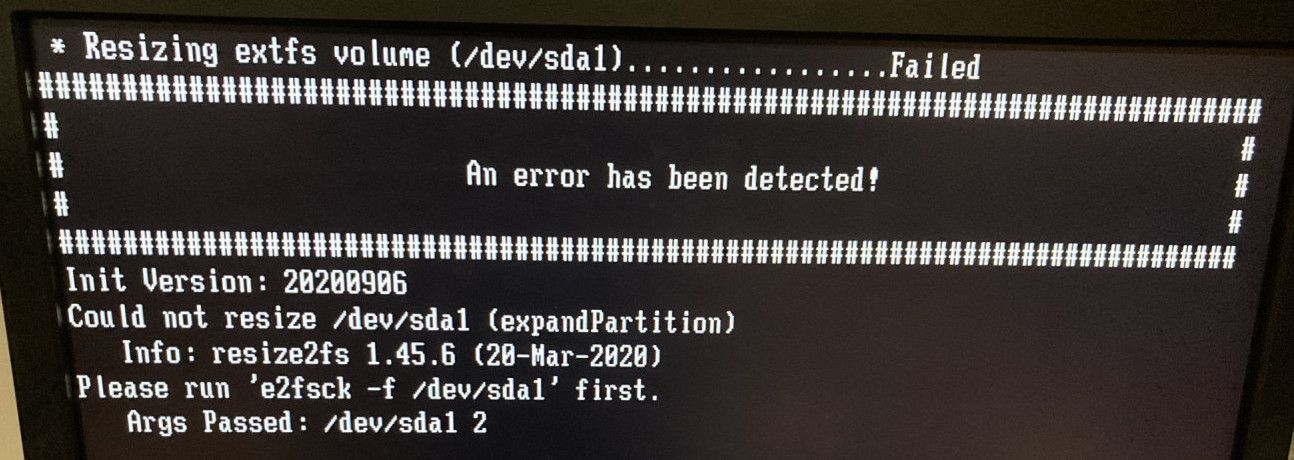
      Still curious I pulled the drive and put another blank drive onto the system and attempted to deploy the resizable image. Again it failed to deploy saying: "Could not resize /dev/sda1 (expand Partition)
      Please run ‘e2fsck -f /dev/sda1’ first…

      Please help me resolve this issue.
      screen-e2fsck.jpg

      Just so your aware my fog server is a CentOS 7 box, running FogProject 1.5.9

      posted in Linux Problems
      J
      JasonNaughton
    • 1 / 1