• Recent
    • Unsolved
    • Tags
    • Popular
    • Users
    • Groups
    • Search
    • Register
    • Login
    1. Home
    2. george1421
    3. Posts
    • Profile
    • Following 1
    • Followers 67
    • Topics 113
    • Posts 15,382
    • Groups 2

    Posts

    Recent Best Controversial
    • RE: Isolated Network Install - No Internet

      @atlas When it comes to opensource, the only wrong answer is one that doesn’t work. Well done!

      Another hackish way would be to instead of changing the programming, you could enter a fake/but valid entry in the /etc/hosts table to point the dns entry to your internal server. This way you can use fog native code when version next comes out. But again if it worked for you it was the right answer.

      posted in FOG Problems
      george1421G
      george1421
    • RE: Cannot PXE boot on Client PCs

      @zguo said in Cannot PXE boot on Client PCs:

      Not sure why it shows 172.20.4.1. I guess maybe because the client PC cannot find the server, then it goes to the default gateway? Then back to the question, how can I let my client PC detect the server?

      99% of the time, your dhcp server is not telling the pxe booting computer the right thing. And your dhcp server’s IP address is at .1

      When you run wireshark are you running it as administrator AND are you picking the wired network interface to monitor. It should see multicast on any computer connected to the same subnet.

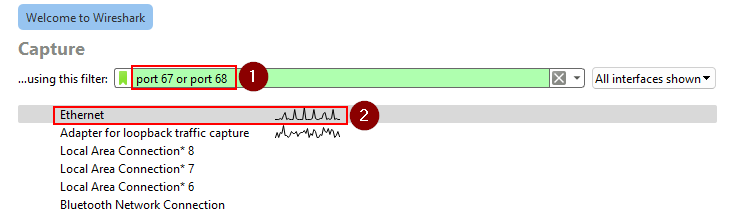
      For wireshark, launch is as Administrator, then your wireshark startup screen should look like this before launching capture. If you don’t see any data or the ethernet port, then you did not run wiershark as admin. Make sure you enter a capture filter like this (1), and then select the network adapter where you see traffice (2)

      ws_capture.png

      posted in General Problems
      george1421G
      george1421
    • RE: Isolated Network Install - No Internet

      @atlas You need to have internet access to install FOG. I have seen some people install 2 network adapters in the fog server, one on the business network and one on the isolated network. The nic on the business network is for management and (install time only) internet access. This keeps the isolated network isolated.

      FWIW that wiki page you referenced is 10 years old and does not currently apply to a current version of FOG.

      FWIW: You can manually download the inits and kernels from here: https://github.com/FOGProject/fos/releases/

      posted in FOG Problems
      george1421G
      george1421
    • RE: Cannot PXE boot on Client PCs

      @zguo Ok this is a good start. Look at the “server” ip address, that should be your FOG server’s IP address. I’m guessing its your router’s IP address. As I mentioned before most soho routers put themselves as the boot-server / next-server.

      We have to be missing something here, because you should be able to see the dhcp process with both tcpdump and wireshark, because the pxe booting computer is now getting the info.

      posted in General Problems
      george1421G
      george1421
    • RE: Problem Capturing right Host Primary Disk with INTEL VROC RAID1

      @nils98 Well that’s not great news. I really thought that I had it with including the intel rst driver. Would you mind sending me the messages log from booting this new kernel? Also make sure when you are in debug mode that you run uname -a and make sure the kernel version is right.

      posted in General Problems
      george1421G
      george1421
    • RE: Problem Capturing right Host Primary Disk with INTEL VROC RAID1

      @nils98 Ok there have been a few things I gleaned by looking over everything in details.

      The stock FOS linux kernel looks like its working because I see this in the messages file during boot. I do see all of the drives being detected.

      Mar  1 15:46:40 fogclient kern.info kernel: md: Waiting for all devices to be available before autodetect
      Mar  1 15:46:40 fogclient kern.info kernel: md: If you don't use raid, use raid=noautodetect
      Mar  1 15:46:40 fogclient kern.info kernel: md: Autodetecting RAID arrays.
      Mar  1 15:46:40 fogclient kern.info kernel: md: autorun ...
      Mar  1 15:46:40 fogclient kern.info kernel: md: ... autorun DONE.
      

      This tells me its scanning but not finding an existing array. It would be handy to have the live CD startup file to verify that is the case.

      Intel VROC is the rebranded Intel Rapid Store Technology [RSTe]

      ref: https://www.intel.com/content/www/us/en/download/19472/intel-rapid-storage-technology-enterprise-intel-rste-software-raid-driver-for-the-intel-server-board-m10jnp2sb.html

      There is no setting for CONFIG_INTEL_RST in the current kernel configuration file: https://github.com/FOGProject/fos/blob/master/configs/kernelx64.config Its not clear if this is a problem or not, but just connecting the dots between VROC and RSTe: https://cateee.net/lkddb/web-lkddb/INTEL_RST.html I did enable it in the test kernel below

      Test kernel based on linux kernel 6.6.18 (hint: newer kernel that is available via fog repo).
      https://drive.google.com/file/d/12IOjoKmEwpCxumk9zF1vtQJt523t8Sps/view?usp=drive_link

      To use this kernel copy it to /var/www/html/fog/service/ipxe directory and keep its existing name. This will not overwrite the FOG delivered kernel. Now go to the FOG Web UI and go to FOG Configuration->FOG Settings and hit the expand all button. Search for bzImage, replace bzImage name with bzImage-6.6.18-vroc2 then save the settings. Note this will make all of your computers that boot into fog load this new kernel. Understand this is untested and you can always put things back by just replacing bzImage-6.6.18-vroc2 with bzImage in the fog configuration.

      Now pxe boot into a debug console on the target computer.

      Do the normal routine to see if lsblk and cat /proc/mdstat and mdm --detailed-platform returns anything positive.

      If the kernel doesn’t assemble the array correctly then we will have to try to see if we can manually assemble the array using mdadm tool.

      I should say that we need to ensure the array already exists before we perform these test because if the array is defunct or not created we will not see it with the above tests.

      posted in General Problems
      george1421G
      george1421
    • RE: Cannot PXE boot on Client PCs

      @zguo Not seeing packets regarding port 67 or 68 is suspicious, but also follows what you see on the pxe booting client. So I see a connection.

      One other comment is that many soho routers (ones you might find in your home), do not support pxe booting properly. They work perfect for dhcp but fail to send out the right boot file names and often define the router as the pxe boot server.

      dhcp works by sending broadcast messages to all computers on the local subnet, so a computer running wireshark or tcpdump should record these packets. If you ran tcpdump on the fog server and it did not record any dhcp packets that means that something is blocking these broadcast messages from getting to your fog server. Understand at the moment your problem is your network infrastructure and not specifically with FOG.

      I do have to say that if your fog server and pxe booting computer is on a different subnet than your dhcp server you will need to configure your router to send dhcp broadcast messages across the router because they are not enabled by default.

      Yes on only the file name and not path with FOG (there is an exception if you have a x32 bit uefi computer but I don’t think that applies here). The tftp server program uses the tftpboot directory as the root directory. This keeps the tftp service program from being able to download random files from your fog server. So it does a change root to /tftpboot. That is probably more than you care about at the moment. But in this case having a full path or not isn’t your current issue, getting the client and fog server to see the dhcp DISCOVER request is the first step.

      posted in General Problems
      george1421G
      george1421
    • RE: Cannot PXE boot on Client PCs

      @zguo in your screen shot you have listed the full path to the boot file, that should only be the boot file name in reference to the /tftpboot directory which for tftp is the root directory for tftp.

      I think you have something missing in your setup. You can use the FOG server or a witness (third computer) with wireshark installed to monitor the communications. If you use wireshark you can use a capture filter of port 67 or port 68 Or follow the guide here to use the fog server to monitor the dhcp/pxeboot process. https://forums.fogproject.org/topic/9673/when-dhcp-pxe-booting-process-goes-bad-and-you-have-no-clue then load the output file into wireshark.

      So what you are looking for is the DORA process (DISCOVER, OFFER, REQUEST, ACK).

      So the pxe booting computer will send out a discover packet (please configure me)
      The dhcp server will respond with an OFFER packet that should contain the next-server and boot-file fields as well as dhcp options 66 and 67 which will align with the next-server and boot-file fields. My guess is that there is something wrong with OFFER packet or your dhcp server.

      posted in General Problems
      george1421G
      george1421
    • RE: Cannot PXE boot on Client PCs

      @zguo Just to be clear, what device is your dhcp server? Is it the fog server or something else?

      At this point FOG isn’t involved if FOG isn’t your dhcp server. The error message is telling you that the dhcp server isn’t answering your computer.

      posted in General Problems
      george1421G
      george1421
    • RE: Problem Capturing right Host Primary Disk with INTEL VROC RAID1

      @nils98 said in Problem Capturing right Host Primary Disk with INTEL VROC RAID1:

      FOS 6.1.63

      OK good deal I wanted to make sure you were on the latest kernel to ensure we weren’t dealing with something old.

      I rebuilt the kernel last night with what thought might be missing, then I saw that mdadm was updated so I rebuilt the entire fos linux system but it failed on the mdadm updated program. It was getting late last night so I stopped.

      With the the linux kernel 6.1.63, could you pxe boot it into debug mode and then give root a password with passwd and collect the ip address of the target computer with ip a s then connect to the target computer using root and password you defined. Download the /var/log/messages and/or syslog if they exist. I want to see if the 6.1.63 kernel is calling out for some firmware drivers that are not in the kernel by default. If I can do a side by side with what you posted from the live linux kernel I might be able to find what’s missing.

      posted in General Problems
      george1421G
      george1421
    • RE: Red dot in Fog

      @Tanguy Just to be clear, you can’t locate the system by using its short name like ping host1 but you can if you use the fqdn like ping host1.domain.com? If yes, then you need to add the search parameter with a domain and it will use the search list to find the fqdn.

      posted in FOG Problems
      george1421G
      george1421
    • RE: Problem Capturing right Host Primary Disk with INTEL VROC RAID1

      @nils98 Nothing is jumping out at me as to the required module. The VMD module is required for vroc and that is part of the FOG FOS build. Something I hadn’t asked you before, what version of FOG are you using and what version of the FOS Linux kernel are you using? If you pxe boot into the FOS Linux console then run uname -a it will print the kernel version.

      posted in General Problems
      george1421G
      george1421
    • RE: Red dot in Fog

      @Tanguy We might need a bit more information, but in general once FOG deploys a registered target computer, the only way it can find that computer on your network is via its host name. So to that point, the name you register in FOG for the host, must be the name of the computer after its attached to AD.

      (this is more to the point of your problem), the fog server needs to be able to resolve the host name via DNS. So to test open the fog server, open a command window, then try to ping the computer via its name as its known to FOG. If it can’t resolve the name, then you need to update the dns server setting so that its proper for your network. I think fedora has a ui tool to do this, or the old school way is to update /etc/resolv.conf file. But I would use the ui tool because it probably sets this file and might overwrite anything you put in there manually.

      posted in FOG Problems
      george1421G
      george1421
    • RE: Hiren BootCD 1.0.2

      @cplemaster Excellent explanation of how to go about solving this.

      I can tell you that pxe booing large files over the tftp protocol can take time. You can and probably should download the wim file over http protocol. Its much faster and scales better than tftp.

      Such as in this parameter block

      set tftp-path tftp://${fog-ip}
      set http-path http://${fog-ip}/images/tools/hbcd102
      kernel ${tftp-path}/win/wimboot gui
      imgfetch --name bootmgr.exe ${http-path}/bootmgr.exe bootmgr.exe
      imgfetch --name bootx64.efi ${http-path}/efi/boot/bootx64.efi bootx64.efi
      imgfetch --name BCD ${http-path}/boot/bcd BCD
      imgfetch --name boot.sdi ${http-path}/boot/boot.sdi boot.sdi
      imgfetch --name boot.wim ${http-path}/sources/boot.wim boot.wim
      boot || goto MENU
      

      ref: https://forums.fogproject.org/topic/10944/using-fog-to-pxe-boot-into-your-favorite-installer-images/10

      posted in General
      george1421G
      george1421
    • RE: iPxe boot fails : Coud not boot :Permission denied (https://ipxe.org/0216eb8f)

      @Thierry-carlotti said in iPxe boot fails : Coud not boot :Permission denied (https://ipxe.org/0216eb8f):

      iPxe boot fails : Coud not boot :Permission denied (https://ipxe.org/0216eb8f)

      This really sounds like secure boot is enabled keeping ipxe from loading/running.

      posted in Linux Problems
      george1421G
      george1421
    • RE: How do I get dnsmasq to direct PXE to my fogserver IP instead of my dnsmasq server IP?

      @45lightrain Lets cover a few things that I’m aware of that might help you get to the bottom of the issue.

      1. When you have a ProxyDHCP server and normal dhcp server on your network you will get two dhcp OFFERS. Well I guess it would be the same if you had two dhcp server you would see two offers, but that is a bit off point. You can tell if an OFFER packet is a proxy dhcp packet because dhcp option 60 will be set to PXEClient in the ProxyDHCP OFFER. That is a signal to the pxe booting client to come back and ask about pxe booting from the ProxyDHCP server. The pxe booting client will ignore the pxe boot information from the main dhcp server.
      2. A properly formed dhcp packet will have both the fields in the header {next-server} and {boot-file} filled out for the bootp booting protocol part of the protocol AND should have dhcp option 66 and 67 set for the dhcp booting protocol. Both must be filled out because its up to the pxe booting client to pick either the dhcp or bootp protocol.
      3. Your ltsp files are correct. The last one you posted has the dhcp-range… commented out, that turns off the proxydhcp feature in dnsmasq.

      SO if you have a pihole server that runs dnsmasq, why are you running an external dnsmasq server. Does your pihole server have pxe boot options? I know pfsense has built in pxe boot fields you can fill out that supports dynamic (bios/uefi) boot loaders.

      When trying to debug this wireshark/tcpdump is your friend that tells you what is flying down the wire. Just remember that dhcp is based on broadcast messages so you can “hear” them from any network port, and proxyDHCP like other unicast messages must be captured at the source, destination, or via a mirrored port.

      posted in Linux Problems
      george1421G
      george1421
    • RE: Problem Capturing right Host Primary Disk with INTEL VROC RAID1

      @nils98 Nice, this means its possible with the FOG FOS kernel. If the linux live cd did not work then you would be SOL.

      OK so lets start with (under the live image) lets run this commands.

      lsmod > /tmp/modules.txt
      lspci -nnk > /tmp/pcidev.txt

      use scp or winscp on windows to copy these tmp files out and post them here. Also grab the /var/log/messages or /var/log/syslog and post them here. Let me take a look at them to see 1) what dynamic modules are loaded and/or the kernel modules linked to the PCIe devices.

      posted in General Problems
      george1421G
      george1421
    • RE: How do I get dnsmasq to direct PXE to my fogserver IP instead of my dnsmasq server IP?

      @45lightrain The pcaps show confusion. Its not your dnsmasq configuration at the moment but more something going on with the pihole dhcp.

      The pcap captured from the fog server -67 is what I would expect as a normal DORA process. Initially the pihole didn’t respond to the first DISCOVER packet but it did for the subsequent ones.

      As expected from a soho router its posting that its the PXE boot server.That’s not a problem because your dnsmasq server has also sent an OFFER packet saying its a ProxyDHCP server. It completes the Request and Ack bits of DHCP and then 3 seconds later it restarts the process over again. This bit is strange.

      Looking at the puhole pcap this one doesn’t align with what the fog server saw. This one only shows the pihole in response without the OFFER from dnsmasq AND the pihole server is now sending out the proper next server (fog server) and boot file names (!!) AND its saying it is the ProxyDHCP server (!!) It would have worked except that it said it was a proxydhcp server, because it failes on the next step.

      The fog server 4011 is expected since ProxyDHCP is unicast messaging and not broadcast like dhcp.

      The pihole 4011 is the proxyDHCP packet, but now the pihole is back saying its the next server (pxe boot) and not your FOG server.

      posted in Linux Problems
      george1421G
      george1421
    • RE: How do I get dnsmasq to direct PXE to my fogserver IP instead of my dnsmasq server IP?

      @45lightrain Are you running this environment on virtual box? The pxe boot messages don’t look typical FOG pxe boot messages.

      So what device is 192.168.2.60?

      Lets find out what actors are at play here. I have a tutorial to use the fog server to monitor the pxe booting process. You can run this from the fog server, but I think since you have dnsmasq running some place else, run the probe from that server. I want to capture the proxydns request on port 4011. That is unicast messaging so we need to capture that from the dnsmasq server’s perspective.
      https://forums.fogproject.org/topic/9673/when-dhcp-pxe-booting-process-goes-bad-and-you-have-no-clue

      https://forums.fogproject.org/topic/9673/when-dhcp-pxe-booting-process-goes-bad-and-you-have-no-clue

      I think there is more going on that we currently know.

      posted in Linux Problems
      george1421G
      george1421
    • RE: Problem Capturing right Host Primary Disk with INTEL VROC RAID1

      @nils98 There are a few interesting things in here, but nothing remarkable. I see this is a server chassis of some kind. I also see there is sata and nvme disks in this server. A quick look of vroc and this is designed for nvme drives and not sata and this is on cpu raid.

      Is your array with the sata drives /dev/sda and /dev/sdb or with the nvme drives?

      I remember seeing something in the forums regarding the intel xscale processor and vmd. I need to see if I can find those posts.

      For completeness, what is the manufacturer and model of this server. What is the target OS for this server. Did you setup the raid configuration in the bmc or firmware, so the drive array is already configured?

      And finally if you boot a linux live cd does it properly see the raid array.
      Lastly for debugging with FOS linux if you do the following you can remote into the FOS Linux system.

      1. PXE boot into debug mode (capture or deploy)
      2. Get the ip address of the target computer with ip a s
      3. Give root a password with passwd just make it something simple like hello it will be reset at next reboot.
      4. now with putty or ssh you can connect to the fos linux engine to run commands remotely. This makes it easier to copy and paste into the fos linux engine.
      posted in General Problems
      george1421G
      george1421
    • 1
    • 2
    • 16
    • 17
    • 18
    • 19
    • 20
    • 769
    • 770
    • 18 / 770