• Recent
    • Unsolved
    • Tags
    • Popular
    • Users
    • Groups
    • Search
    • Register
    • Login
    1. Home
    2. george1421
    3. Best
    • Profile
    • Following 1
    • Followers 66
    • Topics 113
    • Posts 15,373
    • Groups 2

    Posts

    Recent Best Controversial
    • RE: Slowness after upgrade to 1.5.7.102 (dev branch)

      @rogalskij When you deploy an image in the web ui, then pxe boot the target computer, iPXE boots then calls boot.php script on the server. Right after boot.php is called it should transfer bzImage and init.xz. The transfer is super fast so its possible to miss it.

      So lets take this route. Go to tasks and close out any open tasks then go back to schedule another deploy, but this time before you hit the schedule task button tick the debug checkbox. Now pxe boot the target computer. After a few screens of text you need to clear with the enter key, you will be dropped to a FOS Linux command prompt. At the command prompt key in uname -a That will print out the kernel version and name. The version number should be 5.5.3 if the proper kernel is booting.

      If that is the case they key in fog and press enter at the command prompt. This is FOG in debug mode, you will need to press the enter key at each break point in the program, but you will be able to single step through the deployment. It will get to the partclone screen so you can see the transfer rates.

      posted in FOG Problems
      george1421G
      george1421
    • RE: Newbie - Join Domain not Working, Post-sysprep Still Logs In as unattend.xml Setup User Acct

      I can say I have a pretty complex setup for imaging and reading yours I have to say OMG…

      Here is an example of my unattend.xml file: https://forums.fogproject.org/topic/11920/windows-10-1803-sysprep-problem/6

      In your unattend.xml file there are entries for disk and partition creation. If you are using FOG for imaging then you don’t need that section because FOG is already creating the partitions for you.

      A couple of other things. I’m not sure why you are deleting any user accounts. I can say I’ve never deleted any built in user accounts. I have used the unattend.xml file to create local users but never had to delete them first.

      The unattend.xml file should go into the c:\windows\panther file not in the older setup folder.

      I don’t use the fog client so I have the unattend.xml file name the computer and connect it to AD. I use a fog post install script to update the unattend.xml file on the target computer before oobe starts. You can use the fog client service to do this, I just happen to use a different method.

      In our case we use Microsoft’s MDT to build the golden image. Right after MDT is done we run sysprep and then capture the image with FOG.

      In my environment as OOBE is running the unattend.xml file places the target computer in a build OU so no GPO policies are applied to the computer. As you can see in the first run section of the unattend.xml script there is a call to a script to move the computer to a predefined OU. This is just a call to a vbs file we created to move the computer to the destination OU. This call could be made from the setupcomplete.cmd file but we select the first run to make sure everything was setup first then move the computer and reboot.

      To aid in sysprep don’t let your golden image computer reach out to the internet. If it does the golden computer will start to update windows and break sysprep.

      posted in FOG Problems
      george1421G
      george1421
    • RE: Deploying via Multicast aborts midway

      @Dankau What switch manufacture is your networking infrastructure? Cisco Catalyst series?

      I remember a post from not to long ago that something in cisco land needed to be turned on. I also found someone with almost the same initial post as you have but there was no resolution.

      posted in FOG Problems
      george1421G
      george1421
    • RE: Can't WOL PCs

      How old was your old fog server (what version)?

      Have you tried another 3rd party WOL tool like WakeMeOnLAN https://www.nirsoft.net/utils/wake_on_lan.html This would tell us if the issue was the fog server or outside of FOG in your infrastructure. Right now its not clear where the root of the problem is.

      Are your target computers on the same subnet as the FOG server and they are still not waking correctly?

      Understand that windows 10 takes over the wol function. To test removed the power cable from the target computer for 10 seconds and then plug it back in. See if the computers WOL correctly from state G3 hardware powered off. ref: https://docs.microsoft.com/en-us/windows/win32/power/system-power-states

      posted in FOG Problems
      george1421G
      george1421
    • RE: Surface Pro 7

      @epsilon52 The quick answer is the certificate used for apache (HTTP) is not the same certificate used when ipxe.efi was compiled.

      How did you enable the https service in the web server? Did you run the fog installer script with the -S option to enable https in FOG?

      posted in FOG Problems
      george1421G
      george1421
    • RE: Updating a registry file after deployment

      @devrick The bash script variables are listed towards the bottom of this post. https://forums.fogproject.org/post/69723

      The code to update the registry is listed in the fog.copydrivers section of this post: https://forums.fogproject.org/post/105078

      So how should you start, but looking over this tutorial: https://forums.fogproject.org/topic/11126/using-fog-postinstall-scripts-for-windows-driver-injection-2017-ed

      I would copy over the fog.custominstall script as is.

      Create a new bash script that looked similar to the fog.copydrivers script from the above post. Name it fog.updatereg

      #!/bin/bash
      regfile="/ntfs/Windows/System32/config/SOFTWARE"
      key="\Microsoft\Windows\MyTags\SystemTag"
      devtag= ${othertag1}
      reged -e "$regfile" &>/dev/null <<EOFREG
      ed $key
      $devtag
      q
      y
      EOFREG
      

      Change the regfile and key to the appropriate ones for your enviornment.

      Finally update the fog.custominstall replacing the line with fog.copydrivers with fog.updatereg. And the last bit is to hook the fog.custominstall script into fog by following the fog.postdownload section of this post: https://forums.fogproject.org/post/105078

      posted in FOG Problems
      george1421G
      george1421
    • RE: PXE Error "PXE-E99" after OS update

      @rogalskij So you upgraded from a fog server with centos 7 installed and you upgraded to centos 8? Do I understand the situation?

      If FOG was installed and you upgraded, this might get messy.

      1. Look through the hidden file in /opt/fog/.fogsettings update the settings to reflect the new values for the fog server (like interface names and such).
      2. Rerun the FOG installer that might install any missing components as well as correct the rest of the setup.

      If step 2 doesn’t work to correct the issue then rename that .fogsettings file and run the installer. It will prompt you for all of the questions again but this time it will do a complete install (it will not touch the image files or database). That should pull in all of the missing bits.

      Also with the upgrade make sure that selinux is disabled as well as the centos firewall.

      posted in FOG Problems
      george1421G
      george1421
    • RE: Images Created on FOG 1.5.9 Not deployable from FOG 1.5.5

      @tutungzone Yep ram disk size needs to be increased for the new inits. The larger ram disk size will not hurt / impact running the older inits. You are basically changing the ram disk size from 127MB to 278MB (yes MB, not GB).

      posted in FOG Problems
      george1421G
      george1421
    • RE: Capturing Image from VirtualBox VHD VM?

      @tesparza Well we need to get a few things straight here.

      I assume you are building a uefi golden image? When deploying it to a target computer (vm) is that VM in uefi mode? For the uefi firmware, if it detects a uefi boot disk it will add that boot disk into the boot manager. If it can’t locate a valid uefi boot disk, it will only display uefi pxe booting options. Remember that you can only deploy a uefi source image to a uefi target computer, the same holds true for a bios source image, it can only go to a bios based target computer.

      I would start out by making sure your source and target VMs are setup the same way, bios, memory, disk and such. If they are then you can start to debug this issue by scheduling another deploy task to the target VM but before you tick the schedule task button, check the debug checkbox. Now pxe boot the target computer. After a few screens of text on the target computer you should be dropped to a fos linux command prompt. Understand where you should be is on the target computer where you just previously deployed the image, but now you are in debug mode. Key in the following command, lets see what the existing disk structure looks like lsblk

      Once we know that we can debug this issue a bit more.

      posted in FOG Problems
      george1421G
      george1421
    • RE: Multiple I/O Errors during imaging

      I’ve looked into this a bit and there are other references to this error out there. My initial reaction is this is a hardware issue, maybe specifically with the disk or mobo firmware based on the truth table so far.

      You will probably need to do a bit more testing to find the root of the issue. So far no one else has reported this issue so I’m thinking it something unique to your hardware configuration. From what I’ve found from searching is basically the nvme drive is disappearing from the view of the kernel. I don’t think at the moment this is a networking issue.

      The first thing I would make sure the mobo firmware is up to date.

      You have already tested with a 800GB and 35GB image. I was concerned that the 800GB image was running out of resource space on the target computer, so I was going to suggest a 25GB image to see if you were getting the same error. With that 800GB image, one of the concerns about SSD/NVMe drives is sustained writes and thermal heating of the device. 800GB is going to take quite a long time of continuous writes, which is going to heat up the drive, maybe to a throttling thermal limit. I’m not saying that’s the issue, but a possibility. Even with a 25GB image, you are going to have heavy duty sustained writes for 3-4 minutes (assuming you are getting 6GB/m transfer rates in partclone). One of the down sides (if you can call it that) with FOG is that it will push the image to disk as fast as the disk can ingest the image from the fog server and force it into the disk as fast as the disk will accept it.

      So the first thing (after confirming your mobo firmware is up to date) is to try swapping out that nvme disk for something like a samsung evo plus or pro. See if you get the same error.

      You have tried these Crucial drives in different mobos so I don’t add a lot of value here, but try one of those drives in something like a commercial build HP/Dell/Lenovo system to see if you get the same results.

      Those Crucial NVMe drives also have onboard firmware. Confirm that the firmware on the drive is current.

      Right now we don’t know where the error is other than the drive appears to disappear from the linux kernel. So we need to try a few different things to see if the error moves with one of the exchanges above.

      One other thing we can try is to run a deploy in debug mode (check the debug checkbox before scheduling the task). PXE boot the target computer. You will be dropped to the FOS Linux command prompt after a few pages of text. You can start imaging from the command prompt by keying in fog. Proceed with imaging step by step until you get the error. Press Ctrl-C to get back to the command prompt. From there look at the messages in /var/log (syslog or messages, I can’t remember ATM). See if there is any clues at the end of the log that might give us an idea. This command might give us a cloue grep nvme /var/log/syslog

      Also after you get that error and get back to the FOS Linux command prompt key in lsblk to see if the drive really went away.

      posted in FOG Problems
      george1421G
      george1421
    • RE: NBP File Downloaded successfully boot loop

      @sonic136 said in NBP File Downloaded successfully boot loop:

      Upon further investigation, it turns out that older boards dont really like the snponly.efi when PXE booting.

      Well this really isn’t a problem of FOG, but of your computer’s uefi firmware.

      For a little clarity here.

      snponly.efi is to uefi as undionly.kpxe is to bios. Both of these use the NIC’s built in network drivers. Of course undi for bios has been around for 20 years (don’t quote me) For ufei, snp hasn’t been around for that long. So the early motherboards the snp drivers were bad. Within the last 2 years the nic/motherboards with snp are much better where snponly.efi works well.

      Now ipxe.efi is to uefi and ipxe.kpxe is to bios. In this case the ipxe.??? boot loader contains all of the common nic drives built into the boot loader, much like linux has all of its drivers in the linux kernel. This is where ipxe falls behind new and current hardware. Since ipxe needs the drivers someone needs to write them for inclusion into iPXE.

      In the end its the responsibility of the hardware manufacture to get the uefi firmware and snp driver working correctly. That is why the snponly.efi works on some computers and not others.

      posted in FOG Problems
      george1421G
      george1421
    • RE: FOG Server Deployment Architecture & Stress Test Tools

      @wt_101 First let me say I applaud your efforts. No one has taken the time to quantify how well FOG images or do load benchmark testing with FOG.

      I can tell you from practice experience that FOG will:

      1. Transfer at or around 6.1GB/min (as seen by the speed counter on the partclone screen, more on this below) on a well designed 1GbE network. I have seen it get as high as 13.6GB/min where the fog server is running on a 28 core VM Host server with 20GB uplink to the network core with the distribution and access layers all 1GbE.

      2. All of the heavy lifting is done by the target computer not the FOG server. I can run the FOG server on a Raspberry Pi4 and still get 6GB/min transfer rates (single unicast image). During imaging the FOG server only moves images from disk to the network and collects status information on the capture/deployment process.

      3. You can saturate a 1 GbE link on the fog server with 2-3 simultaneous unicast deployments. Because I didn’t have the hardware at the time I did not test saturation of a 10GbE link. If I had to guess it would be in the 10 simultaneous deployment range. I think PCIe performance would saturate before the 10GbE nic would.

      4. Partclone speed. That speed on the partclone screen is a composite speed. It includes the intake speed of the image stream to the target computer (including everything it took to get the image to the target computer like FOG server storage disk performance, OS overhead, fog server nic throughput, and well as any network bandwidth overhead), decompression of the FOG image on the target computer and then eventually the speed as which the target computer can write the image to disk. As you see the partclone speed (GB/min) is the throughput of the entire process not just network throughput. So its possible here to see speeds that are impossible to achieve on a 1GbE network if your target computer has many cores, lots of ram and fast nvme disks.

      5. Image compression. Historically FOG used gzip compression for its stored imaged. This cut down on network bandwidth and fog server disk requirements. Within the last 3 years FOG has switch to zstd for image compression as the default over gzip. Gzip is still supported but the deployment performance gains by using zstd is remarkable. I do have to caveat this with zstd IS slower than gzip on image capture, but its much faster on image expansion on the target computer. You see the most impact because you typically capture once, but deploy many times. So overall zstd IS faster.

      6. What we are seeing as a bottleneck on the larger campus is FOG server performance servicing computers with the FOG Client installed. (this is only a guesstiment) Around 100 FOG clients communicating with the FOG server we see the SQL server utilization shoot up. This causes a slow down in the responsiveness of the FOG Web UI. We’ve traced this down to the default settings in MySQL database. When FOG is installed it uses the MyISAM db engine. Once the fog deployment hits 100 clients we recommend that he FOG admin switch the mysql data engine over to the INNODB engine. Basically the issue with MyISAM is that on a record update the table is locked for all other updates until the current transaction is complete. Where the innodb engine uses row level locking. Because of the MyISAM table level locking there is a lot of resource contention in the database when many clients hit the FOG server at the same time. The innodb releases this contention. If there is db resource contention when we run top we would typically see higher than normal mysql cpu requirements and many (many) php-fpm worker tasks. To properly stress test the fog server with many fog clients you will need to simulate the check in communication the fog client does with the FOG server. For really large campuses it may even be beneficial to setup a dedicated and tuned sql server.

      7. Testing tftp server performance is a bit of a waste of time. The biggest file that is transferred over tftp is 1MB (ipxe.efi). So once the FOG iPXE menu is displayed everything else is done by http. Now I can see value in tuning the apache server for distributing (streaming) large files. AFAIK no one has looked into performance tuning apache. Since you mentioned block size, I do have to say if you are having issues transferring the ipxe code by tftp, check into the networks MTU. If the MTU is less than the default tftp block size you will have PXE startup issues.

      8. Testing with Virtual box may not be the best choice since VB is a type 2 hypervisor (i.e. the underlying OS will also impact the performance of the VMs). You might consider using ESXi or dedicated hyper-v server to give you clean and repeatable performance numbers. While VB works ok in a development environment, I think its own internal performance needs to be taken into consideration.

      About 4 years ago I did basic bench marking testing the 3 subsystems on the FOG server involved with imaging. The results are here: https://forums.fogproject.org/topic/10459/can-you-make-fog-imaging-go-fast

      posted in FOG Problems
      george1421G
      george1421
    • RE: Install FOG on Ubuntu Server 21.10 issues

      @brakcounty said in Install FOG on Ubuntu Server 21.10 issues:

      s FOG 1.5.9 not compatible with 21.10?

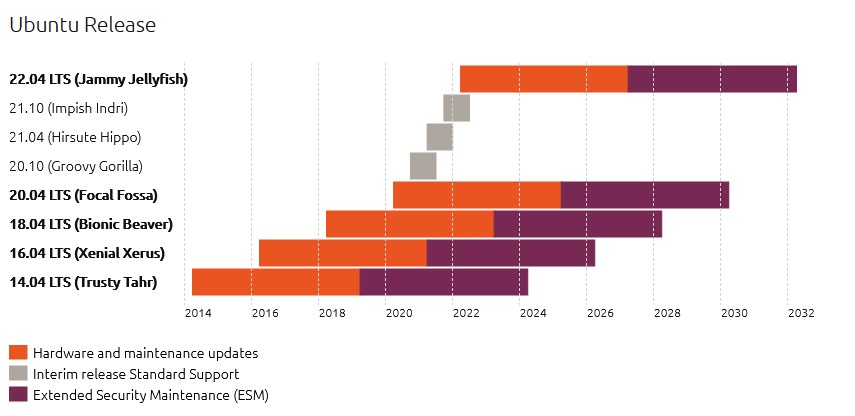
      Correct FOG 1.5.9 has only been tested to 20.04. You bleeding edge guys keep doing yourself in. Also the non-LTS versions have a very (very) short shelf life. 20.04 was the last stable LTS release. That is why its supported by FOG. I would think twice about 21.10 as a FOG platform.

      Ubuntu release cycle.png
      Photo copyright Canonical Ltd https://ubuntu.com/about/release-cycle

      posted in FOG Problems
      george1421G
      george1421
    • RE: Can I set up 2 fog servers to image a pool of hosts at the same time from the same build request

      @llightfoot You could spin up a new (clone) of the production FOG server. Make it a full FOG server. This “backup” FOG server will be added as a storage node to your primary FOG server’s as the master node.

      The main technical differences between a storage node and a full FOG server is that the full FOG server has the FOG database on it, where a storage node does not.

      When you manually add this second full FOG server as a storage node on your master node, the master node will sync all of the raw data files from the current production FOG server to your faux storage node. This will keep the image files you create on the main fog server in sync on the backup FOG server. The only gotcha in this configuration is that you need a way to copy the FOG database from the production server to the backup FOG server. You can do this with a little scripting to use the mysqldump command to export the data from the master node and then rsync or scp to copy it over to the backup storage node.

      As a side note, unless you have a lot of computers with the FOG client installed banging on the FOG server, you don’t need a fog server with a lot of horsepower. I can run FOG on a Raspberry Pi. With that said, all you really need for a fog server is a computer with a fast network and fast disk. Now imaging 100s of computers in a week you must be doing something extraordinary with your fog setup. Bravo for that!

      posted in FOG Problems
      george1421G
      george1421
    • RE: FOG/PXE/W10 unattended install and boot

      @marco_c said in FOG/PXE/W10 unattended install and boot:

      The reimage should be happening only when I decide

      OK good then ignore the netboot stuff I said. You are using FOG as its typically used.

      So the first part is you need to prepare the windows golden image for imaging. This means you should not connect the golden image to your active directory before capturing. You should not turn on bitlocker or secure boot before image capture. You should not install applications that are GUID based (like enterprise versions of antivirus) and you should sysprep the golden image and have sysprep power off the target computer. Then capture with FOG and deploy to the target hardware. As the windows computer boots up for the first time it will run through windows WinSetup/OOBE. At the end of WinSetup and before the first login screen is displayed Winsetup will run the setupcomplete.cmd batch file. This is where you would us the unattended command line options to install any GUID based applications.

      Now when the computer reboots for the first time as I mentioned it will run WinSetup/OOBE if you don’t want to answer all of those microsoft startup questions you should create an unattend.xml (answer file) to answer those questions for you. You can also have the unattend.xml file set the computer name and connect the computer to AD. Drivers are another issue, but if you are using the same hardware on your campus that makes things a bit easier since once you load the drivers on your golden image they will be present on all deployed systems.

      If you want to read up a bit more on windows imaging search for “windows 10 lite zero unattended touch deployment” There is a web site that helped me quite a bit setting things up many years ago https://www.deploymentresearch.com/ and https://www.itninja.com/

      I’m sorry to say that Cloning the image with FOG is the easiest part of your journey. Its getting your golden image setup correctly that will take the most time. But I do have to say the more effort you put into perfecting your golden image the easier time you will have post deployment.

      posted in FOG Problems
      george1421G
      george1421
    • RE: Customize Basic Tasks / Advanced

      @florent said in Customize Basic Tasks / Advanced:

      tasktype.class.php
      tasktypemanager.class.php
      But i don’t understand the file operation.

      Just add the tasktype plugin. That will add a new menu item called task types in the FOG WebUI. Just select that Task Type menu and the remove what you want from the list. You will see all of the menu items for imaging there. There is no code you need to hack to get what you want.

      posted in FOG Problems
      george1421G
      george1421
    • RE: snmysqluser mismatch during upgrade from 1.5.7 to 1.5.9

      @nono In earlier version of FOG it used the default login for mysql root with no password. This is a security concern, so the developers changed the code to prompt the FOG Installer for a one time use password to set root to. Then the fog installer creates a new user for mysql access that only has access to the fog database. The fog installer doesn’t store the root password once this fog db user is created.

      The fogmaster account is what the FOG UI uses to talk to the database internally. The fogstorage account is used for remote storage nodes to talk to the mysql database externally.

      The .fogsettings file is used when you reinstall/upgrade fog so the fog installer scripts know your server specific settings.

      posted in FOG Problems
      george1421G
      george1421
    • RE: after deploying image - no network driver

      @robertkwild OK what I want you to do is this.

      1. Download the following dell driver cab file: https://www.dell.com/support/kbdoc/en-us/000122156/latitude-7204-windows-10-driver-pack (I picked this one because its about 320MB, not really huge).

      2. Use 7-zip to open the cab file to inspect its structure. That is the structure you need to recreate. In reality the script will copy everything below the x64 directory to the target computer. So as long as your drivers are below the x64 directory it will be copied to the target computer. But I recommend that you keep the dell cab file directory structure.

      FWIW: The dell driver cab site is here (I realize you are using different vendor hardware): https://www.dell.com/support/kbdoc/en-us/000124139/dell-command-deploy-driver-packs-for-enterprise-client-os-deployment

      posted in FOG Problems
      george1421G
      george1421
    • RE: Network Boot not working PFSENSE

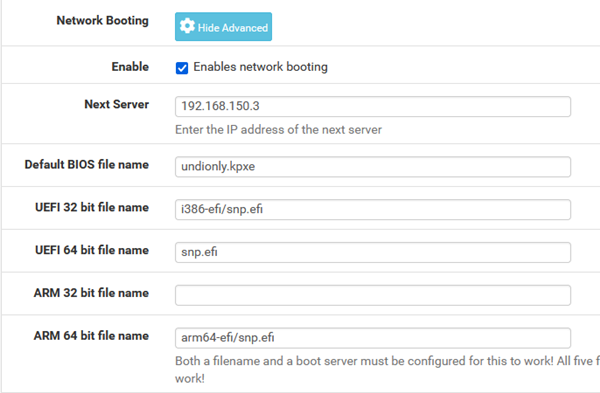
      @dante On your pfsense box, under dhcp services.

      Make sure the dhcp server is enabled, (checked)
      Make sure that you don’t ignore bootp queries (unchecked)
      Make sure you have the IP pool defined
      Down under netbooting make sure you have things configured this way
      pf_sense_netboot.png

      That should work, if it doesn’t then we can debug more. If snp.efi doesn’t work then we can try the older ipxe.efi in its place.

      posted in FOG Problems
      george1421G
      george1421
    • RE: No Configuration methods succeeded !

      @omar_medhat This almost makes me think that you have a spanning tree issue. Make sure that you have the switch port configured as port-fast or fast-stp. If you have a very cheap 5 port switch you can test if its spanning tree issue by putting the cheap switch between the building switch and the pxe booting computer.

      posted in FOG Problems
      george1421G
      george1421
    • 1
    • 2
    • 20
    • 21
    • 22
    • 23
    • 24
    • 139
    • 140
    • 22 / 140