• Recent
    • Unsolved
    • Tags
    • Popular
    • Users
    • Groups
    • Search
    • Register
    • Login
    1. Home
    2. AUTH IT Center
    3. Posts
    • Profile
    • Following 2
    • Followers 0
    • Topics 4
    • Posts 47
    • Groups 0

    Posts

    Recent Best Controversial
    • RE: What ports does FOG use?

      @fogcloud we have an ansible playbook to handle FOG firewall rules (firewalld) and the ports used are:

         allow_icmp:
            - echo-request
            - echo-reply
          services:
            - ftp
            - http
            - mountd
            - nfs
            - rpc-bind
            - tftp
          ports:
            - { port: 20048, proto: tcp }  # nfs
            - { port: 20048, proto: udp }  # nfs
            - { port: "35350-36350", proto: udp }  # tftp
            - { port: "49512-65532", proto: udp }  # multicast
      

      the port 20048 is added on nfs.conf
      the range 35350-36350 is added on tftp options
      and the 49512-65532 is for all the dynamic ports

      posted in FOG Problems
      AUTH IT CenterA
      AUTH IT Center
    • RE: export unauthorized

      @Tom-Elliott

      tested on staging server and it works.

      OS: Ubuntu 22.04
      FOG Server: 1.5.10.1577

      Export of images and hosts now is successful

      b22b7dcd-c424-4efd-a653-c848c107af05-image.png

      posted in FOG Problems
      AUTH IT CenterA
      AUTH IT Center
    • RE: export unauthorized

      I believe the problem you are facing is the way the new export.php (https://github.com/FOGProject/fogproject/compare/1.5.10...1.5.10.41?diff=split&w=#diff-ff9e620c45c9b82140dffca512e6417f03cc4972a20a6659a4f4a248ffa56082) validates the export.

      I have the same problem on a newly installed server OS: Ubuntu 22.04, FOG Server: 1.5.10.48. I changed the if statement with

      echo $currentUser;
      echo '<br>';
      echo strtolower($_SERVER['HTTP_X_REQUESTED_WITH']);
      echo '<br>';
      echo _('Unauthorized');
      exit;
      

      on export.php and as it shows

      User ID: 1 Name: fog
      
      Unauthorized
      

      the blank line is the empty variable which then forces the Unauthorized exit.

      posted in FOG Problems
      AUTH IT CenterA
      AUTH IT Center
    • RE: FOG image capture file permissions

      @AUTH-IT-Center with the dev-branch the created folder after the image capture has the correct permissions.

      83223c8f-3d3a-46ab-af0b-c3634e6768ce-image.png

      will wait for the update on stable branch to deploy to the production server.

      Thank you!

      posted in FOG Problems
      AUTH IT CenterA
      AUTH IT Center
    • RE: FOG image capture file permissions

      @Tom-Elliott since this is the production server I will try it on a staging one and notify you.

      posted in FOG Problems
      AUTH IT CenterA
      AUTH IT Center
    • RE: FOG image capture file permissions

      @Tom-Elliott

      unfortunately the same result.

      9db9bd96-c575-4158-87c9-7b08ce9effc0-image.png

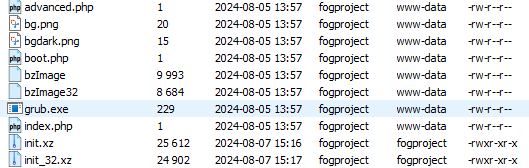
      also the permissions of the init.xz and init_32.xz on /var/www/html/fog/service/ipxe/ got 755 instead of 644 and the group www-data (just mentioning)

      30bf9be5-8373-4f32-9f92-c9120a7e3793-image.png

      the system is 64bit

      posted in FOG Problems
      AUTH IT CenterA
      AUTH IT Center
    • FOG image capture file permissions

      Server
      FOG Version: 1.5.10.48
      OS: Ubuntu 22.04

      Hello first post so please forgive me if it’s in the wrong section.

      Since the storage permissions of /images are 775 (https://forums.fogproject.org/topic/17486/fog-1-5-10-and-earlier-nfs-privilege-escalation-vulnerability) shouldn’t the capture image create the files with the same permisssions?

      While testing a new image capture the permissions are 777 and the owner:group is fogproject.

      8292e5c8-febc-49ca-8dd6-59ee9ab41749-image.png

      posted in FOG Problems
      AUTH IT CenterA
      AUTH IT Center
    • 1
    • 2
    • 3
    • 3 / 3