FOG ubuntu image fails to update database
-
@mashina I have made an update after being able to replicate the problem you described.
Issue it seems was an error 500 occuring on line 329 of the taskingelement.class.php element because it couldn’t find a relevant imaging log.
I’ve added code that seems to be able to address this though not sure what is actually wrong otherwise. WIth the patch I made things seem to complete okay so I think it’d work good for uni and multicast tasks if you’d be willing to update and test?
-
This post is deleted! -
@JGeear It appears there is a issue with the UI after all. I tried updating the password there are extra characters added.

-
@JGeear Updating the password of the storage node fixed the issue. Still I would like to know how these passwords were changed??
-
Yes, it looks like multicast is working correctly. Thank you for the support.
I also want to add a few details to clarify our setup.
A few months ago, I was running version 1.15.10. Since we are developing an API-based solution, we decided to upgrade to the latest development branch.
During the upgrade, I noticed that when the message appeared telling me to visit /fog/management to update the database, no database update actually took place. Instead, the web interface took me straight to the FOG login page.
If I understood that correctly, it suggests there were no database schema changes between 1.15.10 and 1.6. However, that later led me to question my understanding, because several issues arose afterward, including the one mentioned in this post: “Database Update: Failed.”
I will add the other issues to the forum soon and link them here.
-
@Tom-Elliott Absolutely. I will get back to you in a few hours.
-
This post is deleted! -
@JGeear I don’t know who changed what or when or why.
You can look at the history table to get a guess as to when it might have happened, but I don’t believe it’s as direct an audit of what changed specifically, just that the Storage node was updated.
Please help us build the FOG community with everyone involved. It's not just about coding - way more we need people to test things, update documentation and most importantly work on uniting the community of people enjoying and working on FOG! Get in contact with me (chat bubble in the top right corner) if you want to join in.
Web GUI issue? Please check apache error (debian/ubuntu: /var/log/apache2/error.log, centos/fedora/rhel: /var/log/httpd/error_log) and php-fpm log (/var/log/php*-fpm.log)
Please support FOG if you like it: https://wiki.fogproject.org/wiki/index.php/Support_FOG
-
@Tom-Elliott There was no updates to the Storage node until March 3, when I discovered the issue with the image capture. The password was correct. There was just a bunch of &;#38…;#62; characters in the middle of the password. Once I removed the characters and resaved the password, it worked. Note, when I try to fix the password under TFTP server. The characters return.
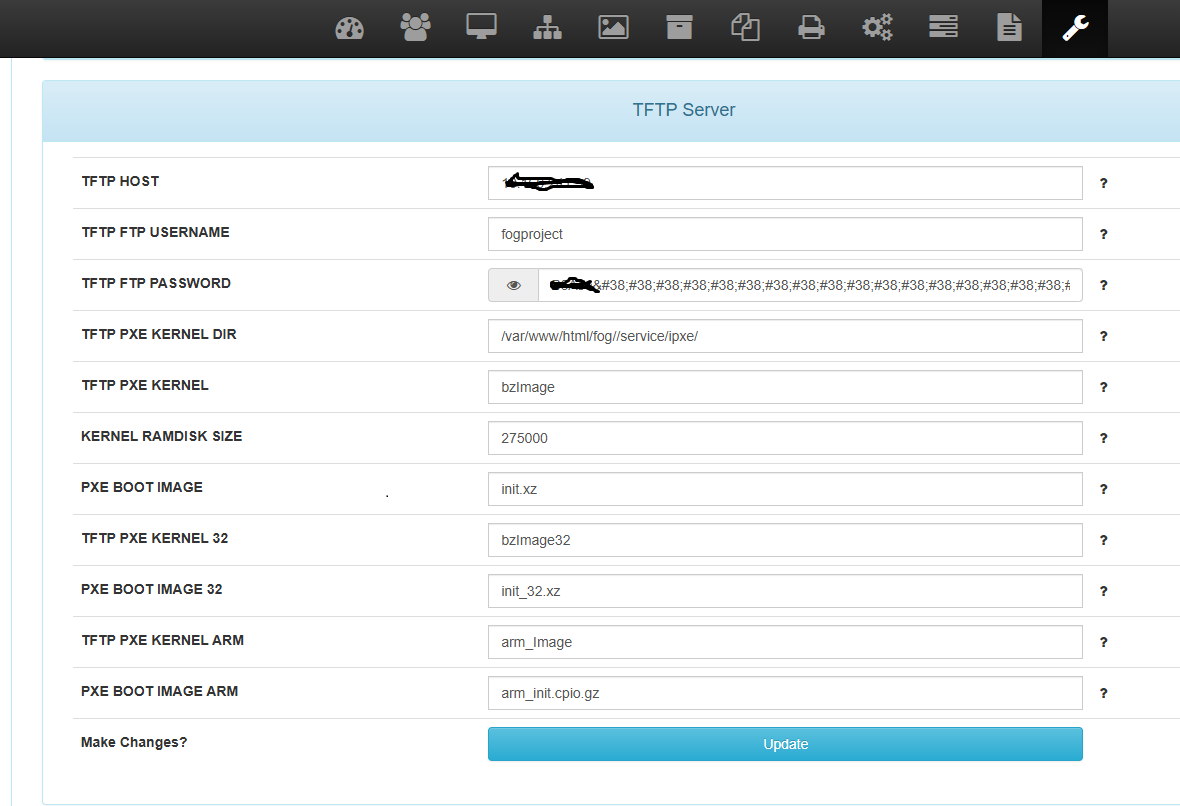
-
@JGeear Would a Greater than(>) character in the password cause this use?
-
@Tom-Elliott Hi, sorry for the delayed response. I updated both the Fog server and storage node, but the same error is thrown at the end of multicasting.
-
This post is deleted! -
@Tom-Elliott All good the last update fixed the issue!

