IPXE boot no longer works after upgrade to 1.6. Error code 0216eb
-
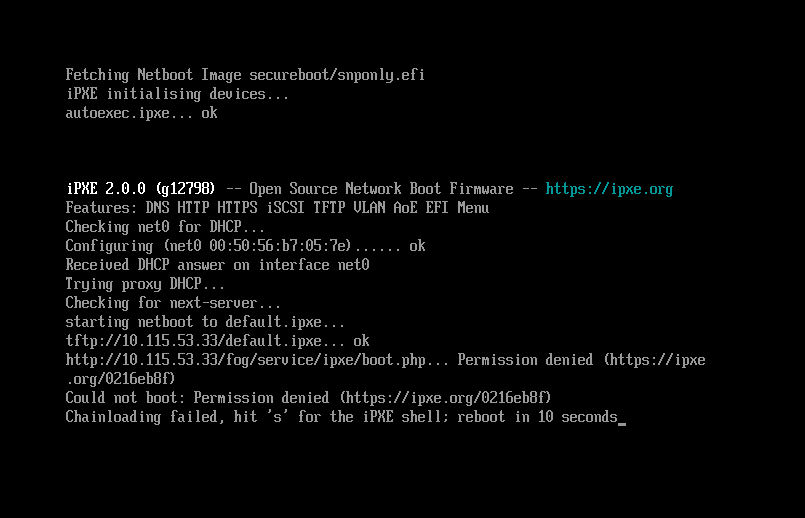
Just updated from 1.5.10.(?) (the last stable version) to 1.6.0.14. Was using the FOGUefi mod with 1.5.10 to get Secure Boot working previously, but I doubt that’s relevant after the upgraded install.
Based on the info from ipxe.org this is a certificate error. But I’m not sure which certificate that might be or what I could do about it in this case.
-
@thesmj248 Your Secure Boot chain works. The shim, the signed snponly.efi, and autoexec.ipxe all load. The failure comes after that.
Error 0216eb8f is iPXE’s “No usable certificates”. It is a TLS certificate check. Your boot.php request goes out over http://, so something on the server redirects it to https://. The signed iPXE binary cannot trust the FOG server’s own CA, so the HTTPS connection fails.
A stock FOG 1.6 install with HTTP netboot does not redirect /fog/service/ipxe/. The redirect probably comes from a config left over from 1.5 or the FOGUefi changes.
Please run this from another machine and post the output:
curl -sI http://10.115.53.33/fog/service/ipxe/boot.phpThen, on the FOG server, post the output of:
grep -rniE "rewrite|redirect|return 30" /etc/apache2/sites-enabled/ /etc/httpd/conf.d/ /etc/nginx/conf.d/ 2>/dev/null -
Ah that makes sense!
Here’s what I get from the curl command:
HTTP/1.1 302 Found
Date: Thu, 05 Nov 2026 14:25:17 GMT
Server: Apache/2.4.66 (Ubuntu)
Location: https://10.115.53.33//fog/service/ipxe/boot.php
Connection: close
Content-Type: text/html; charset=iso-8859-1
The grep command on the server:
/etc/apache2/sites-enabled/001-fog.conf.bak_foguefi:9: RewriteEngine On /etc/apache2/sites-enabled/001-fog.conf.bak_foguefi:10: RewriteCond %{REQUEST_METHOD} ^(TRACE|TRACK) /etc/apache2/sites-enabled/001-fog.conf.bak_foguefi:11: RewriteRule .* - [F] /etc/apache2/sites-enabled/001-fog.conf.bak_foguefi:12: RewriteRule /management/other/ca.cert.der$ - [L] /etc/apache2/sites-enabled/001-fog.conf.bak_foguefi:14:RewriteRule /service/grub/grub.php$ - [L] # Needed for GRUB (unable to fetch ressources HTTPS mode) /etc/apache2/sites-enabled/001-fog.conf.bak_foguefi:15:RewriteRule /service/grub/tftp/.*$ - [L] # Needed for GRUB /etc/apache2/sites-enabled/001-fog.conf.bak_foguefi:18:RewriteRule /service/grub/grub.php$ - [L] # Needed for GRUB (unable to fetch ressources HTTPS mode) /etc/apache2/sites-enabled/001-fog.conf.bak_foguefi:19:RewriteRule /service/grub/tftp/.*$ - [L] # Needed for GRUB /etc/apache2/sites-enabled/001-fog.conf.bak_foguefi:22:RewriteRule /service/grub/grub.php$ - [L] # Needed for GRUB (unable to fetch ressources HTTPS mode) /etc/apache2/sites-enabled/001-fog.conf.bak_foguefi:23:RewriteRule /service/grub/tftp/.*$ - [L] # Needed for GRUB /etc/apache2/sites-enabled/001-fog.conf.bak_foguefi:26:RewriteRule /service/grub/grub.php$ - [L] # Needed for GRUB (unable to fetch ressources HTTPS mode) /etc/apache2/sites-enabled/001-fog.conf.bak_foguefi:27:RewriteRule /service/grub/tftp/.*$ - [L] # Needed for GRUB /etc/apache2/sites-enabled/001-fog.conf.bak_foguefi:30:RewriteRule /service/grub/grub.php$ - [L] # Needed for GRUB (unable to fetch ressources HTTPS mode) /etc/apache2/sites-enabled/001-fog.conf.bak_foguefi:31:RewriteRule /service/grub/tftp/.*$ - [L] # Needed for GRUB /etc/apache2/sites-enabled/001-fog.conf.bak_foguefi:33: RewriteCond %{HTTPS} off /etc/apache2/sites-enabled/001-fog.conf.bak_foguefi:34: RewriteRule (.*) https://%{HTTP_HOST}/$1 [R,L] /etc/apache2/sites-enabled/001-fog.conf.bak_foguefi:57: RewriteEngine On /etc/apache2/sites-enabled/001-fog.conf.bak_foguefi:58: RewriteCond %{REQUEST_METHOD} ^(TRACE|TRACK) /etc/apache2/sites-enabled/001-fog.conf.bak_foguefi:59: RewriteRule .* - [F] /etc/apache2/sites-enabled/001-fog.conf.bak_foguefi:60: RewriteCond %{DOCUMENT_ROOT}/%{REQUEST_FILENAME} !-f /etc/apache2/sites-enabled/001-fog.conf.bak_foguefi:61: RewriteCond %{DOCUMENT_ROOT}/%{REQUEST_FILENAME} !-d /etc/apache2/sites-enabled/001-fog.conf.bak_foguefi:62: RewriteRule ^/fog/(.*)$ /fog/api/index.php [QSA,L] /etc/apache2/sites-enabled/001-fog.conf:9: RewriteEngine On /etc/apache2/sites-enabled/001-fog.conf:10: RewriteCond %{REQUEST_METHOD} ^(TRACE|TRACK) /etc/apache2/sites-enabled/001-fog.conf:11: RewriteRule .* - [F] /etc/apache2/sites-enabled/001-fog.conf:12: RewriteRule /management/other/ca.cert.der$ - [L] /etc/apache2/sites-enabled/001-fog.conf:14:RewriteRule /service/grub/grub.php$ - [L] # Needed for GRUB (unable to fetch ressources HTTPS mode) /etc/apache2/sites-enabled/001-fog.conf:15:RewriteRule /service/grub/tftp/.*$ - [L] # Needed for GRUB /etc/apache2/sites-enabled/001-fog.conf:18:RewriteRule /service/grub/grub.php$ - [L] # Needed for GRUB (unable to fetch ressources HTTPS mode) /etc/apache2/sites-enabled/001-fog.conf:19:RewriteRule /service/grub/tftp/.*$ - [L] # Needed for GRUB /etc/apache2/sites-enabled/001-fog.conf:22:RewriteRule /service/grub/grub.php$ - [L] # Needed for GRUB (unable to fetch ressources HTTPS mode) /etc/apache2/sites-enabled/001-fog.conf:23:RewriteRule /service/grub/tftp/.*$ - [L] # Needed for GRUB /etc/apache2/sites-enabled/001-fog.conf:26:RewriteRule /service/grub/grub.php$ - [L] # Needed for GRUB (unable to fetch ressources HTTPS mode) /etc/apache2/sites-enabled/001-fog.conf:27:RewriteRule /service/grub/tftp/.*$ - [L] # Needed for GRUB /etc/apache2/sites-enabled/001-fog.conf:30:RewriteRule /service/grub/grub.php$ - [L] # Needed for GRUB (unable to fetch ressources HTTPS mode) /etc/apache2/sites-enabled/001-fog.conf:31:RewriteRule /service/grub/tftp/.*$ - [L] # Needed for GRUB /etc/apache2/sites-enabled/001-fog.conf:34:RewriteRule /service/grub/grub.php$ - [L] # Needed for GRUB (unable to fetch ressources HTTPS mode) /etc/apache2/sites-enabled/001-fog.conf:35:RewriteRule /service/grub/tftp/.*$ - [L] # Needed for GRUB /etc/apache2/sites-enabled/001-fog.conf:37: RewriteCond %{HTTPS} off /etc/apache2/sites-enabled/001-fog.conf:38: RewriteRule (.*) https://%{HTTP_HOST}/$1 [R,L] /etc/apache2/sites-enabled/001-fog.conf:61: RewriteEngine On /etc/apache2/sites-enabled/001-fog.conf:62: RewriteCond %{REQUEST_METHOD} ^(TRACE|TRACK) /etc/apache2/sites-enabled/001-fog.conf:63: RewriteRule .* - [F] /etc/apache2/sites-enabled/001-fog.conf:64: RewriteCond %{DOCUMENT_ROOT}/%{REQUEST_FILENAME} !-f /etc/apache2/sites-enabled/001-fog.conf:65: RewriteCond %{DOCUMENT_ROOT}/%{REQUEST_FILENAME} !-d /etc/apache2/sites-enabled/001-fog.conf:66: RewriteRule ^/fog/(.*)$ /fog/api/index.php [QSA,L] -
@thesmj248 That output shows the cause. Your live
sites-enabled/001-fog.confis still the 1.5 vhost with the FOGUefi edits. Lines 37–38 redirect every HTTP request to HTTPS. The 1.6 installer writes its vhost tosites-available/001-fog.conf. I think FOGUefi turned thesites-enabledsymlink into a regular file, so Apache never saw the new vhost.Please check:
ls -l /etc/apache2/sites-enabled/If
001-fog.confis a regular file and not a link to../sites-available/001-fog.conf, run:sudo mv /etc/apache2/sites-enabled/001-fog.conf /root/001-fog.conf.foguefi sudo mv /etc/apache2/sites-enabled/001-fog.conf.bak_foguefi /root/ sudo a2ensite 001-fog sudo apachectl configtest && sudo systemctl reload apache2Then repeat the
curl -sIcommand. It should return200 OK, and the client should boot. -
Ok! Now I do get 200 OK with the curl command. AND the client will boot, as long as secure boot is disabled.
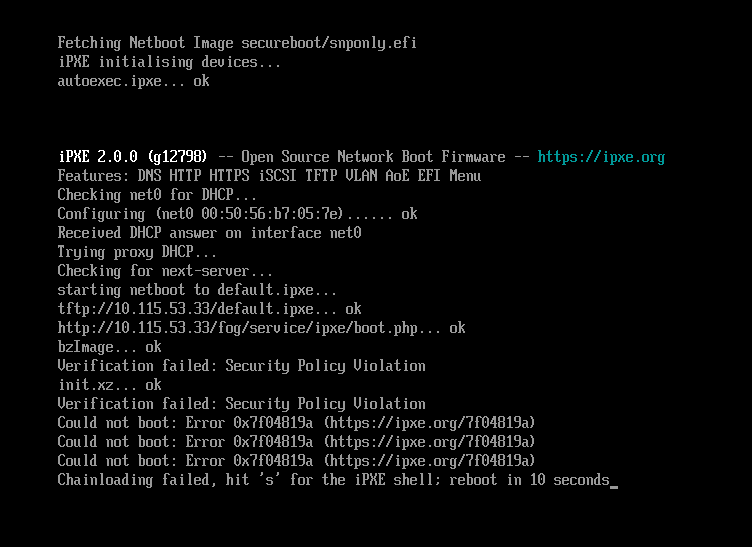
If secure boot is enabled, I get the following:
-
@thesmj248 Good, the redirect was the problem, and boot.php now loads.
The new failure is expected on a Secure Boot client that has not enrolled this server’s key yet. FOG 1.6 signs bzImage and init.xz with the server’s own Secure Boot key. Shim accepts them only when that key is in the client’s MOK list. The key FOGUefi enrolled under 1.5 is a different key, so shim refuses the kernel with “Security Policy Violation”.
Enroll the key once per machine, with Secure Boot still on:
- PXE boot the client to the FOG menu and choose “Enroll Secure Boot Key”.
- Be ready at the keyboard. MokManager gives up after about 10 seconds with no keypress.
- Choose “Enroll key from disk”, select MOK.der, and confirm the enrollment.
- Reboot.
If MOK.der is not in the list, put it on a FAT-formatted USB stick and select it from there. You can download it from http://10.115.53.33/fog/service/secureboot/MOK.der.
-
Alright. Is there, or will there be a way to enroll the key without physical access to the machine? Perhaps if the client is installed and connected to the FOG server prior to the first attempt at imaging?
-
@thesmj248 No, while that sounds like it’d be a reasonable request, the nature of “Secure Boot” would be moot if you could just arbitrarily and remotely define these.
-
@thesmj248 One addition. FOG can shorten the visit to each machine, but it cannot remove it.
Schedule the “Enroll Secure Boot” task for a host or a group. On the next boot, the task stages the MOK request. Someone at the machine then confirms it once in MOK Manager. The one-time password shows on the client screen, or you can set one password for the whole fleet with the sbmokpw kernel argument.
If the machine’s firmware is in Setup Mode (its Secure Boot keys cleared), the task enrolls the key by itself, with nobody at the keyboard.
Either way, the task needs Secure Boot off when it runs. A client that already enforces Secure Boot cannot boot FOS, because it does not trust the kernel yet. So turn Secure Boot off, run the task, confirm the key, then turn Secure Boot back on.