Hopefully I’ll have the answer to that question within the next two weeks!
T
Latest posts made by thesmj248
-
RE: IPXE boot no longer works after upgrade to 1.6. Error code 0216ebposted in FOG Problems
-
RE: IPXE boot no longer works after upgrade to 1.6. Error code 0216ebposted in FOG Problems
That may be an issue for us since our systems are headless and remote. In theory I could switch SB to setup mode, but I believe messing with that setting via HP’s utility will result in the system requiring a confirmation of the change using the keyboard upon the next boot. I know that’s the case for turning it off, but I’ll have to see what it does when switching it to Setup.
On the other hand, FOG 1.5.10 + FOGUefi just works.

-
RE: IPXE boot no longer works after upgrade to 1.6. Error code 0216ebposted in FOG Problems
Alright. Is there, or will there be a way to enroll the key without physical access to the machine? Perhaps if the client is installed and connected to the FOG server prior to the first attempt at imaging?
-
RE: IPXE boot no longer works after upgrade to 1.6. Error code 0216ebposted in FOG Problems
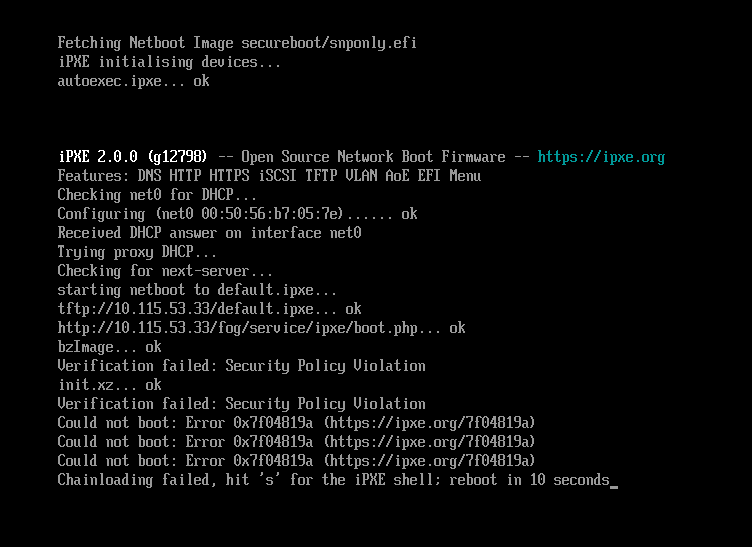
Ok! Now I do get 200 OK with the curl command. AND the client will boot, as long as secure boot is disabled.
If secure boot is enabled, I get the following:
-
RE: IPXE boot no longer works after upgrade to 1.6. Error code 0216ebposted in FOG Problems
Ah that makes sense!
Here’s what I get from the curl command:
HTTP/1.1 302 Found
Date: Thu, 05 Nov 2026 14:25:17 GMT
Server: Apache/2.4.66 (Ubuntu)
Location: https://10.115.53.33//fog/service/ipxe/boot.php
Connection: close
Content-Type: text/html; charset=iso-8859-1
The grep command on the server:
/etc/apache2/sites-enabled/001-fog.conf.bak_foguefi:9: RewriteEngine On /etc/apache2/sites-enabled/001-fog.conf.bak_foguefi:10: RewriteCond %{REQUEST_METHOD} ^(TRACE|TRACK) /etc/apache2/sites-enabled/001-fog.conf.bak_foguefi:11: RewriteRule .* - [F] /etc/apache2/sites-enabled/001-fog.conf.bak_foguefi:12: RewriteRule /management/other/ca.cert.der$ - [L] /etc/apache2/sites-enabled/001-fog.conf.bak_foguefi:14:RewriteRule /service/grub/grub.php$ - [L] # Needed for GRUB (unable to fetch ressources HTTPS mode) /etc/apache2/sites-enabled/001-fog.conf.bak_foguefi:15:RewriteRule /service/grub/tftp/.*$ - [L] # Needed for GRUB /etc/apache2/sites-enabled/001-fog.conf.bak_foguefi:18:RewriteRule /service/grub/grub.php$ - [L] # Needed for GRUB (unable to fetch ressources HTTPS mode) /etc/apache2/sites-enabled/001-fog.conf.bak_foguefi:19:RewriteRule /service/grub/tftp/.*$ - [L] # Needed for GRUB /etc/apache2/sites-enabled/001-fog.conf.bak_foguefi:22:RewriteRule /service/grub/grub.php$ - [L] # Needed for GRUB (unable to fetch ressources HTTPS mode) /etc/apache2/sites-enabled/001-fog.conf.bak_foguefi:23:RewriteRule /service/grub/tftp/.*$ - [L] # Needed for GRUB /etc/apache2/sites-enabled/001-fog.conf.bak_foguefi:26:RewriteRule /service/grub/grub.php$ - [L] # Needed for GRUB (unable to fetch ressources HTTPS mode) /etc/apache2/sites-enabled/001-fog.conf.bak_foguefi:27:RewriteRule /service/grub/tftp/.*$ - [L] # Needed for GRUB /etc/apache2/sites-enabled/001-fog.conf.bak_foguefi:30:RewriteRule /service/grub/grub.php$ - [L] # Needed for GRUB (unable to fetch ressources HTTPS mode) /etc/apache2/sites-enabled/001-fog.conf.bak_foguefi:31:RewriteRule /service/grub/tftp/.*$ - [L] # Needed for GRUB /etc/apache2/sites-enabled/001-fog.conf.bak_foguefi:33: RewriteCond %{HTTPS} off /etc/apache2/sites-enabled/001-fog.conf.bak_foguefi:34: RewriteRule (.*) https://%{HTTP_HOST}/$1 [R,L] /etc/apache2/sites-enabled/001-fog.conf.bak_foguefi:57: RewriteEngine On /etc/apache2/sites-enabled/001-fog.conf.bak_foguefi:58: RewriteCond %{REQUEST_METHOD} ^(TRACE|TRACK) /etc/apache2/sites-enabled/001-fog.conf.bak_foguefi:59: RewriteRule .* - [F] /etc/apache2/sites-enabled/001-fog.conf.bak_foguefi:60: RewriteCond %{DOCUMENT_ROOT}/%{REQUEST_FILENAME} !-f /etc/apache2/sites-enabled/001-fog.conf.bak_foguefi:61: RewriteCond %{DOCUMENT_ROOT}/%{REQUEST_FILENAME} !-d /etc/apache2/sites-enabled/001-fog.conf.bak_foguefi:62: RewriteRule ^/fog/(.*)$ /fog/api/index.php [QSA,L] /etc/apache2/sites-enabled/001-fog.conf:9: RewriteEngine On /etc/apache2/sites-enabled/001-fog.conf:10: RewriteCond %{REQUEST_METHOD} ^(TRACE|TRACK) /etc/apache2/sites-enabled/001-fog.conf:11: RewriteRule .* - [F] /etc/apache2/sites-enabled/001-fog.conf:12: RewriteRule /management/other/ca.cert.der$ - [L] /etc/apache2/sites-enabled/001-fog.conf:14:RewriteRule /service/grub/grub.php$ - [L] # Needed for GRUB (unable to fetch ressources HTTPS mode) /etc/apache2/sites-enabled/001-fog.conf:15:RewriteRule /service/grub/tftp/.*$ - [L] # Needed for GRUB /etc/apache2/sites-enabled/001-fog.conf:18:RewriteRule /service/grub/grub.php$ - [L] # Needed for GRUB (unable to fetch ressources HTTPS mode) /etc/apache2/sites-enabled/001-fog.conf:19:RewriteRule /service/grub/tftp/.*$ - [L] # Needed for GRUB /etc/apache2/sites-enabled/001-fog.conf:22:RewriteRule /service/grub/grub.php$ - [L] # Needed for GRUB (unable to fetch ressources HTTPS mode) /etc/apache2/sites-enabled/001-fog.conf:23:RewriteRule /service/grub/tftp/.*$ - [L] # Needed for GRUB /etc/apache2/sites-enabled/001-fog.conf:26:RewriteRule /service/grub/grub.php$ - [L] # Needed for GRUB (unable to fetch ressources HTTPS mode) /etc/apache2/sites-enabled/001-fog.conf:27:RewriteRule /service/grub/tftp/.*$ - [L] # Needed for GRUB /etc/apache2/sites-enabled/001-fog.conf:30:RewriteRule /service/grub/grub.php$ - [L] # Needed for GRUB (unable to fetch ressources HTTPS mode) /etc/apache2/sites-enabled/001-fog.conf:31:RewriteRule /service/grub/tftp/.*$ - [L] # Needed for GRUB /etc/apache2/sites-enabled/001-fog.conf:34:RewriteRule /service/grub/grub.php$ - [L] # Needed for GRUB (unable to fetch ressources HTTPS mode) /etc/apache2/sites-enabled/001-fog.conf:35:RewriteRule /service/grub/tftp/.*$ - [L] # Needed for GRUB /etc/apache2/sites-enabled/001-fog.conf:37: RewriteCond %{HTTPS} off /etc/apache2/sites-enabled/001-fog.conf:38: RewriteRule (.*) https://%{HTTP_HOST}/$1 [R,L] /etc/apache2/sites-enabled/001-fog.conf:61: RewriteEngine On /etc/apache2/sites-enabled/001-fog.conf:62: RewriteCond %{REQUEST_METHOD} ^(TRACE|TRACK) /etc/apache2/sites-enabled/001-fog.conf:63: RewriteRule .* - [F] /etc/apache2/sites-enabled/001-fog.conf:64: RewriteCond %{DOCUMENT_ROOT}/%{REQUEST_FILENAME} !-f /etc/apache2/sites-enabled/001-fog.conf:65: RewriteCond %{DOCUMENT_ROOT}/%{REQUEST_FILENAME} !-d /etc/apache2/sites-enabled/001-fog.conf:66: RewriteRule ^/fog/(.*)$ /fog/api/index.php [QSA,L] -
IPXE boot no longer works after upgrade to 1.6. Error code 0216ebposted in FOG Problems
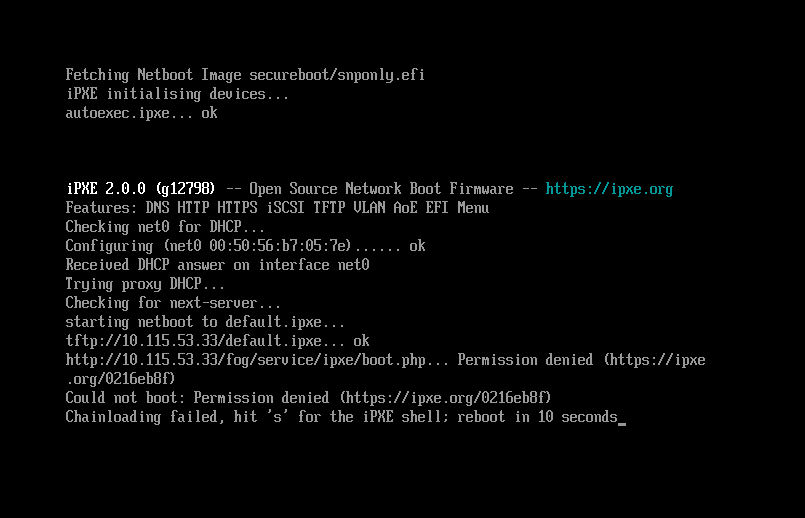
Just updated from 1.5.10.(?) (the last stable version) to 1.6.0.14. Was using the FOGUefi mod with 1.5.10 to get Secure Boot working previously, but I doubt that’s relevant after the upgraded install.
Based on the info from ipxe.org this is a certificate error. But I’m not sure which certificate that might be or what I could do about it in this case.
-
RE: Issue with active directoryposted in Windows Problems
Are you sysprepping the image with all OOBE options set to be skipped before capturing it with FOG?
-
Is the client rejecting the custom CA going to cause problems?posted in FOG Problems
At the behest of my IT Sec department, I installed their custom CA and certs on the FOG server. This makes browsers happy and when connecting to the web interface and more importantly gets their vulnerability scanner to leave me alone.
However, I’m seeing the following error in the client log:
------------------------------------------------------------------------------
--------------------------------Authentication--------------------------------
------------------------------------------------------------------------------
 5/13/2026 3:39:24 AM Client-Info Version: 0.13.0
 5/13/2026 3:39:24 AM Client-Info OS:      Windows
 5/13/2026 3:39:24 AM Middleware::Authentication Waiting for authentication timeout to pass
 5/13/2026 3:41:24 AM Middleware::Communication Download: https://fho-fog/fog/management/other/ssl/srvpublic.crt
 5/13/2026 3:41:24 AM Data::RSA ERROR: Certificate validation failed
 5/13/2026 3:41:24 AM Data::RSA ERROR: Trust chain did not complete to the known authority anchor. Thumbprints did not match.
 5/13/2026 3:41:24 AM Middleware::Authentication ERROR: Could not authenticate
 5/13/2026 3:41:24 AM Middleware::Authentication ERROR: Certificate is not from FOG CA

 5/13/2026 3:41:24 AM Client-Info ERROR: Failed to authenticate, will not run Module Looper.
Based on what I can tell from this guide, this is normal behavior as the client is unable to recognize the custom CA without recompiling the client (which I would rather not bother with anyway). What isn’t clear is if this means that the client will continue to work as it should despite not trusting the CA.
Can I safely ignore this error?
-
RE: Enable SSL/HTTPS without reinstalling FOG?posted in General Problems
Managed to figure it out after looking in the wiki for instructions to uninstall FOG with the intention of reinstalling it. Delete that file, delete the fogproject user, and run the install script again. Now it works.