Failed to Update Database and Host
-
Hi there!
Recently, we updated one of our server from dev-branch 1734 to 2390. It updated smoothly without any error. We updated the database (schema) as well.
Afterwards, I wanted to delete an image from the webpage but I couldn’t do it with the files : it said “Wrong credentials” if I remember well.
I had to delete only the record then going to the server (ssh) and delete the folder.
It’s annoying but I can live with this.We encountered another problem which made me coming here. We imaged existing hosts. Imaging process went well but failed right at the end with these messages : “Failed to update database - Failed to update host”.
The host is well imaged but it is not updated in Fog, informations about last image aren’t written in the database.Also, when we want to deploy an image right after a full perform, it fails saying again “Wrong credentials”…
So there is a problem but I don’t know what it is. Any help?
Thanks.
Cheers!
PS : same problems with 2393
-
@maxcarpone From the sounds of things, the problem you’re running into is the FOG FTP username/password have potentially drifted?
https://forums.fogproject.org/topic/11203/resyncing-fog-s-service-account-password
Is still valid I think though how this happened I don’t know, but without much more information this is likely still the best starting point.
-
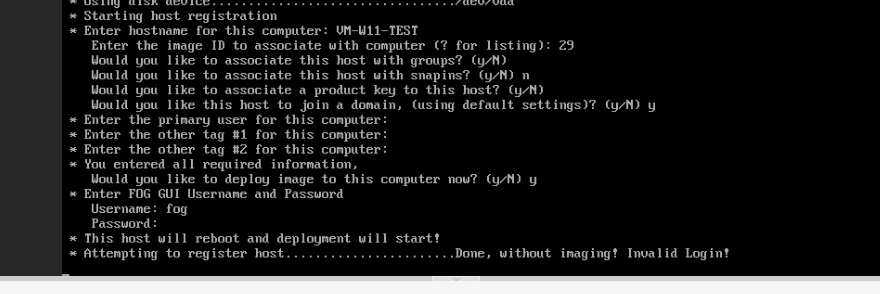
@Tom-Elliott : I tried what you suggested but it doesn’t work. When I try to register a new host, it works but it says “Invalid Login” when I try to deploy an image at the same time.
To succeed deploying an image, I must boot to pxe once more and deploy an image from the menu using the same credentials.Obviously, it’s not related to tftp password.
It’s really weird!
-
I may have found something related to my problem. When I rebooted the Fog Server, it tried to stop 2 instances of MariaDB. Could it be possible that a part of Fog is trying to join the wrong database?
-
@maxcarpone I don’t know for sure if 2 instances running would cause a problem specifically that you’re seeing, but I could see there being a mass confusion in “what
instanceam I connecting to” definitely causing headaches. -
@maxcarpone I had the same problem with 2390 and reverted to an older back up. That version was broke AF
-
@Fog_Newb : Good to know I’m not the only one having this problem. I’ll wait for a patch.
-
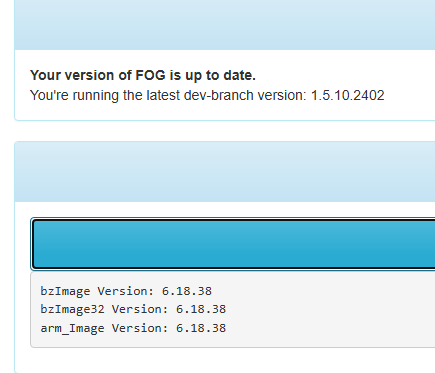
@maxcarpone 1.5.10.2402 is out. It works. I was able to capture from both my PC and laptop successfully. But it has a weird issue with null tasks.
-
@Fog_Newb : Well it doesn’t work for me. I still have problems with this version.
-
I tried new things : I created a new user to see if I have the same problems as user “Fog”.
Well, when I perform a registration with immediate deployment : it works!
But it failed to update the database at the end of the deployment.
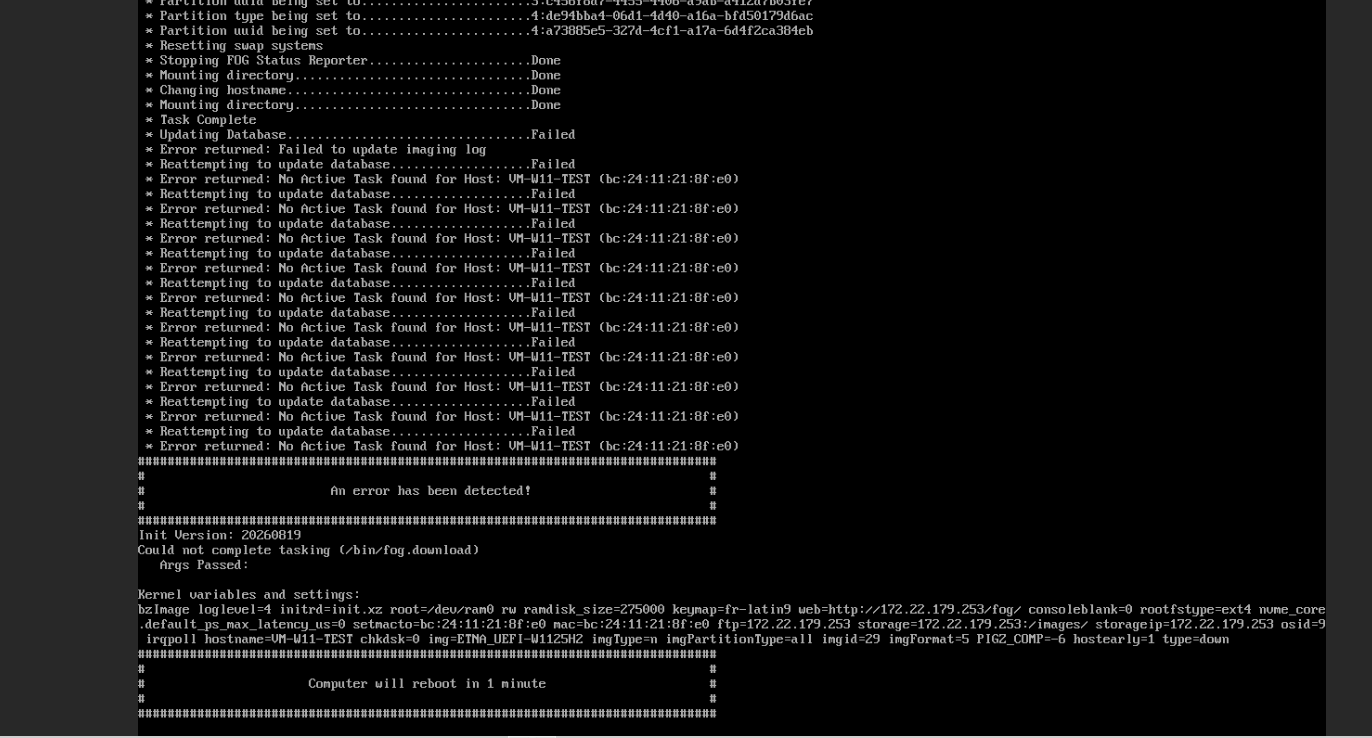
It looks like it has something to do with active tasking.
So, it’s still broken somewhere…
-
I’m suspecting you’re not entering the correct password?
This is your FOG Web login user/password.
-
@Tom-Elliott : Unfortunately, it is the right password. I was wondering myself when the problem appeared but the prompt says something when it’s not the good one and you have 3 tries before giving up.
And by the way, it works using “deploy image” from PXE menu.
I’m available if you want me to do some special moves to find out where is the culprit ^^
-
I’ve found and fixed several ways these empty tasks get created — a group deploy of two or more hosts was failing outright, and deleting an image was leaving its queued tasks pointing at nothing — but before I ship a cleanup for the rows you already have, I need to know whether the bad tasks hold a
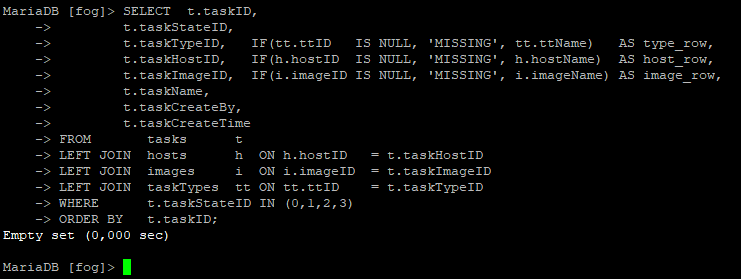
0or the id of something that got deleted, because that changes what the cleanup has to match on. Could you run this against your FOG database and paste the output?SELECT t.taskID, t.taskStateID, t.taskTypeID, IF(tt.ttID IS NULL, 'MISSING', tt.ttName) AS type_row, t.taskHostID, IF(h.hostID IS NULL, 'MISSING', h.hostName) AS host_row, t.taskImageID, IF(i.imageID IS NULL, 'MISSING', i.imageName) AS image_row, t.taskName, t.taskCreateBy, t.taskCreateTime FROM tasks t LEFT JOIN hosts h ON h.hostID = t.taskHostID LEFT JOIN images i ON i.imageID = t.taskImageID LEFT JOIN taskTypes tt ON tt.ttID = t.taskTypeID WHERE t.taskStateID IN (0,1,2,3) ORDER BY t.taskID; SELECT t.taskStateID, COUNT(*) AS rows_total, SUM(h.hostID IS NULL) AS host_missing, SUM(i.imageID IS NULL) AS image_missing, SUM(tt.ttID IS NULL) AS type_missing, SUM(t.taskHostID = 0) AS host_zero, SUM(t.taskImageID = 0) AS image_zero, SUM(t.taskTypeID = 0) AS type_zero, MIN(t.taskCreateTime) AS oldest, MAX(t.taskCreateTime) AS newest FROM tasks t LEFT JOIN hosts h ON h.hostID = t.taskHostID LEFT JOIN images i ON i.imageID = t.taskImageID LEFT JOIN taskTypes tt ON tt.ttID = t.taskTypeID GROUP BY t.taskStateID; SELECT * FROM schemaVersion; -
@Tom-Elliott : I can do that if you tell me how to do it!
Update : I figured it out.
-
@maxcarpone I don’t know if this is directed specifically at you @maxcarpone but if you want the gist:
sudo mariadb -u root fogThen enter the select statements provided earlier.
-
@Tom-Elliott : I found a way to do it :
mysql --user=fogstorage --password=MYPASSWORDHERE -D fogHere are the results :
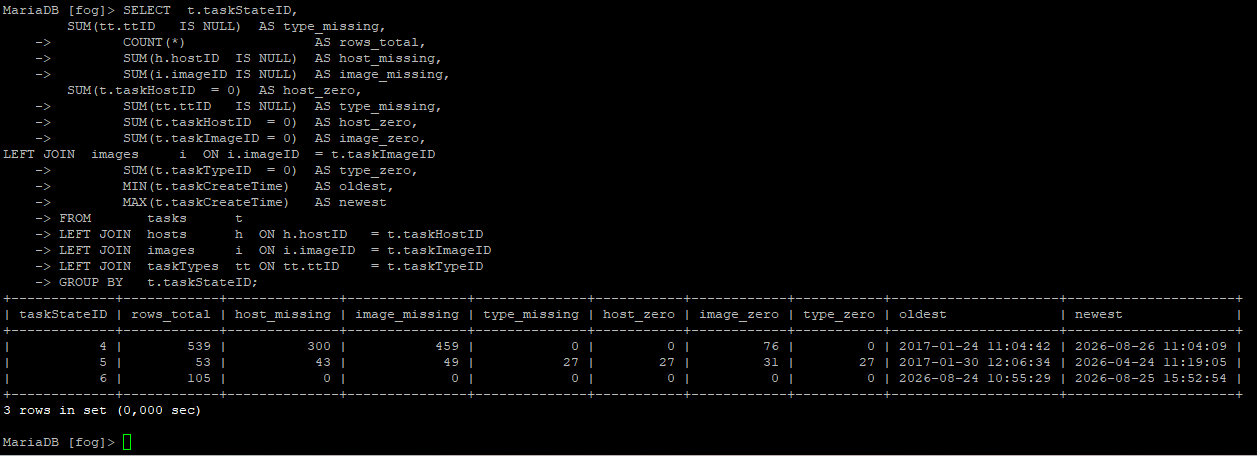
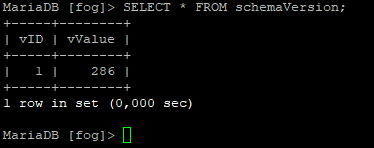
-
@maxcarpone That output was exactly what I needed — thank you for running it, and for the screenshot of the failing deployment, which turned out to be the most useful thing in the thread.
Your database is fine and your schema is current.
schemaVersion286 is the right number for 1.5.10.2402; 287 only landed this morning. And your first query returning an empty set means you have no stuck tasks at all — nothing in Queued or In Progress. The blank entries you’ve been seeing are all in Complete and Cancelled, and they’re just history: 300 of those rows point at hosts and 459 at images that were deleted at some point over the nine years that table has been filling up. Nothing is wrong with them, they simply have nothing left to show.The real bug is the one in your deployment screenshot, and it is not your FTP password. Here is what was happening:
* Task Complete
* Updating Database.....................Failed
* Error returned: Failed to update imaging log
* Reattempting to update database.......Failed
* Error returned: No Active Task found for Host: VM-W11-TEST
Only that first error is real. FOG looks up the open imaging-log row to close it by asking for the row whose finish time is empty, and a change earlier in the 1.5.10 line moved “empty” from a zero date to a real NULL. The query FOG was building for that could never match a NULL — so on every single deployment, on every install, it failed to find the row it had just created minutes earlier. It then reported “Failed to update imaging log” after it had already marked the task Complete, which is why every retry after that came back “No Active Task found for Host” and the machine sat there rebooting into an error.
That also explains your very first post: “the host is well imaged but it is not updated in FOG, information about the last image isn’t written in the database.” It wasn’t. The imaging log never closed, the task was already marked Complete, and nothing recorded that the image had landed.
I’ve reproduced it end to end and fixed it, along with three other ways a task could end up pointing at nothing: https://github.com/FOGProject/fogproject/pull/1391
Two things still outstanding on your side:
-
The two MariaDB instances are worth sorting out on their own. I don’t think they caused the above, but two servers on one box is a real problem waiting to happen and it makes everything harder to diagnose.
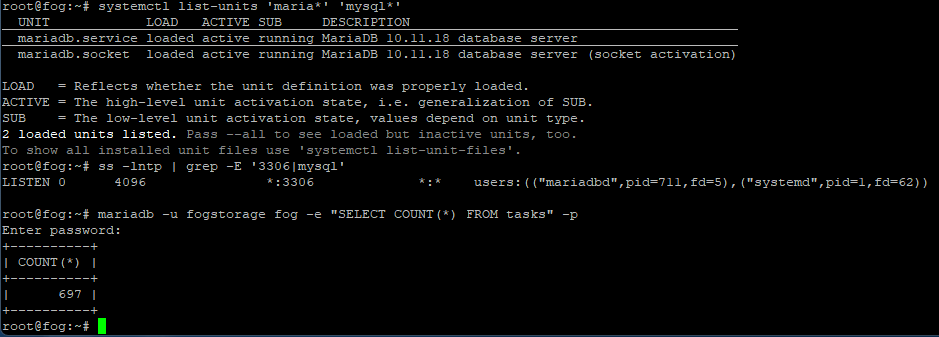
systemctl list-units 'maria*' 'mysql*'andss -lntp | grep -E '3306|mysql'will show what’s actually listening, andsudo mariadb -u root fog -e "SELECT COUNT(*) FROM tasks"compared against the count in the web UI will tell you whether FOG and your shell are looking at the same database. -
“Invalid Login” on register-with-immediate-deploy I have not explained yet, and I’d like to. It’s suspicious that a brand new user worked and
fogdidn’t, because that rules out the typing. Two questions: does thefoguser’s password contain any accented or punctuation characters, and can you log into the web UI asfogright now with that same password? If the answer to the second is yes, the problem is in how the password survives the trip from the boot menu, and that’s a different fix from the one above.
-
-
@Tom-Elliott : Good explanation and I understood the most of it. Many thanks.
I will try to help resolving these remaining bugs.
About the MariaDB Instances. I don’t understand why there are 2 instances but I’m not the only person using this server. Are they both related to Fog? I used your codelines :
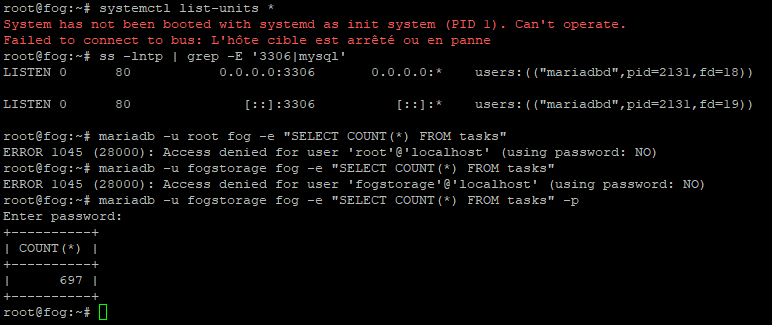
I don’t know where to find the count in the web UI?I remember I had problems with phpmysql for several years and I had to modify a file to be able to update our FOG servers. I noticed I hadn’t have to modify that file (functions.sh) anymore. Could it be related to those MariaDB instances?
Now, speaking about invalid login led me to think the password could be the culprit because it’s started with ‘&’. I’ve just modified it and will try again and finally let you know what happened.
-
Bingo!
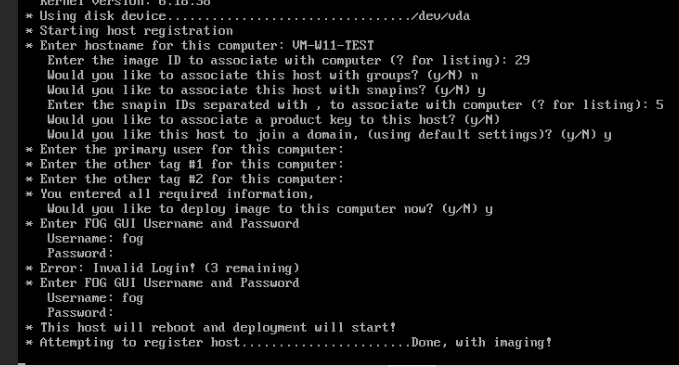
(I tried the older password just to be sure before typing the good one)This one was related to our password which started with ‘&’
I modified it and now, I can image I soon as I register a new host. I must say that password has always worked right from the beginning till the previous version 1734 (prior to update to 2390).So now, everything should be sorted out after updating our server to the last commit?
(Still those instances of MariaDB but I’m no good to debug it without help)
-> I’ve made some progress
-
It’s all good !
As you can see, informations are now written in the database (last image).

Many thanks for your help. And long live Fog and all of you who are involved in the project !

