FOG Secure Boot with Shim
-
@KMEH Well, it must be another image I couldn’t attach.
Which image are you referring to here? bzImage? If so bzImage is the filename of the kernel.
I’ve honestly dedicated many hours to this without success. I’ve seen another project called foguefi (https://github.com/abotzung/foguefi), compatible with Secure Boot directly, without using MOK, and it works. It’s just that when you select options like quickreg or deploy an image, it takes forever. But the point is, it works with recursive boot enabled. It shouldn’t be that complicated.
Yeah, I am aware of foguefi (I actually reference it in the original post), but I think you are slgithly mistaken, it actually is also using MOK. It chains grub via shim (which is similar to what we’re doing here, chaining iPXE via shim) and then re-implements the iPXE menus into grub. This works great, but requires a lot of maintenance effort if anything changes upstream in FOG.
As you can see that project is currently archived, but FOG is also reasonably stable, so I’m not sure how long it will take for a breaking change to stop it from working. Part of the reason I devised this method is that (although hackier to implement on a user level), it doesn’t rely on any functionality that isn’t already present in standard FOG server itself for the most part and it could reasonably be implemented by the FOG developers should the wish to add it.
Anyway, do you have a list of commands to configure it? Maybe I or the AI is missing something.
Sorry I’m a little lost here, commands to configure what? foguefi? If so I’m not sure, I haven’t used it myself so you’d have to ask the developer. If it’s commands to configure my method, the guide above should have everything you need.
-
I don’t understand well everything but maybe it’s more complex than this and I understand nothing at all. haha
On my server I have a “shimx64.efi” in “/boot/efi/EFI/debian/” can I use it directy or I must install shim-signed and use the shimx64.efi.signed ?
-
@jmeyer Now worries, it gets a little confusing, and sorry for the late reply again, I was on Holiday last week so didn’t check the forums for a while. I believe that shim should already be signed and you should be able to use it. You should already have the signed shim package installed which would provide that file I would imagine, though I’m not familiar with Debian to say that with any certainty. However, that shim would need to be copied into the /tftpboot folder and it’s permissions changed accordingly. Remember to renamed your ipxe binary to grubx64.efi or whatever the Debian shim is programmed to automatically chainload.
-
@KMEH
Hi,
I don’t understand well evereything too, but thanks for your work and research on this.
On the last IPXE release 2.0 (https://github.com/ipxe/ipxe/releases), i seeAdd support for UEFI Secure Boot via a dedicated iPXE shim.Does this mean that if FOG include this last ipxe release, Secure Boot support for FOG will be handled automatically?
-
@Florent Hi Florent,
I actually have been meaning to look into this some more, but the likely answer is no, or at least, not entirely. The way that support works is, you download a signed iPXE 2.0 binary from iPXE and a copy of their signed shim. That shim is signed with the Microsoft keys and trusts the iPXE signing keys. What this means in practical terms is, all the steps above would still need to occur, it’s just that the signing of the iPXE binary is managed by iPXE, and you don’t need to enroll a key to boot iPXE.
That said, I would imagine this only covers you for booting iPXE, any chainloaded binaries would still need to be signed either with Microsoft’s key or a MOK key you’ve enrolled on the machine. In FOG’s case this means the FOS kernel has to be signed and trusted on the system, in addition to any other binaries (for example memtest, refind) you plan to boot via FOG.
The other likely blocker is the build itself. Naturally, only iPXE can sign binaries that the iPXE Shim will support. Currently the FOG installer actually builds a slightly modified iPXE binary from source. While I’m unsure if these are all that different from the pre-built binaries from 2.0 in terms of support and functionality, it would at the very least need to be changed to instead pull the iPXE 2.0 binaries.
I don’t think any of these are particularly hard to overcome or deal with though. The bottom line is, 2.0 makes it easier, but only to a point. To get real proper Secure Boot support in FOG, they’ll likely need to generate their own signing keys, and start signing at least the FOS kernels (if not iPXE itself) and update FOG to include shim support somehow.
That said, for basic support, I doubt they would need to go the full mile and get a Microsoft approved signing key, I think distributing a certificate/key you can enroll via MokManager and using a pre-existing signed shim (like the iPXE provided one) would more than suffice for most usecases. I’m not sure how difficult it would actually be to implement any of this into FOG, that’s a question for someone who knows PHP and is more familiar with the FOG codebase than I.
Sorry if that’s a bit long winded, it’s not an easy topic to distill. Hope that helps though.
-
-
@jmeyer I haven’t tested it at all myself, but I wonder if that is referring to the fact that if Secure Boot is turned on all binaries (even the chainloaded ones such as the linux kernel) must be Secure Boot compatible. I’ll be interested to hear of your tests.
-
Here is my first steps.
Install signing tools on your FOG server
apt update
apt install sbsigntool openssl mokutil
Install shim & grub
apt install shim-signed grub-efi-amd64-signed
cp /usr/lib/shim/shimx64.efi.signed /tftpboot/shimx64.efi
cp /usr/lib/grub/x86_64-efi-signed/grubx64.efi.signed /tftpboot/grubx64.efi
I end with this at PXE boot :
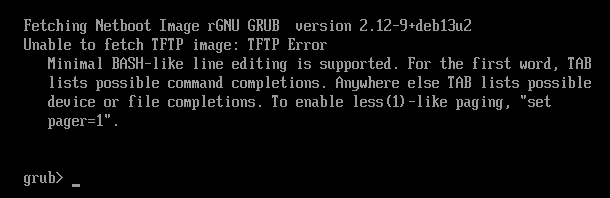
Shim signature give this : (sbverify --list shimx64.efi)
warning: data remaining[831016 vs 957136]: gaps between PE/COFF sections?
signature 1
image signature issuers:
 - /C=US/ST=Washington/L=Redmond/O=Microsoft Corporation/CN=Microsoft Corporation UEFI CA 2011
image signature certificates:
 - subject: /C=US/ST=Washington/L=Redmond/O=Microsoft Corporation/CN=Microsoft Windows UEFI Driver Publisher
   issuer:  /C=US/ST=Washington/L=Redmond/O=Microsoft Corporation/CN=Microsoft Corporation UEFI CA 2011
 - subject: /C=US/ST=Washington/L=Redmond/O=Microsoft Corporation/CN=Microsoft Corporation UEFI CA 2011
   issuer:  /C=US/ST=Washington/L=Redmond/O=Microsoft Corporation/CN=Microsoft Corporation Third Party Marketplace Root
and grub sinature return :
signature 1
image signature issuers:
 - /CN=Debian Secure Boot CA
image signature certificates:
 - subject: /CN=Debian Secure Boot Signer 2022 - grub2
   issuer:  /CN=Debian Secure Boot CA
I tried creating MOK key but I’m stuck with security violation :
mkdir /root/secureboot
cd /root/secureboot
openssl req -new -x509 -newkey rsa:2048 -keyout FOG-MOK.key -out FOG-MOK.crt -nodes -days 3650 -subj "/CN=FOG Secure Boot/"
openssl x509 -in FOG-MOK.crt -outform DER -out FOG-MOK.der
FOG-MOK.key <-- private key (protect!)
FOG-MOK.crt
FOG-MOK.der <-- enroll this on clientsSign ipxe.efi and rename it to grubx64.efi
cd /tftpboot
cp ipxe.efi ipxe.efi.original
sbsign --key /root/secureboot/FOG-MOK.key --cert /root/secureboot/FOG-MOK.crt /tftpboot/ipxe.efi --output /tftpboot/ipxe-signed.efi
cp ipxe-signed.efi grubx64.efi
I think I need to work more and as Fog default exit type is refind, I’ll make more research.
-
I remplaced grubx64 by grubnetx64 (not sure if needed but was recommanded for PXE) and create a “grub” directory in tftpboot with “grub.cfg” inside.
Grub signed look for cfg file in a subdir called “grub” by default.cp /usr/lib/grub/x86_64-efi-signed/grubnetx64.efi.signed /tftpboot/grubx64.efi mkdir /tftpboot/grub chmod -R a+rX /tftpboot/grubI get grub menu.
update (10 am) :
I copied snponly.efi in grub directory and signed it with the FOG-MOK key I generated before.sbsign --key /root/secureboot/FOG-MOK.key --cert /root/secureboot/FOG-MOK.crt /tftpboot/snponly.efi --output /tftpboot/grub/snponly.efiI end with “error ; bad shim signature”.
I think I need to import the key on the computer with command “mokutil --import /chemin/vers/FOG-MOK.der”I keep on searching…
2nd update (12:30 am):
To enroll key :
cp /usr/lib/shim/mmx64.efi.signed /tftpboot/mmx64.efiand in tftpboot/grub/grub.cfg
menuentry 'Enroll MOK' {
    insmod tftp
    insmod chain
    chainloader (tftp,192.168.69.10)/mmx64.efi
    boot
}

menuentry 'Boot FOG (iPXE)' {
    insmod efinet
    insmod tftp
    insmod chain
    net_bootp
    chainloader (tftp,192.168.69.10)/grub/snponly.efi
    boot
}
Copy the .der on usb key, put it on the computer, run “Enroll MOK” in pxe grub menu then “Enroll from disk”
Reboot and run “Boot FOG” in pxe menu.And at least I have the FOG menu !

I think I’m in the right way.
Let’s keep on working.
-
@jmeyer Good work. So far looks very similar to what I was doing above but with grub instead. I’m guessing you’re aiming for something along the lines of the archived project you mentioned earlier that did this. Make sure you modify your ipxe scripts to load the shim with the shim command, and then sign whatever you’re booting from ipxe and you should be more or less there.
It’s worth noting if you want you should be able to skip the grub stage entirely, if you load the shim directly and name your ipxe binary what you’re grub binary currently is you should be able to net boot any shim pretty easily, from there the shim can automatically call mok manager as long as it’s in the same directory as your shim.
Sorry for responding so late. I’m out on training this week.
-
So, somehow this slipped by my radar, but this guide is now largely obsolete! Pretty much everything done here now seems to be automatically handled by FOG after the transition to iPXE 2.0. FOG will now generate it’s own signing keys and seemingly sign the kernels for you, and provides a dedicated boot menu entry to enroll keys via MOK! I’ve yet to test this myself so happy to be corrected if I’m missing anything here.
Additionally, it looks like you can pretty easily migrate existing keys into this setup with some install parameters. I’ll be updating my ansible role to acomodate these changes soon!
-
@KMEH This wasn’t somehow. partly it was yours (among all the others) requests for secure boot and some max access to claude that really helped get this more flushed out more properly.
And a lot of mind tossing to get there.
Hopefully you enjoy it and like it (everyone).
-
@Tom-Elliott Haha thank you! I was more referring to it slipping past my radar… I’m not sure how I missed it being added to be honest, I’d even read the patchnotes for that version of FOG and missed it.
I’m glad my attempts were able to help get this implemented one way or another. I’m going to update my ansible role as it’s currently broken due to the changes (it manually rebuilt iPXE itself with some files from the FOG repo which have now been removed due to the transition to 2.0 so that no longer works), and then I’ll give it a whirl.
Out of interest, I assume that like the other install time parameters this can be set by the .fogsettings file rather than the command line. I had a look in the docs and I can’t see a matching parameter listed, but I’m not sure if that’s because it isn’t supported or just the docs having not been updated yet.
The role uses templating with the .fogsettings file for the majority of the settings (it’s easier than conditionally setting command line parameters), so I’d much prefer to be able to adjust this from the file if I can!
-
@KMEH This might be able to help:
https://docs.fogproject.org/en/latest/management/server/install-fogsettings/ -
@Tom-Elliott Ah yes, thanks. That’s what I was looking for. I was checking on that page but I couldn’t find it, even did a ctrl+f for secure boot. I wonder if it was an old cache or something, weird!
-
@Tom-Elliott Just a thought, was reading through the docs and I noticed that because of the adhereance to stock iPXE 2.0 netbooting with HTTPS is disabled by default. This may be a little too complicated so I’d get avoiding this, but you could probably work around this by nesting shim and iPXE to boot a custom signed iPXE. It would work something like this:
- Netboot iPXE 2.0 normally with it’s shim
- Use autoexec.ipxe with the shim command to reload that shim
- Using autoexec.ipxe chainload a custom build of iPXE 2.0 that has the FOG certificate bundled and trusted.
If the binary chained isn’t already trusted, I believe you should be able to use some scripting to then automatically chain in mokmanager or fallback to chaining via http.
Provided you use the normal FOG signing keys, this should work fine, though it does mean having two shims. It may be worth it to close that small gap in HTTPS. Both the shim and custom iPXE could be chain loaded via TFTP. It does add a little more complexity to the signing and boot process but I figured it was worth mentioning, as having HTTPS wherever possible does seem valuable.
-
Using “secureboot/snponly-shimx64.efi” without secureboot works like snponly.efi ?
Could it be possible to add a very lightweight OS such as Tiny Core Linux with enrolment kit inside (or that get it from web link) that would enrol key automatically via pxe menu ?

-
@jmeyer I’m confused what you’re asking?
secureboot/snponly-shimx64.efi simple is the shim that agrees with the signed snponly.efi. This agreement is only required during “Secure Boot Enabled”, but would/should still work if used for booting “secure boot disabled”.
We already have an ability to boot to the mok manager from the iPXE menu, as well as loading into FOS as its own specific task.
-
@Tom-Elliott
Something isn’t working well for me.
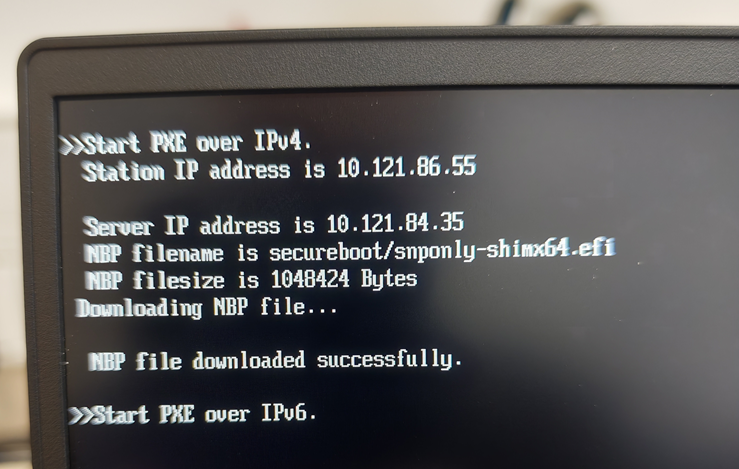
I can’t get iPXE menu when secureboot is enable and secureboot/snponly-shimx64.efi is set.On a Lenovo ThinkPad E16 Gen 1, I only have this :
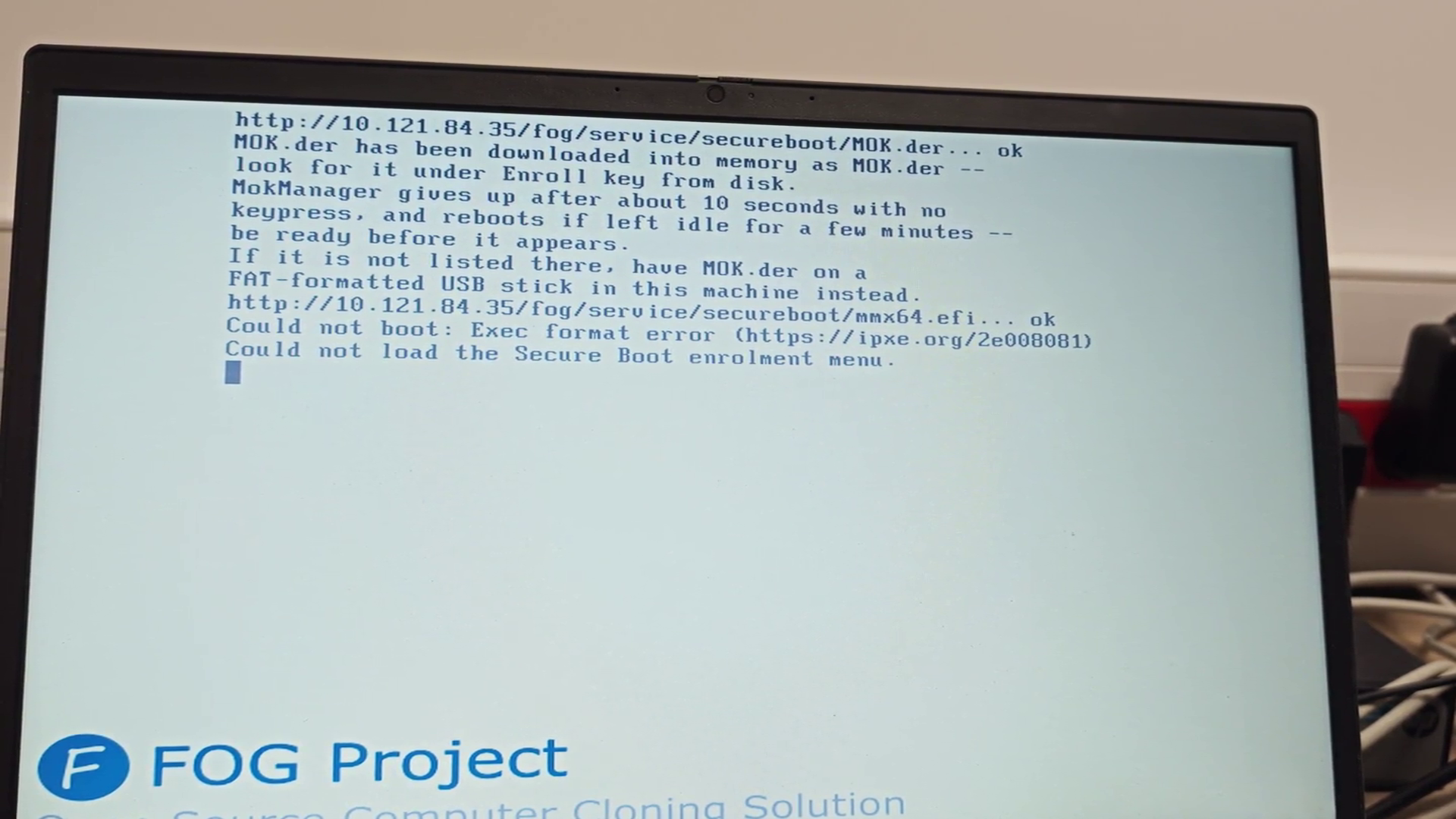
I acces on iPXE menu a Lenovo ThinkBook 15-IIL but yet I think MOK.DER isn’t registering well even with an usb key connected formatted in fat32 with the 3 files.
 https://streamable.com/v6wyus
 -
@jmeyer The first screenshot, I can’t really say what’s wrong beyond for some reason, shim either immediately exits or doesn’t start so the EFI instead moves onto the next boot option which is IPv6.
The second one, MOK.DER is being loaded, but mokmanager itself (which does the enrolling) is failing to load. Exec format error is usually caused either by trying to load a binary built for the wrong architecture (e.g arm on an x86 CPU) or when you have Secure Boot enabled, but the binary you’re trying to load isn’t signed by one of the keys enrolled in the firmware.
So, for the second one, double check that you have the Microsoft keys enrolled in the firmware, or try it with secureboot off and see if that fixes it.
I’m not quite sure what to suggest for the first one, other than maybe try network booting with secureboot off to the standard snponly.efi binary.