FOG Secure Boot with Shim
-
@KMEH Great job !
I can’t wait for it to be implemented directly during the installation of FOG.
Are the bugs on Dell only affecting older models? -
@Florent Thanks Florent. Hopefully it does!
The issues I’ve listed here do seem to only affect older models of Dell, however UEFI (despite having the word unified in the name) varies wildly by vendor, and even within Vendors, so I wouldn’t be surprised to learn there are similar or different issues affecting newer Dells or even non-Dell machines.
That said, based on my experience at work. I can’t say I’ve seen too many machines have the number of bizarre issues as I have seen with the older Dell PCs we have.
As with all things, I’d suggest testing it on some of the machines common in your fleet of computers and seeing what works and what doesn’t.
-
@KMEH Hi,
I tried your method and it only partially worked. It reached the FOG menu correctly after enrolling the key, but the problem arises when I try to perform a quickreg or deploy an image. In both cases, I get the following error (it starts working again when I disable Secure Boot)

my version is 1.5.10
-
@toalalife Hi there! Sorry for the late reply. I’ve been on holiday and I forgot to check up on this. That is interesting. There are a couple of things I can think of to double check/try off the top of my head.
That particular error happens when iPXE can’t execute the binary, usually because either an architecture mismatch (e.g arm64 on x64) or because secboot fails to verify. Given that disabling secboot fixes it, I’m leaning towards that. (https://ipxe.org/err/2e0080)
So I would say you should double check that your kernel is signed. If you’ve updated them you’ll have to resign the kernel to ensure it keeps working.
The other would be to double check that the shim command is being invoked at some point prior to boot.php being chained. There’s a none zero chance that if you’ve updated FOG, it may have overwritten the modified default.ipxe
Other than that, if you could try and record the boot process I’d be happy to take a look and see if I can spot anything out of the ordinary, I’m also happy to take a look at your kernel or any ipxe scripts etc if you want me to double check if they’re signed or bootable.
As a final note, I don’t think I see iPXE loading the initrd.xz file there, which contains the ram filesystem that FOG uses on boot. I could be misremembering the boot process (I can’t recall if it’s normal for it to not do that if the bzImage fails to verify, or if it loads it prior to bzImage), but if that’s failing to load it might also be worth checking that out, though it shouldn’t have to be signed!
-
@KMEH Well, it must be another image I couldn’t attach. I’ve honestly dedicated many hours to this without success. I’ve seen another project called foguefi (https://github.com/abotzung/foguefi), compatible with Secure Boot directly, without using MOK, and it works. It’s just that when you select options like quickreg or deploy an image, it takes forever. But the point is, it works with recursive boot enabled. It shouldn’t be that complicated.
Anyway, do you have a list of commands to configure it? Maybe I or the AI is missing something.
-
@KMEH Well, it must be another image I couldn’t attach.
Which image are you referring to here? bzImage? If so bzImage is the filename of the kernel.
I’ve honestly dedicated many hours to this without success. I’ve seen another project called foguefi (https://github.com/abotzung/foguefi), compatible with Secure Boot directly, without using MOK, and it works. It’s just that when you select options like quickreg or deploy an image, it takes forever. But the point is, it works with recursive boot enabled. It shouldn’t be that complicated.
Yeah, I am aware of foguefi (I actually reference it in the original post), but I think you are slgithly mistaken, it actually is also using MOK. It chains grub via shim (which is similar to what we’re doing here, chaining iPXE via shim) and then re-implements the iPXE menus into grub. This works great, but requires a lot of maintenance effort if anything changes upstream in FOG.
As you can see that project is currently archived, but FOG is also reasonably stable, so I’m not sure how long it will take for a breaking change to stop it from working. Part of the reason I devised this method is that (although hackier to implement on a user level), it doesn’t rely on any functionality that isn’t already present in standard FOG server itself for the most part and it could reasonably be implemented by the FOG developers should the wish to add it.
Anyway, do you have a list of commands to configure it? Maybe I or the AI is missing something.
Sorry I’m a little lost here, commands to configure what? foguefi? If so I’m not sure, I haven’t used it myself so you’d have to ask the developer. If it’s commands to configure my method, the guide above should have everything you need.
-
I don’t understand well everything but maybe it’s more complex than this and I understand nothing at all. haha
On my server I have a “shimx64.efi” in “/boot/efi/EFI/debian/” can I use it directy or I must install shim-signed and use the shimx64.efi.signed ?
-
@jmeyer Now worries, it gets a little confusing, and sorry for the late reply again, I was on Holiday last week so didn’t check the forums for a while. I believe that shim should already be signed and you should be able to use it. You should already have the signed shim package installed which would provide that file I would imagine, though I’m not familiar with Debian to say that with any certainty. However, that shim would need to be copied into the /tftpboot folder and it’s permissions changed accordingly. Remember to renamed your ipxe binary to grubx64.efi or whatever the Debian shim is programmed to automatically chainload.
-
@KMEH
Hi,
I don’t understand well evereything too, but thanks for your work and research on this.
On the last IPXE release 2.0 (https://github.com/ipxe/ipxe/releases), i seeAdd support for UEFI Secure Boot via a dedicated iPXE shim.Does this mean that if FOG include this last ipxe release, Secure Boot support for FOG will be handled automatically?
-
@Florent Hi Florent,
I actually have been meaning to look into this some more, but the likely answer is no, or at least, not entirely. The way that support works is, you download a signed iPXE 2.0 binary from iPXE and a copy of their signed shim. That shim is signed with the Microsoft keys and trusts the iPXE signing keys. What this means in practical terms is, all the steps above would still need to occur, it’s just that the signing of the iPXE binary is managed by iPXE, and you don’t need to enroll a key to boot iPXE.
That said, I would imagine this only covers you for booting iPXE, any chainloaded binaries would still need to be signed either with Microsoft’s key or a MOK key you’ve enrolled on the machine. In FOG’s case this means the FOS kernel has to be signed and trusted on the system, in addition to any other binaries (for example memtest, refind) you plan to boot via FOG.
The other likely blocker is the build itself. Naturally, only iPXE can sign binaries that the iPXE Shim will support. Currently the FOG installer actually builds a slightly modified iPXE binary from source. While I’m unsure if these are all that different from the pre-built binaries from 2.0 in terms of support and functionality, it would at the very least need to be changed to instead pull the iPXE 2.0 binaries.
I don’t think any of these are particularly hard to overcome or deal with though. The bottom line is, 2.0 makes it easier, but only to a point. To get real proper Secure Boot support in FOG, they’ll likely need to generate their own signing keys, and start signing at least the FOS kernels (if not iPXE itself) and update FOG to include shim support somehow.
That said, for basic support, I doubt they would need to go the full mile and get a Microsoft approved signing key, I think distributing a certificate/key you can enroll via MokManager and using a pre-existing signed shim (like the iPXE provided one) would more than suffice for most usecases. I’m not sure how difficult it would actually be to implement any of this into FOG, that’s a question for someone who knows PHP and is more familiar with the FOG codebase than I.
Sorry if that’s a bit long winded, it’s not an easy topic to distill. Hope that helps though.
-
-
@jmeyer I haven’t tested it at all myself, but I wonder if that is referring to the fact that if Secure Boot is turned on all binaries (even the chainloaded ones such as the linux kernel) must be Secure Boot compatible. I’ll be interested to hear of your tests.
-
Here is my first steps.
Install signing tools on your FOG server
apt update
apt install sbsigntool openssl mokutil
Install shim & grub
apt install shim-signed grub-efi-amd64-signed
cp /usr/lib/shim/shimx64.efi.signed /tftpboot/shimx64.efi
cp /usr/lib/grub/x86_64-efi-signed/grubx64.efi.signed /tftpboot/grubx64.efi
I end with this at PXE boot :
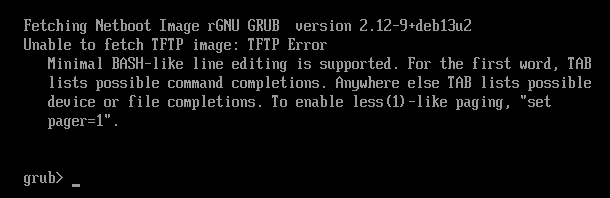
Shim signature give this : (sbverify --list shimx64.efi)
warning: data remaining[831016 vs 957136]: gaps between PE/COFF sections?
signature 1
image signature issuers:
 - /C=US/ST=Washington/L=Redmond/O=Microsoft Corporation/CN=Microsoft Corporation UEFI CA 2011
image signature certificates:
 - subject: /C=US/ST=Washington/L=Redmond/O=Microsoft Corporation/CN=Microsoft Windows UEFI Driver Publisher
   issuer:  /C=US/ST=Washington/L=Redmond/O=Microsoft Corporation/CN=Microsoft Corporation UEFI CA 2011
 - subject: /C=US/ST=Washington/L=Redmond/O=Microsoft Corporation/CN=Microsoft Corporation UEFI CA 2011
   issuer:  /C=US/ST=Washington/L=Redmond/O=Microsoft Corporation/CN=Microsoft Corporation Third Party Marketplace Root
and grub sinature return :
signature 1
image signature issuers:
 - /CN=Debian Secure Boot CA
image signature certificates:
 - subject: /CN=Debian Secure Boot Signer 2022 - grub2
   issuer:  /CN=Debian Secure Boot CA
I tried creating MOK key but I’m stuck with security violation :
mkdir /root/secureboot
cd /root/secureboot
openssl req -new -x509 -newkey rsa:2048 -keyout FOG-MOK.key -out FOG-MOK.crt -nodes -days 3650 -subj "/CN=FOG Secure Boot/"
openssl x509 -in FOG-MOK.crt -outform DER -out FOG-MOK.der
FOG-MOK.key <-- private key (protect!)
FOG-MOK.crt
FOG-MOK.der <-- enroll this on clientsSign ipxe.efi and rename it to grubx64.efi
cd /tftpboot
cp ipxe.efi ipxe.efi.original
sbsign --key /root/secureboot/FOG-MOK.key --cert /root/secureboot/FOG-MOK.crt /tftpboot/ipxe.efi --output /tftpboot/ipxe-signed.efi
cp ipxe-signed.efi grubx64.efi
I think I need to work more and as Fog default exit type is refind, I’ll make more research.
-
I remplaced grubx64 by grubnetx64 (not sure if needed but was recommanded for PXE) and create a “grub” directory in tftpboot with “grub.cfg” inside.
Grub signed look for cfg file in a subdir called “grub” by default.cp /usr/lib/grub/x86_64-efi-signed/grubnetx64.efi.signed /tftpboot/grubx64.efi mkdir /tftpboot/grub chmod -R a+rX /tftpboot/grubI get grub menu.
update (10 am) :
I copied snponly.efi in grub directory and signed it with the FOG-MOK key I generated before.sbsign --key /root/secureboot/FOG-MOK.key --cert /root/secureboot/FOG-MOK.crt /tftpboot/snponly.efi --output /tftpboot/grub/snponly.efiI end with “error ; bad shim signature”.
I think I need to import the key on the computer with command “mokutil --import /chemin/vers/FOG-MOK.der”I keep on searching…
2nd update (12:30 am):
To enroll key :
cp /usr/lib/shim/mmx64.efi.signed /tftpboot/mmx64.efiand in tftpboot/grub/grub.cfg
menuentry 'Enroll MOK' {
    insmod tftp
    insmod chain
    chainloader (tftp,192.168.69.10)/mmx64.efi
    boot
}

menuentry 'Boot FOG (iPXE)' {
    insmod efinet
    insmod tftp
    insmod chain
    net_bootp
    chainloader (tftp,192.168.69.10)/grub/snponly.efi
    boot
}
Copy the .der on usb key, put it on the computer, run “Enroll MOK” in pxe grub menu then “Enroll from disk”
Reboot and run “Boot FOG” in pxe menu.And at least I have the FOG menu !

I think I’m in the right way.
Let’s keep on working.
-
@jmeyer Good work. So far looks very similar to what I was doing above but with grub instead. I’m guessing you’re aiming for something along the lines of the archived project you mentioned earlier that did this. Make sure you modify your ipxe scripts to load the shim with the shim command, and then sign whatever you’re booting from ipxe and you should be more or less there.
It’s worth noting if you want you should be able to skip the grub stage entirely, if you load the shim directly and name your ipxe binary what you’re grub binary currently is you should be able to net boot any shim pretty easily, from there the shim can automatically call mok manager as long as it’s in the same directory as your shim.
Sorry for responding so late. I’m out on training this week.
-
So, somehow this slipped by my radar, but this guide is now largely obsolete! Pretty much everything done here now seems to be automatically handled by FOG after the transition to iPXE 2.0. FOG will now generate it’s own signing keys and seemingly sign the kernels for you, and provides a dedicated boot menu entry to enroll keys via MOK! I’ve yet to test this myself so happy to be corrected if I’m missing anything here.
Additionally, it looks like you can pretty easily migrate existing keys into this setup with some install parameters. I’ll be updating my ansible role to acomodate these changes soon!
-
@KMEH This wasn’t somehow. partly it was yours (among all the others) requests for secure boot and some max access to claude that really helped get this more flushed out more properly.
And a lot of mind tossing to get there.
Hopefully you enjoy it and like it (everyone).
-
@Tom-Elliott Haha thank you! I was more referring to it slipping past my radar… I’m not sure how I missed it being added to be honest, I’d even read the patchnotes for that version of FOG and missed it.
I’m glad my attempts were able to help get this implemented one way or another. I’m going to update my ansible role as it’s currently broken due to the changes (it manually rebuilt iPXE itself with some files from the FOG repo which have now been removed due to the transition to 2.0 so that no longer works), and then I’ll give it a whirl.
Out of interest, I assume that like the other install time parameters this can be set by the .fogsettings file rather than the command line. I had a look in the docs and I can’t see a matching parameter listed, but I’m not sure if that’s because it isn’t supported or just the docs having not been updated yet.
The role uses templating with the .fogsettings file for the majority of the settings (it’s easier than conditionally setting command line parameters), so I’d much prefer to be able to adjust this from the file if I can!
-
@KMEH This might be able to help:
https://docs.fogproject.org/en/latest/management/server/install-fogsettings/ -
@Tom-Elliott Ah yes, thanks. That’s what I was looking for. I was checking on that page but I couldn’t find it, even did a ctrl+f for secure boot. I wonder if it was an old cache or something, weird!
