PXE boot failed some computers
-
Hi!
I have 68 Lenovo M79 computers. All of them were working with PXE boot earlier this week. I even made an image of one of them on Monday.
Since then, 2 machines refuse to boot in PXE mode.
I am trying in UEFI mode with ipxe.efi.Phases:
- Media Present
- Downloading NBP file
- Succeeded to download NBP File
- IPXE initialising devices…
And then it stops here and doesn’t move on. The problem only occurs on 2 computers, the rest boot without any errors. I have checked the bios settings, they are same on all PC-s. I did CMOS reset. NIC settings in Windows they are same on all PC-s. These PC-s is on same VLAN.
How can I find out the cause of the error?
Is this visible in any log files on the server?FOG version: 1.5.10.1650
PS: the IP address of the FOG server changed this week, but I have already corrected it in the configuration files, with this tutorial: https://docs.fogproject.org/en/1.5.9/reference/change_fog_server_ip_address.html
Thank you.
Mikeee -
Hi! I found the problem. I was reinstall the Linux and FOG (without https). And all PC-s booting now. Everything looks fine.
-
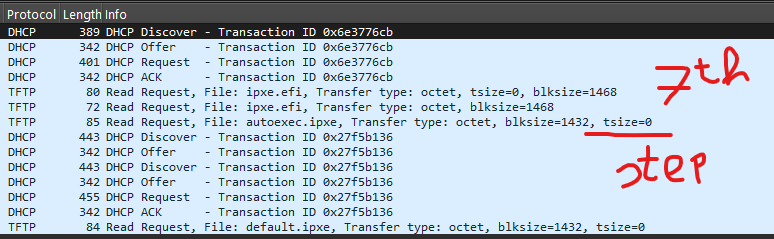
Based on this guide (https://forums.fogproject.org/topic/9673/when-dhcp-pxe-booting-process-goes-bad-and-you-have-no-clue), I tried to monitor the error. One of the faulty machines stops at step seven, while the working machine continues and boots up without error.
-
@Mikeee89 that target computer should not attempt to download the ipxe default autoexec.ipxe file.
The first two tftp requests are normal. The first tftp request just asks for the file size then the download begins. The third request is what I might expect from an ipxe file not from the fog project. The fog project ipxe boot loader would ask for default.ipxe file not autoexec.ipxe (ipxe default file). autoexec.ipxe doesn’t exist on the fog server.
So while you are in the pcap look to see what dhcp server told the client computer. Where did it get the ipxe.efi file from (server). Was it your expected dhcp server that responded to the target computer or do you have 2 dhcp servers giving out different information?
-
@george1421 Hi! Thanks for the answer, I’ll look into it more thoroughly. There are no 2 dhcp servers in that vlan.
-
This post is deleted! -
Hi! I found the problem. I was reinstall the Linux and FOG (without https). And all PC-s booting now. Everything looks fine.
-
M Mikeee89 has marked this topic as solved on
-
I had some problems with AMD computers and found this
https://knowledge.broadcom.com/external/article/269598/firmware-settings-for-ipxe-boot-on-lenov.html
"Resolution
During iPXE troubleshooting it has been determined that the following settings in Firmware/BIOS for Lenovo Thinkpad L15 Gen 3 need to be adjusted to allow for a successful iPXE boot:Memory protection - Set to ‘disabled’
AMD V Technology - Set to ‘disabled’
There also may be certain environments that require further changes. For further information contact Lenovo Support.
Additional DS (Deployment Solution) and GSS (Ghost Solution Suite) files can be found in KB article Updated 64-bit ipxe.efi (ipxe v1.21.1+) binaries
NOTE: The files in the above KB article are not a pointfix but are new version binaries signed by Microsoft"
Leaving it here, because it solved my problem and it sounds like your problem
