@Tom-Elliott
Hi!
I have updated to the latest dev-branch version.
No more updating database … failed error.
The multicast session closing the right way.
Thank you!
@Tom-Elliott
Hi!
I have updated to the latest dev-branch version.
No more updating database … failed error.
The multicast session closing the right way.
Thank you!
This is the same end-of-deploy symptom as #18228 — Task Complete, then Updating Database … Failed / No Active Task found for Host — but on the multicast path, and on 1.5.10.2482, which already contains the fix for that (#1391). The imaging log row is still never closed. I also see multicastSessions.msClients stay at 0, and go to -2 on one run, which looks like the same family of problem as the msState NULL issue described in #18238.
Three further observations that may or may not belong together: the MulticastManager logs nothing about client joins or progress for the whole session, no multicast.log.udpcast.* file is written any more, and the udp-sender command line the manager builds contains no logging switch.
ENVIRONMENT
Reproduced in two unrelated environments, on two FOG versions — all four combinations behave identically.
Environment A (lab): FOG on AlmaLinux 9.8, VM on Hyper-V. Clients: 2 VMs on an internal switch. FOS init 20260902.
Environment B (production): FOG on AlmaLinux 9.7, VM on Proxmox. Clients: 2 physical desktops on the production LAN. FOS init 20260806.
FOG versions tested: 1.5.10.2254 and 1.5.10.2482. PHP 8.0.30 and MariaDB 10.5.29 in both. Multicast runs in the same subnet as the FOG server in both cases.
STEPS TO REPRODUCE
Create a multicast deploy task for 2 hosts (NTFS image, 4 partitions, imgType=n, imgPartitionType=all).
PXE boot the hosts, join the session, let it run to completion.
ACTUAL RESULT
The transfer completes normally — Total Block Process 100.00%, Cloned successfully, all post-processing steps Done, Task Complete. Then:
Updating Database…Failed
Error returned: No Active Task found for Host: <hostname> (<mac>)
Reattempting to update database…Failed
…
An error has been detected!
Could not complete tasking (/bin/fog.download)
The image is restored correctly and Windows boots on every client. Only the task closure fails. In the web UI the imaging log row has a valid start time and no finish time, so it renders a duration of “2026 years 9 months …”.
MULTICASTMANAGER LOG (production, 1.5.10.2482, task 26)
[09-23-26 12:37:57 pm] | Task ID: 26 Name: 6gt is new
[09-23-26 12:37:57 pm] | Task ID: 26 Name: 6gt image file found, file: /images/6-gt_uj2
[09-23-26 12:37:57 pm] | Task ID: 26 Name: 6gt 2 clients found
[09-23-26 12:37:57 pm] | Task ID: 26 Name: 6gt sending on base port 63100
[09-23-26 12:37:57 pm] | Command: /usr/local/sbin/udp-sender --interface ‘ens18’ --min-receivers 2 --max-wait 600 --portbase 63100 --full-duplex --ttl 32 --nokbd --nopointopoint --file ‘/images/6-gt_uj2/d1p1.img’;/usr/local/sbin/udp-sender … d1p2.img’;/usr/local/sbin/udp-sender … d1p3.img’;/usr/local/sbin/udp-sender … d1p4.img’;
[09-23-26 12:37:57 pm] | Task ID: 26 Name: 6gt has started
[09-23-26 12:38:06 pm] | Task ID: 26 Name: 6gt is already running with pid: 5064
… identical line every 10s …
[09-23-26 12:42:08 pm] | Task ID: 26 Name: 6gt is already running with pid: 5064
[09-23-26 12:42:18 pm] | Task ID: 26 Name: 6gt is no longer running
[09-23-26 12:42:18 pm] | Task ID: 26 Name: 6gt has been killed
[09-23-26 12:42:18 pm] | Task ID: 26 Name: 6gt is now completed
[09-23-26 12:42:28 pm] * No new tasks found
Points worth noting:
The manager did not kill anything. It polled the PID, the sender chain exited on its own, and the manager then tore the session down. The “has been killed” wording is misleading.
Nothing is tracked between start and teardown — no client joins, no progress, no partition transitions. This matches msClients staying at 0.
The four udp-sender calls are chained with “;” in one shell, so the manager watches a single PID. When the last sender exits, the session is torn down immediately — while the clients are still in post-processing (UUID reset, ntfs flag, swap, hostname) and have not yet called Post_Stage2.php. I infer the single-shell part from the command line; I did not verify it with ps during a run.
The command line has no logging switch, which is why no multicast.log.udpcast.* file is produced.
SESSION ROWS (production, 1.5.10.2482)
msID 26 — msClients 0, msSessClients 2, msPercent 0, msState 4, msStartDateTime 2026-09-23 12:37:49, msSenderStart 2026-09-23 12:37:57, msCompleteDateTime 2026-09-23 12:42:18
msID 25 — msClients -2, msSessClients 2, msPercent 0, msState 5, msStartDateTime 2026-09-23 11:37:09, msSenderStart 2026-09-23 11:37:19, msCompleteDateTime NULL
msClients was also 0 on every failed run in the lab environment, and -2 there on one run under 1.5.10.2482. A negative value should not be reachable for a join counter. msPercent never leaves 0.
MISSING UDPCAST LOG
-rw-r–r–. 1 root root 6650 Aug 13 2025 /opt/fog/log/multicast.log.udpcast.19
-rw-r–r–. 1 root root 26077 Aug 5 2025 /opt/fog/log/multicast.log.udpcast.12
No such file is written for any current run, in either environment. The 2025 files contain per-client “New connection from …” lines, byte counts and “Transfer complete” — exactly the information that would show whether clients were tracked.
WHAT WAS RULED OUT
Network — the server returns an application-level response (No Active Task found for Host), so HTTP reaches it and is processed. The multicast transfer itself always completes at full speed.
Environment — lab (Hyper-V VMs, internal switch) and production (physical clients, production LAN, FOG on Proxmox) behave identically.
FOS init version — 20260806 and 20260902 both affected.
FOG version — present on 1.5.10.2254, still present on 1.5.10.2482, which includes #1391, #1301, #1305 and #1322.
Stale database rows — the tasks table held no leftover active rows before the runs.
Client count and VM speed — 2 clients in both environments, virtual and physical.
EXPECTED RESULT
The imaging log row is closed and the task is closed by the client, as #1391 does for unicast deploys. msClients reflects the number of joined clients. The udp-sender output reaches a log file again, as it did in 2025.
Screenshot from updating database failed:

Hi! I found the problem. I was reinstall the Linux and FOG (without https). And all PC-s booting now. Everything looks fine.
@george1421 Hi! Thanks for the answer, I’ll look into it more thoroughly. There are no 2 dhcp servers in that vlan.
Based on this guide (https://forums.fogproject.org/topic/9673/when-dhcp-pxe-booting-process-goes-bad-and-you-have-no-clue), I tried to monitor the error. One of the faulty machines stops at step seven, while the working machine continues and boots up without error.
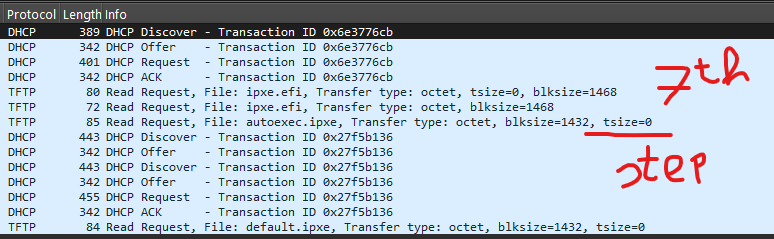
Hi!
I have 68 Lenovo M79 computers. All of them were working with PXE boot earlier this week. I even made an image of one of them on Monday.
Since then, 2 machines refuse to boot in PXE mode.
I am trying in UEFI mode with ipxe.efi.
Phases:
And then it stops here and doesn’t move on. The problem only occurs on 2 computers, the rest boot without any errors. I have checked the bios settings, they are same on all PC-s. I did CMOS reset. NIC settings in Windows they are same on all PC-s. These PC-s is on same VLAN.
How can I find out the cause of the error?
Is this visible in any log files on the server?
FOG version: 1.5.10.1650
PS: the IP address of the FOG server changed this week, but I have already corrected it in the configuration files, with this tutorial: https://docs.fogproject.org/en/1.5.9/reference/change_fog_server_ip_address.html
Thank you.
Mikeee