@fabritrento I am not aware of any differences in speed changes, though there is bandwidth limiting I capabilities. Pretty sure those capabilities exist in 1.5.10 as well though so the only real “change” I suspect are based on the kernel’s being upgraded and maybe something there changed.

Posts
-
RE: deploy in multicast very slow with 1.5.10.1629 versionposted in FOG Problems
-
RE: pc mac adddress - hostname association confused after installed 1.5.10.1629 versionposted in FOG Problems
@fabritrento I’ll be honest, I have no idea what you’re saying is isn’t happening here?
-
RE: FOG Very Slow to Deploy Image - Lenovo Neo 50Q Gen 4posted in FOG Problems
@Quintin-Giesbrecht Would there be a potential of finding out if it’s specific to the ssd by removing it from one of these “slow” lenovos, put the drive in one of your normally fast machines, and try to send the image to it?
if it’s slow in the same way, it’s definitely something scoped to the SSD itself, if it’s fast, it’s likely something specific to these Lenovo Neo 50Q Gen 4 devices.
Just my 2 cents.
-
RE: Problem with FOG Service …posted in FOG Problems
@Laurent The information is stored encrypted in the db + the transfer of information is encrypted between the client and the machine.
The only time the password is clear to any user is when you initially enter it in the field.
-
RE: Problem with FOG Service …posted in FOG Problems
@Laurent Password legacy is no longer used in 0.13.0 I don’t believe. Please enter your domain password in the non-legacy item. 0.13.0 was NOT ever using the legacy fields. It was because of these versions of the FOG client, that the “legacy” items were even created.
-
RE: Location Plugin not working correctlyposted in FOG Problems
@hummela You may need to uninstall and reinstall the location plugin (maybe having to recreate the locations too unfortunately.)
I’m only guessing, but there are things added to plugins DB stuff but no real way to tell plugins that a schema to its db is needed first.
I suspect it’s likely surrounding the newer “protocol” feature of locations.
-
RE: NBP Filesize is 0 bytes ?? Helpposted in FOG Problems
@Bhav We don’t have any information.
What I’m seeing, however, is that the machine you’re attempting to load is using UEFI booting, but you’re presenting MBR/Legacy PXE systems.
-
RE: Unable to encrypt drives with bitlocker after deploying image with Fogposted in Windows Problems
@dtiganas said in Unable to encrypt drives with bitlocker after deploying image with Fog:
The path specified in the Boot Configuration Data (BCD) for a BitLocker Drive Encryption
integrity-protected application is incorrectPlease try the information here:
https://support.microsoft.com/en-us/topic/error-message-when-you-try-to-run-the-bitlocker-drive-encryption-program-cannot-run-39e3c3f5-4f5f-242c-504a-ee55e5015eeeMaybe here as well:
https://www.mcbsys.com/blog/2019/01/bitlocker-wizard-initialization-has-failed/FOG isn’t the “reason” this is happening though it, I suspect, is playing a small part.
Ultimately I think it boils down to the bcd thinking this is one drive, but you’ve cloned it so bcd needs a resync to find the actual drive it’s sitting on.
I think BCD is using a unique identifier to find the paths and that unique identifier isn’t that actual information on that newly deployed system. so This article should help fix that, I hope.
-
RE: Can Fog be used without NFS?posted in FOG Problems
@Pingolin I believe you can setup the ip as subnets:
For example:
/images 192.168.0.0/24(ro,sync,no_wdelay,no_subtree_check,insecure_locks,no_root_squash,insecure,fsid=0)
/images/dev 192.168.0.0/24(rw,async,no_wdelay,no_subtree_check,no_root_squash,insecure,fsid=1)
Which would only allow 192.168.0 subnet to connect to the nfs share.
-
RE: Can Fog be used without NFS?posted in FOG Problems
@Pingolin Technically, yes, realistically probably not.
The reason we use NFS is due to speed and efficiency.
Is there a particular reason you cannot use NFS? Unless you’re using the FOG Server’s NFS to store other data from your company? FOG Server’s are not intended to be that way. The NFS is the point that allows sharing the images you capture and deploy to the machine’s your capturing/deploying (from/to).
NFS is the most user friendly way of accomplishing this.
Now there are past attempts to use SMB shares (Windows file sharing style) but it requires a lot more effort to stand up and is not necessarily guaranteed to work better and might not meet the requirements your company is wanting.
-
RE: User Cleanupposted in Feature Request
@fabritrento As you stated it, UAC is preventing access. There is no real way to fix user cleanup that I’m aware of.
We have started working to remove the features that we cannot manage.
                case 'service-autologout':
                    $this->serviceAutologoutPost();
                    break;
                case 'service-displaymanager':
                    $this->serviceDisplaymanagerPost();
                    break;
                case 'service-hostnamechanger':
                    $this->serviceHostnamechangerPost();
                    break;
                case 'service-hostregister':
                    $this->serviceHostregisterPost();
                    break;
                case 'service-powermanagement':
                    $this->servicePowermanagementPost();
                    break;
                case 'service-printermanager':
                    $this->servicePrintermanagerPost();
                    break;
                case 'service-snapinclient':
                    $this->serviceSnapinclientPost();
                    break;
                case 'service-taskreboot':
                    $this->serviceTaskrebootPost();
                    break;
                case 'service-usertracker':
                    $this->serviceUsertrackerPost();
Sorry that it isn’t “pretty” but this is the code moving forward. You can think of anything not on this list, but still accessible in the 1.5.x versions as being deprecated (to non-functionality)
-
RE: Lenovo ThinkCentre M900: kernel panic with latest fog 1.5.10.1622 version "Kernel Panic" Issue "XZ decompressor ran out of memory"posted in FOG Problems
@fabritrento yes, you can interchange them though sometimes (not the case here) the biggest concern is schema updates between different versions.
In this case, dev-branch is the basis of stable, so these should be effectively interchangable.
-
RE: Lenovo ThinkCentre M900: kernel panic with latest fog 1.5.10.1622 version "Kernel Panic" Issue "XZ decompressor ran out of memory"posted in FOG Problems
@fabritrento That appears to be the correct method.
git clone https://github.com/FOGProject/fogproject.git --branch=dev-branchWould have done the same thing (when you didn’t have the fogproject cloned.
The method you chose is correct though, and moving forward you would simply:
cd fogproject
git checkout dev-branch
git pull
To update to the latest information.
When you want to install stable you would:
cd fogproject
git checkout stable
git pull
Then follow the install instructions as normal.
Thanks!
-
RE: Lenovo ThinkCentre M900: kernel panic with latest fog 1.5.10.1622 version "Kernel Panic" Issue "XZ decompressor ran out of memory"posted in FOG Problems
@fabritrento I understand you have more memory than what would typically be required, but 32 bit only allows up to 4gb of memory (generally) and for some reason, I’m postulating, that because there’s more it’s saying “no, we aren’t putting anything into memory” hence the ran out of memory issue.
That said, if you could test it would be great.
I know you’re in a production environment, but right now (as I see it) your prod environment isn’t working at all. So the “test” is what will be in the next stable release on Nov 15th. If you can test, just to validate you’re able to image again, it would be great.
If you cannot, I understand, just hoping to have more information and provide a solution for you.
Thank you!
-
RE: After updating from .1622 - Could not boot: Result too large - Chain loading failed.posted in FOG Problems
@Fog_Newb Please pull the latest and try again?
-
RE: Lenovo ThinkCentre M900: kernel panic with latest fog 1.5.10.1622 version "Kernel Panic" Issue "XZ decompressor ran out of memory"posted in FOG Problems
@fabritrento Please try to update to the latest dev-branch and see if htis works properly
Yes I want the 32 bit stuff to work properly, but since this is likely a 64 bit machine anyway.
I am thinking this is due to the amount of memory on the machine far exceeding the amount of memory the 32 bit binaries can actually even handle. (Just my suspicions)
-
RE: PXE Boot Error - "Kernel Panic" Issue "XZ decompressor ran out of memory"posted in FOG Problems
@lperoma @fabritrento Please try updating dev-branch to the latest version.
I have added some additional checking.
Granted 32 bit binaries should be able to work without problem but alas it seems there’s an issue currently.
The latest dev-branch tries to address this by taking account of the buildarch of the ipxe binary being i386, but the CPU architecture being 64 bit. I need testing please of course if both of you wouldn’t mind?
Thanks in advance.
-
RE: FOG Very Slow to Deploy Image - Lenovo Neo 50Q Gen 4posted in FOG Problems
@Quintin-Giesbrecht basically I think this is something in the kernel, but what it is we don’t have enough information yet. It’s possible a newer kernel might help.
Then again it could be something like:
https://forums.fogproject.org/topic/13620/very-slow-cloning-speed-on-specific-model/105?_=1729271500055 -
RE: FOG Very Slow to Deploy Image - Lenovo Neo 50Q Gen 4posted in FOG Problems
@Quintin-Giesbrecht We have seen this in the past, though I’ve kind of been out of the loop for some time.
I believe this is specific to the kernel and the way it deals with paging and block size.
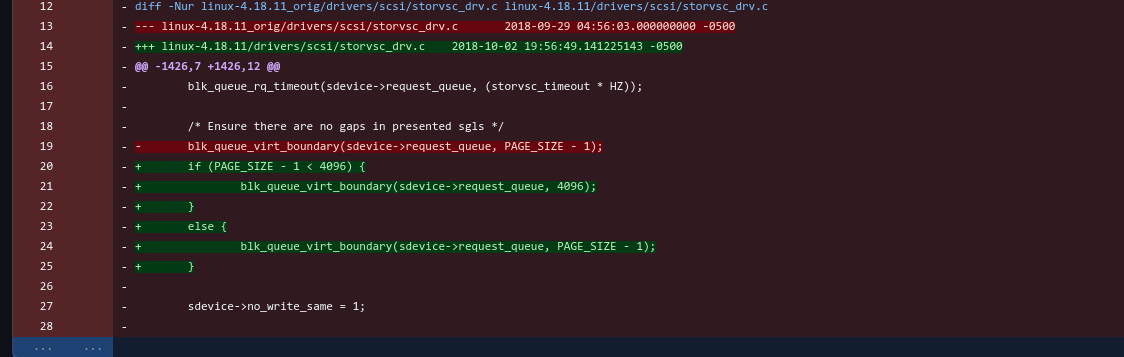
While this is a very old image now, This was effectively the problem.
Basically, what I found back here was that the page_size value being less than the disk size was causing issues by defaulting to anything less than the 4k sector. So if page_size - 1 was less than 4096, default the page size to 4096 to maintain 4k structures.
Now we may need to revisit this, but i’m not so certain. Even this method could be wrong.
-
RE: Snapins not deploying: Illegal characters in path.posted in FOG Problems
@sideone If you’re willing to try the latest pull?
I’m trying to do it while having the new features of location plugin that were added in dev-branch. I apologize for the many iterations, but I think it should work now as I have failsafes in place too now.