As a workaround, we’re doing deploy in these Appliances by Schedule Deploy Tasks, as it bypass the authentication screen. But i would be interesting if we could do deploys without this need.

Posts
-
RE: Cannot authenticate FOG in host to proceed deployposted in FOG Problems
-
RE: FOG ubuntu image fails to update databaseposted in FOG Problems
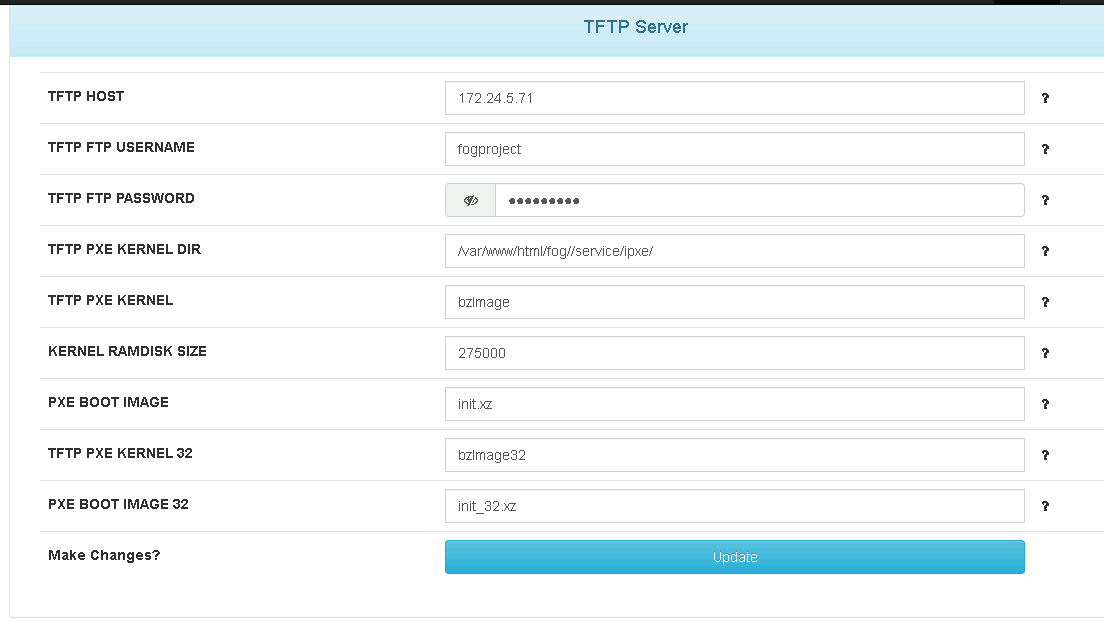
@JGeear check at Fog Settings (index.php?node=about&sub=settings) if the password is stored here is the same you can access ftp server:
-
RE: ASUS NUC14RV iPXE PXE bootposted in FOG Problems
I think this is an issue envolving this kind of nic hardware (Intel I226-V). I opened an issue (18125) where I have some appliances for pfsense, they have got four NICs with this kind of hardware, and we are not getting successfull to deploy an image because it’s not processing authentication, even typíng correct user and password.
-
RE: Cannot authenticate FOG in host to proceed deployposted in FOG Problems
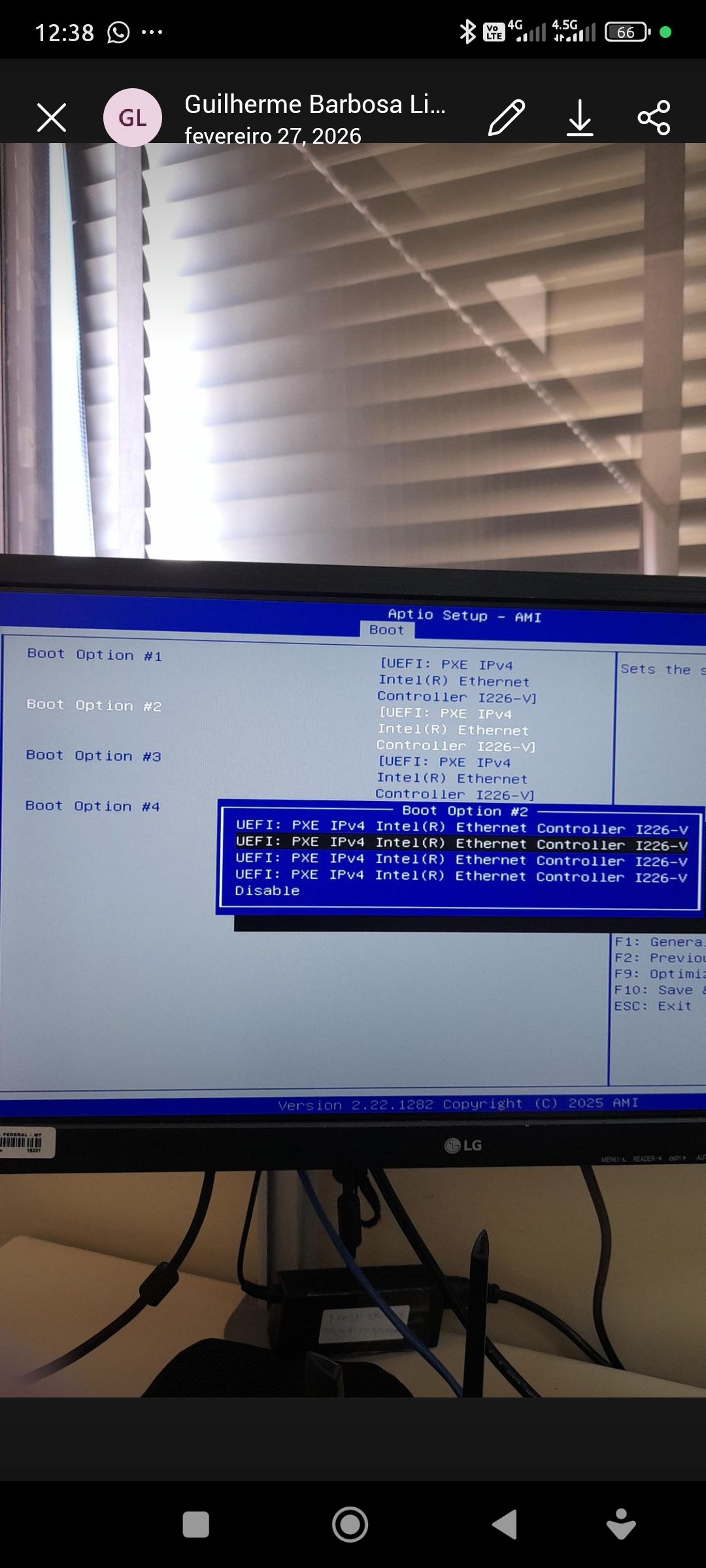
@Tom-Elliott @Tom-Elliott it’s not authentication issue. We don’t have problem when deploying images to other hosts, like PCs and minipcs with just one NiC. But over these Appliances with 4 Nics we got stuck in the authenticon screen even putting correct username and password. Look, we are trying to disable 3 nics in Bios but we can’t . We excluded them to Boot Order and left just the first, but even so, the error persists.1000110829.jpg - I found the issue 16746 about this problem, but it’s happening to us!
-
RE: Clients stuck at iPXE initialising devicesposted in FOG Problems
@pcnr I noticed this issue so many years a go. It may be issues refering undionly.kpxe file. You can find some solutions from this forum about this. In my case I did following:
- Make a backup of /tftpboot/undionly.kpxe to undionly.kxpe.bak;
- Copied /tftpboot/undionly.kkpxe to undionly.kpxe.
So at next time, this stuck problem was solved.
-
Cannot authenticate FOG in host to proceed deployposted in FOG Problems
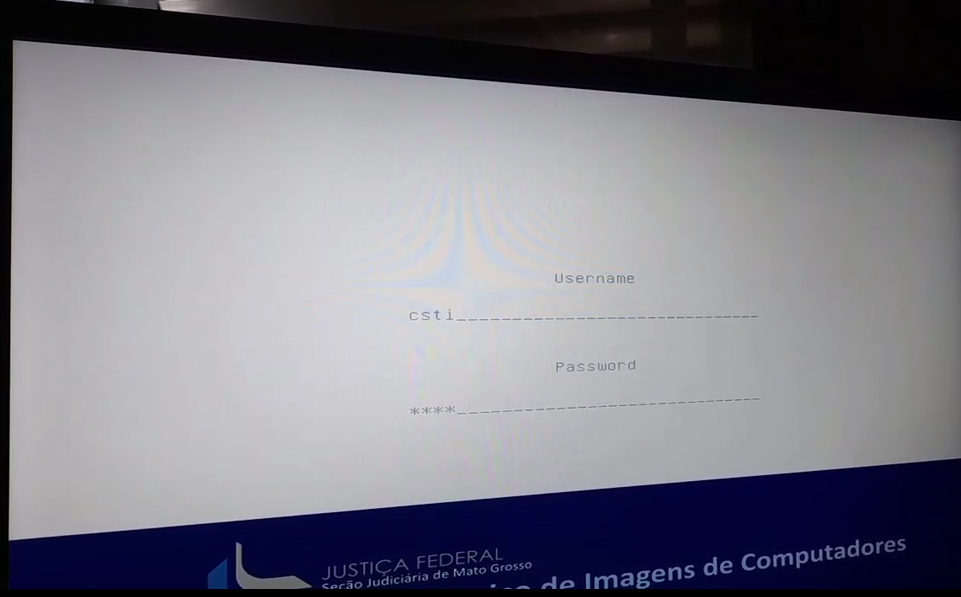
I’m trying to deploy an image to a PFsense Appliance (APPLIANCE FIREWALL 4 LAN I226-V PROC J6412 8GB DDR4 E 256 SSD NVME HDMI/DP) and I cannot authenticate. PXE could get IP by DHCP in each of 4 NICs present in the appliance (obviously I plug network cable in just one of them), but after the actions menu and before images menu, when FOG asks for autentication, we fill auth fields but nothing happens, and FOG cannot overcome the screen I attached here below.
Any ideas?
-
RE: NBP File Downloaded successfully boot loopposted in FOG Problems
Let me give a feedback to this issue, as I faced it recently. In my case, the culprit was faulting parameters in Microsoft DHCP.
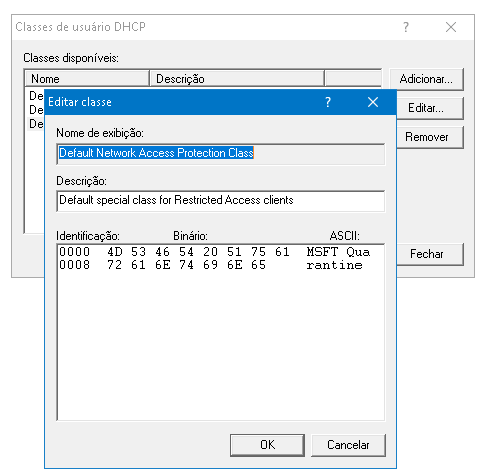
It was faulting “MSFT Quarantine” User Class and PXE Vendor Class is not properly configured (It was typed “PXEclient:Arch:00007” instead of “PXEClient:Arch:00007”).
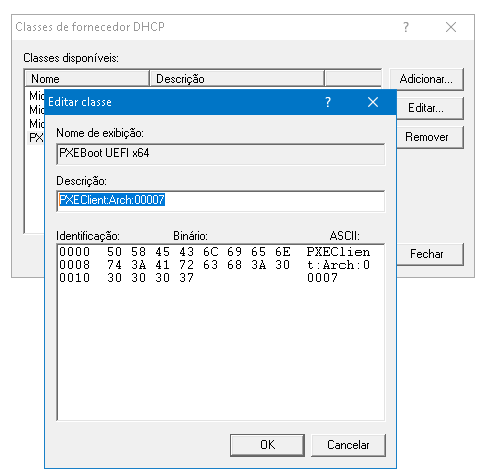
After doing this corrections, PXE got successfully redirected Boot instructions to FOG Server. -
RE: Pxe-E32: TFTP open timeout - FOG 1.5.10 - DHCP Windows Server 2019posted in Linux Problems
@george1421 I make another test with another client
172.24.12.65running on same subnet to172.24.12.35- talking to the same server and got successfull - 12.65 - 3.70.pcap -
RE: Pxe-E32: TFTP open timeout - FOG 1.5.10 - DHCP Windows Server 2019posted in Linux Problems
@george1421 No,
172.24.5.180is not the FOG Server, it’s172.24.3.70… I don’t even know where PXE come with this idea… -
RE: Pxe-E32: TFTP open timeout - FOG 1.5.10 - DHCP Windows Server 2019posted in Linux Problems
@george1421 Look at this pcap file about the other FOG server (172.24.3.71) - It’s working. That’s a 1.5.9 FOG running in Fedora 32 - I think it’s a client issue, because another client could caugth naturally PXE TFTP… I will exam differences between the two clients.
-
RE: Pxe-E32: TFTP open timeout - FOG 1.5.10 - DHCP Windows Server 2019posted in Linux Problems
@george1421 I understand. There is another FOG server on the same subnet (172.24.3.71) that is normally working. I changed by this new one. Here are pcap file you asked before 12.35.pcap
-
RE: Pxe-E32: TFTP open timeout - FOG 1.5.10 - DHCP Windows Server 2019posted in Linux Problems
@george1421 the server is in default subnet (172.24.0.0/22) and the workstation 172.24.12.35 is in WLAN 12 (172.24.12.0/23).
-
Pxe-E32: TFTP open timeout - FOG 1.5.10 - DHCP Windows Server 2019posted in Linux Problems
Hi,
I cannot understand why a computer is not getting PXE boot, even when I configured everything correctly (I think so). I raised FOG 1.5.10 in Fedora 38 server, but when I try to boot a machine, I see the classical error: “Pxe-E32: TFTP open timeout”.
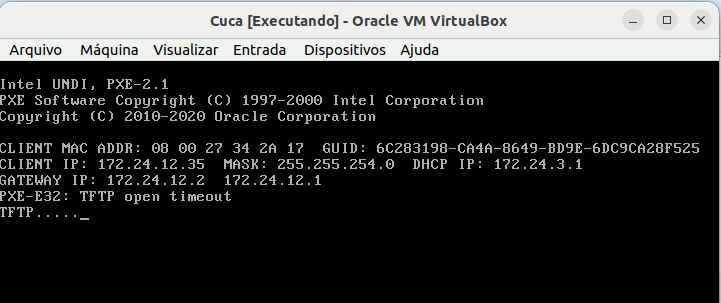
I use a Windows Server 2019 DHCP and everything is fine, as this imagem suggest:
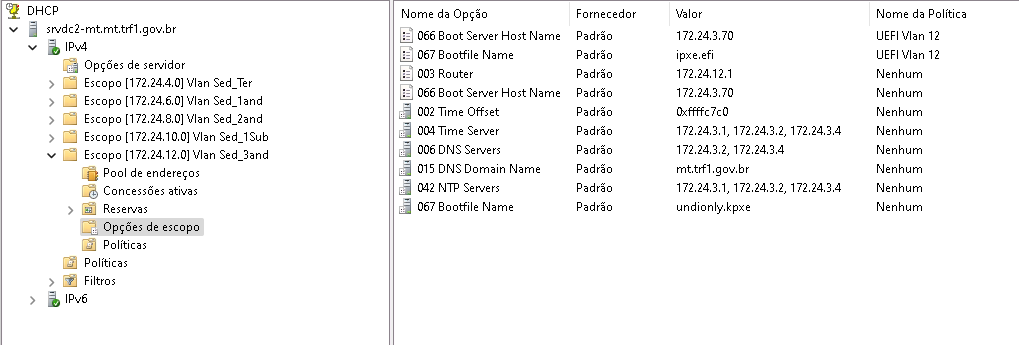
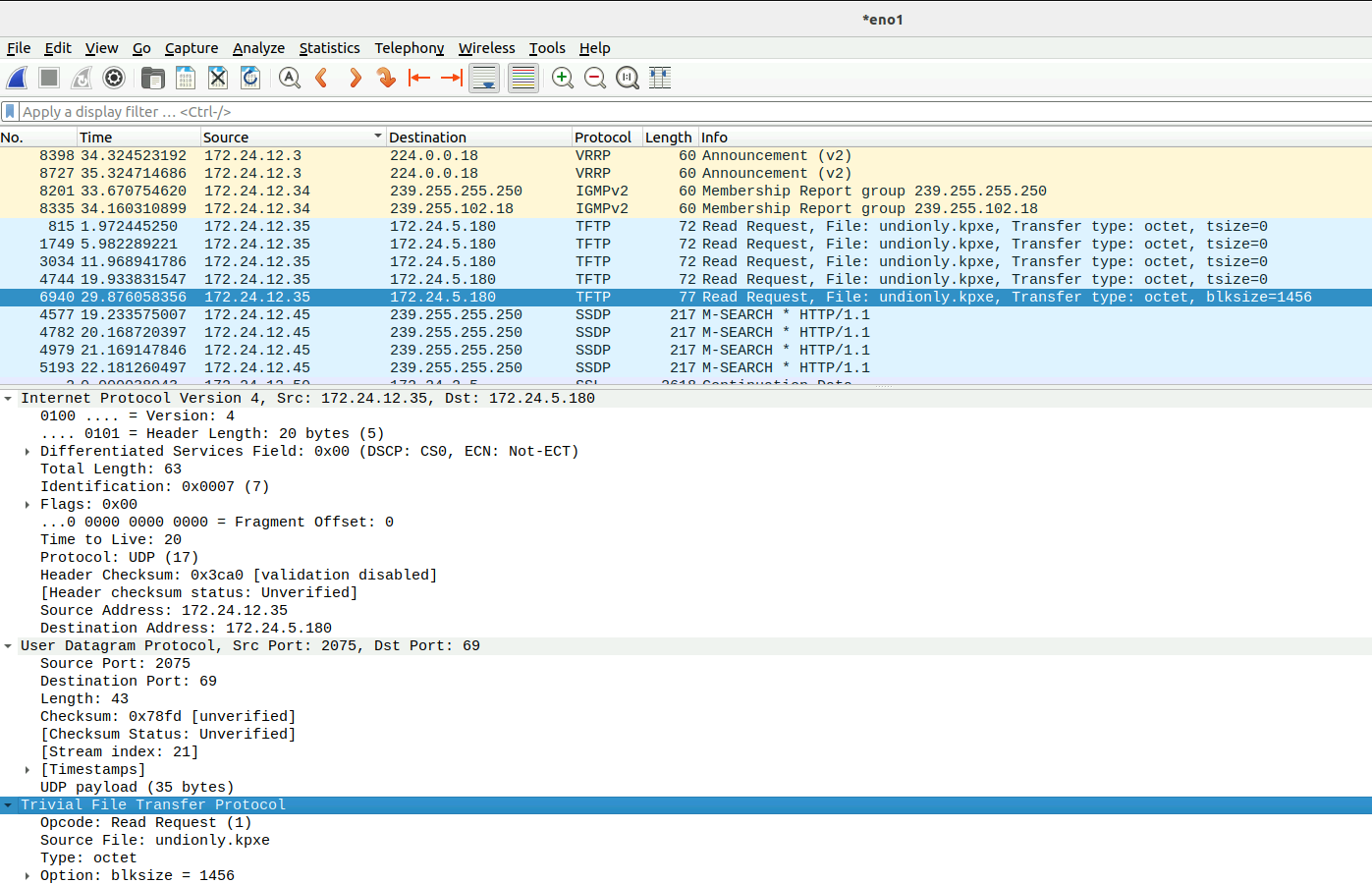
Why it gathers 172.24.5.180 and not 172.24.3.70?
-
RE: Cannot install FOG 1.5.9 in Ubuntu 16.04 because cannot install php7.1 (Is Ondrej repository empty??)posted in FOG Problems
@sebastian-roth I successfully installed 1.5.9 in Ubuntu 18.04! It installed php7.2 on it. Thanks!.. It’s interesting to update installation wiki, because there is written 16.04 as high Ubuntu release that support FOG.
-
RE: Cannot install FOG 1.5.9 in Ubuntu 16.04 because cannot install php7.1 (Is Ondrej repository empty??)posted in FOG Problems
@sebastian-roth I’m not interested in keep Ubuntu 16.04 in these machines. I’ll try in 18.04, for example, but I tried installing a fresh in Ubuntu 22.04, and the error was exactly the same!! But I think this release is too new for this test, ok? I’ll be back with the results about upgrading my server to 18.04
-
Cannot install FOG 1.5.9 in Ubuntu 16.04 because cannot install php7.1 (Is Ondrej repository empty??)posted in FOG Problems
Hi!
I tried update FOG from 1.5.7 to 1.5.9 in my servers. We have 7 fog servers spreading across our State, two running Fedora and others running Ubuntu 16.04. The last two servers (16.04) I couldn’t update because the installer cannot install php7.1 at all.
The error is this:dpkg-query: no packages found matching php7.1 dpkg-query: no packages found matching php7.1-bcmath dpkg-query: no packages found matching php7.1-cli dpkg-query: no packages found matching php7.1-curl dpkg-query: no packages found matching php7.1-fpm dpkg-query: no packages found matching php7.1-gd dpkg-query: no packages found matching php7.1-json dpkg-query: no packages found matching php7.1-ldap dpkg-query: no packages found matching php7.1-mbstring dpkg-query: no packages found matching php7.1-mysql dpkg-query: no packages found matching php-gettext php-gettextIt’s funny, because I connected to Ondrej repository properly. Look:
gpg: keyring `/tmp/tmph5l8tm4m/secring.gpg' created
gpg: keyring `/tmp/tmph5l8tm4m/pubring.gpg' created
gpg: requesting key E5267A6C from hkp server keyserver.ubuntu.com
gpg: /tmp/tmph5l8tm4m/trustdb.gpg: trustdb created
gpg: key E5267A6C: public key "Launchpad PPA for Ondřej Surý" imported
gpg: Total number processed: 1
gpg:               imported: 1  (RSA: 1)
OK
gpg: keyring `/tmp/tmpcfmwjn32/secring.gpg' created
gpg: keyring `/tmp/tmpcfmwjn32/pubring.gpg' created
gpg: requesting key E5267A6C from hkp server keyserver.ubuntu.com
gpg: /tmp/tmpcfmwjn32/trustdb.gpg: trustdb created
gpg: key E5267A6C: public key "Launchpad PPA for Ondřej Surý" imported
gpg: Total number processed: 1
gpg:               imported: 1  (RSA: 1)
It doesn’t matter if the server is newer or just an update. I didn’t installed at all. It seems Ondrej has thrown off these packages, because I added Apt key successfully, as you can see in the attached fog_error_1.5.9 and foginstall logfiles here. You can check, the installer installed php7.0, instead. But the installation ended unsuccessfully.
Any ideas? May I wait for Ondrej to fix his repository?
-
RE: PXE Chainloading error after FOG images menuposted in FOG Problems
@george1421, it’s funny again. I scheduled a Deploy Task for the device. So it entered in a loop:
- Boot UEFI ipv4;
- Error after the message “BzImage…” (I post an image with this error)
- Restart and Boot UEFI ipv4.
Suddenly, the computer began to deploy the image!!!

It’s sure I have connectivity issues, no?
-
RE: PXE Chainloading error after FOG images menuposted in FOG Problems
@george1421 Yes. What I don’t understand is why it could boot on PXE, but goes to error other there? Before this, PXE error occurred at boot time, not after certain operation. It’s like PXE wants to re-register Client at the middle of the operation.