@Sebastian-Roth Unfortunately my environment isn’t really suitable to use the fog client since they get sold after installation.
Q
Posts
-
RE: Mac OS X resizeable disk supportposted in Feature Request
-
RE: Problems with multicast taskposted in FOG Problems
@Miguel-Palacios Is there some extra information in the Apache error log?
In the mean time, updating to the latest and checking again might be useful.
-
RE: Mac OS X resizeable disk supportposted in Feature Request
@Sebastian-Roth Would it be possible to create a first boot script similar to setupcomplete.cmd for windows to do this?
I prefer to automate as much as I can to eliminate as much human error as possible.
-
RE: Windows 10 Audit mode - no start menu or searchposted in Windows Problems
You can always boot to Audit Mode even after the OOBE, command is
%windir%\System32\Sysprep\Sysprep.exe /audit /reboot
When rebooted to Audit Mode and if you like to re-customize the default user profile, it will only affect all future user accounts but does not affect existing ones already present when you booted to Audit Mode. You can of course remove all existing user accounts if necessary before syspreppingIf rebooted to Audit Mode and existing user accounts are kept, you cannot use those usernames when back in OOBE after sysprepping. To create the initial user in OOBE you can for example simply create a dummy local user, let Windows finish the OOBE and boot to this dummy’s desktop, sign out and sign in to your original admin account and remove the dummy account. (in other words don’t forget to remove that account you create)
Sysprepping an upgraded Windows is of course possible and only needs a key and a DWORD deleted in the registry and changing the value of two DWORDs.
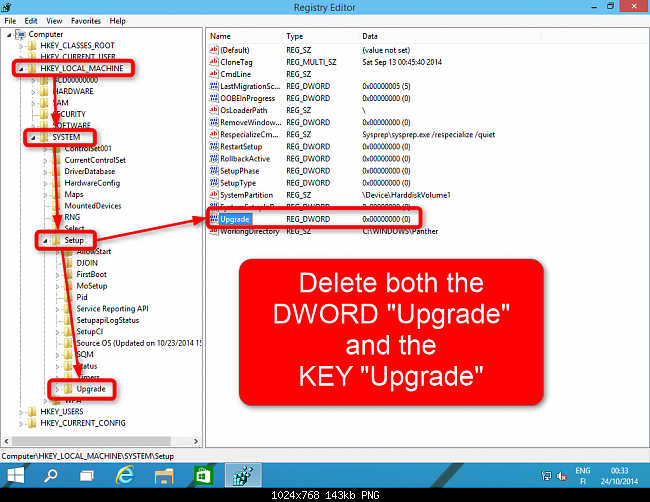
Next up make sure the following values are set to 7
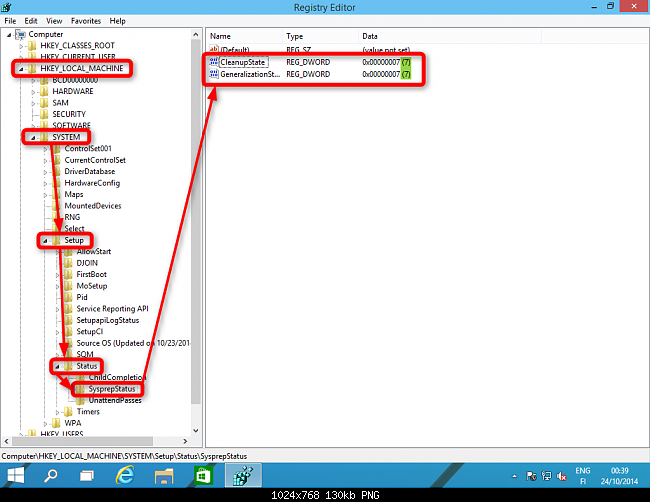
Close the Registry Editor. Open Command Prompt, type slmgr /dli and hit Enter to open Software License Manager. Close it as soon as it opens, close Command Prompt.
I don’t know if the last step is necessary, though.
Good luck.
-
RE: Multicast not startingposted in FOG Problems
@gerald.stachl First thing to try is turn off the firewall on the FOG server, next up would be to check your network infrastructure with the data on the wiki. (I don’t know a ton about that, personally)
-
RE: Multicast not startingposted in FOG Problems
What do you mean boots into imaging but never starts multicast?
Where exactly does it go wrong? Before or after partclone? Any pictures you could take?
-
RE: image size on server is 0posted in FOG Problems
@saif Looks like you have remembered your login credentials for your FOG WebGui in your browser.
Your browser will have filled in the Storage Node credentials with the Webgui login data, overriding the FTP data, so you should correct that for starters. It might have done the same for your FTP settings at the configuration page.
I recommend disabling password remembering for FOG Webgui
-
RE: Windows Fails to Installposted in Windows Problems
@zpoling You can sysprep, just with the unattend file removed.
-
RE: Windows Fails to Installposted in Windows Problems
@zpoling For a test, you could try to remove the file before sysprep and capture and see if that resolves the problem.
-
RE: Fatal Error: Could not locate file (/bin/fog.download) Args Passed:posted in FOG Problems
@GoodGuyQ Try updating to the latest release and see if that helps, I seem to recall this happening around the revision you’re on.
-
RE: Windows Fails to Installposted in Windows Problems
@zpoling That makes a driver issue unlikely, so most likely it’s an issue with an unattend.xml file, at least in my experience.
-
RE: Windows Fails to Installposted in Windows Problems
Do you use the generalize switch when you sysprep?
Regardless, I usually see this with unattend files on certain hardware, not sure why it happens though.
-
RE: Yet another iPXE question rev 7581posted in FOG Problems
@GoodGuyQ My guess is you’re entering the wrong user/password. You can add a new user in the webgui to test that out.
Here is my quick image item for reference
set username foglogin
set password foglogin
params
param mac0 ${net0/mac}
param arch ${arch}
param username ${username}
param password ${password}
param qihost 1
isset ${net1/mac} && param mac1 ${net1/mac} || goto bootme
isset ${net2/mac} && param mac2 ${net2/mac} || goto bootme
With foglogin being a valid username and password
-
RE: Yet another iPXE question rev 7581posted in FOG Problems
To disable the login prompt try the following:
Go to iPXE Menu Configuration
Expand fog.quickimage
Add
set username foglogin (replace these with your username and password obviously)
set password fogloginand change
param username
param passwordto
param username ${username}
param password ${password} -
RE: FOG server destroyedposted in FOG Problems
FOG works perfectly fine without Active Directory, it’s how we use it here all the time.
-
RE: FOG on Ubuntu 16.04 (php7)?posted in Linux Problems
@Blacknutso The /lib folder is relative to the where you downloaded FOG, not in the root location.
-
RE: Having Issues Deploying my first image.posted in FOG Problems
@phil_guy Mbr error1 sounds like a corrupted MBR, can you check the original computer you got the image from if it works properly?
Also, double and triple check the boot order in BIOS settings.
edit: Also, do you happen to have multiple disks in this computer??
-
RE: Having Issues Deploying my first image.posted in FOG Problems
It kind of looks like you’re trying to deploy an MBR system to an EFI system?
-
RE: Mystery file C:\Program?posted in Windows Problems
@Wayne-Workman I think it is FOG Service related since googling the content of the file brought me to the following thread: