@Tom-Elliott awesome, thank you!
P
Posts
-
cannot register host since updateposted in FOG Problems
Since the last FOG update, every time I try to register a new host via the “Full host registration and inventory” method, it prints:
Attempting to register host…invalid product key supplied.
I’ve tried both physical hardware that worked fine with previous versions, as well as virtual machines in proxmox, all fail with the same error.
Registering manually via the web interface works fine.
There’s also no product key entered during registration, I just put in Name, Image, Location and deploy now.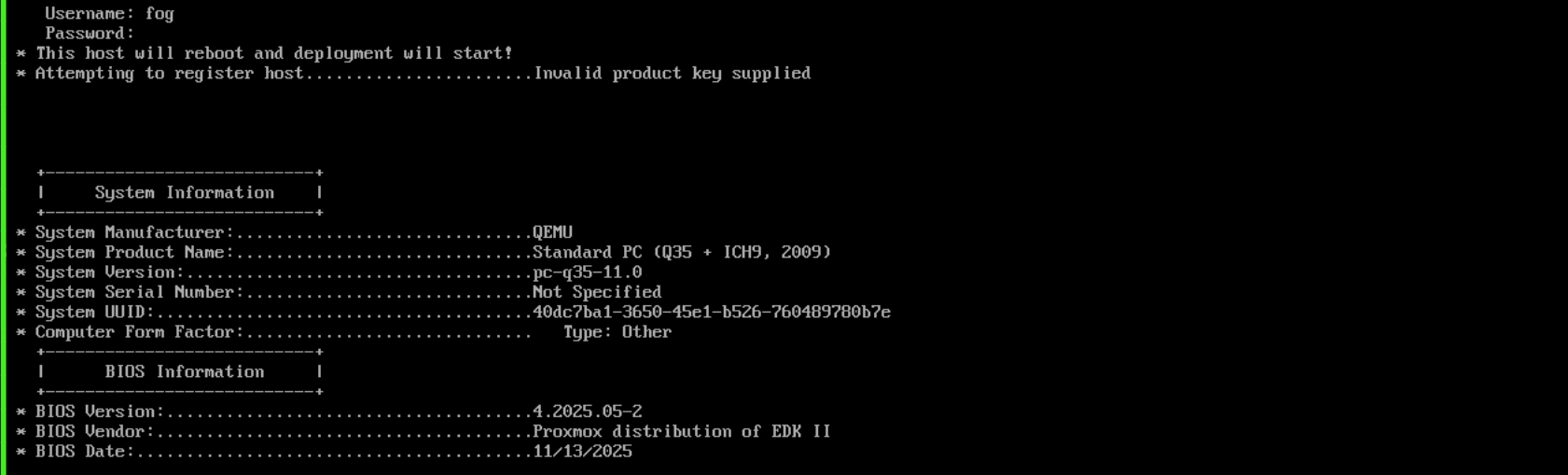
-
RE: linux client on runitposted in Linux Problems
seems to work when copying the directory from another host over to /opt/fog-service and creating a runit file /etc/sv/fog-service/run with content
#!/bin/sh exec 2>&1 echo "Starting FOG Client..." exec mono-service /opt/fog-client/FOGService.exe -d /opt/fog-service -l /opt/fog-service/service.lock -
linux client on runitposted in Linux Problems
the client should be compatible with distros not using systemd or initd according to the FOG Client installation page on the docs, but the installer fails during “installing files”.

There is no directory /opt/fog-service afterwards and there is also no log file in /tmp.
Installer is run as root via mono version 6.14 on void linux. help would be much appreciated. -
RE: Igel M350C - unable to use integrated mmc after recent FOG Updateposted in Hardware Compatibility
@rodluz I know you were talking to the other person, but if you like you can send me the kernels for testing.
-
RE: Issue when I tried to make Windows 11 gold imageposted in Windows Problems
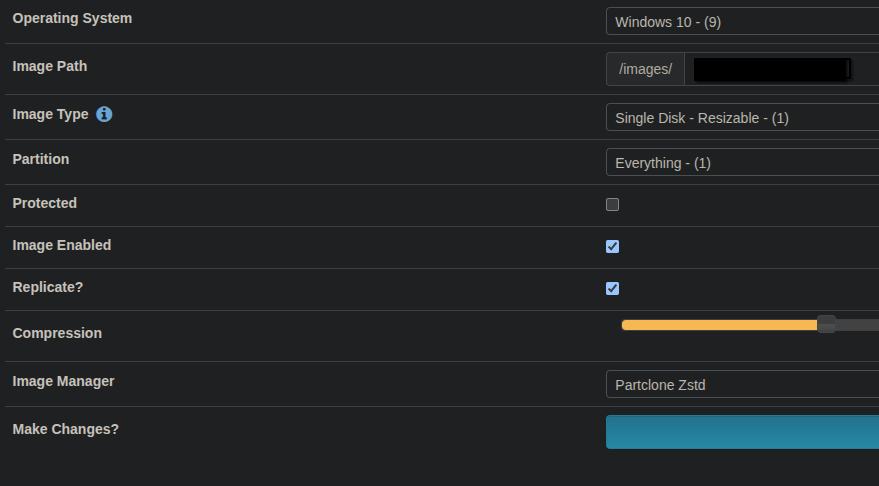
we use these image settings to capture and deploy windows 11 images to hundreds of UEFI computers in our corporate environment and generally have no issues.
I’d recommend you to create a new windows 11 installation for testing to see if everything works fine then.
Also, create the legacy windows 10 image on legacy (non-uefi) hardware and create the UEFI windows 11 image on uefi hardware to avoid compatibility issues.
Should work without issue. -
RE: Igel M350C - unable to use integrated mmc after recent FOG Updateposted in Hardware Compatibility
@JJ-Fullmer didn’t think of that to be honest. neat functionality though.
The computers in question are thinclients made by IGEL with model name M350C. I don’t have any spec sheet at hand, and this is all the information I can get from lshw:
*-mmc0
       description: MMC Host
       physical id: 1
       logical name: mmc0
     *-device
          description: SD/MMC Device
          product: MB2908
          vendor: Unknown (112)
          physical id: 1
          bus info: mmc@0:0001
          date: 12/2021
          serial: 786513286
          capabilities: mmc
        *-interface:0
             physical id: 1
             logical name: /dev/mmcblk0rpmb
        *-interface:1
             physical id: 2
             logical name: /dev/mmcblk0
             size: 7818182656
             capabilities: gpt-1.00 partitioned partitioned:gpt
             configuration: guid=1a95b8bc-00fe-4914-b3e5-fbfeadcec3f3 logicalsectorsize=512 sectorsize=512
           *-volume:0 UNCLAIMED
                description: Windows FAT volume
                vendor: mkfs.fat
                physical id: 1
                version: FAT32
                serial: 2897-15bc
                size: 510MiB
                capacity: 511MiB
                capabilities: boot fat initialized
                configuration: FATs=2 filesystem=fat
           *-volume:1
                description: EFI partition
                physical id: 2
                logical name: /dev/mmcblk0p2
                logical name: /
                logical name: /boot/grub2/i386-pc
                logical name: /home
                logical name: /boot/grub2/x86_64-efi
                logical name: /root
                logical name: /srv
                logical name: /opt
                logical name: /usr/local
                logical name: /var
                serial: 604ab399-44a4-4424-b2a1-6c00b24e85fe
                capacity: 6942MiB
                configuration: mount.fstype=btrfs mount.options=rw,relatime,ssd,discard=async,space_cache=v2,subvolid=257,subvol=/@/var state=mounted
here’s the sata controller:
  *-sata
       description: SATA controller
       product: FCH SATA Controller [AHCI mode]
       vendor: Advanced Micro Devices, Inc. [AMD]
       physical id: 0
       bus info: pci@0000:03:00.0
       version: 61
       width: 32 bits
       clock: 33MHz
       capabilities: sata pm pciexpress msi ahci_1.0 bus_master cap_list
       configuration: driver=ahci latency=0
       resources: irq:37 memory:c0200000-c02007ff
some more info from /sys/block/mmcblk0 :
cat /sys/block/mmcblk0/device/manfid
0x000070

cat /sys/block/mmcblk0/device/oemid
0x0100
dmesg logs :
 dmesg | grep -i mmc
[    2.402874] [     T43] mmc0: SDHCI controller on ACPI [AMDI0040:00] using ADMA
[    2.486871] [     T64] mmc0: new HS400 MMC card at address 0001
[    2.525628] [    T360] mmcblk0: mmc0:0001 MB2908 7.28 GiB
[    2.538622] [    T360]  mmcblk0: p1 p2
[    2.540006] [    T360] mmcblk0boot0: mmc0:0001 MB2908 4.00 MiB
[    2.541111] [    T360] mmcblk0boot1: mmc0:0001 MB2908 4.00 MiB
[    2.542009] [    T360] mmcblk0rpmb: mmc0:0001 MB2908 4.00 MiB, chardev (240:0)
[    7.779557] [    T534] BTRFS: device fsid 05497210-4970-4c6e-8f81-0e94b0309f1d devid 1 transid 224 /dev/mmcblk0p2 (179:2) scanned by mount (534)
[    7.780300] [    T534] BTRFS info (device mmcblk0p2): first mount of filesystem 05497210-4970-4c6e-8f81-0e94b0309f1d
[    7.780325] [    T534] BTRFS info (device mmcblk0p2): using crc32c (crc32c-x86) checksum algorithm
[    7.780334] [    T534] BTRFS info (device mmcblk0p2): using free-space-tree
info from mmc-utils :
mmc extcsd read /dev/mmcblk0
=============================================
  Extended CSD rev 1.8 (MMC 5.1)
=============================================

Card Supported Command sets [S_CMD_SET: 0x01]
HPI Features [HPI_FEATURE: 0x01]: implementation based on CMD13
Background operations support [BKOPS_SUPPORT: 0x01]
Max Packet Read Cmd [MAX_PACKED_READS: 0x3c]
Max Packet Write Cmd [MAX_PACKED_WRITES: 0x20]
Data TAG support [DATA_TAG_SUPPORT: 0x01]
Data TAG Unit Size [TAG_UNIT_SIZE: 0x03]
Tag Resources Size [TAG_RES_SIZE: 0x00]
Context Management Capabilities [CONTEXT_CAPABILITIES: 0x05]
Large Unit Size [LARGE_UNIT_SIZE_M1: 0x0f]
Extended partition attribute support [EXT_SUPPORT: 0x03]
Generic CMD6 Timer [GENERIC_CMD6_TIME: 0x32]
Power off notification [POWER_OFF_LONG_TIME: 0xff]
Cache Size [CACHE_SIZE] is 128 KiB
Background operations status [BKOPS_STATUS: 0x00]
1st Initialisation Time after programmed sector [INI_TIMEOUT_AP: 0x64]
Power class for 52MHz, DDR at 3.6V [PWR_CL_DDR_52_360: 0x00]
Power class for 52MHz, DDR at 1.95V [PWR_CL_DDR_52_195: 0x00]
Power class for 200MHz at 3.6V [PWR_CL_200_360: 0x00]
Power class for 200MHz, at 1.95V [PWR_CL_200_195: 0x00]
Minimum Performance for 8bit at 52MHz in DDR mode:
 [MIN_PERF_DDR_W_8_52: 0x00]
 [MIN_PERF_DDR_R_8_52: 0x00]
TRIM Multiplier [TRIM_MULT: 0x11]
Secure Feature support [SEC_FEATURE_SUPPORT: 0x55]
Boot Information [BOOT_INFO: 0x07]
 Device supports alternative boot method
 Device supports dual data rate during boot
 Device supports high speed timing during boot
Boot partition size [BOOT_SIZE_MULTI: 0x20]
Access size [ACC_SIZE: 0x08]
High-capacity erase unit size [HC_ERASE_GRP_SIZE: 0x01]
 i.e. 512 KiB
High-capacity erase timeout [ERASE_TIMEOUT_MULT: 0x11]
Reliable write sector count [REL_WR_SEC_C: 0x01]
High-capacity W protect group size [HC_WP_GRP_SIZE: 0x10]
 i.e. 8192 KiB
Sleep current (VCC) [S_C_VCC: 0x08]
Sleep current (VCCQ) [S_C_VCCQ: 0x08]
Sleep/awake timeout [S_A_TIMEOUT: 0x15]
Sector Count [SEC_COUNT: 0x00e90000]
 Device is block-addressed
Minimum Write Performance for 8bit:
 [MIN_PERF_W_8_52: 0x08]
 [MIN_PERF_R_8_52: 0x08]
 [MIN_PERF_W_8_26_4_52: 0x08]
 [MIN_PERF_R_8_26_4_52: 0x08]
Minimum Write Performance for 4bit:
 [MIN_PERF_W_4_26: 0x08]
 [MIN_PERF_R_4_26: 0x08]
Power classes registers:
 [PWR_CL_26_360: 0x00]
 [PWR_CL_52_360: 0x00]
 [PWR_CL_26_195: 0x00]
 [PWR_CL_52_195: 0x00]
Partition switching timing [PARTITION_SWITCH_TIME: 0xff]
Out-of-interrupt busy timing [OUT_OF_INTERRUPT_TIME: 0xff]
I/O Driver Strength [DRIVER_STRENGTH: 0x1f]
Card Type [CARD_TYPE: 0x57]
 HS400 Dual Data Rate eMMC @200MHz 1.8VI/O
 HS200 Single Data Rate eMMC @200MHz 1.8VI/O
 HS Dual Data Rate eMMC @52MHz 1.8V or 3VI/O
 HS eMMC @52MHz - at rated device voltage(s)
 HS eMMC @26MHz - at rated device voltage(s)
CSD structure version [CSD_STRUCTURE: 0x02]
Command set [CMD_SET: 0x00]
Command set revision [CMD_SET_REV: 0x00]
Power class [POWER_CLASS: 0x00]
High-speed interface timing [HS_TIMING: 0x13]
Enhanced Strobe mode [STROBE_SUPPORT: 0x01]
Erased memory content [ERASED_MEM_CONT: 0x00]
Boot configuration bytes [PARTITION_CONFIG: 0x00]
 Not boot enable
 No access to boot partition
Boot config protection [BOOT_CONFIG_PROT: 0x00]
Boot bus Conditions [BOOT_BUS_CONDITIONS: 0x00]
High-density erase group definition [ERASE_GROUP_DEF: 0x01]
Boot write protection status registers [BOOT_WP_STATUS]: 0x00
Boot Area Write protection [BOOT_WP]: 0x00
 Power ro locking: possible
 Permanent ro locking: possible
 partition 0 ro lock status: not locked
 partition 1 ro lock status: not locked
User area write protection register [USER_WP]: 0x00
FW configuration [FW_CONFIG]: 0x00
RPMB Size [RPMB_SIZE_MULT]: 0x20
Write reliability setting register [WR_REL_SET]: 0x00
 user area: existing data is at risk if a power failure occurs during a write operation
 partition 1: existing data is at risk if a power failure occurs during a write operation
 partition 2: existing data is at risk if a power failure occurs during a write operation
 partition 3: existing data is at risk if a power failure occurs during a write operation
 partition 4: existing data is at risk if a power failure occurs during a write operation
Write reliability parameter register [WR_REL_PARAM]: 0x15
 Device supports writing EXT_CSD_WR_REL_SET
 Device supports the enhanced def. of reliable write
Enable background operations handshake [BKOPS_EN]: 0x00
H/W reset function [RST_N_FUNCTION]: 0x00
HPI management [HPI_MGMT]: 0x01
Partitioning Support [PARTITIONING_SUPPORT]: 0x07
 Device support partitioning feature
 Device can have enhanced tech.
Max Enhanced Area Size [MAX_ENH_SIZE_MULT]: 0x0001d2
 i.e. 3817472 KiB
Partitions attribute [PARTITIONS_ATTRIBUTE]: 0x00
Partitioning Setting [PARTITION_SETTING_COMPLETED]: 0x00
 Device partition setting NOT complete
General Purpose Partition Size
 [GP_SIZE_MULT_4]: 0x000000
 [GP_SIZE_MULT_3]: 0x000000
 [GP_SIZE_MULT_2]: 0x000000
 [GP_SIZE_MULT_1]: 0x000000
Enhanced User Data Area Size [ENH_SIZE_MULT]: 0x000000
 i.e. 0 KiB
Enhanced User Data Start Address [ENH_START_ADDR]: 0x00000000
 i.e. 0 bytes offset
Bad Block Management mode [SEC_BAD_BLK_MGMNT]: 0x00
Periodic Wake-up [PERIODIC_WAKEUP]: 0x00
Program CID/CSD in DDR mode support [PROGRAM_CID_CSD_DDR_SUPPORT]: 0x01
Vendor Specific Fields [VENDOR_SPECIFIC_FIELD[127]]: 0x00
Vendor Specific Fields [VENDOR_SPECIFIC_FIELD[126]]: 0x00
Vendor Specific Fields [VENDOR_SPECIFIC_FIELD[125]]: 0x20
Vendor Specific Fields [VENDOR_SPECIFIC_FIELD[124]]: 0x00
Vendor Specific Fields [VENDOR_SPECIFIC_FIELD[123]]: 0x00
Vendor Specific Fields [VENDOR_SPECIFIC_FIELD[122]]: 0x20
Vendor Specific Fields [VENDOR_SPECIFIC_FIELD[121]]: 0x00
Vendor Specific Fields [VENDOR_SPECIFIC_FIELD[120]]: 0x00
Vendor Specific Fields [VENDOR_SPECIFIC_FIELD[119]]: 0x00
Vendor Specific Fields [VENDOR_SPECIFIC_FIELD[118]]: 0x00
Vendor Specific Fields [VENDOR_SPECIFIC_FIELD[117]]: 0x00
Vendor Specific Fields [VENDOR_SPECIFIC_FIELD[116]]: 0x00
Vendor Specific Fields [VENDOR_SPECIFIC_FIELD[115]]: 0x00
Vendor Specific Fields [VENDOR_SPECIFIC_FIELD[114]]: 0x00
Vendor Specific Fields [VENDOR_SPECIFIC_FIELD[113]]: 0x00
Vendor Specific Fields [VENDOR_SPECIFIC_FIELD[112]]: 0x00
Vendor Specific Fields [VENDOR_SPECIFIC_FIELD[111]]: 0x00
Vendor Specific Fields [VENDOR_SPECIFIC_FIELD[110]]: 0x00
Vendor Specific Fields [VENDOR_SPECIFIC_FIELD[109]]: 0x00
Vendor Specific Fields [VENDOR_SPECIFIC_FIELD[108]]: 0x00
Vendor Specific Fields [VENDOR_SPECIFIC_FIELD[107]]: 0x00
Vendor Specific Fields [VENDOR_SPECIFIC_FIELD[106]]: 0x00
Vendor Specific Fields [VENDOR_SPECIFIC_FIELD[105]]: 0x00
Vendor Specific Fields [VENDOR_SPECIFIC_FIELD[104]]: 0x00
Vendor Specific Fields [VENDOR_SPECIFIC_FIELD[103]]: 0x00
Vendor Specific Fields [VENDOR_SPECIFIC_FIELD[102]]: 0x00
Vendor Specific Fields [VENDOR_SPECIFIC_FIELD[101]]: 0x00
Vendor Specific Fields [VENDOR_SPECIFIC_FIELD[100]]: 0x00
Vendor Specific Fields [VENDOR_SPECIFIC_FIELD[99]]: 0x00
Vendor Specific Fields [VENDOR_SPECIFIC_FIELD[98]]: 0x00
Vendor Specific Fields [VENDOR_SPECIFIC_FIELD[97]]: 0x00
Vendor Specific Fields [VENDOR_SPECIFIC_FIELD[96]]: 0x00
Vendor Specific Fields [VENDOR_SPECIFIC_FIELD[95]]: 0x00
Vendor Specific Fields [VENDOR_SPECIFIC_FIELD[94]]: 0x00
Vendor Specific Fields [VENDOR_SPECIFIC_FIELD[93]]: 0x00
Vendor Specific Fields [VENDOR_SPECIFIC_FIELD[92]]: 0x00
Vendor Specific Fields [VENDOR_SPECIFIC_FIELD[91]]: 0x00
Vendor Specific Fields [VENDOR_SPECIFIC_FIELD[90]]: 0x00
Vendor Specific Fields [VENDOR_SPECIFIC_FIELD[89]]: 0x00
Vendor Specific Fields [VENDOR_SPECIFIC_FIELD[88]]: 0x00
Vendor Specific Fields [VENDOR_SPECIFIC_FIELD[87]]: 0x00
Vendor Specific Fields [VENDOR_SPECIFIC_FIELD[86]]: 0x00
Vendor Specific Fields [VENDOR_SPECIFIC_FIELD[85]]: 0x00
Vendor Specific Fields [VENDOR_SPECIFIC_FIELD[84]]: 0x00
Vendor Specific Fields [VENDOR_SPECIFIC_FIELD[83]]: 0x00
Vendor Specific Fields [VENDOR_SPECIFIC_FIELD[82]]: 0x00
Vendor Specific Fields [VENDOR_SPECIFIC_FIELD[81]]: 0x00
Vendor Specific Fields [VENDOR_SPECIFIC_FIELD[80]]: 0x00
Vendor Specific Fields [VENDOR_SPECIFIC_FIELD[79]]: 0x00
Vendor Specific Fields [VENDOR_SPECIFIC_FIELD[78]]: 0x00
Vendor Specific Fields [VENDOR_SPECIFIC_FIELD[77]]: 0x00
Vendor Specific Fields [VENDOR_SPECIFIC_FIELD[76]]: 0x00
Vendor Specific Fields [VENDOR_SPECIFIC_FIELD[75]]: 0x00
Vendor Specific Fields [VENDOR_SPECIFIC_FIELD[74]]: 0x00
Vendor Specific Fields [VENDOR_SPECIFIC_FIELD[73]]: 0x00
Vendor Specific Fields [VENDOR_SPECIFIC_FIELD[72]]: 0x00
Vendor Specific Fields [VENDOR_SPECIFIC_FIELD[71]]: 0x00
Vendor Specific Fields [VENDOR_SPECIFIC_FIELD[70]]: 0x00
Vendor Specific Fields [VENDOR_SPECIFIC_FIELD[69]]: 0x00
Vendor Specific Fields [VENDOR_SPECIFIC_FIELD[68]]: 0x00
Vendor Specific Fields [VENDOR_SPECIFIC_FIELD[67]]: 0x00
Vendor Specific Fields [VENDOR_SPECIFIC_FIELD[66]]: 0x00
Vendor Specific Fields [VENDOR_SPECIFIC_FIELD[65]]: 0x00
Vendor Specific Fields [VENDOR_SPECIFIC_FIELD[64]]: 0x00
Native sector size [NATIVE_SECTOR_SIZE]: 0x00
Sector size emulation [USE_NATIVE_SECTOR]: 0x00
Sector size [DATA_SECTOR_SIZE]: 0x00
1st initialization after disabling sector size emulation [INI_TIMEOUT_EMU]: 0x00
Class 6 commands control [CLASS_6_CTRL]: 0x00
Number of addressed group to be Released[DYNCAP_NEEDED]: 0x00
Exception events control [EXCEPTION_EVENTS_CTRL]: 0x0000
Exception events status[EXCEPTION_EVENTS_STATUS]: 0x0000
Extended Partitions Attribute [EXT_PARTITIONS_ATTRIBUTE]: 0x0000
Context configuration [CONTEXT_CONF[51]]: 0x00
Context configuration [CONTEXT_CONF[50]]: 0x00
Context configuration [CONTEXT_CONF[49]]: 0x00
Context configuration [CONTEXT_CONF[48]]: 0x00
Context configuration [CONTEXT_CONF[47]]: 0x00
Context configuration [CONTEXT_CONF[46]]: 0x00
Context configuration [CONTEXT_CONF[45]]: 0x00
Context configuration [CONTEXT_CONF[44]]: 0x00
Context configuration [CONTEXT_CONF[43]]: 0x00
Context configuration [CONTEXT_CONF[42]]: 0x00
Context configuration [CONTEXT_CONF[41]]: 0x00
Context configuration [CONTEXT_CONF[40]]: 0x00
Context configuration [CONTEXT_CONF[39]]: 0x00
Context configuration [CONTEXT_CONF[38]]: 0x00
Context configuration [CONTEXT_CONF[37]]: 0x00
Packed command status [PACKED_COMMAND_STATUS]: 0x00
Packed command failure index [PACKED_FAILURE_INDEX]: 0x00
Power Off Notification [POWER_OFF_NOTIFICATION]: 0x01
Control to turn the Cache ON/OFF [CACHE_CTRL]: 0x01
Control to turn the Cache Barrier ON/OFF [BARRIER_CTRL]: 0x00
eMMC Firmware Version: �
eMMC SECURE_WP_SUPPORT: 1
eMMC SECURE_WP_EN_STATUS: 0
eMMC Life Time Estimation A [EXT_CSD_DEVICE_LIFE_TIME_EST_TYP_A]: 0x01
eMMC Life Time Estimation B [EXT_CSD_DEVICE_LIFE_TIME_EST_TYP_B]: 0x01
eMMC Pre EOL information [EXT_CSD_PRE_EOL_INFO]: 0x01
Secure Removal Type [SECURE_REMOVAL_TYPE]: 0x01
 information is configured to be removed by an erase of the physical memory
 Supported Secure Removal Type:
  information removed by an erase of the physical memory
Command Queue Support [CMDQ_SUPPORT]: 0x01
Command Queue Depth [CMDQ_DEPTH]: 16
Command Enabled [CMDQ_MODE_EN]: 0x00
Note: CMDQ_MODE_EN may not indicate the runtime CMDQ ON or OFF.
Please check sysfs node '/sys/devices/.../mmc_host/mmcX/mmcX:XXXX/cmdq_en'
let me know if this helps or if you’d like anything else
-
RE: Igel M350C - unable to use integrated mmc after recent FOG Updateposted in Hardware Compatibility
using different bzImage from 2024 resolved this issue for me.
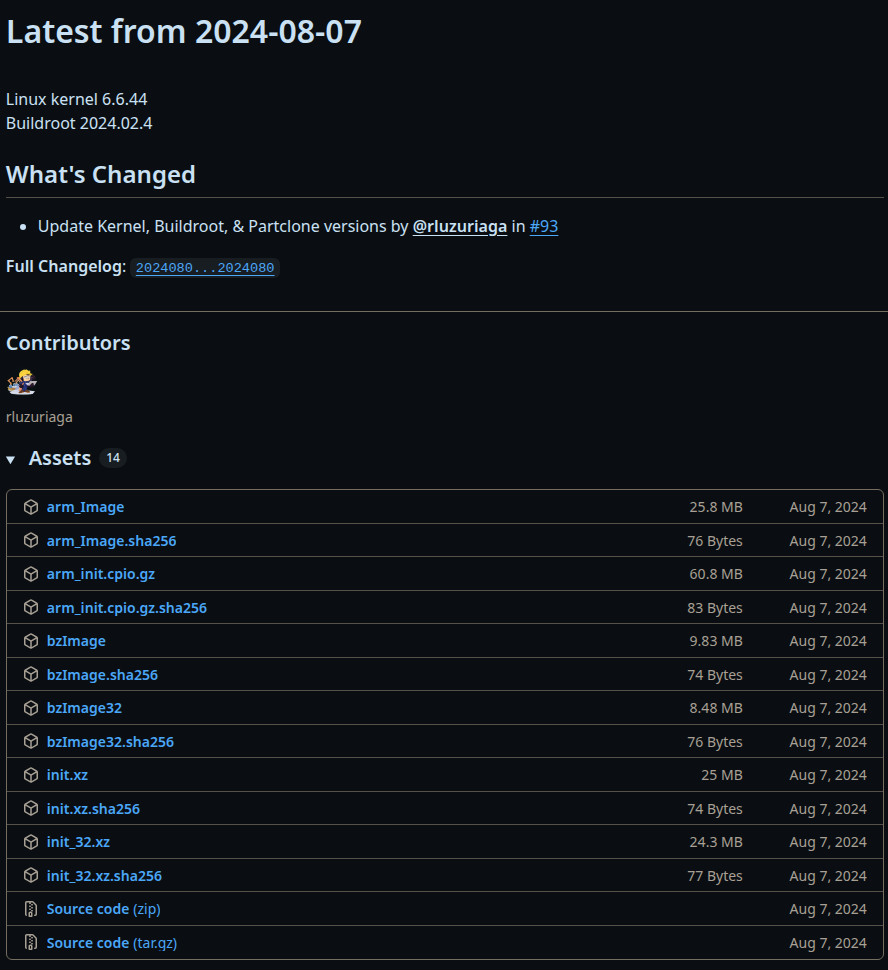
thanks again @RAThomas for the suggestion, this topic can be marked as resolved.
-
RE: New Dell Laptop - LINUX-EFI-INITRD-MEDIA-GUIDposted in FOG Problems
can confirm that up-to-date FOG works fine with this model.
-
RE: Igel M350C - unable to use integrated mmc after recent FOG Updateposted in Hardware Compatibility
@pilipp_edv
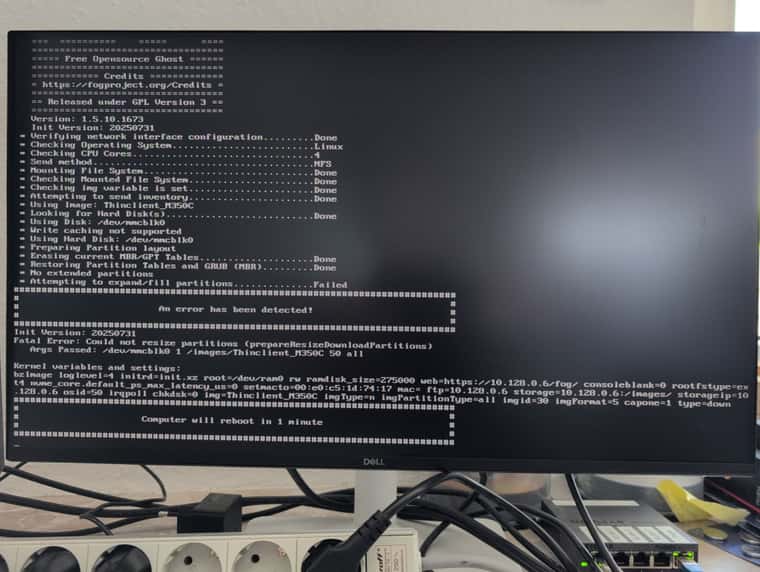
re-ran the current stable installer to get the current bzImage and init.xz again and now this is the error when trying to deploy -
RE: Igel M350C - unable to use integrated mmc after recent FOG Updateposted in Hardware Compatibility
@RAThomas thanks for the hint, switching to bzimage from fog 1.5.9 did not fix this issue however. still fails with the same error.
-
Igel M350C - unable to use integrated mmc after recent FOG Updateposted in Hardware Compatibility
Hi all,
we use FOG to deploy a custom thinclient operating system to hardware made by Igel.
One of the models we use has an integrated sd card reader where the only storage resides.
Before the last FOG update, we did not encounter any issues.
Since updating to 1.5.10.1673 however, we get the following message:mmc0: mmc_select_hs400 failed, error -110 mmc0: error -110 whilst initialising MMC cardfollowed by the “An error has been detected!” - message stating
Init Version: 20250731
Could not determine a suitable disk automatically.
Updating from stable to dev branch did not bump the version number in the fog webinterface and has not resolved this issue.
Any hints on how to resolve this without downgrading? Seems to be an issue with the order in which the linux kernel handles sd cards.
Using the latest init.xz and bzImage from https://github.com/FOGProject/fos/releases did not help either -
RE: realtek RTL8111EPVposted in Hardware Compatibility
After recompiling the ipxe binaries with SSL and testing a few more debugging options, it seems that this nic is just completely broken in this laptop. Will need to wait for lenovo or realtek to update their firmware. recompiling snponly.efi didn’t help either.
could not disconnect Simple Network Protocol Driver: Error 0x7f3e080e not supported by driver "PCI": Error 0x7f2f2083 -
RE: realtek RTL8111EPVposted in Hardware Compatibility
@george1421 hi george, thanks for the reply.
Nothing happens after boot.php is called. Regardless of the used binaries, the process eventually just hangs indefinitely. HTTPS is working correctly server-side and all our existing inventory can use it properly with the default binaries (the ipxe.efi that FOG compiled during the upgrade/installation), however, I need to admit that I did not compile the new binaries from github with explicit HTTPS support. When installing or updating FOG, their script handles that part for you. Will test with HTTPS disabled for the node. If that works, I’ll recompile the binaries. -
realtek RTL8111EPVposted in Hardware Compatibility
Hi,
we’re currently testing FOG with Lenovo Thinkpad L14 Gen5 AMD laptops. Those have RTL8111EPV nics from realtek.
FOG is up to date (version 1.5.10.1655) and works perfectly fine with all other machines in our arsenal.
Attempting to pxe boot, the client gets stuck at “initialising devices” with all .efi files except realtek.efi, where it gets stuck while accessing the boot.php file
I have so far recompiled the ipxe binaries (https://docs.fogproject.org/en/latest/kb/reference/compile_ipxe_binaries/#manual-compilation) with the same result. Compiling realtek.efi with DEBUGGING=realtek gets me this: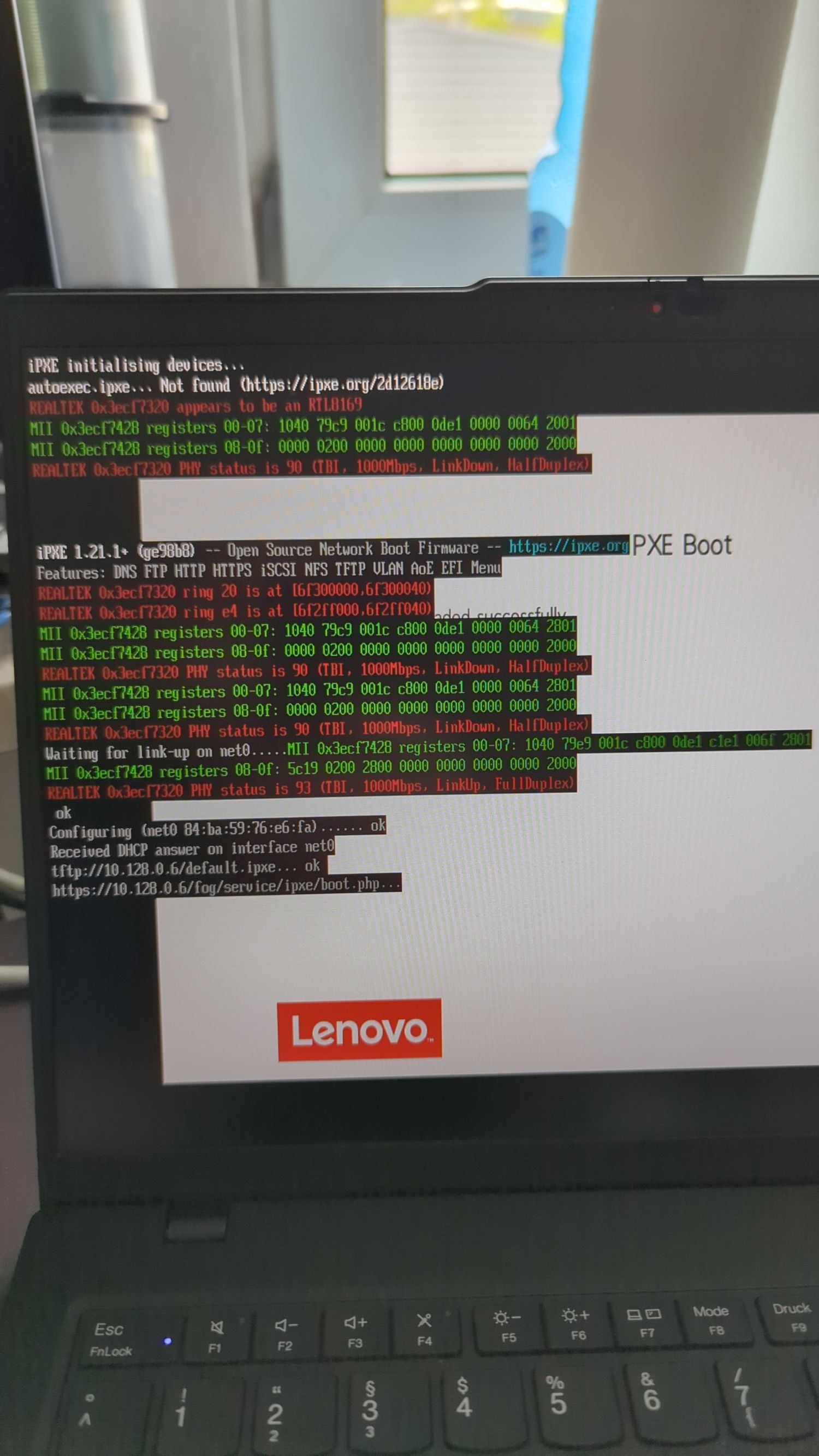 . Any help would be much appreciated and if more information is needed, just ask.
 -
RE: fog update fails from 1.5.10 to 1.5.10.1639posted in FOG Problems
fixed it by installing gcc-aarch64-linux-gnu on ubuntu and running the script again. compilation errors are not logged to the script shown on screen, but to the bin/error_logs/ directory in the extracted archive.
Update now ran without issues. -
fog update fails from 1.5.10 to 1.5.10.1639posted in FOG Problems
trying to update fog from 1.5.10 on ubuntu 22.04 to 1.5.10.1639 after upgrading ubuntu to 24.04.
The fog update fails when compiling the ipxe binaries:* Press [Enter] key when database is updated/installed. * Update fogstorage database password.........................OK * Granting access to fogstorage database user.................Skipped * Setting up storage..........................................OK * Setting up and starting DHCP Server.........................Skipped * Compiling iPXE binaries trusting your SSL certificate.......Failed! !!!!!!!!!!!!!!!!!!!!!!!!!!!!!!!!!!!!!!!!!!!!!!!!!!!!!!!!!!!!!!!!!!! !! The installer was not able to run all the way to the end as !! !! something has caused it to fail. The following few lines are !! !! from the error log file which might help us figure out what's !! !! wrong. Please add this information when reporting an error. !! !! As well you might want to take a look at the full error log !! !! in /root/fogproject/bin/error_logs/fog_error_1.5.10.1639.log !! !!!!!!!!!!!!!!!!!!!!!!!!!!!!!!!!!!!!!!!!!!!!!!!!!!!!!!!!!!!!!!!!!!! 1100K .......... .......... .......... .......... .......... 9.28M 1150K ..... 5.02M=0.3s 2025-03-06 10:49:36 (3.82 MB/s) - ‘/home//fogDBbackups/fog_sql_1.5.10.1639_20250306_104936.sql’ saved [1182811]this is the error log:
/usr/bin/lsb_release
/usr/bin/systemctl
systemd
ln: failed to create symbolic link '/lib/systemd/system/mysql.service': File exists
ln: failed to create symbolic link '/lib/systemd/system/mysqld.service': File exists
ln: failed to create symbolic link '/etc/systemd/system/mysql.service': File exists
ln: failed to create symbolic link '/etc/systemd/system/mysqld.service': File exists
/usr/sbin/iptables
/opt/fog/.fogsettings
Reading package lists...
Building dependency tree...
Reading state information...
curl is already the newest version (8.5.0-2ubuntu10.6).
0 upgraded, 0 newly installed, 0 to remove and 0 not upgraded.
Testing DNS name resolution (neverssl.com)... OK
Testing HTTP connection (http://neverssl.com)... OK
Testing HTTPS connection (https://github.com)... OK
Hit:1 http://de.archive.ubuntu.com/ubuntu noble InRelease
Hit:2 http://security.ubuntu.com/ubuntu noble-security InRelease
Get:3 http://de.archive.ubuntu.com/ubuntu noble-updates InRelease [126 kB]
Hit:4 http://de.archive.ubuntu.com/ubuntu noble-backports InRelease
Fetched 126 kB in 0s (309 kB/s)
Reading package lists...
Adding component(s) 'universe' to all repositories.
Hit:1 http://de.archive.ubuntu.com/ubuntu noble InRelease
Hit:2 http://de.archive.ubuntu.com/ubuntu noble-updates InRelease
Hit:3 http://de.archive.ubuntu.com/ubuntu noble-backports InRelease
Hit:4 http://security.ubuntu.com/ubuntu noble-security InRelease
Reading package lists...
ii  apache2        2.4.58-1ubuntu8.5 amd64        Apache HTTP Server
ii  bc             1.07.1-3ubuntu4 amd64        GNU bc arbitrary precision calculator language
ii  build-essential 12.10ubuntu1 amd64        Informational list of build-essential packages
ii  cpp            4:13.2.0-7ubuntu1 amd64        GNU C preprocessor (cpp)
ii  curl           8.5.0-2ubuntu10.6 amd64        command line tool for transferring data with URL syntax
ii  g++            4:13.2.0-7ubuntu1 amd64        GNU C++ compiler
ii  gawk           1:5.2.1-2build3 amd64        GNU awk, a pattern scanning and processing language
ii  gcc            4:13.2.0-7ubuntu1 amd64        GNU C compiler
ii  genisoimage    9:1.1.11-3.5 amd64        Creates ISO-9660 CD-ROM filesystem images
ii  git            1:2.43.0-1ubuntu7.2 amd64        fast, scalable, distributed revision control system
ii  gzip           1.12-1ubuntu3 amd64        GNU compression utilities
ii  htmldoc        1.9.17-1build3 amd64        HTML processor that generates indexed HTML, PS, and PDF
ii  isolinux       3:6.04~git20190206.bf6db5b4+dfsg1-3ubuntu3 all          collection of bootloaders (ISO 9660 bootloader)
ii  lftp           4.9.2-2ubuntu1 amd64        Sophisticated command-line FTP/HTTP/BitTorrent client programs
ii  libapache2-mod-php 2:8.3+93ubuntu2 all          server-side, HTML-embedded scripting language (Apache 2 module) (default)
ii  libc6:amd64    2.39-0ubuntu8.4 amd64        GNU C Library: Shared libraries
ii  libcurl4t64:amd64 8.5.0-2ubuntu10.6 amd64        easy-to-use client-side URL transfer library (OpenSSL flavour)
ii  liblzma-dev:amd64 5.6.1+really5.4.5-1build0.1 amd64        XZ-format compression library - development files
ii  m4             1.4.19-4build1 amd64        macro processing language
mariadb-client-core
mariadb-client-10.6
mariadb-client
ii  mariadb-client 1:10.11.8-0ubuntu0.24.04.1 amd64        MariaDB database client binaries
ii  mariadb-client 1:10.11.8-0ubuntu0.24.04.1 amd64        MariaDB database client binaries
mariadb-server
mariadb-server-core
mariadb-server-10.5
mariadb-server-10.6
ii  mariadb-server 1:10.11.8-0ubuntu0.24.04.1 amd64        MariaDB database server binaries
ii  mariadb-server 1:10.11.8-0ubuntu0.24.04.1 amd64        MariaDB database server binaries
ii  net-tools      2.10-0.1ubuntu4 amd64        NET-3 networking toolkit
ii  nfs-kernel-server 1:2.6.4-3ubuntu5.1 amd64        support for NFS kernel server
ii  openssh-server 1:9.6p1-3ubuntu13.8 amd64        secure shell (SSH) server, for secure access from remote machines
ii  php            2:8.3+93ubuntu2 all          server-side, HTML-embedded scripting language (default)
ii  php-bcmath     2:8.3+93ubuntu2 all          Bcmath module for PHP [default]
ii  php-cli        2:8.3+93ubuntu2 all          command-line interpreter for the PHP scripting language (default)
ii  php-curl       2:8.3+93ubuntu2 all          CURL module for PHP [default]
ii  php-fpm        2:8.3+93ubuntu2 all          server-side, HTML-embedded scripting language (FPM-CGI binary) (default)
ii  php-gd         2:8.3+93ubuntu2 all          GD module for PHP [default]
php-json-schema
php-json
ii  php-json       2:8.3+93ubuntu2 all          JSON module for PHP [default]
ii  php-ldap       2:8.3+93ubuntu2 all          LDAP module for PHP [default]
ii  php-mbstring   2:8.3+93ubuntu2 all          MBSTRING module for PHP [default]
php-mysql
ii  php-mysql      2:8.3+93ubuntu2 all          MySQL module for PHP [default]
ii  tar            1.35+dfsg-3build1 amd64        GNU version of the tar archiving utility
ii  tftpd-hpa      5.2+20150808-1.4build1 amd64        HPA's tftp server
ii  tftp-hpa       5.2+20150808-1.4build1 amd64        HPA's tftp client
ii  unzip          6.0-28ubuntu4.1 amd64        De-archiver for .zip files
ii  vsftpd         3.0.5-0ubuntu3.1 amd64        lightweight, efficient FTP server written for security
ii  wget           1.21.4-1ubuntu4.1 amd64        retrieves files from the web
ii  zlib1g:amd64   1:1.3.dfsg-3.1ubuntu2.1 amd64        compression library - runtime
Reading package lists...
Building dependency tree...
Reading state information...
apache2 is already the newest version (2.4.58-1ubuntu8.5).
bc is already the newest version (1.07.1-3ubuntu4).
build-essential is already the newest version (12.10ubuntu1).
cpp is already the newest version (4:13.2.0-7ubuntu1).
curl is already the newest version (8.5.0-2ubuntu10.6).
g++ is already the newest version (4:13.2.0-7ubuntu1).
gawk is already the newest version (1:5.2.1-2build3).
gcc is already the newest version (4:13.2.0-7ubuntu1).
genisoimage is already the newest version (9:1.1.11-3.5).
git is already the newest version (1:2.43.0-1ubuntu7.2).
gzip is already the newest version (1.12-1ubuntu3).
htmldoc is already the newest version (1.9.17-1build3).
isolinux is already the newest version (3:6.04~git20190206.bf6db5b4+dfsg1-3ubuntu3).
lftp is already the newest version (4.9.2-2ubuntu1).
libapache2-mod-php is already the newest version (2:8.3+93ubuntu2).
libc6 is already the newest version (2.39-0ubuntu8.4).
libcurl4t64 is already the newest version (8.5.0-2ubuntu10.6).
liblzma-dev is already the newest version (5.6.1+really5.4.5-1build0.1).
m4 is already the newest version (1.4.19-4build1).
mariadb-client is already the newest version (1:10.11.8-0ubuntu0.24.04.1).
mariadb-server is already the newest version (1:10.11.8-0ubuntu0.24.04.1).
net-tools is already the newest version (2.10-0.1ubuntu4).
nfs-kernel-server is already the newest version (1:2.6.4-3ubuntu5.1).
openssh-server is already the newest version (1:9.6p1-3ubuntu13.8).
php is already the newest version (2:8.3+93ubuntu2).
php-bcmath is already the newest version (2:8.3+93ubuntu2).
php-cli is already the newest version (2:8.3+93ubuntu2).
php-curl is already the newest version (2:8.3+93ubuntu2).
php-fpm is already the newest version (2:8.3+93ubuntu2).
php-gd is already the newest version (2:8.3+93ubuntu2).
php-json is already the newest version (2:8.3+93ubuntu2).
php-ldap is already the newest version (2:8.3+93ubuntu2).
php-mbstring is already the newest version (2:8.3+93ubuntu2).
php-mysql is already the newest version (2:8.3+93ubuntu2).
tar is already the newest version (1.35+dfsg-3build1).
tftpd-hpa is already the newest version (5.2+20150808-1.4build1).
tftp-hpa is already the newest version (5.2+20150808-1.4build1).
unzip is already the newest version (6.0-28ubuntu4.1).
vsftpd is already the newest version (3.0.5-0ubuntu3.1).
wget is already the newest version (1.21.4-1ubuntu4.1).
zlib1g is already the newest version (1:1.3.dfsg-3.1ubuntu2.1).
Calculating upgrade...
0 upgraded, 0 newly installed, 0 to remove and 0 not upgraded.
ii  apache2        2.4.58-1ubuntu8.5 amd64        Apache HTTP Server
ii  bc             1.07.1-3ubuntu4 amd64        GNU bc arbitrary precision calculator language
ii  build-essential 12.10ubuntu1 amd64        Informational list of build-essential packages
ii  cpp            4:13.2.0-7ubuntu1 amd64        GNU C preprocessor (cpp)
ii  curl           8.5.0-2ubuntu10.6 amd64        command line tool for transferring data with URL syntax
ii  g++            4:13.2.0-7ubuntu1 amd64        GNU C++ compiler
ii  gawk           1:5.2.1-2build3 amd64        GNU awk, a pattern scanning and processing language
ii  gcc            4:13.2.0-7ubuntu1 amd64        GNU C compiler
ii  genisoimage    9:1.1.11-3.5 amd64        Creates ISO-9660 CD-ROM filesystem images
ii  git            1:2.43.0-1ubuntu7.2 amd64        fast, scalable, distributed revision control system
ii  gzip           1.12-1ubuntu3 amd64        GNU compression utilities
ii  htmldoc        1.9.17-1build3 amd64        HTML processor that generates indexed HTML, PS, and PDF
ii  isolinux       3:6.04~git20190206.bf6db5b4+dfsg1-3ubuntu3 all          collection of bootloaders (ISO 9660 bootloader)
ii  lftp           4.9.2-2ubuntu1 amd64        Sophisticated command-line FTP/HTTP/BitTorrent client programs
ii  libapache2-mod-php 2:8.3+93ubuntu2 all          server-side, HTML-embedded scripting language (Apache 2 module) (default)
ii  libc6:amd64    2.39-0ubuntu8.4 amd64        GNU C Library: Shared libraries
ii  libcurl4t64:amd64 8.5.0-2ubuntu10.6 amd64        easy-to-use client-side URL transfer library (OpenSSL flavour)
ii  liblzma-dev:amd64 5.6.1+really5.4.5-1build0.1 amd64        XZ-format compression library - development files
ii  m4             1.4.19-4build1 amd64        macro processing language
ii  mariadb-client 1:10.11.8-0ubuntu0.24.04.1 amd64        MariaDB database client binaries
ii  mariadb-server 1:10.11.8-0ubuntu0.24.04.1 amd64        MariaDB database server binaries
ii  net-tools      2.10-0.1ubuntu4 amd64        NET-3 networking toolkit
ii  nfs-kernel-server 1:2.6.4-3ubuntu5.1 amd64        support for NFS kernel server
ii  openssh-server 1:9.6p1-3ubuntu13.8 amd64        secure shell (SSH) server, for secure access from remote machines
ii  php            2:8.3+93ubuntu2 all          server-side, HTML-embedded scripting language (default)
ii  php-bcmath     2:8.3+93ubuntu2 all          Bcmath module for PHP [default]
ii  php-cli        2:8.3+93ubuntu2 all          command-line interpreter for the PHP scripting language (default)
ii  php-curl       2:8.3+93ubuntu2 all          CURL module for PHP [default]
ii  php-fpm        2:8.3+93ubuntu2 all          server-side, HTML-embedded scripting language (FPM-CGI binary) (default)
ii  php-gd         2:8.3+93ubuntu2 all          GD module for PHP [default]
ii  php-json       2:8.3+93ubuntu2 all          JSON module for PHP [default]
ii  php-ldap       2:8.3+93ubuntu2 all          LDAP module for PHP [default]
ii  php-mbstring   2:8.3+93ubuntu2 all          MBSTRING module for PHP [default]
ii  php-mysql      2:8.3+93ubuntu2 all          MySQL module for PHP [default]
ii  tar            1.35+dfsg-3build1 amd64        GNU version of the tar archiving utility
ii  tftpd-hpa      5.2+20150808-1.4build1 amd64        HPA's tftp server
ii  tftp-hpa       5.2+20150808-1.4build1 amd64        HPA's tftp client
ii  unzip          6.0-28ubuntu4.1 amd64        De-archiver for .zip files
ii  vsftpd         3.0.5-0ubuntu3.1 amd64        lightweight, efficient FTP server written for security
ii  wget           1.21.4-1ubuntu4.1 amd64        retrieves files from the web
ii  zlib1g:amd64   1:1.3.dfsg-3.1ubuntu2.1 amd64        compression library - runtime
New password: Retype new password: passwd: password updated successfully
init.xz: OK
init_32.xz: OK
bzImage: OK
bzImage32: OK
arm_init.cpio.gz: OK
arm_Image: OK
FOGService.msi: OK
SmartInstaller.exe: OK
'bzImage' -> '/var/www/fog//service/ipxe/bzImage'
'bzImage32' -> '/var/www/fog//service/ipxe/bzImage32'
'init.xz' -> '/var/www/fog//service/ipxe/init.xz'
'init_32.xz' -> '/var/www/fog//service/ipxe/init_32.xz'
'arm_Image' -> '/var/www/fog//service/ipxe/arm_Image'
'arm_init.cpio.gz' -> '/var/www/fog//service/ipxe/arm_init.cpio.gz'
'FOGService.msi' -> '/var/www/fog//client/FOGService.msi'
'SmartInstaller.exe' -> '/var/www/fog//client/SmartInstaller.exe'
mysqlnd
Certificate request self-signature ok
subject=CN = <fog server IP>
Site 001-fog disabled.
To activate the new configuration, you need to run:
  systemctl reload apache2
Enabling site 000-default.
To activate the new configuration, you need to run:
  systemctl reload apache2
renamed '/etc/apache2/sites-available/001-fog.conf' -> '/etc/apache2/sites-available/001-fog.conf.1741254552'
ln: failed to create symbolic link '/var/www/fog/fog': File exists
ERROR: Module php does not exist!
Considering dependency proxy for proxy_fcgi:
Module proxy already enabled
Module proxy_fcgi already enabled
Module setenvif already enabled
Module rewrite already enabled
Considering dependency mime for ssl:
Module mime already enabled
Considering dependency socache_shmcb for ssl:
Module socache_shmcb already enabled
Module ssl already enabled
Enabling site 001-fog.
To activate the new configuration, you need to run:
  systemctl reload apache2
Site 000-default disabled.
To activate the new configuration, you need to run:
  systemctl reload apache2
● apache2.service - The Apache HTTP Server
     Loaded: loaded (/usr/lib/systemd/system/apache2.service; enabled; preset: enabled)
     Active: active (running) since Thu 2025-03-06 10:49:36 CET; 47ms ago
       Docs: https://httpd.apache.org/docs/2.4/
    Process: 42948 ExecStart=/usr/sbin/apachectl start (code=exited, status=0/SUCCESS)
   Main PID: 42952 (apache2)
      Tasks: 6 (limit: 9440)
     Memory: 5.2M (peak: 5.7M)
        CPU: 41ms
     CGroup: /system.slice/apache2.service
             ├─42952 /usr/sbin/apache2 -k start
             ├─42954 /usr/sbin/apache2 -k start
             ├─42955 /usr/sbin/apache2 -k start
             ├─42956 /usr/sbin/apache2 -k start
             ├─42957 /usr/sbin/apache2 -k start
             └─42958 /usr/sbin/apache2 -k start

Mar 06 10:49:35 fog-server systemd[1]: Starting apache2.service - The Apache HTTP Server...
Mar 06 10:49:36 fog-server apachectl[42951]: AH00558: apache2: Could not reliably determine the server's fully qualified domain name, using 127.0.1.1. Set the 'ServerName' directive globally to suppress this message
Mar 06 10:49:36 fog-server systemd[1]: Started apache2.service - The Apache HTTP Server.

● php8.3-fpm.service - The PHP 8.3 FastCGI Process Manager
     Loaded: loaded (/usr/lib/systemd/system/php8.3-fpm.service; enabled; preset: enabled)
     Active: active (running) since Thu 2025-03-06 10:49:36 CET; 14ms ago
       Docs: man:php-fpm8.3(8)
    Process: 42964 ExecStartPost=/usr/lib/php/php-fpm-socket-helper install /run/php/php-fpm.sock /etc/php/8.3/fpm/pool.d/www.conf 83 (code=exited, status=0/SUCCESS)
   Main PID: 42949 (php-fpm8.3)
     Status: "Ready to handle connections"
      Tasks: 6 (limit: 9440)
     Memory: 11.5M (peak: 12.3M)
        CPU: 55ms
     CGroup: /system.slice/php8.3-fpm.service
             ├─42949 "php-fpm: master process (/etc/php/8.3/fpm/php-fpm.conf)"
             ├─42959 "php-fpm: pool www"
             ├─42960 "php-fpm: pool www"
             ├─42961 "php-fpm: pool www"
             ├─42962 "php-fpm: pool www"
             └─42963 "php-fpm: pool www"

Mar 06 10:49:35 fog-server systemd[1]: Starting php8.3-fpm.service - The PHP 8.3 FastCGI Process Manager...
Mar 06 10:49:36 fog-server systemd[1]: Started php8.3-fpm.service - The PHP 8.3 FastCGI Process Manager.
--2025-03-06 10:49:36--  https://<fog server IP>/fog//maintenance/backup_db.php
Connecting to <our proxy>:3128... connected.
WARNING: cannot verify <fog server IP>'s certificate, issued by ‘CN=FOG Server CA’:
  Self-signed certificate encountered.
Proxy request sent, awaiting response... 302 Found
Could not parse Strict-Transport-Security header
Location: ?node=schema [following]
--2025-03-06 10:49:36--  https://<fog server IP>/fog//maintenance/backup_db.php?node=schema
Connecting to <our proxy>:3128... connected.
WARNING: cannot verify <fog server IP>'s certificate, issued by ‘CN=FOG Server CA’:
  Self-signed certificate encountered.
Proxy request sent, awaiting response... 200 OK
Length: unspecified [text/plain]
Saving to: ‘/home//fogDBbackups/fog_sql_1.5.10.1639_20250306_104936.sql’

     0K .......... .......... .......... .......... .......... 1.10M
    50K .......... .......... .......... .......... .......... 1.52M
   100K .......... .......... .......... .......... .......... 2.24M
   150K .......... .......... .......... .......... .......... 3.62M
   200K .......... .......... .......... .......... .......... 4.79M
   250K .......... .......... .......... .......... .......... 4.80M
   300K .......... .......... .......... .......... .......... 5.05M
   350K .......... .......... .......... .......... .......... 3.47M
   400K .......... .......... .......... .......... .......... 4.36M
   450K .......... .......... .......... .......... .......... 4.83M
   500K .......... .......... .......... .......... .......... 10.2M
   550K .......... .......... .......... .......... .......... 3.73M
   600K .......... .......... .......... .......... .......... 5.34M
   650K .......... .......... .......... .......... .......... 4.09M
   700K .......... .......... .......... .......... .......... 5.02M
   750K .......... .......... .......... .......... .......... 5.06M
   800K .......... .......... .......... .......... .......... 5.04M
   850K .......... .......... .......... .......... .......... 5.61M
   900K .......... .......... .......... .......... .......... 5.29M
   950K .......... .......... .......... .......... .......... 6.36M
  1000K .......... .......... .......... .......... .......... 4.59M
  1050K .......... .......... .......... .......... .......... 6.17M
  1100K .......... .......... .......... .......... .......... 9.28M
  1150K .....                                                  5.02M=0.3s

2025-03-06 10:49:36 (3.82 MB/s) - ‘/home//fogDBbackups/fog_sql_1.5.10.1639_20250306_104936.sql’ saved [1182811]
fog web interface reports version 1.5.10.1639 now.
Server has 4 Cores and 8GB of RAM. Disk space is over 300GB free.After the first attempt to update failed, I restored the database from backups and tried again with the same result.
-
RE: lightdm user detected, wont change hostnameposted in Linux Problems
@AUTH-IT-Center the hostname changer is enabled, yes. The hosts are created via full registration and inventory. Using the group-based workaround provided by @Tom-Elliott works so far.
I think there are two problems here, the fog client detects the lightdm linux user and stops and the settings don’t get applied to clients from FOG Configuration -> FOG Settings -> Active Directory defaults.
Note that we don’t join the clients to our domain, we only change their hostname.
-
RE: lightdm user detected, wont change hostnameposted in Linux Problems
@Tom-Elliott but why is it not enforced despite that setting being enabled?