• Recent
    • Unsolved
    • Tags
    • Popular
    • Users
    • Groups
    • Search
    • Register
    • Login
    1. Home
    2. Matthiman
    3. Posts
    M
    • Profile
    • Following 0
    • Followers 0
    • Topics 1
    • Posts 5
    • Groups 0

    Posts

    Recent Best Controversial
    • RE: Regenerate certificate on each installation.

      And I can’t add any hosts—whether via the web interface or by booting over the network—; ultimately, the new host doesn’t appear in the database…

      Failed to query: Error: SQLSTATE[22007]: Invalid datetime format: 1366 Incorrect integer value: '' for column `fog`.`moduleStatusByHost`.`msHostID` at row 1 Error Message: Error Code: "22007", Error Message: ["22007",1366,"Incorrect integer value: '' for column `fog`.`moduleStatusByHost`.`msHostID` at row 1"], Debug: SQL: [629] INSERT INTO `moduleStatusByHost` (`msHostID`,`msModuleID`,`msState`) VALUES (:hostID_0,:moduleID_0,:state_0),(:hostID_1,:moduleID_1,:state_1),(:hostID_2,:moduleID_2,:state_2),(:hostID_3,:moduleID_3,:state_3),(:hostID_4,:moduleID_4,:state_4),(:hostID_5,:moduleID_5,:state_5),(:hostID_6,:moduleID_6,:state_6),(:hostID_7,:moduleID_7,:state_7),(:hostID_8,:moduleID_8,:state_8),(:hostID_9,:moduleID_9,:state_9),(:hostID_10,:moduleID_10,:state_10),(:hostID_11,:moduleID_11,:state_11),(:hostID_12,:moduleID_12,:state_12) ON DUPLICATE KEY UPDATE `msHostID`=VALUES(`msHostID`),`msModuleID`=VALUES(`msModuleID`),`msState`=VALUES(`msState`)
      
      posted in FOG Problems
      M
      Matthiman
    • Regenerate certificate on each installation.

      Hello, I use the dev-branch version and for about 10 days when I launch the installer each time in the middle of the installation there is this message and my client workstations are no longer authenticated…

      This run will mint a new FOG PKI CA. A CA's name constraints are
        fixed at the moment it's issued -- widening them later means
        re-issuing it (rm -rf the CA directory, then re-run).
        Extra hostnames for this server, space-separated (3 min, blank = none):
        Internal domains, space-separated, e.g. example.local (3 min, blank = none):
      
      posted in FOG Problems
      M
      Matthiman
    • RE: Version 1.6.0-beta.3187 ipxe 2.0.0.x problems

      @Tom-Elliott said in Version 1.6.0-beta.3187 ipxe 2.0.0.x problems:

      secureboot/snponly.efi

      Nice work! I had exactly the same problem (see the other thread), and adding “secureboot” to the boot file fixed the issue (even though Secure Boot is actually disabled in the clients’ BIOS)

      posted in Bug Reports
      M
      Matthiman
    • RE: Latest dev version - You're running the latest dev-branch version: 1.5.10.2191 odd ram-0 error [resolved now with 1.5.10.2218]

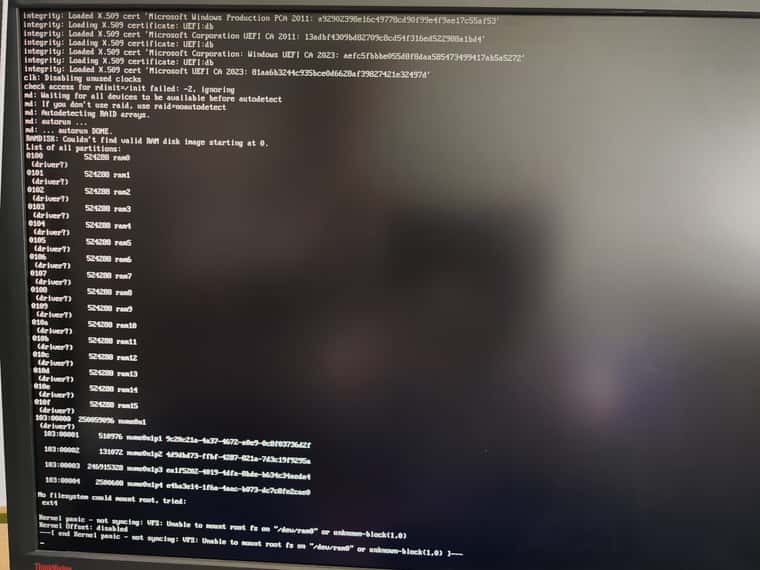
      Hello, I’m taking the liberty of jumping into this conversation because I’ve been having a similar issue for the past few days: everything was working fine a month ago, but I’ve updated FOG several times since then (currently on 2218) and I’ve realized I can no longer deploy images; I get an error message:

      No filesystem could mount root, tried ext4
      Kernel panic - not syncing: VFS: Unable to mount root fs on "/dev/ram0" or unknown-block(1,0)
      Kernel Offset: disabled
      ---[ end Kernel panic - not syncing: VFS: Unable to mount root fs on "/dev/ram0" or unknown-block(1,0)
      

      I modified the “Kernel Ramdisk Size” value to 512000, tested various EFI/iPXE boot files (snp, snponly, intel), and tried rolling back to the master or stable versions (running “git pull” followed by “./installfog.sh -Y” each time), but I encounter this message in every case.
      I had to restore my Veeam backup (dev-branch version 1894) to get it working again (I didn’t test other intermediate versions).

      WhatsApp.jpeg

      posted in FOG Problems
      M
      Matthiman
    • 1 / 1