• Recent
    • Unsolved
    • Tags
    • Popular
    • Users
    • Groups
    • Search
    • Register
    • Login
    1. Home
    2. jmeyer
    3. Posts
    J
    • Profile
    • Following 0
    • Followers 1
    • Topics 56
    • Posts 286
    • Groups 0

    Posts

    Recent Best Controversial
    • RE: Could not download init.xz

      @garrett-stevenson
      I’m not sure of your question but I have installed fog from zip without internet (I am also behind a firewall) by using the -X (–exitFail Do not exit if item fails").
      Then I downloaded them with other computer and have copied them in the /var/www/html/fog/service/ipxe/ directory with winscp (using home as intermediate directory and then puting back rights and owner)
      Yet I had all packages needed to run fog already installed.

      posted in Linux Problems
      J
      jmeyer
    • RE: BSOD only after PXE

      The problem doesn’t appear with my other FOG server .
      FOG version 1.5.9.37
      Kernel 5.15.19
      Exit type : REFIND_EFI

      posted in Windows Problems
      J
      jmeyer
    • BSOD only after PXE

      Hello,

      FOG 1.6.0-alpha 1182
      Kernel 6.1.22
      Exit type : REFIND_EFI

      After deploying an image that have been sysprep with the two last version of Windows 10 (21H2 and 22H2) and 11 22H2 on Lenovo M75q Gen2 and Lenovo M70q, I have BSOD “DRIVER VERIFIER DMA VIOLATION” if i go through EFI PXE.
      If I disconnect network cable during boot, I don’t have this BSOD.

      I don’t have the problem with Lenovo and HP computer from 2018.

      What PXE could change during Windows boot that can create a BSOD ?

      Thank you.

      posted in Windows Problems
      J
      jmeyer
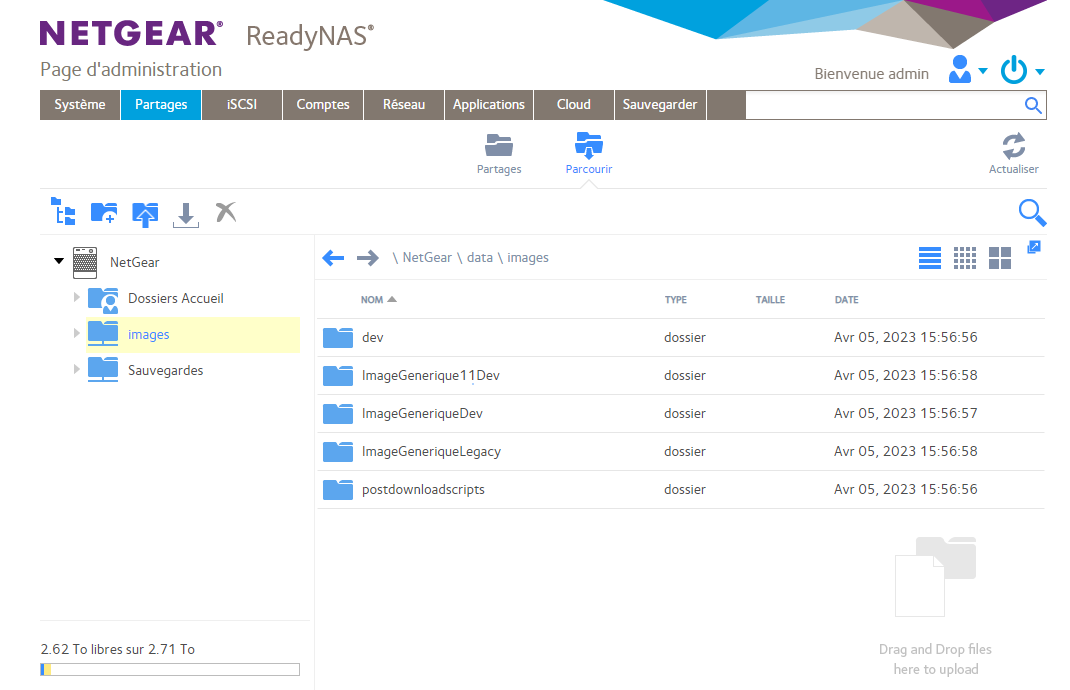
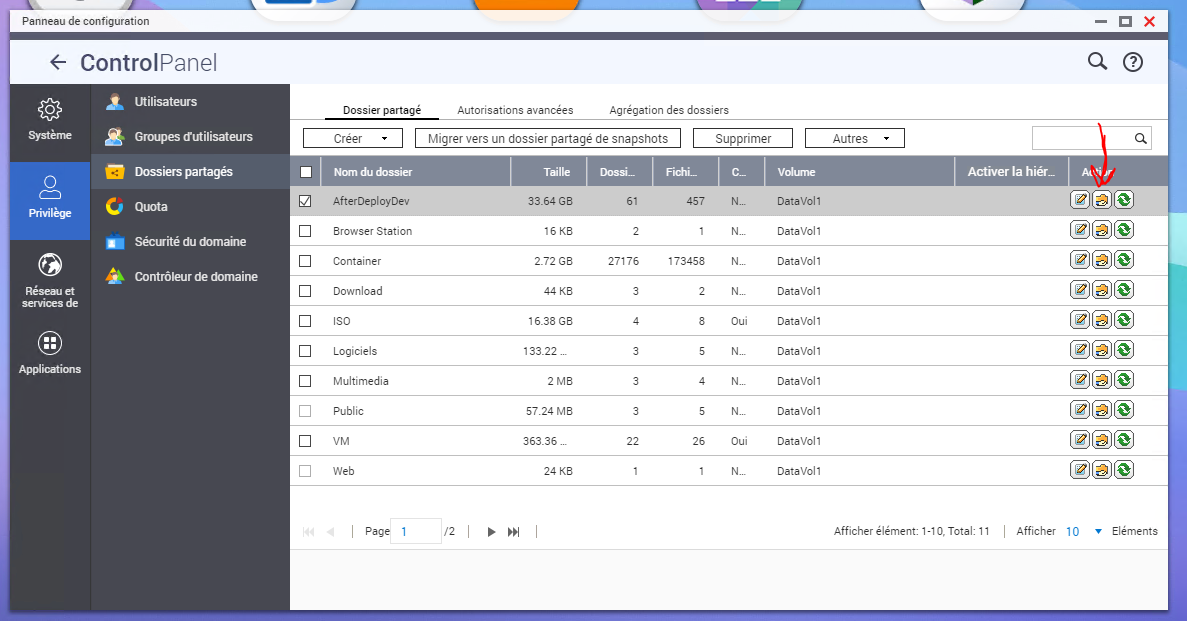
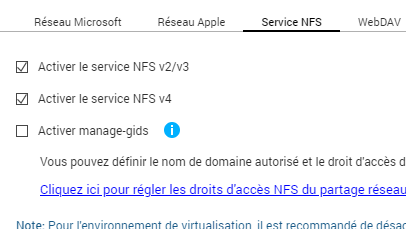
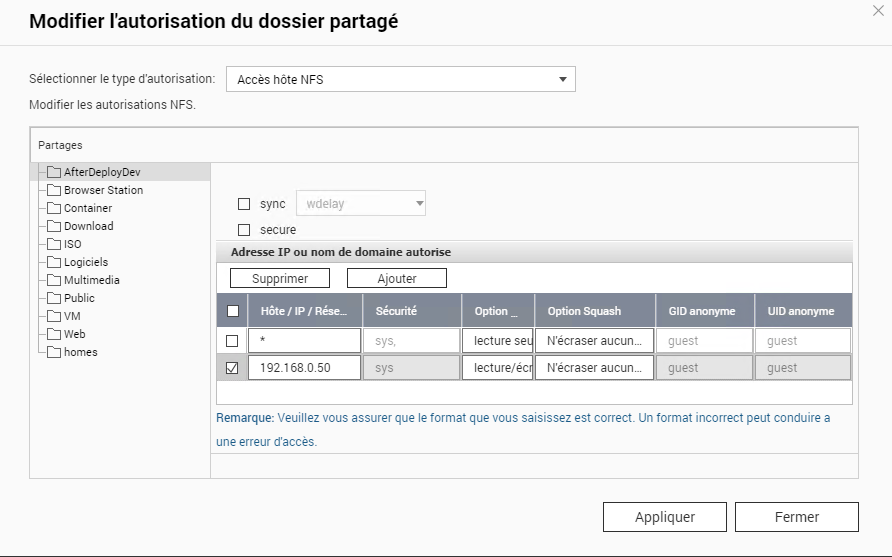
    • Storage with NFS share on NetGear ReadyNAS

      Add NAS on the same network of the FOG server.
      In my case, FOG server has IP 192.168.0.50 and NAS has 192.168.0.55.

      On the ReadyNAS web interface

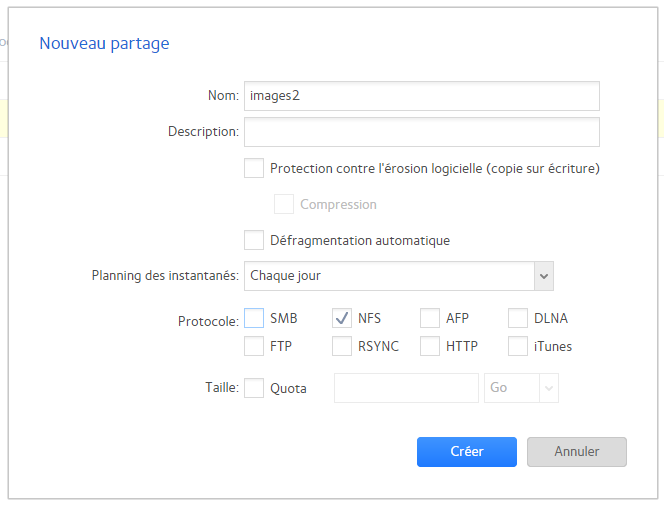
      • Add a share and select NFS protocol.
        9f2e0b61-e22f-4109-b8b8-9f9341ae1c65-image.png

      • Click on the
        bc4c565a-f944-40b0-a2ed-adf455de886b-image.png
        of the share to add allowed computer.

      • Enter the IP of the FOG server and clic Add
        3992f960-1a47-4963-8df0-ca1fb7c51456-image.png

      • On the FOG server, create a new image directory and mount your NAS share
        a86bbebd-6947-4418-80f7-1dc9f691b67d-image.png

      • Test write from FOG server
        6e5ea8db-1147-420e-86ee-0e815dbf727c-image.png

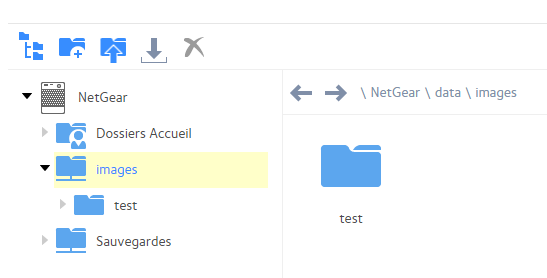
      You should see the new directory on the ReadyNAS web interface
      12f39e1f-3d0c-4d7c-bc28-c885d76bfd4b-image.png

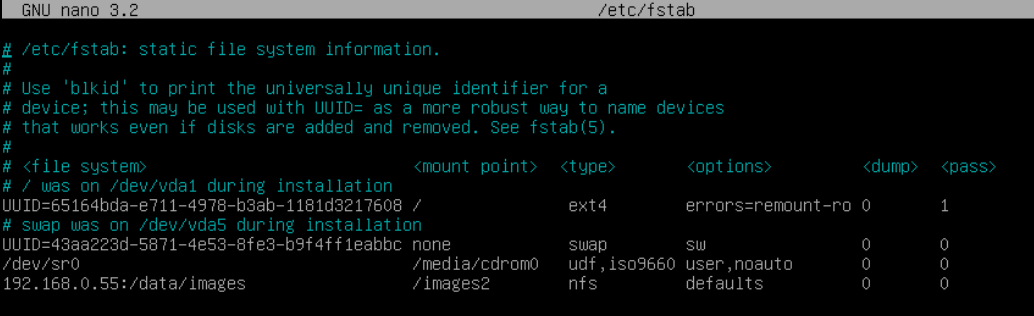
      To mount it add FOG server boot, edit the /etc/fstab file and add this line

      192.168.0.55:/data/images /images2  nfs      defaults    0       0
      

      e7b3be57-677b-4bd9-afc5-de3b179adc5b-image.png

      • Reboot and check auto mount working (create a file or a directory as previous test from manual mount)

      • Change owner of the /images2 directory with command

      chown fogproject:root /images2
      
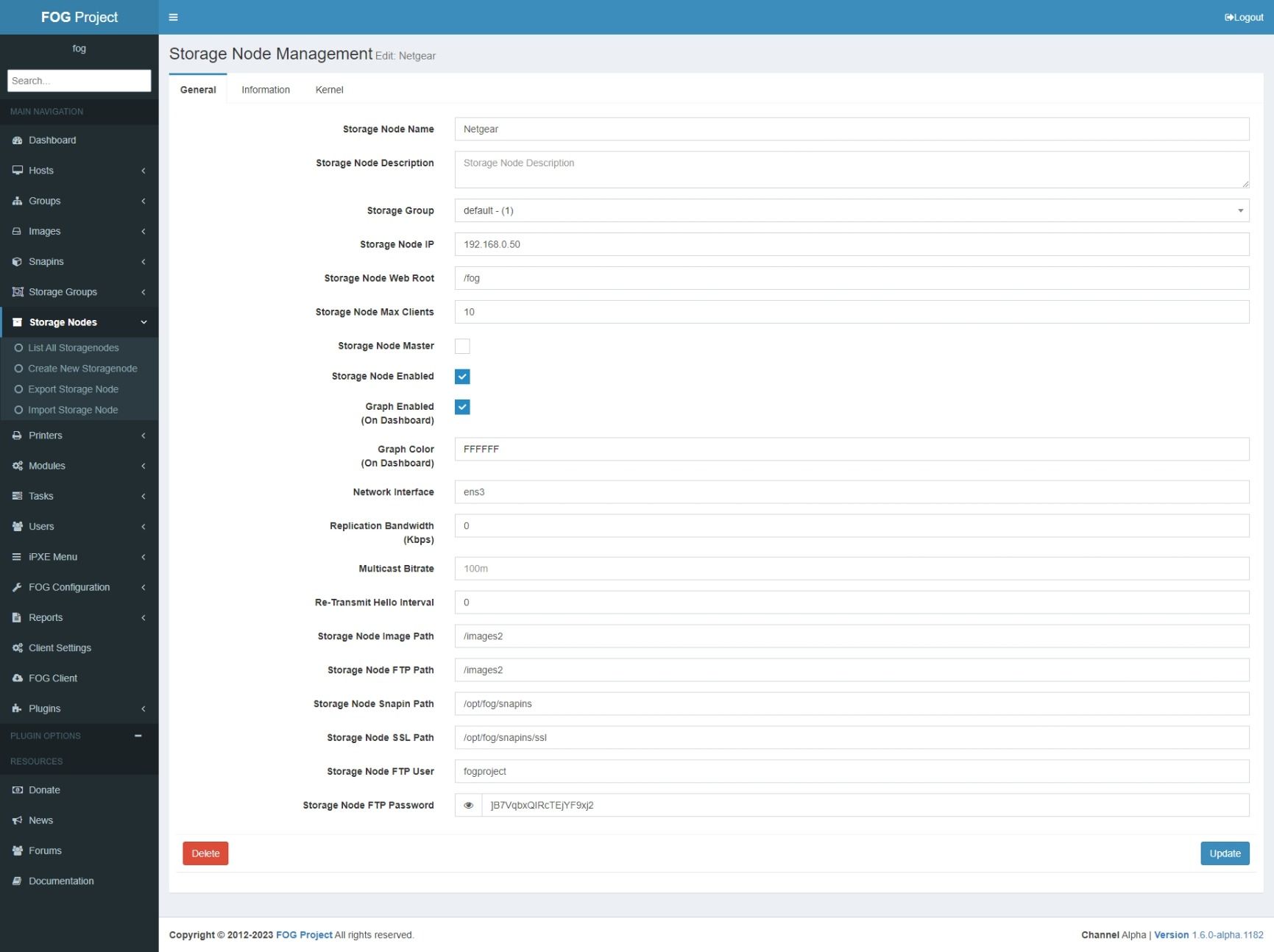
      • Edit or add your storage on FOG GUI to use it.
        a67d4de1-e25f-4cea-adb6-7e547a0c196c-Capture web_5-4-2023_17415_fogserver.jpeg

      • If you added a new storage node in the same storage group, you should see your images, dev and postdownloadscripts directories on NAS share after replication.
        dbf6da1b-2392-4670-b1f2-fe50622ccd11-image.png

      posted in Tutorials
      J
      jmeyer
    • RE: Update to last dev (1.6.0-alpha.1182)

      @Sebastian-Roth
      I think to know what is blocking.
      I have to change vlan and fog IP adress to make updates but it use IP parameter in the updateDB() function :

      wget --no-check-certificate -qO - --post-data="confirm&fogverified" --no-proxy ${httpproto}://${ipaddress}${webroot}management/index.php?node=schema >>$error_log 2>&1
      

      I think -X with help to finish install.

      posted in FOG Problems
      J
      jmeyer
    • RE: Update to last dev (1.6.0-alpha.1182)

      @Sebastian-Roth
      Hi,
      I have run

      ./installfog.sh -y
      

      Here is what script says at the end :

      * Updating Database...........................................Failed!
      
      !!!!!!!!!!!!!!!!!!!!!!!!!!!!!!!!!!!!!!!!!!!!!!!!!!!!!!!!!!!!!!!!!!!
      !! The installer was not able to run all the way to the end as   !!
      !! something has caused it to fail. The following few lines are  !!
      !! from the error log file which might help us figure out what's !!
      !! wrong. Please add this information when reporting an error.   !!
      !! As well you might want to take a look at the full error log   !!
      !! in /home/adminfog/fogproject/bin/error_logs/fog_error_1.6.0-alpha.1182.log !!
      !!!!!!!!!!!!!!!!!!!!!!!!!!!!!!!!!!!!!!!!!!!!!!!!!!!!!!!!!!!!!!!!!!!
      
                 ├─8301 php-fpm: pool www
                 └─8302 php-fpm: pool www
      
      mars 31 13:46:33 fogserver systemd[1]: Starting The PHP 7.3 FastCGI Process Manager...
      mars 31 13:46:33 fogserver systemd[1]: Started The PHP 7.3 FastCGI Process Manager.
      

      I have no request to update DB on GUI.
      It directly go to the dashboard and GUI works well.

      posted in FOG Problems
      J
      jmeyer
    • Update to last dev (1.6.0-alpha.1182)

      Hello,

      I try to update to last dev version from 1.6.0-alpha.1133 but it stuck at “Updating Database”.
      Last install error log is : Started The PHP 7.3 FastCGI Process Manager.

      Any idea of what i can do to reach the end of the install script ?

      Thank you.

      posted in FOG Problems
      J
      jmeyer
    • RE: Fog Server on a Container Station in Qnap

      @Hope1983

      22bc75f6-4c63-4066-91a4-ea303c76385b-image.png

      And for manual mount command used was :

      mount ip_of_the_qnap:/Directory_of_the_qnap /fog_directory/

      ex :

      mount 192.168.0.2:/Images /images2/

      posted in FOG Problems
      J
      jmeyer
    • RE: Fog Server on a Container Station in Qnap

      I just tested on my QNAP.
      I have allow write to my fogserver IP, mount and tested file creation and it works fine.
      I can’t do more test (such as creating images folder to test deploy) since my fogserver is on private network that I can’t access from work network.

      a4e862d0-d379-4b12-943d-6a03223da7d0-image.png

      8e454c53-9f81-47e9-a796-fd40586f16be-image.png

      785f438c-3f1b-4f4e-95a6-24c9365af010-image.png

      a1c57fee-e936-4188-86af-7a3247b8efe2-image.png

      posted in FOG Problems
      J
      jmeyer
    • RE: How to Use FOG to PXE Boot MultiBoot 2k10 Unofficial

      @axander
      Hello,
      it’s all write here : https://wiki.fogproject.org/wiki/index.php/Advanced_Boot_Menu_Configuration_options

      Upload the iso on the server in somewhere in www directory.
      Create new “Boot Menu Items” from GUI and add something like this as parameters :

      initrd http://${fog-ip}/ISO/MultiBoot_2k10.ISO
      chain memdisk iso raw
      
      posted in General
      J
      jmeyer
    • RE: Problem to fully register host in 1.6

      I have the same problem.
      Any idea what is doing this ?
      Could that check be disabled ?

      I had to do quick registration and write down mac to change name and image on gui.

      posted in Bug Reports
      J
      jmeyer
    • RE: WAPT snapins

      I have review my first idea.
      I have used Snapin Pack.
      Zip the wapt and the ps1 script and it’s working for VLC WAPT package.

      Get-ChildItem -Filter '*.wapt' | ForEach {
      	Set-Variable -Name packwapt -Value $_.Fullname
      	Set-Variable -Name packname -Value $packwapt.Substring(0,$packwapt.Length-5)
      	Copy-Item $packwapt $packname'.zip'
      	Expand-Archive -LiteralPath $packname'.zip' $packname
      	Set-Variable -Name s -Value (Get-Content -Path $packname'\setup.py' | Select-String -Pattern 'silentflags = ')
      	if ($s -ne $null) {
      		Set-Variable -Name s -Value ([regex]::matches($s,'(?<=\").+?(?=\")').value)
      		Get-ChildItem -Path $packname -Filter '*.exe' | ForEach {
      			Start-Process -FilePath $_.Fullname $s -Wait;
      		}
      	}
      }
      

      Snapin-General.png

      posted in Tutorials
      J
      jmeyer
    • RE: WAPT snapins

      Caling powershell.exe doesn’t allow to set variable directly ($var=“test”).

      I had to use Set-Variable command but multi commands doesn’t work as expected since every line need a command.

      I’ll keep trying to work on this.

      posted in Tutorials
      J
      jmeyer
    • WAPT snapins

      Hello,
      I am working on WAPT packages import directly in snapins.
      I am writing single line powershell script to rename to zip, extract to directory, find command and run it.

      This is my first test script for VLC from windows :

      $packwapt = "tis-vlc_3.0.16-12_x64_windows_0f4137ed1502b5045d6083aa258b5c42_5.1_PROD.wapt";
      $packname = [System.IO.Path]::GetFileNameWithoutExtension($packwapt);
      Copy-Item $packwapt $packname".zip";
      Expand-Archive -LiteralPath $packname".zip" $packname;
      Remove-Item $packname".zip";
      $s = Get-Content -Path $packname"\setup.py" | Select-String -Pattern "silentflags = ";
      if ($s -ne $null) {
      	$s=[regex]::matches($s,'(?<=\").+?(?=\")').value;
      	Get-ChildItem -Filter $packname"\*.exe" | ForEach {&$_.Fullname $s}
      };
      Remove-Item $packname –recurse;
      

      I’m not sure where I am going and if this is useful… lol

      posted in Tutorials
      J
      jmeyer
    • Snapins public storage

      Hello,

      • Could it be possible to have a public storage for snapins that few people could update (I can help) ?
        Could it be possible to have a list of available snapins from this storage directly for the GUI ?

      • Could it be possible to integrate WAPT store and import software packages to convert them as snapins?

      Thank you.

      posted in Feature Request
      J
      jmeyer
    • Offline install or setup DHCP later

      Hello,

      I have 2 network, one with a DHCP server and internet and other one without both.
      I would like to use FOG DHCP server on the lan without internet.

      Can preinstall need packages before running for FOG install ?
      Can I install DHCP manualy and configure it after changing network to not bring confict on the network that already have a DHCP ?

      Thank you

      posted in General
      J
      jmeyer
    • RE: FOG Project call for engagement

      @sebastian-roth I am not good enough on coding to work on the project and work on something that already exist need time to understand the process before making any update (unless you need me to crash the OS during the setup ! lol).

      What kind of documentation is needed ?
      Is there still any plan to make a ready to use VM ?

      posted in Announcements
      J
      jmeyer
    • RE: Fresh install debian 11

      @sebastian-roth Yes. I’m an running Debian on a Qnap with Container Station.
      From what I have read nsf server can’t run under LXC/LXD version.
      I’ll try using other that LXD version.

      posted in FOG Problems
      J
      jmeyer
    • RE: Fresh install debian 11

      @sebastian-roth 🤦 I should read because I go too fast and end asking stupid questions ! lol
      It was write in white on black !

      * Press [Enter] key when database is updated/installed.
      

      Here is a real error :

       * Setting up and starting NFS Server..........................Failed to get unit file state for nfs.service: No such file or directory
      Failed!
      
      !!!!!!!!!!!!!!!!!!!!!!!!!!!!!!!!!!!!!!!!!!!!!!!!!!!!!!!!!!!!!!!!!!!
      !! The installer was not able to run all the way to the end as   !!
      !! something has caused it to fail. The following few lines are  !!
      !! from the error log file which might help us figure out what's !!
      !! wrong. Please add this information when reporting an error.   !!
      !! As well you might want to take a look at the full error log   !!
      !! in /home/admin/fogproject-dev-branch/bin/error_logs/fog_error_1.5.9.111.log !!
      !!!!!!!!!!!!!!!!!!!!!!!!!!!!!!!!!!!!!!!!!!!!!!!!!!!!!!!!!!!!!!!!!!!
      
      Sep 29 10:25:59 FOGSERVER systemd[1]: Dependency failed for NFS server and services.
      Sep 29 10:25:59 FOGSERVER systemd[1]: nfs-server.service: Job nfs-server.service/start failed with result 'dependency'.
      Failed to enable unit: Unit file nfs.service does not exist.
      Failed to start nfs.service: Unit nfs.service not found.
      Unit nfs.service could not be found.
      
      
      posted in FOG Problems
      J
      jmeyer
    • 1
    • 2
    • 3
    • 4
    • 5
    • 14
    • 15
    • 2 / 15