Ah man that’s exactly what I needed. Thanks so much sir!
J
Posts
-
RE: Choosing Which Storage Node To Deploy Images Fromposted in General
-
Choosing Which Storage Node To Deploy Images Fromposted in General
Hello,
We have one Storage Node server at a separate site than our Main server.
They are both part of the same Storage Group.
How can I force an image deployment to choose one node over the other?
We’ve ran a deploy task on two machines at our Main site, simultaneously. The problem is one of the machines is pulling the image from the remote Storage Node site, causing the deploy to take over an hour for that PC.
I know I could go into the FOG GUI to edit one of the nodes and change the “Max Clients” value to 0, so that it won’t do any unicast, but that seems like a workaround.
At the time of deployment, how can we decide which storage node to pull the image from so that it will always choose the server physically closest to the host?
Thank you
-
RE: Image Replication Not Working - Syntax Errorposted in FOG Problems
Just lyk that I updated the main FOG server to Debian 13 and installed the latest stable release of FOG.
Replication working well now that the OS and FOG server versions match the Storage Node server.
Thanks again
-
RE: Unauthorized errorposted in FOG Problems
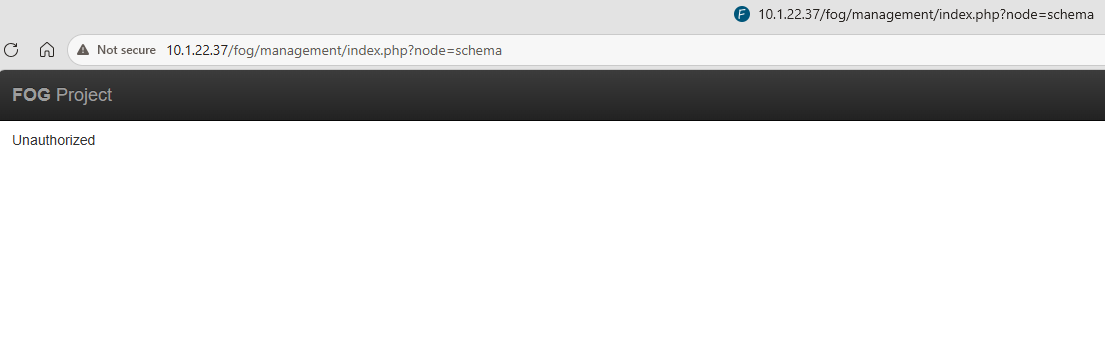
Okay I got past this just by re-running the FOG installer.
It generated a new tokenized URL and this one worked fine!
The new token had way more characters than the first one it printed, not sure if that means anything
-
RE: Unauthorized errorposted in FOG Problems
Hey Tom,
The URL the installer generates is >
http://10.1.22.37/fog/management/index.php?node=schema&fogtoken=a813f075fc54cdd34f5304ff6cf3a3ee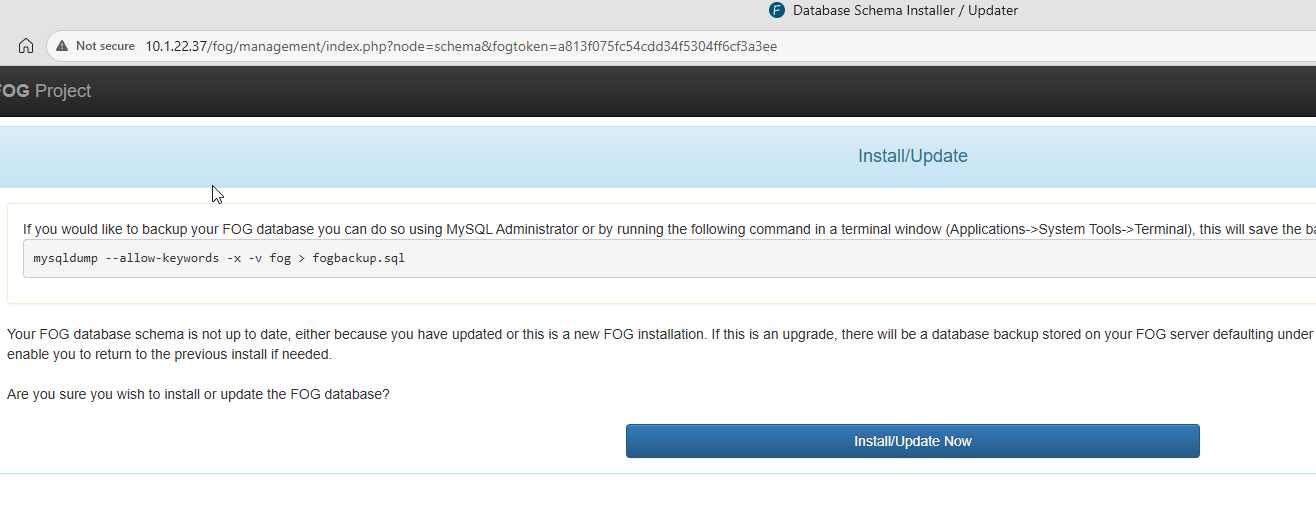
-
RE: Unauthorized errorposted in FOG Problems
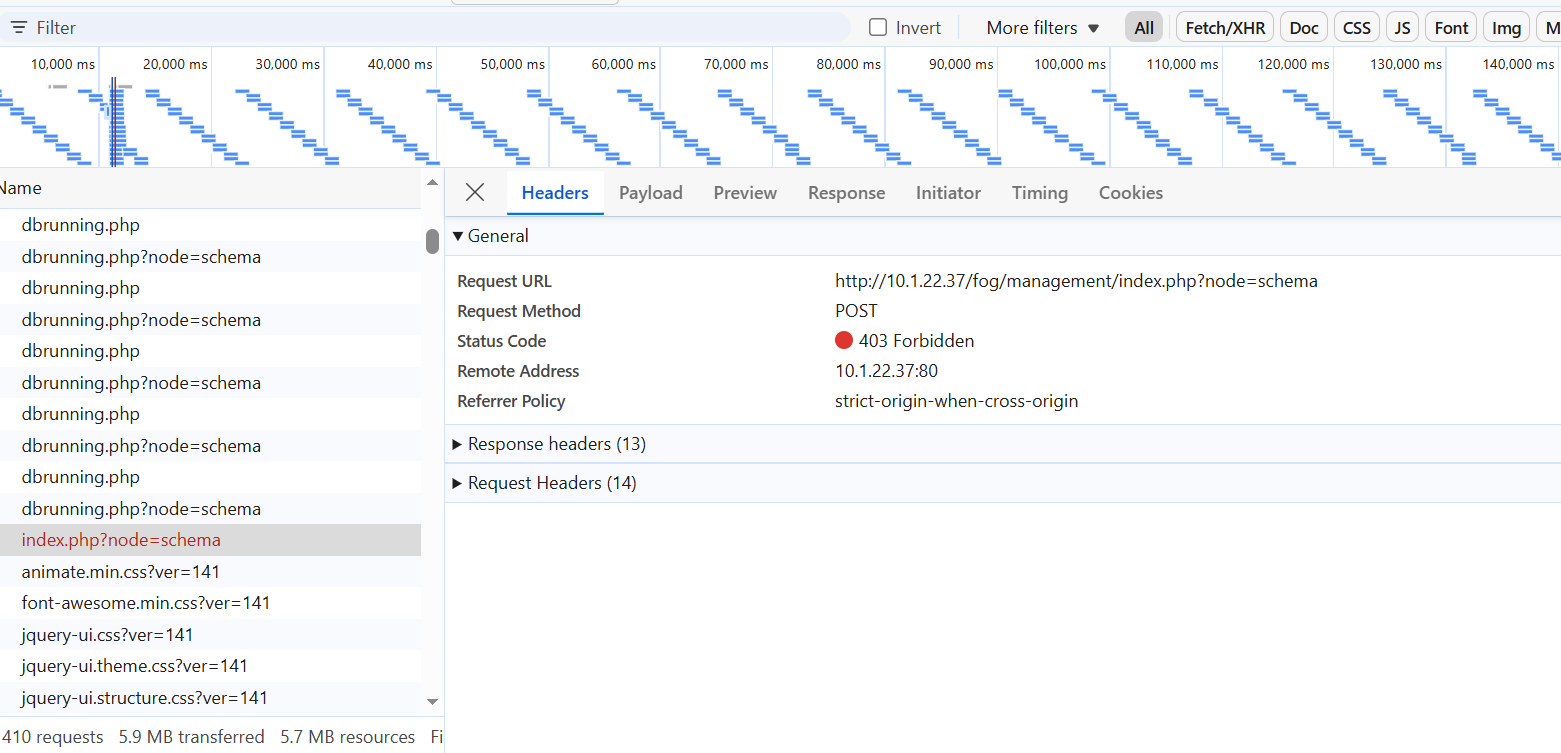
Just posting more info
This is the only 403 response that shows when I get to the page that says Unauthorized
-
RE: Unauthorized errorposted in FOG Problems
Sorry this is not a helpful response

Crazy this was just posted 10 min ago because I just ran into the same error.
Just did fresh install of Debian 13, trying install latest stable FOG release, everything went well up to this point.
-
RE: Image Replication Not Working - Syntax Errorposted in FOG Problems
Thanks for the prompt response!
That’s fair, and I definitely considered that could be the problem. Just thought I’d check before going through the work of upgrading things.
I’ll try that first!
-
Image Replication Not Working - Syntax Errorposted in FOG Problems
Master Node
Fog 1.5.5
Debian 9Storage Node (proimage02)
Fog 1.5.10
Debian 13Below is the output of /opt/fog/log/fogreplicator.log
Most concerning is the line " sh: 1: Syntax error: “(” unexpected " or any of the “file does not exist” lines. Those errors show for each image FOG finds to replicate
This has never worked for me- I just set up the FOG storage node server a few days ago and connected it to the master FOG server.
[06-17-26 10:16:18 am] * Found Image to transfer to 1 node
[06-17-26 10:16:18 am] | Image Name: HP280-G1-WIN10-2026
[06-17-26 10:16:19 am] # HP280-G1-WIN10-2026: File does not exist d1.fixed_size_partitions (proimage02)
[06-17-26 10:16:19 am] # HP280-G1-WIN10-2026: File does not exist d1.mbr (proimage02)
[06-17-26 10:16:19 am] # HP280-G1-WIN10-2026: File does not exist d1.minimum.partitions (proimage02)
[06-17-26 10:16:19 am] # HP280-G1-WIN10-2026: File does not exist d1.original.fstypes (proimage02)
[06-17-26 10:16:19 am] # HP280-G1-WIN10-2026: File does not exist d1.original.swapuuids (proimage02)
[06-17-26 10:16:19 am] # HP280-G1-WIN10-2026: File does not exist d1.original.uuids (proimage02)
[06-17-26 10:16:19 am] # HP280-G1-WIN10-2026: File does not exist d1.partitions (proimage02)
[06-17-26 10:16:19 am] # HP280-G1-WIN10-2026: File does not exist d1p1.img (proimage02)
[06-17-26 10:16:19 am] # HP280-G1-WIN10-2026: File does not exist d1p2.img (proimage02)
[06-17-26 10:16:19 am] # HP280-G1-WIN10-2026: File does not exist d1p3.img (proimage02)
[06-17-26 10:16:19 am] # HP280-G1-WIN10-2026: File does not exist d1p4.img (proimage02)
[06-17-26 10:16:19 am] | CMD: lftp -e ‘set xfer:log 1; set xfer:log-file /opt/fog/log/fogreplicator.HP280-G1-WIN10-2026.transfer.proimage02.log;set ftp:list-options -a;set net:max-retries 10;set net:timeout 30; set net:limit-total-rate 0:1280000; mirror -c --parallel=20 -R --ignore-time -vvv --exclude “.srvprivate” “/images/HP280-G1-MT-WIN10-2026” “/images/HP280-G1-MT-WIN10-2026”; exit’ -u fogproject,[Protected] 192.168.16.30
[06-17-26 10:16:19 am] | Started sync for Image HP280-G1-WIN10-2026 - Resource id #27390
sh: 1: Syntax error: “(” unexpected
[06-17-26 10:16:19 am] | Sync finished - Resource id #27208
[06-17-26 10:16:19 am] | Sync finished - Resource id #27236
[06-17-26 10:16:19 am] | Sync finished - Resource id #27316
[06-17-26 10:16:19 am] | Sync finished - Resource id #27353
[06-17-26 10:16:19 am] | Sync finished - Resource id #27390 -
RE: Fog Storage Node installation Fails (Checking connection to master database... Failed)posted in Linux Problems
Shoutout “The Minester”
https://github.com/FOGProject/fogproject/issues/685
On the storage node, create a .my.cnf file in root’s home directory:
sudo tee /root/.my.cnf << ‘EOF’
[client]
skip-ssl = true
EOFMariaDB will try to connect with SSL by default but that’s not enabled on the main FOG server. This is why I had to use the --ssl=FALSE flag when I connected to mysql manually.
The installation succeeded!
-
Fog Storage Node installation Fails (Checking connection to master database... Failed)posted in Linux Problems
From the remote server, I can manually connect to mysql on the main FOG server with the fogstorage user credentials > mysql -u fogstorage -p -h x.x.x.x --ssl=FALSE (The connection fails saying the server doesn’t support SSL, which is why I add that last part)
So I know the credentials are good, and that firewall isn’t blocking connection to MySQL. Not sure what else could be wrong.
I copied and pasted the full installation log below the server details (removed network information like hostname/IP address)
Here are the server details.
Main FOG:
OS: Debian GNU/Linux 9 (stretch)
FOG: 1.5.5Storage Node:
OS: Debian GNU/Linux 13 (trixie)
FOG: (Trying to install the latest release, 1.5.10).-
Here are the settings FOG will use:
-
Base Linux: Debian
-
Detected Linux Distribution: Debian GNU/Linux
-
Interface: eno1
-
Server IP Address:
-
Server Subnet Mask: 255.255.255.0
-
Hostname:
-
Installation Type: Storage Node
-
Node IP Address:
-
MySQL Database Host:
-
MySQL Database User: fogstorage
-
Send OS Name, OS Version, and FOG Version: Yes
-
Are you sure you wish to continue (Y/N)
-
Installation Started
-
Testing internet connection…Done
-
Adjusting repository (can take a long time for cleanup)…OK
-
Preparing Package Manager…OK
-
Packages to be installed:
apache2 bc build-essential cpp curl g++ gawk gcc gcc-aarch64-linux-gnu genisoimage git gzip htmldoc isolinux lftp libapache2-mod-php libc6 libcurl4t64 liblzma-dev m4 mariadb-client mariadb-server net-tools nfs-kernel-server openssh-server php php-bcmath php-cli php-curl php-fpm php-gd php-json php-ldap php-mbstring php-mysql php-mysqlnd tar tftpd-hpa tftp-hpa unzip vsftpd wget zlib1g -
Skipping package: apache2…(Already Installed)
-
Skipping package: bc…(Already Installed)
-
Skipping package: build-essential…(Already Installed)
-
Skipping package: cpp…(Already Installed)
-
Skipping package: curl…(Already Installed)
-
Skipping package: g++…(Already Installed)
-
Skipping package: gawk…(Already Installed)
-
Skipping package: gcc…(Already Installed)
-
Skipping package: gcc-aarch64-linux-gnu…(Already Installed)
-
Skipping package: genisoimage…(Already Installed)
-
Skipping package: git…(Already Installed)
-
Skipping package: gzip…(Already Installed)
-
Skipping package: htmldoc…(Already Installed)
-
Skipping package: isolinux…(Already Installed)
-
Skipping package: lftp…(Already Installed)
-
Skipping package: libapache2-mod-php…(Already Installed)
-
Skipping package: libc6…(Already Installed)
-
Skipping package: libcurl4t64…(Already Installed)
-
Skipping package: liblzma-dev…(Already Installed)
-
Skipping package: m4…(Already Installed)
-
Skipping package: mariadb-client…(Already Installed)
-
Skipping package: mariadb-server…(Already Installed)
-
Skipping package: net-tools…(Already Installed)
-
Skipping package: nfs-kernel-server…(Already Installed)
-
Skipping package: openssh-server…(Already Installed)
-
Skipping package: php…(Already Installed)
-
Skipping package: php-bcmath…(Already Installed)
-
Skipping package: php-cli…(Already Installed)
-
Skipping package: php-curl…(Already Installed)
-
Skipping package: php-fpm…(Already Installed)
-
Skipping package: php-gd…(Already Installed)
-
Skipping package: php-json…(Already Installed)
-
Skipping package: php-ldap…(Already Installed)
-
Skipping package: php-mbstring…(Already Installed)
-
Skipping package: php-mysql…(Already Installed)
-
Skipping package: php-mysql…(Already Installed)
-
Skipping package: tar…(Already Installed)
-
Skipping package: tftpd-hpa…(Already Installed)
-
Skipping package: tftp-hpa…(Already Installed)
-
Skipping package: unzip…(Already Installed)
-
Skipping package: vsftpd…(Already Installed)
-
Skipping package: wget…(Already Installed)
-
Skipping package: zlib1g…(Already Installed)
-
Updating packages as needed…OK
-
Confirming package installation
-
Checking package: apache2…OK
-
Checking package: bc…OK
-
Checking package: build-essential…OK
-
Checking package: cpp…OK
-
Checking package: curl…OK
-
Checking package: g++…OK
-
Checking package: gawk…OK
-
Checking package: gcc…OK
-
Checking package: gcc-aarch64-linux-gnu…OK
-
Checking package: genisoimage…OK
-
Checking package: git…OK
-
Checking package: gzip…OK
-
Checking package: htmldoc…OK
-
Checking package: isolinux…OK
-
Checking package: lftp…OK
-
Checking package: libapache2-mod-php…OK
-
Checking package: libc6…OK
-
Checking package: libcurl4t64…OK
-
Checking package: liblzma-dev…OK
-
Checking package: m4…OK
-
Checking package: mariadb-client…OK
-
Checking package: mariadb-server…OK
-
Checking package: net-tools…OK
-
Checking package: nfs-kernel-server…OK
-
Checking package: openssh-server…OK
-
Checking package: php…OK
-
Checking package: php-bcmath…OK
-
Checking package: php-cli…OK
-
Checking package: php-curl…OK
-
Checking package: php-fpm…OK
-
Checking package: php-gd…OK
-
Checking package: php-json…OK
-
Checking package: php-ldap…OK
-
Checking package: php-mbstring…OK
-
Checking package: php-mysql…OK
-
Checking package: tar…OK
-
Checking package: tftpd-hpa…OK
-
Checking package: tftp-hpa…OK
-
Checking package: unzip…OK
-
Checking package: vsftpd…OK
-
Checking package: wget…OK
-
Checking package: zlib1g…OK
-
Configuring services
-
Setting up fogproject user…OK
-
Locking fogproject as a system account…OK
-
Setting up fogproject password…OK
-
Checking connection to master database…Failed!
!!!
!! The installer was not able to run all the way to the end as !!
!! something has caused it to fail. The following few lines are !!
!! from the error log file which might help us figure out what’s !!
!! wrong. Please add this information when reporting an error. !!
!! As well you might want to take a look at the full error log !!
!! in /root/fogproject-stable/bin/error_logs/fog_error_1.5.10.1826.log !!
!!!ii unzip 6.0-29 amd64 De-archiver for .zip files
ii vsftpd 3.0.5-0.2 amd64 lightweight, efficient FTP server written for security
ii wget 1.25.0-2 amd64 retrieves files from the web
ii zlib1g:amd64 1:1.3.dfsg+really1.3.1-1+b1 amd64 compression library - runtime
New password: Retype new password: passwd: password updated successfully -
-
Moved Win11 image to Separate FOG Host, Windows Won't Boot after Deploymentposted in FOG Problems
Hello,
We have a Windows 11 image that we are deploying to Geekom A6 Mini PCs
I captured and deployed the image successfully from the first FOG server onto three of these Geekoms at this site.I’m following this wiki post > https://wiki.fogproject.org/wiki/index.php?title=Migrate_images_manually#Image_Definitions
We have a second FOG server running at a different site, I used NFS to copy the folder of this image over to the /images directory on the second FOG server. Then, I exported the image definitions to a CSV from the FOG GUI and imported that into the second FOG server.
I confirmed that the owner/group permissions of the directory match the permissions on the original FOG server.The image appeared in the FOG GUI of the second server, and I was able to run a Deploy task.
The deploy completes, but when the machine restarts, Windows fails to boot, “Your device ran into a problem and couldn’t be repaired.”I’ve tried deploying it three times, to the same PC over at this second site.
Is there anything I’m missing?
FOG Server 1 - Version 1.5.5, bzImage/bzImage32 version 6.12.35
FOG Server 2 - Version 1.5.9, bzImage/bzImage32 version 6.12.35