@Tom-Elliott
Updated to latest dev-branch and snapins are working now
Thansk for help.
G
Posts
-
RE: FOG Client and The remote server returned an error: (500)posted in FOG Problems
-
FOG Client and The remote server returned an error: (500)posted in FOG Problems
Hello,
I have updated FOG server to the latest stable version: 1.5.10.1903.
FOG server is running on Ubuntu 24.04.4 LTS.The problem is that now FOG clients are returning error:
Communication ERROR: Could not contact FOG server
Communication ERROR: The remote server returned an error: (500) Internal Server Error.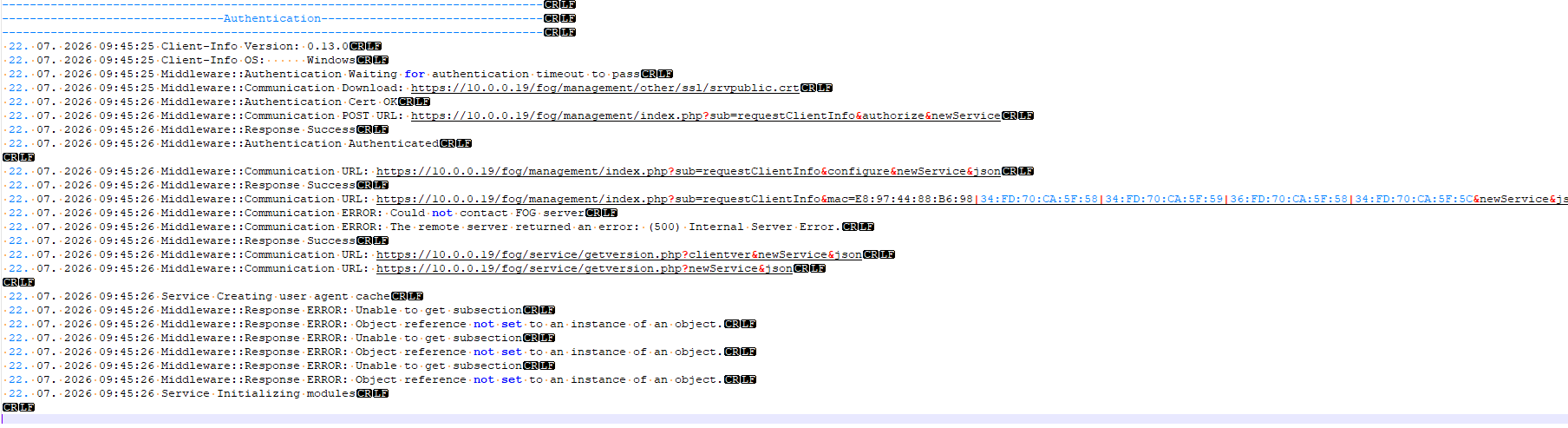
When I have checked apache2/error.log I have folowing error:
Wed Jul 22 09:45:28.388629 2026] [proxy_fcgi:error] [pid 676068] [client 10.0.0.107:54208] AH01071: Got error ‘PHP message: PHP Fatal error: Uncaught ValueError: min(): Argument #1 ($value) must contain at least one element in /var/www/fog/lib/fog/storagegroup.class.php:228\nStack trace:\n#0 /var/www/fog/lib/fog/storagegroup.class.php(228): min()\n#1 /var/www/fog/lib/client/snapinclient.class.php(160): StorageGroup->getMasterStorageNode()\n#2 /var/www/fog/lib/fog/fogpage.class.php(3306): SnapinClient->json()\n#3 /var/www/fog/lib/fog/fogpage.class.php(255): FOGPage->requestClientInfo()\n#4 /var/www/fog/lib/pages/dashboardpage.class.php(76): FOGPage->__construct()\n#5 /var/www/fog/lib/fog/loadglobals.class.php(65): DashboardPage->__construct()\n#6 /var/www/fog/lib/fog/loadglobals.class.php(79): LoadGlobals::_init()\n#7 /var/www/fog/commons/base.inc.php(38): LoadGlobals->__construct()\n#8 /var/www/fog/management/index.php(22): require(’…‘)\n#9 {main}\n thrown in /var/www/fog/lib/fog/storagegroup.class.php on line 228’
From the logs I assume that there is a problem with StorageGroup.
I have a few storage groups & storage nodes as per pictures below.
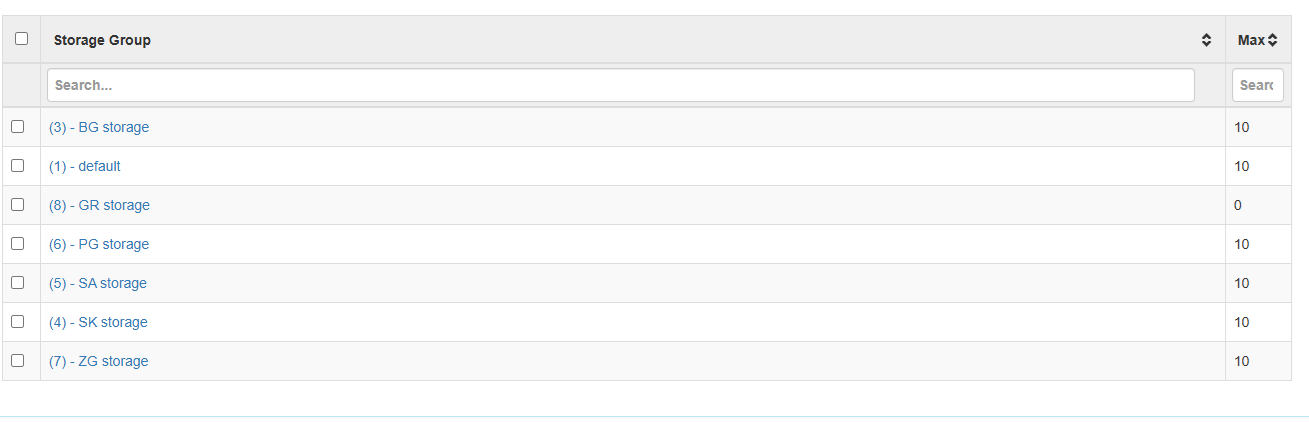
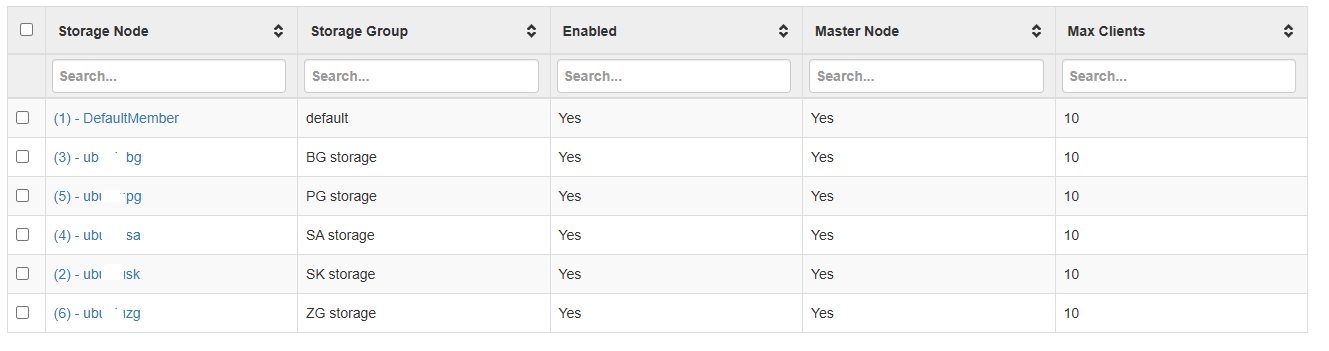
Snapins Storage group on this FOG server are set to GR storage.
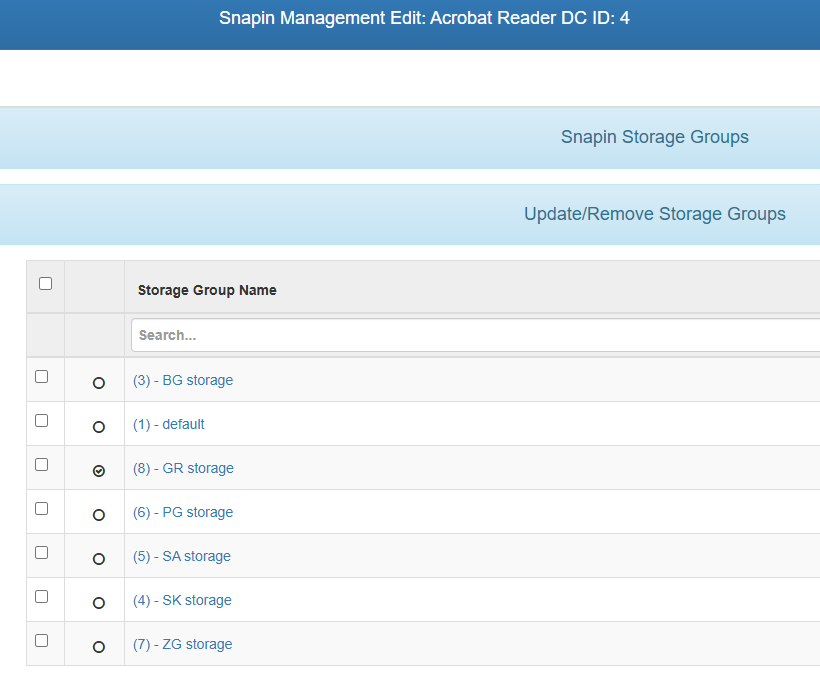
Is my setup wrong?
Can you help me somehow? -
RE: Detected Hardware unit hangposted in FOG Problems
@Richarizard504 You can try to use snponly.efi or snp.efi in your DHCP 067 Bootfile Name setting.
After change I was able to perform host registration and inventory.
Hope it helps. -
RE: Detected Hardware unit hangposted in FOG Problems
@Richarizard504 There was no reply for this problem.
I think this problem started with iPXE 2.0.0+ and new Lenovo ThinkPad T16 Gen 4 (model 21QFS5BE00). -
RE: SnapinClient ERROR: Hash does not matchposted in Windows Problems
I pulled latest dev-branch version 1.5.10.1856, re-run installer and snapins are working again.
Thank you very much for help.
-
RE: SnapinClient ERROR: Hash does not matchposted in Windows Problems
@Tom-Elliott I tried 3 snapins all returned SnapinClient ERROR: Hash does not match…
-
RE: SnapinClient ERROR: Hash does not matchposted in Windows Problems
This is the same file downloaded from the same fog server (just with powershell iwr and saved to different folder)
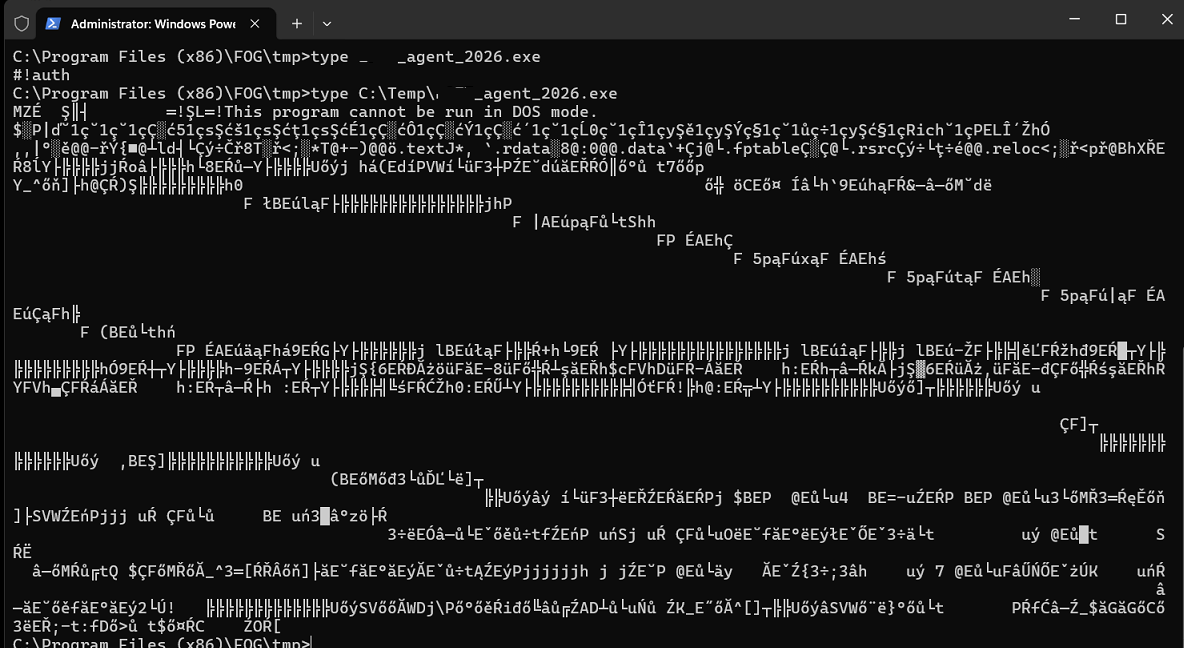
Hope it helps…
-
RE: SnapinClient ERROR: Hash does not matchposted in Windows Problems
@Tom-Elliott said in SnapinClient ERROR: Hash does not match:
Are you able to read the file as in a text?
Yes. See picture attached.
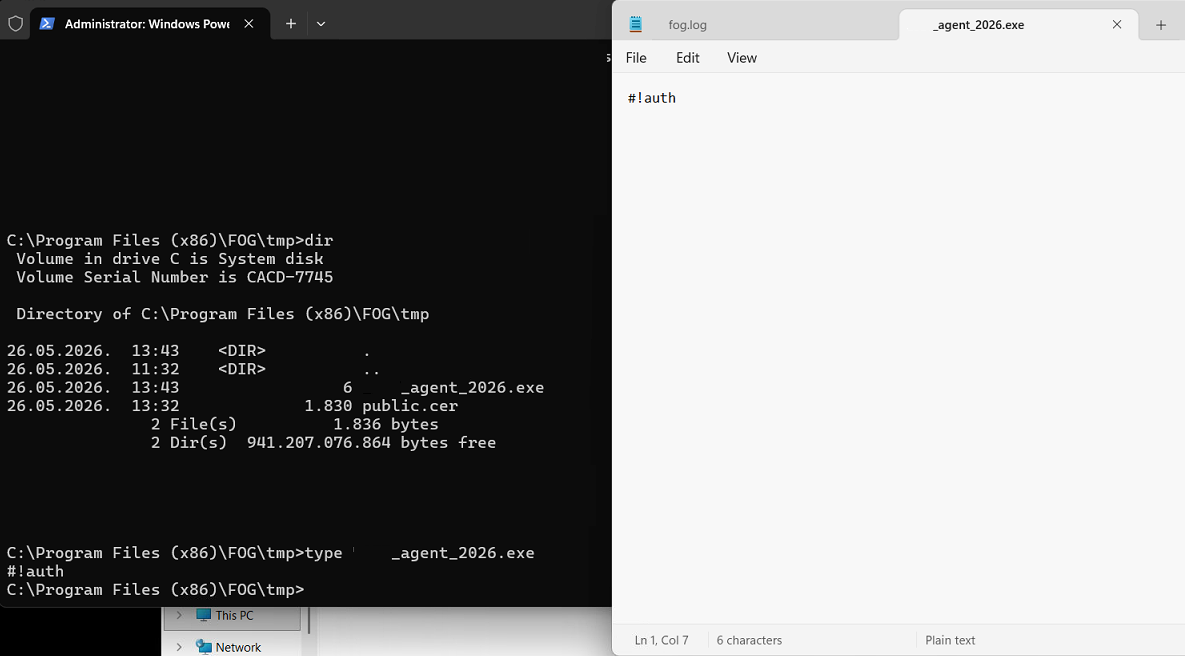
-
SnapinClient ERROR: Hash does not matchposted in Windows Problems
Hello,
On installed FOG dev-branch version: 1.5.10.1854 I have a problem with deploying snapins.
fogclient downloads file in C:\Program Files (x86)\FOG\tmp. The size of file is usually 1kb.
In fog log i get : SnapinClient ERROR: Hash does not match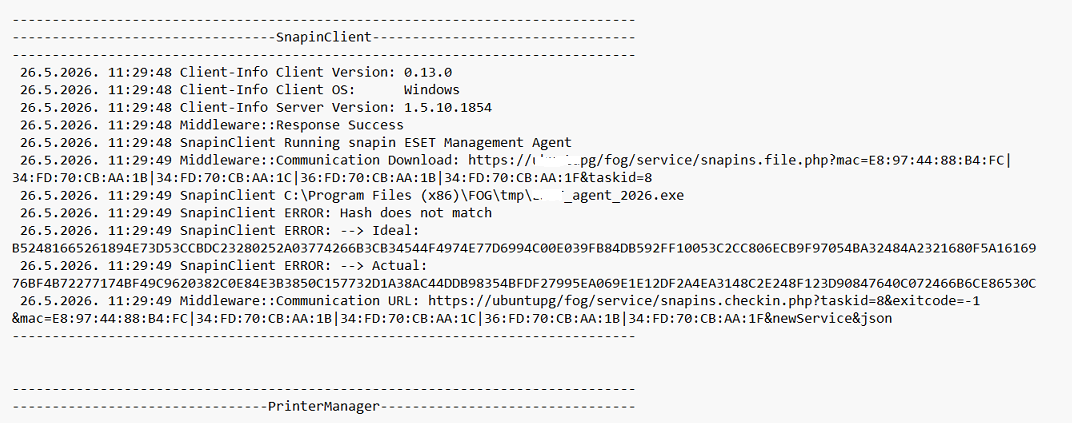
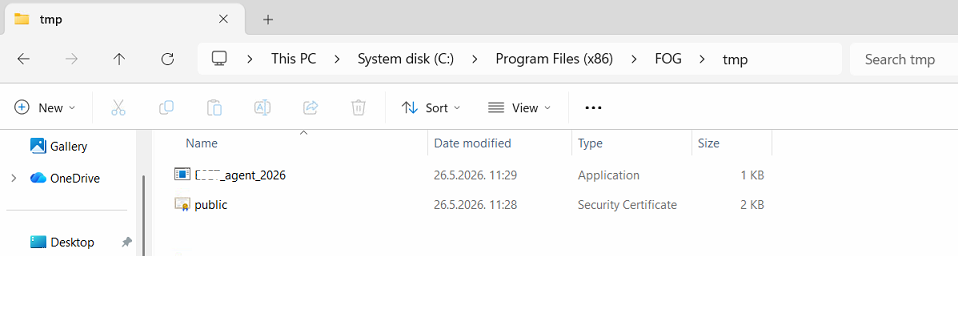
I have checked on server sha512sum and size of installation file and it seems ok.
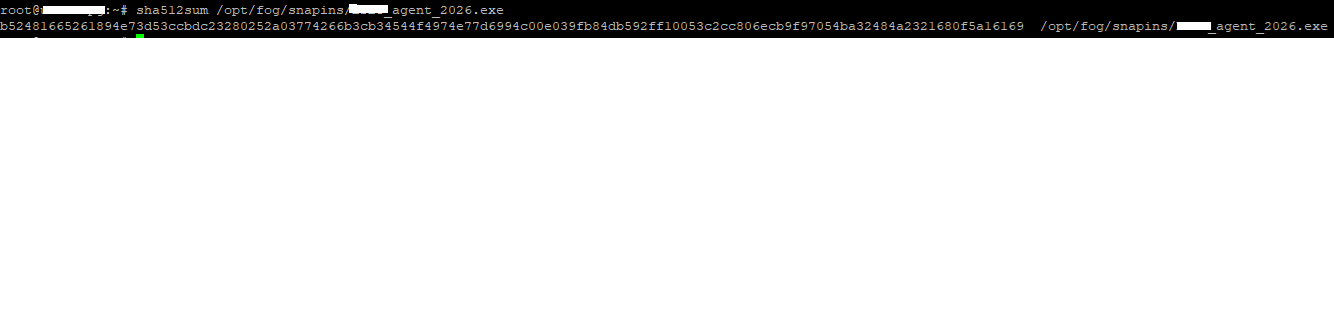
Any help is much appreciated.
-
RE: Web UI problemposted in FOG Problems
@Tom-Elliott
This is resolved in latest dev-branch version: 1.5.10.1853
Thanks. -
Web UI problemposted in FOG Problems
I have installed FOG dev-branch version: 1.5.10.1847 on freshly installed Ubuntu 24.04 LTS.
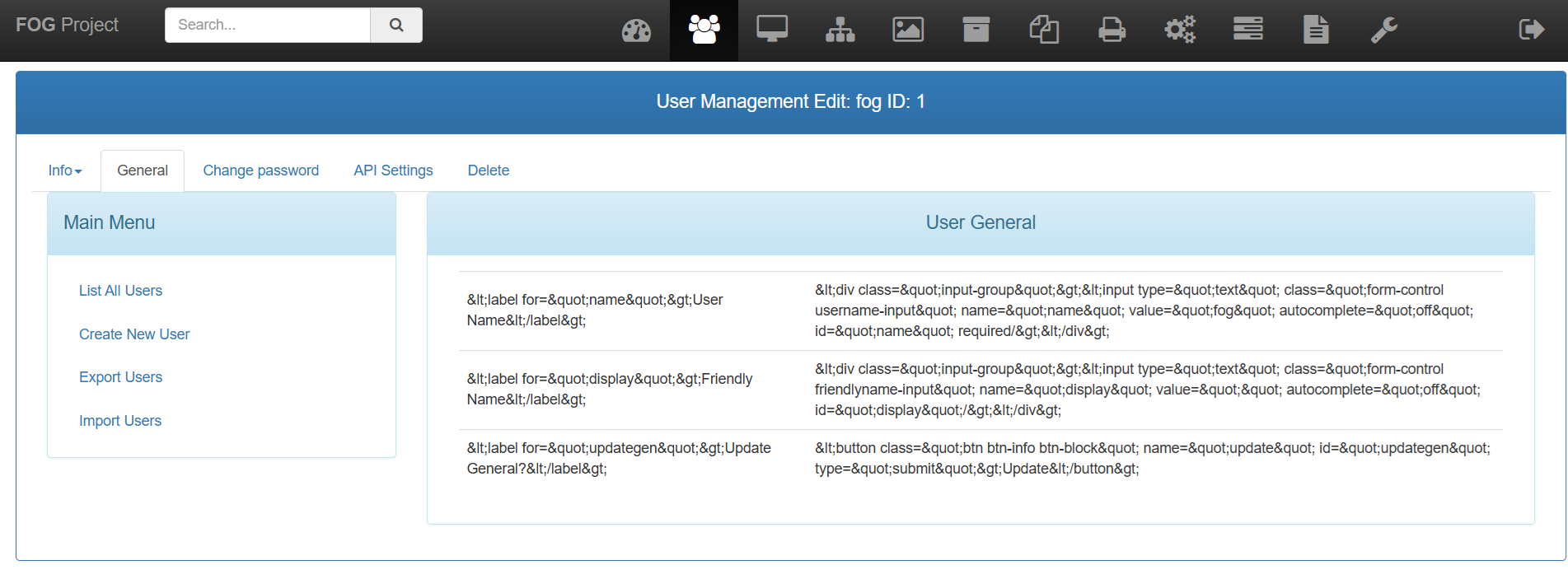
After installing and updating database I could log in with default credentials. When I tried to change fog user password i got output on picture below:
Then I tried to register host and quick host registration worked, but web output is not ok.
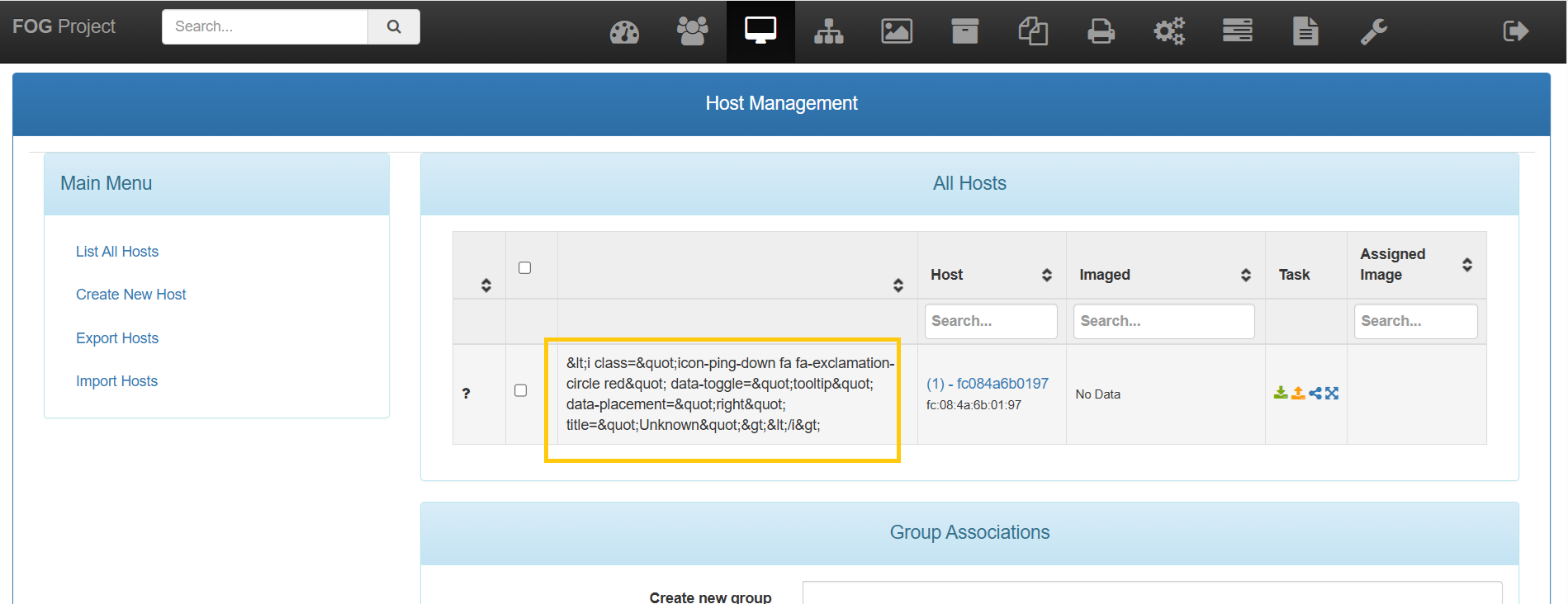
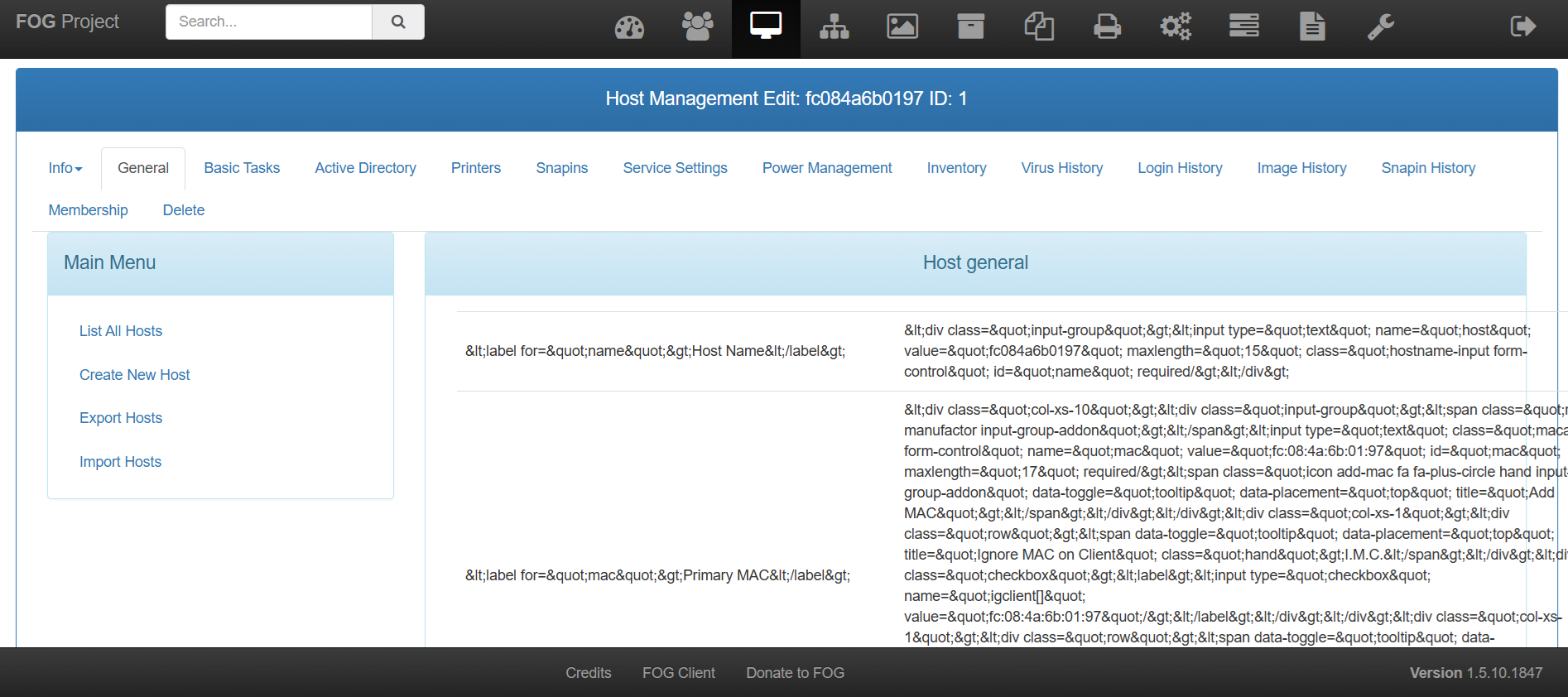
Can you help me with this issue?
-
Detected Hardware unit hangposted in FOG Problems
Hello,
I have a problem when trying to register (or image) host.
I get error: e1000e 0000:00:if.6 enp0s31f6: Detected Hardware unit hang:
For more details see picture.I have installed latest FOG dev-branch version: 1.5.10.1826. OS is Ubuntu 24.04.4 LTS.
Registration on the same laptop from different FOG server (version: 1.5.10.1763) works normally.
Any ideas? -
RE: FOGclient Response Failed to decrypt data on serverposted in General Problems
@sebastian-roth The IP or the host name was not changed from the initial OS installation.
-
RE: FOGclient Response Failed to decrypt data on serverposted in General Problems
@sebastian-roth said in FOGclient Response Failed to decrypt data on server:
https://forums.fogproject.org/topic/13100/problem-with-domain-join-after-deployement
Solved my problem with commands you suggested to @benjamind on Apr 9, 2019, 10:49 PM.
Thanks for help.
-
RE: FOGclient Response Failed to decrypt data on serverposted in General Problems
@sebastian-roth Which version of FOG did you use before?
1.5.9.111 or 1.5.9.154 …sorry but i’m not sure exactly.openssl x509 -noout -modulus -in /var/www/fog/management/other/ssl/srvpublic.crt | openssl md5
(stdin)= a3b32215b30b501670ffae86597cbb8f
openssl rsa -noout -modulus -in /opt/fog/snapins/ssl/.srvprivate.key | openssl md5
(stdin)= 4fc67bd30e70b917d24443c620a2cd07
openssl verify -verbose -CAfile /opt/fog/snapins/ssl/CA/.fogCA.pem /var/www/fog/management/other/ssl/srvpublic.crt
/var/www/fog/management/other/ssl/srvpublic.crt: OK
-
FOGclient Response Failed to decrypt data on serverposted in General Problems
Hello,
After upgrading FOG server (on Ubuntu 20.04 LTS) to latest dev-branch version: 1.5.9.159 all FOG clients have “Middleware::Response Failed to decrypt data on server” in their log files.
Please see attached log.
Any ideas what to do…where to start?
-
RE: FOG client 0.9.9 Authenticationposted in FOG Problems
Hi,
My browser downloads certificate srvpublic.crt, it doesn’t open it in browser. -
FOG client 0.9.9 Authenticationposted in FOG Problems
Hello,
I have a problem with FOG client 0.9.9 on Windows 8.1. The error is below:
------------------------------------------------------------------------------
--------------------------------Authentication--------------------------------
------------------------------------------------------------------------------
 14.12.2015 12:51 Client-Info Version: 0.9.9
 14.12.2015 12:51 Middleware::Communication URL: http://xxx.yyy.zzz.18/fog/management/other/ssl/srvpublic.crt
 14.12.2015 12:51 Middleware::Communication ERROR: Could not download file
 14.12.2015 12:51 Middleware::Communication ERROR: Unable to connect to the remote server
 14.12.2015 12:51 Middleware::Authentication ERROR: Could not authenticate
 14.12.2015 12:51 Middleware::Authentication ERROR: The system cannot find the file specified.

 14.12.2015 12:51 Service Sleeping for 120 seconds

------------------------------------------------------------------------------
--------------------------------Authentication--------------------------------
------------------------------------------------------------------------------
 14.12.2015 12:53 Client-Info Version: 0.9.9
 14.12.2015 12:53 Middleware::Communication URL: http://xxx.yyy.zzz.18/fog/management/other/ssl/srvpublic.crt
 14.12.2015 12:53 Data::RSA FOG Server CA cert found
 14.12.2015 12:53 Data::RSA ERROR: Certificate validation failed
 14.12.2015 12:53 Data::RSA ERROR: Trust chain did not complete to the known authority anchor. Errors: The signature of the certificate cannot be verified. (NotSignatureValid)
 14.12.2015 12:53 Middleware::Authentication ERROR: Could not authenticate
 14.12.2015 12:53 Middleware::Authentication ERROR: Certificate is not from FOG CA
 14.12.2015 12:53 Service Sleeping for 120 seconds
 14.12.2015 12:58 Bus Became bus server
 14.12.2015 12:59 Bus {
  "channel": "Status",
  "data": "{\r\n  \"action\": \"load\"\r\n}"
}
 14.12.2015 12:59 Bus Emmiting message on channel: Status

------------------------------------------------------------------------------
--------------------------------Authentication--------------------------------
------------------------------------------------------------------------------
 14.12.2015 12:59 Client-Info Version: 0.9.9
 14.12.2015 12:59 Middleware::Communication URL: http://xxx.yyy.zzz.18/fog/management/other/ssl/srvpublic.crt
 14.12.2015 12:59 Data::RSA FOG Server CA cert found
 14.12.2015 12:59 Data::RSA ERROR: Certificate validation failed
 14.12.2015 12:59 Data::RSA ERROR: Trust chain did not complete to the known authority anchor. Errors: The signature of the certificate cannot be verified. (NotSignatureValid)
 14.12.2015 12:59 Middleware::Authentication ERROR: Could not authenticate
 14.12.2015 12:59 Middleware::Authentication ERROR: Certificate is not from FOG CA
 14.12.2015 12:59 Service Sleeping for 120 seconds
 14.12.2015 13:00 Bus Registering ParseBus in channel Power
 14.12.2015 13:00 Bus Became bus client
 14.12.2015 13:00 Bus Registering OnNotification in channel Notification
 14.12.2015 13:00 Bus Registering OnUpdate in channel Update
It doesn’t help if I reinstall FOG client. The error is the same.
Does anyone have similar problem?Edited formatting and title
-
RE: Latest Development FOGposted in General
[quote=“Tom Elliott, post: 46691, member: 7271”]Is this a dual boot system? Why so many partitions?
It’s not a bad thing, just a bit odd to see 7 partitions.
I believe Thomas Rucker had a similar issue some time last year. His fix was documented.[/quote]
It’s not a dual boot system. Actually is a preloaded Win 8.1 from Dell.
Why so many partitions?
I have:
“System partition” d1p5.img
“Data partition” d1p6.img
“Dell recovery partition” d1p7.imgJust for info when I get a new Dell laptop/desktop and I create “Basic image” it has 6 partitions or maybe I should put it this way …i have on fog server 6 image files (d1p1.img to d1p6.img) + d1.mbr + d1.original.swapuuids…