@Pyrol Its not clear why the webui update processes is failing. But in the case of your hardware you DO need the 5.6.18 kernel to see the network adapter. Since its a Dell don’t forget to set the disk mode to AHCI mode and not use RAID-ON. The system will function just fine in AHCI mode with no performance loss.

Posts
-
RE: FOG Kernel update: "Preparing to move to tftp server"posted in FOG Problems
-
RE: FOG Kernel update: "Preparing to move to tftp server"posted in FOG Problems
@Pyrol said in FOG Kernel update: "Preparing to move to tftp server":
and the final step was to go into WebGui>fog settings>tftp server
and here changed bzImage to bzImage.64 the same with bzImage32I would back up to this step. Replace the existing bzImage with the .64 bit one keeping it bzImage and the 32 bit image should be named bzImage32 (watch your case because it is important). Leave everything else FOG defaults. It will save you headaches in the future. Then pxe boot the client once you are on 5.6.18 it will see the network adapter.
Then we can look back to why the update process is not working as it should. What version of FOG are you running?
-
RE: could not install PciConfig hanlerposted in FOG Problems
@cicero ok two things.
The PciConfig handlers is just a spurious warning message. You can safely ignore this warning. If FOS Linux hits a critical warning it will stop booting.
What is more interesting is what I can’t read in the picture. It looks like /images are being redirected somewhere. What is going on with that link? I think I can make out you have the virtual raid adapter md127 is mounted on /raid/fog/images and then you have a symlink mapping /images to that sub directory. NFS doesn’t follow symlinks.
There is a few ways to fix this, but I would have to ask why the logic of /raid/fog/images? A quick way to fix is to mount /dev/md127 over /images (directly) and then rerun the fog installer to fix the reset of the bits.
-
RE: Skip Bitlocker detection?posted in FOG Problems
@Sebastian-Roth said in Skip Bitlocker detection?:
But how?
If you run bitlocker without TPM you have an option to use a usb key with the certificate installed or with a preboot password that is managed by the uefi boot loader. It is surely not as secure at the tpm route, but if you have no option, you have limited choices.
Some countries may mandate to not use tpm protection.
-
RE: Shutdown host after deploy, change BIOS time?posted in FOG Problems
Change bios time with fog NO. FOG can’t step into the bios of the computer. But should the question be, how can I set the target OS timezone on a deployed image?
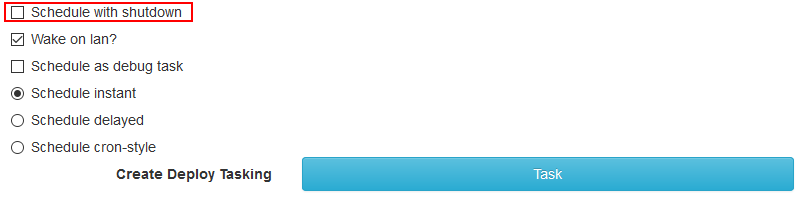
As for the shutdown on image there is an option when you deploy. Just tick the checkbox and the remote system will power off instead of reboot.
-
RE: new setup in vitual box Node Offline Node is unavailableposted in FOG Problems
@Sebastian-Roth I chatted with the OP last night and got things worked out. There was a number of things wrong with the setup. We got them worked out one by one.
- The IP address for the fog server was incorrect in dhcp
- In the end FOG wasn’t installed completely on the FOG server. Something happened during the install because the
.fogsettingsfile was missing (not very common so it took us a bit to narrow down).
-
RE: DHCP option 67posted in FOG Problems
@FOG38640 To add on to Sebastian’s post.
We find sometimes that the FOG Administrator gets instructions to go to the webui to install the database and then forgets to go back to the linux console and press enter to finish the install. The command line installer has 2 parts. They think that when the web ui is up FOG is finished installing, that is wrong.
Rerun the installer again and pick the same options you did the first time. It will not break your system if you rerun the installer at this point to completion. If the .fogsetting file exists then you are done.
-
RE: Booting pxe problemposted in FOG Problems
I fully agree with Sebastian to upgrade your kit to get support.
As for your dhcp server settings, if you review the following link you will see what FOG would install if you selected FOG to be your dhcp server. Look at the tests for the specific hardware to see that this configuration will dynamically switch between uefi and bios systems: https://wiki.fogproject.org/wiki/index.php/BIOS_and_UEFI_Co-Existence#Example_1
-
RE: Fog Update 1.4.4posted in FOG Problems
@Kamiii said in Fog Update 1.4.4:
As for the images, how do I copy them over to a new fog node?
When you setup a new FOG server make sure you place the /images on its own partition. If you use Centos to install the default will be to place the root partition on 50GB and then give /home the remainder of the disk. For FOG I would select custom configuration and then select auto create partitions. Then rename /home to /images sections and then set that configuration. This will keep you from accidentally filling up the partition with imaging and killing your OS and database. The other option if creating in a VM pick the minimum size of disk required by your OS and then install the OS. Once the OS is installed create a second disk for your images and then mount that new disk over the /images mount point, THEN install FOG. This will then keep your disk images on a different disk and away from your OS disk.
-
RE: Cannot exit IPXE menu and boot from hard drive?posted in FOG Problems
@wmw509 said in Cannot exit IPXE menu and boot from hard drive?:
bootx64.efi
This should be renamed to match what FOG is using the same for the 32 bit version. You can discard the bootaa version since that is for ARM processors.
I just pxe booted into ubuntu 20.04 on a uefi VM. refind found grub64.efi and booted that. So the issue might be hardware related. Describe the number of disks and their structure on this mobo? Are they sata or nvme? Do you have 2 NVMe drives installed?
-
RE: refind not working properlyposted in FOG Problems
@Huecuva Lets keep it simple for the moment. Lets make sure we fully understand how this second fog server is setup (since it is acting differently than the main site). Knowing they are 2 independent servers eliminates many of the potential issues because now we know the “problem” is localized to this new FOG server and its environment. Also what iPXE thinks about the target computer is important. I don’t want to chase something for several hours and have it be the CSM issue again. So knowing what exactly is configured for dhcp options 66 and 67 is important as well as what device is the dhcp server. I may ask you to capture some network packets so we can see exactly what the target computer is telling the dhcp server. If you know how to use wireshark we can get this answer in about 5 minutes. I don’t want to go this route until we fully understand the environment.
These are very contemporary mobos so they may be doing something we don’t expect in firmware simply because we don’t see them in a typical enterprise environment.
-
RE: Issues with inventory and uploading imageposted in FOG Problems
@sjensen that’s probably lower case L for list not the number one.
-
RE: Issues with inventory and uploading imageposted in FOG Problems
Just to be clear my recommendations was to spin up a new FOG server and not to upgrade. The host OS is soon to be unsupported and FOG 1.5.0 can’t really be supported because its so old.


-
RE: refind not working properlyposted in FOG Problems
@Huecuva Yes that is the right location for it. Is the refind.conf file the same one that was setup by FOG or did you copy over the one from the zip file. The right answer should be the one delivered by FOG.
first priority because it had reversed the priorities by itself.
The windows installer will do this for you, even if you don’t want it to.
-
RE: Adding computer to FOGposted in FOG Problems
@Developers to get this one-off kernel I started with the kernel config file for 1.5.9 and copied it into the linux 5.9.3 build tree. I updated CONFIG_EXTRA_FIRMWARE field to include the firmware for the rt8125 nic card and built the kernel
rtl_nic/rtl8125b-1.fw rtl_nic/rtl8125b-2.fw rtl_nic/rtl8125a-3.fwNo other modifications were made to settings. I did open the .config file and then save it right away so the menuconfig program would do a sanity check on the .config settings. We needed to use 5.9.x series to support the B version of this network adapter. While the previous kernels supported this adapter it was only the A version.
One thing is if you need to compile 5.8.x kernels or later you will need gcc 4.9, which meant I need to spin up a new centos 8.2 system to build the kernel.
-
RE: Need help added Duke and nuke to fog ipxe menuposted in FOG Problems
@darkxeno Might you be trying to run this on a uefi based computer? Do you get the same results on a bios based computer?
-
RE: Cannot boot hard drive from PXE menuposted in FOG Problems
@blankzapper It would be interesting to see the pcap of the pxe booting process taken from the fog server perspective. https://forums.fogproject.org/topic/9673/when-dhcp-pxe-booting-process-goes-bad-and-you-have-no-clue
This will not resolve anything only confirm what you are seeing. FWIW the actual dhcp option field you want to look at is 93 as you posted below.
So you say you can get into the fog iPXE menu and register the computer. What boot file are you sending to the target computer? What do you have set for dhcp option 67? Or are you using dnsmasq or windows dhcp server profiles to dynamically set the boot file?
I can tell you that you can not boot a bios boot loader (undionly.kpxe) on a uefi system or a efi boot loader (ipxe.efi) on a bios system. The formats are different and they will not boot. I know some systems are dynamic in that they will switch between bios and uefi mode based on the disk image format.
Now we’ve seen some luck by rolling back refind to version 0.11.0 the newer versions of refind seem to not find the boot media. But first we need to identify what boot file you are using so we can focus on the exit modes.
-
RE: Cannot boot hard drive from PXE menuposted in FOG Problems
@blankzapper Well as they say the pcap doesn’t lie. Your computer IS saying that its a bios based x86 computer. Your dhcp server is sending the proper file and I see it booting into ipxe getting an IP address again and then pulling up the default.ipxe script that leads to the iPXE Menu. So your computer is working perfectly. Not how you want, but working as designed. Now I assume when it exits from the iPXE menu that is when things go bad. (because the disk structure is efi and we are pxe booting in bios mode. So the bios default exit mode SANBOOT should be called to mount the disk and boot.
So now in your bios (firmware) do you need to enable the uefi network stack? On the dual boot systems they don’t typically come with the uefi network stack enabled in the firmware. I would focus on the firmware settings because outside of your computer everything is working as intended.
-
RE: Cannot boot hard drive from PXE menuposted in FOG Problems
@blankzapper That is an interesting mobo then. Does it have a boot manager like the Dells where when booting you can hit F12 to pick the boot device? On the Dells there is a bios and uefi section on the systems that support both formats. You can tell it to pxe boot bios or pxe boot uefi.
Something else to check, make sure that mobo is running the latest bios version. They might have corrected that behavior in a later firmware update.
Lastly FOG will image a uefi computer while running in bios mode. Just don’t have the target computer boot through pxe to the hard drive. Only enable pxe booting when you need to reimage the computer. In a way that is how I do it at my office. I only have it pxe boot when the IT Tech is specifically going to reimage a computer. This keeps them from accidentally deploying an image to the wrong computer if everything was setup automatically.